How Do I Create an Opt-In or Sign-Up?

When you’ve pretty much got your new site written and designed, you need to start thinking about building a list of readers/potential clients/followers. Maybe you already have a sign-up box and you send out a newsletter to your email list now and then. Or maybe you’re resistant to the idea of collecting emails, because of all the spam sitting in your email folders – you don’t want to do that to anyone else! Or you’re on track, you’ve got a steady trickle of sign-ups, and you’re emailing your list all the time. If so, why aren’t you making the sales you were hoping for?

Let me break it down a little. The purpose of your email list is not for easy marketing, it’s for creating an opportunity for two-way communication with your site visitors. Don’t get me wrong – it’s still your most valuable marketing tool! But that’s because, by signing up or opting in, your reader or follower has indicated that they’re interested in what you’re doing and they want to learn more. They’re most likely to buy from you if they trust you, like you, and feel like they know you. And that’s where a lot of people go wrong.

But let’s back up a bit to the basics – how do you get your site visitors to give you their name and email? By trading them for something valuable that they want, via an opt-in or sign-up form!

An opt-in or sign-up webform is simply a free offer that you have on your site, that gives your visitors something of really great value for free, in return for them “signing up” or “opting in” by giving you their name and email address. Here are examples of two very different opt-ins from two of my sites:

As you can see, your opt-in can be very simple, or it can be more complex. In the beginning, it may be easiest to go with a simple offer for one item that will either solve a common problem your reader has, or, something that will really grab their interest. Here’s the big secret: give your BEST stuff away for free! Think about it, if your free stuff blows them away, they will think, “This is what she/he gives for free?! imagine what I’ll get when I pay for it!”

Your opt-in may be for a free podcast, or teleseminar, or video, or eBook, or free consult with you – something that your visitors REALLY want or need and is often in digital format, so you can email it to them (no cost to you!). In the case of a free consult, you can conduct that via phone or Skype, at no hard cost to you (just your time).

For this opt-in on the homepage of my ListenToYourGut.com site, my conversion rate (percentage of people who purchase from me after signing up for this offer) is 25 – 30 percent. That is unheard of. A “good” conversion rate is considered to be 1 – 2 percent and many Internet marketers are happy with 0.5 percent.

Why is my conversion rate so high? Because I have implemented all of the things I’m telling you to do in this Listen To Your Freedom program; I give super useful, top quality stuff for free, I tell my story, I speak directly to my site visitor’s pain and problems, they know I understand them intimately, and as a result I build trust.

I also provide a series of 7 emails for this opt-in offer, and during the series I give them 3 free eBooks and 2 free teleseminars (mp3 and transcript). So they really build a relationship with me over 7 weeks and I give them so much excellent stuff without any expectation of them ever buying from me.

Seriously. If someone can heal themselves from this free series, then I am thrilled with that. Because guess what, do you think they’re going to tell people about me? Post to their friends on Facebook and Twitter about me? You bet they are. And if they ever have a gut issue in the future, or their friend or family member does, are they going to come back to me? Yes they are.

I routinely have my husband Ian saying things like this to me (because he handles the daily operations): “We had a customer buy $300 worth today and the last time he bought was six years ago.” Are you in it for the long-term? Then make sure everything you put out there reflects that.

Most internet marketers (and the strategies they’re selling you) rely on the quick sale; get them in quick, flood them with “free bonuses” and make the sale. Ask yourself this: How many of these guys are going to be around in 20 years? And who cares that they sell a million dollars worth of product when their return rate is 70%? And no, they don’t advertise that part of their method! I sell over a million dollars of product each and every year, and my return rate is less than 1%. THAT is the kind of business I’m showing you how to build here at Listen To Your Freedom.

Competition?

Even when you’re selling exactly the same thing as someone else, your opt-in can be completely different in look, tone, feel, and grab a different audience – depending on who you are.

Check out these two opt-ins to see what I mean. Each of these women are working a completely different look and feel from each other. They may be selling essentially the same product, but they are not really in competition with each other since they each attract a very different audience. But, they each generate over $1 million/year from their business:

VS.

The first opt-in is from Marie Forleo. She is a glam Jersey-girl in New York and she loves slick production and high fashion – her videos are shot with a full crew and post-production editing.

The second opt-in is from Leonie Dawson. Leonie is from Queensland, Australia and she has shot many of her videos from her laptop camera, often while breastfeeding, or out in nature. She also does all the artwork for her book covers, meditation covers and opt-in offers herself.

Both these women do a superb job of communicating exactly who they are and what they’re about, and offering products that satisfy their market. You can see just from their opt-ins that they know intimately who their customer is (i.e. who they are targeting). I encourage you to go have a look at both their sites and swipe away (borrow and adapt the elements that appeal to you) – like you should from any good site.

Why Do I Need An Opt-In Form?

Having a free opt-in allows you to start collecting names and emails for your list. Do this ASAP if you haven’t already! Your list is one of your most important assets. And even if you just get one opt-in per week in the early days, the names will quickly add up.

Then when you want to promote a book or product using an affiliate link (set up to receive a commission on) or your own book or product, you will have a list of people sitting in your database you can contact right away. These people may also forward your emails on to other people they know.

Also, what happens if you do another really great report, or podcast, or video that you want to give away for free? If you don’t have your site visitors’ email addresses, you can’t communicate with your people, you can’t even send them freebies!

A sign-up box that allows you to build an email list, or database, of people who are interested in you, allows you to start building a relationship with those people. It allows you to have a two-way conversation.

If only they can contact you, and see what you’re doing, but you can’t contact them, or ask them questions, then you don’t have a relationship. A relationship is a two-way street. Building a list allows you to get that relationship going and then deepen it.

Here are two separate emails from Freedomite Jeromy Johnson at EMFanalysis.com that illustrate perfectly the importance of having an opt-in or sign-up box on your site:

Email #1: “Hi Jini – see the comment below from a couple that just signed up for my email list. 20 new signups the past 2 days!

Comment
“We are very impressed with your site; we are both electro-sensitive. One of the most relevant sites, fact-wise, that we’ve seen; you have all the essential info. in a succinct, well-laid-out way. I will be forwarding a lot of it to doubting friends and family.”

Email #2: “I want to thank you for everything this year. LTYF has helped me in so many ways. Thank you!! It seems some traction is taking place as well. My website had been cruising along at about 100 visits per day. Yesterday it jumped up to 850 visitors and today I have had 1,700 visitors! Tons of new email address for my contact list. Perhaps this topic is starting to hit the mainstream….”

So like I said, even if you start out really slow, with only 1 sign-up per week, as you keep blogging about helpful or interesting things, you will get more and more people finding out about your site. And then as you saw from Jeromy’s second email, you will hit points of “critical mass” where your traffic, visitor, signups, revenue etc. take big leaps forward.

Don’t Upset or Burn Out Your List

So yes, there are endless ways to do this right, and tons of possibilities. But there are also some “don’ts” to keep in mind! Just like any good friendship, you must not abuse this relationship with your email list. Don’t just email your people when you have something to sell. ALWAYS, always, always send them free, helpful, useful or amazing information, tell them stories, share tools, tips, etc.

And when you do want to sell something, give something great for free first at the beginning of your email and then give them your sales offer afterwards – in the same email. Never just send a sales email – think how you feel when you get these, they feel rude and grabby don’t they?

Believe me, I have tested everything I’m telling you here. I currently have 52,000 people on my list and some of them have been with me for over 10 years, without unsubscribing.

As you can see, it’s a little bit art, a little bit science. But rather than looking at emails purely as a sales tool, take a breath, have some fun, and focus on building relationship and trust between you and your tribe. Believe me, it’s worth it.

Setting Up Your Opt-In

Okay, now let’s get into the nitty-gritty of how to set up your opt-in webform and then how to place that sign-up box on your website. In case you haven’t noticed by now, ‘opt-in’ and ‘sign-up’ are just two different ways of saying exactly the same thing.

However, before I can present you with the different technical solutions that can do this for you, we have to do a bit of Internet Marketing 101; so you’ll know what I’m talking about when I tell you a system has a certain feature, or not.

If websites and opt-ins are old news to you, heads up anyway! If you’ve paid someone to set up your site infrastructure, or if you’ve cobbled your site together from bits of information here and there, or even if you’ve taken your cues from an online business guru, it is possible your systems are not running as efficiently or professionally as they could be. So stick with me on this and run your site through the checklist as I go over all the important details.

There are 3 things that you’ll need to understand in order to make a good decision about which platform to use for your opt-in offer:

  • What is a customer relationship management (CRM) system?
  • What is an email marketing platform?
  • What do I get when I select a shopping cart for my site – what’s included?

The reason we need to talk about shopping carts at this stage, is because many shopping carts automatically come with email marketing platforms and opt-in web forms. So you need to know what you need, and what you can afford, in order to make the best choice for your site.

If this is sounding really technical and your eyes are starting to glaze over, snap out of it! Buckle on your self-discipline and stay with me, because you absolutely need to understand this section or you won’t make any money from your site! You can outsource the set-up of these components, if you wish, but you still need to understand what they are and how they work.

Let’s start with email marketing and CRM (customer relationship management), since these are both ways you will interact with and grow your relationship with your site visitors and customers…

How Do I Communicate With My Email List?

What’s the difference between customer relationship marketing (CRM) and email marketing? The short answer is that email marketing is how you turn your site visitors into your customers and CRM is how you grow your existing customers into great customers. But let’s get into exactly what that means and how it’s done.

Customer relationship management (CRM) is where you can pull up the customer record for Joe Smith (for example) and you can see what he has bought, when he bought that product, which free reports he downloaded, any customer service questions he asked and when they were answered, etc. So that when you are emailing or talking to Joe Smith, you can say, “Oh by the way, I notice you haven’t ordered a replacement filter for your showerhead and it’s been 7 months now – did you want to add one to this order?” Or you can say, “I see that your last order got delayed over the weekend, so we sent you a free widget, did you receive it?”

Joe Smith now feels really chuffed that you know all this stuff about him and he is not just a faceless number in your shopping cart – you see, you are using CRM technology to manage and build your relationship with Joe Smith.

A CRM system also makes it easy for companies that have more than one customer service person to keep track of what’s happening when different operators talk to or help the same customer, at different times. Whatever happens with Joe Smith is logged into his customer record, so the next person can just pull up his customer record when talking to Joe and be instantly up to date.

Email marketing is where you use email as the means of communicating with people who are visitors to your site and have opted in to your free offer, or signed up for your newsletter, or subscribed to your blog, or have purchased something from you.

After someone has purchased something from you, you can use automated emails to get their feedback on your product, or give them something else for free, or offer them your next product or service, and so on.

Mouse Traps Anyone?

Let’s say I’m selling a book on mouse traps and I want to find out if the trap is working well for people. I can have an autoresponder email set up in my email marketing platform to be automatically sent out 20 days after the book purchase, which asks the customer for feedback.

A time-scheduled email that is sent out automatically is called an autoresponder.

I can then have another email (autoresponder) queued to go out in 45 days time (from the date of book purchase) which asks all mouse trap book purchasers if they’re having problems with ants, termites or bed bugs and would they like my free report on that?

Ten days later I can email (autoresponder) all the people who downloaded that report with the first of 3 emails telling them why my eBook on Pest Control is just what they need and how it contains all this detailed how-to information that was referred to in the report. Maybe I want to offer a discount on the eBook (since they’ve already bought the mouse trap book), or a free gift with purchase, or a bonus if they purchase in the next 48 hours.

So your autoresponder (automated emails) sequence for your Mouse Trap book looks like this:

Day 1 – book purchase

Day 20 – Feedback request

Day 45 – Offer for Ants, Termites, Bed Bugs free report

If someone signs up for your free Ants, Termites and Bed Bugs report, then that action (signing up) puts them into another autoresponder sequence that looks like this:

Day 1 – opt-in to free Ants, Termites and Bed Bugs report

Day 10 – Best cleaning products to use (products are affiliate linked to Amazon) for preventing pests and a Discount offer for your full-length book on Pest Control

Day 30 – Link to video on how to Pest-Proof your bedroom

Day 45 – Home remedies for insect bites (affiliate linked to products on Amazon) and time-sensitive discount offer for your book on Pest Control (eg. Offer expires in 24 hours)

Do you see how exciting an email marketing platform can be? And what’s REALLY exciting is you only have to do the work ONCE, in the set up. After that, all these sequences run automatically – while you’re asleep, or skiing, or lying on the beach.

You can also email your opt-ins or blog/newsletter subscribers when you have a special promotion or discount on offer. Or you can send coupons for discounts or free gifts. You can also let your list know when you’ve got a really exciting teleseminar coming up, or when you’ve just put up a really helpful video.

We can get into email marketing (relationship building) more in-depth when you’re ready, and I’ll also show you how to avoid emailing your list too much! All I’m doing here is giving you a basic overview and understanding of email marketing, so you understand WHY you need to have an email marketing program and how exciting that can be for your business.

Free vs Paid?

Many people get confused between what to give away for free and what to charge for. Especially when you’re supposed to be giving your best stuff away for free! So let me give you a few examples to stimulate some ideas for your own content.

Example #1 Professonal Stunt Longboarder

You have an eBook on how to be a pro longboarder. This eBook is a combination of text and demonstration videos.

→ You charge for the eBook (which could also be positioned as a Course, by the way) and you give away your best demo video for free. Which of your videos will produce the most elation (I did it!!) in your viewer? That’s the one you give for free.

OR

→ You charge for the eBook and you take your best video demo and you chunk it down into Parts 1, 2, 3. This then becomes 3 separate emails, each with a message from you, some tips, perhaps a link to a blog post, or an affiliate link to an awesome set of wheels (best for doing the stunt you’re going to teach them) and then Part 1 of the demo video, and so on, for a 3-email series.

Example #2 How To Refinish An Antique Armoire

You have an online DVD course that shows people how to purchase an antique armoire from a flea market and refinish it to showpiece quality.

→ You charge for the DVD course and you select just ONE topic from the course and send an email with some intro text and a video that shows just that one piece of how-to. Maybe you select the topic of how to spot a good buy from a garbage piece at the flea market – that’s hugely valuable, shows your expertise and if someone uses that info to buy an armoire, now they’re going to want your course to figure out how to refinish it!

OR

→ You charge for the DVD course, and you offer a mini-course for free. This mini-course tells them the major (overview) steps involved in purchasing and refinishing an armoire. But it doesn’t give the details; it doesn’t tell them which varnish to purchase, which grade of sandpaper – it talks about why it’s important to choose the correct products, but it doesn’t give out the products or specifications. It also doesn’t contain the videos. It only contains excerpts of 1 to 3 videos (so they can see how good your production, lighting, sound etc. is).

But they have a lot more knowledge than when they started. Probably, if someone wanted to, they could attempt the process themselves – maybe they’re an advanced woodworker and can figure out the details themselves. No worries, maybe that person will then become an affiliate of yours! Or he will refer people to your course.

Example #3 Hypnosis Audios

You have a series of audio-based healing sessions using hypnosis for different conditions: Stop smoking, lose weight, bedwetting, anxiety, insomnia, etc.

→ You charge for your individual audios or sessions and you give away your most WOW audio session for free. What is the audio that is likely to be an issue most of your site visitor’s have? Anxiety, stress, insomnia or weight loss? If you know who your customer is, you should already know the answer to this question. That is the audio you give away for free. Because once someone has a fantastic result, they will tell everyone and they will also come back for help with their other problems.

OR

→ You charge for your audio sessions, but you come up with a free email Mini-Course that will help people with a common problem – Are You Stuck In a Rut? So the first email is a quiz that helps them identify where and why they are stuck, along with a short video from you with some understanding and inspiration in the form of a story. The next email contains a link to an interview or teleseminar you gave on a related topic. The third email contains a download link for a mini-hypnosis session designed to help them feel more positive about their journey or challenges.

Let’s put together YOUR own opt-in that will encourage your ideal customers and site visitors to give you their name and email address!


Jot down quickly any and all ideas of what you can offer your site visitors for your opt-in, or sign-up offer, on your site. What do you have, or what can you create that will let people start building a relationship with you and give them as much value as they would receive from something they purchased from you. What is the most valuable thing you could give them? What would YOU be happy to receive?:


Now that you’ve got some ideas for WHAT to offer people, how do you want to package, or deliver that content/information? To help you brainstorm, which of these appeal to you and would be a good delivery method for your content or message?:

Teleseminar
Audio recording
Video
eBook
Game
Quiz with analysis
List or resource
Recipe
Formula
Picture tutorial
Mini-course
Consult
Mini session
Software app
Review or critique
Template form (legal, business, political)

If you’re stuck, go back to the examples I gave you above and adapt one of them to your content or topic.

Next, make a quick sketch here of your sign-up offer; Your headline, very short description, Name and email:


Remember, it doesn’t have to be complicated or even meaty; it just has to be something you yourself would sign up for. You may also have other ideas pop in your head as you read through this module – just go back to your notes and jot them down.


Now let’s continue on with setting up your site infrastructure so that you can receive those sign-ups, then give them their freebie, and then receive their credit card when they come back to buy from you!

Choosing Your Email Marketing Platform

Your back-end email marketing system can be amazingly complex, depending on how big your business is and how many ways you want to be able to interact with your people. Or, it can be fairly simple and basic and you can build it slowly as you go. I’ll give you a few different solutions later from the most basic, up to Rolls Royce and you can choose what fits you best at this time.

However, much as I’d like to keep things simple for you, we cannot really talk about email marketing platforms without talking about how you’re going to sell things from your site. This is because you need to have your shopping cart (or purchase method) interface or integrate with your email marketing platform – so that you can have a centralized database of all the people who are interested in your stuff.

So although I’d prefer you to focus on just your opt-in offer right now, because I don’t want you to waste your money or time (by purchasing only a short-term solution), I’m going to have to get into your shopping cart options and affiliate programs at the same time.

And unfortunately, this is where things get sticky, because we have to balance “perfect world” scenarios with real-life time and money constraints.

Some systems are fabulous and can do everything you’d ever need or want them to do, but they also take a lot of time to learn and implement. So if you’re a mom with two young children, or maxed-out, full-time with your current biz, you’re going to give up in frustration, since you don’t have enough hours in the day to make use of such a system.

This business program is written for people who might not have 12 hours a day to devote to internet marketing – it will still work brilliantly (and much faster!) for those people, but it is designed for people who only have a few hours a day (and sometimes only a few hours a week) to get a viable business up and running, or, to upgrade their current business to a new and improved, heart-driven, more-hands-off, truly fulfilling and successful model. Sound good?

But I Hate Sales and Marketing!

One last thing: don’t let the words ‘marketing’ or ‘sales’ put you off. All both terms really mean is: Communicating and building relationship.

If you have an aversion to these terms it’s because people have used them poorly in the past – pushy, slimy, grabby, or manipulative are words that come to mind. Make sure your sales and marketing activities are never like that! Those methods may work for one-off, or short-term sales, but they are the kiss of death for building a long-term relationship with your site visitors and customers.

Make sure that every time you communicate with your customers (aka marketing and sales), you are sending an email, or shooting a video, or writing a free eBook that YOU would like to receive. It’s really that simple. If you would not be happy, or entertained, or intrigued to see that piece of communication in your Inbox or mailbox, then don’t send it.

Because good marketing results in a real relationship (two-way, not one-way) it totally turns the typical concept of ‘selling’ on its ear.

Ask And Ye Shall Receive

Let me explain: Since my first book was published, my readers (customers) and site visitors have been emailing and phoning me to tell me what they want next. How cool is that? Forget market research, focus groups, testing the market etc. If your people are in relationship with you, they will tell you what they want!

And then when you produce that for them, there is no ‘selling’ involved – because they asked for it and they’ve been waiting for you to do it and get it to them. So when you make it available, they say “Oh thank you! I’ve been waiting for this – just what I need, thank you SO much!” Well where’s the “sell” in that?

Another way your customers will automatically tell you what they want is by the questions they ask. Let’s say you’ve written a book about energetically dialoguing with your body and your book is very detailed, you’ve laid out the process step by step, but yet you keep getting feedback from people saying they love the book but they just can’t connect.

They just can’t hear clearly what their body is saying. So they’re asking you questions like, “How do I know it’s my body speaking and not my mind?” or “Every time I relax, I just fall asleep, so I never make it to the connecting part, what can I do?”

As you ponder their questions and feedback, you realize that what you really need to give them is an audio (mp3 file) to go along with the book. Now you’re getting excited!

You realize that you need to record a guided meditation that takes them into their body wisdom, so they can relax and just follow your instructions. So you get that out to the people who have already bought your book and you add it to your book listing, so new purchasers automatically receive it.

Now you’re getting completely different feedback from your customers – they love it! They’re having great success with it, they tell you about the ailments they’ve cured. Which leads you to another idea…

You notice from the feedback emails you’re getting that people seem to have a number of the same health issues. Don’t forget, you are receiving this feedback regularly because you set up your email marketing platform to automatically send a request for feedback (autoresponder email) 30 days from the purchase date.

So you notice that there are five ailments that people mention over and over again. So you think, hmmm…. what if I were to create guided healing meditations (or eBooks) for these specific conditions. Not only might my existing customers buy these specific meditations, but I could open up a whole new market here. Because many people don’t want to read a book, they just want a solution to insomnia (for example).

And if I don’t call them ‘meditations’ I may also open myself up to the Bible belt market and other markets who don’t like the word ‘meditation’. You see how this process goes?

Does this process sound like your previous concept of ‘sales and marketing’? Probably not. So take this opportunity now to throw out your old conditioned ‘euwww!’ response to these words and embrace what they really mean.

Exchanging Gifts

Selling used to mean ‘convincing people to buy’. But what if it could mean giving people what they’re asking for – for which they say thank-you by giving you money. You give them a gift (product or service) and they give you a gift (money) in exchange.

Selling is simply an exchange of energy and intentions symbolized by the stuff you exchange (gift each other).

Bernadette Jiwa sums this process up perfectly:

sales

noun

  1. The exchange of a commodity for money; the action of selling something.
  2. A quantity or amount sold.

Actually, sales is understanding how your customer wants to feel, not what she wants to buy and doing everything you can to get her there.

There is no convincing, manipulating or pressuring involved when ‘selling’ means meeting someone’s need, solving their problem, easing their pain, bringing them laughter, increasing their joy. Are you with me?

Take a moment now to close your eyes and let this really sink in. Because switching your old, negative programming to this new paradigm of helping, facilitating joy, alleviating suffering, and helping people by exchanging gifts, will completely change your experience of business. And your sales figures will reflect that.

Concurrently, holding this paradigm of sales and marketing will also keep you rooted in integrity. All your actions, ideas, manufacturing, harvesting, etc. will come from this place of wholeness and integrity. If everyone held this paradigm, there would be no destruction of the environment, or torturing of animals just to provide humans with what they want.

So there you go, let’s be the change we want to see in this world. It all starts with each tiny, little business we start and expands from there. When I threw my first (and I thought only) book out into the Universe, I had no idea that the exact process I outlined above would result in that one book expanding to 16 books, 10 CDs and DVDs, 19 teleseminars, 45 videos and 350 health products – selling to over 60 countries worldwide.

Remember, it’s about communication, not marketing. It’s about doing all you can to give people what they actually want and need, not forcing them to buy something they don’t. And all this automation simply allows for consistent quality and timeliness in your communication and relationships; which allows you to reach, help, and inspire more people, with no drain on your energy or time.

Can you feel the tingle of possibility? Or are you still struggling to envision or trust the process? Either way, keep on reading – there’s no one right way to go at this. Whether you take it all in and implement everything at once, or slow it down and add to your site bit by bit as each piece begins to make sense, doesn’t matter. What does matter is that you learn these processes and find ways to understand them that feel good to you.


How Do I Get (And Keep) People On My Email List?

After you’ve chosen your email marketing platform and shopping cart, you need to make your final decision about what your opt-in offer will be. If you aren’t clear on what an opt-in offer is, head over here to plan yours out, before coming back here.

You always want to offer your BEST stuff, something that really shows who you are and the value you give and then you’ll be ready to get your opt-in webform up on your site! If, when you have your website and opt-in form running, and you’re not collecting at least a few names and email addresses per week, it’s definitely time for a fresh look at that sign-up offer.

If you don’t have anything really great to offer yet, you have two options:

  1. Offer something fun or enjoyable – this can be as simple as My 5 Most Delicious Cake Recipes to The 3 Best Garden Sheds In Existence to Gnomes Cottage & 10 Other Top Tiny Houses.
  2. Offer a “Coming Soon” sign up list. Amazingly enough, when MindValley entrepreneur Vishen Lakhiani did this on one of his blog sites, he actually got more sign-ups than for any other opt-in offer! His normal opt-in rate for site visitors was 12%, but his “Don’t Miss Out! Our free course launches in 2009, get on the wait-list and you will hear from us” opt-in offer had a sign up rate of 37%! You can watch his fabulous and inspiring presentation about this in the very next unit.

If you don’t want to do either of the above, then at the very least, you can set up (or have your programmer set up) a “Subscribe To My Blog” form. This way you can begin collecting names and emails right away – but unless you’ve already got lots of fantastic content, you won’t get too many subscribers anyway, so it’s definitely better to go with #2 above and do a “Coming Soon” offer. Then you can add your offer for an eBook, or report, or audio download, etc. when you have one available.

But do try to come up with something really awesome for this – you won’t regret it. Just a few options include: teleseminar, audio recording, video, eBook, game, quiz with analysis, list or resource, recipe, formula, picture tutorial, mini-course, free consult, free mini session, app, review or critique, or template form (legal, business, political)?

What do you have, or what can you create that will let people start building a relationship with you, AND give them as much value as they would receive from something they purchased from you? Keep reading, as I’m going to give you even more ideas.

Where Should I Put My Webform Opt-In Offer?

Eye-tracking software has shown that when people look at a site for the first time, their eyes immediately go to the top right or top left corners of the site. So the best place to put your sign-up offer is at the top of every page of your site, on either the right or left side.

The reason you may want to have your opt-in on every page is because you don’t know what page someone will land on when they first come to your site! Don’t assume people will come to your homepage.

Search engines (like Google) will spider your site (map it out) according to your content. So when someone is looking for a solution to their problem, Google is going to direct them to land on the page or post that gives the best solution – and that may not be your homepage.

With blog-based sites, the blog list and widgets are normally in a column (sidebar) on the right hand side. So usually you will put your opt-in in this same column, at the very top of the right hand side. If you want your sign-up to be a specific size, then it might be tricky to get it formatted correctly (since you’re copying code from your email marketing platform provider – GetResponse or 1ShoppingCart or InfusionSoft).

You could easily get a programmer on Fiverr.com to do this for you for $5 or $10. Or, if you’re paying a programmer to do your entire site, then have him/her configure your opt-in when he first puts your site up. But most blog sidebars will fit the standard opt-in sizes offered by your email marketing platform – see my video below.

By the time you finish this module, I’d like you to purchase your email marketing platform or shopping cart and create your opt-in offer (follow your provider’s instructions). Once you have created your opt-in offer, you will be able to copy the code for it. Then paste that code into a TextEdit or NotePad file (Save As: plain text only). And from there you copy/paste that code into your blog sidebar.

Here’s a video where I show you how easy it is to then paste that code into your blog and have your opt-in offer appear live on your site:

How Do I Know How Many Of My Site Visitors Are Opting-In?

In the example above, I talked about how Lakhiani’s “Coming Soon” opt-in got a sign-up rate of 37% versus the average sign-up rate of 12%. You may have been wondering how he knew this.

This kind of data is tracked by using a free site activity tracking tool called Google Analytics. If you don’t already have a Google Analytics account, go sign up for it now and get your tracking code.

You can install Google Analytics on your site, or have a programmer do it for you. If you want to do it yourself, simply type this into your browser: how to install google analytics on wordpress and it will pull up all the info and instructions you need.

Google Analytics will also tell you interesting information like how many people are visiting your site each day, which page they are coming in on (not always your homepage!), how long they stay, which page they are on when they leave your site, etc.

You don’t need to track this kind of data, but many people find it interesting and helpful. However, if you want to do any kind of testing – for example if you want to test two different homepage layouts to see which is more effective – then you would definitely need to install Google Analytics.

Here’s some feedback from a Freedomite who definitely enjoys tracking her site activity and you can see how meaningful the data is:

I want to thank you for everything this year. Listen To Your Freedom has helped me (us) in so many ways. It seems some traction is taking place as well. My website has been cruising along at about 80 visits per day. Two weeks ago it jumped up to 875 visitors and then 1,600 visitors the next day! Since then I’ve averaged over 1,000 visitors per day. Tons of new email addresses for my contact list – I’ve had 27 new signups the past 2 days! And my affiliate commissions have increased alongside. Thank you!!”

If you are already using Google Analytics and you want to take it a step further, you could install a heat map software; to show you exactly where people are clicking the most and least on each webpage. SumoMe is a good heat map app to use.

Examples Of Opt-In Forms and Placement

Now let’s look at some examples of sites that are doing a good job with their opt-in forms, and where they have placed the sign-up on their site.

If you are not getting many opt-ins, then either you are not getting many visitors to your site, or your opt-in offer is not attractive to your visitors, or your site visitors are not noticing your opt-in. You can use Google Analytics or the SumoMe heat map to gather the information about your site visitors that will answer these questions. You could also make sure you are doing everything I tell you; to create an attractive opt-in and place it in the correct spot on your site!

Here are three examples of the different ways you can use opt-in webforms to gather names and email addresses for your list. As you look at each of these, make note of:

  • Where on the page they have put their opt-in offer
  • What they are offering in return for the sign-up
  • Is their free gift likely to be interesting or attractive to their site visitors – is the offer something they likely need or want, does it solve a problem they have, or does it provide them with a benefit?
  1. SiteTrafficControl.com 

If you look at this Site Traffic Control homepage, they actually have 2 different kinds of opt-in offers on the top right. The first is Boost Your Conversion Rate * Download the White Paper. When you click on it, an opt-in form pops up for you to fill in your name and email. Their second opt-in is the Free Consultation. Now, for the free consult they ask you to enter your name, email, phone number and website.

You can ask for more information if its makes sense; which in this case, it obviously does. A free 30-minute personal consultation is a GREAT give-away with a high value, but it also justifies the need for a phone number since they need to call you and they also need your website so they can take a look at it and give you feedback.

Make sure you don’t ask for more information than you need or can justify, or you risk losing people. If you ask for more than a first name and email for a digital product download (teleseminar, eBook, report, white paper, etc) it can actually put people off and work against you.

  1. ModernHomesteading.ca/blog

This is a great opt-in offer because it shows they really know who their customer/visitor is. Look at the tagline on their brand:

Modern Homesteading
a no fluff look at rural living for newbies

Okay, so they know their visitor is likely considering a rural life, not someone who is already living on a farm, growing their own food. Or, it is someone who has just made the move, but is not yet fluent in homesteading skills.

All their blog posts and their affiliate products are geared to this very specific market. So they haven’t just picked a niche, they’ve picked a niche within a niche and they’re catering directly to that – which is why they came up on page one of Google.

Their opt-in offer – “What are the 5 mistakes you DON’T want to make when you move to the country?” – is brilliant because they are not only addressing an issue that is top of mind for their site visitor, they are also providing a clear benefit by relieving their visitor’s fear about a very difficult, scary transition. Their offer also has a strong curiosity factor – I want to download it ‘just in case’ I’m ever going to move to the country… and I grew up in the country!

They are also using two of the techniques in Jini’s Copywriting Tips & Tricks – the fear factor (mistakes you don’t want to make) and the number technique (5 mistakes).

This is definitely a headline for an opt-in offer worth swiping and then you just plug in your own content. Let’s take a quick break to go scribble in your notebook and see what you come up with…


Let’s take a closer look ate the great opt-in offer from Modern Homesteading:


What are the 5 mistakes you DON’T want to make when you move to the country?

Name: ___________
Email: ___________

Find out with our FREE Audio MP3


We’re going to go ahead and swipe this concept, and modify it to fit your own content or niche. Fill in the blanks below to create a sign-up box for YOUR website:


What are the 5 mistakes you DON’T want to make when you ___________________________ ?

OR

What are the 5 mistakes you DON’T want to make when ______________________________ ?

OR
W

What are the 5 mistakes you DON’T want to make while ______________________________ ?

Did you come up with something fun, interesting, or challenging for your own site? Let’s look at another example:


  1. ListenToYourPassions.com

Note the opt-in webform here on my art site is actually a permanent part of the right hand side column (in the Widget area of the sidebar). So no matter what Page or blog post you are on, you will see this opt-in. So with a blog-based site, you’ll need to get your programmer to place your opt-in webform in one of the fixed columns (sidebars) of your blog frame, like this, and that way it will automatically appear on every page of your site. You can also choose to have it appear on some of the pages of your site, but not on others.

I came up with something very simple here – it’s just a list of 100 words! Can you get any simpler than that? But what you can do with that list addresses a top problem that artists have. And this is an easy and fun solution to their problem of getting stuck in a rut, or feeling like their creativity is blocked. It is also unique and not something they’re likely to have already. The wording of my offer contains the benefit:

YES! Please send me the 100 WORDS GAME to kick-start my creativity.

I formatted the 100 words onto a nicely decorated one-page sheet that people can then tack on the wall of their studio for easy access. I added the line:

Compliments of Jini Patel Thompson: www.ListenToYourPassions.com

along the bottom of the page and made the URL a live link to my site. This means that if the person clicks on that URL, it will automatically open up my webpage.

ALWAYS put your website address and or copyright notice (if it’s original content, written by you, you want a copyright notice on it) on anything you give away – this is so that people can find you again easily. But it is also a good idea because people pass things on to their friends that they think are great. For downloads you should also have them in PDF format, so people cannot copy or alter them easily. A copyright notice for a free download is very simple, like this:

© 2014 Jini Patel Thompson. All Rights Reserved. www.ListenToYourPassions.com

OR

© 2014 Jini Patel Thompson www.ListenToYourPassions.com All Rights Reserved

How To Email Your Free Offer

The second someone enters their name and email to my opt-in offer and clicks SUBMIT, they are sent an email – the email is sent automatically from my Infusionsoft platform. This email asks them to confirm their email address and add me to their list of ‘accepted senders’ so that I can send them the free 100 Words Game.

This is a regulatory requirement to prevent spam and your email platform will likely require it too. To give you another example, here’s what my standard double opt-in (confirm email) looks like for my health site – you can see how it’s worded to cover the dozens of different free gifts I offer:

However, when you’re just starting out and have only your main opt-in offer, you can really customize your double opt-in (email confirm) message. So you may want to use something like this, feel free to swipe this:


Hi [Name Is Automatically Inserted Here],

Thanks for signing up for my [free item].

In order for me to send it to you, you need to click the link below to confirm that I am not a spammer and you really do want to hear from me. As soon as I receive confirmation, I can send you [the item]:

[confirm weblink appears here]

This way, we can make sure you don’t miss out due to having my emails flagged as ‘junk’ or ‘spam’. Some email providers (like Yahoo or Hotmail) filter your email automatically and may accidentally block emails you want to receive.

Your [item] is coming soon!

warmly,
[your name]
[your site]


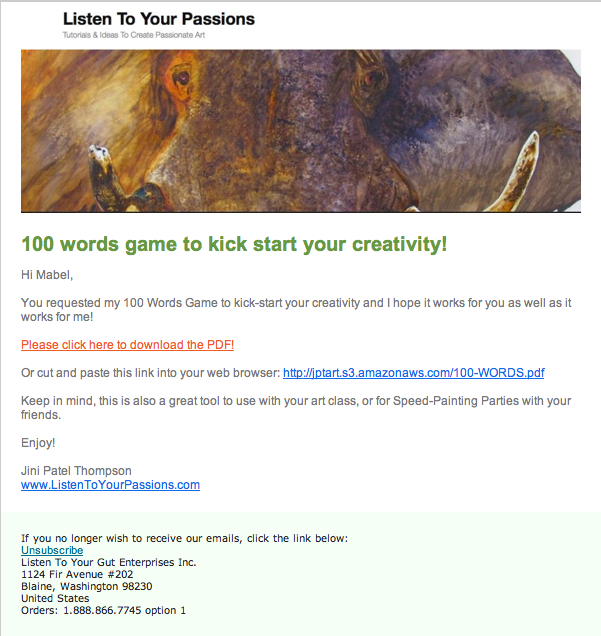
So for my art site, as soon as they click on the link to confirm (and even if they don’t) a second email automatically goes out that now contains the free gift:

You’ll notice in this email that I have given people a link to click on to download the 100 Words Game to their computer. I have stored the PDF file on my server, so that anyone can download it if they have the link. If you don’t want to store the file on your server, you can also set it up as a file attached to the email.

But if you have a larger file, it’s a good idea to upload it to your server and email people a download link, as I have done here. Otherwise, you may have people emailing you that they didn’t get the attachment, or they don’t know how to open it, etc. We have found that a download link creates less problems for people.

Don’t worry, you can find detailed instructions on how to upload files (audio or PDF) to a server by clicking this link. For now, you just need to have an understanding of how all this works. Now that we’re getting into the nitty-gritty of someone signing up for your opt-in and then you having an automated system to confirm their email and deliver your free gift, you’re probably seeing the value of having an email marketing platform like GetResponse or 1ShoppingCart.

Okay, are you ready to create and set up your opt-in offer?

Do this right now:

  1. Choose an email marketing platform to manage your sign-ups and automatically send your emails out to your growing list of names (your database).
  2. Figure out what you’re going to offer people who sign-up. What will solve one of your visitor’s problems? What will blow them away with great value?
  3. Create that content – whether it’s an eBook, an audio recording, a video, a simple PDF, or something else entirely. If you don’t have anything ready yet, then create a “Coming Soon – Don’t Miss Out!” offer. Or put up a Subscribe To My Blog sign-up form.
  4. Now use your email marketing platform to generate the computer code (html or javascript) for your opt-in offer. And put the offer at the top right, or top left of every page on your site.
    Note: Most WordPress blogs prefer html and javascript sometimes doesn’t work. Your programmer can do this for you, once you give him the code. Or you can follow my video below (this is the same one I gave you at the beginning of this unit) and put your opt-in offer on your blog yourself. But for now, your first step is to grab the code from your email marketing platform and copy and paste it into TextEdit (for Mac) or Notepad (for PC).

If you want to put your opt-in on your site yourself, or you already have your blog up, here’s the super easy how-to video again:

  1. Write the email(s) that people will receive when they sign up for your offer. You will likely need one email that has them confirm their email – this is also called a ‘double opt-in’. And the second email will then contain the free item (eBook, audio file, etc); either as an attachment or a download link to the free item. You can either swipe the templates I gave you above for your email text, or, follow my detailed instructions on how to write these emails (called autoresponders) and set them up in your email platform.

Opt-In Case Study: “How We Made $1 Million in 18 Months From a Simple Blog”

Remember way back at the beginning of this topic when I told you about Vishen Lakhiani who got a 37 percent opt-in rate for a “Coming Soon…” offer – which was more than double that of any of his other opt-ins?

Well, here he gives you all the details on that and also how he used a simple niche blogsite (on the topic of Remote Viewing!) to generate $1 million in only 18 months: