What Is A Teleseminar?
 A teleseminar is simply a seminar (training or information) conducted via the telephone, or Skype, or webpage. Teleseminars often involve some kind of interaction. Either you are interviewing someone else, or your listeners can call in (or submit their questions via a webpage).
Many people also use teleseminars as a vehicle to host and record their coaching sessions. If you have 10 people or less in a group coaching call, it is very easy to answer individual questions, or give everyone a chance to speak within a 1-hour call.
But if you want to use a teleseminar primarily to create and promote a product, then here’s an easy way to do that:
1. Select a Profitable Niche. Use your current knowledge and expertise – you should know who your customer is by now! Or you can select a new niche by doing market research – use Clickbank, Youtube, Amazon, Competitors Websites, etc. to see what’s selling or in demand. Make sure whatever you choose aligns with your expertise and passion. You do NOT need to create the product or program you’re going to sell yet, just select the product (concept) you wish to create.
2. Identify a Problem in That Niche and a Way to Solve the Problem. Or identify a need in that niche and a way to fulfill that need.
3. Create a Teleseminar Registration Page for a FREE Teleseminar about this topic. Your registration page can either be a Page on your site, or a blog post, or a Facebook Page. Your registration page needs to contain the bullet points of what you’ll be covering – the problem(s) you’ll be solving for attendees.
The registration form can either be a Name and Email -> Submit form that is organized by your email management platform (GetResponse, 1ShoppingCart, etc.). Or it can be a customized Contact Form widget on your blog – that is then just emailed to you.
4. Promote the Teleseminar. Email it out to your list, post it on Facebook, Twitter, Pinterest, Instagram, etc. Get your friends and associates to post it to their Facebook, Twitter, blog, etc. Advertise it on Facebook. Ask other people in your field to email it out to their email list (best if you can offer them an affiliate commission on any sales). Give out the weblink that leads to the Registration page on your site – where they can sign up.
 5. Host the Free Teleseminar and Record it. You can either use a free teleseminar service provider (although I don’t recommend it as the line quality and recording quality is often poor), or you can use a multi-purpose provider, like InstantTeleseminar.com. I use Instant Teleseminar because I already use them for my webinars, podcasts and interviews and it is a flat monthly fee no matter how many events you use it for.
If you are absolutely strapped for cash, and you think you have a forgiving audience, then you may want to attempt to host a call using Skype, which is completely free. You can then record it using Quick Time Player or Free Video Call Recorder for Skype for PC (you can specify Audio Only for the record function), available here: http://www.dvdvideosoft.com/products/dvd/Free-Video-Call-Recorder-for-Skype.htm
Skype also has a directory of free apps which can record your call: http://shop.skype.com/apps/Call-recording-audio-only/
The downside of using Skype, as you may know, is that the audio quality can be glitchy and people can get dropped from the call. It also has a bit of a “cheap” feel to it compared to the paid teleseminar platforms. This may matter to your audience or it may not.
At the end of the day, you need to start with what you can afford. If your heart is in the right place, you will find your ‘tribe’ who will support you and be willing to grow with you, rather than expecting everything to be great right off the bat. The other factor to consider is that if your information is fantastic, or life-changing, then people will be glad to have it, no matter what the delivery method.
Either come up with a teleseminar format that involves lots of questions and participation from your audience (who can participate via phone, Skype or web) or use a format that involves you interviewing an ‘expert’ and then open it up for questions after the interview.
Note: In both formats, because people are often shy, make sure you have a bunch of good “questions” ready to go that you can pretend people submitted.
Be sure to give your best stuff away during the teleseminar. Over-deliver on the content, share a great story or two, and help them get results. If people can solve a problem or get results from your free teleseminar, they will be far more likely to buy your product or program (or coaching, or consulting) because you will already have proved to them that your stuff is great!
6. Offer Your Bootcamp or Special Product Offer, or Your Consulting or Coaching Package etc. Whatever you are offering, make it a special discounted offer for people who buy right away, from your teleseminar offer. Tell viewers this is a special deal ONLY for teleseminar attendees.
Make it EASY for viewers/listeners to purchase directly from the teleseminar. Also send everyone who registered for the teleseminar an email immediately after the teleseminar with the same offer in it – tell them it’s valid for only 24 hours and make it easy to purchase from the email.
Don’t wait until right at the end to make your offer, as this makes it easy for people to just click off. Give your offer about half-way or 3/4 way through the teleseminar. Keep it short and sweet, no more than 1 – 2 minutes, then carry on with the good content and give the offer again at the end, where you can spend more time talking about it, or answering questions about whatever you’re offering.
If you’re selling a program, keep in mind that you don’t have to create the entire program at once! All you need is the first chunk, first installment, or module. If you plan it as a weekly package or program, that will then give you an entire week to create the next piece.
7. Create the Training or Package or Product. Use the bullet points you listed on the registration page to create your outline for your program and then just create the first installment, or session, or module. If you are selling a physical product, you need to set up your special or bundled offer (e.g. 2 full-size bottles, plus a free sample for the price of 1) – and your shopping cart help desk will direct you in how to do that. As I mentioned above, all you need is the first installment, or Part 1 of your program/package ready to go. If you plan it as a weekly package or program, that will then give you an entire week to create the next piece.
8. Host Your Live Training and Record it. If you offered a bootcamp, or coaching, or other training program that involves live events, you can record your live calls, videos, training webinars etc. the first time you do them for customers. Then you do not need to do them live again, as your content has already been created! So for subsequent purchasers – because of course you are going to run this whole promotion again (starting with the free teleseminar) and again – they will receive these pre-recorded training sessions.
9. Package and Brand the Product so you can Sell it at Any Time. Once you have recorded the first time you offered your program, you now have a packaged, ready-to-go product to sell. By now, you also likely have enough money to invest in some good branding for your product/package – to make it look nicer.
You can use the initial free teleseminar (which you recorded in Step 5) to market your product again and again.
10. Deliver the Content. Now, you simply set up an automated way of delivering the weekly content (video, webinar, teleseminar, pdf workbook, etc.) directly to your customer. You can either email them links to webpages, or email them download links for content, or send them to a password-protected membership site – where all your content is hosted. Head over this way to learn how best to deliver content.
Brainstorm your ideas for how you can use a teleseminar to create a great freebie, or online course, or other audio product. Here are some questions to ask yourself to stimulate some ideas:
Who would I love to talk to?
Who has more specialized info or experience in one of my FAQ’s (frequently asked questions) than I do?
Who’s got a really cool idea or product I want to explore?
Who could answer a bunch of the questions that I have at this point? Now write down your answers/ideas:
 What Is A Webinar?
 3. Create a Webinar Registration Page for a FREE Webinar about this topic. Your registration page can either be a Page on your site, or a blog post, or a Facebook Page. Your registration page needs to contain the bullet points of what you’ll be covering – the problem(s) you’ll be solving for attendees. And it needs to contain some kind of registration form.
 6. Offer Your Bootcamp or Special Product Offer, or Your Consulting or Coaching Package etc. Whatever you are offering, make it a special discounted offer only for people who buy right away, from your webinar offer. Tell viewers this is a special deal ONLY for webinar attendees. Remember, you can create your training or program later, it will actually force you to create it faster, HUGE BONUS for you if you tend to procrastinate.

 programs where some hands-on, in-person training is crucial, there is likely to be an entire chunk of the training that can be automated content delivery.



 Coaching and consulting services are particularly easy to add to your product roster because they do not require any production time – but keep in mind they do take your actual time to deliver, and therefore you’ll be limited in how much you can offer.
 Horse Trainer or Dog Trainer: Not everyone can afford to hire you personally to come out and work with their animal and many people just need some advice, or a fresh perspective. So you could offer:
 If you’re a counselor, or therapist you may only accept clients who will book and pay for a 5-Session Package – because that’s the number of sessions you know people need in order to see results.
 If you’re only conducting one-on-one sessions, many prefer to use
  Think about how you can start building a relationship with that person in your niche. And is there anything you can do for them, or give to them? If you can start building relationships with other people in your field, you will then be able to interview them for your blog, or your podcast, or do a teleseminar with them, or even a joint-venture with them.
 The only other person – also a medical doctor – who did not respond to my emails, nor return my phone calls, lived in Australia and was a world-renowned gastroenterologist who also lectured worldwide and headed up the GI department at one of the top hospitals in Sydney. Totally understandable that he would have zero time to respond back to me.
 Why have I been talking for pages now about offering a free mini-consult? Well, let’s go back to the Golden Rule of Business: What would you like to receive? How would you like to be treated?
 In this unit we’re going to look at different methods you can use to secure your digital content – whether you’re emailing it out, or hosting it on your website.
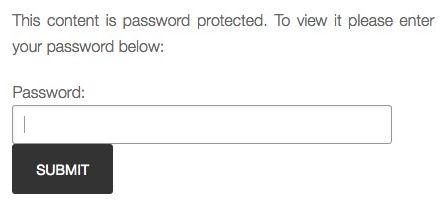
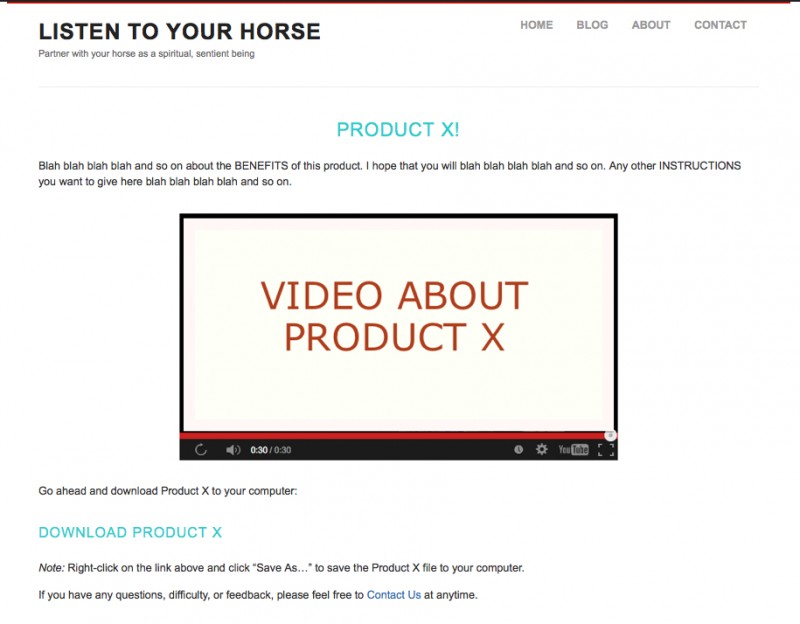
 Let’s say you have made a video to go along with your eBook, or MP3 audio. Because people have paid money for this product, you don’t want to just put the video up on your regular YouTube channel where all your people can see it. So how do you get that video to your customer – or the person who opted-in to your offer – yet keep it private, or ‘more’ private?


 Digital Content Ground Rules
 computer (or device) to actually download a video for viewing. And it also takes a long time to download a video file, so this is best avoided. In the coming units I am going to show you the best ways to deliver video-based courses, or content and how to host your video files. But in the rare case they do need to actually download the video, and for whatever reason you need to do this, then .MOV is the best file format to use and the most compatible across devices.
 1. Upload the product to your server. This is where you first upload your piece of content (MP3 audio, PDF eBook, report, etc.) to your server. Your server (ISP) is where you have your site hosted. You can either upload PDF files using your blog interface – see
  A smooth purchasing experience will increase the chance of your customer returning to buy something else, or recommending you or your product to someone else. Specifically, because the perceived value of a digital product can be less than a physical product (and many buyers might be new to digital products), you need to deliver something convenient to buy, download and use. This makes the speed and ease of digital delivery into an added bonus, instead of a hassle. Every complication, error, or time-suck in your process, even if it’s fairly benign, will frustrate your customers – and that’s the last thing you want to do!
 o doubt you will refer back here as time goes on and as you create new and different kinds of content or products.


 A CD or audio (MP3 file) can be a great item to have for your customers or site visitors since many people prefer to listen, rather than read. Many people even prefer it to video, since you can listen while you run, drive, walk the dog, lie down, or cook.
 hich you can create in one day) you have positioned that solution as a “package” and thereby greatly increased the perceived value of that solution.
 Note: you can also use Skype for this step, but only if you are planning on giving the audio away for free. This is because the quality of Skype is just not good enough (in my opinion). Here’s a sample of an interview recorded on Skype from Daniel Vitalis and you can see for yourself what I mean about quality. Click the PLAY button, or, you can download this audio from the link below:
 We’ve talked often in Listen To Your Freedom about how people have different learning styles and preferences. So while some people prefer a book, or online course and workbook, others prefer learning via video or audio.
 The
The  Now let’s look at the mid-range: A much cheaper mic, that has also gotten rave reviews from podcasters and Internet radio show hosts is the
  t quality and no interference during transmission. Just make sure it is compatible with your computer. Here are two good quality headsets that you could use:
 Now let’s see what Budget Bob has to say: Believe it or not, you can also try recording using Voice Memo on your iPod or iPhone. I’ve heard recordings done using Voice Memo that were perfectly good and sellable audio recordings – you just have test repeatedly to get the perfect distance and then you have to maintain that position for the duration of the recording. So basically, you and your device cannot move for the duration of the recording. And of course, you have to record in a fairly soundproof room.
 1. Used my


 So let’s say you’ve recorded your audio course, or meditation, or audio book, or teleseminar series… and you download it onto your iPod or mp3 player to test it and you realize – oh my gosh, that just ate up a third of my memory! And you wonder, how big are those file sizes anyway?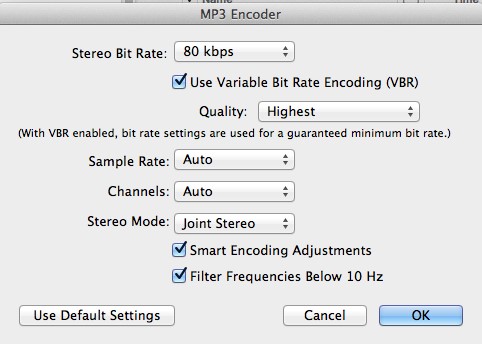

 So let’s say you’ve published your softcover or hardcover book, and it’s available for sale on Amazoan, in Barnes & Noble bookstores, and on your site. Or you’ve published your e-reader book on Kindle, or Nook.
 Although it looks like you have to enter all your personal information, you actually don’t, and it works with just the password and the Image Verification fields filled in. NOTE that I don’t recommend you set your webpage up like this! This is way too confusing and she must get a lot of customer service questions about this process. I’m going to show you a method you can use that is much simpler and clearer for your reader or customer.
 HOWEVER, as I said, there is a much simpler way for you to set up exactly the same thing on your handy-dandy WordPress site in three easy steps, that is also less confusing for your customer:

Recent Comments