How Do I Find the Time to Work?

When your time is so restricted, how do you carve out a decent amount of time to plan a business, work on a business, set up a business, get it running and then keep it running?

In the audio below I share solid strategies for when and how to work even when you have young kids or a full-time job, how to get the members of your family on board and motivated to support you, and how to set some clear boundaries to protect your work space.

I answers questions like:

  • “My girlfriend is really starting to resent the time I’m spending on my new business. How do I juggle my full-time job, my girlfriend and my new business?”
  • “I have 4 kids, the youngest is only two and my products are all audio-based – how can I ever get a QUIET time to record?”
  • “Now that I’m working on my new business, my house is turning into a pigsty! Then I can’t work effectively because the mess and clutter invades my brain and I can’t afford a cleaner – what can I do?”

DOWNLOAD Finding The Time To Work (right click and “save as”)

Or click the PLAY button to listen online:
[sc_embed_player fileurl=”http://listentofreedom.s3.amazonaws.com/finding-time-to-work.mp3″]

Kid Interruptions

Randi Zuckerberg at DotComplicated asked parents to share their strategies for how they managed to stay productive with kids running around. Here are some of the best responses:

Set Your Boundaries

I’m a former tv news journalist so I like deadlines. I’m constantly setting deadlines/alarms on my iPhone. -@LizzieBtv

We have a structured day with set work & play times. My daughter knows that Mom works for a bit & then we play! -@writeassociate
Limit. White flat vector buttons on gray background.I have a (stolen) hotel “privacy” card on my office door. I use it when I need to have no kid interruptions.- @amyjrosenberg

Door into my office is designated a “transporter” to elsewhere…once I’m through that door…#MommasGone -@sapienist

Make sure your office has a door, invest $100 in a train table and pay a babysitter for a few hours a week. -@lizapviana

Involve Your Kids

For creative work, involve your children. I enjoy their fresh perspectives & model healthy work ethic -@HalfTomS

I tell my kids I will do quick project or have snack with them at certain times. Then I’m off limits.- @jenniferwindrum

Find some part of the work you need to get done that they can help you do too – works every time!- @nick_johnstone

When All Else Fails

Dry hair shampoo, a trampoline, jump ropes, snacks and clear communication when “mom needs to work.”- @PorterGale

Hire a helping hand- @floragoog

I try to stress to my kids that, “Just like Daddy,” I have to work, but I do it from home.” -@jenniferwindrum

Lock them in the basement 😉 – @bristolmary

Now that you have some good, practical strategies to use to carve work time out of your busy day, let’s move onto the energetic piece of getting support from your loved ones…

How Do I Get More Productive?

Jini & Audelina (c) Linda Bickerton-Ross

This page is packed full of the secrets to my super powers! I’m going to show you exactly how I managed to build a million dollar business, while raising 3 fabulous kids, dealing with health challenges, and enjoying my passions like art, horses and yoga.

And no, I’m not an energizer bunny-woman with glazed eyes, because I drive myself so hard! I’m actually very peaceful and fun-loving – if I wasn’t, my horses would refuse to hang out with me!

I’m also an “earth mother” type with my kids – I breastfed for five years, the kids slept in our bed. I’ve taught my kids how to cook, sew, knit and crochet! Well, truthfully, the boys never made it past sewing, only my daughter carried on. Oh – proud Mama moment, here’s my daughter Zara, with the organic cotton baby blanket she knit for her new cousin:

Every unit in this module is dedicated to giving you all of the tools and processes I’ve developed to be able to live a full, vibrant life – health, kids, money, animals, peace, hobbies, sports, contentment – the whole shebang, can be yours.

But just before I tell you how, I’m going to give you a brief list of the major projects I’ve accomplished this last year – whilst raising three children, pursuing my passions of painting, horse riding and yoga and spending time with my husband, family and friends. I’m giving you this list now, because I want you to take the tools I’m going to give you in this module to heart and put them into action. So, in the last 12 months I:

  • Wrote and published 8 new eBooks
  • Revised and published the second edition of one of my hardcover books
  • Launched 2 new websites and 3 new YouTube channels
  • Shot, edited and uploaded 11 videos.
  • Conducted and published 3 teleseminars
  • Began work on 2 new healing programs; one is 40% finished, the other 60% finished
  • Began writing the course material for a new business program (LTYF!), as I write this it’s 70% finished.
  • Wrote and published 51 blog posts
  • Set up 3 joint-venture deals with product distributors and provided them with all the materials needed

Now remember, that was all accomplished while raising 3 kids, painting, horse riding, doing yoga and spending plenty of time with family and friends. And that list does not include the ongoing running of my businesses, customer service, managing my team, etc. Our revenues increased 25% during that year.

I’m telling you this because I want you to know that I am not presenting you with nice theories here, but I am giving you the actual blueprint for how to live a well-rounded, balanced life, yet be super successful and productive in your business too.

And the reason I’m working so hard to convince you to adopt my time management strategies is because I want YOU to be super successful too! Nothing turns my crank more than seeing others increase their freedom and bring forth their magnificence – it’s the reason I’m here.

Of course, you may need to tweak the strategies I’m giving you. But for the top strategies I’m giving you on this page, please just try them out first – ideally for one month, but even if you just test them for one week that should be long enough to see the difference. But don’t just test out one or two, you have to adopt ALL of the strategies in this unit, at the same time, to experience the same results. Here we go…

Emails Last

Do not EVER come to your desk at the start of your work segment and open up your email program. Emails are black holes that almost never contribute to your bottom line. But more importantly, they also fragment your concentration and wreck your energy focus for the important tasks you need to get done.

If your business does have time-sensitive elements that come in via email, then go back to the email setup I gave you and make sure that all those time-sensitive emails are sent to your Urgent Biz mailbox and that is the ONLY mailbox you look at in the beginning of your work day.

Also make sure your “new email” sound (of a new email hitting your Inbox) is turned OFF.

So when can I check and respond to emails?

Set the last half hour of your work slot to check your emails and respond to or handle the most important ones. Then, the rest of your emails can be answered here and there as you’re taking care of your kids, riding the bus, or have 5 minutes here and there.

Think about it: Emails do not require focus or extended concentration to deal with. They are the ideal task to fit in here and there. Put the chicken in the oven, then go do some emails. Drive your kid to hockey and do emails while you wait for him. Waiting in the dentist’s office – do your emails.

For those of you who avoid WiFi (like I do) you do not need to have your device turned on while you’re reading and replying to emails. Just download all your emails, then put your device into Airplane Mode while you reply to all of them. Then send them all in one batch and back to Airplane Mode. Of course, it’s best if you don’t hold your device while sending or receiving data – just put it down somewhere and if you can go outside that is best for reducing your radiation exposure.

Surfing, Watching Videos and Emails from Friends

These types of emails and Internet activity may appear in the same place as your work stuff, but they need to live in a completely different category in your brain. You need to think of web surfing, watching YouTube vids and checking out things friends sent you as ENTERTAINMENT or chill-out activity.

They belong in the same time slot as watching TV, reading novels and watching movies.

So set yourself the amount of time each day you need to spend on entertainment. For me it’s 2 hours and I spend it reading a book in bed, right before I go to sleep. I’m not a big TV fan, but my husband is and that’s his way to chill out for an hour or two before bed. If TV is your thing, then make sure you record all your stuff and watch it later so your time is not wasted by sitting through ads!

Most people don’t realize how much of their time is sucked into the TV or surfing the web – which contributes very little to your quality of life.

Turn Off Your Personal Phone

The easiest way to manage phone interruptions is to have a separate business line and personal/home line. Then, when you are working you ONLY answer the business line.

However, I realize that when you are just starting out, you often don’t have the budget for two phone lines. Although don’t forget, you can get a second business number from Grasshopper (worldwide) for a very cheap price – so be sure and check that out.

Young beautiful woman waiting for call isolated

In the meantime, if you don’t get many business calls, then just completely turn off your phone for at least half your work time. Then check messages and spend some time returning only your business calls and leave your phone on if you are waiting for people to call you back. But again, only answer the phone if it is a business call. Let your friends, family etc. go to voicemail.

If you don’t need to wait for any callbacks, then turn your phone completely off again, and continue working.

If you don’t turn your phone off, but set it to vibrate, it is going to result in the same splintering of focus as the ‘ding’ of your email inbox – and that’s exactly what you need to avoid to get quality work done.

I think of my work time as ‘dropping into a zone’ and I need to stay there, I need to stay completely in the flow to be able to work with maximum efficiency. Any noise, notifications, bells, or even music provide varying levels of distraction from the kind of pure focus that will enable you to work at anywhere from double to quadruple the speed of everyone else.

And this will not be stressful! Pure focus is actually rejuvenating and vital. Think of an athlete – after running the fastest 100 metre race they can, do they say, ‘Wow, that was really stressful.’ No. They may be physically tired, but they feel pretty good about giving it their best.

Some people think they work better with music, than without. Again, I say, test it! When I’ve had my kids test this with homework, they’ve all found they do better work, much quicker without music – even when they were convinced the music helped them.

If you’re doing tasks that don’t require focus, like answering emails, or sorting bills, or editing a document for line spacing, etc. then sure, no problem, music is not going to be an issue.

But I’m talking about creating products, or marketing materials, or other important activities that directly contribute to your bottom line.

Plug The Leaks In Your Energy

The final key for this unit of foundational strategies involves some introspection and stepping into your ‘observer self’, to determine where you are leaking your lifeforce energy.

Indians call lifeforce energy ‘prana’, Chinese call it ‘chi’, Japanese call it ‘ki’. It doesn’t matter what you call it. It is the foundational energy that gives us vitality, vibrancy and energy to do all the things that are important to us. Notice I said ‘important’ not ‘urgent’!

Maybe you find yourself wanting to move ahead with your business, passionately desiring the life of your dreams, but you seem to be moving at a snail’s pace. Or you take one step forward and then one step back, or even two steps back. If any of this rings true, then it is likely you are leaking your lifeforce energy out of your body somewhere.

This can be a difficult phenomenon to recognize in ourselves. Close friends or family can probably see it much more easily and clearly than you can. So either ask them for their insights, or step into your ‘observer self’ and take a look at your actions over the week.

Imagine yourself standing off to the side, or up near the ceiling, looking down at yourself – this is your ‘observer self’. So while you are going about your day, talking, eating, etc., your observer self is standing over there, watching you – not judging, just watching and observing.

See if you can observe the instances, or patterns in your life where you get thrown off track, or distracted from your purpose; the places that drain your energy and leave you feeling tired and ‘who cares’ or ‘screw it’ about your goals or vision.

For many people, relationship dramas are a primary leak-hole for their lifeforce energy. Let’s say you’ve just sunk into writing your eBook and you’re making great progress with chapter two. Then your doorbell rings, or your phone rings and it’s your sister, or your mother, or your best friend and they’re distraught, or raging, or sobbing. Feels really important that you rush to their side, doesn’t it? Perhaps it boosts your self-esteem; it makes you feel important, or needed.

But your observer self, looking on, notices that this type of drama occurs on a weekly basis. And maybe each new dramatic event takes 2 – 3 days of dialogue, support, or assistance to resolve. It takes up your time and your energy. When you sit down to work on your book again, you feel drained. You can’t think of much to say and you can’t stop thinking about poor mum, sis, friend, etc.

You must save your lifeforce energy for your business or you will not be able to bring forth your passion and vibrancy to all the people who need it. No excuses. And no exceptions. The tools that I’m going to give you in this module will help you to set stronger boundaries around your time and energy, so that you will have strategies and boundaries in place to handle events like this. But your first step is awareness.

If you do not realize where you are leaking your lifeforce energy (and time!) then you will not be able to stop it.

Others may leak their lifeforce energy into their TV set, or web surfing, or texting, or Facebooking, or by living vicariously through their children or partner.

You MUST save your lifeforce energy for your business.

In the example I gave above, if you had turned off your phone during your work slot, would your distraught friend or family have been able to reach you? If you have a commitment to yourself that you do not come out of your office during your work time, would you have answered your doorbell?

You may even have to have a conversation with the drama queens in your life and let them know that you will not be answering the phone or door during your office hours. And then expect them to test you! Prepare yourself for the test, so that you don’t cave, but stick to the boundaries you’ve set. Take a closer look at some of the challenges leaking your lifeforce – and what you can do about them – in writing…


Think about ways you currently leak your lifeforce energy – and ask your friends and family members for their insight if you need to. Look at relationship drama, TV, web surfing, texting, Facebooking, overeating, living vicariously through your kids or partner, etc.:


Now what can you do to set boundaries around your time and energy, so that you preserve your lifeforce energy for your business and manifesting your purpose here on earth?


Create a Task List right now! Write down the top 3 tasks you need to get done a.s.a.p. (as soon as possible) to create these boundaries. Don’t forget to put checkboxes in front of each task:


Let’s talk about some other ways you can set your boundaries and focus your energy on what’s important to your life.

Focus On Important Tasks Not Urgent Tasks

Being able to discern between tasks that are urgent (gotta do this now!) and important (these will still matter next month or next year) is an essential skill to develop.

So how can you discern which tasks need to be done today, during your work time, and which can be put off and accomplished later?

The simple test is to ask yourself this question: If I DON’T do this, will it make a difference to my life or my biz one month from now?

Let’s look at some tasks that may feel urgent, but when you apply the ‘matter in one month?’ test, you realize they are not important at all:

  • Answering all my emails.
  • Cleaning my messy kitchen.
  • Organizing my computer files.
  • Dealing with my Facebook messages.
  • Watching my son’s soccer game, when my spouse is going to be there, and I’ve already attended 3 games this month.
  • Learn a new photo editing program.
  • Feed the cat.

Not one of these things is going to make a difference to your business or your life in one month’s time, so they must NOT be allowed to take up your work segment. They can all be dealt with after you’re finished working and are moving about the rest of your day.

Okay, now let’s look at some tasks that will pass the ‘matter in one month test’ as you realize they are actually important items that need to be dealt with:

  • Write my weekly blog post
  • Pin a photo with a quote to my Pinterest account
  • Write an email to someone whose work I love, about possibly collaborating
  • Apply salve to my daughter’s bleeding knee and settle her on the couch with a movie and a snack
  • Pick up the phone and talk to two of my customers
  • Write one chapter of my eBook
  • Record a half hour audio
  • Go for lunch with my bestie and brainstorm my latest product idea – take notes.

Do you see the difference? You have to discipline yourself to be ruthless about not letting urgent items creep onto your to-do list or interrupt your work slot. Because they feel urgent! They feel like they’re really important, but when you apply the ‘matter in one month’ test, they are not.

Let’s try it out right now. Look at your day and create two lists of Urgent and Important tasks. Of course, some items can be both, but then they just go to the top of the Important list. So, right now, today, divide your tasks up (using the ‘matter in one month’ test) into Urgent and Important tasks.

URGENT

_____________________________

_____________________________

_____________________________

_____________________________

_____________________________

IMPORTANT

_____________________________

_____________________________

_____________________________

_____________________________

_____________________________

Multi-Tasking Is Not Efficient

I know I’m going against the current zeitgeist here when I state that multi-tasking is actually not an efficient way to work. Sorry! But that’s the truth and here’s why: When you allow (or force) yourself to focus on only one task at a time, you will complete that task much faster. And the quality of work you produce will be much higher due to your intense, laser focus on that one thing.

I’m a mum with 3 kids, 2 cats, a dog, 3 horses and a huge house and yard – trust me, I have plenty of opportunities to multi-task! And when I’m not in my work zone, I multi-task like a banshee. My office or work time is the place where I use my self-discipline to get rid of everything else and just focus on ONE task at a time.

Create Your Task List

Remember that self-discipline is a ‘muscle’. The more you use it, the stronger it gets and the easier it is to use. So here’s how you create that focus on completing only the important tasks – one at a time – in your work slot:

  1. WRITE DOWN each of the things you need to get done that pass the ‘matter in one month’ test.
  2. Now number those tasks in order of priority and logistics. For example, you can’t upload your eBook to your shop page until you have the eBook cover completed – so the cover has to be done first.
  3. Add a checkbox next to each task.
  4. Have that task list right on your desk, where you can see it the second you walk into your work space and sit down.
  5. Use your self-discipline to force yourself to complete the tasks in order and to make sure you do not start any new tasks until ALL the tasks on your list are completed.
  6. Place a tick in each checkbox as soon as you complete each task.

Here’s an example of a priority-ordered task list:

This may sound very simple. But until you actually implement this system, you will not realize its value. The most important parts of this system are the ‘writing it down’ part and the ‘checkbox’ part. Go ahead and try it, you’ll see.

If you get great ideas while you’re working – use your self-discipline to force yourself to stay on task and not go off on a tangent. You can thank yourself for the great idea, jot it down in the margin of your to-do list and carry on.

Again, it is really important to write down that thought, or great idea, because you need to get it out of your head and down on paper. Now your head is clear again and can focus on the numbered tasks on your list. If you don’t write it down, it will keep popping up as you’re working, “Don’t forget about…” and then you’ve lost your focus and slowed yourself down.

Remember at the beginning of this unit, when I wrote this?

… for the top strategies I’m giving you in this first unit, please just try them out first – ideally for one month, but even if you just test them for one week that should be long enough to see the difference. But don’t just test out one or two, you have to adopt ALL of the strategies in this unit, at the same time, to experience the same results.”

Let’s re-cap each of the strategies again to make it easy for you to implement and test:

  • Close my email app. Do not look at emails until the last half hour of my work segment. Then check my business email box only.
  • Do not use the Internet for ANYTHING other than completing the tasks on my to-do list. If I don’t need the Internet (I’m writing, or recording, etc.), I close my Internet browser.
  • Completely turn off my phone (home or cell) at the start of my work slot. If I need to check for messages, I check only once and then turn it off again.
  • Figure out where I’m leaking my lifeforce energy and STOP. Put up strong boundaries around my time and energy.
  • Create my Task List and start working through the checkboxes.

That doesn’t sound so hard, does it? And you certainly don’t need to wait until your business is up and running to implement these strategies – you can start right now. Remember, when you’re working through the modules in LTYF, that IS your work time!

Okay, now that you have your foundational strategies for revving up your super powers, let’s carry on and build the rest of your framework…


How Do I Organize My Day-To-Day?

It never ceases to surprise me how many people think they can be effective and efficient keeping their task list in their head. Yet every single person I know who has tested working both ways – keeping their to-do list in their head, versus writing it down – finds they accomplish much more, much faster by writing their task list down!

You can check out my quick and easy way to create a Task List if you want, but for now let’s go more in-depth on this and also look at ways to create digital task lists for those of you that need, or prefer, that method.

Staying On Task

The way you organize your to-do list is going to depend on whether most of the elements of your business are time-sensitive, or not.

For example, if your business primarily involves making sales calls and then following up with those people in a timely fashion, then you are going to need a CRM (customer response management) software or app.

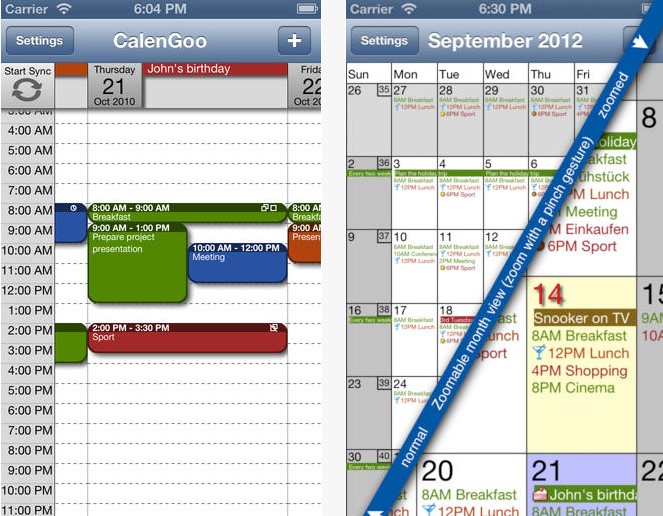
But for most of us, our business meetings, teleseminars, interviews and sales calls can be managed using either handwritten calendars and lists, or a normal calendar app for our computer or mobile, like this one, from ActionFocus:

Personally, I prefer to buy a desk calendar (with great photos) every year and then just handwrite onto it. This also works for my family as my husband and kids can pop into my office and check where I am or what I’ve got on. Sometimes my kids write their own reminders or appointments on here:

I combine this desk calendar with my handwritten to-do list with checkboxes. This is similar to what I showed you in the last unit, but this is my real-life one. As you can see, I prefer just a serviceable spiral notebook – that way my lists never get lost and I can flip back to check details:

I prefer to handwrite my task lists because I find it easier and faster and I prefer tactile things to screens.

Gift Time – LTYF Task Sheets!

For those of you that also prefer a written task list, I’ve created these groovy Task Sheets you can download and print out. You can use them as daily task sheets, or weekly task sheets – however you prefer to work is great. Here’s what they look like:

DOWNLOAD the LTYF Task Sheet (Right-click and Save As…)

Whether you prefer to keep a written task list, or to organize yourself digitally, it doesn’t matter which method you use – as long as you do it and don’t leave everything in your head!

Digital Organizers

If you prefer to use a digital calendar and to-do list, then you likely already have a digital calendar installed on your computer – check your Applications folder. But in case you don’t, I’m going to give you some good ones now, and you can also easily search for a good calendar organizer by entering these search terms into Google:

calendar organizer app
calendar organizer software
calendar organizer free software

First of all, Google has a free online calendar you can use:

https://www.google.com/calendar/render

And here are some good calendar apps for your mobile phone or tablet:

iPhone Calendar Apps

If you don’t like Calendar (which comes with your Mac computer and iPhone) then a great calendar app for your iPhone is Calendars+

Calendars+ is an elegant and easy to use calendar application available on iTunes. It works perfectly with Google Calendar and built-in iOS Calendar. For both iPhone and iPad.

Other good apps for iPhone are:

miCal

miCal is THE missing calendar for your iPhone and iPod touch. Many users like that you can read all your appointments without having to scroll. Award winning App at “App-Developer Conference 2010” and third place at “Best iPhone App”

CalenGoo

CalenGoo gives you a fast and easy way to access and modify your Google Calendar with your iPhone, iPod Touch or iPad. It can also be used when you have no Internet connection, using the cached data. Changes are saved and uploaded the next time you are connected.

Android Calendar Apps

Rabotan ToDo Calendar

Full-featured all-in-one Calendar and ToDo List. Scheduled task are shown in calendar views as well. Includes an automatic interchange of tasks, and information about their completion, via sms and email.

Business Calendar

Business Calendar is a complete calendar application that synchronizes with your Google calendars. Smooth scroll and zoomable multi-day view (1-14 days). Graphical and textual presentation and month, agenda, day and event views.

WeekCalendar

Week Calendar is the most user friendly and all-round calendar app worldwide for everyone that needs to manage a busy schedule. Week Calendar works without setup using the Exchange, Google and other calendars you have configured on your Android device.


Take a minute to plan on paper…

Which monthly calendar are you going to use for yourself?


Which Task List system are you going to use, digital or written? And if written, what are you going to write on – a spiral notebook, a legal pad, a journal, or your LTYF Task Sheets?


Okay, now that you’ve got yourself organized for your monthly calendar and your daily or ongoing task lists, let’s look at another facet of staying organized so you can be super speedy and efficient.

Account Information – Logins

As you accrue more and more accounts and login information (usernames and passwords) it helps to store them all in one document for easy access on your desktop, in alphabetical order. An easy solution is to download a password manager, like LastPass. This is especially great if you need to share logins throughout your team.

But some people don’t like using software to store this sensitive information – here’s the super simple, nearly analogue way I keep all my account information organized, from my blog login, hosting account, Amazon account, Facebook account, YouTube channel, and so on. I have a file saved to my desktop called Internet-Accounts and I copy/paste all login URLs, usernames and passwords in alphabetical order. For example – see how I bold the account name so I can scan and quickly find what I want:

Amazon Affiliate
https://affiliate-program.amazon.com/
Username:
Pswd:
Email:

BigCommerce
https://shoppe.listentoyourgut.com/admin/
Username:
Pswd:

CodeCanyon
http://codecanyon.net
Username:
Pswd:

And so on… but remember to put your accounts in alphabetical order so you can find them easily.

If you don’t know how to alphabetize, you can have Microsoft Word do it for you! Simply create your list of account names first and then format them as a bulleted or numbered list:

  • CodeCanyon
  • BigCommerce
  • Amazon Affiliate

Highlight your list and then click Table → Sort and select these options:

Note: If you have an older version of Word, then on the Home tab in the Paragraph group, click Sort.

And your list will be automatically alphabetized to look like this:

  • Amazon Affiliate
  • BigCommerce
  • CodeCanyon

Then you can de-select the bullet points and fill in the login information:

Every 3 months or so, PRINT that list out.

Do not just store them in digital form and don’t store them on your phone or other mobile device that you could lose. It’s best if you can store your Account Logins file on a flash drive (memory stick), rather than on your computer or laptop. And then keep this flash drive somewhere secure. My husband had both his computers stolen and he had his account login information on his computer! So we had to spend 5 hours changing 19 pages worth of passwords – NOT something you ever want to do!

Some people prefer to store their login information in their Address Book or some other digital organization solution, but if you cannot easily print your entire list (with one click) you will not print it out regularly. And then you risk the same extreme hassle if your computer crashes, or you lose your digital data.

Also, don’t use the same password for all your accounts and avoid using your name, birthdate or other easily recognizable info for your passwords.

Now that you’re all organized, let’s talk about how to keep your body and energy healthy, strong, and supported while you work, play, and create! On to the next Module…


How Do I “Protect My Energy”?

When your body has good energy and your brain is sharp and quick, you can zip through your work much faster. So although I could write an entire book on how to have vibrant health (oh wait, I already did!), I’m just going to give you some of the most important bits here.

These are the biggest-bang-for-your-buck things you can do to protect your energy and keep your brain and body strong and fast – no matter what your current work or life situation. This isn’t just about maximizing your productivity – this is about freedom, and what says freedom better than a healthy body and a clear mind?

Move Every Day

We’ve all heard the admonitions about exercise being the number one thing you can do for your health. In one ear and out the other, right?

So let’s not even mention the word ‘exercise’. Let’s talk about movement. And how about just making sure you MOVE your body somehow, every day?

Here are some ideas you can have fun with:

Take an activity that you normally do and just do it standing up. For example, I like to paint, so I make sure I stand at my easel.

Walk somewhere. For myself I rarely just ‘go for a walk’, there has to be some point to it. So I will make myself walk to the bank, or the grocery store. Or I walk to meet someone for lunch. I find giving myself a reward at my destination really helps; walk to a café, then sit down and have a yummy drink. Or walk to the bookstore and when you get there you get to buy yourself a book. Whatever works for you.

Put on some music and dance for 5 minutes.

  1. Lie down on the floor while your kids or partner is talking to you and just let your body stretch however it wants to. I do this at night while talking to my kids at bedtime – then I throw in some situps and butt lifts, since I’m already there and in position!
  2. Put a treadmill or a stationary bike in front of your TV.
  3. Convert your desk to a standing desk. You can do this cheaply by placing side tables (from Ikea) on top of your desk for your monitor and keyboard. Or you can buy an actual standing height desk. See the pictures below for ideas.
  4. Find a hobby that involves movement. When I got back into horses, my arm muscles instantly grew and my back straightened out more. I receive as many benefits as if I’d worked out. Try doing squats for 45 minutes (also known as posting trot!).
  5. Add movement and stretching to your regular activities. If you vacuum, change hands and work both sides evenly. When you’re gardening, alternate a ‘horseriding stance’ position (a wide squat), with spreading your legs wide and bending down, like a triangle – let this giraffe show you how it’s done:
  6. Sit on an exercise ball at your desk, rather than a chair. These are surprisingly cheap and very comfy. Here’s mine:

Standing Desk Options

You can convert your desk to a standing desk very easily and cheaply, or you can make it more professional. However, keep in mind that standing for hours on end is not good either, and can stress your lower back and leg veins. So best is to create a set-up where you can easily toggle back and forth between standing and sitting. Or, get a bar stool height chair for when you want to sit down.

My version of a standing desk, using boxes and end tables:

And here’s how that exact same setup allowed me to also work while sitting on my saddle! I wanted to work on training my heels to stay down, but I was also able to get some movement in by half-standing in the stirrups from time to time. Listen to your own body and get creative – maybe you want to set up a treadmill, or a bicycle at your desk, it’s all good!

Here are some other cheap and cheerful versions of standing desks:

Eat Well & Supplement

Here’s a simple formula to eating that will not only normalize your weight, but also give you good energy and muscle tone. Make sure your plate is composed of: protein, good fats and vegetables. You rarely need grains or carbs and when you do eat them, choose potatoes and starchy vegetables, rather than grains (wheat, rice, millet, etc.). When you do want some grains, eat quinoa. Chia seed in smoothies or as cereal also replaces the desire for grains. Good fats are coconut oil, olive oil, butter, other cold-pressed oils and fat from grass-fed animals only!

If you can have some raw food for breakfast, you’ll really notice the difference in your energy and how the rest of your day goes. Either get yourself a MagicBullet (cheaper than a NutriBullet, but does the same job – I’ve tested both) to make super fast and easy raw smoothies, with 30 seconds clean-up! Or get some raw protein (grass-fed whey or vegan protein) and add raw coconut water and chia powder.

If you eat this way, your body will just drop fat without any extra effort required. You will also feel much more energetic and if you tend toward depression, you should see a shift in about 3 months. Add a therapeutic quality probiotic and your results will accelerate.

Here’s what I drink for my morning protein shake:
http://blog.listentoyourgut.com/raw-grass-fed-whey-protein/

And here’s what my family drinks for raw juice:
http://blog.listentoyourgut.com/jinis-favorite-raw-juice-recipes-juicing-or-blending/

Protect Your Eyesight

Staring at a screen for half the day (or a full day) will likely weaken your eyesight over time. And the older you are, the faster the change will occur.

However, there are simple exercises you can do – that take less than 4 minutes – to strengthen the muscles of your eyes and prevent your vision deteriorating. I bought an entire book on this, called Eye Yoga. But chiropractor Ben Kim recently reminded me that even a few of these core exercises are enough to improve your vision:

Do these simple eye exercises – 3 times a day if you can – to keep your eyes and vision as healthy as possible:

  • Look as far to your right as possible for 3-5 seconds, then as far to your left as possible for 3-5 seconds. Rest for a few seconds, then repeat this sequence several times.
  • Look as far up as possible for 3-5 seconds, then look as far down as possible for 3-5 seconds. Rest for a few seconds, then repeat this sequence several times.
  • Slowly roll your eyes in a circle, first clockwise, then counter-clockwise. Rest for a few seconds, then repeat this sequence several times. Be sure to roll slowly – it should take at least 3 seconds for you to roll your eyes in a full circle.
  • Hold a pen in front of you, about an arm’s length away. Focus your vision on the tip of your pen for 3-5 seconds, then shift the focus of your vision to an object that is farther away for 3-5 seconds. The greater the distance between your pen and the distant object, the better.
  • If you are indoors, look out a window to find a distant object to focus your vision on. Repeat this sequence of going back and forth between your pen and a distant object several times. This last exercise is used by some professional baseball players to optimize visual acuity, which is essential for the hand-eye coordination needed to play ball.

Please note that all of these exercises should be done with your eyes, not your head and neck. So keep your head and neck still while you take your eyes through the movements described above.

If you would like more comprehensive guidance on how to improve and protect your vision, I can highly recommend:

Relearning to See: Improve Your Eyesight – Naturally! By Dr. Thomas Quackenbush

This book is based upon the Bates Method, but if you don’t mind reading “older” English (c. 1920), you can download the original Bates Vision Method book for free here:

DOWNLOAD Bates Method eBook

Or a great online course (also based upon the Bates Method) is RebuildYourVision.com

You can also make screen-time easier on your eyes by downloading f.lux, a simple program designed to automatically correct the light coming from your screen, depending on the time of day. Pumping bright computer light (which is designed to mimic sunlight) into your eyes at all hours, including after sunset, can affect both your eyesight and your circadian rhythms.

Flux changes your screen light from bluer, brighter light in the daytime to yellow, dimmer light in the evening, slowly adjusting as the hours go by, and synched to your timezone. Pretty cool. All you have to do is download it, allow it to use your location, and forget about it; it will operate quietly and automatically in the background without any further tinkering.

You can download f.lux here: https://justgetflux.com