How Do I Configure My Sign-Up or Opt-In Box?

Your First Touch With Your Customer

In this discussion, we’re going to go through all the elements necessary for you to use your opt-in (or sign-up) box on your site to begin and then nurture a beautiful, mutually-beneficial relationship with your tribe.

Your first touch, or interaction with your customer, does not happen when they purchase from you. It happens long before that. Your first touch with any customer is when they first come to your site and sign-up to get your freebie.

With this action, they initiate the process of eventually (if all goes well) becoming your customer.

If you fail to connect with them at this first touch, or you show them you are disorganized, or provide low quality stuff, then you will likely sever the relationship and they will not continue on and eventually become your customer, or member of your tribe.

On the other hand, if their experience of you and your stuff from their first touch (site visit and opt-in) is good (or great!), then you can continue to develop that relationship that will eventually result in a sale. And then likely more sales as time goes by; as you provide for more and more of their needs.

Note: If you find tech stuff really challenging, then you may want to listen to this audio first – as it will give you the overview and the WHY, before you get all stymied by the HOW. Also, after you know what you want to set up for your business, you may choose to outsource most of this kind of stuff. You can find someone on Upwork to take this whole process off your hands for the cost of dinner and a movie – just look for someone who is specifically experienced with your email marketing platform.

Configuring Your Sign-Up Box

So first you’re going to need to have your opt-in offer or sign-up box set up – and perhaps you have more than one – so you can start building a list of names and emails of people who are interested in what you have to say.

Before we go any further, let’s just make sure you have that sign-up box or opt-in offer configured correctly – so that your branding and message is coming through right from the first touch with your site visitor.

I’m going to use GetResponse as my example – and Freedomite Lori Clarke has once again graciously allowed me to use her system to demo on – but the same method and principles apply to any email marketing platform you choose to use.

Let’s work through things step-by-step using Lori’s homepage opt-in offer as an example and you can see I am testing it by entering my details:

What’s Wrong With This Opt-In?

  1. The first thing that’s wrong with this opt-in (sign-up box) is the programmer has not removed the notice at the bottom: Email Marketing by GetResponse

[ ] Remove Advertising or Links: Make sure you are not advertising your email platform on your opt-ins! If someone clicks that link, they will also leave your site – not good. Have your programmer remove this hyperlinked notice from your form.

  1. After I enter my details and click the Sign Up! Button, I receive this email in my Inbox. I have circled the problem areas:

The problem is that this subscription confirmation email looks generic. It does not carry Lori’s branding and I’m not even sure who it’s from. Maybe I signed up, then went out to run errands. I come back 4 hours later, see this in my Inbox… do I even remember who I signed up to, or who Lori is?

[ ] Personalize the text at the top and the bottom. Even if you can only personalize the text at the bottom and add your website, then this would be much better than just “Lori”, for example:

Looking forward to lots of fun, learning, shift and transformation together! Thanks so much for joining me.
Lori Clarke
www.HealingWithGratitude.com

  1. After I click the blue box to Confirm Subscription > I am taken to a webpage that says this:

Oh dear – same problem! What the heck is “lori_405262 list”? So Lori needs to personalize this message as well, to replace lori_405262 list with something people recognize as coming from her.

[ ] Customize Confirmation Messages: Sign up to your own list and go through every step of the process to make sure all the points of contact with your site visitor (or customer) highlight you and represent you.

Make Sure Your Opt-In is Branded & Personalized

Here’s another way you can customize the “Thank you for subscribing!” message. This is from Katharina at DrKatharina.com for her program Awakening Your Inner Healer (beta test group) – it works because there is no confusion as to what I signed up for:

New & Improved!

After Lori made these changes in her GetResponse account and personalized all the points of contact, here’s what Lori’s “Confirm Subscription” email now looks like:

And here’s what her new and improved “Thank you for subscribing!” webpage message looks like:

Much better wouldn’t you say? She is showing people right from their first contact that she knows what she’s doing – which immediately inspires confidence. And when that visitor comes to make a purchasing decision, that seed of confidence will contribute to the emotional decision to buy.

FINAL BIG TIP: If your email marketing platform, or shopping cart, or CRM system seems buggy, or super frustrating, or you just can’t figure out how things work, you can do two things: Phone your provider and ask for help and/or switch internet browsers. You would not believe how using a different internet browser can make everything go easily and smoothly! In my experience, Firefox is the best browser to use.

Also, know that I have instructional videos coming up, both 19.2 and 19.4, where I show you step-by-step how to set up the back-end for your autoresponder sequence (the automated emails that are sent out after someone opts-in to your free gift), so if you’re still a bit confused, stay with me to the end of this Module and I promise you it will all make sense!

Got it? Take a minute to scheme in your notebook…


Have you chosen your email marketing platform yet? Which one did you go with?

________________________________________________________

Have you come up with a juicy freebie for people who sign-up to your list? And have you go en your sign-up box configured yet? If so, your email marketing platform will have provided you with both the javascript and html code for your sign-up (opt-in) box. The javascript code will be about 1-2 lines long and the html code will be 10-50 lines long. Copy and paste both of them into a text document that you can save for easy reference.


Did you opt-in to your own offer on your site? Make sure you do, so you can test the entire sign-up process and make sure that all the customer touch-points we talked about in this unit look good. Here are the elements you want to make sure appear the same way on your opt-in box, your email confirmation, and your Thank-you/Welcome page or email:

Name of my sign-up freebie or list:

Name of me or my company
:


Is there anything you need to x, change, or tweak?


Okay, now that is all taken care of, what are your site visitors going to receive AFTER they sign-up to your list? Let’s get that mapped out for you in the next unit…
How Do I Craft An Autoresponder Email Sequence?

You likely already have your opt-in or sign-up box set up on your site. But have you also set up a good autoresponder email sequence that continues on after your freebie has been delivered to your opt-in?

Learn exactly how an autoresponder email sequence works, by watching this video where I walk you through the process, step-by-step. We are using GetResponse email marketing platform for this demo. If you don’t have your opt-in set up yet, or you don’t know what an email marketing platform is, then click here to get caught up.

I use Lori Clarke’s (she is such a good sport!) homepage opt-in and freebie to demo live exactly how she has configured her autoresponder campaign from her site sign-up box, and how she is going to deliver each piece of free content:

  • How to embed a video
  • How to create a hidden webpage
  • How to create a password-protected webpage and other useful tools are also thoroughly explained.

What Is An Autoresponder?

Autoresponders are what you’ll set up to go out whenever someone signs up on your opt-in form. They’re also how you’ll likely be delivering your online content to people who have just paid for your product. Newsletters, product launches, reminders, announcements, and more can also be easily programmed to go out on schedule to everyone on a specific list = autoresponder emails.

An autoresponder is simply an automated email. So you write and prepare the email ahead of time (insert any images, or links to webpages or videos, etc.) and cue it up in your email marketing system to be sent out whenever you choose.

For example, you may designate a certain autoresponder to be sent out as soon as the person signs up for your freebie (this would be set to go out on Day 0 after sign-up). Or, you may have an autoresponder cued up to go out a month after someone has purchased your eBook (set to go out on Day 30 after purchase).

Autoresponders are super necessary because they make it so that YOU don’t have to manually send out every email, or keep track of each customer or site visitor and how many days have passed since they opted-in or purchased from you! But they are still written by you, for your customer, so although they are automatic, they can still carry your tone, feel, warmth, or personality. Automatic doesn’t necessarily meant robotic! In fact, it means consistent, organized, and timely customer care and engagement.

This video covers a 3-step email sequence after a site visitor opts-in. But keep in mind, the process is exactly the same for any email sequence, including after someone has purchased from you. You may remember this video if you’ve already looked into delivering a digital product to your customer.


And remember to quality-check all of your autoresponders before you go live:

  • Is your branding cohesive?
  • Do you have a product name, or course name? If so, make sure you format it the same way every time it appears (bold, italics, caps, etc. – whatever you choose).
  • Decide whether to send people to a public page, or a hidden page
  • Does your email sound like YOU – does it match your personality?
  • Is your email visually appealing? Should you add a photo or image?
  • Do you want to invite discussion or feedback?
  • Do you list your website and contact info to show you’re legit?
  • Do you need a legal disclaimer at the bottom of your emails?
  • Does it actually work? Test every autoresponder yourself, as the backend of your systems can be confusing and it’s easy to program things incorrectly. If it doesn’t work (if the email doesn’t arrive at the time it’s supposed to, or at all, or displays incorrectly, or the links don’t work), you can check the details yourself or call into the support desk to get help troubleshooting.

NOTE: In case you would rather pull your hair out then set up all this stuff, remember, that’s what outsourcing is for! You can find someone on Upwork to take this whole process off your hands for the cost of dinner and a movie – just look for someone who is specifically experienced with your email marketing platform.

In this unit, I want to show you how to edit, or troubleshoot the text and layout of your own autoresponder sequences. So we’re going to use Lori Clarke’s autoresponder series again as our example and I will show you what she does wrong, what’s missing and how to fix it so that your autoresponder emails look fabulous!

Keep in mind that this process is exactly the same when you are crafting an autoresponder sequence for after someone has purchased. So you can use the same principles and techniques whether you are delivering a freebie, or a paid product.

If you already have one or more autoresponder sequences set up, then just run them through this same process/checklist to make sure you’re doing a great job of communicating, inspiring confidence, and nurturing a real relationship with your tribe.

Note: Here’s the breakdown on how to email digital content if you get confused.

Autoresponder Email Campaigns

So, now that your site visitors have opted-in… what are you going to send them? How are you going to deliver whatever freebie you promised in your sign-up box?

Well, you go back into your email marketing account and set up an autoresponder email sequence that is automatically sent out after someone signs-up.

You have to put yourself in your opt-in’s shoes and and ask yourself: What do I need to receive that is easy to understand and that I can access instantly?

And no, I’m not going to give you templates, because I almost never give you templates for communicating with your customers. Your emails need to sound like YOU and you need to communicate with your tribe from your heart, and in your language/phrasing.

But I am going to give you lots of guidance and ideas!

So let’s go back to Ms. Clarke’s opt-in as our example – you’ll notice she has now removed the advertising link from her sign-up box and also emphasized the name of her series, so it stands out better. In fact, the entire opt-in looks different (we’ll get to that in a moment):

After I have signed-up and then confirmed my email, I automatically receive the first video from her SHIFT HAPPENS! Series – because Lori has set it up that way in her account with 1ShoppingCart.

Here’s a quick note from Lori regarding why she ultimately switched from using Get Response to 1ShoppingCart:

“I switched because I found 1ShoppingCart was more intuitive and user friendly. GetResponse also wasn’t robust enough on the customer management side, and their customer service (to me as the customer) wasn’t as good as 1ShoppingCart. The other part of it was that I wanted to add an affiliate program and a shopping cart – by the time I would have paid for all three of these separately, it didn’t make sense; because by the time my business was up and running, I would have to switch anyway!
I needed to believe that my business was going to thrive. I needed to choose something that was reflective of what I wanted and believed my business could be. So although I didn’t have the funds, I let my belief drive me, not my pocketbook.”

So definitely think about the long-term when you are choosing your email marketing platform. And yes, if you don’t yet have a vision, or don’t believe that your business is going to generate significant money, then you may choose the cheapest (or free) option. That’s totally okay, but just know that it’s going to cause you more work down the road when you have to switch everything over to the more robust system.

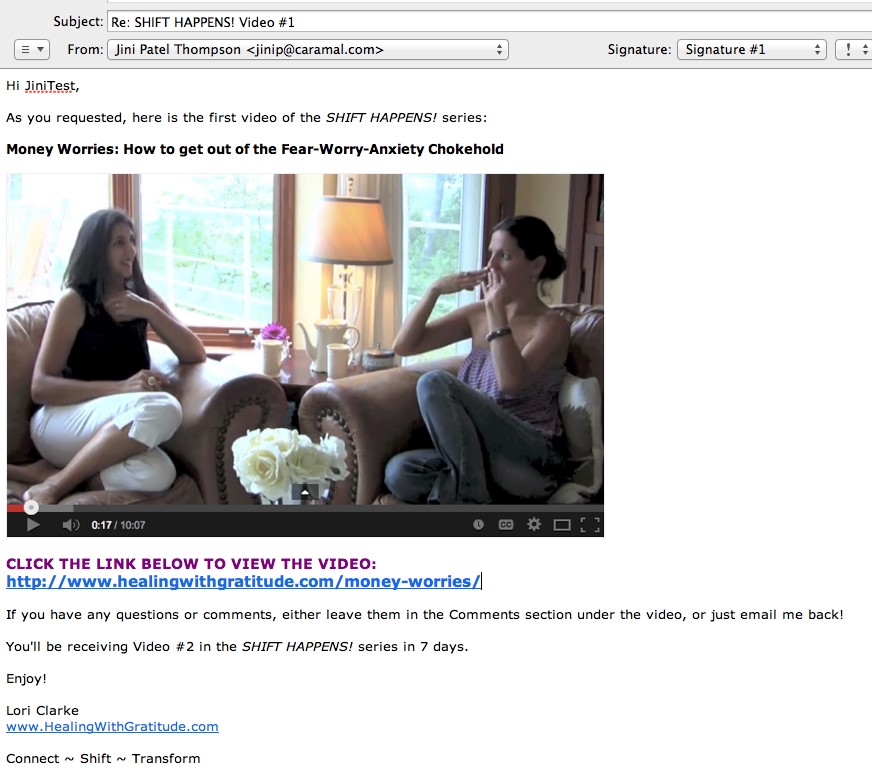
Okay, let’s get back now to the first email I receive after I sign-up for Lori’s free video series. This is the first email in her autoresponder campaign for her site opt-in. Let’s look at her first draft for this autoresponder, and then go over how she could make it better.

First Draft of Autoresponder Email #1 for SHIFT HAPPENS! Series

Subject: 3-part Video Series SHIFT HAPPENS

Jini2

Thank you for signing up for the AWESOME 3-part video series
SHIFT HAPPENS!

The time is NOW to begin shifting disappointment, fear and scarcity
that is limiting you from living a life of abundance. Here’s the first video:

[insert YouTube link]

Enjoy!

Lori Clarke

Powered by: http://app.getresponse.com/referral.html?x=a62b&u=Qdcg&y=g&
800 -15355 24 Ave #591, V4A2H9, Surrey, Canada
To unsubscribe visit:
http://app.getresponse.com/me.html?x=a62b&m=B42Oi&s=BQOD0c&u=Qdcg&y=6&
To change your contact details visit:
http://app.getresponse.com/me.html?x=a62b&m=B42Oi&s=BQOD0c&u=Qdcg&y=6&


Second Draft of Autoresponder Email #1 for SHIFT HAPPENS! Series

See the text in red for the improvements Lori needs to make to her first draft…

Subject: SHIFT HAPPENS! Series – Video #1

Hi Jini2,

[delete extra line space here]
Thank you for signing up for the AWESOME 3-part video series
SHIFT HAPPENS! [add italics]

The time is NOW to begin shifting disappointment, fear and scarcity
that is limiting you from living a life of abundance.

Here’s the first video in the series:

[insert screenshot PHOTO of vid and hyperlink to video]

[underneath screenshot, give actual YouTube URL, or weblink to Hidden Page]

If you have any questions or comments, either leave them in the Comments section under the video, or just email me back!

You’ll be receiving Video #2 in the SHIFT HAPPENS! series in one week.

Enjoy!

Lori Clarke
[where is your website? How do I know who you are? Do you want to include your tagline? Don’t assume I’ll remember who/what I signed up for]

[see if you can add about 5 extra lines spaces here, so this info shunts further down the page – do you want a legal disclaimer?]
Powered by: http://app.getresponse.com/referral.html?x=a62b&u=Qdcg&y=g&
800 -15355 24 Ave #591, V4A2H9, Surrey, Canada
To unsubscribe visit:
http://app.getresponse.com/me.html?x=a62b&m=B42Oi&s=BQOD0c&u=Qdcg&y=6&
To change your contact details visit:
http://app.getresponse.com/me.html?x=a62b&m=B42Oi&s=BQOD0c&u=Qdcg&y=6&

Autoresponder Quality Control Checklist

  • Is your branding (how you look & feel) cohesive?
  • Do you have a product name, or course name? If so, make sure you format it the same way every time it appears (bold, italics, caps, etc. – whatever you choose).
  • Decide whether to send people to a public page, or a hidden page
  • Does your email sound like YOU – does it match your personality?
  • Is your email visually appealing? Should you add a photo or image?
  • Do you want to invite discussion or feedback?
  • Do you list your website and contact info to show you’re legit?
  • Do you need a legal disclaimer at the bottom of your emails?*

Now let’s take a look at her edited, final autoresponder email (she also decided to change her intro text) and see how much better it looks than her first draft!


FINAL Version of Autoresponder Email #1 for SHIFT HAPPENS! Series

19_11

19_12-footerThen, obviously, Lori needs to carry on in this way – keeping all formatting the same – for the next 2 videos in the series.

Hidden Page vs Public Page

Note how initially Lori was going to send people to a YouTube video. Then, after thinking about it, she decided to send them to a hidden page – where she has the video embedded, along with some additional written content to add value and exclusivity to her offer. It’s easy to set up hidden, or password-protected pages – so check out this tutorial if you need it.

Setting her freebie up as a hidden page on her site has two benefits:

  1. It drives traffic to her site, thus increasing her search engine ranking, over time.
  2. It increases the perceived value of her freebie. Not just ‘anyone’ can view that information. Sure the video is available on her public YouTube channel (if you know where to find it), but the added text content is only on the hidden webpage.

Quality-Check Your Autoresponder

I wanted to show you this process (thanks Lori!), so that you can go back over your own autoresponder emails and double-check for all the same elements:

  • Is your branding cohesive?
  • Do you have a product name, or course name? If so, make sure you format it the same way every time it appears (bold, italics, caps, etc. – whatever you choose).
  • Decide whether to send people to a public page, or a hidden page
  • Does your email sound like YOU – does it match your personality?
  • Is your email visually appealing? Should you add a photo or image?
  • Do you want to invite discussion or feedback?
  • Do you list your website and contact info to show you’re legit?
  • Do you need a legal disclaimer?

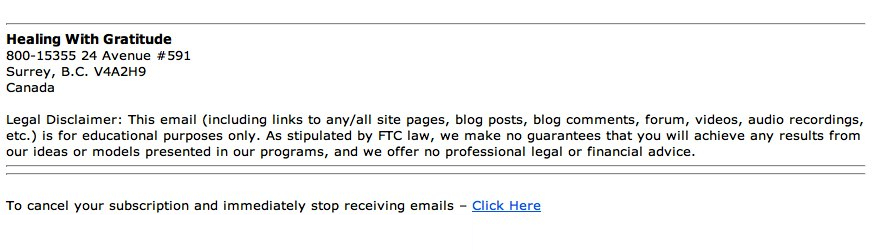
If you are giving any kind of help or advice to people, then you may want to have a disclaimer at the end of your emails, at the bottom of your product page on your shopping cart, and/or the bottom of your sales pages on your site.

Here are three Legal Disclaimers you can swipe, or edit to fit your material:

Health, Fitness Legal Disclaimers

Legal Disclaimer: This email (including links to any/all site pages, blog posts, blog comments, forum, videos, audio recordings, etc.) is for educational purposes only and is not a substitute for professional medical advice. Do not use this information for diagnosing or treating a medical or health condition and never discontinue any prescription medication or other type of medical treatment without consulting your treating physician.

or

Legal Disclaimer: This email (including links to any/all site pages, blog posts, blog comments, forum, videos, audio recordings, etc.) is for educational purposes only and is not a substitute for professional medical advice. Please consult your physician for any health or medical concerns.

Advice, Education Legal Disclaimer

Legal Disclaimer: This email (including links to any/all site pages, blog posts, blog comments, forum, videos, audio recordings, etc.) is for educational purposes only. As stipulated by FTC law, we make no guarantees that you will achieve any results from our ideas or models presented in our programs, and we offer no professional legal or financial advice.

Business, Marketing Legal Disclaimer

You can either use the disclaimer above, or you can use a more extensive one, like this one I have at the bottom of the LTYF sales page. Feel free to modify it as you wish:

EARNINGS DISCLAIMER: We’ve taken every effort to ensure we accurately represent the Listen To Your Freedom Program and it’s potential to help you discover and grow your business. However, there is no guarantee that you will earn any money using the techniques you learn from our Program and we do not present this as a “get rich scheme.” Nothing on our websites or in our Program is a promise or guarantee of earnings. Your level of success in attaining similar results to those discussed is dependent upon a number of factors including your skill, knowledge, ability, dedication, business savvy, network, emotional state and financial situation. Because these factors differ between individuals, we cannot guarantee your success, income level, or ability to earn revenue. You alone are responsible for your actions and results in life, health and business. Any forward-looking statements outlined on our sites or in our Program are simply our personal experience and our expectations or forecasts for future potential, and thus are not guarantees or promises for actual performance. These statements are simply our opinion. As stipulated by FTC law, we make no guarantees that you will achieve any results from our ideas or models presented in this Program, and we offer no professional legal or financial advice.

DOWNLOAD these disclaimers in Word .doc format for easy swiping and editing!

Your Autoresponders

Now that you’ve seen an example of an autoresponder series, it’s time to get yours set up! Or at least planned out…


What are you offering to people who opt-in to your list (what is your sign-up freebie)?:


How many emails do you need to send to deliver this? One email, or like Lori, do you have a series of emails – each delivering part of your freebie?


Plan out the first draft (point form) of your actual email autoresponders here:


Now take a look at your email(s) and proof it/them against the Autoresponder Quality Control checklist:

[ ] Is your branding cohesive?

[ ] Do you have a product name, or course name? If so, make sure you format it the same way every time it appears (bold, italics, caps, etc. – whatever you choose).

[ ] Decide whether to send people to a public page, or a hidden page

[ ] Does your email sound like YOU – does it match your personality?

[ ] Is your email visually appealing? Should you add a photo or image?

[ ] Do you want to invite discussion or feedback?

[ ] Do you list your website and contact info to show you’re legit?

[ ] Do you need a legal disclaimer?


What Happens AFTER The Freebie?

Okay, now that Lori has added her Legal Disclaimer to her autoresponder emails, what happens when her 3-part series comes to an end?

Let’s say you offered a free eBook for your opt-in offer. What happens after that eBook has been delivered?

Well, you continue to build your relationship with your site visitor and eventually present them with something they want to purchase!

But first, let’s look at another live demo to help you nail down your autoresponder process and newsletter set-up (if you have one).

In the video below, LTYF Team Member Justin will walk you through the work you’ve done in the last three units, and answer several questions along the way!

Let’s look at this entire process (from the last three units) in video format, as Justin takes Freedomite Katharina Johnson through her autoresponder campaigns and also her newsletter set-up on GetResponse.

Whether you are using GetResponse, or 1ShoppingCart, or some other email marketing platform, the components will be the same and this video will help build your understanding of the entire process. It will also show you tips and tricks you can use to speed things up – like creating templates so you don’t have to type up each email or format graphic elements from scratch each time.

And remember: You should pick up the phone and call your platform for help with any questions, or if you get stuck. They will login to your account and then walk you through every step, so don’t be shy!

What Happens After The Autoresponder Series is Finished?

After your sign-up autoresponder series is finished, you may want to have people automatically moved to a new campaign. For example, perhaps you want them all to receive your newsletter, once per week, ongoing.

Some email marketing platforms can do this and some cannot. Infusionsoft and 1ShoppingCart can be set up to do this. But GetResponse cannot. So, if your platform cannot do this automatically, then you have to manually go in and transfer groups to your new campaign. Again, phone your platform and get them to walk you through the steps involved.

In GetResponse, here’s what that looks like (thanks Katharina!):

GetResponse HelpDesk: “I’m afraid that at the moment we don’t have an automation rule that allows something like that. But you could create a saved search by going to contacts –> search contacts –> advanced search –> and generating a list of contacts who have completed the cycle with the conditions. It will look like this:

AND

This means that whenever you want to send out an email to the people who have completed the autoresponder cycle, you have to do this process, as shown above. If you create a saved search of people who, let’s say, are not receiving autoresponders, then anyone who is not receiving autoresponders will be automatically added to the saved search.

A saved search is a search that you have already done before so it remembers the settings. And when you create a saved search, it creates a separate group of these people, like a separate list, and you can then send a newsletter, or some other email, or series of emails, to these people. When you are selecting recipients at the end of the set-up process, your saved search will be there too.”

NOTE: In case you would rather pull your hair out then set up all this stuff, or figure out what it means, remember, that’s what outsourcing is for! You can find someone on Upwork to take this whole process off your hands for the cost of dinner and a movie – just look for someone who is specifically experienced with your email marketing platform.

Lastly, remember to quality-check all of your autoresponders and newsletters before you go live:

  • Is your branding (look & feel) cohesive?
  • Do you have a product name, or course name? If so, make sure you format it the same way every time it appears (bold, italics, caps, etc. – whatever you choose).
  • Decide whether to send people to a public page, or a hidden page
  • Does your email sound like YOU – does it match your personality?
  • Is your email visually appealing? Should you add a photo or image?
  • Do you want to invite discussion or feedback?
  • Do you list your website and contact info to show you’re legit?
  • Do you need a legal disclaimer?*
  • Does it actually work? Test every autoresponder yourself – meaning, send yourself a test of each email before launching it – as the backend of these systems can be confusing and it’s easy to program things incorrectly. If it doesn’t work (if the email doesn’t arrive at the time it’s supposed to, or at all, or displays incorrectly, or the links don’t work, or anything else), you can check the details yourself or call into the support desk to get help troubleshooting.

*Don’t forget – I’ve given you a selection of legal disclaimers to swipe!

NEXT: Your turn: what are you doing with the people on your list after your freebie autoresponder series is finished?


Are you going to put them into another campaign for one of your products? Or are you going to transfer them to your email list? Or transfer them to your blog subscriber list? Write your plan here:


Join me as I talk with Ian Thompson about the bigger picture of email marketing and why it’s important to think long-term with your strategies, treat freebies the same as customers, and nurture those relationships.

Ian (aside from being my husband!) is a former marketing and advertising executive who handles all of the email marketing for my businesses.

If you found any of this confusing, then this overview – where we get into the WHY more than the HOW – should really help you get clear by giving you the big-picture overview. Likewise, if you didn’t need all of the technical info in the previous units, then this call will give you a new way of looking at your current autoresponder series and how to make them even more effective.

In this call, we go over two scenarios in detail; discussing all of the steps and why:

  • Pretend someone has signed up for a free report or free audio. What is your process with them over the next year?
  • Pretend someone has just purchased an eBook, or other product. What is your process with them over the next year?

DOWNLOAD AUDIO Communicate With Your List

Or click the play button below to listen online:

[sc_embed_player fileurl=”http://listentofreedom.s3.amazonaws.com/Module19-Communicate-with-List.mp3″]

Here’s one of your top take-away’s from this call with Ian: Think of each autoresponder series as a CAMPAIGN (not just a series of emails). And a campaign has two components:

  1. What is my objective with this campaign?
  1. Strategy: How am I going to achieve that objective?

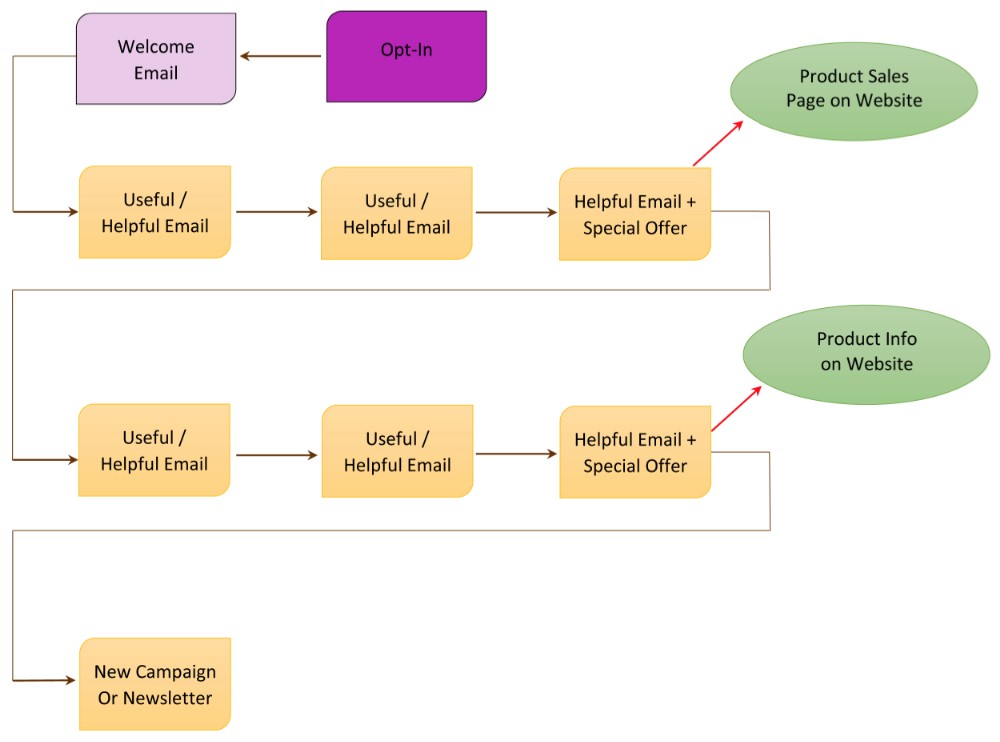
When you think of your autoresponder series as a campaign, then each email and action becomes an interlinked series of events, like this:

Or, you could also have a really simplified version of an autoresponder campaign like this, which is also very effective:

Let’s keep going and these diagrams will start to make more sense and may even look easy to you!


How Do I Go From An “Opt-In” or Email List To Getting Paying Customers?

Emailing your list with lots of free and helpful stuff enables you to build a relationship with them. A relationship is where you care about someone, you offer them help, or you make them laugh – you don’t just ask them for money.

Your free, helpful, inspiring or funny stuff is located on your site or blog, so this drives traffic to your site (which increases your search engine ranking) and also keeps bringing them back to you.

Or perhaps you have a really active Facebook page, so you like to engage your list by posting their comments on Facebook, then driving them to a blog post from your Facebook page.

Or you like to send them to a video on YouTube and then back again to your site or blog.

Eventually, this process of building a relationship by giving great free stuff will result in a sale. Here’s an example of what all these variations can look like:

Your email list (database) is your most valuable asset. It is your most powerful marketing tool, because it allows you to build that one-on-one relationship with your site visitors. People rarely buy the first time they come to your site, but after they know you and TRUST you, then they are likely to buy from you, if you have what they need.

But it is also easy to overwork your list and lose people. If you email people too often, it becomes annoying and they will unsubscribe. I’ve found that a maximum of 1 email per week results in long-term email retention; some of my list have been with me for over 10 years without unsubscribing.

Continue To Tell Your Story

If you were following my advice when you wrote your About page, your product descriptions, and your elevator speech and tagline, then you were storytelling all the way.

And the storytelling doesn’t stop there! When you email your list and continue to build your relationship with them, the best way to do that is tell them more stories. Meaningful stories, funny stories, inspirational stories, stories you heard from someone else that are so excellent you need to pass them on, stories your readers or customers have told you, and so on. Stories about things you’re struggling with, or stories about how something happening led to a thought or realization.

Stories about how and why you decided to create a new product, or why you promoted it the way you chose are also very powerful. Like this story from Leslie Bladgett, creator of bareMinerals make-up in an interview with Randi Zuckerberg:

“We decided to do our first ad campaign with models. Before that we brought in real people that sent us letters and they were the ones on the Infomercial. Now, we were going to hire people and pay them to model, which was kind of against the grain for me a little bit.

But what we did instead, is that we brought them in on the go-see, but we weren’t looking at them, we were listening to them. We had them answer questions. And the ones we liked, as people, and if they sounded like we wanted to hang out with them, if they had good ideas, if they weren’t all about vanity and themselves, had intelligence and were fun, we hired them.

We actually signed five people… signed them! …before seeing them. And they became our models. It was very stressful. I’m sweating just thinking about it.

The risk is that they all look exactly the same and that they’re all the same age. That would be weird because most of the people who are seeing it in the magazine don’t know how we got the models.

We know. It was really for us and we did a little campaign on it, but most of the people that saw these pictures didn’t know how we got them. So, what if they were all blonde, blue-eyed and 24-years old? That would be a bummer. But luckily we got quite the range. And I’m still in touch with these women. They’re cool. So I feel good about that.

And when the agency retouched the pictures, we had a big issue with them wanting to retouch them but that’s what they were used to. We had to say,  “We like her nose, we like her eyebrows, we like her chin.” We knew we needed to keep these people – whom we had met, heard and loved their stories – true all the way to the end. We feel good about that and that’s why we are an inspirational brand. We need to be inspired at work, and then hopefully our customers will be inspired.”

How are you feeling about bareMinerals now? Will this story build relationship with her list? Does it bind her existing customers more closely to her? Does it make new people want to go to her site, or keep an eye out for her products in stores? You bet!

Your integrity, your reasons for doing what you do, will shine through every facet of your business – use your email list to tell people those stories and by doing so you will build a deep, real relationship with the people on your list.

Even if you have an informational email – about a medicine, or a gadget, or a mattress – start the email with a story. The story can be about why you are emailing the information, how you came across the product, how the information changed your life, why you were so thrilled to discover the product, etc.

It doesn’t have to be a long story, it may only be one paragraph. But your story is your emotional hook that will get your email read, rather than trashed. The story is the thing that will keep your readers feeling that you are giving value and connection, rather than just selling something.

BIG TIP: And when you write the SUBJECT of that email (the title that shows in someone’s Inbox) make sure the Subject is about the story – not the product or information – because the story is always juicier.

For example, let’s say I want to send an informational email (or partial email that links to my in-depth blog post) about the many benefits of magnesium and why everyone should be taking it. That’s valuable information isn’t it? And I’m not selling anything – except of course the link to the magnesium brand I recommend – but that’s still not enough reason to get someone to open my email in the midst of the 100 other emails they received that day.

So which headline would work better and get my readers to open and read my email?

Information-based Subject:
The 10 Top Benefits of Magnificent Magnesium

Story-based Subject:
How Magnesium Saved My Dad a Trip to the Hospital Last Night

You see what I mean? The first one is a good title, but the second one peaks your curiosity. And then my email would open with my story about my Dad and his heart arrhythmia.

Even though I used a suggestion from my Copywriting Tips to come up with the first headline, the second headline is still more compelling because it has an emotional hook – you want to hear the story!

Or how about this Subject (title for your email) to make it even more relevant:

Magnesium Saved My Dad a Trip to the Hospital Last Night – Are You Mg Deficient?

So when you’re writing any email to your list, about any topic, try to always include a story about what happened, what you thought, what you wondered, an amusing anecdote, or something from your heart.

Also include a photo or image whenever possible – the more inviting your email looks, the more likely it is to get read.

Compelling Email Offers

When you want to promote something to your email list, remember that you NEVER just sell something, or give a sales pitch email. You always share or give something free first (a video, a helpful blog post, an eBook, a story, etc.) and then put your offer in the same email – usually at the end or middle of the email.

Then, right before your email campaign ends – and here’s the part that counts, so get ready! – you send out a LAST CHANCE email. This is something I have tested repeatedly and I’m telling you, it doesn’t matter how many emails you’ve sent to promote your product or program, or how many followers you’ve got in that sequence, or how much free stuff you’ve given away, you will sell the same or MORE from that final, ‘last chance’ email then you will have sold during your entire promotion!

So always, always, send out a ‘last chance’ email – even if your email campaign consists of just two emails; the offer and the last chance email.

If you are sending your email out en masse (an email blast), to your entire list and you don’t have the capability yet to segment off those who are particularly interested, then the maximum number of emails in a promotional sequence (or product launch) should be three – including the ‘last chance’ email. But two might be even better.

If you know people are interested in the offer, you can email them more. But if you’re just sending a group email blast to your entire list, then you don’t want to risk annoying people and having them unsubscribe. That’s why I recommend two emails for sure and you might be able to stretch it to three IF your offer is likely to interest everyone in your list.

If you are using Infusionsoft or 1ShoppingCart, then you will be able to tag and segment up your list into only those people who are interested and want to learn more. In that case, you are also able to carry out a Product Launch Sequence, so be sure to check that out when you are ready to offer a product or service to your list.

With some email platforms and Customer Relationship Management (CRM) systems, you can tag opt-ins or purchasers, thus segmenting them into specific groups, or areas of interest. So, if you have an email platform or CRM that can do this, then you can email a target group more often – because you know they are interested in your new product/service. But, if your system cannot tag and segment people based on their preferences, or interest areas, then all your opt-ins will be together in the same pool of ‘people who liked something you were offering’. In that case, you need to follow my instructions above and email blast those people a maximum of 2-3 times with your promotion.

If you do have a tagged and segmented list of people who are specifically interested in something connected to your promotion, then you could craft a story-based campaign up to 7 emails long – maybe run a competition, give a few things away for free (eBook, or video or audio). There is a lot more in-depth info on marketing campaigns throughout this site  – so don’t worry, this is an area you can always grow and expand your expertise in.

For now, sending 2-3 emails to your entire list will likely work well for you – especially if you follow the guidelines I’m giving you: Tell stories, give free stuff away, tell more stories, and use the ‘Last Chance’ heading in your final email.

Compelling Product Offers That Result In Action

Here are four ways to craft an offer to send to your list, that will encourage them to take action. Or you could turn these into postcards included with product you mail out, or create a blog post and/or video about your offer, etc. Remember to only choose “tactics” that feel good to YOU, that YOU would click on or buy. And when you write it, write it in a way that still feels like it’s you talking, not a sales template.

  1. Limited Time Offer. You need a legitimate reason WHY the offer is time restricted, this makes your offer believable and will create a sense of urgency. Maybe you’re promoting a service with an upcoming start date (after which it’s closed) or a product where the special pricing or combination of items will only be available until your new stock arrives.

Example: We are only taking registrations for X School/Program for the next 30 days. After that, enrollment closes and we cannot take on any new students, so that we can really focus in on our new Members.

  1. Discounted Price Offer. If you have a legitimate reason to discount, this kind of offer works well. If you’ve just brought in the newest model and so want to discount the previous model, that’s a great reason. Or perhaps you’re overstocked and need to make room in your warehouse. You can also offer a discount to celebrate a special day (Mother’s Day, for example), or to celebrate your first year in business, etc. If you restrict it to that day, then you will also have a Limited Time Offer that creates a ‘sense of urgency’ as well.

Example: Our supplier accidentally sent us double what we ordered, but rather than shipping it all back, we’ve decided to offer you a crazy discount of 30% ($10 off!) instead.

  1. Limited Availability Offer. This is where you let people know you only have a certain number of slots, or product available – for a good reason. Your reason WHY the appointments or product is limited has to make sense, so people know your offer is real. Otherwise, it will just feel like a gimmick and you won’t get the same response.

Example: I only have 3 spots open for my new X coaching program – and then all my time slots are filled and you would have to wait until the program ends for the next chance to get onboard. So don’t miss out as I’d LOVE to work with you!

  1. Free Bonus. This can be set up a few ways. Perhaps your free bonus is the ‘icing on the cake’ that is going to be the final emotional reason that convinces the person to buy. Perhaps your free bonus is actually more ‘valuable’ than the product you’re trying to sell. Or perhaps your free bonus is something that works synergistically with the product you’re charging for; you buy the book and get the workbook/journal as a free bonus. Or you buy the book and get the meditation as a free bonus. Or you buy the meditation and get an art journal as a free bonus, etc.

Example: Because I’m totally invested in helping you change your relationship with food and seeing REAL results in your body, when you purchase my new X book, I’m going to include this fabulous 100-page X Recipe Book for FREE!

Now let’s do a little brainstorming and create a compelling offer for one of your products…


Choose one of your products or services and pretend you’re offering that product to your tribe. How could you encourage them to make a purchasing decision? Which of the compelling offer techniques from this unit could you use? Write a compelling offer for your product here. Don’t worry if you’re not sure how to do this, just slap something down:


Example: [after I tell a story about magnesium] Special Offer: I’ve got only 30 bottles of the Mini-Minerals Magnesium left until we get our next delivery. So to make it easy for you to try this amazing mineral, here’s a 20% o coupon (so you save $7!) if you order by midnight on Tuesday.


Now I’m sure you might be wondering… How do I know what to sell and what to give away free?

How Do I Create a Freebie Email Campaign For My Opt-In Offer?

What To Sell And What To Give For Free

Many people get confused between what to give away for free and what to charge for. Especially when you’re supposed to be giving your best stuff away for free! So let me give you a few examples to stimulate some ideas for your own content – you might remember these from when you were learning the basics of communicating with your email list – we’ll expand them into a campaign below.

Example #1 Professonal Stunt Longboarder

You have an eBook on how to be a pro longboarder. This eBook is a combination of text and demonstration videos.

→ You charge for the eBook (which could also be positioned as a Course, by the way) and you give away your best demo video for free. Which of your videos will produce the most elation (I did it!!) in your viewer? That’s the one you give for free.

OR

→ You charge for the eBook and you take your best video demo and you chunk it down into Parts 1, 2, 3. This then becomes 3 separate emails, each with a message from you, some tips, perhaps a link to a blog post, or an affiliate link to an awesome set of wheels (best for doing the stunt you’re going to teach them) and then Part 1 of the demo video, and so on, for a 3-email series.

Example #2 How To Refinish An Antique Armoire

You have an online DVD course that shows people how to purchase an antique armoire from a flea market and refinish it to showpiece quality.

→ You charge for the DVD course and you select just ONE topic from the course and send an email with some intro text and a video that shows just that one piece of how-to. Maybe you select the topic of how to spot a good buy from a garbage piece at the flea market – that’s hugely valuable, shows your expertise and if someone uses that info to buy an armoire, now they’re going to want your course to figure out how to refinish it!

OR

→ You charge for the DVD course, and you offer a mini-course for free. This mini-course tells them the major (overview) steps involved in purchasing and refinishing an armoire. But it doesn’t give the details; it doesn’t tell them which varnish to purchase, which grade of sandpaper – it talks about why it’s important to choose the correct products, but it doesn’t give out the products or specifications. It also doesn’t contain the videos. It only contains excerpts of 1 to 3 videos (so they can see how good your production, lighting, sound etc. is).

But they have a lot more knowledge than when they started. Probably, if someone wanted to, they could attempt the process themselves – maybe they’re an advanced woodworker and can figure out the details themselves. No worries, maybe that person will then become an affiliate of yours! Or he will refer people to your course.

Example #3 Hypnosis Audios

You have a series of audio-based healing sessions using hypnosis for different conditions: Stop smoking, lose weight, bedwetting, anxiety, insomnia, etc.

→ You charge for your individual audios or sessions and you give away your most WOW audio session for free. What is the audio that is likely to be an issue most of your site visitor’s have? Anxiety, stress, insomnia or weight loss? If you know who your customer is, you should already know the answer to this question. That is the audio you give away for free. Because once someone has a fantastic result, they will tell everyone and they will also come back for help with their other problems.

OR

→ You charge for your audio sessions, but you come up with a free email Mini-Course that will help people with a common problem – Are You Stuck In a Rut? So the first email is a quiz that helps them identify where and why they are stuck, along with a short video from you with some understanding and inspiration in the form of a story. The next email contains a link to an interview or teleseminar you gave on a related topic. The third email contains a download link for a mini-hypnosis session designed to help them feel more positive about their journey or challenges.


Okay NOW, let’s expand on those examples and I’ll give you the details on exactly how to set up the Freebie Campaign for each of those items.

OH – hilarious – so what I’m doing here (pull back for the overview) is in itself an example of what I’m trying to teach you! Let me explain: Imagine you’re getting this info through an opt-in offer. The way I gave you the Free vs. Paid examples above could be the free stuff. And the detailed how-to I’m going to give you below could be the stuff you then want to pay for. How cool is that? Sometimes I just tickle myself pink!!

Alright, now that I’ve calmed down, I’m going to give you the elements that make up a good Freebie Campaign (free stuff that leads to a product purchase) and then I’m going to give you three examples of how you would set up your email sequences (autoresponder campaigns) to carry on from your free opt-in offer in each of these examples.

Crafting A Freebie Campaign

I’m going to give you the elements that make up a good Freebie Campaign (free stuff that leads to a product purchase) and then I’m going to give you three examples of how you would set up your email sequences (autoresponder campaigns) to carry on from your free opt-in offer in each of these examples.

A Freebie Campaign is a sequence of free autoresponder emails that showcase who you are and give people an experience of your great stuff, and hopefully lead to a product purchase. And the purpose of a Freebie Campaign is that it:

  • Shows your tribe WHO you are
  • Shows your tribe the great SOLUTIONS, instruction, help, or entertainment you have for them
  • Shows them WHY they would want to be in relationship with you and why they would eventually want to purchase some great stuff from you
  • Gives them a compelling reason to purchase NOW

To put together your Freebie Campaign, you basically brainstorm to figure out what you can give away for free that is really great – look to give away some of your BEST stuff. Remember the old saying about ‘first impression is the biggest impression’? Or, ‘first impression is the lasting impression’? Well, that same principle applies here. It doesn’t matter whether your first touch (impression) with your site visitor is free or paid, it is still the first impression they have of you and will form the basis for how they think and feel about you for a very long time.

But remember what I’ve been telling you throughout LTYF; that people rarely buy their first time on a site. So it’s almost always going to be your free stuff that makes your first impression on people. And that’s why it’s absolutely crucial to come up with a really good Freebie Campaign for your site opt-in.

After your site opt-in campaign (autoresponder series) is set up, you can also come up with a Freebie Campaign for each new product or service you want to offer your list. Again, this free stuff will tell your tribe what this new product is about, whether it resonates with them, whether they have any need or desire for it – you have to give them a taste, touch and feel of it first.

In the three examples below I’m going to take three completely unrelated niches and show you how each of them could craft a great Freebie Campaign to promote a new product or service.

#1 Professonal Stunt Longboarder

Product: You have an eBook on how to be a pro longboarder. This eBook is a combination of text and demonstration videos (which could also easily be positioned as a Course – just saying!).

Opt-In or Email Offer to Your List: Give away your best demo video for free. Which of your videos will produce the most elation (I did it!!) in your viewer? That’s the one you give for free. If you have the ability to segment or tag your list, here’s where you would use a special link, or webform to track the people who express interest and want to be a part of this campaign.

Helpful/Useful Email #1: Great tip that changed the way you slide forever, ask readers to share any of their helpful tips, then talk about your eBook (tell a story!) and give your eBook offer.

Helpful/Useful Email #2: Intro paragraph on your great compilation wipe-out video, then link to your blog post to view it. Encourage readers to post links to their best wipe-out video in the Comments section below the blog. Then give your eBook offer in both the email and on the blog post.

Helpful/Useful Email #3: Story about a stunt video and link to your blog to watch it, then use one of the Compelling Product Offer techniques above to create urgency about your eBook offer. Maybe this is your ‘Last Chance!’ email for that special offer.

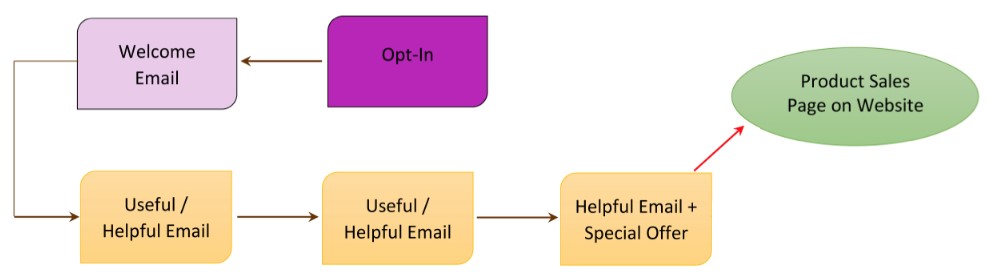
Here’s what this email campaign looks like visually:

Note: If you find it helpful to create a schematic like this, you can create them for free using either Google Drawing or Bubbl.us

Voila! Do you see how you have shared your personality, your help, your sense of humor and put some great groundwork into building a real relationship with the people on your list? AND you have also given them three chances to buy your eBook; which will help them even more.

OR

You take your best video demo and you chunk it down into Parts 1, 2, 3. This then becomes 3 separate emails, each with a message from you, some tips, perhaps a link to a blog post, or an affiliate link to an awesome set of wheels (best for doing the stunt you’re going to teach them) and then Part 1 of the demo video.

Your next email goes out 3 or 7 days later, contains a story or helpful advice and Part 2 of the video.

The last email goes out 3-7 days later, contains Part 3 and then a stronger call to purchase your eBook. Now that they’ve had a chance to get to know you and the quality of your stuff, you can give a stronger call-to-action. So maybe you offer a special discount that expires in 24 hours. Or you offer a special bonus if they purchase in the next 7 days.

There are many ways you can create an email campaign of great free stuff that shows your tribe who you are and what great stuff you have. There is no ‘right or wrong’, the only determining question you should ask yourself is: What would I be happy, thrilled, or excited to receive? And then send that to your list.

#2 How To Refinish An Antique Armoire

Product: You have an online DVD course that shows people how to purchase an antique armoire from a flea market and refinish it to a showpiece.

Opt-In or Email Offer to Your List: You offer a mini-course based on your DVD for free. This mini-course tells them every single step involved in purchasing and refinishing an armoire. But it doesn’t give the details; it doesn’t tell them which varnish to purchase, which grade of sandpaper. It talks about why it’s important to choose the correct products, but it doesn’t give out the products. It also doesn’t contain the videos (that are in the DVD Course). It only contains excerpts of 1-3 videos (so they can see how good your production, lighting, sound etc. is).

Voila! They have a lot more knowledge than when they started. They also have a lot of trust in you as an expert and they’ve seen the quality of your teaching and production quality of your videos. Now, if someone wanted to, perhaps they could attempt the process themselves – maybe they’re an advanced woodworker and can figure out the details themselves. No worries, maybe that person will then become an affiliate of yours! Or he will refer people to your course. Or he will purchase one of your other products.

OR

You could do a simple email marketing campaign that would be just as powerful at showing people how great your stuff is: You charge for the DVD course and you select just ONE topic from the course and send an email with some intro text and the video that shows just that one piece of how-to. Maybe you select the topic of how to spot a good buy from a garbage piece at the flea market – that’s hugely valuable, shows your expertise and if someone uses that info to buy an armoire, now they’re going to want your course to figure out how to refinish it! Here’s what that sequence would look like:

*See the section above on Compelling Product Offers That Result in Action if you’ve forgotten what a Compelling Offer is or how to craft one.

#3 Hypnosis Audios

Products: You have a series of audio-based healing sessions using hypnosis for different conditions: Stop smoking, lose weight, bedwetting, anxiety, insomnia, etc. You also charge for individual sessions.

Opt-In or Email Offer: You give away your most WOW audio session for free. What is the audio that is likely to be an issue most of your site visitor’s have? Anxiety, stress, insomnia or weight loss? Because you know who your customer is you will already know the answer to this question. And that is the audio you give away for free. Because once someone has a fantastic result, they will tell everyone and they will also come back for help with their other problems.

Helpful/Useful Email #1: You tell a client story (anonymous, of course) and offer some questions to stimulate exploration of your reader’s own issues. You can either give the whole content in the email, or a teaser paragraph that links to your blog – do whichever YOU prefer to receive. Have a link at the end of the text to a Private Session, or audio relevant to the topic.

Helpful/Useful Email #2: Send out a Quiz – people LOVE quizzes! You can get a free quiz plugin or webform (Infusionsoft) for your blog – so you would link to the page on your blog that has the quiz. Again, have a link at the end of the quiz to a Private Session, or audio relevant to the quiz.

Helpful/Useful Email #3: Send a compelling teaser that links to your blog where you tell a story using mostly photographs. After the photo story, include a powerful client testimonial and then a Compelling Offer for one of your products.

Here’s what this autoresponder sequence looks like, visually:

OR

You come up with a free email Mini-Course that will help people with a common problem – Are You Stuck In a Rut?. So the first email is a quiz that helps them identify where and why they are stuck, along with a short video from you with some understanding and inspiration (don’t forget to tell a story or two). The next email contains a link to an interview or teleseminar you gave on a related topic. The third email contains a download link for a mini-hypnosis session designed to help them feel more positive about their journey or challenges.

You see how easy this process can be? All you need to do to create an awesome autoresponder campaign is to visualize your customer and then ask yourself: What would I like to receive?

Create Your First Freebie Campaign!

Now let’s take everything you’ve learned and put it into action! We’re going to go play in your LTYF Workbook and create a Freebie Campaign that:

  • Shows your tribe WHO you are
  • Shows your tribe the great solutions, instruction, help or entertainment you have
  • Shows them WHY they would want to be in relationship with you and eventually purchase some great stuff from you
  • Gives them a compelling reason to purchase NOW

Here’s what you’re going to map out:

Simple Freebie Campaign


So let’s walk you through crafting each of the steps shown in the diagram above…

Let’s take everything you’ve just learned and put it into action! Pick one of your products or services (or you can use an idea for a product or service) and create a Freebie Campaign that:

  • Shows your tribe WHO you are
Shows your tribe the great solutions, instruction, help or entertainment you have
  • Shows them WHY they would want to be in relationship with you and eventually purchase some great stuff from you
  • Gives them a compelling reason to purchase NOW


Ready? Grab your notebook and get to work…


My Product or Service:


My Opt-In Offer (can be given in an email, or in a sign-up box on your site):


Welcome Email (you only need this if the person has never received email from you before – it contains the link they need to click to confirm they want to receive stuff from you):


Useful/Helpful Email #1 (this is where you deliver what you promised in your Opt-in Offer) Point-form is fine, then type out your final in your email program:


Useful/Helpful Email #2 (summary or bullet points of content/freebie + product offer at end – use stories!):


Useful/Helpful Email #3 – summary or bullet points of content/freebie + Compelling Special O er (Last Chance! email). Remember to link to the product page or download page on your site:


Ta-da!! You’ve just crafted your first Freebie Campaign. Isn’t that awesome??

Simply come back and re-visit this process every time you have a new product or service to offer. And when you’re ready to kick things up a notch and develop a bigger campaign (perhaps you have a higher priced product), make sure you check out detailed or segmented product launches, which might look something like this:

Okay, hopefully you now have lots of ideas about what you can offer for your site sign-up, new product launches, or existing product promotion. And if you are now swimming with questions like:

Have no fear, all those techniques and more (and they are all very easy to do) are explained in the links above!

And in case you’ve forgotten, now that your fabulous autoresponder campaign has resulted in product sales… what do you do next? You can start by listening to this audio where Ian and I detail our product follow-up sequences. We tell you exactly what we send out after someone has purchased one of our products.

Here’s a simple diagram of the product follow-up sequence for digital products, physical products, and services or sessions. This little chart will save you so much time (clarity!) AND make any new product autoresponder set up easy-peasy!

Did you like that? Did it make things a whole lot simpler? Go ahead and download this as a PDF you can print to guide you through your own campaigns.

DOWNLOAD Customer Follow-Up Chart here (Right-click and Save As…)

Tack this chart up on your bulletin board or wall – somewhere super handy – and make your life easier! Remember, the more you can simplify things, the more effective you’ll be.

As you now have a lot more understanding of the ways you can communicate with your list and develop a relationship with them, you should be able to answer this question…


What are you doing with the people on your list after your sign-up box autoresponder series is finished? They have opted-in to your list, received your freebie, now what? Are you going to put them into a campaign for one of your products? Or another freebie? Or are you going to transfer them to your email list? Or transfer them to your blog subscriber list? Write your plan here:


If you have any products or services already selling, run them through this same chart and checklist to make sure you’re providing an excellent experience for your tribe.


How Do I Use My Email List As My Top Asset?

ian-2015-portrait-woodJoin me as I talk with Ian Thompson about the bigger picture of email marketing and why it’s important to think long-term with your strategies, treat freebies the same as customers, and nurture those relationships.
Ian (aside from being my husband!) is a former marketing and advertising executive who handles all of the email marketing for my businesses.

If you found the previous units in this module confusing, then this overview – where we get into the WHY more than the HOW – should really help you get clear by giving you the big-picture overview. Likewise, if you didn’t need all of the technical info in the previous units, then this call will give you a new way of looking at your current autoresponder series and how to make them even more effective.

In this call, we go over two scenarios in detail; discussing all of the steps and why:

  • Pretend someone has signed up for a free report or free audio. What is your process with them over the next year?
  • Pretend someone has just purchased an eBook, or other product. What is your process with them over the next year?

[EDIT File name, 29:16 – “Module 19” reference, 30:28 – support we don’t offer, 53:00]

DOWNLOAD AUDIOCommunicate With Your List

Or click the play button below to listen online:

[sc_embed_player fileurl=”http://listentofreedom.s3.amazonaws.com/Module19-Communicate-with-List.mp3″]
Here’s one of your top take-away’s from this call with Ian: Think of each autoresponder series as a CAMPAIGN (not just a series of emails). And a campaign has two components:

  1. What is my objective with this campaign?
  1. Strategy: How am I going to achieve that objective?

When you think of your autoresponder series as a campaign, then each email and action becomes an interlinked series of events, like this:

Or, you could also have a really simplified version of an autoresponder campaign like this, which is also very effective:

Let’s keep going and these diagrams will start to make more sense and may even look easy to you!

How Do I Communicate with Customers After They Have Purchased?

It’s important to keep in mind that your customer’s experience of you and the positioning of your product is not complete when they’ve purchased your product.

To maintain the positioning of your product (and your brand) you want to have at least three points of contact with your customer AFTER they’ve bought from you:

Immediately after purchase – Upon payment an email should automatically go out (an autoresponder) thanking the person for their order. For digital products, the email should contain the download link, or instructions about where/how to download it. For physical products, the email should contain the order invoice, shipping information, and possibly the courier tracking number (although usually the tracking number is sent in  a separate email). Make sure you include at least an email (but preferably also a phone number) where they can reach out for help or answers if they need to.

Within 3 days – An email should go out saying something like this: I hope you received your product. Just in case, here’s the download link again… If you have any questions, remember we’re right here for you, just email us at…

3 – 4 Weeks later – An email should go out saying something like this: Hi, just wanted to see how X was working out for you. I’d love to hear your feedback, or any suggestions you have for how to make it better… Please feel free to email me at anytime at…

Of course, if you are mailing, or couriering out a physical product, you will need to adjust the timing of these last two emails to allow for the shipping time.

You would set these emails up as autoresponders (automated emails) in either your shopping cart (e.g. 1ShoppingCart), or your email platform (e.g. GetResponse). Whichever provider you are with will have instructions for you on how to set up autoresponders that are tagged to be immediately sent out, upon the purchase of certain products or services. They will also show you how to set the timing of your emails at 3 days, 21 days, etc. after purchase.

If you find yourself wishing I would give you a template for these emails, I’m going to tell you why I’m NOT doing that… It is of utmost importance that you communicate to your people from your heart. You need to speak in your language, tone, sense of humor, quirkiness – whatever it is that makes you, YOU.

In this way, your emails will continue your relationship with that person. They will carry your distinct branding and your customer will feel you have reached out to them.

Just apply the customer shoe test: Pretend you’ve bought your product and put yourself in your customer’s shoes. You receive Email #1… how do you feel? Does it give you all the information you need? Do you have questions about anything? Can you reach someone by phone or email for help if there’s a problem? Do you need anything else?


Plan out your basic post-purchase email sequence now (do one for every product or service you sell and refer to my suggestions in this unit if you get stuck). If you want to save time, just do point-form notes here and write out the nal emails directly in your email program:

Email #1 – Immediately After Purchase

Subject (email title): Hi X,


Email #2 – Within 3 days for digital products, 10-14 days for physical products

Subject (email title): Hi X,


Email #3 – 21 days later for digital products, 28 days later for physical products

Subject (email title): Hi X,


If you’re not clear on how an autoresponder email sequence works, then check out this video where I walk you through the process, step-by-step. This 16-minute video covers a 3-step email sequence after a site visitor opts-in. But, the process is exactly the same for the 3-email sequence (above) after someone has purchased from you.

Of course, your contact with your customer won’t end after these three emails. Maybe one month later you want to send them another autoresponder sequence that gives them a free gift and tells them about your next product that would really help them.

Or perhaps you want to share the feedback you’ve received from others. Making people feel good about their purchase AFTER they’ve bought is just as important as motivating them to buy your product.

Maybe you want to send blog updates once a month, with a paragraph from your blog post, a photo and the link to your post.

It is YOUR relationship with your customer and always, always put yourself in their shoes and ask yourself, “What would I like to receive?” Would that be valuable, or useful, or would that bug me? How would I FEEL when I received this? And so on.

There is a lot more to developing and maintaining a relationship with your email list – this is just to stimulate your thinking process, and finish laying out the buying process.

For now, you can give yourself a BIG CONGRATS for completing the steps needed to offer your first product or service to the world!!

Are you feeling excited, are you feeling scared? Maybe a bit of both… If you’re anything like me, your belly has a tingling, butterfly sensation and you feel excited and squiffy.

In fact, this is the perfect time for those blocks and saboteurs to rise up and delay your progress!

So in the next two units, we’re going to explore two of the biggies that can pop up to slow you down, or stop you: Fear of putting yourself out there (losing privacy) and fear of the pressures or expectations that might occur when you decide to ‘go public’ or ‘up your game.’

How Do I Know What Makes My Business Different?

Here’s another great process you can use to position your product or service and then craft your compelling offer for your sales page or shopping cart.

This one comes to us compliments of the fabulous Bernadette Jiwa, who says:

Nobody told Jobs and Wozniak how to build a computer company, let alone how to make it one of the most loved brands in the world, and Howard Schultz didn’t get the Starbucks magic from a manual.

Nobody can tell you what to stand for, or how your values, wants and needs, should intersect with those of your customers and then manifest as a business, an idea or experience. Figuring out the destination is hard — but recognising it, is more valuable than knowing exactly how you’re going to get there. The most useful answers are the ones we take time to figure out for ourselves — not the ones that everyone can find in a handbook.

It turns out that it’s more powerful to have your own map than it is to have someone else’s directions. Once you have that map, you’ll always have a way to get from where you are to where you want to go.”

The Difference Map works best if it’s completed in the order shown on the map:

1. Principles
2. Purpose
3. People
4. Personal
5. Perception
6. Product

Ask and answer as many questions as you can for each of the six sections – you’ll see the questions once you download the Map.

DOWNLOAD The Difference Map

By the time you complete it, you should have good clarity about what makes you different and how to position yourself and your stuff to visitors and clients.

Thanks Bernadette!