How Do I Find the Time to Work?

When your time is so restricted, how do you carve out a decent amount of time to plan a business, work on a business, set up a business, get it running and then keep it running?

In the audio below I share solid strategies for when and how to work even when you have young kids or a full-time job, how to get the members of your family on board and motivated to support you, and how to set some clear boundaries to protect your work space.

I answers questions like:

  • “My girlfriend is really starting to resent the time I’m spending on my new business. How do I juggle my full-time job, my girlfriend and my new business?”
  • “I have 4 kids, the youngest is only two and my products are all audio-based – how can I ever get a QUIET time to record?”
  • “Now that I’m working on my new business, my house is turning into a pigsty! Then I can’t work effectively because the mess and clutter invades my brain and I can’t afford a cleaner – what can I do?”

DOWNLOAD Finding The Time To Work (right click and “save as”)

Or click the PLAY button to listen online:
[sc_embed_player fileurl=”http://listentofreedom.s3.amazonaws.com/finding-time-to-work.mp3″]

Kid Interruptions

Randi Zuckerberg at DotComplicated asked parents to share their strategies for how they managed to stay productive with kids running around. Here are some of the best responses:

Set Your Boundaries

I’m a former tv news journalist so I like deadlines. I’m constantly setting deadlines/alarms on my iPhone. -@LizzieBtv

We have a structured day with set work & play times. My daughter knows that Mom works for a bit & then we play! -@writeassociate

Limit. White flat vector buttons on gray background.I have a (stolen) hotel “privacy” card on my office door. I use it when I need to have no kid interruptions.- @amyjrosenberg

Door into my office is designated a “transporter” to elsewhere…once I’m through that door…#MommasGone -@sapienist

Make sure your office has a door, invest $100 in a train table and pay a babysitter for a few hours a week. -@lizapviana

Involve Your Kids

For creative work, involve your children. I enjoy their fresh perspectives & model healthy work ethic -@HalfTomS

I tell my kids I will do quick project or have snack with them at certain times. Then I’m off limits.- @jenniferwindrum

Find some part of the work you need to get done that they can help you do too – works every time!- @nick_johnstone

When All Else Fails

Dry hair shampoo, a trampoline, jump ropes, snacks and clear communication when “mom needs to work.”- @PorterGale

Hire a helping hand- @floragoog

I try to stress to my kids that, “Just like Daddy,” I have to work, but I do it from home.” -@jenniferwindrum

Lock them in the basement 😉 – @bristolmary

Now that you have some good, practical strategies to use to carve work time out of your busy day, let’s move onto the energetic piece of getting support from your loved ones…

How Do I Make a Final Sales Pitch?


Attractive casual woman pointing down. Isolated on white.

Now that you know how much you want to charge for your product and what to call it (that positions it as a solution or benefit), let’s look at how you can make the final presentation of that product to your site visitor.

This is sometimes called your sales pitch, or your sales offer. It’s basically part of how you position your product (or service) when you ask for the sale.

And yes, you do have to ask – even gently – for the sale! Don’t assume that ‘if someone wants to buy it, they will.’ Everyone needs a nudge, or a bit of encouragement. Because it’s very easy to say, ‘That looks really good, I’ll come back next week.’ Except that by next week, they may have forgotten your website, or come across another offer that encouraged them (or gave them an incentive) to buy right away, and now they’re learning from someone else.

You absolutely do NOT want to be pushy, or selly, or needy. But you need to keep in mind that buying is an emotional decision, so you want to be positioned to cash in on your visitor’s enthusiasm.

Everyone loves to feel they got a bargain – because that feels like winning! The methods I’m going to give you below, are each designed to give your visitor this feeling. So not only are you giving them a great benefit or solution to their pain or problem, you are giving them the chance to feel like a winner – does it get any better than that?

So let’s go through the ways you can encourage a site visitor, or someone on your email list to buy from you, rather than from someone else. Keep in mind, that each of these methods can be used singly, or in combination – you’ll see what I mean:

Scarcity

Inducing a feeling of ‘scarcity’ is when you position your offer to let people know you only have a limited number of items available, or available at that price, and then they’re gone. This makes the person feel an urgency to purchase – before they lose out on the chance to purchase, or they lose out on the great deal (discount).

Timed Offer

A timed offer is also a form of scarcity. It’s when you say to the person: This offer is only available for 24 hours. Or for 7 days. Or until the end of the month. And then this special offer is gone.

What makes the offer special could be a discount on the regular price, or perhaps you’ve added an extra product or service (free bonus). Or maybe it’s the unedited, or uncut version of a film or audio. Anything that makes the product or package they’ll receive different from what you normally sell, constitutes your special offer. The fact that this special offer will cease to exist in a certain amount of time, makes it a timed offer.

Guarantee

Maybe your offer is special because you’re packaging it with an outrageous guarantee – a guarantee you wouldn’t normally give. Perhaps your normal guarantee is for 30 days on unopened product, but you’re going to extend that offer to 365 days (1 year) and they can send the product back in any condition. Or maybe they don’t need to send the product back. Whatever you figure will completely take away the risk of purchasing, you can offer that as a special guarantee.

Again, you can combine this outrageous guarantee with a timed offer (only available if you buy in the next 48 hours), or you can use scarcity and only offer the guarantee for the first 200 products sold.

Now here’s an inside tip on guarantees: Figure out what kind of guarantee would make it completely risk-free for you to purchase… and then make that your regular guarantee.

When I looked at my books and put myself in my customer’s shoes I realized that if the book had an unconditional guarantee (no questions asked!) and the company paid for my return shipping, then that would completely take away the risk of trying something I wasn’t sure would work, or give me value for my money.

Now you might say: I can’t afford to do that! That’s crazy. What if people read the book, pass it around their friends and then return it 6 months later and I can’t re-sell it, plus I have to completely refund their money and then pay for their return shipping… that’s going to cost me money!

So then I say to you: TEST IT. That’s what we did. Go ahead and offer a completely risk-free guarantee for a month or two. Then track those customers that purchase and see what happens.

What I bet will happen is that your sales go way up – because now no one is afraid to buy. And your returns go way down! When you remove the time limit from a return, people feel like they have all the time in the world to try or test the product. Then time passes, and they either love your product, or they forget about it.

Let’s say they forget about it; by the time they remember, it feels like a big hassle to hunt for that 8 month old receipt, contact you, package it up and send it back. Plus, there’s likely some embarrassment there too.

Sure, you’ll still get some returns, but your increase in sales will likely 10x compensate you for the money lost in returns. For my books, my return rate is less than 1%. Here’s how we position that guarantee:

365 Day, No-questions-asked Money Back Guarantee + Return Postage!

Our 1 year guarantee gives you plenty of time to read through and try the protocols and therapies in Listen To Your Gut, at no financial risk. We offer such an unlimited guarantee because we know so many of you have already tried so many things that didn’t work – and we don’t want you to be afraid that this is just one more disappointment. In fact, we believe so strongly in the value of Listen To Your Gut, that if you want to return it, we’ll even pay for your return postage! It doesn’t get any more risk-free than that.

Free Bonuses

Another great way to encourage customers to buy is to package your product up with some fabulous free bonuses. That way people feel like they’re getting a ‘steal of a deal’ for so much stuff!

You likely have some blog posts that you could package together and turn into a free eBook. Or have someone interview you and offer it as a free teleseminar.

Try to think of free bonuses that mesh with or support the product or service you’re selling.

Another great tactic is to approach people with complementary products or services and see if they would like to include anything in your free bonuses. For example, for my Listen To Your Gut book, I approached an EFT Therapist and a Life Coach. I asked them if they would like to offer a free consult (20 minutes) to every person who bought my book. Which would then act as a continual lead generation for them of potential new clients.

This arrangement was a win-win for all three parties involved: Me, who got to add great value and help to my book purchasers; the therapist, who ended up with a high conversion rate on those free consults (because the prospects were pre-qualified as being the ideal client for them); and the customer who got two free therapy sessions which they found really helpful!

Along with those free consults, I also offered a free recipe eBook, a free Resource eBook and 1 month Gold Membership in my Wellness Circle – here’s what the Free Bonuses looked like on my sales page:

You’ll see in the screenshot above (this is one of my split-test sites I was using to test sales formats and offers), I have also combined the free bonus offer with a timed offer.

TEST: What’s the big no-no I committed in the first Free Bonus?

Leveraging your FAQ’s is a great way to create excellent content – but I should NEVER have called the eBook a “Question and Answer” book (or an “FAQ” book or anything else along those lines). That’s right, this free bonus would have had a much higher perceived value if I’d called it: Tales From The Healing Journey or Tips & Strategies for Your Healing Journey and then adjusted the description accordingly.

Comparative Pricing

Comparative pricing is a way to justify the price you are charging for your product or service, by comparing it to what the person might pay for other items or services. Again, take a look at this screenshot from my old test-site to see how I compared the price of a visit to a naturopath, herbalist, massage therapist, rolfer, and EFT therapist to the price of my healing program:

You’ll also notice that I then offered a discount on that price if they purchased in the next 24 hours (timed offer).

However, these screenshots are from my old test site that didn’t get as many sales as my normal site, and led to negative feedback in forums about how ‘it smelled fishy; it was so ‘selly’ it must be a scam.’

Well, when you read the copy on these screenshot pages – does it sound like me? Hell no. I was doing what a top Internet marketer told me to do! The words and the pitch were his, not mine. And boy, did it show!

That’s why I won’t give you the words or templates to use for your sales page, or for the emails you send to your list. Every point of contact with your site visitor or customer has to sound and smell like YOU!

I also decided that timed offers, without a legitimate reason, were not ME. I don’t mind doing Christmas specials, or back-to-school discounts. And to everyone on the waitlist for LTYF I gave a massive discount. But this pressure-tactic timed offer just didn’t feel good to me – because there wasn’t a reason for it.

Likewise, I also would feel fine about offering a discounted sales price in the next 24 hours as a special offer following a teleseminar, and only for the attendees of that teleseminar. Because that feels like a special gift to me, not a pressure tactic.

Your words will always carry the energy of your intent. That’s why you should always do the ‘customer shoe test’ and only put out things that YOU would like to be on the receiving end of.

Every single point of contact with your site visitor, or your customer, must live, breathe, feel and sound like YOU. Everything must carry your intent and your energy – or you will betray your connection to your tribe and they will lose trust in you. Which, of course, will reduce your sales over time.

So let’s get back to comparative pricing strategy. An easy way to position your product is to compare it against something you already offer. For example, if you offer private sessions for $100/hour, then your new 5-session Audio Course priced at only $97 is a steal of a deal!

Annabel Fisher transitioned from doing single sessions to group sessions and her clients were thrilled because a package of 4 group sessions was only $47 more than a single private session… Annabel positioned her group sessions using comparative pricing to her single session; which highlighted the value of the offer – what a great deal – 4 for almost the price of one! Of course, it was also an excellent deal for Annabel because her time went from being worth $150/hour to $492/hour. A win-win scenario that carries a great positive energy for all involved!

Another way to use comparative pricing, is to compare your product or service to something that feels similar, but costs more.

For example, let’s say you’re an artist and you want to offer workshops or private sessions. You could research what the art schools in your area are charging and then position your pricing against theirs. If they are paying the costs of admin staff, office rent, insurance, etc. You can certainly undercut their price (and probably walk away with more profit) due to your owner-operator setup.

Any digital content you are selling can be comparatively priced against a live session that offers the same benefit. And of course, you can charge less for digital content than live, physical, one-on-one sessions.

Remember that everyone loves to feel they are getting a bargain, because that feels like winning! So which of these positioning tools would you feel good about using? Grab your notebook…

Sketch out your offer for a current product or service (or one you’re working on) using the positioning tools given in this unit: Scarcity, Timed Offer, Guarantee, Free Bonuses, and Comparative Pricing. How can you position (offer) your product or service to your people to make them feel they are winning something, and which of these techniques feels good/right to you?


Let’s go check in with Lisa Sasevich for a bit of inspiration on how to present your price to a live audience. Of course, the same principles apply when using text on a webpage. Notice how she talks about comparative pricing.

Note: The good stuff starts at 2:00 minutes

Now, let’s just go through a few more aspects of positioning and re-positioning before we close out this module and complete the sales process.

How Do I Decide What To Charge For My Products or Services?

There are many methods you can use to decide what to price your product or service at, but your baseline for setting your pricing has to first take into account what it costs you to produce or offer that product. I know, this sounds very simple and commonsense, but you’d be surprised how many people have not run their numbers, and are working off a guesstimate!

Now don’t go all math-phobic on me! Because ‘running your numbers’ is not only invigorating, it’s empowering – and yes, I’m someone who loathed math in school too. So this kind of math needs to be put into the ‘I love receiving money‘ section of your brain – not the math section. If you view it this way, you may even find yourself enjoying this process! And yes, as per usual, I’m going to walk you through every single piece…

Determine Baseline Cost of Products

So let’s say you want to sell a printed book. First, you have to calculate your baseline or hard cost to produce and offer that book for sale. So you might figure out the cost per unit (cost per book) this way:

Printing 100 copies $400
Shipping books to warehouse $50
Cover design cost $60
Book layout design cost $60
TOTAL: $570

So your hard cost per book ($570 divided by 100 books) is $5.70 per book

Then, you may also want to factor in these costs:

Fulfillment cost per book $0.40
Warehouse, insurance, shopping cart (per month) $80

Optional: Are you going to include the cost of your monthly storage and insurance fees? Are you going to factor in the cost (broken down) of your website hosting, telephone, shopping cart, office rent, etc.? Or are you going to ignore these costs, since you are selling 5 other products as well, and just write them off as “cost of doing business”? There is no right or wrong answer – you can choose to be super accurate, or happy with a rougher ballpark figure.

So let’s say you ballpark your grand total cost per book at $7.00

Acceptable Amount Of Profit

Now that you know that your total baseline cost is $7.00 per unit, your next step is to decide how much profit you want to make per book.
You might say, “Well, I’m happy with a 100% markup, so I’ll price the book at $14.00”

If you were only going to sell your book directly to your customer, that price would be fine. But what if you want to sell your book in bookstores? The standard wholesale price for books is a 40% discount off the retail price. This means if your retail price is $14, then 40% of 14 is $5.60, so you would need to sell the book to bookstores for $8.40.

Wait a minute, your cost per book is $7.00, so that means you’re not only making $1.40 profit per book… now how does that sound? Not so great, eh?

Wholesale Pricing

So even if your business model is to sell direct, you may want to set your pricing to take into account the fact that you may want to sell in stores at some point. Standard wholesale pricing is 40 – 50% off the retail price. If you are going to sell to a distributor – who then sells to retail stores – the distributor will want a 50 – 60% discount.

A quick and easy way to take into account all these pricing scenarios is to take your baseline cost and multiply it by at least 3. Here’s what that looks like for your $7 book:

Production cost per unit: $7
Cost x 3 = Retail Price: $21
Selling Direct: $21 (profit to you is $14)
Wholesale Price (40% discount) $12.60 (profit to you is $5.60)
Distributor Price (50% discount) $10.50 (profit to you is $3.50)

The rationale for making less money from wholesale or distributor sales is that selling through these channels should result in a greater number of books sold (higher volume). So even though your profit per unit is less, you hopefully will net out with more money due to a much larger number of books being sold.

Choose a Method to Use to Set Your Price

Now that you know your baseline cost and you have a good ballpark on the minimum retail price you need to set, it’s time to determine your final price.

Fine-Tune Your Price

Once you’ve figured out your retail price, fine-tune it further by making the number appeal to the widest audience.

Make sure your price ends in a 5, 7, or 9. This is because split tests have shown that if you offer a product at say, $22.99 versus $23 – more people will buy the $22.99 product because it feels cheaper to them. Amazingly enough, most people round down, not up.

Tim Smith, PhD and founder of Wiglaf Pricing has an explanation for this phenemenon:

Busy consumers will try to make decisions based on value, and since we read from left to right, the most important numbers are always on the left. So you’re more likely to notice the first number when something is $9.99 and think it’s a much better deal than $10 because nine is less than 10. Your mind discards the rightmost digits to save mental energy and time. Although it’s only a penny less, a $29.99 item is psychologically perceived as a mental victory against the vendor than paying $30.”

Other Internet split tests have shown that ending the price in a 5, 7, or 9 triggers the most purchases. For example, $97 will pull better than $94 (yes, even though it’s more expensive!).

So if you want $100 for your product, price it at $97.

If you want $25, price it at $24.99

If you want $7, price it at $6.95

One last tip: Adding zeros or commas to a price makes it look/feel larger.

So if you want to minimize the impact of your price, keep it short and sweet.

For example, $249 is better than $249.00

And $4999 is better than $5,000.00

But if you want to emphasize the price – let’s say you’re including some free bonuses with your program – then throw in those commas and zeros! For example, if I want you to appreciate that I’m giving you a great free gift with your purchase I can list the price of my product at $67 and the free bonus value at $38.00.

Adding free bonuses or add-ons can increase the perceived value of your product – but before we get into bonus land, let’s figure out some of your own base pricing…


Pick at least one of your products and figure out a profitable price for it, using the tips and techniques I gave you in this unit:

What is the total cost of producing or providing the product or service?

Multiply that cost x3 to get the base retail price for the product/service

Make sure your number ends in a 5, 7, or 9

Use zeroes to make your price look bigger – get rid of the zeroes to make your price look cheaper.

Keep in mind that the profitable price is not necessarily the best price for your product
or service – because you also need to take positioning into account. Maybe your course is profitable if you sell it at $39, but because you are positioning it as an exclusive, premier product, you should actually sell it at $149 and thus you will get more buyers at that price. If you’re confused, we cover pricing and positioning more in audio format below:


Join me as I talk about the elements of deciding how to price your products or services:

  • Selling solutions vs. selling products
  • What your product is worth vs. what your people can afford
  • Researching your competitors (why this is not so helpful)
  • Before-purchase vs. after-purchase knowledge
  • The Happiness Test

I’ll give you real-life examples and prices, and tell you stories about how we learned to price and position our products to our customers to build a multi-million-dollar business. Lots of goodies in this 31-minute audio!:

DOWNLOAD Pricing & Positioning Part 1 or click the PLAY button below:

[sc_embed_player fileurl=”http://listentofreedom.s3.amazonaws.com/pricing-positioning-part1.mp3″]

When you get to the part of the Audio where I talk about what your product is worth versus what people can afford, keep in mind this quote from Paul Zelizer:

While I’m a BIG fan of you getting paid well for your skills and expertise, there is hidden ego focus in a “Charge what you deserve!” approach.  At a deep level, it’s saying your needs and desires are the ONLY thing that matter.  It implies that your clients and prospective clients are like human ATM’s without any feelings or needs of their own.”

And then when you get to the place in the Audio where I talk about the “dollar store phenomenon”, check out this actual order from my health shoppe to see what I mean!

Got all that? Now join Ian Thompson as he fields questions from Freedomite Lori Clarke. Lori has a new Audio series and she needs to pick Ian’s brain on what and how she should price it.

Here are some of the topics discussed in this lively call:

  • How to price something your heart wants to give for free
  • Why connection is more important than price
  • How to use webinars or teleseminars to sell your products
  • How to test pricing and give yourself the flexibility to lower your price whenever you want – without devaluing your product.

As Ian walks Lori through the process, you’ll get to experience your own A-ha moments and also learn why positioning is more important than the price!

DOWNLOAD Pricing & Positioning Part 2 – Right-click to download this 51-minute audio, or click the PLAY button to listen:

[sc_embed_player fileurl=”http://listentofreedom.s3.amazonaws.com/pricing-positioning-part2.mp3″]


How Do I Use Customer Feedback To Position My Products?

This is an excellent process from Lisa Sasevich, that you can use to determine the positioning of any of your products and services. I also learned this same process at a workshop with Stephan Stavrakis and I’m sure it’s taught by a number of people cause it’s just that good!

You can use this process over and over again. It’s a condensed version of determining the pain points (problems) of your customer and then determining the top benefits your product or service provides.

Use Customer Feedback To Determine Positioning

Answer these questions below (in writing!) and in the following order. If you find the questions difficult or confusing, then check out my example below – where I put LTYF through this process – or watch the video there, then come back here and do it for your product or service.

NOTE: As you go through this process, just pick ONE product, service, or program at a time.


My product/service: ________________________________________________________

  1. What is it that people say about how I’ve helped them. Think of ONE person that was a real success story from using my product/service. What are his/her exact results, in his/ her words?


  1. What additional transformation happened as a result of my help?
  2. What would have been the cost of NOT accepting my help?


  1. Now go back to what you wrote down in point #1 and turn each of their specific statements → into a more global statement, or a statement that gets to the essence of what they’re saying.

For example: I learned to ride a bike in only 3 days, it was a blast! → Learn to ride a bike quickly (days, not weeks!) and easily and have a great time doing it!

  1. Do the same thing for all the statements you wrote down for point #2 – encapsulate the feeling or essence and turn it into a statement that applies to everyone.

Example: I felt this loosening and then the swelling in my arm started to go down in front of my eyes → Feel your condition loosening and witness it beginning to heal.


  1. Now take all of the global statements you created in points 4 and 5 above and list them here, one after the other:
  2. Now turn those points listed in #6 above into a cohesive paragraph – and that is your positioning statement, or compelling o er, for your product or service! Again, see my example (or the video) below if you need more guidance in how to carry out this process for your own stuff.


Example: Using Customer Feedback To Determine LTYF Positioning

Now I’m going to put my LTYF program though this exact same process. Instead of using customer feedback, I’m using feedback from Testers. But I’m going to combine points 1 and 4; and points 2 and 5, so you can see how to convert the personal statements into more global ones:

1. & 4. What is it that people say about how I’ve helped them. Think of ONE person that was a real success story. What are his/her exact results, in his/her words? Then create a global statement for each feedback point.

Isabella:

  • Without LTYF, this would have taken me 10 years.Vector customer feedback concept in flat style
    Converts to→ Want to start living my purpose and shift my life quickly.
  • LTYF makes it so easy, I don’t even notice I’m getting all this stuff done.
    Converts to→ I’m not good at school or tech stuff, or details.

Michael:

  • Wish I’d had this years ago, would have saved me so much time and I’d be much farther ahead.
    Converts to→ Already wasted time on other methods or tracks, not seeing results.
  • I can help groups of people now, instead of just one-on-one.
    Converts to→ Help more people in less time, and earn more money.

2. & 5. What additional transformation happened as a result of my help?

Isabella:

I got to experience the moment my unique brilliance burst forth.

Converts to→ Offer my unique gifts to the world.

Michael:

I have a mobile biz that can support my lifestyle and travels.

Converts to→ Automated = freedom.

3. What would have been the cost of not accepting my help?

Isabella:

I’d still be struggling, knowing I was meant to do something really big in the world, but not knowing how to get there.

Converts to→ For those who know they have a greater purpose.

Michael:

I wouldn’t have the freedom to live in different countries and still earn excellent money no matter where I am.

Converts to→ For those who want to earn good money but not lose their freedom of time, mobility, hobbies.

6. Now take all of the global statements you created in points 4 and 5 and list them here, one after the other:

Want to start living my purpose and shift my life quickly.

But I’m not good at school or tech stuff, or details

Already wasted time on other methods or tracks, not seeing results

Help more people in less time, and earn more money

Offer my unique gifts to the world

Automated = freedom

For those who know they have a greater purpose

For those who want to earn good money but not lose their freedom of time, mobility, hobbies.

Do it Yourself keyboard key. Finger7. Now turn those points listed in #6 into a paragraph – and that is your positioning statement, or compelling offer, for your product or service!

Shift your life quickly: Start living your greater purpose and offer your unique gifts to the world. I’ll show you how to set up an automated system to earn good money and not lose your freedom of time, travel, or passionate hobbies. For those that want to help more people in less time, and earn more money – whether or not they are good at school or tech stuff. Even if you feel you’ve already wasted time on other methods or systems, without seeing results, this program will be the one you wish you’d started with!

*                  *                  *

Pretty cool process, eh? You can come back and use this process over and over for any new products you create, or additional services you want to offer. This easy process allows you to position your product for your ideal customer and create your compelling product offer.

Here’s a video of Lisa Sasevich at a live event where she walks a volunteer through this exact same process of creating her compelling sales offer:

Want to know more about pricing and positioning? Have I got the page for you

How Do I Name My Products?

When most people talk about their product or their service, they focus on telling people WHAT it is. But what they should be focusing on is HOW the person will USE it and what benefits the person will experience (how their life will change) as a result of usage. This is going to affect how you name your products as well as how you present and position them.

Here’s an infographic to help you understand the difference between Features and Benefits:

So for each product or service that you offer, ask yourself this question:

How will someone use this and how will it change their life?

Use your answers to this question to form your sales copy, your product name, and make your answers (the benefits) the focus of all your promotional efforts; blog posts, teleseminars, webinars, etc.

Benefits vs Features

There’s a big difference between benefits (how the customer feels) and features (what the product does) and why you always want to focus on the benefits your product or service will bring. When you talk about the benefits – how the customer will feel, be, experience, improve, and in what ways their life will get better – you give your customer the emotional motivation to buy. Remember: People don’t buy what they need, they buy what they want, and how people feel about the story the product tells is far more important than what the product is.

Whether you’re positioning your website, or your individual products, you always want to focus on the SOLUTION you will provide. Not just describing what the item is. Harvard Business School professor Theodore Levitt summed this up when he said, “People don’t want to buy a quarter-inch drill. They want a quarter-inch hole!”

How To Name Your Stuff

So when you’re trying to figure out what to call your product or service, use my copywriting tips and techniques to come up with a memorable, appealing name for your product. Try to make sure your title includes the benefit your customer will receive – not just describe what it is.

Then you might want to think about whether there’s a way to package that product or service that will allow you to charge more for it.

For example, which of these products or services would you want to buy?

Boring Catchy Catchy+Extra
Retirement Planner eBook by Emily Jones, CPA $9.95 How To Plan Your Secure, Sexy Retirement eBook by Emily Jones, CPA $9.95 How To Plan Your Secure, Sexy Retirement eBook by Emily Jones, CPA plus a 1-hour Personal Mastermind Session with Emily Jones $249
Renovate Your Bathroom DVD by Jack Mulligan $14.99 Art Deco Your Bathroom! DVD by Jack Mulligan $24.99 Art Deco Your Bathroom! DVD by Jack Mulligan and 1-hour Personal Consult with Josh to go over your ideas and design. $137
How To Lose That Extra Weight CD by Annette Walters $16.95 21 Days To a Healthier, Slimmer You CD by Annette Walters $16.95 21 Days To a Healthier, Slimmer You CD by Annette Walters includes a weekly 1-hour compassionate group support, advice and cheerleading session with Annette (maximum 15 participants to ensure quality!) for 3 weeks in a row. $197

Note: that the prices here end in a 5, 7, or 9. This is because split tests have shown that if you offer a product at say, $22.99 or $23 – people will buy the $22.99 product because it feels cheaper to them. Other split tests have shown that ending the price in a 5, 7, or 9 triggers the most purchases. For example, $97 will pull better than $94. Don’t worry – we’ll cover pricing much more extensively throughout this Module.

Brainstorm Your Product Names

Now it’s your turn. Using the examples in the chart above, take a look at the current names you have for your products or services. Do you need to make them more appealing? Do your names contain a promise, solution or benefit? Can you add on a product (audio, video, eBook) or a service (consult, coaching, mastermind) to value-pack your product, or enable you to charge more?

Or, if you’ve just started thinking about products or services you might create, brainstorm those ideas now too.


How Do I Re-Position or Expand My Products?

Once you know how to position your core products or services, and once you’ve been selling those for a while, do you have to create new products all the time?

Not necessarily. Often you can simply re-position an existing service or product and sell it as something different, or sell it to a different audience.

Differentiate & Expand

The easiest way for me to explain how this works, is to give you some examples. Here are some examples to stimulate your ideas about ways to present (position) your existing services beyond the obvious:

  1. Horse Trainer or Dog Trainer: Let’s say you currently offer private training sessions and group workshops. Not everyone can afford to hire you personally to come out and work with their animal. And others may not live near you, so can’t come for a workshop. But, many people just need some advice, or a fresh perspective. So you could offer:

Problem-Solving Phone Consult (30 minutes)

and/or

Training Advice Phone Consult (60 minutes)

TIP: Once you have held a consult with someone, you are now primely positioned to capture them as a client once they are ready to proceed with training. You can set up an automatic email sequence (autoresponder) to move them along this pathway; give them more help and keep yourself top-of-mind for when they are ready to book someone to physically work with their pet. Want to know more about using autoresponders to develop a deeper relationship with the people on your email list?

  1. Home Renovation: You currently handle home renovation projects for people who want to renovate their kitchen or bathroom, or entire house. But what about the people who are in the dreaming or planning stage (they’re not ready to do the renovation) and they just want to get some professional input at this stage?

Brainstorm Your Reno Consult (1 hour)

and/or

Reno Ideas & Advice Consult (1 hour)

  1. Professional Artist or Photographer: You currently sell your art and prints and maybe you offer workshops teaching others your style. But instead of just selling your own work, or specific technique, how about helping other artists with your global artistic expertise, or business experience?

5-Painting Art Critique (1 hour) – Submit up to 5 works and then we will discuss your strengths, what needs to be developed, easy tips for improvement that yield big results and what direction you should go in next.

and/or

Sell More Art! (1 hour) – We’ll talk about your unique situation, assess your strengths and constraints and I’ll share my ideas for how you can take your art marketing to the next level.

Your Turn


Use the above examples to help you brainstorm how to expand your products or services, or appeal to a new type of customer:


What are some ways you can expand the products or services you o er to make them bigger, or more interesting, or capture a new type of customer? You may be able to charge more too… refer to the examples in this unit if you need some ideas.


Now let’s look at other ways you can re-position an existing service or product and sell it to a completely different audience.


Re-positioning Existing Products For A New Market

You’ll notice that I often talk about multi-purposing your digital content; taking what you already have and packaging it up in different ways, and at different price points.

Well, you can also do this with physical products and services and the best way for me to show you what I mean, is to give you an example.

Example: Andy the Horse Trainer

Andy is a horse trainer. He offers a standard 2.5 day Horsemanship Clinic format. This is a standard length of time for people in the horse world, and the price at $375 is also considered very reasonable.

But Andy wants to expand his product offerings and he wonders how he could appeal to other audiences; which would give him a wider reach and more income streams.

So whilst his current Horsemanship Clinic format is great for people who own their own horse – neither the time commitment, nor the intensity would fit with people who do not own their own horse, or regularly spend time with horses.

He can however, teach pretty much the exact same content (techniques, methods) to anyone who’s interested in being with a horse, by packaging it up and positioning it differently. Here’s how…

Andy could offer a half-day workshop. But his positioning wouldn’t be for horse owners. It would be for people desiring leadership, or personal mastery, and the horse is the vehicle or coach for that process.

Using a similar fee rate for his existing clinic ($375 for 2.5 days) he could charge $149 and that would be a very easy sell to a wide circle of people.

He could also offer these workshops as Part 1, Part 2, etc. So that people who enjoyed the experience, could keep going (repeat customers!). Taking the exact same techniques he teaches in his regular Horsemanship Clinic, he could break down the content and re-position it.

For example, Andy could take 3 simple things; catching the horse, grooming her, and leading her… and turn that into a $149, half-day workshop. Here’s how he would position that…

Leadership Training – The Way of the Horse

Catch a horse in your mind first, then with the rope – Learn how to adjust your intention and body cues so the horse practically places its nose in the halter for you. Foster congruence between your mental intention and your body language, which will allow people to perceive you as trustworthy.

Experience how your energy transfers to others – When you groom a horse, his heart rate will sync to yours. Become aware of your breath, your emotions, and the energy you’re holding. Begin understanding that you can control your energetic presence in the world – and consequently, how people respond to you.

Leading and stopping the horse – Lead your horse with a hair trigger of pressure only; while maintaining your boundaries and groundedness. Learn that you can get your horse to walk slower or faster simply by using your own body energy and a simple cue. Have your horse stop with only a gentle, yet firm signal – or even just a shift in your body and energy. Go deeper into emotional and physical body congruence. Learn more about how your energy and intention affect those around you – especially your employees, or your children, or anyone else with whom you are in a leadership role.

Does that sound like a great workshop, or what? And well worth the money. Andy could market this workshop to a number of different audiences – and he would change the wording (re-position it) accordingly:

  • Parents struggling with kids who won’t listen or don’t respect them
  • Single women having trouble in relationships because men don’t respect them, or walk all over them
  • Anyone having difficulty in a leadership role
  • Anyone wanting to improve their leadership skills

The workshop positioned to teach or improve leadership could be marketed to large corporations for all their management staff. Andy could also target non-profit, or community organizations; which often have funds allocated for personal development. And he could also market directly to individuals in leadership roles.

You see how this works? More money for Andy, for less time. Yet he is also diversifying his revenue streams, which will protect his cash flow. He can also train an assistant to handle the lower level workshops, while he is teaching the higher levels, thus increasing his revenue. Let’s use Andy’s example and apply it to your own product offerings…


Use the example of Andy the Horse Trainer and brainstorm how you can apply it to your own business…

Look at all the different points of contact with your site visitors and your customers; examine the ways you are communicating with them. How are you making them FEEL? Are there any places you could position things in a better way? Make sure you take a look at common elements like: Returns, guarantee, shipping guidelines, customer service contact, policies, safety issues, rules and regulations, etc. Make your to-do list and jot any ideas down here:


Positioning Your Customer Contact Points

In every interaction you have with your customer, you need to be thinking about positioning. Because how you position something, determines how your customer perceives it. Which then determines how he feels about you – which is extremely important!

So positioning does not just apply to your products and services. It applies to every point of contact you have with your customer.

For example, how do you position (present) your safety guidelines, without making your customers feel they are in danger, or afraid to take a step without your permission?

Or how do you position your return policy in a way that makes your customers feel safe to order from you? And that you are on their side if something goes wrong with a product?

Let’s look at an example again, from Andy the horse trainer’s business. Andy has a horse training program that goes through three stages, from haltering through to saddling and riding. The first stage of groundwork is crucial to the success of the program, so he doesn’t want people to advance to Stage 2 unless he sees they are ready and gives his approval.

So how does Andy communicate (position) that to his clients?

BEFORE:
Note: You cannot advance to the next stage until Andy gives the go-ahead. You must learn this stage thoroughly before you will be given permission to move on to the next stage.

Now let’s say the same thing, but change the positioning (presentation).

AFTER:
Note: You will not be advanced to the next stage until Andy gives the go-ahead. He has worked with hundreds of horses over many years and this stage cannot be rushed, or the training will not hold. Andy wants nothing but success for you and your horse, so he needs to make sure you have both mastered this stage before progressing. You may not recognize the difference between learning and mastery, but Andy does, and he will support you and your horse for however long it takes for you to get there.

Which notice would make you feel safe with Andy? Which notice would make you feel he’s got your back and is looking out for your best interest, rather than trying to control you?

Both notices are saying exactly the same thing, but they are positioning it in completely different ways. Personally, the first notice would be enough to stop me from buying this course. I would be afraid that Andy could pull all kinds of egotistical crap on me and I’d have no recourse. Or that he could stall me indefinitely for no good reason. I would not trust him or feel safe.

The second notice makes me feel that Andy is a trustworthy guy of great integrity. I feel like he’s not only got my back, but also has some skin in the game – he’s willing to support me for however long it takes, wow, that’s commitment!

Do you see how important positioning is? Grab notebook, and let’s look at how your positioning is making your customers or site visitors feel…


Look at all the different points of contact with your site visitors and your customers; examine the ways you are communicating with them. How are you making them FEEL? Are there any places you could position things in a better way? Make sure you take a look at common elements like: Returns, guarantee, shipping guidelines, customer service contact, policies, safety issues, rules and regulations, etc. Make your to-do list and jot any ideas down here:


Okay, now that you have encouraged your customer to purchase from you, what happens AFTER you’ve made the sale? Are you done? No chance Lance…

How Do I Configure My Sign-Up or Opt-In Box?

Your First Touch With Your Customer

In this discussion, we’re going to go through all the elements necessary for you to use your opt-in (or sign-up) box on your site to begin and then nurture a beautiful, mutually-beneficial relationship with your tribe.

Your first touch, or interaction with your customer, does not happen when they purchase from you. It happens long before that. Your first touch with any customer is when they first come to your site and sign-up to get your freebie.

With this action, they initiate the process of eventually (if all goes well) becoming your customer.

If you fail to connect with them at this first touch, or you show them you are disorganized, or provide low quality stuff, then you will likely sever the relationship and they will not continue on and eventually become your customer, or member of your tribe.

On the other hand, if their experience of you and your stuff from their first touch (site visit and opt-in) is good (or great!), then you can continue to develop that relationship that will eventually result in a sale. And then likely more sales as time goes by; as you provide for more and more of their needs.

Note: If you find tech stuff really challenging, then you may want to listen to this audio first – as it will give you the overview and the WHY, before you get all stymied by the HOW. Also, after you know what you want to set up for your business, you may choose to outsource most of this kind of stuff. You can find someone on Upwork to take this whole process off your hands for the cost of dinner and a movie – just look for someone who is specifically experienced with your email marketing platform.

Configuring Your Sign-Up Box

So first you’re going to need to have your opt-in offer or sign-up box set up – and perhaps you have more than one – so you can start building a list of names and emails of people who are interested in what you have to say.

Before we go any further, let’s just make sure you have that sign-up box or opt-in offer configured correctly – so that your branding and message is coming through right from the first touch with your site visitor.

I’m going to use GetResponse as my example – and Freedomite Lori Clarke has once again graciously allowed me to use her system to demo on – but the same method and principles apply to any email marketing platform you choose to use.

Let’s work through things step-by-step using Lori’s homepage opt-in offer as an example and you can see I am testing it by entering my details:

What’s Wrong With This Opt-In?

  1. The first thing that’s wrong with this opt-in (sign-up box) is the programmer has not removed the notice at the bottom: Email Marketing by GetResponse

[ ] Remove Advertising or Links: Make sure you are not advertising your email platform on your opt-ins! If someone clicks that link, they will also leave your site – not good. Have your programmer remove this hyperlinked notice from your form.

  1. After I enter my details and click the Sign Up! Button, I receive this email in my Inbox. I have circled the problem areas:

The problem is that this subscription confirmation email looks generic. It does not carry Lori’s branding and I’m not even sure who it’s from. Maybe I signed up, then went out to run errands. I come back 4 hours later, see this in my Inbox… do I even remember who I signed up to, or who Lori is?

[ ] Personalize the text at the top and the bottom. Even if you can only personalize the text at the bottom and add your website, then this would be much better than just “Lori”, for example:

Looking forward to lots of fun, learning, shift and transformation together! Thanks so much for joining me.
Lori Clarke
www.HealingWithGratitude.com

  1. After I click the blue box to Confirm Subscription > I am taken to a webpage that says this:

Oh dear – same problem! What the heck is “lori_405262 list”? So Lori needs to personalize this message as well, to replace lori_405262 list with something people recognize as coming from her.

[ ] Customize Confirmation Messages: Sign up to your own list and go through every step of the process to make sure all the points of contact with your site visitor (or customer) highlight you and represent you.

Make Sure Your Opt-In is Branded & Personalized

Here’s another way you can customize the “Thank you for subscribing!” message. This is from Katharina at DrKatharina.com for her program Awakening Your Inner Healer (beta test group) – it works because there is no confusion as to what I signed up for:

New & Improved!

After Lori made these changes in her GetResponse account and personalized all the points of contact, here’s what Lori’s “Confirm Subscription” email now looks like:

And here’s what her new and improved “Thank you for subscribing!” webpage message looks like:

Much better wouldn’t you say? She is showing people right from their first contact that she knows what she’s doing – which immediately inspires confidence. And when that visitor comes to make a purchasing decision, that seed of confidence will contribute to the emotional decision to buy.

FINAL BIG TIP: If your email marketing platform, or shopping cart, or CRM system seems buggy, or super frustrating, or you just can’t figure out how things work, you can do two things: Phone your provider and ask for help and/or switch internet browsers. You would not believe how using a different internet browser can make everything go easily and smoothly! In my experience, Firefox is the best browser to use.

Also, know that I have instructional videos coming up, both 19.2 and 19.4, where I show you step-by-step how to set up the back-end for your autoresponder sequence (the automated emails that are sent out after someone opts-in to your free gift), so if you’re still a bit confused, stay with me to the end of this Module and I promise you it will all make sense!

Got it? Take a minute to scheme in your notebook…


Have you chosen your email marketing platform yet? Which one did you go with?

________________________________________________________

Have you come up with a juicy freebie for people who sign-up to your list? And have you go en your sign-up box configured yet? If so, your email marketing platform will have provided you with both the javascript and html code for your sign-up (opt-in) box. The javascript code will be about 1-2 lines long and the html code will be 10-50 lines long. Copy and paste both of them into a text document that you can save for easy reference.


Did you opt-in to your own offer on your site? Make sure you do, so you can test the entire sign-up process and make sure that all the customer touch-points we talked about in this unit look good. Here are the elements you want to make sure appear the same way on your opt-in box, your email confirmation, and your Thank-you/Welcome page or email:

Name of my sign-up freebie or list:

Name of me or my company
:


Is there anything you need to x, change, or tweak?


Okay, now that is all taken care of, what are your site visitors going to receive AFTER they sign-up to your list? Let’s get that mapped out for you in the next unit…

How Do I Craft An Autoresponder Email Sequence?

You likely already have your opt-in or sign-up box set up on your site. But have you also set up a good autoresponder email sequence that continues on after your freebie has been delivered to your opt-in?

Learn exactly how an autoresponder email sequence works, by watching this video where I walk you through the process, step-by-step. We are using GetResponse email marketing platform for this demo. If you don’t have your opt-in set up yet, or you don’t know what an email marketing platform is, then click here to get caught up.

I use Lori Clarke’s (she is such a good sport!) homepage opt-in and freebie to demo live exactly how she has configured her autoresponder campaign from her site sign-up box, and how she is going to deliver each piece of free content:

  • How to embed a video
  • How to create a hidden webpage
  • How to create a password-protected webpage and other useful tools are also thoroughly explained.

What Is An Autoresponder?

Autoresponders are what you’ll set up to go out whenever someone signs up on your opt-in form. They’re also how you’ll likely be delivering your online content to people who have just paid for your product. Newsletters, product launches, reminders, announcements, and more can also be easily programmed to go out on schedule to everyone on a specific list = autoresponder emails.

An autoresponder is simply an automated email. So you write and prepare the email ahead of time (insert any images, or links to webpages or videos, etc.) and cue it up in your email marketing system to be sent out whenever you choose.

For example, you may designate a certain autoresponder to be sent out as soon as the person signs up for your freebie (this would be set to go out on Day 0 after sign-up). Or, you may have an autoresponder cued up to go out a month after someone has purchased your eBook (set to go out on Day 30 after purchase).

Autoresponders are super necessary because they make it so that YOU don’t have to manually send out every email, or keep track of each customer or site visitor and how many days have passed since they opted-in or purchased from you! But they are still written by you, for your customer, so although they are automatic, they can still carry your tone, feel, warmth, or personality. Automatic doesn’t necessarily meant robotic! In fact, it means consistent, organized, and timely customer care and engagement.

This video covers a 3-step email sequence after a site visitor opts-in. But keep in mind, the process is exactly the same for any email sequence, including after someone has purchased from you. You may remember this video if you’ve already looked into delivering a digital product to your customer.


And remember to quality-check all of your autoresponders before you go live:

  • Is your branding cohesive?
  • Do you have a product name, or course name? If so, make sure you format it the same way every time it appears (bold, italics, caps, etc. – whatever you choose).
  • Decide whether to send people to a public page, or a hidden page
  • Does your email sound like YOU – does it match your personality?
  • Is your email visually appealing? Should you add a photo or image?
  • Do you want to invite discussion or feedback?
  • Do you list your website and contact info to show you’re legit?
  • Do you need a legal disclaimer at the bottom of your emails?
  • Does it actually work? Test every autoresponder yourself, as the backend of your systems can be confusing and it’s easy to program things incorrectly. If it doesn’t work (if the email doesn’t arrive at the time it’s supposed to, or at all, or displays incorrectly, or the links don’t work), you can check the details yourself or call into the support desk to get help troubleshooting.

NOTE: In case you would rather pull your hair out then set up all this stuff, remember, that’s what outsourcing is for! You can find someone on Upwork to take this whole process off your hands for the cost of dinner and a movie – just look for someone who is specifically experienced with your email marketing platform.

In this unit, I want to show you how to edit, or troubleshoot the text and layout of your own autoresponder sequences. So we’re going to use Lori Clarke’s autoresponder series again as our example and I will show you what she does wrong, what’s missing and how to fix it so that your autoresponder emails look fabulous!

Keep in mind that this process is exactly the same when you are crafting an autoresponder sequence for after someone has purchased. So you can use the same principles and techniques whether you are delivering a freebie, or a paid product.

If you already have one or more autoresponder sequences set up, then just run them through this same process/checklist to make sure you’re doing a great job of communicating, inspiring confidence, and nurturing a real relationship with your tribe.

Note: Here’s the breakdown on how to email digital content if you get confused.

Autoresponder Email Campaigns

So, now that your site visitors have opted-in… what are you going to send them? How are you going to deliver whatever freebie you promised in your sign-up box?

Well, you go back into your email marketing account and set up an autoresponder email sequence that is automatically sent out after someone signs-up.

You have to put yourself in your opt-in’s shoes and and ask yourself: What do I need to receive that is easy to understand and that I can access instantly?

And no, I’m not going to give you templates, because I almost never give you templates for communicating with your customers. Your emails need to sound like YOU and you need to communicate with your tribe from your heart, and in your language/phrasing.

But I am going to give you lots of guidance and ideas!

So let’s go back to Ms. Clarke’s opt-in as our example – you’ll notice she has now removed the advertising link from her sign-up box and also emphasized the name of her series, so it stands out better. In fact, the entire opt-in looks different (we’ll get to that in a moment):

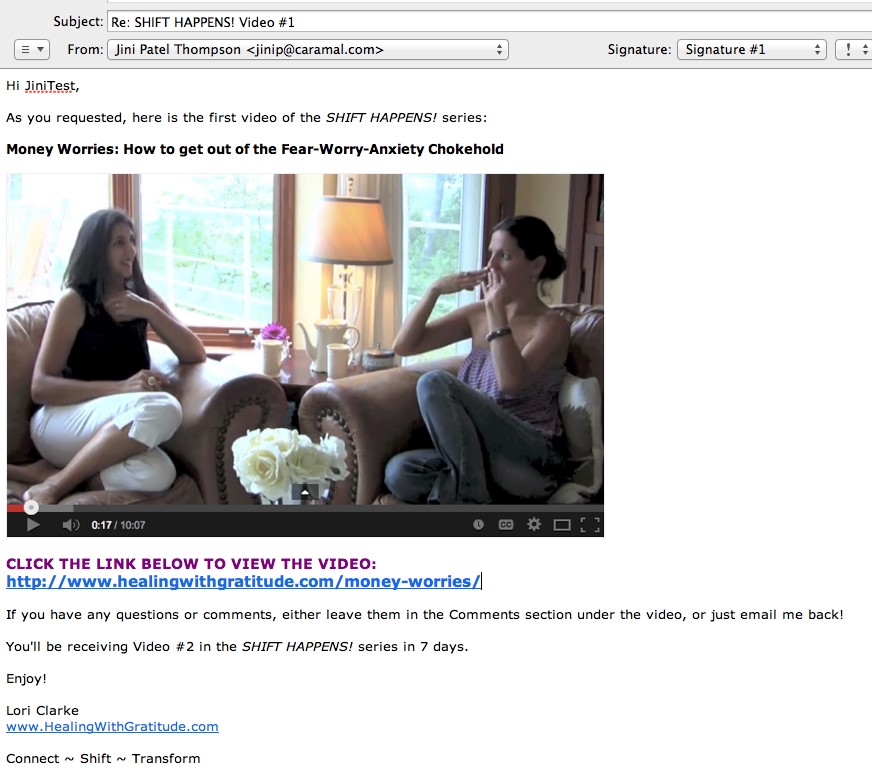
After I have signed-up and then confirmed my email, I automatically receive the first video from her SHIFT HAPPENS! Series – because Lori has set it up that way in her account with 1ShoppingCart.

Here’s a quick note from Lori regarding why she ultimately switched from using Get Response to 1ShoppingCart:

“I switched because I found 1ShoppingCart was more intuitive and user friendly. GetResponse also wasn’t robust enough on the customer management side, and their customer service (to me as the customer) wasn’t as good as 1ShoppingCart. The other part of it was that I wanted to add an affiliate program and a shopping cart – by the time I would have paid for all three of these separately, it didn’t make sense; because by the time my business was up and running, I would have to switch anyway!
I needed to believe that my business was going to thrive. I needed to choose something that was reflective of what I wanted and believed my business could be. So although I didn’t have the funds, I let my belief drive me, not my pocketbook.”

So definitely think about the long-term when you are choosing your email marketing platform. And yes, if you don’t yet have a vision, or don’t believe that your business is going to generate significant money, then you may choose the cheapest (or free) option. That’s totally okay, but just know that it’s going to cause you more work down the road when you have to switch everything over to the more robust system.

Okay, let’s get back now to the first email I receive after I sign-up for Lori’s free video series. This is the first email in her autoresponder campaign for her site opt-in. Let’s look at her first draft for this autoresponder, and then go over how she could make it better.

First Draft of Autoresponder Email #1 for SHIFT HAPPENS! Series

Subject: 3-part Video Series SHIFT HAPPENS

Jini2

Thank you for signing up for the AWESOME 3-part video series
SHIFT HAPPENS!

The time is NOW to begin shifting disappointment, fear and scarcity
that is limiting you from living a life of abundance. Here’s the first video:

[insert YouTube link]

Enjoy!

Lori Clarke

Powered by: http://app.getresponse.com/referral.html?x=a62b&u=Qdcg&y=g&
800 -15355 24 Ave #591, V4A2H9, Surrey, Canada
To unsubscribe visit:
http://app.getresponse.com/me.html?x=a62b&m=B42Oi&s=BQOD0c&u=Qdcg&y=6&
To change your contact details visit:
http://app.getresponse.com/me.html?x=a62b&m=B42Oi&s=BQOD0c&u=Qdcg&y=6&


Second Draft of Autoresponder Email #1 for SHIFT HAPPENS! Series

See the text in red for the improvements Lori needs to make to her first draft…

Subject: SHIFT HAPPENS! Series – Video #1

Hi Jini2,

[delete extra line space here]
Thank you for signing up for the AWESOME 3-part video series
SHIFT HAPPENS! [add italics]

The time is NOW to begin shifting disappointment, fear and scarcity
that is limiting you from living a life of abundance.

Here’s the first video in the series:

[insert screenshot PHOTO of vid and hyperlink to video]

[underneath screenshot, give actual YouTube URL, or weblink to Hidden Page]

If you have any questions or comments, either leave them in the Comments section under the video, or just email me back!

You’ll be receiving Video #2 in the SHIFT HAPPENS! series in one week.

Enjoy!

Lori Clarke
[where is your website? How do I know who you are? Do you want to include your tagline? Don’t assume I’ll remember who/what I signed up for]

[see if you can add about 5 extra lines spaces here, so this info shunts further down the page – do you want a legal disclaimer?]
Powered by: http://app.getresponse.com/referral.html?x=a62b&u=Qdcg&y=g&
800 -15355 24 Ave #591, V4A2H9, Surrey, Canada
To unsubscribe visit:
http://app.getresponse.com/me.html?x=a62b&m=B42Oi&s=BQOD0c&u=Qdcg&y=6&
To change your contact details visit:
http://app.getresponse.com/me.html?x=a62b&m=B42Oi&s=BQOD0c&u=Qdcg&y=6&

Autoresponder Quality Control Checklist

  • Is your branding (how you look & feel) cohesive?
  • Do you have a product name, or course name? If so, make sure you format it the same way every time it appears (bold, italics, caps, etc. – whatever you choose).
  • Decide whether to send people to a public page, or a hidden page
  • Does your email sound like YOU – does it match your personality?
  • Is your email visually appealing? Should you add a photo or image?
  • Do you want to invite discussion or feedback?
  • Do you list your website and contact info to show you’re legit?
  • Do you need a legal disclaimer at the bottom of your emails?*

Now let’s take a look at her edited, final autoresponder email (she also decided to change her intro text) and see how much better it looks than her first draft!


FINAL Version of Autoresponder Email #1 for SHIFT HAPPENS! Series

19_11

19_12-footerThen, obviously, Lori needs to carry on in this way – keeping all formatting the same – for the next 2 videos in the series.

Hidden Page vs Public Page

Note how initially Lori was going to send people to a YouTube video. Then, after thinking about it, she decided to send them to a hidden page – where she has the video embedded, along with some additional written content to add value and exclusivity to her offer. It’s easy to set up hidden, or password-protected pages – so check out this tutorial if you need it.

Setting her freebie up as a hidden page on her site has two benefits:

  1. It drives traffic to her site, thus increasing her search engine ranking, over time.
  2. It increases the perceived value of her freebie. Not just ‘anyone’ can view that information. Sure the video is available on her public YouTube channel (if you know where to find it), but the added text content is only on the hidden webpage.

Quality-Check Your Autoresponder

I wanted to show you this process (thanks Lori!), so that you can go back over your own autoresponder emails and double-check for all the same elements:

  • Is your branding cohesive?
  • Do you have a product name, or course name? If so, make sure you format it the same way every time it appears (bold, italics, caps, etc. – whatever you choose).
  • Decide whether to send people to a public page, or a hidden page
  • Does your email sound like YOU – does it match your personality?
  • Is your email visually appealing? Should you add a photo or image?
  • Do you want to invite discussion or feedback?
  • Do you list your website and contact info to show you’re legit?
  • Do you need a legal disclaimer?

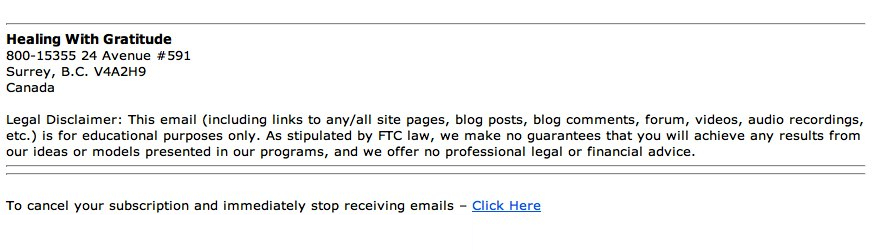
If you are giving any kind of help or advice to people, then you may want to have a disclaimer at the end of your emails, at the bottom of your product page on your shopping cart, and/or the bottom of your sales pages on your site.

Here are three Legal Disclaimers you can swipe, or edit to fit your material:

Health, Fitness Legal Disclaimers

Legal Disclaimer: This email (including links to any/all site pages, blog posts, blog comments, forum, videos, audio recordings, etc.) is for educational purposes only and is not a substitute for professional medical advice. Do not use this information for diagnosing or treating a medical or health condition and never discontinue any prescription medication or other type of medical treatment without consulting your treating physician.

or

Legal Disclaimer: This email (including links to any/all site pages, blog posts, blog comments, forum, videos, audio recordings, etc.) is for educational purposes only and is not a substitute for professional medical advice. Please consult your physician for any health or medical concerns.

Advice, Education Legal Disclaimer

Legal Disclaimer: This email (including links to any/all site pages, blog posts, blog comments, forum, videos, audio recordings, etc.) is for educational purposes only. As stipulated by FTC law, we make no guarantees that you will achieve any results from our ideas or models presented in our programs, and we offer no professional legal or financial advice.

Business, Marketing Legal Disclaimer

You can either use the disclaimer above, or you can use a more extensive one, like this one I have at the bottom of the LTYF sales page. Feel free to modify it as you wish:

EARNINGS DISCLAIMER: We’ve taken every effort to ensure we accurately represent the Listen To Your Freedom Program and it’s potential to help you discover and grow your business. However, there is no guarantee that you will earn any money using the techniques you learn from our Program and we do not present this as a “get rich scheme.” Nothing on our websites or in our Program is a promise or guarantee of earnings. Your level of success in attaining similar results to those discussed is dependent upon a number of factors including your skill, knowledge, ability, dedication, business savvy, network, emotional state and financial situation. Because these factors differ between individuals, we cannot guarantee your success, income level, or ability to earn revenue. You alone are responsible for your actions and results in life, health and business. Any forward-looking statements outlined on our sites or in our Program are simply our personal experience and our expectations or forecasts for future potential, and thus are not guarantees or promises for actual performance. These statements are simply our opinion. As stipulated by FTC law, we make no guarantees that you will achieve any results from our ideas or models presented in this Program, and we offer no professional legal or financial advice.

DOWNLOAD these disclaimers in Word .doc format for easy swiping and editing!

Your Autoresponders

Now that you’ve seen an example of an autoresponder series, it’s time to get yours set up! Or at least planned out…


What are you offering to people who opt-in to your list (what is your sign-up freebie)?:


How many emails do you need to send to deliver this? One email, or like Lori, do you have a series of emails – each delivering part of your freebie?


Plan out the first draft (point form) of your actual email autoresponders here:


Now take a look at your email(s) and proof it/them against the Autoresponder Quality Control checklist:

[ ] Is your branding cohesive?

[ ] Do you have a product name, or course name? If so, make sure you format it the same way every time it appears (bold, italics, caps, etc. – whatever you choose).

[ ] Decide whether to send people to a public page, or a hidden page

[ ] Does your email sound like YOU – does it match your personality?

[ ] Is your email visually appealing? Should you add a photo or image?

[ ] Do you want to invite discussion or feedback?

[ ] Do you list your website and contact info to show you’re legit?

[ ] Do you need a legal disclaimer?


What Happens AFTER The Freebie?

Okay, now that Lori has added her Legal Disclaimer to her autoresponder emails, what happens when her 3-part series comes to an end?

Let’s say you offered a free eBook for your opt-in offer. What happens after that eBook has been delivered?

Well, you continue to build your relationship with your site visitor and eventually present them with something they want to purchase!

But first, let’s look at another live demo to help you nail down your autoresponder process and newsletter set-up (if you have one).

In the video below, LTYF Team Member Justin will walk you through the work you’ve done in the last three units, and answer several questions along the way!

Let’s look at this entire process (from the last three units) in video format, as Justin takes Freedomite Katharina Johnson through her autoresponder campaigns and also her newsletter set-up on GetResponse.

Whether you are using GetResponse, or 1ShoppingCart, or some other email marketing platform, the components will be the same and this video will help build your understanding of the entire process. It will also show you tips and tricks you can use to speed things up – like creating templates so you don’t have to type up each email or format graphic elements from scratch each time.

And remember: You should pick up the phone and call your platform for help with any questions, or if you get stuck. They will login to your account and then walk you through every step, so don’t be shy!

What Happens After The Autoresponder Series is Finished?

After your sign-up autoresponder series is finished, you may want to have people automatically moved to a new campaign. For example, perhaps you want them all to receive your newsletter, once per week, ongoing.

Some email marketing platforms can do this and some cannot. Infusionsoft and 1ShoppingCart can be set up to do this. But GetResponse cannot. So, if your platform cannot do this automatically, then you have to manually go in and transfer groups to your new campaign. Again, phone your platform and get them to walk you through the steps involved.

In GetResponse, here’s what that looks like (thanks Katharina!):

GetResponse HelpDesk: “I’m afraid that at the moment we don’t have an automation rule that allows something like that. But you could create a saved search by going to contacts –> search contacts –> advanced search –> and generating a list of contacts who have completed the cycle with the conditions. It will look like this:

AND

This means that whenever you want to send out an email to the people who have completed the autoresponder cycle, you have to do this process, as shown above. If you create a saved search of people who, let’s say, are not receiving autoresponders, then anyone who is not receiving autoresponders will be automatically added to the saved search.

A saved search is a search that you have already done before so it remembers the settings. And when you create a saved search, it creates a separate group of these people, like a separate list, and you can then send a newsletter, or some other email, or series of emails, to these people. When you are selecting recipients at the end of the set-up process, your saved search will be there too.”

NOTE: In case you would rather pull your hair out then set up all this stuff, or figure out what it means, remember, that’s what outsourcing is for! You can find someone on Upwork to take this whole process off your hands for the cost of dinner and a movie – just look for someone who is specifically experienced with your email marketing platform.

Lastly, remember to quality-check all of your autoresponders and newsletters before you go live:

  • Is your branding (look & feel) cohesive?
  • Do you have a product name, or course name? If so, make sure you format it the same way every time it appears (bold, italics, caps, etc. – whatever you choose).
  • Decide whether to send people to a public page, or a hidden page
  • Does your email sound like YOU – does it match your personality?
  • Is your email visually appealing? Should you add a photo or image?
  • Do you want to invite discussion or feedback?
  • Do you list your website and contact info to show you’re legit?
  • Do you need a legal disclaimer?*
  • Does it actually work? Test every autoresponder yourself – meaning, send yourself a test of each email before launching it – as the backend of these systems can be confusing and it’s easy to program things incorrectly. If it doesn’t work (if the email doesn’t arrive at the time it’s supposed to, or at all, or displays incorrectly, or the links don’t work, or anything else), you can check the details yourself or call into the support desk to get help troubleshooting.

*Don’t forget – I’ve given you a selection of legal disclaimers to swipe!

NEXT: Your turn: what are you doing with the people on your list after your freebie autoresponder series is finished?


Are you going to put them into another campaign for one of your products? Or are you going to transfer them to your email list? Or transfer them to your blog subscriber list? Write your plan here:


Join me as I talk with Ian Thompson about the bigger picture of email marketing and why it’s important to think long-term with your strategies, treat freebies the same as customers, and nurture those relationships.

Ian (aside from being my husband!) is a former marketing and advertising executive who handles all of the email marketing for my businesses.

If you found any of this confusing, then this overview – where we get into the WHY more than the HOW – should really help you get clear by giving you the big-picture overview. Likewise, if you didn’t need all of the technical info in the previous units, then this call will give you a new way of looking at your current autoresponder series and how to make them even more effective.

In this call, we go over two scenarios in detail; discussing all of the steps and why:

  • Pretend someone has signed up for a free report or free audio. What is your process with them over the next year?
  • Pretend someone has just purchased an eBook, or other product. What is your process with them over the next year?

DOWNLOAD AUDIO Communicate With Your List

Or click the play button below to listen online:

[sc_embed_player fileurl=”http://listentofreedom.s3.amazonaws.com/Module19-Communicate-with-List.mp3″]

Here’s one of your top take-away’s from this call with Ian: Think of each autoresponder series as a CAMPAIGN (not just a series of emails). And a campaign has two components:

  1. What is my objective with this campaign?
  1. Strategy: How am I going to achieve that objective?

When you think of your autoresponder series as a campaign, then each email and action becomes an interlinked series of events, like this:

Or, you could also have a really simplified version of an autoresponder campaign like this, which is also very effective:

Let’s keep going and these diagrams will start to make more sense and may even look easy to you!


How Do I Choose Which Tasks to Outsource?

Teams joining

A great way to get started with your list of outsourcing needs is this:

Pretend that you died, or had to leave your business for some absolutely unavoidable reason. Now, who would you get to replace yourself? Which tasks would you outsource to others that would enable your business to run smoothly without you? Make a list and then start implementing, one-by-one, the items on your list – it really can be that simple.

Then, every 4 months (ongoing!), come back to this list, go over it again and see what ELSE you can outsource and clear off your plate – leaving you free to do the most important tasks that make the most difference to your business.

1. Website Design
It may sound odd, but recent research shows that most people assume that a company with a website is larger and more stable than a company without one. So lucky for you, you already have a site! However, maybe you’ve started with just a basic site, so you may want to have a new site designed – or an existing site given a makeover – this only takes a couple of weeks or sometimes even days.

2. Programming
Web programming is an incredibly diverse field. Let’s just summarize: If it happens on a website, somewhere a programmer made it happen. Anything you’ve seen on another website can be developed on your website. Virtual outsourcing is the perfect way to tap into specialized web programming skills.Working

3. E-commerce Website
The rate of online purchasing of products and services continues to rise dramatically. With e-commerce you can reduce your transaction costs while reaching customers around the world. Use an outsourced freelancer to install your shopping cart, gateways and links to your credit card merchant accounts, install PayPal applications, and upload all your products or services to your shopping cart.

4. HTML Emails Or Newsletter
If you’re using text-only emails, consider upgrading to HTML emails. HTML emails (and Newsletters) have the look and feel of a website but are delivered to your clients’ inboxes. Once a template is set up, you can add your own text, images, or other graphic elements, create a variety of links to different pages on your site, and even include banner ads for your (or for others) services. Whichever email platform you chose (back in Module 11) you can hire a freelancer who’s familiar with that platform to set up your opt-in, autoresponders, newsletters, etc.

5. Search Engine Optimization & Search Engine Marketing
Search engine placement is critical to anyone with a website; even though you built it, they won’t come if they can’t find you. Search engine optimization (SEO) specialists help your site gain high rankings; the algorithms change constantly so techniques naturally evolve.

Search engine marketing (SEM) is also a specialized field. It can take days, months and years of expertiseSEO concept to write effective ads, place your banners on the right sites, set up effective affiliate programs, or manage your pay-per-click programs so you get the most visitors and more importantly conversions.


HINT: Never let an untested SEO company loose on your main website. Give them a small site or test project to do and see how it goes first. If they do anything that Google doesn’t like, they could get your site black-listed and seriously harm your business.

6. Slideshows
Creating a compelling and interesting slideshow can really grab your site visitor’s attention. A skilled graphic designer, or artist, can make sure your slideshow looks great and functions perfectly.

7. Animation
Get noticed and set your business apart with high quality animation. Many companies can benefit from animation on websites, movies, presentations, product demos, applications, advertisements, and logos.

Skilled animators are proficient in 2D/3D modeling for simpler applications like caricatures, and cartoons, while medical animation helps healthcare professionals see and understand complex procedures and processes. If movement can add value and understanding to your message, an animator can take you to that next level.

Animation can be quite expensive, so a much cheaper alternative is to have an animated “sketch” or whiteboard video – where the images are drawn in color or black & white. Fiverr has quite a few of these on offer for a really great price.

8. Social Networking Applications
Do you need a custom Facebook application? (Or simply want help setting up your Facebook page?) Do you want to optimize your use of MySpace or LinkedIn? You can learn the tricks of the trade yourself, but you don’t have to. Social media managers can manage all your social media pages and accounts.

9. Software or App Design
Good entrepreneurs have great ideas – the problem is affordably implementing those ideas. A freelance software designer in India or Russia can code your app or software for much less than you’d think!

10. Technical Support
Occasionally your site or site applications will have a problem; your email goes down, your forms no longer function properly, or (gasp!) a hacker takes over your site. Use an outsourced freelancer to step in, sometimes on a moment’s notice, to take care of your problem and get your site working smoothly again.

Local firms may not be able to respond as quickly as you need. Think of it this way: If you’re on the West Coast of the U.S. and your site goes down at 11 pm, it’s 11:30 am in Pune, India; your problem could be fixed before you get your morning coffee. And if your customers need support, outsource that function to firms who offer 24-hour, 7-day per week coverage.

11. Auto-responders
It’s exciting when potential clients use a form on your website to request information, or even better, order a product or service. Auto-responders automate the process of responding to queries or confirming registrations, requests, or sales, and can be set up to deliver information on a scheduled basis and to remind visitors or users of upcoming events or promotions. Use an outsourced freelancer to develop your auto-responder campaigns and/or to write your emails for you.Mailing List Diary

12. Podcasts
Recording and distributing audio has never been easier thanks to podcasts, and setting up web applications or blog plugins that allow users to listen to or download your audio files is a good idea. If you’re not sure how to best approach the problem, use an outsourced freelancer to create easy-to-use tools for you to upload and distribute your audio, or handle the entire process for you anytime you wish to add audio content to your site. Focus on your content – let a professional take care of how it’s delivered to your audience.

13. Web Banner Ads
Web advertising has exploded in popularity and effectiveness. Advertising on the right websites can put your products or services in front of consumers eager to buy your products or try your services – but only if the ad works. Banner ads can not only catch a site visitor’s attention; designed properly they can also send highly-targeted web traffic your way. Remember, successful advertising isn’t simply a function of spending – it’s also a function of spending wisely.

14. Print Ads
Statistics show print ads, including photos and well-designed graphic elements, catch the attention of four times as many readers as do text-only ads. Your freelancer can also source stock photography – in case you don’t have photos of your own. Make sure your ads are consistent with the business identity (branding) you’ve worked hard to establish.

15. Professionally Designed Product Catalogs
Catalog design is both art and science. Whether you have a few or a few hundred (or thousand) products, your catalog must be well-organized, accessible to readers, and most of all present your products in the best light possible. A catalog is worthless unless it helps you make sales; ensure your catalog combines photos, art, descriptions, and specifications – plus a call to action – to turn browsers into buyers.

16. Package Design
Great package design creates an emotional appeal and helps brand your product. Plus your design must be easy to store and assemble, meet shipping specifications and any regulatory requirements, and fit your budget. Package design requires skill and experience; while you may be willing to try your hand at designing your own product packaging, the result may only serve to signal that, well, you created your own packaging. Whether you need a label, a simple package, or a multi-part set of packaging, Use an outsourced freelancer to help you reinforce your business identity and help your product stand out in a crowded marketplace.Document archive

17. Document/Book Design
Even if you haven’t written a book or eBook yet, your manuals, guides, white papers, and other reports will make a greater impact if they’re well-designed. A great book or document designer can not only make sure your work is laid out properly and efficiently – he or she can also give your work greater impact. And your business identity can be incorporated, ensuring that while readers are learning, your brand is reinforced.

18. Audio
Say you’ve made an audio recording. The problem is you need to edit it for length, add other content, place a layer of music in the background, and clean up a few mistakes. With Audacity it can all be done, but the task is time consuming. Just outsource it instead!

19. Video
If a picture says a thousand words, how much is a video worth? Web visitors not only enjoy, they’ve come to expect videos that explain processes, feature products, or simply entertain visitors – and keep them coming back for more. But poorly-produced or delivered videos can quickly turn visitors away. Use an outsourced freelancer to edit, enhance, and prepare your video for “publishing” on the web, whether on your site or on social media sites. Also considered having an animated or “white board” video produced if the style fits your company.

20. 3D Graphics
3D graphics add a sense of realism and depth that two-dimensional graphics simply cannot. A 3D graphic can also be rotated and viewed from any orientation. A graphic of your new product can even be “opened” to show what’s inside. A good 3D graphic can convince you that it always has the same mass, that it’s hard, soft, rigid, or pliable… almost like it’s alive. Use an outsourced freelancer to create simple graphics for web or print use, or multi-piece models for display or sales presentations.

VIRTUAL ASSISTANTS

There is an entirely new category of worker called a Virtual Assistant (VA). A virtual assistant is far more than just a secretary or administrative assistant. Here are some of the varied tasks a Virtual Assistant can take off your plate:

Research

1. Sales Leads
Without sales, you don’t have business. But if you’re spending time meeting prospective clients and servicing existing customers, it’s hard to find new leads. A VA can find and research individuals, companies, and technologies – via blogs, websites and forums.  They can prepare reports and briefs to help you determine who to contact next. With the right information in hand you can focus on developing new business relationships instead of having to spend time researching.

2. Fact CheckingBearded man
To be persuasive, you need facts on your side; nothing ruins your credibility quicker than inaccurate information. A VA can double-check facts, provide statistics and backup information, and verify data to make sure you always put an accurate foot forward.

3. Products or Services to Buy
Not sure which car meets your needs? Looking for a home theater system but can’t make sense of all the different models and specifications? A VA can take into account your budget and preferences, sift through the options, check out reviews and recommendations, and create a short list of the prime contenders for purchase. Plus, a VA can comparison shop, find the best deals possible, and even arrange the purchase if you prefer.

4. Products or Services to Sell
A VA can perform a lot of basic research: Products already marketed that can be privately labeled, products you can buy wholesale and sell at retail, products you can license so you have the right to sell them… the possibilities are endless. If you’re already in business and are considering adding a new product or product line, let a VA handle basic research while you focus on your core business.

Data Entry / Word Processing

1. Turn Business Cards into Outlook Entries
Networking is critical in most businesses. Putting information from business cards into your Outlook address book (or whichever system you use) helps you stay organized and automatically organizes your phone or PDA. Who really has the time to do this? You can fax/scan/photograph or mail the business cards you receive, or send Excel or Word contact listings to a VA who can transfer the information for you. You’ll always have the information you need at your fingertips.

2. Collect Contact Information
Need specific information about current or prospective clients? With a little research performed by a VA you can collect all the data you need, including phone numbers, email addresses, social media links, etc. They can then enter the collected data into spreadsheets, documents, address books… whatever is most useful to you.

3. Article Submission
Posting articles in article directories, press release directories, and other websites, can be a great way to build an audience and generate links to your website or blog. Hundreds of directories exist. Make the process easy by hiring a VA: Simply provide youCraigslist-Precautionsr articles along with a list of directories you wish to submit to (or ask the VA to create a list for you), and your words can be seen by thousands of readers worldwide.



4. Craigslist (or another classified listing site) Posting
If you sell a product and want the maximum exposure possible, posting to online classifieds can be a great way to get the word out. But posting ads on a regular basis to a number of sites and cities can be exceptionally time-consuming. Give a VA an ad template, a list of cities, and the rest of your requirements, and your ads will appear on schedule. You can spend more time fulfilling orders instead of endlessly prospecting for new clients.

Social Media

1. Blog Posting
First a caveat: If you have a distinctive writing “voice,” only talented writers will be able to mimic it and create blog posts that “sound” like you. But don’t let that stop you from hiring a VA to help with your blog posts. Virtual Assistants can collect news, keep up with trends, do research… even write rough drafts of posts that you can then shape into your “own” distinctive style. And to keep the conversation among your readers going, a VA can respond to comments left on your blog, alerting you when a comment requires your expertise to answer.

Many bloggers generate a mixture of posts. Some are simple news recaps and updates while others are more like opinion pieces. Let a VA help you make your blog more robust… while also making it easier to maintain and keep fresh.

2. Commenting and Linking
Leaving comments on blogs and social media sites is a great way to make new connections and leave backlinks to your own sites and blogs. A VA can take care of the process for you. Create a list of sites (or have the VA create it), give guidelines on comments you’d like to leave, and off you go! You can also have the VA send you links to new articles or sites that you should check out personally. While you’re at it, a VA can respond to comments and questions left on your sites and blogs, too.

3. Profiles and Accounts
Want to benefit from social networking but don’t have the know-how or the time to start? Hire a VA to create your accounts and profiles on LinkedIn, Facebook, Twitter, Pinterest, and/or other social media sites. Once you’re all set, you can focus on creating and developing relationships.

4. Managing Social Media
Social Media sites like Facebook are great ways to network and create social connections – but managing your accounts can take time away from other productive work. A VA can keep up with your friend requests, respond to messages, post your videos, blog posts, photos or quotes, and keep you informed about your account activity.

General Administrative Assistant

1. Voicemail Managementfriendly administrative assistant at the desk with a laptop
Do you receive a lot of voicemails? Do you spend a lot of time in meetings and dread having to check your messages? A VA can check your voicemail on the schedule you set, prioritize your messages, and even email summaries to you in case you’re not in a position to receive calls. A VA can also return routine and emergency calls, saving the important or sensitive calls for you to make when you have the chance.

2. Email Management

Even if you receive hundreds of emails each day, chances are a number of them are routine – and if they’re routine, that means a VA can respond to those emails using guidance you provide. Then all you’ll need to do is respond to unusual or out of the ordinary emails. You can take it a step further and have your VA forward emails only you can handle to a separate account; that way you’ll never see or need to deal with the hundreds of emails your VA can handle for you.

If you feel like you type the same response – to different people – more than once, a VA can handle the task. You can either have a list of FAQs your VA can copy/paste from and email out to people. Or, even better, have your VA turn each FAQ into a separate blog post, then your VA emails out the weblink to that blog post, the person clicks the link to see their question answered on your site, and this drives more traffic to your site and increases your search engine rankings!

3. Gifts and Cards
Whether they’re our friends or our customers and clients, all of us want to remember important people at special times. Provide spending guidelines and other basic information, and your VA can track down and ship the perfect gifts, send online cards, or mail pre-signed greeting cards to everyone on your list.

4. Thank You and Follow-Up
Many businesses send notes or make phone calls to recent purchasers. It’s a great way to say “thank you” and also to answer any questions and proactively resolve potential problems. A VA can send thank you cards, or make post-purchase calls to new customers or clients, creating a memorable personal touch that can help drive repeat business and build long-term business relationships.

WRITING CONTENT & EDITING

Search engine ranking is primarily based on the free, informative content you provide on your website – or through other means that provide useful content and then drive traffic to your site via a link. Therefore, this is a key marketing activity that cannot be ignored.

1. Articles
You may never be published in a printed magazine or newspaper, but the Internet has created an endless demand for well-written, information-packed articles on virtually any subject. Not only will articles on your website provide useful advice and guidance to your visitors, they can also help your site perform better in search engine rankings, drawing more visitors – and potential customers – to your business. And by using an article distribution service you can place your article – and your contact information – on multiple sites, reaching even more customers.Stapel von alten Zeitungen und Zeitschriften

Create a work for hire (ghostwriter) agreement and you not only own the copyright for the work, but you can also publish the articles you commission under your own name.

Not only can writers develop your articles, but they can also post those articles directly to your site, saving you time and effort. Some writers specialize in certain fields, while others are capable of creating outstanding articles on a wide range of topics. If you want to inform, educate, and attract visitors to your site but don’t have the skills or time, writers all over the world are ready and waiting to assist you.

2. Press Releases
A press release is like a news story: It’s written to share information about a person, event, service or product. If your company has developed a new product, a new service, landed a large customer, expanded operations – in other words, something newsworthy and significant has occurred – a press release is a perfect way to let the world know. Properly written, your press release may catch the attention of an editor or reporter and serve as the springboard to a story or feature on the web, TV, or in print, gaining you valuable – and free – publicity.

Sounds great, but the fact is most press releases never get picked up by major media because they’re poorly written and seem intended to “sell” rather than to inform. Media outlets appreciate press releases that read like news – a skilled writer can turn a quickly discarded press release into an item that immediately grabs the attention of readers, media outlets – and customers.

3. Copywriting
Words are powerful. Well-crafted messages can be unbelievably powerful. Marketing copy takes many forms: slogans, headlines, direct mail text, taglines, jingle lyrics, etc. and is used in print ads, mail-order catalogs, billboards, commercials, brochures, postcards, websites, and other advertising media. Chances are any time you communicate in writing with your customers, a skilled copywriter can dramatically increase the effectiveness of your message.

Business concept. keyboard and crumpled paper on table.4. Editing
Have you ever written a letter or memo and realized, upon re-reading it a few days later, how much better it could have been? A fresh look, or a fresh pair of eyes, can quickly spot ways to improve nearly anyone’s writing. Most full-time writers will agree with this statement: “Any words, no matter how carefully chosen, can benefit from skillful and thoughtful editing.”

Instead of explaining complex information to a writer, you may feel it’s easier to write a first draft and have an editor make corrections and improvements. A good editor can help shape the tone and style of your text, help you fine-tune your message, and/or avoid embarrassing mistakes.

5. Newsletters
Want a custom newsletter to deliver valuable information to your customer base? It’s a great idea, but it takes time and effort (and skills) you may not have. With a little input regarding your goals, your audience, and potential subject matter, a provider can format, write, and even email your newsletter to your customer base.

You may initially decide to review the newsletter before it’s published, but once you develop a good working relationship your input may be limited to a few minutes of your time per each newsletter. And since you already have the content, your writer can post each newsletter to your website archives, and you can even pull out individual articles for inclusion on other sites – after all, you own the content!

6. Sales Materials
Do you have the skills and experience to write an effective television commercial? Most people would say no, but many try to write their own sales letters, advertising copy, or promotional literature. If you’re not sure your writing is making the grade, hire a skilled writer – the end result will be more bang for your advertising buck.

7. Books & eBooks
A writer can help you write – or even write entirely for you – books and eBooks for print or web publication. Not only can a book or eBook inform or enlighten current or prospective customers, it can also enhance your professional image and help you stand out as an expert in your field. While you may already be an expert in your field, you may not have the time or skills to devote to writing – but skilled writers do. It’s easier than you think. A good writer will adapt to your needs: Create content from scratch, or turn your thoughts and random musings into a well-crafted, professionally-written book.

8. TranslationThe word "Business" in a dictionary
The global marketplace makes selling products and services possible in almost any market. But if you want to promote your service in another country, you’ll need to speak their language – at the very least in print and web media.

Skilled translators translate writing and speech, taking into account slang, technical terms, and everyday usage. If your high school foreign language class didn’t prepare you adequately, don’t worry. A skilled translator is available for almost any language. Translators ensure language is no longer a barrier; if you want to reach global markets, it’s easier than ever.

9. Manuals & Guides
You understand your process, but can you convey your knowledge to employees or users? Manuals and guides not only inform and educate readers, they also save you time and effort. Effective manuals cut training time, reduce customer requests for assistance, and create a consistent process flow that can reduce waste and effort.

Skilled technical writers have a knack for distilling complex information and presenting it in a clear, logical, easy-to-understand way for experts and novices alike. In fact, you may know too much about your process or product to write an effective user’s guide – you’ll naturally assume knowledge or experience your readers just won’t have. A skilled tech writer can create documentation nearly anyone can understand. Not only will you save time by outsourcing your writing work, you’ll eliminate repetition of steps or instructions.

10. Public Relations
If a tree falls in the forest, does it make a sound? Maybe, but did anyone hear it? If you’ve launched a business, you need people to hear about it – without customers you don’t have a business. Public relations specialists craft press releases, provide media coaching, help get articles and reviews of your product or service highlighted by regional and national media outlets, and line up interviews or guest spots on radio or TV shows for you.

Public relations is very different from advertising. A well-placed positive article about your product or service can yield tons of inquiries and new customers, and a quick interview on a local TV program can make thousands aware of what you do – for free.

11. Grant Writing
Writing a grant for private, public, or government funding requires a unique set of skills. To get funding for your project or initiative you’ll need to convince the reader that your effort will be worthwhile and worthy of funding, and at the same time you’ll need to format and craft your grant proposal in the way organizations expect.

The success or failure of your search for funding often rests on the quality of the grant proposal itself. Don’t go it alone; a skilled provider can effectively communicate your mission, your goals, your short- and long-range plans, and how your project will make a real impact.

MISCELLANEOUS – YET IMPORTANT

1. Bookkeeping
Your bookkeeper doesn’t need to be down the street; many small businesses outsource their entire bookkeeping and accounting functions. For example, a home improvement and repair company with over 40 locations uses web-based tools to handle job costing, invoicing, sales, timesheets, labor and materials tracking… virtually all their day-to-day bookkeeping operations are handled virtually by a provider thousands of miles away.22_11

Web-based accounting also gives you 24-hour, 7-day per week access to your financial “books” and reports no matter where you happen to be. You can also add controls to ensure only you or trusted employees have the authority to sign checks or transfer and withdraw funds. The right bookkeeper will help you stay on top of your financial situation as well as streamline your administrative functions – and you could save money, too.

2. Collections
Many business owners despise the collections process. Contacting clients who are late paying bills or invoices is stressful and, handled poorly, can lead to hard feelings or even lost clients. And if you have a lot of customers or generate a number of monthly invoices and you don’t stay on top of the situation, your receivables can quickly add up to a considerable sum. Instead of facing a potentially emotionally-charged confrontation, outsource your collections process. Skilled collections providers handle customer communications firmly but with a deft, nimble touch.

Getting the money you’re owed and still maintaining a positive customer relationship is a difficult skill to master; plus good collections agents are also great negotiators, and may be able to find creative solutions that you, in the heat of the moment, might overlook. One of the basic tenets of outsourcing is to outsource the tasks you aren’t good at – in the case of collections it may also make sense to outsource a task you truly dislike.

3. Financial Reporting
What is your cost of sales this month? Which products generate the most profit? Which services should you stop providing because they actually cost you money? Which customers are truly your best customers – from a profit point of view? Accurate and timely financial reports give you the information you need to make quick decisions, re-focus your efforts, and grow your business based on data and facts, not on hunches or estimates.

Providers can generate the reports on a scheduled basis, or can set up automated reports in accounting packages like QuickBooks that you can then run yourself whenever you need information. Either way you save time and still get the critical information you need. Not sure which reports will help you? A skilled provider can suggest key metrics to evaluate based on the nature of your business.

4. Tax Returns
Your accountant may not be happy about it, but last year more people than ever used online freelancers to prepare their tax returns. Tax returns are rules-based accounting, and can be prepared by following a series of steps and guidelines – making tax return preparation a great virtual outsourcing service.

Providers can handle your business returns as well as your personal returns, and often for significantly less than your accountant or local tax return preparation service. If you handle your own basic bookkeeping, a provider can make sure that you take advantage of all the deductions and benefits available to you.

financial analysis5. Financial Analysis
How much is your business worth? What is your return on investment on recent projects? Are there seasonal swings you can take advantage of? Or best of all, does outsourcing one or more of your functions make good financial sense?

Skilled financial specialists can wade through complex data and financial statements and make recommendations that can improve your bottom line. The financial repercussions of some decisions are often not clear unless you can really crunch the numbers; if you don’t have that kind of skill, don’t worry – there’s help available.

6. Tax Consulting
Every business wants to minimize the taxes it pays. A skilled provider can ensure you pay as little tax as possible based on what you did last year, but a skilled tax consultant can help you make decisions today that will save you money next year. Don’t wait until tax time to find out that you could have taken advantage of legitimate deductions – if you only knew about them ahead of time.

You may also qualify for tax credits due to the industry you’re in or the employees you hire. Taxes are a significant expense for almost any business – proactive planning can help you retain more of what you earn.

7. Call Center
Users often require technical support to assemble, use, or maintain your product. You can rely on phone centers to remotely diagnose and fix problems your customers may experience. You can even create a database to track problems, and improve call center response time by providing step-by-step troubleshooting and help guides for operators to use.

The beauty of a call center is its scalability and affordability. Many call centers charge by the hour; if you get less calls your fee is lower, and if you get more calls you don’t have to worry about adding full-time or part-time employees to your staff.

Hand Holding Telephone against a white background8. Answering Service
Research shows that more than 50% of first-time callers will not leave a message if they reach an answering machine. And what if there’s an emergency and a customer (or family member) absolutely needs to reach you? Your small businesses may not have the resources to ensure all calls are answered. That’s where an answering service comes in.

It’s a simple process: Once calls are forwarded, the operator can tell which business is being called, answer the phone appropriately, and take messages or answer simple questions. Depending on your needs, answering services can not only answer calls but schedule appointments, answer customer questions, receive and forward faxes, and process orders.

To present the right image to your customers you may need someone to answer the phone during normal business hours. Instead of adding staffing, hire an answering service – that way you’ll never miss a call.

***********************
Whew! Was that a long enough list for you?

And that’s not even a comprehensive list of all the tasks you can outsource. For a really exhaustive list, visit Elance.

22_12The important thing is just to get your feet wet, and start the process of changing your thinking. Get fluent with outsourcing and you’ll be amazed at the positive difference it makes to your business and your personal life!



So remember the questions I asked you at the very beginning of this unit?

Pretend that you had to leave your business for 3 months, for some absolutely unavoidable reason. Now, who would you get to replace yourself? Which tasks would you outsource to others that would enable your business to run smoothly without you?


Now that you have an idea of all the varied tasks you can outsource, make a list of ALL the tasks that are NOT in your zone and that you would like to offload onto someone else. Don’t worry about whether you can a ord to hire anyone yet, just start by getting clarity and seeing your intention. This is a list you can keep returning to as your business grows:


Now that you have a good idea of where you’re heading, start outsourcing, one-by-one, the items on your list – it really can be that simple.

Then, every 4 months (ongoing!), come back to this list, go over it again and see what ELSE you can outsource and clear off your plate – leaving you free to do the most important tasks that make the most difference to your business.


How Do I Outsource the Stuff I Hate Doing?

The Best Outsourcing Sites

Specialists who freelance at every task you can imagine can be found at:

 Upwork (formerly Elance and Odesk)

upwork-logo

Guru

download (1)

iFreelance

ifreelance

Fiverr

images

  • Craigslist – specify that you are looking for students willing to work cheap to build their portfolio, references and experience
  • Local Colleges – Find a college that offers specialized programs in the tasks you need done. For example, I once needed to hire a sound engineer to master and add special effects to some audio storytelling CDs – if I had hired a professional, he would have charged me $2500 for the project. However, I got a student in her final year – with access to all her college’s cutting-edge equipment, who did a great job for only $600. She got her first client for her resume, plus awesome samples for her portfolio, and I got to complete my project at the quality level I required, for a fraction of the price – that’s a win-win for both of us!
  • TaskRabbit – Find safe, reliable help in your neighborhood: outsource household errands and skilled tasks. Search for local people who have had background-checks done to pre-screen applicants.

How To Hire A Freelancer

businessman freelancer or employee ticking box with markerAs soon as you have a little bit of money to be able to hire someone (and I’m talking 5 or 10 bucks!), then follow this same procedure to outsource any task:

  • Post your job with as much description as possible on Upwork.com or iFreelance.com or any other outsourcing agency.
  • Look for someone who has a minimum 90% Feedback Rating (or 4.5 stars) from other jobs.
  • Choose the top 2 or 3 people you want to work with and give them each a small job to start with.
  • See how they perform – maybe one is quicker, but makes so many errors that it takes you longer to correct all the errors than the other. Likewise, one might be way cheaper, but the cost saving is eaten away in the time you have to spend to correct their mistakes.
  • When you find someone who works brilliantly for you, hire them as your ongoing freelancer for that type of task – also ask what else they can do.

Congratulations! You just added the first person to your team! Without having to hire any employees and deal with all the paperwork, taxes, and personal drama that goes along with having staff. This is the kind of freedom I’m talking about!

Outsource Your First Task

outsource-cartoon-boxedFor their first time outsourcing, some people find it easier to just scroll through the freelancers on Fiverr.com and pick one with a good feedback rating. This way you don’t need to post your job description, you just go hire someone and try them out right away.

You may think this little cartoon at the side here is funny – but that’s exactly what I taught my 15-year-old son to do! He came to me at 10 pm on Sunday night, with 11 pages of handwritten poems, and asked me if I could type them up and print them out for him, as they were due Monday morning. Hmmm… let me think about that… Hell no!

Instead, I grabbed the priceless learning opportunity and taught him how to go to Fiverr and search for a transcriptionist in India – because India’s daytime is our night time. He had to pay $5 extra for 24-hour service and he requested the project be completed by 4 am our time.

I also taught him how to scan each page of his poems into a PDF, put all the PDFs into a file folder, compress the folder, and then upload that folder to Amazon S3 cloud server. Then I showed him how to grab the download link for the folder and message it to the transcriber in India.

I told him the next time he needed homework help, I would pay the regular $5 fee, but if he left it until last minute and needed a rush job, then he would have to pick up the extra $5 rush fee himself!

When he woke up the next morning, there was the finished file waiting for him. Then he complained because the transcriptionist had just typed everything in one long sequence, “Why didn’t he put each poem onto a separate page?!”

I replied, “Did you instruct him to? He will only do exactly what you ask him to do. So now you know for next time, you have to give super detailed instructions.”

Imagine if all of us were taught to outsource from a young age, so that we could focus on the pieces that only we can do – or that we do the best… wouldn’t life be a whole lot more interesting, right from the get-go?

In the next unit, I provide detailed instructions on how to post a job to Upwork, or hire a provider from Fiverr – so check that out first, if you wish. But if you’re ready to get rolling with your outsourcing, open up your notebook and get planning…


Choose now, the first task you are going to outsource. It may be the task you hate the most, or it may be the task you can a ord to outsource right now. Write it here:


Now pick an outsourcing agency to use (Elance, Fiverr, Odesk, Guru, iFreelance). Which one are you going to use?

________________________________________________________________________________


Write down here the outcome of your job posting, hiring and testing of applicants – any tips for next time?:


In case you have a mental block about finding people to do jobs and tasks that you either don’t want to do, or are not skilled at, I’m going to walk you through all of the steps involved in posting your job on Elance, or, finding and hiring a provider on Fiverr. I have shot a video specifically to show you step-by-step how simple it is. Remember, something is only difficult and intimidating the first time you do it!

In case you have a mental block about finding people to do jobs and tasks that you either don’t want to do, or are not skilled at, I’m going to walk you through all of the steps involved in posting your job on Elance, or, finding and hiring a provider on Fiverr. I have shot a video specifically to show you step-by-step how simple it is. Remember, something is only difficult and intimidating the first time you do it!

Hiring From Fiverr & Posting To Elance

Here is the video where I show you how super-duper easy it is to hire someone from Fiverr, or to post a job on Elance. The process for Upwork is very similar. The video begins with the Fiverr instructions and then the Elance portion begins at 6:22 minutes:

Now post your job on Elance, on Upwork, or Fiverr, or research the listings, and pick 1 – 3 people who look good. If you have enough work (and budget) then give each of the top 3 a small job to do. If you can only hire one right now, then pick the one that looks the best and give them the task. How did they do? If you aren’t happy, or you feel they did an “okay” job, hire someone else! Don’t stop until you find someone great.

Maybe you hired a few people on Fiverr, but none of them ‘wowed’ you. Then switch to Elance and repeat the process again. Don’t worry, it will be totally worth it to take the time and effort to find excellent people as you will keep them for years and they will grow alongside your business.

Post Your Job on Elance

Here are the detailed written instructions for how to post a job on Elance, if you want to understand more fully the process I showed you in the video.

To post a job, you must first create an account on Elance. Once you’ve verified your email address, you can post your job by following the steps below.  If your are signed out of your account, click the Get Started button on the homepage, or click on the Hire –> Post Job link if signed in.

On the job post form fill out the following information:

1. The name of the job

2. A detailed job description – For your job description, be as detailed as possible, including specific information about the work needed, the size of the job, estimated start and completion dates, and some background on your company.  You also have access to a number of job description templates by using the Description Assistant.

If you select a template and you no longer want to use it, you can remove the template, and revert back to your original text and selections, by choosing the UNDO button.

You may attach up to 10 files (maximum size 50 MB per attachment) that help clarify the job requirements and enable freelancers to prepare more thorough, relevant proposals.

"HOW?" letters (questions advice, enquiries help support why)3. Select the category and subcategory that best describe your job and the skill set you would like your freelancer to have.

4. Select a Fixed price or Hourly job.  Fixed price jobs are best when you have a well-defined scope and structure for the work.  If the job scope is less certain and you would like to work with your freelancer on a more flexible basis, then choose the hourly option.  Hourly jobs are Work View enabled.  Work View is a safe and efficient way to pay for hourly work online.  For Hourly jobs, you will be asked to indicate if the job is a part, full-time or a one-time job.  You will also be asked to indicate the number of hours per week as well as the duration of the job.

5. Pick your budget.  You will able to choose from predefined budget ranges or create your own custom budget range.

6. Near the bottom of the Job Post page click the Show button to see privacy and additional options for your job posting.  Here you can set additional job preferences, such as the posting duration, start date, visibility options, sealed proposals, and the option to automatically file 1099 forms. When you are finished, click Continue.

7. Next you will be able to select your posting type. Elance offers 3 types of job postings:

Featured Job Postings – With a featured job posting, your job will be highlighted to stand out from the crowd and attract more candidates.  There is a $25 cost to feature your post.

Freelancer at His WorkplaceVerified Job Postings – Verified job postings will have a payment verification seal on your job post.  This indicates to freelancers that you are more serious about the job. This is a one time $5 fee and the payment seal will be included on any future jobs.

Basic Job Postings – Basic jobs will only post your job without any of the features on the other two options.

I’ve only ever selected a Basic Job Posting (no charge) and that has been sufficient for my needs.

8. If you chose either the Featured or Verified option, you will be prompted to pay the fee. Proceed to enter in your payment details on the next page and finalize the job post.

Note: After you have posted the job you will be required to verify your email address in order to have your job posting published.  For security purposes you will receive an email from Elance.com shortly after clicking the Post This Job link.  Once you click the link within this email your job posting will be published on the Elance.com website.

Also: Jobs are not published immediately and may go through a short moderation process.

More information at:
http://help.elance.com/entries/415238-How-do-I-post-a-job