Singles or Packages
So now that we’ve got the ball rolling and you’re thinking about packaging up your solutions, ideas, information, entertainment and products, what other ways can you think of to increase the value of your products and services?
There really is no end to the variety of ways you can package and position your content or products. Let your creativity run wild, let yourself brainstorm at random and see what you come up with.
 The important thing is to pick the one that either draws you most strongly, or is the easiest, and start with that. Perhaps you want to start with just a PDF-format eBook, or a single MP3 audio. When you’re just starting out, it’s nice to pick something easy so you can gain confidence, satisfaction and fluency in your new business.
Once you’ve done a few of these easy products (remember, you can offer these for free or monetize them, your choice), then simply put them together and monetize them further by creating a larger package, for example:
- An eBook and an audio recording
- A teleseminar followed by a workshop
- A webinar and an eBook
- An eBook (or printed book) and a DVD (can be a private online video)
A typical product development progression – and there are a number of courses online that charge you upwards of $2,000 just to learn this sequence – that has been repeatedly proven to work as the price point escalates is:
Freebie
↓
eBook
↓
Live workshop teaching eBook contents
↓
Record that live presentation and offer as an Audio Course
↓
Video that same presentation and offer as a DVD course
↓
Offer chance for a Mastermind group with you, or private coaching.
Your Upsell Funnel
This progression (also called an upsell funnel) works because it cashes in on the relationship you have developed and are developing with your customer.
Your eBook is priced cheaply because that’s likely the first purchase someone makes – let’s call him George. Keep in mind that George has been on your email list for some time already, he’s already received some nice freebies from you, and maybe he has posted a question on your blog or Facebook page and you answered him promptly. So George is now ready to trust you and the quality of work you’ve shown him you provide, by giving you around $10.
George reads your eBook, which is incredibly helpful, so he feels really connected to you and you’ve helped him make a positive shift in his life.  So when he gets your email offering your helpful tools and information in audio form, packaged together with two or three freebies (expert interviews, or an in-depth teleseminar on one specialized aspect) of new, exciting content for $27 or $37 or $47, is he likely to purchase? Yes, you’ll get a pretty good conversion rate with that offering.
After a few months – keeping in mind George is still on your email list and has been receiving great content and occasional freebies from you all this time – you email George again and offer him the DVD course for $97 or $197. Turns out George’s preferred method of learning is visual – or maybe he’s been telling his wife all about his journey and what he’s learning from you, but she only like videos. So George sees this as an ideal opportunity to bring his wife on board.
After another few months, you now offer George the chance to attend a workshop with you. You offer him the chance to meet and be with you in person for $797 or $997, or to attend the same workshop online for $497. George is excited – maybe his Aunt lives in San Diego where you’re holding the live event and he chooses to go there. Or maybe he’s got small kids and can’t travel, so he decides to treat himself to your online workshop instead.
At the end of the workshop (live or online) when everyone is jazzed up from the experience, you offer them the chance to work directly with you, for an entire year. You only have 15 spots available for this incredibly exclusive and unique experience and the cost is $3,997 – $9,997 for the year.
This process is called a sales funnel, or upsell funnel, and it looks like this, below. Notice how the top of the funnel is very wide, because you have the greatest number of people there. As your people progress through your upsell, less of them may purchase, but that doesn’t matter because your revenues are increasing:

You may have 2,000 people buy your eBook for $9.95 and only 10 people purchase your coaching, but you will make more from those 10 clients than all your eBook purchasers together.
However, if you have a product funnel like this in place, it’s ideal because you get the revenue from both your eBook AND your coaching clients and everything in-between – so it’s all good!
Keep in mind though, that you have to balance this revenue model against your own personal likes and dislikes.
If you loathe coaching people one-on-one, for example, then no amount of money will make up for that. In that case, you’re better off focusing on digital products and online training courses. Perhaps you can find a coach you feel confident referring people to, and you take a commission on referrals. Or you train someone to coach people instead of you, and you pay them a fixed hourly rate. There is always a way to stay true to your desires and still bring in the cash – don’t hesitate to go outside the box and find it.
Do you have enough ideas now to brainstorm what your Upsell Funnel could look like? Go ahead and fill it in – don’t worry, you can always change it later!
What might your upsell funnel look like? What could you offer for free, and then progress down the funnel from your cheapest paid product or service to your most expensive?

 Every week do a Q&A video. Each video features one of your customer’s FAQs (but remember, you DON’T EVER call them FAQs or Q&A! You simply present the question or the topic. The video could either be you presenting live, or a PowerPoint video, or a screenshot video, with your voice accompanying it. You can publish these single-topic videos to your public YouTube account – which will also help you generate search engine traffic for these topics (videos often rank higher in search engines than text, as there is less competition).
 “When I was creating my very first product, an eBook for my site at
  as an eBook, or printed book.
 The simple way to launch a new product or program is to let your email list (including blog subscribers) know about it by: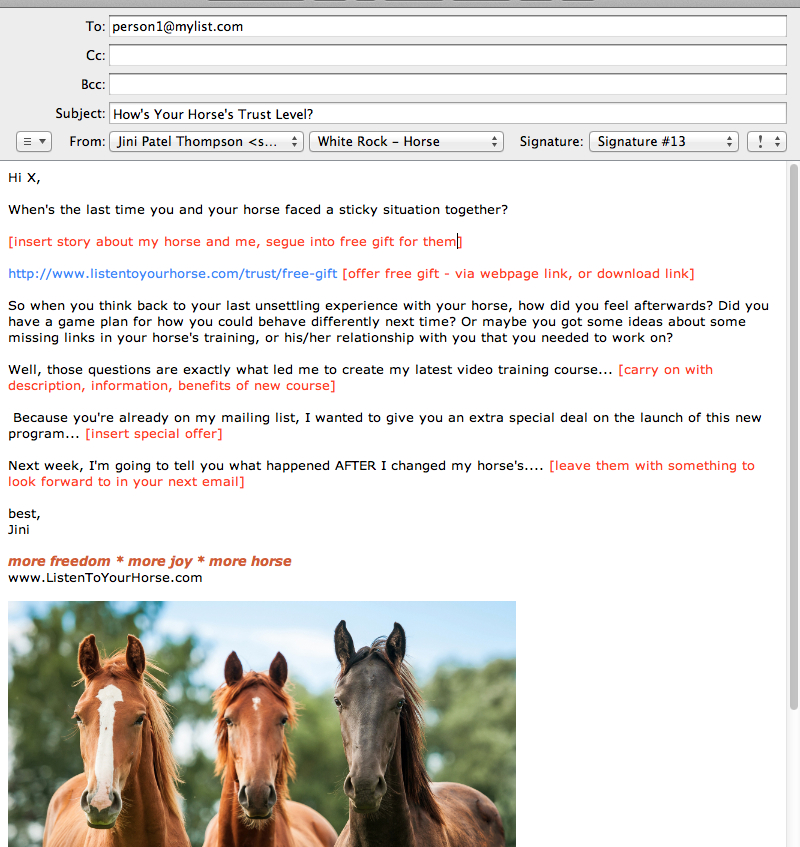


 So, for a more complex product launch, you need to have at least these five elements in place:


 Some people have a landing page that only offers one option – for example they want the visitor to sign-up for a free audio, or video. There are no other options or links available on the page. That’s what I showed you in the Listen To Your Freedom example above. Statistically, that method works.
 Here’s a way to ensure that the people you would love to joint-venture with (have them promote your product to their list) agree to do so: By making them part of your product!
 There are three things I want you to notice about this email:


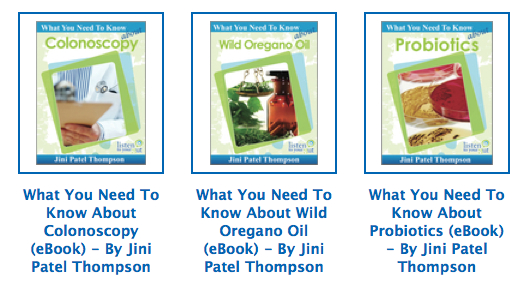





 2. She then drew out her cover idea, and used a graphic designer (sourced on
  3. Finished Cover:


 There are a number of items that need to be in place for you to be considered the legal owner of your creative work – anything literary, musical, dramatic or instructional. Obviously, your creative work can be in physical or digital form. Before you start selling your book, or program or audio in the marketplace – or even giving it away for free – you want to be legally recognized and protected as the owner and creator of that piece of content. So before we get started, let’s just go over the different types of products and how they can be protected:
 Your Copyright Notice
 Type this into Google: how to register book copyright in [your country] or how to register DVD copyright in [your country] For a printed book, it’s a good idea to register your copyright, even though it isn’t required, for these reasons:
 Personally, I wonder if it would change things that much if I also paid to have a copyright certificate as well? Especially when the government agency who issues your copyright plainly states, “please note that the Copyright Office is not responsible for policing or checking on registered works and their use, nor can it guarantee that the legitimacy of ownership or the originality of a work will never be questioned.”? What’s the value of a “copyright” when the legal, issuing body has not even checked whether the work has already been copyrighted by someone else?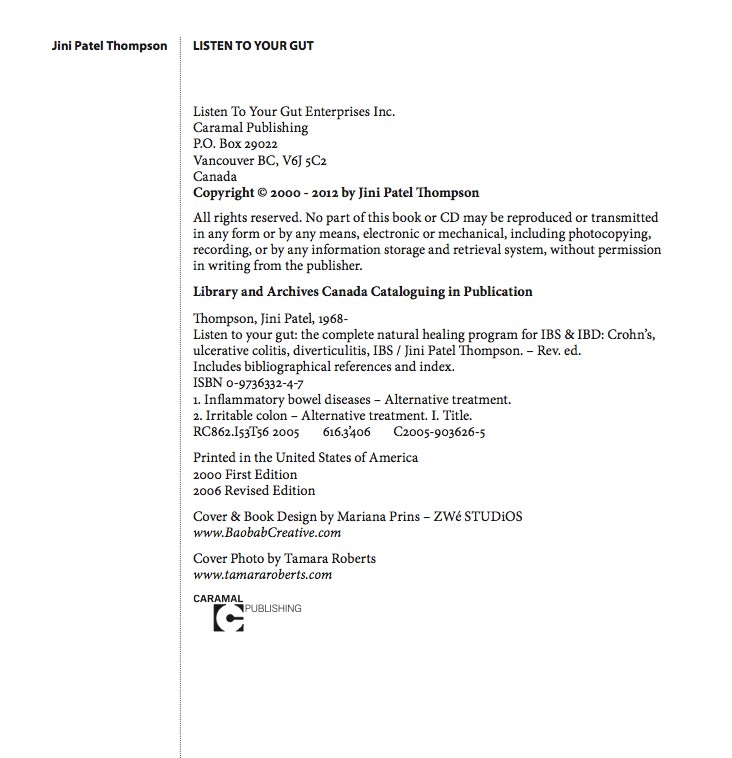
 R.R. Bowker, LLC – US ISBN Agency
 Technically, you are supposed to issue a new/different ISBN for each version of your book. So your printed book has one ISBN, your eBook has a different ISBN, your Kindle book yet another ISBN, and so on. But as I told you above, many digital retailers don’t require you to have an ISBN in order to carry your book, so it is not crucial – although that may change at any time!
 Encoded within is whatever information you wish to have encoded, like price, description, ISBN number, etc. If you are selling your book, DVD, CD or products on your own site, you do not need to have a barcode on your products. However, if you are selling on Amazon (for example) you need to have either a bar code, or an ISBN. If you are selling in a physical retail store, you will need to have both an ISBN and a bar code. Obviously, if you are selling teddy bears (for example) in a store or on Amazon you don’t need an ISBN, you only need a bar code.

 Book Disclaimer Notice
Recent Comments