How Do I Know Whether or Not to Self-Publish My Book?

If you’ve written a fiction book, you may be able to argue the merits of mainstream publishing over self-publishing… maybe. But if you’ve written a non-fiction book, then you definitely want to self-publish. Unless you don’t care about making any money from the book. Let me explain.

magnesium-miracle-bookI have a friend – Dr. Carolyn Dean – who is both a naturopathic doctor and a medical doctor. She has had 15 books published by mainstream publishers. She is well-known in her field, sits on the advisory boards of a few large and well-respected associations and she has sold a lot of books worldwide.

Well, her publisher has sold a lot of books worldwide. On her part, she has made so little money from all the sales that she has vowed to only self-publish from now on.

Here’s what many people don’t know about book royalties: You will receive your royalty (around 10%) from the price the publisher sells the book for, NOT the retail cover price of the book.

So the publisher can give away or discount thousands of books for which you receive very little or nothing.

The other problem with putting your work into the hands of a corporate publisher is they care very little for your content or your audience. Their primary concern is with their profits.

A publisher may get you to substantially change, delete, or re-write large sections of your book – even if you disagree with those changes.

childrens-past-lives.jpgHere’s another example: a friend of a friend wrote a book about children’s past lives. A mainstream publisher offered her a contract and was very excited about the book. The marketing division came up with a detailed plan for advertising, promotion, book tour and so on. However, a couple of months before the book was printed, another book came along that the publisher was even more excited about and the company decided to pull the funding from her promotional campaign and put it behind this other book!

So she ended up doing pretty much all the promotion, book tour and signings on her own, funded by herself, for only 10% of the profits. Like Dr. Dean, she realized that if she had self-published her book, she would have done the same amount of work and got to keep all the profits.

How Much Profit?

Now as I’m talking about profits, I’ve decided to open up my account book for you, so you can understand exactly what I mean when I say the authors above “made so little money” from a mainstream published book. So let’s take a look at my first book, Listen To Your Gut and I’ll walk you through the numbers, so you realize why this is so important.

Listen To Your Gut retailed at $24.95 when it was first published. If I had signed a deal with a mainstream publishing house (like Knopf, or Harper Collins) I would have received a maximum 12% royalty payment. Although, as I mentioned above, that would be a 12% commission on what the publisher sold the book for, NOT the stated cover price – however, let’s just be generous and pretend I received 12% of the retail cover price (12% of $24.95). In that case, after 12 months of book sales (because it takes a while for sales to ramp up) I would be receiving a cheque for around $400/month from my publisher.

ltyg-coverBUT, by publishing Listen To Your Gut myself, by the end of a year, I was making $2790/month in profit. Yes, profit. This means I have deducted my production cost (graphic design and layout), printing cost, warehouse and fulfillment costs, and website costs. And I am left with (my net profit) almost $3K/month.

You get the difference? If you go with a mainstream publisher, you get pocket money, or you can hire a housekeeper once a week. You self-publish and you can quit your day job. PLUS you have acquired a list of customers who love your stuff that you can market your next book to! This is where the big, long-term money comes in. Many of my readers have bought 3-5 of my books, plus referred their friends and family. So you launch your next book, or a video course, and now you’re making $5,000-$6,000/month, or more.

In the next unit, where we talk about leveraging your content, it will become even more apparent why it’s crucial for you to hang onto the publishing rights for your content – and not give them away for pocket money.

Self-Publishing Gives You CONTROL and Money

Now let’s look at the fiction book market – because it is different from the non-fiction book market I’ve been talking about thus far. If you are already an established author, or someone with good audience-recognition (an actress or political figure, for example) then you can likely shop your book via an agent to a mainstream publisher and get a book deal along with some decent money from royalties (your commission on retail sales). But even so, keep in mind you will still make substantially less money than if you self-published.

However, if you are just starting out, or you are a lesser-known author, then it may be best for you to take more control of your destiny and also reap the financial rewards. I’m going to share two stories with you from fiction authors – in their own words – that illustrate exactly why this may be preferable to a publishing contract.

Rose Pressey, author of Forever Charmed, shares her experiences with self-publishing her books on Kindle (Amazon KDP):

forever-charmed-book.jpgThe fiction bug bit me in 2006 and I began my writing journey. Thoughts of writing a novel had crossed my mind many times in the years prior to that, but I finally decided to stop talking about it and actually write. After finishing my first novel, I entered the seemingly endless query/submission/rejection merry-go-round.

Over the next four years, I completed five novels and endured over five hundred rejections from agents and publishers. I had a few exciting instances of signing with an agent and having an editor request a second look – but nothing seemed to pan out.

“Fast forward to April 4th, 2011 when I uploaded my first eBook to KDP. Me and My Ghoulfriends was a light paranormal romance that sold a whopping seven copies that first week after release. Seven may not seem like many, but I was hooked on the whole independent publishing concept.

As I already had four other complete novels simmering on my hard drive; I began to release one every month for the next several weeks. With more titles, sales took off exponentially. By June, I was selling well over 1,000 copies a month. Now instead of receiving weekly rejections from the slush piles, I was reaching readers around the world!

I’ve continued to write 2,000 words per day – have outsourced both my editing and cover designs to professionals, and have fourteen full-length novels on KDP – with regular monthly sales in excess of 10,000 copies. I’m thrilled to have people reading my books and sharing my stories.

The part I enjoy most about Kindle Direct Publishing is the independence it affords me in my writing. Since I suffer from Psoriatic Arthritis and have knee replacements, KDP allows me to work from home. I might just set the world record for joint replacements! I’ll soon have my hips replaced, elbows, and at least one shoulder.

If I finish a new book on Friday night, by Monday morning hundreds of people are able to enjoy it. Although I’ll soon be considered a ‘hybrid’ author being both indie published and traditionally published – my roots are always firmly planted within the indie community, thanks to Amazon KDP.”

So Rose’s story – aside from her success – also illustrates another important point. Once you are selling well as an independent author, the mainstream publishers will find you and offer you a book deal anyway.

The same process is happening in the music industry too. Many young artists (Justin Beiber anyone?) have their own YouTube channel and sell their own music through various platforms. They build their subscribers, sales, etc. and then the big labels come calling.

So even if a mainstream book deal is your end-goal, there’s no reason to sit around and wait for it
. Get going with self-publishing your books, start building your audience, your sales, and then when a book publisher finds you, you can decide what to do then – and you’ll also be in a substantially better negotiating position.

school-nightmare-book.jpgHere’s another self-publishing story from Raymond Bean, author of the School Is A Nightmare series:

November 2012 marked the four year anniversary of my leap into self-publishing. When I published my first title way back in 2008, I didn’t know what a Kindle was, no one read digital books yet, and self-publishing was about as cool as a canker sore.

At the time, the only thing I had to show for my writing was a computer full of stories and a binder full of rejections. I taught during the day, worked for a catering company on the weekends, and wrote as often as possible. I did what writers were “supposed to do”:

  • Send out query letters
  • Wait for responses
  • Cross fingers and toes

Writing wasn’t paying the bills, and I had two young children to provide for. I’d read a bunch of Jim Cramer books on options trading after which I convinced myself I could figure it out. I wasn’t terrible at it, but I wasn’t that good either. I’d managed to skim a bit of a profit trading stock on Marvel Studios when it announced it would create an Iron Man movie.

One day my wife read an article in a local paper about a writer who’d self-published a book using a print on demand service. She convinced me it was time to stop investing in stock options based on comic book character movie hunches and start investing in my writing. I took my Iron Man money and invested it in self-publishing. As usual, my wife was right.

When my book, Sweet Farts (don’t judge, kids love it), released in November 2008, my wife and I crossed our fingers and hoped we’d be lucky enough to make our money back some day. We never dreamed that Sweet Farts would hit the Amazon Humorous Bestsellers list by February 2009 and stay there for four years running! At the time, I couldn’t have imagined that in only four year’s time I’d have eight titles out in the U.S., half a dozen foreign deals, and film offers for my books.

Last year, I launched my new series, School Is A Nightmare. I wanted to write a fun series for kids and bring titles to market quickly. Partnering with CreateSpace for the book creation services and KDP to reach my readers digitally has been the perfect combination. I’ve utilized free promotions, participated in the lending library and released an omnibus edition called Quadzilla to help expand the reader base for the series. I’ll release several more titles in the series this fall.

I’ve found that more and more kids are reading digitally on Kindle and Kindle apps. Self-publishing the series allows me to provide content to readers when I want and without delays. The ease of working with CreateSpace and KDP helps me experiment with new ideas and keep up with a rapidly changing market.

Going forward, I see myself self-publishing some titles and traditionally publishing others. The next installment of my School Is A Nightmare series is in edits right now at CreateSpace, I just signed a deal for a fun new series with a traditional publisher, and I have several titles completed and ready to go. The most exciting thing about right now is that when I’m writing a book, I know it will be released. I no longer have the dread that the work may never see the light of day.

The days of crossing my fingers and toes are over. I’ve also given up trading stock options. Self-publishing proved to be a better investment offering very low risk and extraordinarily high reward. I guess those Jim Cramer books paid off after all.”

So both Rose and Raymond’s stories illustrate nicely how taking control of your destiny – rather than waiting for someone else to hand it to you – is a much better approach. And again, in both cases, once they got rolling, the mainstream publishers came to them. But you’ll notice how Raymond is not going to give away his cash cow – he is choosing to self-publish some books and sign a publishing deal for others. Very smart.

This next account, from Stephanie Bond, echoes the experiences my friends had with their non-fiction books; losing out financially and being at the whim of the publisher’s marketing department:

stop-the-wedding-book.jpgI’m what has been termed in the industry as a “hybrid” self-published author, meaning I was traditionally published first, then migrated into self-publishing.

Why? Because although I’m grateful for the experience and the readership that writing for traditional houses gave me, I was constantly frustrated by the lack of marketing or the inaccurate positioning of my books.

But the biggest problem I had/have with traditional publishing is the protracted production schedule; when a writer has to deliver a manuscript a year to eighteen months prior to its release, he/she can’t respond to reader and market demands.

For example, my traditional publisher didn’t want to extend a series because the initial print run hadn’t sold as well as they’d hoped, so they switched me to a different project, which I had to accept to maintain a revenue stream. Fast forward a year and the original series had started to snowball, but the publisher had already “moved on” and didn’t want to continue the series, leaving my readers very unhappy. And I get those emails, not the publisher!

Over the years, I’d quietly collected the rights back to about a dozen of my romance and mystery novels as they fell out of print, not sure what I’d do with them, but inherently knowing they were safer in my hands. In 2011, my then-publisher ended yet another series of mine, and I was facing another reset.

A good writing friend suggested I dust off those reverted rights books, update them, and put them out on my own. Because I thought those books were some of my best (writers know which of our books are better than others!) and since I didn’t have anything to lose, I dove into self-publishing and clunked my way through my first project.

My sales were slow in the beginning, but after a couple of months, things started to pick up enough that I realized I could actually pay my bills with self-publishing. And then another writer friend shared her great experience with the Amazon Kindle KDP Select program. Coming from the traditional side of the business, I was reluctant to make my books exclusive to one retail source, but I’m so glad I did!

Offering my books for free to avid Kindle readers expanded my readership by leaps and bounds…my sales exploded. I’ve had several titles in the Kindle Top 100 paid list, and I’ve sold over 200,000 copies of two titles; one of them, Stop The Wedding!, is a romantic comedy my publisher turned down three times.

My book, Our Husband, which a former print publisher sold at less than impressive levels, was the best-selling self-published Kindle book of 2012.

To date, I’ve sold over a million copies of my own books. Now I’m able to continue series my publishers ended prematurely, and launch new projects. I love that my books are no longer static, that if a cover or a price isn’t working, for example, I can change it.

If I had any qualms about leaving traditional publishing, they were settled last fall: the royalty check I received from my publisher representing six months of sales for over 40 projects was less than I’d made the previous day in KDP royalties for about 12 books.

This month, the first book in my original self-published mystery series Two Guys Detective Agency will be released through KDP Select. The series features two estranged sisters (whose last name is Guy) who find themselves husbandless and broke and take on a faltering P.I. agency in a strip mall. And Hollywood is definitely paying attention to self-published books and authors: Two Guys Detective Agency has been optioned for TV series development and is currently being shopped to networks, so all good wishes appreciated!”

UntitledFor myself, I spent a few months trying to find an agent or publisher for the very first book I wrote, Real Women Eat Sushi, which was based upon the two years I lived in Japan, working in the fashion industry. But after a number of rejections and a letter from an agent who said, “I enjoyed your book so much I took it with me and read it over my lunch hour (and ordered sushi!)… but it doesn’t fit into any of the established genres, so I can’t take it on.” I took matters back into my own hands and I have self-published my books ever since.

Coincidentally (or not) about nine months after that letter from the agent, I saw a book – published by one of the companies I had approached – that was virtually identical to mine. Did they rip off my concept, or were they already in process with that book, and that’s why they rejected mine? I’ll never know, but let me just say that it was similar enough that it set my spidey-sense tingling. It also made me feel really glad I was done with the whole publisher/agent arena!

Don’t forget, that once you are established as an author, or you have a book that is selling really well, the publishers will come looking for you! Then you will be in a strong bargaining position for royalties, promotion, and editorial control. In that scenario, there is a much higher chance of you coming out of the deal satisfied – if that’s what you want.

But even in that scenario, I urge you to follow the lead of Stephanie Bond and Raymond Bean (in the examples above) and don’t give away the farm! Keep some, or most, of your books self-published and test the mainstream publishing deal with a new book, or series.

Ready to think about the ins and outs of self publishing?

How Do I Create a Basic or Free eBook Cover?

If you don’t need anything too fancy – maybe you just need a quick cover for your free eBook – then Microsoft Word has some nifty templates you can use.

For this next project, I used Microsoft Word to create an eBook template that I use for a lot of my free eBook give-aways. It may be simple, but it looks clean and professional. And keep in mind my audience for this freebie – the design doesn’t matter so much, they are just really keen (and sometimes desperate) for the information.

For your eBook, you might want to do something a little more glamorous and have an image or some slicker graphics.

There are many templates in Microsoft Word that you can customize to your liking – you can change the font style, size, color and also change images, borders, or background colors.

Simply open up a Microsoft Word document and then click on GALLERY:

Choose from any of the templates you see lined up in a row – Microsoft Word calls these Cover Pages.

Let’s say you choose this template, or Cover Page:

You can easily change the photo to customize it, by right-clicking on the image, then select: CHANGE PICTURE. Like this:

Or, you can just drag and drop a new picture over top of the existing one – not as reliable as “Change Picture” but it can work!

Here’s what it looks like when I have changed the picture and also the color and size of the font for my name:

Pretty spiffy hey? And honestly, that took about 5 minutes.

You then drop in your text on the next page, or start typing your text, and when you’re finished, you save it as a PDF. Done! How easy is that? ~ Love it! ~

Here are two more eBook covers I created using Microsoft Word:

If you have a Mac, you can also use Pages to create some nifty DIY (do-it-yourself) cover templates for your eBooks.

That said, you can also use a great online DIY design tool – Canva which is just superb, easy to use, and mostly free (they charge only for premium pictures and designs, which are still very gently priced). They are especially great if you’re needing lots of social media or blog graphics, but really they’ve got you covered for just about anything.

Here’s a graphic I whipped up in three minutes just to show you how cool Canva is:

How Do I Create an eBook or Manual?

In these next few units, we’re going to look at how to write, produce and publish your book, eBook, instruction manual, tutorial, or course manual. Don’t worry, we can also cover selling and delivering that item to your customer when you’re ready. But in this discussion we’re just focusing on product creation and getting it ready to sell.

And if you think it’s hard to write a book, or the idea intimidates you, then be sure and read this article first on how writing a book is as easy as writing a few emails to a friend – really!

But once your book is written, a slew of other questions may ensue: Should you self-publish, or look for a mainstream publisher? Should you do a digital eBook, or get your book printed? And now that you’ve written the book, how do you get it out there to the people who will want or need it?

When you’ve written your first book, or you’re thinking of writing a book, the first questions you need to ask yourself are:

  • Who is my customer for this book?
  • How am I planning to sell/market this book? How will my customer find out about this book?
  • How will they be purchasing? – cash, credit card, online, at bookstore, at my workshops, etc.
  • Where do I want the book to be available? (bookstores, online bookstores, my online shop, my website, my workshops, etc.)

Your answers to these questions will then determine the best method of publishing or printing your book (including digital methods). Let me walk you through the process.

My publishing company, Caramal Publishing Inc. has been going since 1999 and we’ve published hardcover, softcover, eBooks, Kindle books, CDs and DVDs.

I’ve found that for shorter books (up to 100 pages, but ideally not more than 60 pages) people don’t mind an eBook. But for anything longer, they may want the physical book. For many of my longer books, people will buy both the eBook (so they can get started right away) and the printed book.

Kindle and Other e-Readers

The exception to this rule is Kindle (or other e-reader books). If someone likes using their e-reader device, then they will often prefer a book in that format, regardless of length. Although, you also cannot assume that people like to use an e-reader device, as many do not.

The other consideration with publishing on Kindle or other e-readers is readability and ease of navigation. So, if you have a fiction book, then it’s usually fine on Kindle, regardless of length. However, if you have a non-fiction book; any kind of how-to, or reference, or anything else that involves the person dipping in and out, or looking for specific information, then the e-readers can be very annoying to navigate, if the book is longer than 100 pages or so. In this case, you would want to also offer a printed version of the book.

I have a lot of customers who purchase BOTH the hardcover and eBook (which I offer at a substantial discount) so they can get started right away while they’re waiting for the hardcover to be delivered. Or some customers want to also have the eBook so they can access it on their mobile device if/when they want to. And not surprisingly, there are also customers who buy the eBook or Kindle version to check it out first, and see if they like it enough to buy the printed book.

So What Should You Do?

In an ideal world, you would offer your book in all 3 formats: eBook, Kindle (e-reader), and printed (softcover or hardcover). In reality, you should start with whichever version you can afford.

If you have a website with good site traffic, or a good-sized email list, then start by selling an eBook. eBooks in .pdf format are the easiest to format and sell.

Kindle formatting, uploading, entering the SEO keywords, description etc. is a lot more work because it can be quite buggy and then the glitches are time-consuming (and frustrating) to fix. However, you can use a reasonably-priced service like BookBaby to handle all of that for you if you have the budget.

If you don’t have a lot of visitors to your site, or a decent size email list, then who are you going to sell your eBook to? In that case, it may be better to do a Kindle book and invest some time (or money to hire someone) to do it right, with excellent SEO (search engine optimization) elements so that your audience can actually find your book on Kindle, or Barnes & Noble. Again, BookBaby can do all this for you for a reasonable price.

Of course, you could also just link to your book listing on Kindle from your site. The only downside to this is that you are sending people off your site. But the upside is that you don’t have to set up PayPal or any kind of shopping cart on your site.

REMEMBER: There are many ways to skin a goat! Translation: There is no right or wrong way to do things here. I’m giving you all the options and then you have to connect with your gut and make the best decision for yourself at this time depending on your available budget and time constraints. Nothing is carved in stone and you can always do things in stages, or modify as you go along. Take a breath.

Another great option you have available that is super cheap (and even free) is to use an Amazon company called CreateSpace. With CreateSpace, you can upload both your book text and your cover photo and text to a pre-set template they provide. All you need is an Amazon account (free) and a CreateSpace account (also free).

Once you have created your book within CreateSpace, you can either print off anywhere from 10 – 50 copies to get started (at around $4-$5/book), or you can just use Print-On-Demand. Printing on demand means that CreateSpace only prints a book after a customer has purchased it – so you don’t need to invest any money up-front. With print-on-demand, your customer would first buy your book on Amazon, then CreateSpace would print it and ship it out to your customer.

Writing Your Manuscript

When you are creating the manuscript of your book or eBook, the easiest format to create your book in is Microsoft Word (.doc).

After your manuscript is written, what you do with it depends on whether you want it to be:

  • A printed book
  • A Kindle or e-reader book
  • An eBook

For both Kindle books and printed books it can be fairly difficult to do the layout so that it reliably looks the way you want it to and also so that it looks good on the page.

For a printed book, if you are fluent in using InDesign or Quark, you can do the layout yourself. For myself, I always outsource this part. BUT you still must maintain control of making sure your design elements are specified clearly and then you still have to double-check everything to make sure all is how you want it.

I Can’t Write!

Now if the thought of writing a book, or eBook scares you, or sets you off protesting about how you could never do that, or don’t even know where to start. Then let’s take a break right now and I want you to go check out this post on Brainstorm Your Biz, where I show you a method of book writing that is so easy, it requires the same effort as an email to a friend – seriously! After you’ve read it, come back here and we’ll continue on.

Why do I want you to write a book? Because it is the absolute easiest and fastest way to position yourself as an expert. It is also a super easy way to create a free gift for your sign-up box that has a good perceived value. Your first eBook does not have to be a major slog! It can be 10-20 pages long. As long as you have a nice cover, it’s proofread properly, and you’ve laid out the text nicely (yes, I will show you how to do all this), you will have a nice published piece you can sell, or give away to your site visitors after they fill out your opt-in form.

If you’re stumped for ideas of what to write about, go back to your customer’s pain points. Take just one thing your ideal customer needs a solution for and write about that. Or pick one thing that would be fun or entertaining to your customer and write about that.

And remember, you don’t need to physically write the book; you can always voice record it and get someone on Fiverr.com to transcribe it for you. Then get your 3 pickiest, most literate friends or family members to proofread it for you – give it to the first person, make all the corrections, then give it to the second person, make all their corrections, then give it to the third person and hopefully by the time you’ve corrected the errors they’ve found, you’ll have an error-free book!

Kindle and e-Reader Books

For Kindle, Kobo, Nook, iBooks, or other e-reader books, I found the formatting process quite difficult. Sure there are lots of instructions and it doesn’t look too complicated, but unless you have a fiction book (novel) that just scrolls straight through, you can go crazy trying to get it formatted properly.

If you need to have a clickable Table of Contents in your book, or you have diagrams, or headings and sub-headings… then getting your manuscript to appear the way you want on an e-reader device like Kindle is a real hassle. I outsource this to someone who specializes in e-reader platform uploads and I get her to do the complete job for me: Format, upload to Kindle, book description, keywords, author profile, etc.

You can post your job advertising for someone who specializes in Kindle, Kobo, Nook, or other e-readers on Elance.com, or you can use BookBaby.com to do it all for you and upload to multiple e-reader platforms.

Style Guidelines

For any book (whether printed or eBook) I always set up these style guidelines as soon as possible. For sure, my Word .doc that I sent to my layout person adheres to each of these – of course, you could change the fonts and font size for these however you wish:

  • Font size and type (eg. Helvetica 11 pt)
  • Headings (eg. Helvetica, Bold, 16 pt)
  • Sub-Headings (eg. Helvetica, Bold, 14 pt)
  • Sub sub-headings (eg. Helvetica, Bold, Italics, 12 pt)
  • Leading (space between lines) – about 1.2 lines; show me samples and I will choose
  • Page Numbers – Top of page, right corner of right-facing page and left corner of left-facing page
  • Chapter Title Pages – make sure they are always on a right-facing page
  • Front Matter appears in this order: Reviews, Disclaimer & Copyright Info, Table of Contents, Acknowledgements

Creating Your eBook As a PDF File

A PDF file can be made available to your customers as a download, via a weblink, that you send them once they’ve opted in (if it’s a freebie) or paid for it (if it’s for sale). For example:
http://paid-know-about.s3.amazonaws.com/What-Need-Know-About-Probiotics.pdf

Don’t worry, if the how part isn’t clear to you, you’ll learn all about content delivery in the next Module – for now we’re still focused on producing your book. So your customers will receive a file that they can scroll through and read on any computer, smartphone or tablet with PDF reading software (like Adobe Reader, which is free to download). They can even print it out if they prefer to read it that way. On your site or in your shop, you can display your eBook with an image of its cover to make your product look official and professional. Like this:

If I’m creating an eBook, or Report, or Tutorial that I am going to save as a PDF and then email out to people; I create my manuscript following the same style guidelines I gave you above. The only change is that I set the Leading (or line spacing) at 1.5 lines. To do this, you highlight/select your entire document, then click on FORMAT -> Paragraph. Select Line spacing: 1.5 lines and then check the box that says: Don’t add space between paragraphs of the same style. It should look like this:

and then click OK.

If you are creating your eBook, Report, White Paper, Tutorial etc. yourself, then you simply get your Word document (.doc) formatted correctly – as I outlined above – and then save it as a PDF (.pdf).

To save a Word .doc as a .pdf you open your .doc, then click on:

File -> Print

Then click the button on the bottom left that says: PDF -> Save As PDF

Here’s what that looks like:

As you’re saving your .doc to .pdf format, you can also add some security options, so let’s talk about that next.

eBook Security

There are lots of security options for eBooks – but at the end of the day, once someone has bought the eBook, if they want to send it to someone else they can. And why not? We can lend our physical books anytime we want.

The only way you can really deter people from sharing your eBook en masse is to lock it with a password. But they can still email it to their friends, along with the password.

To do this, you simply click on SECURITY OPTIONS when you are saving your .doc as a .pdf and here’s what pops up:

You can then select which actions you wish to password-protect.

Personally, I find it super annoying to have to enter a password every time I open an eBook – annoying enough that I would really hesitate to purchase again from someone who I knew was going to put me through that hassle.

Also be prepared to have your customers emailing you endlessly because they have forgotten or lost the password; if you choose to password-protect anything.

I don’t think you should ever restrict printing an eBook, because many people (especially older people) always print their eBooks out.

It does, however, make very good sense to use the Security Options box to prevent people from copying text, images and other content. I check this box and then I do not give the password out to anyone. Because I don’t mind if people share the eBook, I do not mind if they print it, but I don’t want them to be able to copy/paste sections of it into their blog, or emails, or anywhere else.

For my health stuff, I make more money selling products from my health store than I do selling eBooks, so I do not password-protect my eBooks. I don’t actually mind if people pass my health eBooks around.

I may password-protect the course content PDFs in Listen To Your Freedom though, because I don’t want people making these available for Internet-wide download and devaluing my program. Or rather, I should say, I don’t want to make it EASY for people to share LTYF Modules en masse! But then again, I may not. There are a number of apps you can download that will unlock any PDF – so if someone really wants to rip-off your stuff, they certainly can.

Remember, that at the end of the day, people can swipe and share anything they want – there is always a way. As long as your copyright notice is on your stuff, you can prosecute if need be. But I don’t sweat it too much, as I do believe in Karma (you reap what you sow) so I just leave that all up to the flow of the Universe. So far, I haven’t had to take legal action against anyone.

Okay, so just to re-cap, here are the steps involved in creating your eBook, or manual and here’s the easy way to write the book:

  1. Write manuscript in Word .doc format.
  2. Format all style elements.
  3. Add the cover, front pages, and any back pages.
  4. Have document (including cover) proofread by at least 3 people who are picky, critical and good at spotting mistakes.
  5. After making all the corrections and you think it is perfect, give it to your most picky person for the final proofread.
  6. Save the finished document as a PDF and set Security Options.
  7. Keep the .doc file for future edits and also for Kindle formatting.
  8. If you’re having the book printed, head over here to learn more.

How Do I Use PowerPoint or iPages to Create a Book or Course?

Another easy way to create online programs or courses (or simple eBooks) is by using PowerPoint (or iPages if you have a Mac) and then saving your PowerPoint presentation as a PDF. You can import your own artwork or photos into PowerPoint, or use royalty-free images sourced from Fotalia or Dreamstime. I do not recommend you use images from ‘free’ photo sites – here’s why. PowerPoint also has a lot of formatting tools and graphics that make your eBook, course or program look really professional.

BUT you can be a complete techno-phobe and still create an amazing product using PowerPoint! SuZen Maureen had never used PowerPoint before and was scared and intimidated by the prospect. However, her 13-year-old son had used PowerPoint in school and so he showed her how.

If you don’t have a kid or spouse who can help you, you can also watch the free tutorial videos on YouTube as they are very good. So here are a couple of pages from what SuZen created on PowerPoint – this is a great example of a simple, yet effective, How-To eBook:

Leonie Dawson uses PowerPoint to create eBooks in one day. She uses these eBooks as free giveaways to build the relationship with her followers, or to get new signups for her million dollar+ business. Here’s a couple of pages from her eBook, A Message From Your Angels:

To see the entire eBook, you can download A Message From Your Angels here (Right-click and Save As…):

Before you begin using PowerPoint to create YOUR eBook, go over these PowerPoint ground rules, so that when you save your PowerPoint as a PDF file it will not be too big to download easily:

1. Make sure you do not import large size photos to PowerPoint. If you paste the originals from your camera, then yes, they are likely way too large and that will make your pdf file too big for someone to download.

The way around this is to first save your photos as smaller size images. Then import or insert those smaller photos into PowerPoint. If you have a Mac, go into iPhoto and email yourself a HIGH Quality (not Maximum quality) a MEDIUM or SMALL size image of each of them, save the photos from your email to your Desktop (or designated file folder) and then those are the smaller size ones you can import/insert into PowerPoint.

Always use the insert/import function for photos, don’t just copy/paste as this seriously affects file size.

If you don’t have iPhoto or a photo editing software, then use a screenshot software – free ones are SnapNdrag for Mac and Snipping Tool for PC. In that case, you open the large jpg photo on your computer screen, then shrink (zoom out) the image until it’s the size you want (on the page), then use your screenshot tool to take a photo of it at that size. See this video for instructions on how to take a screenshot photo:

2. Also be careful about layering too many ‘effects’ – that will also affect the file size of the finished pdf eBook.

If you follow these two points and your finished PDF eBook is still too big (file size is too large for quick downloading), then here’s a detailed list on everything that could possibly happen to make your finished eBook too big, and so you can check for each problem:

My PowerPoint eBook Is Still Too Big!

If you save your PowerPoint as a PDF file and still find it is humungous, then go through these lists and troubleshoot what else you could have done:

http://office.microsoft.com/en-ca/powerpoint-help/reduce-the-size-of-your-powerpoint-files-HA001116882.aspx

Here’s another great (more simple) troubleshooter:

http://elearningcentralia.wordpress.com/2012/05/04/powerpoint-too-big-to-email/

Save Your PowerPoint As A PDF File

When you have finished creating all the slides in PowerPoint that make up your eBook, then save it as a PDF.

To do that, click on:

FILE -> Save As

Then in the box that opens up, change the file format from .pptx to PDF:

If you want to password-protect a PDF you have created from PowerPoint, you can either use Adobe Acrobat (costs money) or download a free PDF security plugin.

And that’s it – YAY!!! You just created your first PowerPoint eBook – congratulations!

You can now learn how to upload that PDF eBook to your server, so that you can email out a download link to whoever purchases or sign-ups for your eBook.

Look at the example of Leonie Dawson’s eBook I gave you above… this was the name of her PDF file: leonie-angelmsg.pdf

And then this is the download link (I uploaded Leonie’s PDF to my own server):

http://listentofreedom.s3.amazonaws.com/leonie-angelmsg.pdf


PowerPoint is a really fun way to create an eBook, since you can use lots of visuals – photos, graphs, charts etc. Which also means you don’t need to have a lot of text for your eBook to look good – in fact, you can create an eBook in a day! Remember the examples I gave you from Leonie Dawson and SuZen Maureen? What are some PowerPoint eBooks you would enjoy creating?


How Do I Get My Book Printed?

Before we get into the how-to’s, I just want to define a few of the terms we’ll be using:
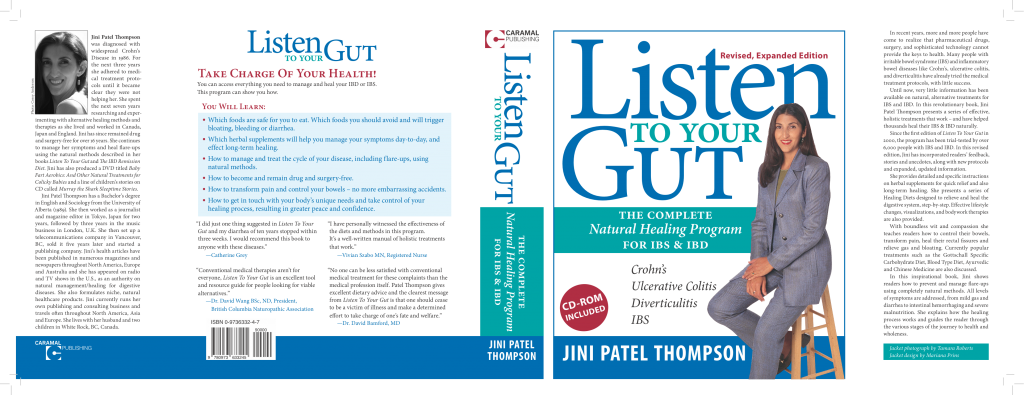
Softcover book – a book with a soft, flexible cover. You can choose a matte or a gloss finish to that cover. The binding (where pages are affixed to the spine) is usually just glued.

Hardcover book – a book with a hard cover (boards) usually covered with some kind of material or texture and the title stamped on it in metallic or plastic. The binding can be just glued, or glued and sewn (Smythe-sewn).

Dust jacket – a flexible, printed sheet that wraps around the hard cover and folds inside the front and back of the book with flaps. You can choose a matte or gloss finish to your dust jacket.

Spine – the part of the book that is visible when it sits on a shelf. Usually shows the book title and author.

Here’s what the cover design for a softcover book can look like – this is what’s sent to the printer:

Here’s what the dust jacket design (this is what’s sent to the printer) for a hardcover book can look like:

There are a few ways to get your books printed fairly cheaply, depending on how you want to sell them.

Firstly, there’s a company in Ohio called 48hrBooks that is really good for short-run, softcover or hardcover books (no minimum order) – that way you can have books in stock if someone wants the physical book, with minimal investment. I recently published this 136-page softcover book on natural healing for constipation with them and they did a great job – production, communication, delivery, etc. – everything was no hassle and delivered as promised:

If you’re planning to sell on Amazon though, then your best option may be an Amazon company called CreateSpace. This service allows you to print-on-demand only the number of copies you need. You submit your book design files and they will keep them on file and just print and bind the number of copies you request, or sell on Amazon – and the print cost is very competitive.

However, if you’re selling only on Amazon, then CreateSpace automatically deducts the cost of printing from your retail price, so you pay NOTHING up-front. The customer buys your book, CreateSpace deducts the printing cost, Amazon takes their commission, and then you get the rest – and it’s all automated, you do nothing but receive your money.

The other fun thing about CreateSpace is they have online template designs you can use to design your book covers yourself. You just drop in your chosen photo or image and enter your title, sub-title, author name and voila! You have a decent-looking book cover.

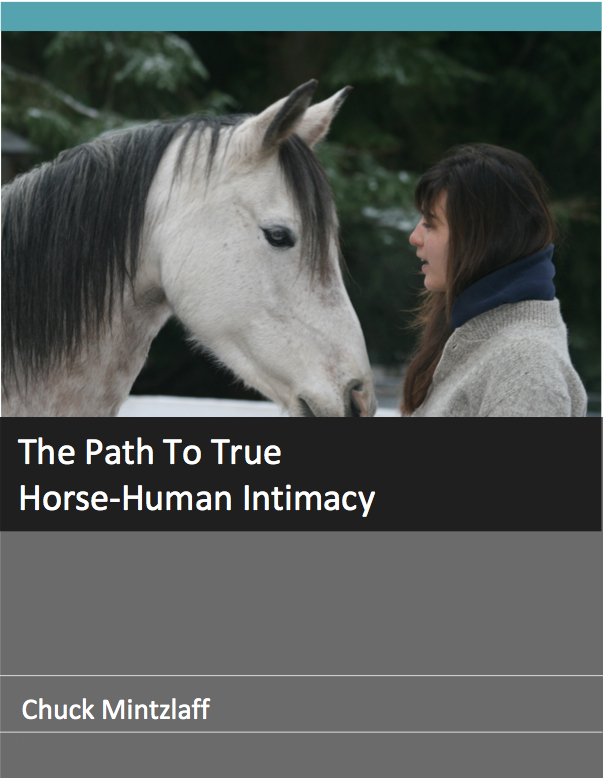
Here’s one that was done that way using CreateSpace – note the photo on the cover is the same photo, the template just crops different sections of the same photo and then tiles them. Also note the bar code and ISBN number. A nice looking book at a total cost of about $4/copy and this book sold well to her students and at horse expos and events:

Note: During the template book creation process, CreateSpace will offer you a free ISBN. But this means that your book is registered with CreateSpace as the publisher, NOT with your company as the publisher.

If you do this, then your book can only be sold through CreateSpace, Amazon and the bookstores and libraries that CreateSpace distributes to. If you wanted to make your book available to other stores, or libraries, you would have to publish another version of it, with your own company’s ISBN. When you’re just starting out, this should not be an issue.

Once your book is printed by CreateSpace, you then have two options – and you can certainly do both, if you choose. You can sell your books through Amazon (i.e. the customer orders your book through Amazon) and Amazon will handle shipping and fulfillment of that book to the customer, plus any customer service issues.

Or you can order your books to sell on your own website, at your seminars, workshops etc. To do this, you simply place an order of your book with Create Space and again, there’s no minimum order. So you can order 10 books or 100 books. Here’s quick look at the pricing guidelines on CreateSpace. They also do DVDs and CDs as well.

Since companies change their pricing, you would do best to compare the pricing of 48hour Books and CreateSpace – taking into account CreateSpace’s affiliation with Amazon, and then choose the solution that will work best for you. You may also want to price-compare with BookBaby, Blurb and Lulu.

You will likely find that CreateSpace is significantly cheaper then these other book printers. The only catch is that with CreateSpace you cannot specify the type or weight of paper you want used for either the interior or the cover. You also cannot print your book as a hardcover.

Selling Your Book

We just talked a bit above about selling your book through Amazon. Since CreateSpace is an Amazon company, if your book is printed by CreateSpace it’s easy to have Amazon sell and ship your book.

But if you choose to have your book printed by an independent printer, then you will have two ways of selling books on Amazon:

  1. You warehouse your own books. Amazon emails you the customer order, you package and ship the book to the customer.
  2. Amazon warehouses your books, receives the order and ships it.

If you don’t use CreateSpace, then it is cheaper and easier to use option 1 to sell your book.

Also, you may want to start out just selling your book from your own website. In that case you will already be warehousing your own books – either in your home, or at your fulfillment house. If you want to go over that in detail, check out this unit on how to sell and fulfill your physical products.

For now, I’ll just share with you two different pathways that would both work well when you’re just starting out:

Publishing Path #1

1. Write your book in Word .doc format

2. Use CreateSpace to layout your book text, make the cover, and print the book. Use their free ISBN if you don’t mind having CreateSpace listed as the publisher of the book. Otherwise, get an ISBN from your country’s ISBN agency.

3. Sell through Amazon, directly from CreateSpace, using print-on-demand

4. Order books from CreateSpace to sell at your workshops, tradeshows, etc.

5. Either sell your books on your website (pack and ship from your home or fulfillment center), or just feature your book’s Amazon listing on your website

6. Sell the PDF eBook version of your book on your website as an eBook

7. Sell an AudioBook version of your book on your website

8. Then sell a Kindle version of your book on Amazon and/or Nook, Smashwords and other e-reader sales sites. Kindle will show you how to do this (complicated!) or you can hire a company like BookBaby.com to do it for you.

Publishing Path #2

1. Write your book in Word .doc format

2. Get ISBN number from your country’s ISBN agency.

3. Get barcode

4. Hire a designer from Elance.com or Fiverr.com to design your book cover, and layout the text (pages) of your book. Have them design both the print version and the eBook version at the same time.

5. Use either 48hrbooks.com or CreateSpace.com to print your book

6. Warehouse and fulfill (pack and ship) your book either in your own home,
or at a fulfillment center like Efulfillmentservice.com or Propack.com

7. Sell your book on your website and through Amazon (pack and ship from your home or fulfillment center), and at your workshops, tradeshows, etc.

8. Sell the PDF eBook version of your book on your website

9. Sell an AudioBook version of your book on your website

10. Then sell a Kindle version of your book on Amazon and/or Nook, Smashwords and other e-reader sales sites. Kindle will show you how to do this (complicated!) or you can hire a company like BookBaby.com to do it for you.

What Would Jini Do?

I like to have a lot of control over my book layout and cover design, so I would go with Publisher Path #2. BUT I would also like to test out CreateSpace’s distribution network. So I would actually publish two versions of the same book, with two different ISBNs. For the first I would use the free ISBN assigned by CreateSpace, as that would put me into CreateSpace’s distribution network. For the second version, I would use my own ISBN – and that is the one I would sell on my website and submit to libraries (if I wanted to) and other e-reader platforms like Nook and Smashwords. Then I would track my sales and see if anything interesting happened with the CreateSpace version!

Book Layout

For a printed book, if you are fluent in using InDesign or Quark, you can do the layout yourself. For myself, I always outsource this part (Elance.com).

BUT you still must maintain control of making sure your design elements are specified clearly and then you still have to double-check everything to make sure all is how you want it.

For example, for any book (whether printed or eBook) I always set up these style guidelines as soon as possible. For sure, my Word .doc that I sent to my layout person adheres to each of these – of course, you could change these however you wish, just make sure your entire manuscript follows whatever style guidelines you set:

  • Font size and type (eg. Helvetica 11 pt)
  • Headings (eg. Helvetica, Bold, 16 pt)
  • Sub-Heading (eg. Helvetica, Bold, 14 pt)
  • Sub sub-headings (eg. Helvetica, Bold, Italics, 12 pt)
  • Leading (space between lines) – about 1.2 lines; show me samples and I will choose
  • Page Numbers – Top of page, right corner of right-facing page and left corner of left-facing page
  • Margins – leave 1/2 inch blank at top, bottom, and outside edge of page, and 1 inch blank space at gutter
  • Chapter Title Pages – make sure they are always on a right-facing page
  • Front Matter appears in this order: Reviews, Disclaimer & Copyright Info, Table of Contents, Acknowledgements

So before you submit your manuscript to your designer for the final book layout – or before you upload it to CreateSpace – here is your checklist:

() Write manuscript in Word .doc format.

() Format all style elements.

() Add images and text for the front cover, front pages, any back pages and the back cover.

() Have the document (including front and back cover) proofread by at least 3 people who are picky, critical and good at spotting mistakes.

() After making all the corrections and you think it is perfect, give it to your most picky person for the final proofread.

() Send to your designer to create PDF and cover, or upload it yourself to CreateSpace.

() Keep the .doc file for future edits and also for Kindle formatting.

Hardcover Book versus Softcover Book

When determining whether to print a hardcover or softcover book, you have to take into account your audience, your product positioning, and how you expect readers will use the book. Let me explain…

If you are printing any kind of book that your readers will be in and out of, or refer to again and again, then you’ll want to go with a hardcover. And ideally with a smythe-sewn and glued binding. This will ensure the book can stand up to repeated wear and tear.

I have a 480-page book called Listen To Your Gut that my readers repeatedly refer to as their ‘bible’, or they tell me they carry it everywhere with them. Yet I have never had a complaint that the book fell apart because it is hardcover, and both smythe-sewn and glued.

The other occasion where you might want to print hardcover, is if your book has a prestige, or showcase element to it. Think of a coffee-table book – it just wouldn’t be the same in softcover.

Hardcover also has a much higher perceived value than softcover. So if you’re positioning your book as an elite or premium product, or again, playing on the prestige, or design element, then hardcover makes sense.

For all else, softcover is usually fine. Keep in mind that most readers of fiction and other books prefer softcover books, because they are more comfortable to hold and carry. Books that are meant to be stuffed in a purse or pocket, or taken traveling, are also better as softcover, because they’re lighter.

How Many Should I Print?

Don’t even think about printing 500 or 1000 copies of your book until you have established a sales record. It’s not uncommon for a niche publication to only sell 20 books per month. At that rate, it would take you over 2 years to sell out a print run of 1000 copies, by which time some of your information will probably be out of date.

Also, another big reason to print small runs: No matter how well you’ve edited your book, after it’s published, your readers will call your attention to all the errors you missed! If you only print 50 books at a time, you can easily fix these errors before the next print run.

Book Cover Design

My publishing company (Caramal Publishing) has been running since 1999, and we’ve published 16 books, plus CDs and DVDs, so I’ve had a fair bit of experience and tried a number of different methods.

If you want to get the interior layout of your eBook or Kindle book formatted and a cover design done, definitely use Elance.com to source a cheap-as-chips designer from India, Russia, China, etc. In fact, due to the competition in this marketplace you can often find a North American designer who will quote for only a little bit more.

There is no charge to you to post your project and receive quotes for the job (the provider pays Elance the brokerage commission). If you use www.elance.com it will be very cheap to get your eBook, DVD, or CD cover and interior ready and available. You can also use Elance to have your book formatted and uploaded to Kindle – which can be quite the hassle to do yourself.

Another great place to get your book cover design done, is at BookBaby. They have basic or deluxe design packages at different prices, with a very fast turnaround time.

You should also take a look at the eBook designers on Fiverr.com or Microlancer.com as it’s very fast to scroll down the page and find someone quickly whose style you like, and what they charge is listed right there.

For example, this designer from Bulgaria (took me about 4 minutes to find her) shows a great versatility in design, but all have a clean, professional look for – wait for it – only $70 complete!

And last – but not least – don’t forget CreateSpace! Both CreateSpace and Kindle offer free eBook cover creators – where you login and create your own cover from templates they provide. They’re not great, but you will get a decent book cover. Here’s a sample of CreateSpace cover templates:

Notice that the first template (upper left) is the one Christa used to do her book:

I also provide you with more ways to design and produce covers for your products (books, DVDs, CDs, eBooks, manuals, online courses, etc.), so be sure and check that out before making your final decision.

You’ll have to balance your design esthetic with your budget and then choose the best design service you can afford. If you can’t afford to pay for design, then don’t let that stop you! At the end of the day, your site visitors and people from your email list KNOW you and they know the quality of your content. They will not be put off purchasing by the fact that your book has a plain cover.

Whew! This unit is a monster! Is your head swimming yet? But don’t worry, if you’ve got a book in mind, then let’s get this down on paper and break all this down into manageable steps…


Let’s plan out your book printing! Start by looking at Publishing Path #1 and #2 again – which one appeals to you? Check which path you’re going to take first:

#1: Use CreateSpace to get my book out there super fast, with no money required and to test my audience, sales expectations, etc.

or

#2: I know I’ll be writing a lot of books and I want to have control over every aspect right from the start, so I’m going to manage the entire process myself and pay to have my rst 100 copies printed.

Do you think your book would sell better and present better as a:

  • Hardcover
  • Softcover
    (Hint: which would YOU like to receive?)


Here’s your book production checklist, to keep you on track and assure you that you haven’t missed anything:

Write manuscript in Word .doc format.

Format all style elements. NOTE: Go through all these points yourself, or give them to the person forma ing your book layout for you:

Font size and type (eg. Helvetica 11 pt)

Headings (eg. Helvetica, Bold, 16 pt)

Sub-Heading (eg. Helvetica, Bold, 14 pt)

Sub sub-headings (eg. Helvetica, Bold, Italics, 12 pt)

Leading (space between lines) – about 1.2 lines; show me samples and I will choose

Page Numbers – Top of page, right corner of right-facing page and left corner of left- facing page

Chapter Title Pages – make sure they are always on a right-facing page

Margins – leave 1/2 inch blank at top, bo om and outside edge of page and 1 inch blank space at gu er

Front Matter appears in this order: Reviews, Disclaimer & Copyright Info, Table of Contents, Acknowledgements

Add images and text for the front cover, front pages, any back pages and the back cover.

Have the document (including front and back cover) proofread by at least 3 people who are picky, critical and good at spotting mistakes.

After making all the corrections and you think it is perfect, give it to your most picky person for the nal proofread.

Send to your designer to create the PDF and cover, or upload it yourself to CreateSpace.

Keep the .doc le for future edits and also for Kindle forma ing.

Are you going to use a template from CreateSpace for your book cover design, or are you going to hire someone from Fiverr.com or EnvatoStudio.com to design your book cover for you?

If you’re at all artistic, what kind of image could you create to use for your book cover – and then send to your designer on Fiverr or EnvatoStudio to incorporate into your book cover design?


Create Your Own Cover

If money is super tight, or, if you have a subject matter that lends itself to a more artsy cover, you can create your own cover for your book, CD, or DVD. Here are two examples of covers created from hand-drawn artwork:

CD

BOOK

Check out my tutorial on how to create your own covers for your books, CDs, Program, Courses, or DVDs – along with other easy, affordable cover creation ideas.

Test Different Book Formats

When your hardcover or softcover book, or eBook, or Kindle book is ready, just test it and see which version your market prefers! You can’t know anything for sure until you test, as each person’s market is slightly different. The good news is, if you follow my tips here, you can keep your production cost really low, so if you find that Kindle works better for you than selling eBooks off your site, no problem. Either offer both, or just link to Kindle from your site instead.

Your people will also tell you what they want. If you get repeated requests for a printed book, then go ahead and print 20 or 30 and see how they sell.

I’m going to close this section, with a quote from Jack Cheng, a debut novelist who used Kickstarter as the platform to raise money to publish his first novel. Keep in mind, that Jack’s day-job is as a designer and advertising copywriter in the technology field:

Why I’m Printing a Physical Book

For all the distances we travel between the pages of the book, the physical object itself is a souvenir of that experience. Like all souvenirs, the object is a memory device, so that when our eyes glance over the cover on our shelves, we are pulled momentarily and subconsciously into these past worlds and emotions. The nicks and creases and tea stains that patina the object over time further ground it in our memories, reminding us of where we were when we read the book, what we were doing, who we were with. The object is a conversation hook, an invitation to friends who stop by before going out on Friday night, and strangers you meet on the train in the sweltering New York summer. And the object is a ticket to return, a ticket that never expires.

I buy physical books. I buy e-books. Both have their advantages, but I believe that at this moment in time, a physical book is still a vastly superior interface for the stories I cherish. These are the books I find myself reading over and over again. These books have hard covers but they are also soft and yielding—they are forgiving to our different ways of highlighting and annotating. They can be dog-eared and marked up and still work when you drop them. They may not have search boxes, but their contents are imminently discoverable, especially when you’re not sure what exactly it is you’re trying to find. And they never run out of batteries.

Of course, whether you’re creating eBooks, printed books, or even just PDF reports, there are a few legal elements you need to take care of, like copyright and ISBN’s. So head on over to the next unit where I’m going to make all of that stuff super simple for you!

How Do I Sell More Books?

You may have noticed how, throughout the Listen To Your Freedom program, I keep telling you to focus on getting people to opt-in or sign-up to your email list. I tell you over and over again how this is the backbone of your ability to develop a relationship with your site visitors and how this relationship will eventually turn into sales. Sound familiar?

Well, this same advice applies no matter what type of product you are selling – even books. Our typical concept of book buying has been that you go into a bookstore, the cover makes you pick up the book, you read the back of the book, and if you like it, you purchase the book. There’s nothing there that involves a relationship with the author, is there?

Except the majority of books are not sold like that anymore and bookstores have been dying for over a decade. The majority of book purchasing nowadays is either done online, or people have heard about the book online.

Even a lot of the marketing of mainstream publishers is now carried out online – their authors are required to appear in videos, online interviews, online Q&A sessions and many have their own blog where they blog about their family, their life, and their travels. It all equals relationship.

Tim Grahl is a marketing expert who specializes in helping authors promote their books. In his book on how to sell, Your First 1000 Copies, Tim writes:

“Your #1 goal as an author should be to grow your email list as much as possible.  Write that on a post-it.  Recite it to yourself every morning.  Tattoo it on your forehead.  Do whatever it takes to make sure that developing your email list is the #1 goal of your platform strategy.”

Tim goes on to say:

“How does this work in the real world?  When I say to “Tattoo it on your forehead”, I’m trying to give a sense of urgency, but it’s often easier to know you need to do something but much harder when you go to actually do it.

So let me give a clear step-by-step plan that is rooted in the ideas of the book.

  1. Create a compelling offer for your email list.  Give a free book away a chapter at a time over a month.  Give a free PDF download away.  Offer something for subscribers to get when they sign up for your email list.
  2. Create a landing page.  Create a page on your website where the only action for visitors to take is to signup for your email list.  Here’s one we created for a client that works really well:

http://www.jeffselingo.com/guide/

Create a page with a title, some content and then an email list signup.  That’s it.

  1. Link to that landing page in everything you do.  If you guest blog somewhere, put a link at the bottom of the post that invites people to download your PDF, get a free eBook, etc.  If you are doing a talk somewhere, put that link on the last slide in your powerpoint presentation.  If you do an interview, invite people to go to that page on your website.

We regularly see increases of 8x on email subscriptions just by doing these simple steps.”


Now if I clicked on the weblink Tim gave (take a look at the screenshot below), you can see how he has used the exact same process I outline here to come up with the solutions to this niche’s problems. And these solutions are presented as bullet points on the book’s landing page:

So visitors can immediately see that this freebie (excerpted from the book) has clear benefits to them and will solve their problems and alleviate their pain – that’s why this sign-up is working so well.

The author is also giving some of his best stuff away for free – remember how I frequently tell you to do this? So that people can be ‘wowed’ by the quality and excellence of your stuff and will definitely want more.

Launching Your New Book

When it comes time to launch your new book – and this usually starts before your book is finished – you can use the 3 points Tim Grahl outlined above, combined with either a simple product launch, or a complex product launch.

Those steps again are:

  1. Create a compelling sign-up offer – then email out your launch sequence to your opt-ins (3 – 10 emails). Or email your existing list.
  2. Create a landing page, or sales page, on your website which you link to in all your emails.
  3. Give out the URL for that landing page everywhere you talk about your book, in your blog, teleseminars, interviews, etc.

Again, this is the same format I followed for Listen To Your Freedom. Every email in my 7 Freedom Steps sequence (my sign-up offer) linked to my sales page, or landing page: www.ListenToYourFreedom.com/show-me

Your landing page, or sales page, is very simply where you speak from your heart about your product. Where you address all the pain points, or problems your visitor is facing, and you tell them about your solution(s).

Also put your opt-in offer on your landing page. Maybe that person came from a blog link, or was referred by a friend, so make sure they can opt-in to your launch sequence to learn more about you and start developing a trusting relationship with you.

Where Should I Host My Landing Page?

As we discussed in the last unit – at this point you may be wondering: Is it best to host a landing page on a separate URL, or incorporate it into my main site? And should I have the main menu showing, or not, so that people cannot click away from the page?

Some people have a landing page that only offers one option – for example they want the visitor to sign-up for a free audio, or video. Statistically, that method works. But personally, I don’t like it and it doesn’t represent me. I don’t like to force people to do things. I prefer to give people a choice, trusting that when the time is right, they will get with me.

But you may feel differently, or you may have a product or book that is ideally suited to that kind of landing page – listen to your gut.

If you go that route, after opting-in, the person will then be transferred (automatic url-forward) to your sales page where you will give them all the details about your book, or seminar, or course.

Some people like to use a paid plugin for WordPress called OptimizePress to design and host their landing pages, so be sure to check them as they are a great option. If you think you are going to have multiple landing pages, or sales pages, for multiple products, then OptimizePress (at $97) is probably your most economical option.

If you are with Infusionsoft, you can create landing pages easily within your account.

For myself, I usually just create a Page on my site and I pay my designer to create some nice forms or graphics for me.

There is no right/wrong choice here – just ask yourself: If I was coming to this page, what would I like to see? How would I like to be treated? And then just do what YOU would like! It really is that simple.

Whichever way you choose to go, make sure your landing page, or sales page:

  1. Looks really good; inviting and attractive.
  2. Looks good and works well on mobile devices (responsive design) like cell phones, iPads, tablets, etc.
  3. Make sure your page loads quickly (1 second or less) and any audio or video plays instantly, without glitches.

If you don’t want to link to a dedicated landing page, you could also link to your shop listing for your book, or your Amazon listing.

Fiction Books

Now, what if you are selling a fiction book?
You have to take a slightly different approach, but you still have to give people a taste of your writing – a taste that will leave them wanting more.

An effective way to do this, is to give away one of your books or novellas for free. A novella is a shortened version of a novel – usually around 100 pages or so. So it is far longer than a short story, but much shorter than a novel. An even stronger hook would be to make this book or novella the first in a series, so readers are attached to your characters and want to find out more.

Or, you can price your first novel (or novella) super cheap – $0.99 for example – and that is a very low-cost way people can get a taste of your work. This is what Amanda Hocking did to earn $1 million in 18 months on Kindle:

Being her own boss allowed her to set her own pricing policy – she decided to charge just 99 cents for the first book in a series, as a loss leader to attract readers, and then increase the cover price to $2.99 for each sequel.

Though that’s cheap compared with the $10 and upwards charged for printed books she gained a much greater proportion of the royalties. Amazon would give her 30% of all royalties for the 99-cent books, rising to 70% for the $2.99 editions – a much greater proportion than the traditional 10 or 15% that publishing houses award their authors.

You don’t have to be much of a mathematician to see the attraction of those figures: 70% of $2.99 is $2.09; 10% of a paperback priced at $9.99 is 99 cents. Multiply that by a million – last November Hocking entered the hallowed halls of the Kindle Million Club, with more than 1m copies sold – and you are talking megabucks.”

Elizabeth Lorraine is a fiction writer who also maintains an excellent blog and resource site for authors (check it out): thewritersguidetopublishing.com

She too has tested the low-priced or free book promotion strategy and here’s what she has to say about it:

I too have used the free book to skyrocket sales, over 11,000 since it debuted in August of paid books. I am writing four full-length books a year plus two shorter free ones which include chapters of the first book in each of my series. It works great to introduce people to me.

I will be launching book six of my first series Royal Blood Chronicles in a week, which will give me seven full length books. I price the first one at $0.99 the rest are at $2.99. I think each author needs to find their price point. Definitely a series sells much better.

I did try the 99 Cents on Book One – Bootscootin’ Blahniks – and then left Books Two and Three – Stompin’ on Stetsons and Buckles Me Baby – at $2.99 and got nowhere on Books Two and Three, although I got a couple thousand sales at the 99 Cent point.

For me, it wasn’t till I did that Book One Free and the rest at 99 Cents that I really began to build my reader base.

And for me, it is the Number of Readers over The Money From Each Sale.

I can remember my husband and I sitting together and first changing Bootscootin’ Blahniks from $2.99 to 99 Cents! Our hands were shaking! But here’s the thing… when by the next morning, we’d already sold more in 24-hours than we’d sold in the previous 6 months combined, we knew we were onto something!

When I took Bootscootin’ from 99 Cents to Free, I just went for the gusto, made the change, and called my DH at work to tell him what I’d done. LOL! The line was silent. Then, like the superfab SweetMan he is, he just said, “I know you, and obviously you’ve done your homework… and you sure as hell were right the last time.”

As Lorraine points out, until you are a popular author, it is much more important to get your work out there than to focus on money. Once you have a large reader base who love your work, they will watch for your next book and then your sales figures will climb. But until many people know about you and connect with your work, you won’t sell much anyway!

Remember what we’ve talked about throughout LTYF: Give your best stuff away for free. Then people will keep coming back to you for more.

What’s Your Book About?

Another important element you need to have in place for selling fiction books is to have a short, but compelling book description. This is the blurb that goes on the back of the book. In an online marketplace it is the first thing that viewers read about your book.


Have you even heard about distilling down your business into an “elevator speech”? Well, this is exactly the same thing – but done for a book.

So you’re in the elevator and someone turns to you and says, “Oh, what is your book about?” and… GO! You have just that short elevator ride to answer their question – and you want to answer it well enough that the person wants to go get your book – open up your notebook and get writing!

You’re in the elevator and someone turns to you and says, “Oh, what is your book about?” You answer:


Another great way to gather content for your book description is to have several family or friends read your book. Then ask them: “Pretend we’ve never met, I see you reading that book and I ask you, ‘what’s it about?’ and you answer me… what would you say?”


Have your recording device ready to go, or your notebook, to record what they say. When it’s your own book, you often need to bring in some ‘fresh eyes’ because you just can’t pull back and take an overview anymore – you’ve stared at it and lived in it for too long. You also may be surprised by what other people see as the major theme(s) or point of the book – perhaps things you thought were minor. Now, based on your notes, or your recordings, write your ‘fresh eyes’ book description here.


Author Richard Ridley has done an excellent article for CreateSpace (which you should also go have a look at – it’s owned by Amazon) on How to Write an Effective Book Description. A writer for more than 20 years, Richard offers a unique perspective on book marketing based on his own experiences as a self-published author.

He is the author of the IPPY Award-winning young adult series The Oz Chronicles. Book one in the series – The Takers – and is also the winner of the Writer’s Digest International Self-Published Book Award in the Middle Grade/Young Adult category.

Here is Richard’s article:

How to Write an Effective Book Description

One of the most crucial elements to selling a book is also probably the most difficult element to create for authors. The book description is your lead in, your chance to hook a reader and get them to crack the cover and satisfy their curiosity. Even in an online environment, the book description can bridge the gap between having just another title among a sea of choices and a sellable book worth reading.

The problem is that many authors have a hard time writing a good book description. The main reason it can prove so difficult is because they don’t want to leave anything out. As the creator of the material, there’s a natural instinct to find a way to cram all or as much of that material into the description. But too many details can render your description confusing and ineffective.

Elements of the Book Description

As someone who has failed and triumphed over book descriptions, here is what I have learned through my personal series of trial and error. Call them rules, suggestions or ramblings of an author gone mad, but I’ve collected these tips by observing and consulting with other authors, both self-published and traditionally published.

  1. Don’t include subplots. When it comes to the book description, the only thing that matters is the main plot or main theme. That’s all you need to focus on when you sit down to write your book description. Including anything else will send you off into an endless loop of “then this happened” moments that will dilute your book description. What is the primary action that drives your book?
  2. Keep it under 150 words. This, no doubt, will elicit some moans and groans by a lot of authors. Summarizing a book that consists of tens of thousands of words to just 150 is impossible, right? No. In fact, I am of the belief that you should be able to summarize your book in a single short sentence. Remember, you don’t have to concern yourself with the character development and sub-plots, so those tens of thousands of words it takes to adequately draw a reader into a book aren’t necessary when it comes to your book description. In the simplest terms, what is your book about and what will make readers interested?
  3. Write in third person, present tense. Even though your book is most likely told in past tense, your book description is not. You are describing this book as if you’re sitting face to face with the reader, and they’ve asked you what the book is about. You wouldn’t speak to them in the past tense. In addition, the book description is told from third person point-of-view even if you’ve written your book from first person point-of-view.
  4. Use emotional power words. You are trying to evoke emotions with your book description, the same emotions that your book evokes. To convey these feelings, you need emotional powers words like tormented, charismatic, passion, obsession, terrifying, etc. There are too many to mention here, but a quick search for “Power Words” on the internet will produces hundreds of words to choose from. Just be careful not to overdo it. Use power words sparingly and strategically. If I had to put a number it, I’d say in a 125 word description, you’d use 6-10 emotional power words.
  5. You are not the author. You are not writing your book description as the author. You are writing it as the publisher. Making an impact on the reader is your principal concern. What will move the reader to want to know more about your book? What will motivate the reader to add your book to his or her cart? Write the book description with your head, not your heart. Remember, the book description is marketing material – not literature.

Those are my five main points when it comes to writing a book description. Another good practice when writing your book description is to read as many book descriptions in your genre as possible. It’s a great way to figure out what the industry standard is. These descriptions become industry standards for one reason: they sell books.

Here’s an example of a book description that I believe gets it right. It’s for Gil Adamson’s novel, The Outlander, published by Harper Collins in 2007.

In 1903 Mary Boulton flees alone across the West, one heart-pounding step ahead of the law. At nineteen, she has just become a widow – and her husband’s killer. As bloodhounds track her frantic race toward the mountains, she is tormented by mad visions and by the knowledge that her two ruthless brothers-in-law are in pursuit, determined to avenge their younger brother’s death. Responding to little more than the primitive instinct for survival at any cost, she retreats ever deeper into the wilderness – and into the wilds of her own mind.

From the description, I know the book is a psychological thriller featuring a young woman on the run from some very nasty people. I get a hint that her husband may have deserved his fate, but I’m also led to believe that Mary Boulton may be mentally unstable. The description is roughly 90 words. It’s told in third-person, present tense, and I count seven emotional power words (“heart-pounding,” “frantic,” “tormented,” “mad,” “ruthless,” “primitive,” and “wilds”). I only know the main plot: she killed her husband, and now she’s a fugitive running for her life. I picked up the book because of its cover, but I opened the book because of this description. I now own it.

You’re not just writing your description for your back cover. You’re also writing this for your social media network, as part of your bio information for personal appearances, for flyers and other print material, etc. This isn’t just for you; it’s for your fans. With a concise book description, they are more likely to copy and paste it into an email to friends and family or on their own social networking accounts. Think of this type of description as being portable. It’s easy to share and, as a result, is a major tool in your spread-the-word campaign.

I will leave you with this: you may get it wrong the first time you try to write a book description, and that’s okay. It’s just another part of the process. As you go through various versions, don’t delete those earlier ones. I’ve found that by combining the elements of the latest version with earlier versions, I hit pay dirt. Good luck, and happy selling!”

I’m going to quote again, this key paragraph from Richard Ridley’s article above:

You’re not just writing your book description for your back cover. You’re also writing this for your social media network, as part of your bio information for personal appearances, for flyers and other print material, etc. This isn’t just for you; it’s for your fans. With a concise book description, they are more likely to copy and paste it into an email to friends and family or on their own social networking accounts. Think of this type of description as being portable. It’s easy to share and, as a result, is a major tool in your spread-the-word campaign.”

So in keeping with all these ways people are going to use your book description to spread the word about you; know that your book description does not just tell people what your book is about, but it is also used to let new people know about your work. So make sure your book description or book title also contain the top keywords for your target audience.

For example, let’s say someone is looking for new books on paranormal romance – that is a very specific genre and they’re going to be using those and related keywords to search for new books and authors, like:

  • Paranormal romance
  • Vampire novels
  • Vampire romance
  • Psychic novels
  • Historical paranormal romance

If you want your books to turn up in their search results, then you have to include these keywords (whichever ones apply) in your book description. You will also have fields where you can enter keywords when you upload your eBook to Kindle (or other e-reader platforms), so make sure you take advantage of that too. This page will tell you more about keywords if you need help. Now get to work writing your book description!


Write down the top keywords for your book that should appear 2 – 3 times in your book description:


Now put together everything you’ve learned, your keywords and the two book descriptions you’ve already written above, and write your final book description:


TIP: Bestselling fiction author J.A. Konrath has an excellent blog with all kinds of tips and insider knowledge. He also gives away all his contacts – cover designer, eBook promoter, eBook store builder, etc. for free.

Guy Kawasaki is a bestselling book author and marketing expert who has more than 6 million social media followers – so a good guy to learn from! Here’s a quick, very simplified intro of his process:

And now, Guy gives us his top 19 techniques that show how authors can use social media channels like Facebook, Twitter, Google+, and Pinterest to reach their target audiences and sell more books.

Note: The how-to stuff starts at 4:00 minutes – if you want to skip the introduction.

Next, we have this great video from Brian Jud, who is a consultant and author of 17 books on self-publishing and marketing.

In this webinar, Brian will show you creative and practical tactics to increase your book’s chances of success as you publish and after it goes on sale.

In the publishing phase, you can begin arranging media events, prepare your title for reviews, build your audience with social networking, and more.

Once your book is available for sale, the stage of perpetual promotion begins. Brian will show you innovative, low-cost, and proven marketing actions you can take to sell more books.

PLEASE NOTE:

I have provided these videos for those of you who want to do a kick-ass job of promoting your book and maximize your routes to success. But I also want you to know that I have done very little to promote my health books! I have focused on building an extremely helpful online site and blog where I give tons of stuff away for free. People often find their way to me through a really specific search term (e.g. internal hemorrhoid remedy) for which there is not a lot of competition. And via word-of-mouth. This works for me because my solutions are truly unique and they work super well – when you heal yourself, you tell everybody!

So you also have to look at the type of book you’ve written and how much competition is in your niche, to determine how much promotion you need to do to put your book on the map. Also, if you already have a good-sized email list, then you may want to focus your marketing efforts on them, rather than on procuring new readers.

All I’m saying, is that if you watch videos like these and feel exhausted, then know that there are other, more organic ways that also work well. Just stay true to yourself and keep doing the things that authentically let people know about the valuable stuff you have for them – it may take longer, but you’ll be happier! Or, of course, you can hire someone to do all the book promotion for you! If you don’t know how, this is the easy-peasy way to outsource stuff you don’t like doing.

Making Money With Your eBook

Here is a free eBook for you to download – compliments of BookBaby – on the essential steps to market your eBook like a pro. This eBook is not only a valuable marketing guide, it is also a great template of how to layout and design a really great looking freebie for your opt-in or sign-up offer on your site!

As you read through Making Money With Your eBook you will also see that many of the recommended steps are things you have already done in previous Modules – so give yourself a smug pat on the back and just focus on the items remaining.

DOWNLOAD Making Money With Your eBook: Think Like a Marketer and Sell Your Book Like a Pro by Steven Spatz

By the time you’ve finished this Module, watched the two videos in the last unit, and read this eBook – you will know more about marketing your book than most published authors! How awesome is that?