How Do I Know Whether or Not to Self-Publish My Book?

If you’ve written a fiction book, you may be able to argue the merits of mainstream publishing over self-publishing… maybe. But if you’ve written a non-fiction book, then you definitely want to self-publish. Unless you don’t care about making any money from the book. Let me explain.

magnesium-miracle-bookI have a friend – Dr. Carolyn Dean – who is both a naturopathic doctor and a medical doctor. She has had 15 books published by mainstream publishers. She is well-known in her field, sits on the advisory boards of a few large and well-respected associations and she has sold a lot of books worldwide.

Well, her publisher has sold a lot of books worldwide. On her part, she has made so little money from all the sales that she has vowed to only self-publish from now on.

Here’s what many people don’t know about book royalties: You will receive your royalty (around 10%) from the price the publisher sells the book for, NOT the retail cover price of the book.

So the publisher can give away or discount thousands of books for which you receive very little or nothing.

The other problem with putting your work into the hands of a corporate publisher is they care very little for your content or your audience. Their primary concern is with their profits.

A publisher may get you to substantially change, delete, or re-write large sections of your book – even if you disagree with those changes.

childrens-past-lives.jpgHere’s another example: a friend of a friend wrote a book about children’s past lives. A mainstream publisher offered her a contract and was very excited about the book. The marketing division came up with a detailed plan for advertising, promotion, book tour and so on. However, a couple of months before the book was printed, another book came along that the publisher was even more excited about and the company decided to pull the funding from her promotional campaign and put it behind this other book!

So she ended up doing pretty much all the promotion, book tour and signings on her own, funded by herself, for only 10% of the profits. Like Dr. Dean, she realized that if she had self-published her book, she would have done the same amount of work and got to keep all the profits.

How Much Profit?

Now as I’m talking about profits, I’ve decided to open up my account book for you, so you can understand exactly what I mean when I say the authors above “made so little money” from a mainstream published book. So let’s take a look at my first book, Listen To Your Gut and I’ll walk you through the numbers, so you realize why this is so important.

Listen To Your Gut retailed at $24.95 when it was first published. If I had signed a deal with a mainstream publishing house (like Knopf, or Harper Collins) I would have received a maximum 12% royalty payment. Although, as I mentioned above, that would be a 12% commission on what the publisher sold the book for, NOT the stated cover price – however, let’s just be generous and pretend I received 12% of the retail cover price (12% of $24.95). In that case, after 12 months of book sales (because it takes a while for sales to ramp up) I would be receiving a cheque for around $400/month from my publisher.

ltyg-coverBUT, by publishing Listen To Your Gut myself, by the end of a year, I was making $2790/month in profit. Yes, profit. This means I have deducted my production cost (graphic design and layout), printing cost, warehouse and fulfillment costs, and website costs. And I am left with (my net profit) almost $3K/month.

You get the difference? If you go with a mainstream publisher, you get pocket money, or you can hire a housekeeper once a week. You self-publish and you can quit your day job. PLUS you have acquired a list of customers who love your stuff that you can market your next book to! This is where the big, long-term money comes in. Many of my readers have bought 3-5 of my books, plus referred their friends and family. So you launch your next book, or a video course, and now you’re making $5,000-$6,000/month, or more.

In the next unit, where we talk about leveraging your content, it will become even more apparent why it’s crucial for you to hang onto the publishing rights for your content – and not give them away for pocket money.

Self-Publishing Gives You CONTROL and Money

Now let’s look at the fiction book market – because it is different from the non-fiction book market I’ve been talking about thus far. If you are already an established author, or someone with good audience-recognition (an actress or political figure, for example) then you can likely shop your book via an agent to a mainstream publisher and get a book deal along with some decent money from royalties (your commission on retail sales). But even so, keep in mind you will still make substantially less money than if you self-published.

However, if you are just starting out, or you are a lesser-known author, then it may be best for you to take more control of your destiny and also reap the financial rewards. I’m going to share two stories with you from fiction authors – in their own words – that illustrate exactly why this may be preferable to a publishing contract.

Rose Pressey, author of Forever Charmed, shares her experiences with self-publishing her books on Kindle (Amazon KDP):

forever-charmed-book.jpgThe fiction bug bit me in 2006 and I began my writing journey. Thoughts of writing a novel had crossed my mind many times in the years prior to that, but I finally decided to stop talking about it and actually write. After finishing my first novel, I entered the seemingly endless query/submission/rejection merry-go-round.

Over the next four years, I completed five novels and endured over five hundred rejections from agents and publishers. I had a few exciting instances of signing with an agent and having an editor request a second look – but nothing seemed to pan out.

“Fast forward to April 4th, 2011 when I uploaded my first eBook to KDP. Me and My Ghoulfriends was a light paranormal romance that sold a whopping seven copies that first week after release. Seven may not seem like many, but I was hooked on the whole independent publishing concept.

As I already had four other complete novels simmering on my hard drive; I began to release one every month for the next several weeks. With more titles, sales took off exponentially. By June, I was selling well over 1,000 copies a month. Now instead of receiving weekly rejections from the slush piles, I was reaching readers around the world!

I’ve continued to write 2,000 words per day – have outsourced both my editing and cover designs to professionals, and have fourteen full-length novels on KDP – with regular monthly sales in excess of 10,000 copies. I’m thrilled to have people reading my books and sharing my stories.

The part I enjoy most about Kindle Direct Publishing is the independence it affords me in my writing. Since I suffer from Psoriatic Arthritis and have knee replacements, KDP allows me to work from home. I might just set the world record for joint replacements! I’ll soon have my hips replaced, elbows, and at least one shoulder.

If I finish a new book on Friday night, by Monday morning hundreds of people are able to enjoy it. Although I’ll soon be considered a ‘hybrid’ author being both indie published and traditionally published – my roots are always firmly planted within the indie community, thanks to Amazon KDP.”

So Rose’s story – aside from her success – also illustrates another important point. Once you are selling well as an independent author, the mainstream publishers will find you and offer you a book deal anyway.

The same process is happening in the music industry too. Many young artists (Justin Beiber anyone?) have their own YouTube channel and sell their own music through various platforms. They build their subscribers, sales, etc. and then the big labels come calling.

So even if a mainstream book deal is your end-goal, there’s no reason to sit around and wait for it
. Get going with self-publishing your books, start building your audience, your sales, and then when a book publisher finds you, you can decide what to do then – and you’ll also be in a substantially better negotiating position.

school-nightmare-book.jpgHere’s another self-publishing story from Raymond Bean, author of the School Is A Nightmare series:

November 2012 marked the four year anniversary of my leap into self-publishing. When I published my first title way back in 2008, I didn’t know what a Kindle was, no one read digital books yet, and self-publishing was about as cool as a canker sore.

At the time, the only thing I had to show for my writing was a computer full of stories and a binder full of rejections. I taught during the day, worked for a catering company on the weekends, and wrote as often as possible. I did what writers were “supposed to do”:

  • Send out query letters
  • Wait for responses
  • Cross fingers and toes

Writing wasn’t paying the bills, and I had two young children to provide for. I’d read a bunch of Jim Cramer books on options trading after which I convinced myself I could figure it out. I wasn’t terrible at it, but I wasn’t that good either. I’d managed to skim a bit of a profit trading stock on Marvel Studios when it announced it would create an Iron Man movie.

One day my wife read an article in a local paper about a writer who’d self-published a book using a print on demand service. She convinced me it was time to stop investing in stock options based on comic book character movie hunches and start investing in my writing. I took my Iron Man money and invested it in self-publishing. As usual, my wife was right.

When my book, Sweet Farts (don’t judge, kids love it), released in November 2008, my wife and I crossed our fingers and hoped we’d be lucky enough to make our money back some day. We never dreamed that Sweet Farts would hit the Amazon Humorous Bestsellers list by February 2009 and stay there for four years running! At the time, I couldn’t have imagined that in only four year’s time I’d have eight titles out in the U.S., half a dozen foreign deals, and film offers for my books.

Last year, I launched my new series, School Is A Nightmare. I wanted to write a fun series for kids and bring titles to market quickly. Partnering with CreateSpace for the book creation services and KDP to reach my readers digitally has been the perfect combination. I’ve utilized free promotions, participated in the lending library and released an omnibus edition called Quadzilla to help expand the reader base for the series. I’ll release several more titles in the series this fall.

I’ve found that more and more kids are reading digitally on Kindle and Kindle apps. Self-publishing the series allows me to provide content to readers when I want and without delays. The ease of working with CreateSpace and KDP helps me experiment with new ideas and keep up with a rapidly changing market.

Going forward, I see myself self-publishing some titles and traditionally publishing others. The next installment of my School Is A Nightmare series is in edits right now at CreateSpace, I just signed a deal for a fun new series with a traditional publisher, and I have several titles completed and ready to go. The most exciting thing about right now is that when I’m writing a book, I know it will be released. I no longer have the dread that the work may never see the light of day.

The days of crossing my fingers and toes are over. I’ve also given up trading stock options. Self-publishing proved to be a better investment offering very low risk and extraordinarily high reward. I guess those Jim Cramer books paid off after all.”

So both Rose and Raymond’s stories illustrate nicely how taking control of your destiny – rather than waiting for someone else to hand it to you – is a much better approach. And again, in both cases, once they got rolling, the mainstream publishers came to them. But you’ll notice how Raymond is not going to give away his cash cow – he is choosing to self-publish some books and sign a publishing deal for others. Very smart.

This next account, from Stephanie Bond, echoes the experiences my friends had with their non-fiction books; losing out financially and being at the whim of the publisher’s marketing department:

stop-the-wedding-book.jpgI’m what has been termed in the industry as a “hybrid” self-published author, meaning I was traditionally published first, then migrated into self-publishing.

Why? Because although I’m grateful for the experience and the readership that writing for traditional houses gave me, I was constantly frustrated by the lack of marketing or the inaccurate positioning of my books.

But the biggest problem I had/have with traditional publishing is the protracted production schedule; when a writer has to deliver a manuscript a year to eighteen months prior to its release, he/she can’t respond to reader and market demands.

For example, my traditional publisher didn’t want to extend a series because the initial print run hadn’t sold as well as they’d hoped, so they switched me to a different project, which I had to accept to maintain a revenue stream. Fast forward a year and the original series had started to snowball, but the publisher had already “moved on” and didn’t want to continue the series, leaving my readers very unhappy. And I get those emails, not the publisher!

Over the years, I’d quietly collected the rights back to about a dozen of my romance and mystery novels as they fell out of print, not sure what I’d do with them, but inherently knowing they were safer in my hands. In 2011, my then-publisher ended yet another series of mine, and I was facing another reset.

A good writing friend suggested I dust off those reverted rights books, update them, and put them out on my own. Because I thought those books were some of my best (writers know which of our books are better than others!) and since I didn’t have anything to lose, I dove into self-publishing and clunked my way through my first project.

My sales were slow in the beginning, but after a couple of months, things started to pick up enough that I realized I could actually pay my bills with self-publishing. And then another writer friend shared her great experience with the Amazon Kindle KDP Select program. Coming from the traditional side of the business, I was reluctant to make my books exclusive to one retail source, but I’m so glad I did!

Offering my books for free to avid Kindle readers expanded my readership by leaps and bounds…my sales exploded. I’ve had several titles in the Kindle Top 100 paid list, and I’ve sold over 200,000 copies of two titles; one of them, Stop The Wedding!, is a romantic comedy my publisher turned down three times.

My book, Our Husband, which a former print publisher sold at less than impressive levels, was the best-selling self-published Kindle book of 2012.

To date, I’ve sold over a million copies of my own books. Now I’m able to continue series my publishers ended prematurely, and launch new projects. I love that my books are no longer static, that if a cover or a price isn’t working, for example, I can change it.

If I had any qualms about leaving traditional publishing, they were settled last fall: the royalty check I received from my publisher representing six months of sales for over 40 projects was less than I’d made the previous day in KDP royalties for about 12 books.

This month, the first book in my original self-published mystery series Two Guys Detective Agency will be released through KDP Select. The series features two estranged sisters (whose last name is Guy) who find themselves husbandless and broke and take on a faltering P.I. agency in a strip mall. And Hollywood is definitely paying attention to self-published books and authors: Two Guys Detective Agency has been optioned for TV series development and is currently being shopped to networks, so all good wishes appreciated!”

UntitledFor myself, I spent a few months trying to find an agent or publisher for the very first book I wrote, Real Women Eat Sushi, which was based upon the two years I lived in Japan, working in the fashion industry. But after a number of rejections and a letter from an agent who said, “I enjoyed your book so much I took it with me and read it over my lunch hour (and ordered sushi!)… but it doesn’t fit into any of the established genres, so I can’t take it on.” I took matters back into my own hands and I have self-published my books ever since.

Coincidentally (or not) about nine months after that letter from the agent, I saw a book – published by one of the companies I had approached – that was virtually identical to mine. Did they rip off my concept, or were they already in process with that book, and that’s why they rejected mine? I’ll never know, but let me just say that it was similar enough that it set my spidey-sense tingling. It also made me feel really glad I was done with the whole publisher/agent arena!

Don’t forget, that once you are established as an author, or you have a book that is selling really well, the publishers will come looking for you! Then you will be in a strong bargaining position for royalties, promotion, and editorial control. In that scenario, there is a much higher chance of you coming out of the deal satisfied – if that’s what you want.

But even in that scenario, I urge you to follow the lead of Stephanie Bond and Raymond Bean (in the examples above) and don’t give away the farm! Keep some, or most, of your books self-published and test the mainstream publishing deal with a new book, or series.


Ready to think about the ins and outs of self publishing?

How Do I Find the Time to Work?

When your time is so restricted, how do you carve out a decent amount of time to plan a business, work on a business, set up a business, get it running and then keep it running?

In the audio below I share solid strategies for when and how to work even when you have young kids or a full-time job, how to get the members of your family on board and motivated to support you, and how to set some clear boundaries to protect your work space.

I answers questions like:

  • “My girlfriend is really starting to resent the time I’m spending on my new business. How do I juggle my full-time job, my girlfriend and my new business?”
  • “I have 4 kids, the youngest is only two and my products are all audio-based – how can I ever get a QUIET time to record?”
  • “Now that I’m working on my new business, my house is turning into a pigsty! Then I can’t work effectively because the mess and clutter invades my brain and I can’t afford a cleaner – what can I do?”

DOWNLOAD Finding The Time To Work (right click and “save as”)

Or click the PLAY button to listen online:
[sc_embed_player fileurl=”http://listentofreedom.s3.amazonaws.com/finding-time-to-work.mp3″]

Kid Interruptions

Randi Zuckerberg at DotComplicated asked parents to share their strategies for how they managed to stay productive with kids running around. Here are some of the best responses:

Set Your Boundaries

I’m a former tv news journalist so I like deadlines. I’m constantly setting deadlines/alarms on my iPhone. -@LizzieBtv

We have a structured day with set work & play times. My daughter knows that Mom works for a bit & then we play! -@writeassociate

Limit. White flat vector buttons on gray background.I have a (stolen) hotel “privacy” card on my office door. I use it when I need to have no kid interruptions.- @amyjrosenberg
Door into my office is designated a “transporter” to elsewhere…once I’m through that door…#MommasGone -@sapienist

Make sure your office has a door, invest $100 in a train table and pay a babysitter for a few hours a week. -@lizapviana

Involve Your Kids

For creative work, involve your children. I enjoy their fresh perspectives & model healthy work ethic -@HalfTomS

I tell my kids I will do quick project or have snack with them at certain times. Then I’m off limits.- @jenniferwindrum

Find some part of the work you need to get done that they can help you do too – works every time!- @nick_johnstone

When All Else Fails

Dry hair shampoo, a trampoline, jump ropes, snacks and clear communication when “mom needs to work.”- @PorterGale

Hire a helping hand- @floragoog

I try to stress to my kids that, “Just like Daddy,” I have to work, but I do it from home.” -@jenniferwindrum

Lock them in the basement 😉 – @bristolmary

Now that you have some good, practical strategies to use to carve work time out of your busy day, let’s move onto the energetic piece of getting support from your loved ones…

LTYF Program and Tech FAQs

This is your FAQ for the entire program. If you are ever looking for how to do something, that wasn’t given in previous modules, either scan through the Questions here below

OR

Press and hold down both the ‘Ctrl’ and ‘F’ keys on your keyboard if you have a PC (press and hold at the same time) or press and hold “Command” and “F” if you have a Mac, to bring up a Search box you can use to search for any specific word (keyword or keyword phrase) in this module.

Questions

  1. How Do I Make A Video Using PowerPoint?
  2. How Do I Add a Link To Another Site From My Blog?
  3. How Do I Add Social Media Icons to my Homepage?
  4. How Do I Change The Social Media Icons On My Blog?
  5. How Do I Add Amazon Affiliate Products or Links To My Blog?
  6. How Do I Add An Opt-In or Sign-Up Box To My Blog Sidebar?
  7. How Do I Add a Free Slideshow At The Top of My Blog?
  8. How Do I Take Photos of My Computer Screen (Screenshots)?
  9. How Do I Add Words to Photos or Artwork?
  10. How do I use Google Docs so I can enter my answers for LTYF online? Or so I can share a working document or spreadsheet with someone else online, so we can each work on the same document?
  11. How do I create a chart, infographic, or other colored visual to use for an eBook, or blog post, or tutorial, etc.?
  12. Where can I go to hire a cheap, yet good designer for my logo, biz cards, graphics, website, etc.?
  13. My site has been on Weebly, which is easy and working well for me. Should I switch to WordPress?
  14. How do I stop a page title from appearing at the top of my Page (eg. HOME on my homepage)
  15. How do I use Google Analytics to get information about my site?
  16. How Do I Feature a List or Recommended Items on My Blog (with or without affiliate links)?
  17. How Do I List a Blog Post Summary Instead of the Full Text on my BLOG page?
  18. Is there a way to automatically convert my blog posts to a newsletter or email and broadcast that out to my email list?
  19. How do I make a group call using Skype – with more than 2 people and can I share my computer screen with them?
  20. How do I make my YouTube Channel Art big enough, or format it properly?
  21. I’m in Australia, who is the best merchant provider for processing credit cards on my site?
  22. Why is there no information in LTYF about Metatags?
  23. What about assigning tags to my blog posts? Are they important?
  24. Which membership plugin should I use that integrates with my shopping cart and affiliate program?
  25. WordPress is deleting my coding for videos or affiliate links when I save the post – help?
  26. How do I record an Audio file using Audacity and export it as an MP3 file?
  27. How do I embed videos from sites other than YouTube?
  28. I’ve watched your video, but I’m still having trouble inserting Amazon affiliate links to my blog. They disappear after I paste them in – help?
  29. How do I create a ‘hidden’ page on my website?
  30. How can I extract the MP3 audio from my film in iMovie?
  31. How do I convert an AIF or WAV or m4a file into an MP3 file in iTunes?
  32. I’ve recorded an audio but the volume is too low! What can I do?
  33. What are the best settings to use to export video for uploading to Vimeo or YouTube?
  34. How do I upload an ebook or audio file to my server?
  35. How do I deliver my eBook, or my audio to my customer after they have purchased it?
  36. How do I set up an autoresponder series or email campaign?
  37. Is Facebook making people pay for their fans and followers to be able to see their posts? I heard that Facebook is now only showing about 20% of what I post to people who “like” my page, is this true?
  38. Is it possible to put html links into a pdf document?
  39. How do I install WordPress on my GoDaddy hosting account?
  40. How do I label my MP3 Audios with my name, album, etc.?
  41. How do I add an anchor or jump link which makes a word a clickable link which links down to a specific spot on a the same page (or a different page) – not just to the top of the page?
  42. Is there a FREE shopping cart I can use?


Question: How Do I Make A Video Using PowerPoint?

Answer: You can produce great videos without ever having to show your face! Use PowerPoint to create your slides, then save as Pictures (jpgs), import these photos into iMovie (or your editing software), record a voice-over and voila! You’re done.


Question: How Do I Add a Link To Another Site From My Blog?

Answer: This video shows you how to insert a link into your blog post – to link to another site from your WordPress blog post, also called hyperlink. And how to get that site to open in a new window, so people don’t lose your site.


Question: How Do I Add Social Media Icons to my Homepage?

Answer: This video shows you how to add your social media icons – links to YouTube, Twitter, Facebook, etc. – to the Homepage of your WordPress Blog site.


Question: How Do I Change The Social Media Icons On My Blog?

Answer: This video shows you how to change the twitter, facebook, youtube, linkedin and other social media icons on your WordPress blog – how to delete the ones you don’t need, or change them to a different style of icon.


Question: How Do I Add Amazon Affiliate Products or Links To My Blog?

Answer: This video shows you how to add Amazon affiliate links and products to your WordPress blog – in text link form, or as photos that link to the products on Amazon. It shows you either the manual way to add products or links, also plugins you can use, or widgets.


Question: How Do I Add An Opt-In or Sign-Up Box To My Blog Sidebar?

Answer: This video shows you how to collect names and emails and start building your list! Jini shows you how to quickly and easily grab your opt-in code and have your sign-up form appear in the sidebar of your blog.


Question: How Do I Add a Free Slideshow At The Top of My Blog?

Answer: Here’s a tutorial on how to install and setup a slideshow (slider) display of photos for your blog using MetaSlider; a free plugin. Maybe you want photos that fade from one to the next, or a series of photos the person can select from.


Question: How Do I Take Photos of My Computer Screen (Screenshots)?

Answer: This video shows you how to take pictures of images or photos on your computer screen, or on the internet, using free software apps for both Mac and PC.


Question: How Do I Add Words to Photos or Artwork?

Answer: We have separate videos showing you how to do this, depending on whether you are using a Mac or PC, or online free services like AddText.com. You can create your own Pinterest or Facebook posts of a great quote – maybe it will go viral! Don’t forget to put your website somewhere on the image.

Video #1 – Using Preview for Mac

Video #2 – Using Gimp for PC


Question: How do I use Google Docs so I can enter my answers for LTYF online? Or so I can share a working document or spreadsheet with someone else online, so we can each work on the same document?

Answer: Everything you need to get started is here:

http://www.google.com/drive/apps.html

And we’ve also got a quick video showing you exactly what to do:


Question: How do I create a chart, infographic, or other colored visual to use for an eBook, or blog post, or tutorial, etc.?

Answer: There are two ways to get customized infographics, diagrams or mind maps done. Firstly, you can do this yourself for free by using Google Drawing. All you need is a free Google account and go here:

https://docs.google.com/drawings/create?usp=apps_start&hl=en

Or you can purchase a variety of very cheap infographics or charts etc. from GraphicRiver.net The price depends on what you’ll be using them for. For example, if you just want to use these on your site, or as a free PDF, you only have to pay $10 for all of these! If you want to use them in a product, that you’re going to charge for, then you pay $150 for the license.

Or, if you find something you like, or a certain graphic style that you like, you can also email the designer to do some custom work for you.


Question: Where can I go to hire a cheap, yet good designer for my logo, biz cards, graphics, website, etc.?

The best places I’ve found (and that I use myself) are:

Microlancer.com

Upwork.com

GraphicRiver.net

Fiverr.com


Question: My site has been on Weebly, which is easy and working well for me. Should I switch to WordPress?

Answer: You will not get the same Search Engine rankings with Weebly as you will get using WordPress – set up exactly the way I direct you. For long-term growth and flexibility, yes, I definitely recommend you switch. Even to be able to implement all the stuff in LTYF (which will turbo-charge your business) you should switch. This popular review on the topic is a good overview of basic differences – what they don’t tell you is that THEIR site is on WordPress!:

http://www.websitebuilderexpert.com/weebly-vs-wordpress-whats-the-difference/

Also, WordPress will NOT be more difficult for you to use as we have a full set of excellent, super-easy, tutorial videos on every aspect of WordPress – see Module 23.


Question: How do I stop a page title from appearing at the top of my Page (eg. HOME on my homepage)

Answer: Insert this code at the bottom of the Page (switch to TEXT mode, not VISUAL) in your Page Editor. Different blog themes require slightly different codes, so try each of the codes below and see which one works for your blog. Note: If you don’t know how to set up or edit a Page – check out the WordPress tutorials in Module 23 first:

<style><!–

h1.page-title{display:none !important;}

–></style>

OR

<style>

h1.entry-title{display:none !important;}

</style>

*make sure you copy/paste the code exactly as shown here into the TEXT (not the VISUAL) version of your page.


Question: How do I use Google Analytics to get information about my site?

Answer: Here is a concise tutorial on how to use Google Analytics when you first get your site up and want to track the basics, compliments of digital marketing strategist, Sujan Patel:

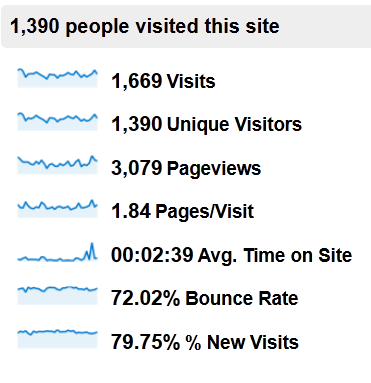
A startup without measurable analytics goals is truly a ship without a rudder, which is what makes Google Analytics such an important part of any new business’s growth and development.

To get started making sense out of all the information this program provides, check out the following list of the most important metrics to consider when integrating Google Analytics into your startup’s website:

1 – Overall Visitors

The number of overall visitors arriving on your site is a blunt metric, but it’s one that you should pay attention to nonetheless. Ideally, as your startup grows and your marketing strategy develops, the number of visitors arriving on your website should go up month after month.

To view your overall visitors, log in to Google Analytics and click on the “Audience” heading in the left-hand sidebar. The default “Overview” will provide total visitor counts for the last month (you can adjust the reporting period using the calendar feature in the upper right-hand area of the display):

S24_01Of course, overall visitor counts don’t paint a realistic picture of the quality of your traffic – it’s entirely possible to attract more of the wrong type of visitor, artificially inflating these numbers. Keep an eye on this statistic, but be sure to pair it with some of the related metrics below for a more complete understanding of the quality of your traffic.

2 – Bounce Rate

If a website visitor arrives on your startup’s website and then leaves from the same page, this is considered a “bounce.” A lower bounce rate is better, as this indicates that visitors are engaging with your site and finding value that encourages them to stay.

Pay attention to both your overall bounce rate and the bounce rate of specific pages. Visitors who are arriving on your home page and then leaving obviously aren’t finding what they’re looking for, while visitors who land on your opt-in page and leave to subscribe should naturally have a high bounce rate.

However, since your overall site bounce rate can play a role in how your startup’s website is ranked in the search engines, it’s a good idea to set a goal of reducing this metric as much as possible.

3 – Average Time on Site

If your startup is driven by content or social engagement (as in the case of blogs and startup social networking sites), average time on site is a critical metric.

To boost your average time on site, consider taking any of the following actions:

  • Include internal links that direct visitors to other interesting pages on your site
  • Use “related posts” plugins or scripts to display other relevant content to visitors
  • Make use of embedded videos, which naturally require users to stay on your site longer
  • Develop interesting, “link bait” style content that captures reader attention

When implementing any of these tactics, be sure to record your baseline average time on site to see which techniques have the biggest impact on improving this metric.

4 – Conversion Rate

On the other hand, if your startup is more sales-oriented than engagement-focused, your key analytics goals should be based around how many visitors convert into buyers – not necessarily how long they remain on your site or how many pages they read.

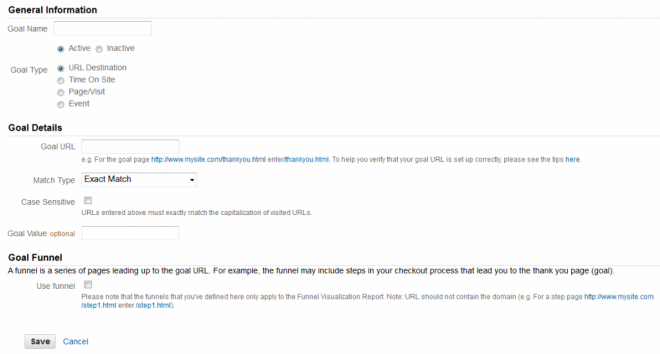
To track conversion rates within Google Analytics, you’ll first need to set up “Goals”, which allow you to specify the parameters that indicate a successfully completed conversion.

If you sell a single product, click on the gear icon in the upper right-hand corner of your Analytics dashboard, navigate to the “Goals” tab within your site’s profile and click “Add Goal”. Select the “URL Destination” goal type, enter the URL of the thank you page a visitor lands on after purchasing your product and then enter the purchase price of your product into the “Goal Value” field:

S24_02

Setting up your goal in this way will allow Google Analytics to track the number of visitors that purchase your product and the total value of your overall sales.

If you sell multiple products on your site or if you use a multi-step sales funnel that pitches visitors on upsells or additional purchases, Google Analytics can still capture your conversions data, although it will require a few extra steps to set up. The following help articles from Google Analytics will show you how to perform advanced conversion goal tracking:

5 – Traffic Sources

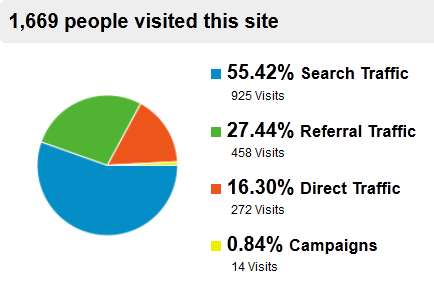
Another interesting metric that all startups should consider is the percentage of visitors coming in from different traffic sources. To view where your visitors are coming from within Google Analytics, log in to your dashboard and click on “Traffic Sources” from the left-hand menu bar:

S24_03

From the Overview section that appears automatically, you’ll see the percentage of your traffic that comes from each of the four main traffic sources:

  • Search Traffic – Visitors that come to your site from search engine queries
  • Referral Traffic – Visitors that come to your site from links on other websites
  • Direct Traffic – Readers who enter your URL directly into their browser windows
  • Campaigns – Visitors who come from your email marketing campaigns and other indirect traffic sources.

Each of these sections can be broken down to give you more detail on which sites and search keywords are sending you the most traffic. Pay special attention to the top keywords that are sending you search traffic, as this data could reveal potential opportunities to capture additional search engine visitors by targeting related keywords with new content.

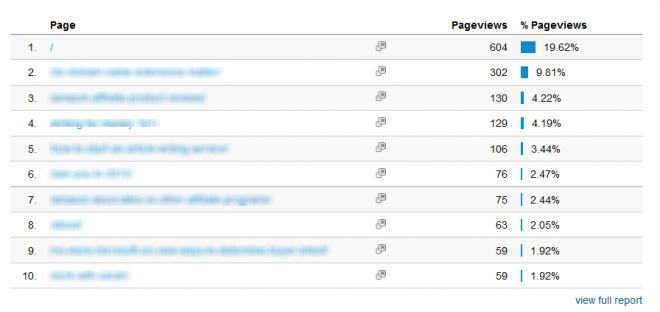
6 – Top Content

Understanding which pages on your site receive the most views can also prove to be interesting data for your startup’s website, as it allows you determine which pages your readers find most engaging and provides possible direction for your future content development.

For example, if you publish content to your startup’s blog that falls into four different categories and find that your readers tend to view articles in one category more than the others, you could decide to develop more content in this category that’s proven most engaging to your readers.

To find this information, click on “Content” in the left-hand menu bar and look for the list of your Top 10 Content Pages within the Overview section:

S24_04

7 – ROI

One final metric your startup should pay attention to when integrating Google Analytics into your website is the overall ROI of your different promotion methods.

So far, we’ve covered how to track sales and measure the income these conversions generate, as well as how to identify which traffic sources are sending you the most traffic. But to truly get the most out of Google Analytics, you’ll want to combine these two metrics in order to determine which traffic sources are sending you the most paying customers.

For example, if you knew that the traffic you received from the organic search results was sending you three times more sales or opt-ins than your social media traffic, you’d know to either focus more of your efforts on SEO than social media or to retool your social networking campaigns to attract different visitors.

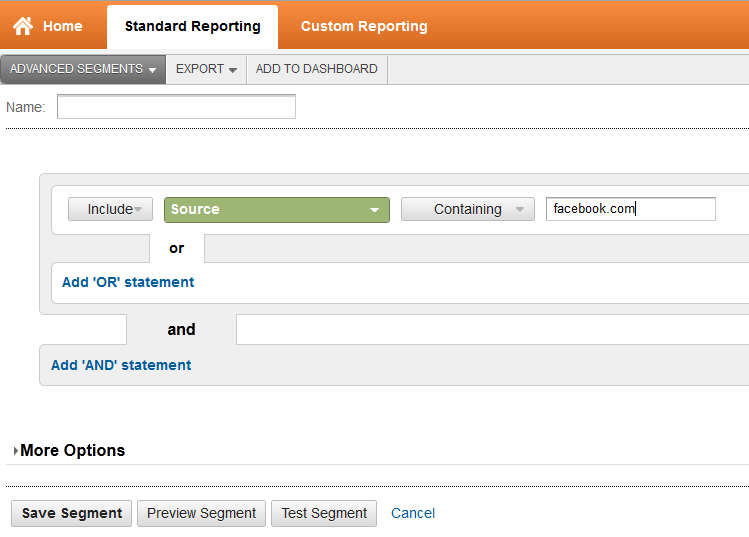
The key to making this connection lies in creating Advanced Segments that allow you to filter your conversion data based on different traffic sources. To do this, click on the “Advanced Segments” from any screen in the Standard Reporting view, and then select “+ New Custom Segment” from the lower right corner of the Advanced Segments screen.

S24_05

Use the “Source” modifier to create a separate Advanced Segment for each of your Top 10 traffic sources, and then apply this filter to your conversions data to see which traffic source is the most profitable for your startup.

Keep in mind that these recommendations only scratch the surface in terms of the full power of the Google Analytics program. However, implementing these tips into your startup’s website represents a great starting point when it comes to harnessing the power of data-driven decision making in order to increase your company’s overall profitability.


Question: How Do I Feature a List or Recommended Items on My Blog (with or without affiliate links)?

Answer: You may have noticed that blogs often feature lists of recommended items, or perhaps the list is composed of the author’s favorite things.

As you learned in the copywriting module, people love lists! And they are also really easy to compose as we all have our favorite books, or music, or tools, or gear, etc.

I’m going to show you the different ways you can feature a list of recommended or favorite things on your site – and also how to monetize them, so that when someone clicks on an item, if they purchase it, you will get a commission on the sale!

Let’s use books as our example, but keep in mind that you can feature anything that you wish – hunting gear, cooking tools, music, movies, sports gear, etc.

Let’s say that you want to feature a list of Books I Love. You’ve already done Module 8, so you want to have an affiliate link to your Amazon Associates account for each book (so you will earn a commission on the sale). But where on your site do you put this list? Is it a fixed Page, or what?

Well, the choice is entirely up to you and depends on how you want the list to appear:

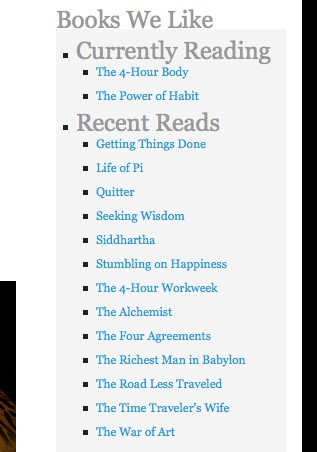
  • If you just want to give the book titles, then your would set it up as a list of CLICKABLE LINKS in the sidebar of your blog.
  • If you want to write only one paragraph about each book, and have all the books together on one page or list, then you would set it up as PAGE.
  • If you want to write one blog post about each book, then you would set each book review up as a single blog post within a BLOG POST CATEGORY.

Let’s get into exactly how you would set up and use each one of these options…

Clickable Links Book List

If you want your Books I Love list to appear as just a clickable list of book titles in your side column, like this:

24_01

then you need to set them up as LINKS in the Settings → WIDGETS section of your blog. Get your programmer to do this, or watch the WordPress how-to video, Creating Links in Module 23 for instructions.

However, if you want to be able to write a description or commentary on each book, then it’s best to set them up either as one Page or as a Blog Post Category.

Book Recommendations on ONE Page

You would set up your book list as a PAGE if you want to just have all the books you love listed on one Page. So your Page for Books I Love would have:

  • All your favorite novels, listed one after the other, with a brief description of why you love them – maybe a paragraph or so per book.
  • Each book title and book cover photo would be hyperlinked with your Amazon affiliate link. So if someone clicks on the product (the photo, or the book title) it goes via your affiliate link to Amazon.

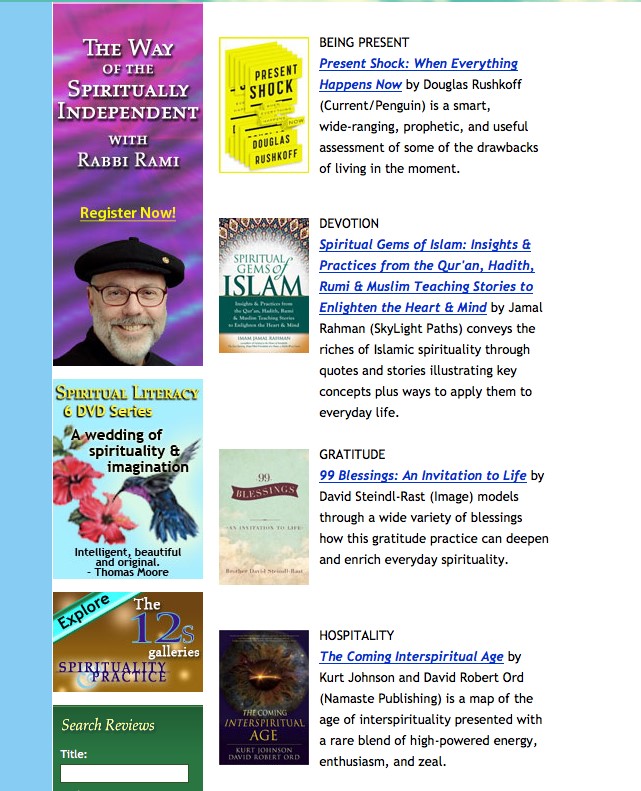
Here’s are two examples of what that could look like.

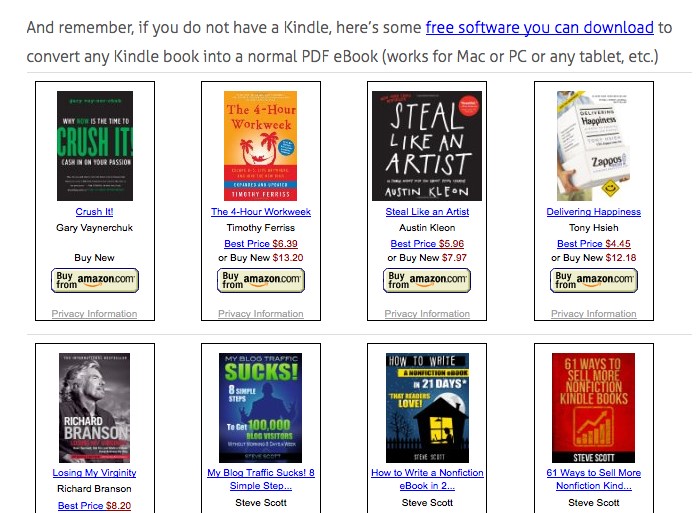
This first site has their ads and affiliate links down the left hand side and then their book list with affiliate links to Amazon for each book on the right hand side. Note that they have uploaded jpg photos of each book cover and then the book title is their Amazon affiliate link for each book:

24_02

OR, your Page could look like this one in Module 1.8 where I have added the actual product listings from Amazon to the Page:

24_03

If you don’t know how to set up a PAGE, then watch the WordPress tutorial video in Module 23, Posts vs. Pages.

Blog Post Category with Individual Book Reviews

Lastly, you could choose to set your list up (Books I Love) as a blog CATEGORY, then you would feature one book per blog POST, where you would write a fuller critique or review of each book. Then of course, you affiliate link the book to your Amazon affiliate acct.

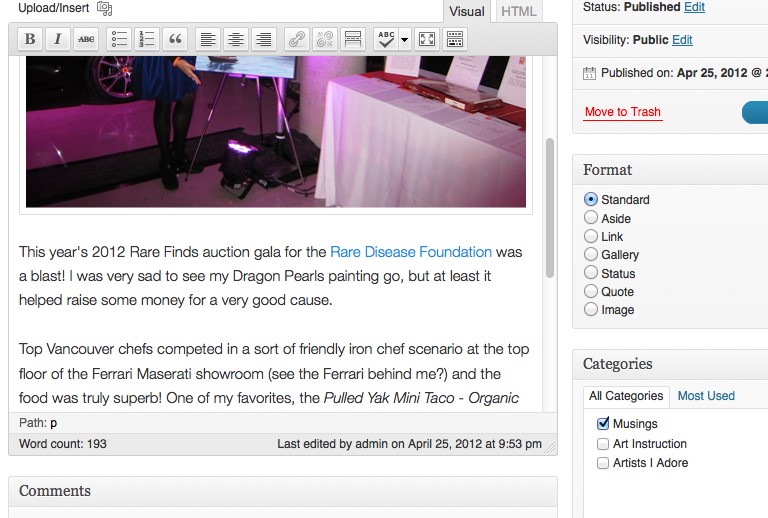
After writing each blog post, you simply click the CATEGORY you want to assign the post to, here’s what that looks like on one of my blogs, see the categories I can choose from on the right hand side (you can see I’ve put this blog post in the MUSINGS category):

24_04

So if this was your blog, you would have one more Category appearing in this list, you would have:

  • Musings
  • Art Instruction
  • Artists I Adore
  • Books I Love

And then you would write a blog post about each book, one at a time, and then classify each post into the appropriate category (Books I Love). This option would also work well if you had a Book Club and wanted to write about your club’s reaction to your monthly book selection – as you would want more space to do this, than just a brief blurb, or a title link.

If you don’t know how to set up a blog post, see the WordPress tutorial video in Module 23 called, Creating A New Post. You may also need to watch the video, Categories and Tags.

So the method you choose simply depends on: How much do you want to write about each book?

  • If you want to write one paragraph about each book, then set it up as PAGE. Click here for the tutorial video on how to set up a Page.

Whichever way you set it up, make sure you have signed up for an Amazon Affiliate account (see Module 8).

And then use your affiliate link for each book (and photo of the book) that you list or write about. This way, when people click through to Amazon to learn more about the book, or to buy it, you will earn a commission on the sale.

Here is my quick video on how to grab the Amazon affiliate link for whatever book or product you want to feature and then how to add the affiliate link to your blog post or page:


Question: How Do I List a Blog Post Summary Instead of the Full Text on my BLOG page?

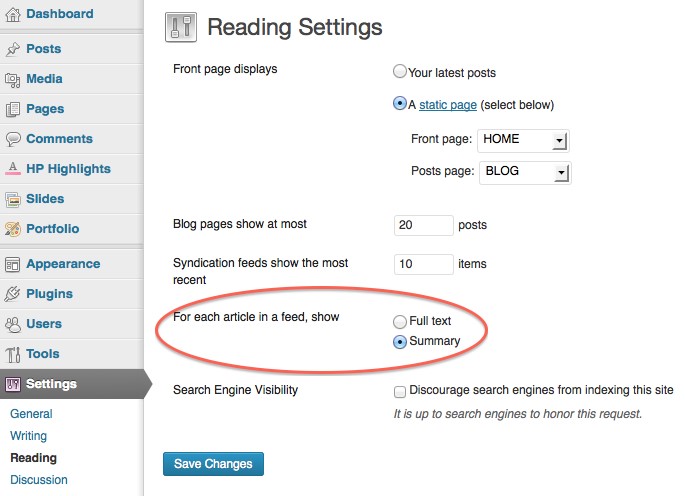
Answer: On your blog page – where it lists all your posts – it may currently be showing the full, complete text of every blog post. But maybe you want it to show only a summary or brief teaser of each blog post. So here’s how you can do that:

Some blogs are set up to do this automatically, so go to:

Dashboard -> Settings -> Reading

And select “Summary” as shown here:

24_06

If that does not work on your particular blog theme, then use this next technique where you can set it manually for each post.

To manually show only the summary on the blog listing page (or if you want a different amount of text shown in the summary) you will then need to edit the post.

Choose one of your blog posts and go the Post Editor for that post in your Dashboard. Note: If you don’t know what any of these words mean, then you first need to watch the basic WordPress How-To Videos in Module 23.

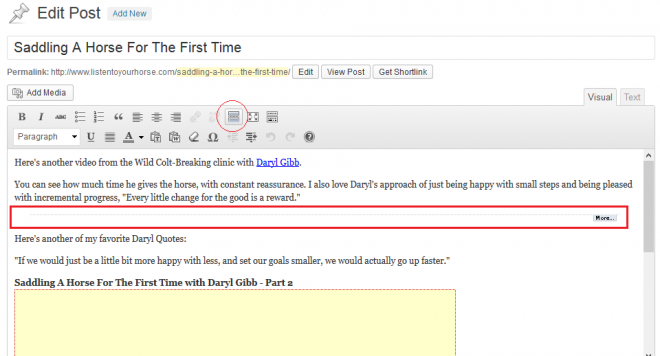
Put the cursor where you want to break the content of your blog post and separate the portion at the top that you want to comprise the summary, or teaser.

Then click the icon highlighted in the screenshot below.

24_07

And you will then see a horizontal line with the ‘more’ link (outlined in red above) – indicating where you have set the summary text. That’s it.

Only the summary will now show (the portion of text above the MORE link) and if they click on the “more” or the blog post title, then those will link to the entire contents of the blog post, on its individual blog post page.


Question: Is there a way to automatically convert my blog posts to a newsletter or email and broadcast that out to my email list?

Answer: Yes there is! You can save yourself a whole lot of time and work by automating this process. It’s called RSS-to-Email. An RSS-to-Email service watches your blog’s RSS feed. When it sees a new post on your blog, it pulls the content from the feed, drops it into a template and emails it off to your subscribers.

Most services accept subscriptions from visitors, verify their email address, and manage opt-outs for you. Once you’ve set it up and customized the look of your emails (or newsletter), it is relatively hands-free. If you signed up for GetResponse, here’s how it works:

Mail Chimp and Aweber also have this functionality. And you can choose to import your main email list to the RSS-to-Email campaign, if you wish.


Question: How do I make a group call using Skype – with more than 2 people and can I share my computer screen with them?

Answer: For all questions like this, it’s best to go to the provider’s website and search their FAQ or user instructions – since instructions will change as the provider upgrades their software, or changes functions. But for now, here’s the detailed instructions on how to do this for Mac:

https://support.skype.com/en/faq/FA10809/making-a-group-call-mac

Or for Windows PC:

https://support.skype.com/en/faq/FA2831/making-a-group-call-windows-desktop


Question: How do I make my YouTube Channel Art big enough, or format it properly?

Answer: YouTube channel art must be 2120 x 1192 pixels minimum. The easy way to format one of your photos or images so that it is this size (if you don’t have specialized photo editing software) is by using a browser-based tool to create your YouTube channel art.

Watch this video and it will show you exactly how to do this. BUT important to keep in mind, when you go to File → Page Setup, here is what 2120×1192 pixels works out to in inches or centimeters: 29 inches x 16 inches OR 75 cm x 45 cm. Once you know how to do it, it will take you less than 5 minutes!


Question: I’m in Australia, who is the best merchant provider for processing credit cards on my site?

Answer: Have you already looked at WorldPay? Also, we always have 2 active payment processors at any time, in case one goes down or glitches (which has happened). So you may want to also get a back-up in place to your bank or main payment processor anyway.

These Aussie providers look good

http://www.eway.com.au

http://www.securepay.com.au

And this may be useful (keep in mind this site is owned by Merchant Warrior):

http://www.paymentgatewayaustralia.com/reviews/australian-payment-gateways-reviews

And here’s their bank comparison:

http://www.paymentgatewayaustralia.com/reviews/australian-bank-comparisons

Basically, you will have to do your research and pick the best processor for your particular situation, needs, sales volume, etc.


Question: Why is there no information in LTYF about Metatags?

Answer: This is because a WordPress blogsite does not need metatags – WordPress has done a lot of the SEO for you. As long as you have installed the All In One SEO Pack as recommended – and then you fill out the fields for each post, you’re good!


Question: What about assigning tags to my blog posts? Are they important?

Answer: There are two ways to organize your blog posts on WordPress: tags or categories. One is not better than the other from a SEO (search engine optimization) perspective. It just pretty much depends on whether you prefer to use categories, or tags. Personally, I find tags look messy and confusing on a blog, so I’ve always used categories to organize my posts. Using categories also forces me to keep things simple and I feel this makes it easier for my readers. But here is a comprehensive answer:

http://en.support.wordpress.com/posts/categories-vs-tags/


Question: Which membership plugin should I use that integrates with my shopping cart and affiliate program?

I am having some technical challenges at the moment, but am trying to sort it out. I am planning to use Optimizepress for my membership site, but just found out it does not integrate with Premium Webcart, which I wanted to use for the Affiliate system. Wondering if you have a quick recommendation for me? They integrate with 1shopping cart though… but I think they have no affiliate program.

Answer: I would check out WishList Member for your membership site (it is the most robust and is the one I’m using for LTYF) and I believe that it integrates with Premium Webcart (although I don’t recommend Premium Webcart as their customer service is really bad and their system has some significant glitches). You could keep OptimizePress just for your landing/sales pages.

For your stage of business though, I would look seriously at either 1ShoppingCart (which does indeed have an affiliate program) or Infusionsoft – shopping cart, affiliate program, email marketing platform, landing pages etc. all-in-one. And it integrates with WishList Member. Module 10 has all the details on each option.


Question: WordPress is deleting my coding for videos or affiliate links when I save the post – help?

When I click Preview, it doesn’t show the Amazon affiliate links. They’re showing up in text, then disappearing when I save.

Answer: For videos and other code, you have to save in TEXT mode and then leave it in TEXT mode.

Then you cannot see them until you PUBLISH.

Then you can go in and UPDATE if you need to fix or tweak anything. That’s just the way it is.


Question: How do I record an Audio file using Audacity and export it as an MP3 file?

Answer: This is a question best answered using a demo rather than words! So here are three instructional videos that walk you through the process of installing both Audacity and the LAME MP3 Encoder on your PC and then recording your audio:

Install Audacity

Now that you have installed Audacity, you can go ahead and use it to record and also to export .wav files. But, if you want to export the much smaller .mp3 files (take much less space on your hard drive or iPod!), then you need to first install the LAME encoder.

Install Audacity LAME Encoder for MP3 Export

And lastly, here’s how to use Audacity to record your audio:


Question: How do I embed videos from sites other than YouTube?

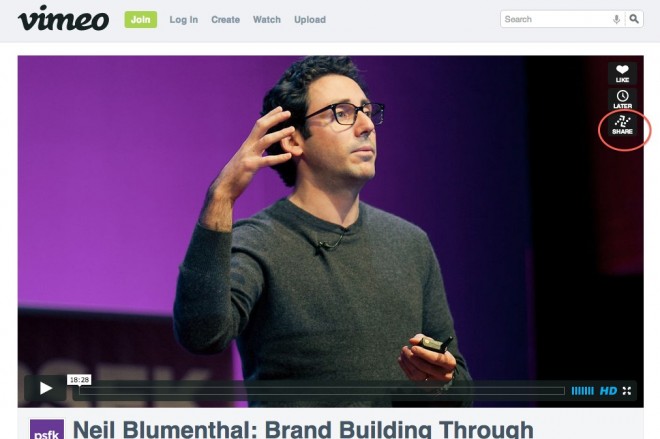
Answer: whichever video platform you’re on, look for the SHARE button – then follow their instructions. For example:

24_08

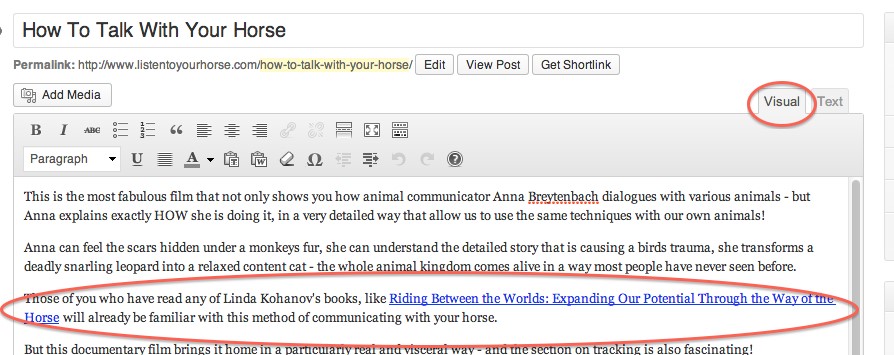
Some video platforms do not allow sharing, they will only let you link to the page. You can see how I handle that issue here:

http://www.listentoyourhorse.com/how-to-talk-with-your-horse/


Question: I’ve watched your video, but I’m still having trouble inserting Amazon affiliate links to my blog. They disappear after I paste them in – help?

Answer: So you have copied the affiliate link from Amazon, pasted it into Notepad or TextEdit. You copy the aff link again from Notepad or TextEdit and then paste it into your blog post, making sure the Post Editor is in TEXT mode. It should look like this:

24_09Then you click SAVE DRAFT.

After Saving, you can switch to VISUAL mode and here’s what it should look like:

24_10

NOTE: You cannot PREVIEW Amazon affiliate links that include a photo, and you cannot preview an embedded video either – both will not appear.

AND when you are ready to publish your blog post, make sure you are in TEXT mode, click SAVE DRAFT, then click PUBLISH, and then go VIEW POST.

Do not SAVE or PUBLISH in VISUAL mode, and do not switch it back to VISUAL mode if you have code in your post. For some types of javascript code, you can never view that blog post in VISUAL mode, or the code will disappear. If the code is HTML, then you can switch back and forth between TEXT and VISUAL after saving or publishing. It’s just one of those annoying things!


Question: How do I create a ‘hidden’ page on my website?

I want to create a page that isn’t displayed as a tab at the top, nor shown as a new blog post, but is still publicly accessible, so that I can link to that page.

Answer: The easiest way to do this is to install this super simple plugin (takes about 40 seconds and no configuration required!) You can either download the plugin from here:

http://wordpress.org/plugins/exclude-pages/

Or the easy way is to go to your blog dashboard: Plugins →Install New Plugin. Then type: Exclude Pages into the Search box. When the search pulls it up, click INSTALL.

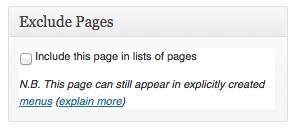
This plugin adds a checkbox: “[] Include this page in menus”, that appears in the right side column of your Page Editor. Simply uncheck the box to exclude the Page from the menu navigation that users see on your site. It looks like this:

24_11

Or, if you have some programming knowledge, you can use the wp_list_pages with exclude option, and this will exclude your page from the list.


Question: How can I extract the MP3 audio from my film in iMovie?

Answer: This can be done two ways…

Export video from iMovie using QuickTime:
go to Share –> Export using QuickTime
Then open the video file in QuickTime Player on your desktop
go to File –> Export
select Format: Audio Only
This will save the audio as an m4a file.
If you then need to convert it to mp3, then either open it in iTunes and convert it there, or import it to Audacity and convert it there.

OR

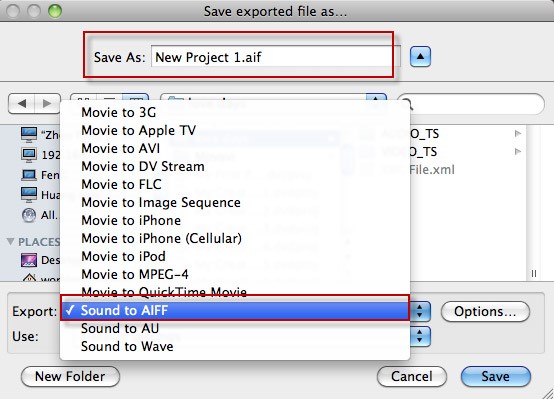
Open up your video in iMovie, then click Share → Export using QuickTime

In the box that opens up, go to the tab down near the bottom of the box that says EXPORT and select the Sound to AIFF option:

24_12

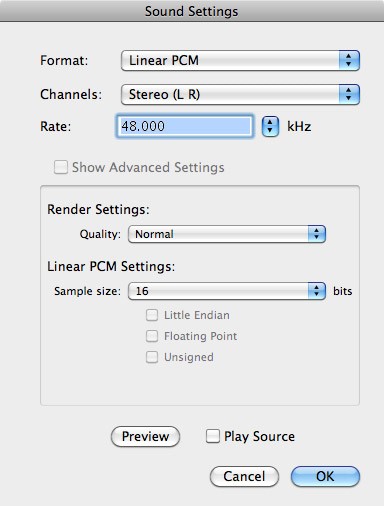
Then click the button next to EXPORT that says OPTIONS and customize the sound settings like this, click OK when finished:

24_13

Now go to the folder where you saved this AIF file and drag the file into iTunes (or use the LAME encoder for PC) and then convert the AIF file into an MP3 file.


Question: How do I convert an AIF or WAV or m4a file into an MP3 file in iTunes?

Answer: If you have a PC, then LAME is an excellent free MP3 encoding software to use. You can use it to either make an MP3 file smaller, or to convert a WAV file to a smaller MP3 file. You can download it and get all the instruction for use here: http://lame.sourceforge.net/download.php

Then here is an instructional video, showing you how to use LAME and Audacity to compress and export MP3 files if you have a PC:

If you’re on a Mac, I am going to tell you how to compress your WAV or MP3 files into a smaller file size – without losing audio quality – using iTunes. I will also share what I found the best compression rate to be: The compression rate will apply to any computer or software (not just iTunes).

First of all, here is a good video that shows you how to use the MP3 encoder in iTunes to make your MP3 files smaller:

After watching this video, I did some testing with an audio recording that consisted of spoken voice with music in the background. The file was created in Audacity using a voice recording on one track and instrumental music accompanying it on another track.

The original recording was done at 160 kbps (kilobits per second – the data transfer speed) and the finished file was 50.3 MB, which is a bit large.

I then tested compression rates for the file and here are my results:

80 kbps – file size dropped to 27 MB, no noticeable drop in audio quality.

64 kbps – file size dropped to 21 MB. The music sounds the same, the voice is slightly more muffled; has mildly lost the upper treble/sharpness range. MAY be preferable though as voice may feel a bit more soothing.

56 kbps – file size dropped to 16.9 MB. Voice is noticeably more muffled; not good quality for the voice – sounds like a cheap recording. And the music has lost its range and complexity of sound.

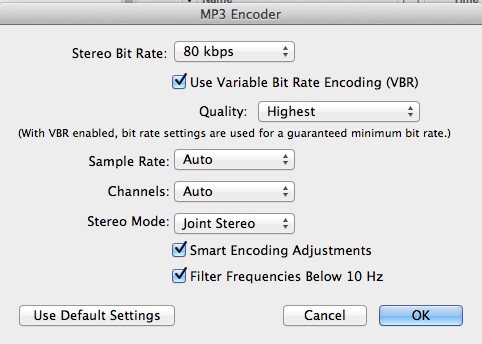
I also kept these setting as follows (rather than MONO as the video suggested) as I didn’t want the recording to play only out of one earphone, or only play out of one speaker in the car!:

Sample Rate: Auto
Channels: Auto
Stereo Mode: Joint Stereo

So it looked like this:

24_14

ONE more thing: I noticed when playing the file on my computer, that I had to have the volume turned way up. Which may be okay for an iPod, but if someone was playing this recording in an MP3 player that is across the room, or in a yoga studio (for example), then I have not left enough volume for them to increase as needed.

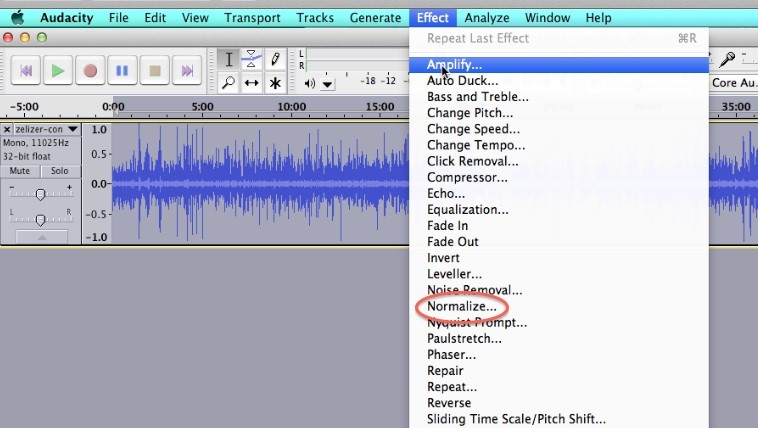
So the way to fix that is in Audacity – I had to go back to the original recording and set the volume level higher before exporting. The current volume needed to be roughly doubled. You can increase the volume on an audio file by first Selecting the entire track (Edit→Select→All) then go to Effect→Normalize the track volume, then Effect→Amplify the track volume:

24_15

Then you export your file again. If you have LAME installed, then you can export it as an MP3 file. But if you don’t (or if it’s buggy) then you can export it as a WAV file, then use iTunes to convert the WAV file to an MP3 using the MP3 encoder as shown in the video above.

By the way, for those of you who want a really thorough understanding of what all the options on the MP3 Encoder in iTunes are, here is the complete explanation from the Apple Help Library:

The MP3 Encoder pane contains the following settings.

Extension: This field displays the MP3 file extension (.mp3) automatically after the MP3 output format is selected from the File Format pop-up menu or the (+) pop-up menu in the Settings tab.

Allow Job Segmenting: This checkbox allows you to turn off job segmenting. It is relevant only if you are using Compressor with distributed processing and with multi-pass encoding. (The distributed processing feature is limited to computers that have Final Cut Studio installed.) For more information, see Job Segmenting and Two-Pass or Multi-Pass Encoding.

Stereo Bit Rate pop-up menu: The higher the Mono or Stereo kilobits per second (kbps), the higher the audio quality and the larger the file size. The most common bit rate for stereo MP3 files is between 128 kbps and 192 kbps. Lower bit rates are more appropriate for sound files containing voice recordings (as opposed to music).

Some example settings and uses include:

  • 32 kbps: AM radio quality, suitable for medium quality speech
  • 96 kbps: FM radio quality, suitable for high quality speech or medium quality music
  • 128 kbps: Suitable for good-quality music
  • 256 kbps and 320 kbps: Suitable for music that is near CD quality

Use Variable Bit Rate Encoding (VBR): This setting varies the number of bits used to store the music depending on the complexity of the music. This can help keep file size to a minimum.

Sample Rate pop-up menu: The number of times per second that the music waveforms are captured digitally. The higher the sample rate, the higher the quality and the larger the file size. Don’t choose a sample rate higher than the rate used originally to store the music or you’ll waste space. CD quality, for example, is 44.100 kHz, so choosing a higher rate when you’re encoding from a CD is unnecessary.

Channels pop-up menu: If you don’t have stereo speakers or if your audio files are monaural, choose Mono (mono files are about half the size of stereo files). If you’ll be listening to your MP3 files using your stereo system, choose Stereo.

Joint Stereo: When this checkbox is deselected, your MP3 files contain one track for the right stereo channel and one track for the left. In many cases, the two channels contain related information. When the Joint Stereo checkbox is selected, one channel carries the information that’s identical on both channels, and the other channel carries the unique information. At bit rates of 160 Kbps and below, this can improve the sound quality of your converted audio.

Smart Encoding Adjustments: Select this to have Compressor analyze your encoding settings and music source, and then adjust settings to maximize quality.

Filter Frequencies Below 10 Hz: Filtering inaudible frequencies results in smaller, more efficient files without perceptible loss of quality.


Question: I’ve recorded an audio but the volume is too low! What can I do?

You may have noticed when playing the file on your computer, that you had to have the volume turned way up. Which may be okay for an iPod, but if someone was playing the recording on an MP3 player that is across the room, or in a yoga studio (for example), then you may realize you have not left enough volume for them to increase as needed.

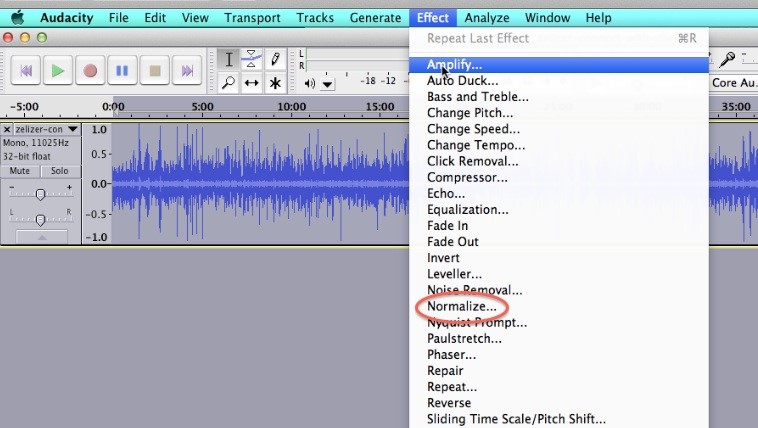
So the way to fix that is in Audacity – go back to the original recording and set the volume level higher before exporting. The current volume may need to be roughly doubled. You can increase the volume on an audio file by first Selecting the entire track (Edit→Select→All) then go to Effect→Normalize the track volume, then Effect→Amplify the track volume:

24_16

Then you export your file again. Make sure you also have LAME installed, so you can export it as an MP3 file.

If your audio is still not loud enough, you might be able to pay a professional audio recording engineer to make it louder for you (use Upwork.com or www.fiverr.com). Otherwise, you will just have to re-record it.


Question: What are the best settings to use to export video for uploading to Vimeo or YouTube?

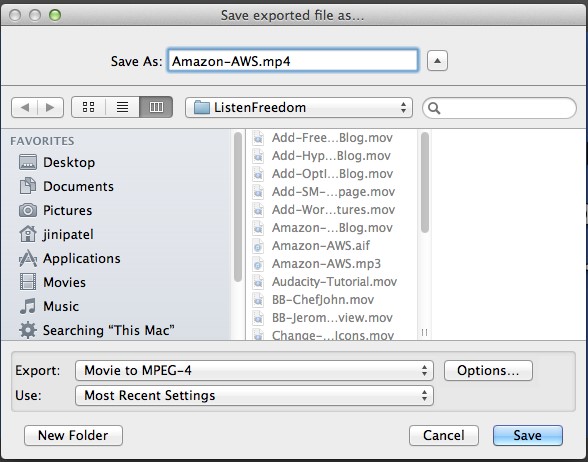
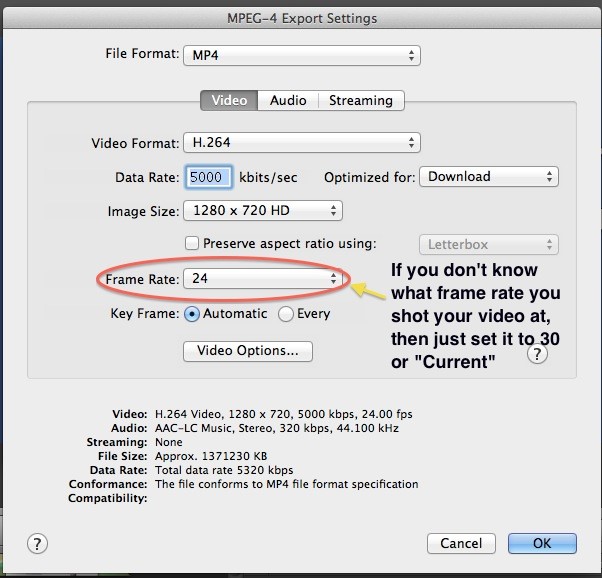
Answer: YouTube says it’s okay to upload .mov files, but in many people’s experience (including mine), it doesn’t work well. Instead, upload in MPEG-4 (MP4) which is also the preferred format for Vimeo. For both YouTube and Vimeo, export using Quicktime and use the following settings:

Go to File → Export as Quicktime → Movie to MPEG-4

24_17

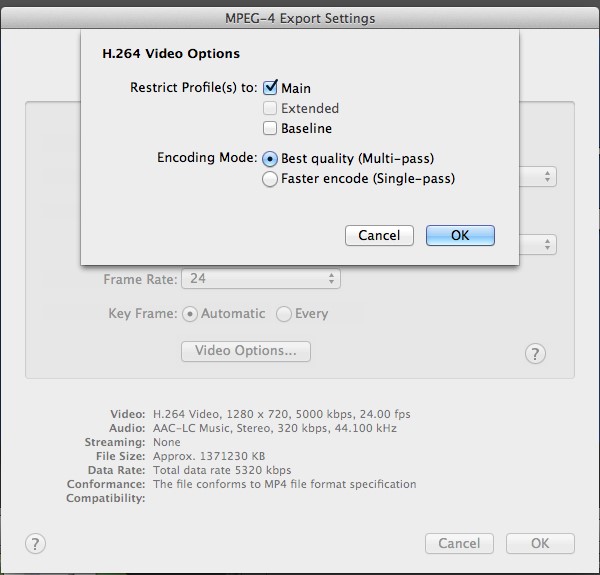
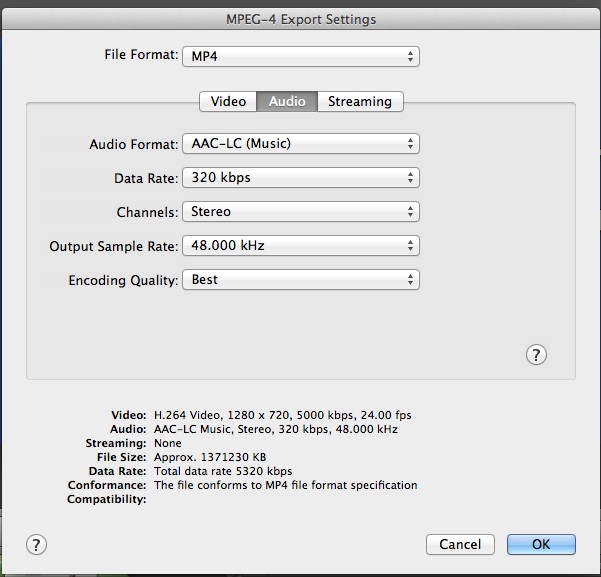
Then click on OPTIONS and configure all the settings to match as shown below:

VIDEO:

24_18

Then click on VIDEO OPTIONS (underneath Key Frame):

24_19

AUDIO:

24_20

OR consult with Vimeo’s guidelines for best video upload settings here:

https://vimeo.com/help/compression


Question: How do I upload an ebook or audio file to my server?

Answer: If it’s a one-time upload that not many people are likely to download at the same time, and the file is not too big, then you can upload it to your blog. See Module 23.13 for the video showing you how to do that.

But if you want to upload a larger file, or one that is going to be downloaded frequently and possibly with numerous people downloading it at the same time, then you’re best to upload it to an Amazon Cloud Server. Here’s all the steps and instructions for how to do that in the easiest, fastest way:


Question: How do I deliver my eBook, or my audio to my customer after they have purchased it?

Answer: This video shows you all the steps involved and how to get it done the quickest, easiest way:


Question: How do I set up an autoresponder series or email campaign?

Answer: This video shows you all the steps involved and how everything links together. We are using GetResponse to demo in this video, if you have a different platform, it may look different, but the steps will be the same. For any technical questions, phone your platform provider and have them walk you through it.


Question: Is Facebook making people pay for their fans and followers to be able to see their posts? I heard that Facebook is now only showing about 20% of what I post to people who “like” my page, is this true?

Answer: Yes, this is true. Facebook is looking to increase paid reach and shows content only to a certain percentage of fans based on an algorithm that they developed. The way it works is that Facebook shows the post to 16% of your fans at first. Then, depending on the way the post is received (how many people it engages, how many likes and shares it gets), Facebook may gradually increase the reach of the post.

The algorithm has been in place for about 2 years now. There has been a lot of “buzz” about this lately because Facebook drastically decreased the organic reach. Facebook has responded to this wave of criticism and will increase the reach of links to articles in it’s algorithm, so smart Facebook users will adapt accordingly. All free social media platforms change and develop over time – usually to make the platform more attractive to advertisers. So you need to constantly keep an eye on new trends and changes and think of how you can make sure you reach as many people as possible.

If a fan wishes to see ALL the posts of a given fan page, he can do so by changing his settings. You could do a post informing people that they can change their settings to receive all your fan page posts, and then boost that post to all fans, to make sure everyone sees it. However, from experience, we know that this process (getting people to change their settings) is not very effective.


Question: Is it possible to put html links into a pdf document?

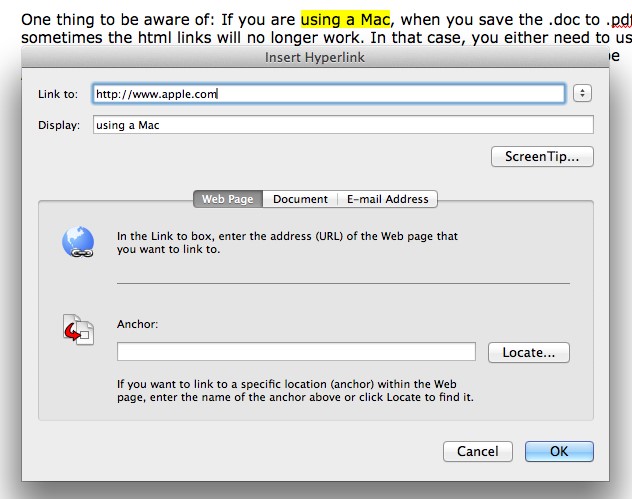
Answer: If you have Adobe Acrobat, you can add the html links to the pdf. Otherwise, you need to add the html link to the Word .doc before you save it as a pdf.

  • Open your word document in Microsoft Word
  • Highlight the text you want linked
  • Then go to INSERT –> HYPERLINK
  • Make sure the web link includes the http://www. part too! Like this:

24_21

One thing to be aware of: If you are using a Mac, when you save the .doc to .pdf, sometimes the html links will no longer work. In that case, you either need to use a PC, or send the word .doc to a friend who has a PC! Or, you have to use Adobe Acrobat to add the html link again to the pdf.


Question: How do I install WordPress on my GoDaddy hosting account?

Answer: You can contact GoDaddy Support to walk you through it over the phone: 480-505-8877 or 1-866-938-1119. Or simply follow these easy instructions:

WordPress® is a personal publishing platform, or content management system, that you can use to set up a blog on your website.

To Install WordPress on Your Hosting Account:

Log in to your Account Manager.
Click Web Hosting.

Here are the rest of the instructions, based on the type of hosting you have. You can tell this by the second word in your hosting’s description beneath your hosting account’s domain name, e.g. Deluxe Web correlates to Web (Hosting Control Panel).

Web (Hosting Control Panel)

Next to the hosting account you want to use, click Launch.
In the Popular Apps section, click WordPress.
Complete the on-screen fields, and then click OK:
Domain — Select the domain on your account you want to use.
Directory — Enter the directory after the domain name where you want to install WordPress. If you want the domain name itself to use WordPress, the directory field should only have “/” entered.
Enter a Username, a Password (and its confirmation), and an Email Address.

WordPress will be installed to your hosting account with the options you selected within 24 hours. When it is complete, you will receive a confirmation email.

Linux (cPanel)

Next to the hosting account you want to use, click Launch.
In the Web Applications section, click WordPress blog.
Click Install this application.
Complete the on-screen fields, and then click Install.

Windows (Plesk)

Next to the hosting account you want to use, click Launch.
Go to the Applications tab.
In the WordPress section, click Install.
Select the domain name you want to use, enter the directory where you want to install WordPress, and then click Install.


Question: How do I label my MP3 Audios with my name, album, etc.?

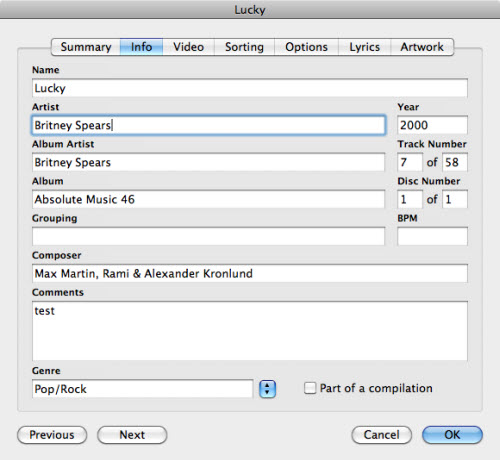
Answer: These labels are called iTunes ID3 tags (or iTunes tags). They are the metadata or information like artist, album, genre, year and so on. In iTunes, the tags are mainly used to categorize your music, display information for the files, sort the files and be used by Smart Playlist.

iTunes Built-in Tag Editor

Editing tag in iTunes is very convenient. Directly highlight a song and click once to edit tags one by one. Plus, iTunes also allows you to edit the tag information with the built-in info editor. To access it, right click on the file you want to edit the tags for, and select Get Info (or just press Command + I on keyboard).

itunes-get-info

Tag Edit Multiple Songs in iTunes

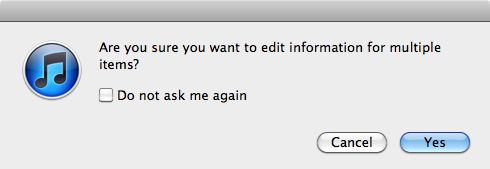
You could also edit the tags for multiple songs. It’s similar to editing the tags of a single file. The difference is you need to select multiple files before right-clicking and selecting the Get Info command. You can hold down Command or Shift key and click to select multiple files, or use Command + A to select all files.

edit-multiple-tags

Tips: If you want to clear an iTunes tag such as a comment, simple uncheck the box before the comment text field and choose OK to apply to selected files.


Question: How do I add an anchor or jump link which makes a word a clickable link which links down to a specific spot on a the same page (or a different page) – not just to the top of the page?

Answer: This is a great way to efficiently send your readers to relevant content without forcing them to scroll through unrelated information.

I like to have two windows open to do this. In the first window, I have the page I’m currently working on (in Edit mode) – we’ll call this the MAIN page. In the second window, I have the page that that link will go to (also in Edit mode) – let’s call it the JUMP page.

In this example, let’s say my MAIN page is about different kinds of bears, and because pandas aren’t technically bears, I’m not discussing them here. I have, however, mentioned them in my FAQ page, and explained the phenomenon of them being mistaken for bears all the time. I want to send my readers there with a link, but I don’t want them to have to scroll through miles of unrelated FAQs before they find the relevant part. I want to add a hyperlink to my MAIN page that sends them to a specific part of my JUMP page. Got it? Here we go.

1. On my JUMP page (the second window) I switch to text mode and locate the section I want my anchor or jump link to go to. Ex: Are Pandas Even Bears?. I choose a simple anchor word, say “notbears”, and add this little html tag before the line I want to jump to so, it looks like this:

<a name=”notbears”></a>Are Pandas Even Bears?.

I press Update while still in TEXT mode (don’t go back to visual mode).

Then I go to my MAIN page, the first window. I stay in visual mode for this because it’s easier. I highlight the text I want hyperlinked (“click here to read why I’ve excluded pandas”) and click the link icon in my toolbar. When the window pops up, I paste in the URL to my JUMP page and at the end of it, without any spaces, I type in #notbears. It looks like this:

http://www.myFAQpage.com/#notbears“.

I also select the “open in new window” box, then I click the Update button.

Then I Update the changes on the whole page and go to “View Post” to check if my link is showing up properly, and that when I click on it, a new window opens up my FAQ page, partway down, with “Are Pandas Even Bears?” at the top of my viewing window.

Note: If I want to do this part in text mode instead, I wrap my hyperlink text like this:

<a href=”http://www.myFAQpage.com/#problem” target =”_blank”>click here to read why I’ve excluded pandas</a>.

The target=”_blank” part means that it opens in a new window; if you don’t want a new window to open up, leave it out.

Note: Now, you can also add an anchor link to jump your readers further down on the same page; say you have a long wall of text and instead of separate pages for each chapter or section, you want to make clickable headlines at the top of the page that can send the readers to the appropriate section further down in your text.

In this case, you only need to edit one page, in one window. Stay in text mode for this, but otherwise it’s the same process.

Add the <a name=”anchor”></a> html before the part of the page you are jumping TO,

and <a href=”http://www.yourwebsite.com/#anchor“>hyperlink text here</a> around the text you are linking FROM (switch out “hyperlink text here” for your own title).

Unfortunately, you can’t jump from your site to a specific part of someone else’s site without editing THEIR site. In this case, when you have no control over the page you’re linking to, you have to manually tell your readers “scroll down half-way” or “scroll to Headline B” in order to direct them to the relevant information.


Question: Is there a FREE shopping cart I can use?

Answer: PrestaShop is a great little shopping cart that is used quite a lot in Europe (but can be used in any country) and it is open source software, i.e. free! PrestaShop comes with an easy, back-end content management system and if you are tech-savvy, you can install it on your server yourself.

For me, I would want to have my programmer do this for me. It can be integrated with your WordPress blog, so that you can feature products right in your blog posts. Or it can stand alone as a separate site, or, as a separate page on your site.

As long as your server has the capability to host PrestaShop (check this first), that’s all you need. Here are two detailed beginner’s guides to installing PrestaShop that you can either use yourself, or send to your programmer:

http://www.1stwebdesigner.com/tutorials/beginners-guide-prestashop/

and

http://www.siteground.com/tutorials/prestashop/prestashop_installation.htm

Next, here is a link to some great free PrestaShop Themes, again, choose one and then either send to your programmer, or do it yourself:

http://smashfreakz.com/2013/04/free-prestashop-themes/

And lastly, here is a free theme that integrates WordPress and PrestaShop together:

http://www.smashingmagazine.com/2011/06/26/free-prestashop-and-wordpress-e-commerce-theme-velvet-sky/

How Do I Increase the Value of My Existing Products and Services?

Singles or Packages

So now that we’ve got the ball rolling and you’re thinking about packaging up your solutions, ideas, information, entertainment and products, what other ways can you think of to increase the value of your products and services?

There really is no end to the variety of ways you can package and position your content or products. Let your creativity run wild, let yourself brainstorm at random and see what you come up with.

The important thing is to pick the one that either draws you most strongly, or is the easiest, and start with that. Perhaps you want to start with just a PDF-format eBook, or a single MP3 audio. When you’re just starting out, it’s nice to pick something easy so you can gain confidence, satisfaction and fluency in your new business.
Once you’ve done a few of these easy products (remember, you can offer these for free or monetize them, your choice), then simply put them together and monetize them further by creating a larger package, for example:

  • An eBook and an audio recording
  • A teleseminar followed by a workshop
  • A webinar and an eBook
  • An eBook (or printed book) and a DVD (can be a private online video)

A typical product development progression – and there are a number of courses online that charge you upwards of $2,000 just to learn this sequence – that has been repeatedly proven to work as the price point escalates is:

Freebie

eBook

Live workshop teaching eBook contents

Record that live presentation and offer as an Audio Course

Video that same presentation and offer as a DVD course

Offer chance for a Mastermind group with you, or private coaching.

Your Upsell Funnel

This progression (also called an upsell funnel) works because it cashes in on the relationship you have developed and are developing with your customer.

Your eBook is priced cheaply because that’s likely the first purchase someone makes – let’s call him George. Keep in mind that George has been on your email list for some time already, he’s already received some nice freebies from you, and maybe he has posted a question on your blog or Facebook page and you answered him promptly. So George is now ready to trust you and the quality of work you’ve shown him you provide, by giving you around $10.

George reads your eBook, which is incredibly helpful, so he feels really connected to you and you’ve helped him make a positive shift in his life. shopping-cart-smallSo when he gets your email offering your helpful tools and information in audio form, packaged together with two or three freebies (expert interviews, or an in-depth teleseminar on one specialized aspect) of new, exciting content for $27 or $37 or $47, is he likely to purchase? Yes, you’ll get a pretty good conversion rate with that offering.

After a few months – keeping in mind George is still on your email list and has been receiving great content and occasional freebies from you all this time – you email George again and offer him the DVD course for $97 or $197. Turns out George’s preferred method of learning is visual – or maybe he’s been telling his wife all about his journey and what he’s learning from you, but she only like videos. So George sees this as an ideal opportunity to bring his wife on board.

After another few months, you now offer George the chance to attend a workshop with you. You offer him the chance to meet and be with you in person for $797 or $997, or to attend the same workshop online for $497. George is excited – maybe his Aunt lives in San Diego where you’re holding the live event and he chooses to go there. Or maybe he’s got small kids and can’t travel, so he decides to treat himself to your online workshop instead.

At the end of the workshop (live or online) when everyone is jazzed up from the experience, you offer them the chance to work directly with you, for an entire year. You only have 15 spots available for this incredibly exclusive and unique experience and the cost is $3,997 – $9,997 for the year.

This process is called a sales funnel, or upsell funnel, and it looks like this, below. Notice how the top of the funnel is very wide, because you have the greatest number of people there. As your people progress through your upsell, less of them may purchase, but that doesn’t matter because your revenues are increasing:

You may have 2,000 people buy your eBook for $9.95 and only 10 people purchase your coaching, but you will make more from those 10 clients than all your eBook purchasers together.

However, if you have a product funnel like this in place, it’s ideal because you get the revenue from both your eBook AND your coaching clients and everything in-between – so it’s all good!

Keep in mind though, that you have to balance this revenue model against your own personal likes and dislikes.

If you loathe coaching people one-on-one, for example, then no amount of money will make up for that. In that case, you’re better off focusing on digital products and online training courses. Perhaps you can find a coach you feel confident referring people to, and you take a commission on referrals. Or you train someone to coach people instead of you, and you pay them a fixed hourly rate. There is always a way to stay true to your desires and still bring in the cash – don’t hesitate to go outside the box and find it.

Do you have enough ideas now to brainstorm what your Upsell Funnel could look like? Go ahead and fill it in – don’t worry, you can always change it later!


What might your upsell funnel look like? What could you offer for free, and then progress down the funnel from your cheapest paid product or service to your most expensive?


How Do I Sell My Products Into China?

Selling Your Products To Chinese Consumers

Now, for those of you who have already been selling physical products for a while – either from a retail, or online store – I want to tell you about a way to take what you’re already doing and boost it to the next level.

Take a look at this screenshot from Alibaba.com and you’ll see that vendors from different countries are sourcing/manufacturing products from certain countries and then selling into other countries. Like the wheatgrass vendor from the Netherlands, who sourced raw materials from China and is now selling it into the US and also back into China! It’s a completely fluid, wide-open process:

Jack Ma (Ma Yun) is the founder of the $200 billion Internet giant, Alibaba Group. Jack’s story is a good one to kick off this topic because he really embodies the LTYF ethos! Jack failed his university entrance exam three times. He applied to 30 jobs when he was looking for work and was rejected from all of them, including a job at KFC where 24 people applied and they hired everyone but him. He applied to study at Harvard a total of 10 times and was rejected every single time.

When the idea came to Jack to start Alibaba, he gathered 17 of his friends in his apartment and pitched the idea for hours. Only one friend thought it was a good idea. But the next day, he decided to officially start his company anyway. Knowing that those 16 people couldn’t fully see his vision (yet), he trusted in himself that his vision was a solid idea, and he figured it’s better to try and fail, then to never move forward from the idea stage.

He launched his first basic webpage in 1999 at 9:40 am and 3 hours later he’d received 5 emails (he didn’t even know what email was) – people were exclaiming that this was the first website they’d seen from China on the Internet! Now, Alibaba processes 60 million transactions per day.

Be sure to pay attention at 28:40 where Jack outlines how YOUR business could be selling into China with easy access – and why Chinese consumers need you! So even though Alibaba Group (which also includes Tmall and Taobao) is just one of the Chinese E-commerce Platforms we’ll be looking at – everything Jack says holds true for all of us thinking about selling products into China.

Are you inspired, excited? Now let’s go a little deeper into Jack Ma’s goal to support small businesses (your business!) sell their products to Chinese consumers. Again, it doesn’t matter which Chinese e-commerce platform you end up using (Jingdong Group, Amazon, Alibaba Group), the same concepts apply:

Okay, are you ready to explore what and how YOUR business can sell its products into China? I sure was after watching these videos!

But if you’re anything like me, your time is likely already tight and taking a few weeks to research the different Chinese e-commerce platforms, find out how they work, which of your products would be best to list, how the listing process works, setting up your bank account etc. is not something you likely have time for.

Selling Retail or Wholesale To China

Well here we go again, where I am going to give you information right here that is worth the entire price you paid for LTYF! Yep, I’m going to hand over the keys to the kingdom on this one. And we’re going to go deep into each of the six Chinese online marketplaces, whether to sell retail or wholesale, how to set up a Chinese bank account, how to warehouse your products in China, how to handle shipping within China, or to China from your country, everything!

I’m also going to open up my Rolodex and give you the name and contact info for my company’s agent in China. Talk about plug ‘n play! Just keep reading, and it’s all here…

We’re going to go through all the major online marketplaces in China, where foreigners can sell their stuff to Chinese businesses and consumers, the pros and cons of each, along with my Chinese agent’s recommendations – who has over a decade of managerial experience in import/export.

The Top 6 Chinese E-Commerce Platforms

When you’re ready to start thinking about selling your products into China – via an online, e-commerce platform – there are six main options to choose from:

  • Amazon.cn
  • JD.hk
  • JD.com
  • Taobao.com
  • Tmall.com
  • Alibaba.cn (also called: 1688.com)

JD.hk and JD.com are both part of the Jingdong Group. There are some important distinctions between the two sites and we will get into those later in detail.

For now, let’s start by understanding the similarities and differences between the 3 different e-commerce platforms that are all part of Alibaba Group: Taobao.com, Tmall.com and Alibaba.cn (known in China as 1688.com). Of course, Alibaba.com is also part of Alibaba Group, but we’re not going to talk too much about it in this unit. Why? Because businesses in China sell on Alibaba.com, but they usually buy on Alibaba.cn

The Similarities

So let’s start by looking at what Taobao, Tmall and Alibaba.cn have in common…

The Same Payment Gateway & Process

Taobao, Tmall and Alibaba.cn all use the same third-party payment platform: Alipay. When purchasing products, customers pay Alipay first, and Alipay holds the funds in escrow, until the customer receives the product(s) and sends confirmation of receipt. Then Alipay will release payment to the seller.

This is the ingenious solution Jack Ma came up with to overcome the biggest objection Chinese consumers have to purchasing online: “How can I trust the seller with my money, how do I know this is not a scam?”

The Same Customer Chat Software

Taobao, Tmall and Alibaba.cn also use the same Instant Messaging (IM chat) software: Aliwangwang; which is also called AliTrademanager (AliTM) or Trademanager (TM). The software is similar to Skype, and can be used to communicate with either buyers or sellers. The most important thing about this IM software is that you can send the chat records to Alibaba Group’s customer service if any trade disputes occur and ask them to resolve the dispute. All communication is in Mandarin, not English.

The Same Keyword Search Function

On all three platforms, buyers are able to search for their desired products using keywords. However, an important distinction is that when buyers search for a product on Taobao, the relevant products from Tmall will also display. But, the reverse is not true and Tmall searches will not display products from Taobao.

Another interesting point to keep in mind is that customers will search by company name, as well as product. So if they know they like your company (maybe they bought something from you last time), they may just enter your company name into the keyword search to see what products you have on offer. Something to keep in mind when setting up your product keyword tags!

The Differences

Now let’s take a look at how each of these Chinese e-commerce platforms differ from one another, as this will help you to narrow down which platform is best for your business to use…

NOTE: Things are going to get detailed and in-depth below, so if you just want the short, to-the-point version, you can skip straight to my China E-Commerce Comparison Chart

Different Business Model

Taobao is mainly a C2C platform (Consumer-To-Consumer, like Ebay), but businesses can still register and sell their products without any negative effect.

Tmall is a B2C platform (Business-To-Consumer, like Amazon), only can be registered as an enterprise user, and must pay an annual fee and deposit before you can start selling products.

Alibaba.cn and Alibaba.com are both B2B platforms (Business-To-Business). The important distinction is that www.alibaba.com is used primarily to sell Chinese products to foreign buyers. Very few Chinese people (or businesses) use it to purchase products from overseas companies.

If you wish to sell your products to Chinese businesses, then you need to list your products on www.alibaba.cn also known as 1688.com

Technically, you can be a business seller, or a personal seller, to register and sell your products on Alibaba.cn. And technically, you do not need to pay any fees to use Alibaba.cn. But, free users are uncompetitive on Alibaba.cn, and no one will see your listings! So both personal users, or business users, need to pay an annual fee plus a deposit to actually be competitive on this e-commerce platform. Realistically though, since Alibaba.cn is a B2B platform, Chinese buyers won’t have much confidence placing a large wholesale order with a seller who is not a proper business.

JD.com is a B2C platform, as is JD.hk and Amazon.cn

Wholesale vs. Retail

Taobao is a retail trading platform and anyone can register as a seller; whether you’re an individual person, or a business.

Tmall is a retail trading platform too, but only businesses can be sellers.

Alibaba is a wholesale trading platform and technically anyone can be a seller; whether you’re an individual person or a business. But of course, personal sellers are not regarded as being as trustworthy or reliable as business sellers.

JD.com is a retail trading platform and anyone can register as a seller; whether you’re an individual person, or a business.

JD.hk is a retail trading platform and anyone can register as a seller; whether you’re an individual person, or a business.

Amazon.cn is a retail trading platform and anyone can register as a seller; whether you’re an individual person, or a business, or a seller on Amazon.us.

*Note: Here’s where we get some of the wiggedy stuff happening: You’ll note that a number of these platforms state that you can be a personal/individual seller, if you like. However, as we go through the registration requirements, you’ll also notice that – except for Taobao – they all require you to have a Foreign (local) or Chinese business license!

Different Consumer Groups

The main consumer group of Taobao, Tmall, JD.com, JD.hk and Amazon.cn is the general public.

The main consumer groups of Alibaba.cn are wholesalers, distributors, dealers, and other businesses.

An interesting thing to keep in mind, is that some of the Taobao and Tmall sellers purchase their products from Alibaba, and then on-sell them to the general public.

Different Suppliers

Sellers on Taobao, JD.com, JD.hk and Amazon.cn source their products from various channels, such as local factories, local wholesalers, Alibaba.cn, and some manufacture their own products.

Sellers on Tmall are usually manufacturing their own products, or private labeling, or licensing products from manufacturers, wholesalers, or Alibaba.cn.

Sellers on Alibaba.cn are usually supplying their own products; they own factories or are the licensors of the product. In most cases, Alibaba sellers are the actual manufacturers.

Different Customer Keyword Search Habits

Obviously, whichever platform you choose to sell your products on, it’s really important to know how buyers are searching for products on that platform – and no, it’s not always the same!

When conducting a product search on Taobao, the buyer usually enters only the keyword descriptors of the product, and they will view multiple examples of that product/item just like they were shopping in the mall. For example, they might type in “waterproof ankle boots woman”

On Tmall, buyers enter keyword descriptors for their desired product, but sometimes they’ll search by entering the seller’s name (brand name) too.

When buyers search on Taoboa, and Alibaba.cn, search results from Tmall will also automatically display (but not vice-versa). So if you can afford to become a seller on Tmall (it has the highest fees), you will gain the widest exposure for your products.

JD.com and JD.hk are both part of the Jingdong Group. When a consumer searches for a product on JD.com, similar products from JD.hk will display and the consumer can select and purchase any of them. However, the reverse is not true; searching on JD.hk will not also pull up products from JD.com.

When a consumer searches for a product on Amazon.cn, similar products from Amazon.us will display, but the consumer cannot directly select and purchase from Amazon.us unless they have a separate user account on Amazon.us When a consumer searches for a product on Amazon.us, similar products from Amazon.cn will not display.

Different Ways to Establish Seller Credibility

As a Taobao, JD.com, JD.hk and Amazon.cn seller, it takes a long time to establish your credibility. It’s a very slow process and you will need to build up a good track record of sales and satisfied buyers.

However, as a Tmall seller, due to the high fees, buyers know that anyone selling on Tmall is a serious business and highly unlikely to jeopardize their deposit by unscrupulous dealings. So credibility and trust issues are non-existent on Tmall.

As an Alibaba.cn seller, it can also take a very long time to establish your credibility, just like Taobao. However, you can choose to pay an annual fee to rapidly improve your credibility rating. In fact, if you do not pay the annual fee, you won’t have any credibility or competitiveness on Alibaba. So even though the annual fee is theoretically ‘optional,’ in reality it’s pretty necessary!

Different Sales Commission Fees

Taobao and Alibaba.cn take no sales commission in return for allowing Sellers to use their e-commerce platform.

Tmall takes a 3% commission on every sale. However, sellers not only make money by selling their goods on Tmall, but if they have a good sales record, it also helps to enhance their brand value. Don’t forget, buyers on Tmall often conduct keyword searches using company/brand names.

JD.hk takes a 6% commission on every sale.

Richard Lui – Founder, JD.com

JD.com takes a 7% commission on every sale.

Amazon.cn takes an 8% commission on every sale.

Different After-Sale Protection

Taobao sellers need to comply with the basic consumer protection provisions of Chinese laws.

Tmall sellers need to comply with both the consumer protection provisions of Chinese law and all the other provisions set out by Tmall; such as sending out goods within five days, the buyer may return product within 7 days with no reason, and so on. There are many stringent return/exchange conditions that Tmall sellers must adhere to. But this is just one of the reasons that sellers on Tmall are instantly trusted. The customer knows that they will be taken care of, no matter what!

Alibaba.cn sellers should comply with both the consumer protection provisions of Chinese laws and any other provisions agreed to between the buyer and seller – as negotiated in your contract.

JD.hk and JD.com have different Return/Exchange policies depending on whether the product is fulfilled by JD, or by you (the Seller). However, if you look at their own policy (where JD is the Seller), it gives you a good idea of what the Chinese consumer expects in terms of good customer service:

And here is what JD requires you – as the Seller – to provide customers:

Registering As A Seller

Now let’s take a look at what each e-commerce storefront actually looks like and what each requires of you to register as a Seller on that platform. Again, if your head starts spinning, remember that I have distilled all this information down into a simplified China E-Commerce Comparison Chart – so just click over there whenever you need to!

Taobao

Any overseas company or individual can register to be a seller on Taobao for free, you just need provide your passport and your Chinese bank account details. You need to have a Chinese bank account, or, an overseas account that will accept payment in RMB (Chinese Yuan) because that is only currency Taobao makes payments in.

OR, you can use Alipay to convert your RMB revenue into US dollars (or 12 other currencies) and deposit to your local bank account, but the minimum conversion amount is USD $5,0000. So, Alipay will not convert and transfer your sales revenue to your local bank account until you have accrued at least USD $5,000 in sales.

Alipay charges 3% commission on each transaction ongoing.

Tmall

To become a seller on Tmall, foreign companies need to apply for a business license in mainland China and open a Chinese business bank account. Tmall sellers also need to contract their own warehouse and fulfillment center in China and be able to accept and process returns to their warehouse. They must offer Mandarin customer service via Tmall’s Aliwangwang chat service.

The fees you need to pay will vary depending on the type of company/brand you are, and your annual sales volume. For example, you would need to pay a security deposit of RMB 100,000 Yuan (US$15,000) if your company has a registered trademark “TM”. But if your registered mark is “R” then you only need to pay a security deposit of RMB 50,000.

In addition, you would also pay an annual fee of RMB 30,000 Yuan. When your annual sales volume reaches more than RMB 180,000 Yuan, you will be returned RMB 15,000. When your annual sales volume exceeds RMB 600,000 Yuan, your annual fee will be completely refunded. After your company’s application is checked by Tmall and you have submitted the appropriate fees, your company can become a Tmall seller.

You can use your local Chinese bank account to collect sales revenue. OR, you can use Alipay to convert your RMB revenue into US dollars (or 12 other currencies) and deposit to your local bank account, but the minimum conversion amount is USD $5,0000. So, Alipay will not convert and transfer your sales revenue to your local bank account until you have accrued at least USD $5,000 in sales.

Tmall also charges 3% sales commission on each transaction ongoing.

Alibaba.cn (1688.com)

If you are a foreign company wanting to sell on Alibaba.cn (more commonly known in China as 1688.com), you first need to submit your local business license and after passing an examination of your license, you will need pay RMB 7,000 Yuan (USD $1100) as a security deposit and RMB 3,688 Yuan (USD $580) as the annual fee. After that, you will become an Alibaba seller.

You can also apply for a Chinese business license if you wish and submit that license instead. After passing the license inspection, you would then pay the same RMB 7,000 Yuan as the security deposit and RMB 3,688 Yuan as the annual fee.

Again, you can use your local Chinese bank account to collect sales revenue. OR, you can use Alipay to convert your RMB revenue into US dollars (or 12 other currencies) and deposit to your local bank account, but the minimum conversion amount is USD $5,0000. So, Alipay will not convert and transfer your sales revenue to your local bank account until you have accrued at least USD $5,000 in sales.

Jack Ma has tried to make it as easy as possible for foreign companies to sell on Alibaba.cn. However, some predict the entry will become more complicated in the next few years. At this point, when you or your agent contact Alibaba.cn about becoming a seller, they will appoint a special staff member to help you out.

JD.com

To become a seller on JD.com, you must have a Chinese business license and a Chinese bank account. JD.com only pays out in RMB (Chinese Yuan). A security deposit of RMB 50,000 (US$7500) is required, along with an annual fee of 12,000 RMB (USD $1800) and JD.com takes 7% commission on each sale.

The seller must clear all products through Customs and must have a warehouse/ fulfillment center in China. You must also be able to accept returns and have Mandarin-speaking customer service available through JD Dongdong chat service.

To sell on JD.com the seller should factor in the cost of international shipping and import tariffs, to the retail price of product. Then the seller should either ship for free to the Chinese customer, or, only require the Chinese customer to pay for the domestic shipping.

If you would like to check out JD.com (in English) and get an idea of the shopping experience they provide, you can go to: http://en.JD.com/
You may notice that they are catering to the Russian consumer, so Russia obviously buys a lot of goods from China online. But prices are in US$, shipping is free (so built into product cost) and shipping time is often listed at 35 days.

JD.hk

You do not require a Chinese business license or bank account to sell on JD.hk. All you need is your foreign (local) business license and a bank account that can accept US dollars, as JD.hk pays out in US dollars. Your bank account can be located anywhere.

A security deposit of USD $10,000 is required, along with an annual fee of USD $1,000, and JD.hk takes 6% commission on every sale.

Product may be shipped directly from overseas to China and temporarily warehoused in the Tariff Free Zone (TFZ). This speeds up the arrival of goods into China. China has a unique exemption where products incurring less than RMB 50 in Customs fees can be sent as “personal parcels,” where the Chinese buyer does not have to pay any Customs fees. So for most products, as long as the value of the product is less than RMB 1,000 it will qualify. However, certain items, like health products, are taxed at 10%, so then the maximum parcel value can only be RMB 500.

So the way Sellers get around this limitation is to split the shipment up into smaller packages – each one worth no more than RMB 1,000. So let’s say a Chinese buyer purchased $700 worth of product from you. You would first ship your inventory of that product to the TFZ. Then you would split that $700 order into 5 parcels and send 5 separate parcels to your Chinese Buyer. That way, the Chinese buyer would not have to pay any Customs taxes when the product is mailed from your warehouse in the TFZ to the buyer. This is common practice and you will often see notifications by Sellers on JD.hk about this.

Obviously, if your products cannot be split into smaller parcels, then you will need to have an agent or fulfillment center in China who can handle the Customs clearance for you. Chinese buyers cannot and will not handle import or customs regulations – they are too complicated! Technically, you could ship these “personal parcels” from overseas, direct to the Chinese buyer, but there may be delays if the parcel is held, or examined by Customs. If you ship them to the TFZ, then you are guaranteed there will be no delays.

The seller must have a product return center in China. The terms of Refund or Exchange can be specified by the seller, unless the product is of poor quality – in which case a full refund, including shipping fees, must be given.

If your application to be a Seller is accepted, then JD.hk will appoint an English-speaking representative for you.

Amazon.cn

To sell on Amazon.cn, you must have a Chinese business license and a Chinese business bank account. Amazon.cn only deposits in RMB Chinese Yuan.

A safety deposit of RMB 50,000 (USD $7,000) is required, no annual fee, and Amazon.cn takes 8% of each sale ongoing.

The seller must clear all products through Customs. And then either have their own warehouse/fulfillment center in China, or, pay to use Amazon.cn’s warehouse and delivery service.

The seller should factor in the cost of international shipping and import tariffs to the retail price of product. Then, the seller should either ship for free to the Chinese customer, or only require the Chinese customer to pay for the domestic shipping.

All products must have Chinese labels. After the buyer signs for receipt of the product, Amazon.cn will not accept the return and the buyer needs to contact the seller directly; who can specify their own Refund/Exchange policy. BUT due to Amazon’s rating system, if you do not treat your customers well, you will get a poor rating and your sales will plummet. There are no online customer service requirements.

When a consumer searches for a product on Amazon.cn, similar products from Amazon.us will display, but the consumer cannot directly select and purchase from Amazon.us, unless they have a separate user account on Amazon.us. When a consumer searches for a product on Amazon.us, similar products from Amazon.cn will not display.

Help! What Would Jini Do?

Now just in case your brain is swimming in confusion right now, trying to sort out all these rules and regs… the pros and cons of one e-commerce platform over another… have no fear! I have simplified and compiled all of this info down into a handy-dandy China E-Commerce Comparison Chart.

As you scan the columns of this chart, you will quickly realize that Taobao.com is the cheapest e-commerce platform to get started with, but JD.hk is probably the easiest.

Selling Retail Products to Individual Consumers – so, if your company is a small to mid-size business that manufacturers, or Private Labels, or purchases products wholesale, that you would like to sell at retail prices to individual consumers; you will have to decide whether ease or cash flow are your priority in getting started.

If cash is tight, then Taobao may look like your best bet. However, you will need a bank account that can accept payment in RMB, and then you will have some issues around converting RMB to your local currency and getting the money out of China – see the section below on Setting Up A Bank Account In China. OR, you can use Alipay to convert your RMB revenue into US dollars (or 12 other currencies) and deposit to your local bank account, but the minimum conversion amount is USD $5,0000. So, Alipay will not convert and transfer your sales revenue to your local bank account until you have accrued at least USD $5,000 in sales.

On the positive side, Taobao is part of the Alibaba Group, so you may also be able to use Alipay to get access to the business funding options that Alipay offers. However, you will also need to set up a Chinese warehouse and fulfillment center.

So, in some cases, you may find JD.hk the easiest way to start, because they will deposit US dollars directly into your current bank account, so you don’t need to deal with converting RMB Yuan and transferring money out of China. If your products are under RMB 1,000 (about US $158) then you also don’t need to set up a Chinese warehouse and fulfillment center. You can ship parcel post directly from your country. So those are two big barriers to entry overcome immediately. Although the fees (US $1,000 annually) and security deposit (US $10,000) are substantially higher than Taobao, in my opinion, the ease of use makes up for it!

If you have a large, robust business, then I would use Tmall – because, although it’s the most expensive, it has the greatest pool of buyers and you will not have to spend the time building up a credible track record. You will also have the funds to set up the banking network needed to convert and transfer RMB out of China – see the section below on Setting Up A Bank Account In China.

Selling Wholesale Products to Business – if your company only wants to sell products or raw materials at wholesale prices to other businesses; then I would use Alibaba.com and Alibaba.cn (1688.com).

Funding Your Expansion Into China

Just to make this option even more exciting for you, as you learned in the second video, Jack Ma is one of the few people who understands the metrics for assessing small business loans. So be sure and check out his e-Credit Line in case you’d like some financing to purchase products or raw materials from Alibaba.

Of course, we also have a few more ways for you to raise capital, so also check those out if you’re in need of expansion funds.

Use My Chinese Agent!

The important thing to keep in mind for any Chinese e-commerce platform is that all of the application forms are in Mandarin. As are all the forms and correspondence for setting up a bank account, or warehouse/fulfillment center, or applying for a Chinese business license. So to apply to become a Seller, you will need a Mandarin-speaking agent to assist you in the process.

If you’re ready to expand your business into China, or you just want to test the waters a little bit, I’m happy to pass onto you the name and contact information for my agent in China. Just email us and we’ll introduce you. And by the way, he recommends setting up your warehouse/fulfillment center in a Tariff Free Zone like Shenzhen, Shanghai, or Dalian to make the arrival of goods (AOG) easier.

Of course, you can also look for and hire an agent yourself through Upwork.com (formerly Elance and Odesk).

Setting Up A Bank Account In China

When you need to set up your Chinese bank account, my agent recommends you use either Bank of China (BC) or Industrial and Commercial Bank of China (ICBC), located in Shenzhen, Guangzhou or Shanghai. He prefers Shenzhen (which you’ll notice above is also a TFZ – Tariff Free Zone). You will need the following documentation to apply for a Chinese bank account for your company:

a) Your business license, registered in China (original copy) – see below
b) Your passport (original copy)
c) You can fly to China and open the account yourself, or you can use an entrusted agent to open the bank account for you.
d) The foreign exchange purchasing amount (i.e. the amount of RMB you can convert/exchange each year) must be examined and approved by the China Foreign Exchange Control Administration.

When you take into consideration the convenience of merchandise exports & imports, entering and departing China yourself, administrative examination and approval, as well as the easy access to warehousing and logistics centers, my Chinese agent recommends you select either the Bank of China (BC) or Industrial and Commercial Bank of China (ICBC) bank in Shenzhen, Guangzhou or Shanghai. He prefers Shenzhen.

When you get into the nitty-gritty of transferring RMB (Chinese Yuan) from your Chinese bank account to your foreign (local) bank account, some interesting regulations can come into play. Obviously, you will have to check with each individual bank when you get to this stage for updated information. But at the time of writing, here’s how it works when you sell your products on Taobao, or Alibaba.cn, or Tmall; using Alipay as the payment processor:

You can only withdraw your money in RMB Yuan at a maximum amount of RMB 1,000,000 Yuan each time (USD $158,000), up to three times per day. Alipay does not charge a fee.

However, due to Chinese foreign exchange controls, you can only exchange/convert a maximum of USD $50,000 worth of RMB per year, unless you get special permission from the China Foreign Exchange Control Administration.

So the way around this law is to open a bank account in Hong Kong (such as HSBC or SCB) and transfer your money in RMB from your Chinese bank account to your Hong Kong bank account. You then convert the RMB in your Hong Kong bank account into the currency of your choice. And then you can transfer it to your local bank account.

OR you can use Alipay to convert your RMB revenue into US dollars (or 12 other currencies) and deposit to your local bank account, but the minimum conversion amount is USD $5,0000. So, Alipay will not convert and transfer your sales revenue to your local bank account until you have accrued at least USD $5,000 in sales.

For this reason, you may prefer to use JD.hk as your e-commerce platform as it is the only platform that will pay out in US dollars, directly to your local bank account – ease of use and reduction of hassle can be worth a lot!

Applying For A Chinese Business License

You’ll notice that some of the e-commerce platforms allow you to submit your application using your foreign (current) business license, whilst others require you to submit a Chinese business license.

Again, you will definitely need an agent fluent in Mandarin to assist you with this process, but just to give you an idea of what’s involved, here’s the  process and materials currently required to apply for a Chinese business license:

1. Certificate of Approval process: send an application to the branch of MOFTEC of the People’s Republic of China in the city you want to apply for a business license. You will get the certificate within 90 days after you are approved.

Materials required for Certificate of Approval application:
a. Your passport
b. Proofs provided by China’s embassy in Canada (including your legal documents and credit certification)
c. Application letter
d. Feasibility study report
e. Articles of incorporation
f. The appointed legal representative can be you or anyone else. Foreigners need to provide their passport and Chinese people need to provide their identity card.

2. Business license: Once you have your Certificate of Approval from MOFTEC, you then send an application to the industrial and commercial bureau in the city you intend to apply for a business license from. If approved, you can get your business license within 15 days after approval.

Materials required for business license application:
a. Certificate of Approval
b. Proofs provided by China’s embassy in Canada (including the investor’s legal documents and credit certification)
c. Articles of incorporation
d. The appointed legal representative can be you or anyone else. Foreigners need provide their passport and Chinese people need to provide their identity card.
e. The certification of your workplace (office, warehouse) in China

All materials must be original copies and written on your company’s letterhead (except your passport). Materials can be written in English, but must be accompanied by the Chinese translation.

Again, my agent recommends Shenzhen as a good location to apply for a Chinese business license.

Whew! Is this super exciting or what?? Or perhaps you’re just plain overwhelmed at this point and you need to let all this information percolate on the back burner for a while. That’s just fine too and this may be a unit you want to come back to in a year or two. Either way, it’s all good!

But let’s come back down to earth for a minute, and whether you are selling digital products, or physical products, you still need to let your own people (on your email list) know about the great stuff you have. So head on over to the next module where we are going to talk about product launches.

How Do I Warehouse, Fulfill & Ship My Physical Products?

This is a huge topic because it’s a part of your business that you can endlessly tweak and improve. So it’s important not to get bogged down in details, or overwhelmed – but rather, to focus on a few very simple goals: fulfilling orders, delivering products and keeping your customers happy! So let’s start at the beginning…

List Your Product For Sale On Your Site

When you are selling physical products, you want to have a really good photo of the product for sale. And make sure people can see a large size image, if they wish. If you’re selling something like furniture, toys, sculpture, or clothing, make sure you provide photos of the back and sides of the product as well.

Once you have your product image(s), simply follow the instructions provided by your shopping cart to get your product listed in your shop. If you don’t have a shopping cart yet, time to get one!

Here’s how we list a new product for sale on my health site, where we use BigCommerce for our shopping cart. You can follow similar steps with whichever shopping cart you are using:

If you’re not using a shopping cart yet, then you can use a PayPal “Buy Now” button on your webpage to process the sale and use your email platform to communicate with your customer immediately following the sale. PayPal has easy instructions for how to set up a “Buy Now” button on your sales page. Or here’s a short video showing you exactly how to add a PayPal “Buy Now” button to your WordPress page or post:

If you’re not using a shopping cart yet, then you can use a PayPal “Buy Now” button on your webpage to process the sale and use your email platform to communicate with your customer immediately following the sale. PayPal has easy instructions for how to set up a “Buy Now” button on your sales page. Or here’s a short video showing you exactly how to add a PayPal “Buy Now” button to your WordPress page or post:

Note: Remember when pasting code to your site, paste it in TEXT mode, not Visual mode. See the WordPress How-To videos if you have any difficulties.

Here’s a tip for you: When you’re creating a sales page with your PayPal ‘Buy Now’ links, try to make the page visually appealing with photos (or even video), not just text. And always have a good photo of what your product looks like – this is very important!

Large or uncompressed photos slow down your page load time (time it takes to appear in the browser window), so always check your page load time (clear your cache and reload the page as if you were a new visitor) to keep your site fast – no more than 2 seconds maximum load time.

Another option, as I’ve mentioned before, is using an eCommerce site like Bandcamp, Etsy, eBay or Amazon to process your physical products, depending on what kind of stuff you’re offering. Each site has its specifics, including the niche it serves, the way it processes orders, the price to you as a user, and so on, so you’ll have to do some research to find the site that works for you, if you choose to go this path.

Remember that selling this way usually requires your customer to already have or sign up for an account with that particular site – which could be a sales deterrent if you’re marketing to people outside of that community. So if you go this route, make sure you also have your product for sale on your site, either in a shopping cart or using a PayPal “Buy Now” button.

Get That Product To Your Customer

Getting products to your customer is called order fulfillment – you are fulfilling their order. Order fulfillment is broken down into these processes:

  • Warehousing physical products – clean, temperature-controlled, insured
  • Receiving orders, packing product into boxes, labeling – correct packaging size and type, biodegradable.
  • Shipping orders – UPS or FedEx courier services, or local postal service – how fast does the person want the order, can you offer any volume discounts?
  • Accepting returns, processing returned stock, issuing refunds
  • Customer service – any inquiries at any point in the above processes.

There are two ways you can handle order fulfillment: You can do it all yourself, or you can sub-contract out everything but the customer service and credit card refunds. Ian (who has handled all orders, shipping, fulfillment, customer service and more for our Health Shoppe since 1999) and I are going to tell you all about it…

Different Ways To Warehouse and Fulfill Your Products

DOWNLOAD and listen to this audio where I interview Ian Thompson about the different ways to WAREHOUSE and FULFILL physical products. Ian draws on his decades of experience managing our order fulfillment process for over 350 products that we sell in our online health store (36 minutes):

Or click PLAY to listen:

[sc_embed_player fileurl=”http://listentofreedom.s3.amazonaws.com/module15-fulfillment.mp3″]
As I promised on this audio, here are the fulfillment companies we use ourselves, but first, here’s a great overview video from EFS that takes you inside a fulfillment warehouse and shows you exactly what happens:


Note: To just watch the fulfillment process, start watching at 1:30 minutes.

The Fulfillment Companies We Use

Alright, this is one of those times that you can pat yourself on the back for becoming a Freedomite! And saving yourself thousands of dollars worth of time and hassle finding an excellent product fulfillment partner – because we’ve already done that for you! It’s open up our rolodex time again… and here are the fulfillment companies that we have tried-and-tested and used for years:

1. eFulfillment Service (EFS)– can warehouse and fulfill anything; supplements, books, DVDs, electronics, etc.

Here’s a complete list of what they provide.

And you can also take a free test-drive of their service,

2. ProPack – can warehouse and fulfill anything; supplements, books, DVDs, electronics, etc.

Here are the services they provide.

Note: If you are using Infusionsoft, it integrates well with ProPack and Ian has developed an API (application programming interface) for Infusionsoft and BigCommerce – so just email us if you need more details on that. If you don’t understand anything about API’s, don’t worry, you probably don’t need one!

Insider Tips On Shipping Products

Product shipping is another area that is fraught with confusion – especially if you’re really trying to do the best you can for your customer. So let’s tune into Ian Thompson again and he will give you all the tips and tricks we’ve learned from shipping worldwide – to over 60 different countries – since 2000.

DOWNLOAD and listen to this audio where Ian Thompson gives you the full details about the wonderful world of SHIPPING physical goods (11 minutes):

Or click PLAY to listen:

[sc_embed_player fileurl=”http://listentofreedom.s3.amazonaws.com/module15-shipping.mp3″]

Now let’s sketch out your plan for selling and fulfilling (shipping) your own physical products from your website. Or maybe this is a module you need to come back to in 6 months or so, after you’ve used digital products to get your revenues up. In that case, make a note to yourself to come back here and click the weblinks for each service, if you’d like to donate the affiliate commissions to charity!


Write out your plan here for moving forward with selling and fulfilling physical products. Which fulfillment companies are you going to contact? Are there any other components you need to set up? Or maybe this is a module you need to come back to in 6 months or so, after you’ve used digital products to get your revenues up…


If you’ve already been selling your products online, or in a physical retail store for a while, you may get just a little super, crazy excited about our next unit – like I did! So if you’re ready to open up a whole new market for your business and products, come on over and learn step-by-step how to sell your products (or products that you wholesale) into one of the biggest consumer markets in the world – China!


How Do I Manufacture My Physical Products?

If you want to manufacture a physical product (as opposed to digital products that can be delivered online) there are a few ways you can go about this.

If you’ve written a book, you can print physical copies, and audio and video files can of course become CDs and DVDs.

You can follow those links if they’re what you’re after, but here we’re going to focus on manufacturing other kinds of products; clothing, supplements, household items, electronics, etc.

Manufacturing Your Own Products

Let’s say you want to manufacture your own invention. Or you want to knit your own funky sweaters and sell those. Or you want to sell t-shirts with your designs on them.

Well, you have a few options:

  1. You can make the product yourself and then fulfill orders yourself, or outsource it. Example: knit your own alpaca sweaters. For this, all you need is a good shopping cart, affiliate program and email platform combined into one, like 1ShoppingCart.
  1. You can hire a contract manufacturer, who ships the finished product to your warehouse. You then ship out individual orders to your customers. Example: supplement manufacturing.
  1. You can use an online, automated production and fulfillment house – an online marketplace – where you just host a shop plugin or link with your name or branding on the shop. Your customer actually orders from the online marketplace and they handle product production and fulfillment. Example: FineArtAmerica or CafePress.

Contract Manufacturers

Depending on your industry, or the types of products you want to sell, you will have to do your own research for contract manufacturers.  Keep in mind that when manufacturing your own products, each contract manufacturer will have a ‘minimum run’ order. For example, if you’re manufacturing supplements, then often the smallest run you can order is 1000 units (bottles). Or if you’re manufacturing clothing, the smallest production run is often 100 pieces.

In that case, you may wish to start out by searching for a product you like that you can private label. Private label means that you don’t have to formulate (invent) or manufacture your own product. You can find a manufacturer whose product you already like and they will manufacture it for you, but they will place your labels on the product, instead of their own. With private label, the order minimums are usually much lower than with contract manufacturing.

Here are some sites with products that you can create online and then have delivered to you, that don’t require a large minimum order:

1. Custom stickers, iPod or cellphone skins and cases
stickerapp.com

2. Custom flash drives, CDs
www.infodistributors.com

3. Books, workbooks
www.48hrbooks.com

4. Custom t-shirts, housewares, mugs, etc.
www.CafePress.com

5. Clothing
amarisas-clothing.com
or
jomsyfashion.com
or
sewingworks.eu

6. Electronics
rbbsystems.com
or
www.ocmmanufacturing.com

To find a specific type of product manufacturer, that doesn’t require large production runs, type this into Google:

small order [insert product here] manufacturers

For example:

small order clothing manufacturers

small order electronics manufacturers

Online Marketplace

If you don’t want the hassle of producing and carrying your own inventory in a warehouse, you can have other companies manufacturer and ship for you – using what I call an online marketplace shop. This is where the online store will take your customer’s order, produce the product, ship it out the your customer, and handle returns. You can either link to these online marketplaces, or you can display (embed) a version of their shop on your site.

Here are some online marketplace shops I have found (or that I use on some of my sites), that you can embed into your site – so people don’t have to leave your site to peruse your merchandise, or to place their order. These online marketplaces handle receiving the order and accepting payment, producing it, shipping it out and dealing with any returns. All of these can ship internationally:

1. T-shirts, hoodies, infant onesies, mugs, travel cups, laptop sleeves, aprons, tote bags, etc.
www.printfection.com

Here’s an example of a Printfection store on my kids’ site:

2. Art prints, canvas giclees, frames, iPod and iPhone cases
www.fineartamerica.com

Here’s an example of the Fine Art America shop widget that pastes right into a page on my WordPress-based art site::

3. Books or Workbooks
www.CreateSpace.com

4. T-shirts, stationery, tote bags, mugs, bumper stickers, infant clothes, iPad cases, etc.
www.cafepress.com

Manufacture Your Products & Sell On Other Sites

Now, if you make your own products, but you don’t want to set up your own shopping cart yet, then these are stores you can use to sell your stuff until you’re ready to have your own shop. You have to handle warehousing product, shipping it and handling returns. These shops just showcase your products and take the orders (process payment):

1. Handmade, vintage, jewellery, housewares, food, etc.
www.etsy.com

2. Books only
www.blurb.com

3. Music, jingles, intros, songs
www.AudioJungle.com

4. Anything new or used
hub.shop.ebay.com

5. New stuff – any type of item. New or used books are also accepted.
www.amazon.com
Note: Amazon also has an option where they will warehouse and ship your product.

6. Crafts, t-shirts, mugs, clothing, jewellery, housewares, etc.
www.cafepress.com

7. Original music
www.bandcamp.com

8. In addition to these big sites above, if you’re an artist or craftsperson, then it’s probably a good idea to also have your stuff listed in one or two of these smaller sites as well:
http://www.craftbizblog.com/etsy-26-sites-sell-handmade-crafts-online/

What About Selling Into Other Countries?

As you may know, if you’re selling your products through Amazon.com – anyone, worldwide, can order from Amazon.com. But, Amazon also has country-specific versions of it’s online marketplace in different countries, for example:

UK – Amazon.co.ukfutureDT
CHINA – Amazon.cn
GERMANY – Amazon.de
and so on.

Each of these countries varies in the way products are listed and managed, so if you think your product(s) would be ideal for a certain market, then you can find an agent on Upwork who can research the requirements for you and then manage your account – especially if it’s in a different language to yours!

If you go this route, then also commission your agent to prepare a report for you on which online marketplace they think would be best for your product(s) in their country – as it may not be Amazon! This is what happened to me when I thought I wanted to sell my health products into China using Alibaba.com.

Selling Your Own Skills Online

And since we’re on the topic, here’s a bonus category for you! If you’re a tradesperson, or personal assistant you can list your services here: www.taskrabbit.com

If you’re skilled at anything that can be done online (marketing, website design, graphics, etc.) you can list your services in these reputable marketplaces:

Upwork.com

iFreelance.com

Fiverr.com

Now let’s sketch out your plan for selling physical products from your website. Or maybe this is a task you need to come back to in 6 months or so, after you’ve used digital products to get your revenues up. In that case, make a note to yourself to come back here and click the weblinks for each service, if you’d like to donate the affiliate commissions to charity!


Write out your plan here for selling physical products. Which shop plugins are you going to set up? Which online marketplaces do you want to investigate? Or maybe this is a module you need to come back to in 6 months or so, after you’ve used digital products to get your revenues up. In that case, make a note to yourself to come back here…


Okay, now for those of you who want to sell your own products on your site and fulfill your own orders, head on over to the next unit where we’re going to get into all the details, including which fulfillment companies I use myself.


How Do I Create & Host a Webinar?

What Is A Webinar?

Think about a webinar as a way to attend a conference without leaving home. Using your computer and telephone, you can hear a presentation and also see the presenter’s slides (watching over an internet connection). You won’t be able to see the presenter or the moderator, or others attending the program – and they won’t be able to see you (a bonus if you want to attend in your pajamas!). You can submit your questions to the presenter via email or the internet, or you can ask them using your phone (like a conference call). Of course, if you are hosting a webinar, then YOU are the presenter and your attendees will be submitting their questions to you.

Here’s a powerful, yet easy way to use webinars to sell your product, program, bootcamp, coaching, or consulting in 10 easy steps – even if you don’t yet have anything to sell! You’ll notice the process is very similar to creating and promoting a teleseminar:

1. Select a Profitable Niche. Use your current knowledge and expertise – you should know who your customer is by now – and identify a very specific group of people from your niche who need a very specific solution to their problem, or pain, or desire.

Or you can select a new micro-niche by doing some market research – use Clickbank, Youtube, Amazon, Competitors’ Websites, etc. to see what’s selling or in demand. But make sure whatever you choose aligns with your expertise and passion and fits with your business plan. One website ~ One message. Remember?

Note: You do NOT need to create the product or program yet, just select the product (concept) you wish to create.

2. Identify a Problem in Your Niche and a Way to Solve the Problem. Or identify a need in that niche and a way to fulfill that need. Identify what’s causing people pain and then give them a solution to that pain. Map out – very specifically – their desire and how you will fulfill that desire.

3. Create a Webinar Registration Page for a FREE Webinar about this topic. Your registration page can either be a Page on your site, or a blog post, or a Facebook Page. Your registration page needs to contain the bullet points of what you’ll be covering – the problem(s) you’ll be solving for attendees. And it needs to contain some kind of registration form.

The registration form can either be a Name and Email -> Submit form that is organized by your email management platform (GetResponse, Mail Chimp, etc.). You can go to your email management platform and get detailed instructions on how to set the form up.

Or it can be a customized Contact Form plugin on your blog – that is then just emailed to you. Again, follow the instructions for your plugin to configure your sign-up form. If you don’t have one installed already on your blogsite, then Contact 7 is a good one. You can install it directly from your Dashboard (search Contact 7 from your Plugins dashboard). You can install it directly from your Dashboard (search Contact 7 from your Plugins dashboard). Here are instructions on how to install a plugin.

Or download it from here: http://wordpress.org/plugins/contact-form-7/

4. Promote the Webinar. Email it out to your list, post it on Facebook, Twitter, Pinterest, Instagram, etc. Get your friends and associates to post it to their Facebook, Twitter, blog, etc. Advertise it on Facebook. Give out the weblink that leads to the Registration page on your site – where they can sign up.

5. Host the Free Webinar and Record it. You can either use a customized webinar service provider, like GoToWebinar or WebinarJam OR you can use a multi-purpose provider, like InstantTeleseminar to host and record your webinar.

I use InstantTeleseminar because I already use them for my teleseminars, podcasts and interviews and it is a flat monthly fee no matter how many events you use it for.

You simply create your webinar presentation using PowerPoint slides and then upload the pdf or jpg slides to your account. Be sure to give your best stuff away during the webinar; over-deliver on the content, share a great story or two, and help them get results.

If people can solve a problem or get results from your webinar, they will be far more likely to buy your product or program (or coaching, or consulting) because you will already have proved to them that your stuff is great!

Remember to record your webinar as you are giving it!

If you are absolutely strapped for cash, and you think you have a forgiving audience, then you may want to host the webinar using Skype, which is completely free. You can then record it using Quick Time Player (Mac) or Screencast-O-Matic (PC), both free software.

The way you would do this is to set your screencast recorder (Quick Time or Screencast-O-Matic) to record just your PowerPoint slides. It will automatically record your voice and any questions from Skype attendees that are coming over your speakers as well, at the same time.

The risk with Skype, as many of you know, is that the audio quality can be glitchy and people can get dropped from the call.

6. Offer Your Bootcamp or Special Product Offer, or Your Consulting or Coaching Package etc. Whatever you are offering, make it a special discounted offer only for people who buy right away, from your webinar offer. Tell viewers this is a special deal ONLY for webinar attendees. Remember, you can create your training or program later, it will actually force you to create it faster, HUGE BONUS for you if you tend to procrastinate.

Make is EASY for viewers/listeners to purchase directly from the webinar. Also send everyone who registered for the webinar an email immediately after the webinar with the same purchase offer in it – tell them it’s valid for only 24 hours and make it easy to purchase from the email (have a direct link to your shopping cart or paypal link). Keep in mind that you don’t have to create the entire program at once! All you need is the first chunk, first installment, or module. If you plan it as a weekly package or program, that will then give you an entire week to create the next piece.

Don’t wait until right at the end to make your offer, as this makes it easy for people to just click off. Give your offer about half-way or 3/4 way through the teleseminar. Keep it short and sweet, no more than 1 – 2 minutes, then carry on with the good content and give the offer again at the end, where you can spend more time talking about it, or answering questions about whatever you’re offering.

7. Create the Training or Package or Product. Use the bullet points you listed on the registration page to create your outline for your program and then just create the first installment, or session, or module. If you are selling a physical product, you need to set up your special or bundled offer (e.g. 2 full-size bottles, plus a free sample for the price of 1) – and your shopping cart help desk will direct you in how to do that.

8. Host Your Live Training and Record it. If you offered a bootcamp, or coaching, or other training program, you can record your live calls, videos, training webinars etc. the first time you do them for customers. Then you do not need to do them live again, as your content has already been created! So for subsequent purchasers – because of course you are going to run this whole promotion again and again – they will receive these pre-recorded training sessions.

9. Package and Brand the Product so you can Sell it at Any Time. Once you have recorded the first time you offered your program, you now have a packaged, ready-to-go product to sell. By now, you also likely have enough money to invest in some good branding for your product/package – to make it look nicer.

You can use the initial free webinar (which you recorded back in Step 5) to market your product again and again.

10. Deliver the Content. Now you simply set up an automated way of delivering the weekly content (video, webinar, teleseminar, pdf workbook, etc.) directly to your customer. You can either email them links to hidden webpages (a hidden page is not listed in your site navigation menu), or email them download links for content, or send them to a password-protected membership site – where all your content is hosted.

10 Reasons To Use Webinars

  • Webinars are one of the best ways to increase sales (without having to spend much) because they don’t “sell” your product. They give excellent value, position you as the expert, give people trust and confidence in you and THEN they want to buy from you. Listen to this Audio with Ian Thompson to really understand how this process works.

  • Few things convert better than a webinar (not even video)
  • Few things generate more interested people (qualified leads) than webinars
  • Webinars help you connect with your audience better than anything (except live events)
  • When done well, webinars position you as an expert in your community
  • You can sell anything from a webinar (products, services, software, live events, memberships, coaching, and more)
  • Webinars help you connect with other thought leaders (even the biggest names in the world)
  • You don’t have to be a great speaker or have any tech skills to be successful with webinars
  • Webinars are extremely cost effective (even for the tightest budget)
  • You only have to do a live webinar once, and then just keep replaying it for each event (means less work and automated revenue)

There are lots of free resources on the Internet if you want even more detailed instruction on hosting webinars. If you just want to buy an all-in-one detailed guide, then Lewis Howes has a good one available on Kindle called The Ultimate Webinar Marketing Guide.

How about you? Do you see any webinars in your future…?


Brainstorm your ideas for how you could create a webinar, or use a webinar as part of your free content, or education series. If you still don’t have a good grasp of what this would actually look like, then listen to this audio with Ian Thompson first, then come back here and brainstorm, sketch or doodle your ideas:


How Do I Create & Host A Teleseminar?

What Is A Teleseminar?

A teleseminar is simply a seminar (training or information) conducted via the telephone, or Skype, or webpage. Teleseminars often involve some kind of interaction. Either you are interviewing someone else, or your listeners can call in (or submit their questions via a webpage).

Many people also use teleseminars as a vehicle to host and record their coaching sessions. If you have 10 people or less in a group coaching call, it is very easy to answer individual questions, or give everyone a chance to speak within a 1-hour call.

But if you want to use a teleseminar primarily to create and promote a product, then here’s an easy way to do that:

1. Select a Profitable Niche. Use your current knowledge and expertise – you should know who your customer is by now! Or you can select a new niche by doing market research – use Clickbank, Youtube, Amazon, Competitors Websites, etc. to see what’s selling or in demand. Make sure whatever you choose aligns with your expertise and passion. You do NOT need to create the product or program you’re going to sell yet, just select the product (concept) you wish to create.

2. Identify a Problem in That Niche and a Way to Solve the Problem. Or identify a need in that niche and a way to fulfill that need.

3. Create a Teleseminar Registration Page for a FREE Teleseminar about this topic. Your registration page can either be a Page on your site, or a blog post, or a Facebook Page. Your registration page needs to contain the bullet points of what you’ll be covering – the problem(s) you’ll be solving for attendees.

The registration form can either be a Name and Email -> Submit form that is organized by your email management platform (GetResponse, 1ShoppingCart, etc.). Or it can be a customized Contact Form widget on your blog – that is then just emailed to you.

4. Promote the Teleseminar. Email it out to your list, post it on Facebook, Twitter, Pinterest, Instagram, etc. Get your friends and associates to post it to their Facebook, Twitter, blog, etc. Advertise it on Facebook. Ask other people in your field to email it out to their email list (best if you can offer them an affiliate commission on any sales). Give out the weblink that leads to the Registration page on your site – where they can sign up.

5. Host the Free Teleseminar and Record it. You can either use a free teleseminar service provider (although I don’t recommend it as the line quality and recording quality is often poor), or you can use a multi-purpose provider, like InstantTeleseminar.com. I use Instant Teleseminar because I already use them for my webinars, podcasts and interviews and it is a flat monthly fee no matter how many events you use it for.

If you are absolutely strapped for cash, and you think you have a forgiving audience, then you may want to attempt to host a call using Skype, which is completely free. You can then record it using Quick Time Player or Free Video Call Recorder for Skype for PC (you can specify Audio Only for the record function), available here: http://www.dvdvideosoft.com/products/dvd/Free-Video-Call-Recorder-for-Skype.htm

Skype also has a directory of free apps which can record your call: http://shop.skype.com/apps/Call-recording-audio-only/

The downside of using Skype, as you may know, is that the audio quality can be glitchy and people can get dropped from the call. It also has a bit of a “cheap” feel to it compared to the paid teleseminar platforms. This may matter to your audience or it may not.

At the end of the day, you need to start with what you can afford. If your heart is in the right place, you will find your ‘tribe’ who will support you and be willing to grow with you, rather than expecting everything to be great right off the bat. The other factor to consider is that if your information is fantastic, or life-changing, then people will be glad to have it, no matter what the delivery method.

Either come up with a teleseminar format that involves lots of questions and participation from your audience (who can participate via phone, Skype or web) or use a format that involves you interviewing an ‘expert’ and then open it up for questions after the interview.

Note: In both formats, because people are often shy, make sure you have a bunch of good “questions” ready to go that you can pretend people submitted.

Be sure to give your best stuff away during the teleseminar. Over-deliver on the content, share a great story or two, and help them get results. If people can solve a problem or get results from your free teleseminar, they will be far more likely to buy your product or program (or coaching, or consulting) because you will already have proved to them that your stuff is great!

6. Offer Your Bootcamp or Special Product Offer, or Your Consulting or Coaching Package etc. Whatever you are offering, make it a special discounted offer for people who buy right away, from your teleseminar offer. Tell viewers this is a special deal ONLY for teleseminar attendees.

Make it EASY for viewers/listeners to purchase directly from the teleseminar. Also send everyone who registered for the teleseminar an email immediately after the teleseminar with the same offer in it – tell them it’s valid for only 24 hours and make it easy to purchase from the email.

Don’t wait until right at the end to make your offer, as this makes it easy for people to just click off. Give your offer about half-way or 3/4 way through the teleseminar. Keep it short and sweet, no more than 1 – 2 minutes, then carry on with the good content and give the offer again at the end, where you can spend more time talking about it, or answering questions about whatever you’re offering.

If you’re selling a program, keep in mind that you don’t have to create the entire program at once! All you need is the first chunk, first installment, or module. If you plan it as a weekly package or program, that will then give you an entire week to create the next piece.

7. Create the Training or Package or Product. Use the bullet points you listed on the registration page to create your outline for your program and then just create the first installment, or session, or module. If you are selling a physical product, you need to set up your special or bundled offer (e.g. 2 full-size bottles, plus a free sample for the price of 1) – and your shopping cart help desk will direct you in how to do that. As I mentioned above, all you need is the first installment, or Part 1 of your program/package ready to go. If you plan it as a weekly package or program, that will then give you an entire week to create the next piece.

8. Host Your Live Training and Record it. If you offered a bootcamp, or coaching, or other training program that involves live events, you can record your live calls, videos, training webinars etc. the first time you do them for customers. Then you do not need to do them live again, as your content has already been created! So for subsequent purchasers – because of course you are going to run this whole promotion again (starting with the free teleseminar) and again – they will receive these pre-recorded training sessions.

9. Package and Brand the Product so you can Sell it at Any Time. Once you have recorded the first time you offered your program, you now have a packaged, ready-to-go product to sell. By now, you also likely have enough money to invest in some good branding for your product/package – to make it look nicer.

You can use the initial free teleseminar (which you recorded in Step 5) to market your product again and again.

10. Deliver the Content. Now, you simply set up an automated way of delivering the weekly content (video, webinar, teleseminar, pdf workbook, etc.) directly to your customer. You can either email them links to webpages, or email them download links for content, or send them to a password-protected membership site – where all your content is hosted. Head over this way to learn how best to deliver content.


Brainstorm your ideas for how you can use a teleseminar to create a great freebie, or online course, or other audio product. Here are some questions to ask yourself to stimulate some ideas:

Who would I love to talk to?


Who has more specialized info or experience in one of my FAQ’s (frequently asked questions) than I do?


Who’s got a really cool idea or product I want to explore?


Who could answer a bunch of the questions that I have at this point? Now write down your answers/ideas:


How Do I Make a Final Sales Pitch?


Attractive casual woman pointing down. Isolated on white.

Now that you know how much you want to charge for your product and what to call it (that positions it as a solution or benefit), let’s look at how you can make the final presentation of that product to your site visitor.

This is sometimes called your sales pitch, or your sales offer. It’s basically part of how you position your product (or service) when you ask for the sale.

And yes, you do have to ask – even gently – for the sale! Don’t assume that ‘if someone wants to buy it, they will.’ Everyone needs a nudge, or a bit of encouragement. Because it’s very easy to say, ‘That looks really good, I’ll come back next week.’ Except that by next week, they may have forgotten your website, or come across another offer that encouraged them (or gave them an incentive) to buy right away, and now they’re learning from someone else.

You absolutely do NOT want to be pushy, or selly, or needy. But you need to keep in mind that buying is an emotional decision, so you want to be positioned to cash in on your visitor’s enthusiasm.

Everyone loves to feel they got a bargain – because that feels like winning! The methods I’m going to give you below, are each designed to give your visitor this feeling. So not only are you giving them a great benefit or solution to their pain or problem, you are giving them the chance to feel like a winner – does it get any better than that?

So let’s go through the ways you can encourage a site visitor, or someone on your email list to buy from you, rather than from someone else. Keep in mind, that each of these methods can be used singly, or in combination – you’ll see what I mean:

Scarcity

Inducing a feeling of ‘scarcity’ is when you position your offer to let people know you only have a limited number of items available, or available at that price, and then they’re gone. This makes the person feel an urgency to purchase – before they lose out on the chance to purchase, or they lose out on the great deal (discount).

Timed Offer

A timed offer is also a form of scarcity. It’s when you say to the person: This offer is only available for 24 hours. Or for 7 days. Or until the end of the month. And then this special offer is gone.

What makes the offer special could be a discount on the regular price, or perhaps you’ve added an extra product or service (free bonus). Or maybe it’s the unedited, or uncut version of a film or audio. Anything that makes the product or package they’ll receive different from what you normally sell, constitutes your special offer. The fact that this special offer will cease to exist in a certain amount of time, makes it a timed offer.

Guarantee

Maybe your offer is special because you’re packaging it with an outrageous guarantee – a guarantee you wouldn’t normally give. Perhaps your normal guarantee is for 30 days on unopened product, but you’re going to extend that offer to 365 days (1 year) and they can send the product back in any condition. Or maybe they don’t need to send the product back. Whatever you figure will completely take away the risk of purchasing, you can offer that as a special guarantee.

Again, you can combine this outrageous guarantee with a timed offer (only available if you buy in the next 48 hours), or you can use scarcity and only offer the guarantee for the first 200 products sold.

Now here’s an inside tip on guarantees: Figure out what kind of guarantee would make it completely risk-free for you to purchase… and then make that your regular guarantee.

When I looked at my books and put myself in my customer’s shoes I realized that if the book had an unconditional guarantee (no questions asked!) and the company paid for my return shipping, then that would completely take away the risk of trying something I wasn’t sure would work, or give me value for my money.

Now you might say: I can’t afford to do that! That’s crazy. What if people read the book, pass it around their friends and then return it 6 months later and I can’t re-sell it, plus I have to completely refund their money and then pay for their return shipping… that’s going to cost me money!

So then I say to you: TEST IT. That’s what we did. Go ahead and offer a completely risk-free guarantee for a month or two. Then track those customers that purchase and see what happens.

What I bet will happen is that your sales go way up – because now no one is afraid to buy. And your returns go way down! When you remove the time limit from a return, people feel like they have all the time in the world to try or test the product. Then time passes, and they either love your product, or they forget about it.

Let’s say they forget about it; by the time they remember, it feels like a big hassle to hunt for that 8 month old receipt, contact you, package it up and send it back. Plus, there’s likely some embarrassment there too.

Sure, you’ll still get some returns, but your increase in sales will likely 10x compensate you for the money lost in returns. For my books, my return rate is less than 1%. Here’s how we position that guarantee:

365 Day, No-questions-asked Money Back Guarantee + Return Postage!

Our 1 year guarantee gives you plenty of time to read through and try the protocols and therapies in Listen To Your Gut, at no financial risk. We offer such an unlimited guarantee because we know so many of you have already tried so many things that didn’t work – and we don’t want you to be afraid that this is just one more disappointment. In fact, we believe so strongly in the value of Listen To Your Gut, that if you want to return it, we’ll even pay for your return postage! It doesn’t get any more risk-free than that.

Free Bonuses

Another great way to encourage customers to buy is to package your product up with some fabulous free bonuses. That way people feel like they’re getting a ‘steal of a deal’ for so much stuff!

You likely have some blog posts that you could package together and turn into a free eBook. Or have someone interview you and offer it as a free teleseminar.

Try to think of free bonuses that mesh with or support the product or service you’re selling.

Another great tactic is to approach people with complementary products or services and see if they would like to include anything in your free bonuses. For example, for my Listen To Your Gut book, I approached an EFT Therapist and a Life Coach. I asked them if they would like to offer a free consult (20 minutes) to every person who bought my book. Which would then act as a continual lead generation for them of potential new clients.

This arrangement was a win-win for all three parties involved: Me, who got to add great value and help to my book purchasers; the therapist, who ended up with a high conversion rate on those free consults (because the prospects were pre-qualified as being the ideal client for them); and the customer who got two free therapy sessions which they found really helpful!

Along with those free consults, I also offered a free recipe eBook, a free Resource eBook and 1 month Gold Membership in my Wellness Circle – here’s what the Free Bonuses looked like on my sales page:

You’ll see in the screenshot above (this is one of my split-test sites I was using to test sales formats and offers), I have also combined the free bonus offer with a timed offer.

TEST: What’s the big no-no I committed in the first Free Bonus?

Leveraging your FAQ’s is a great way to create excellent content – but I should NEVER have called the eBook a “Question and Answer” book (or an “FAQ” book or anything else along those lines). That’s right, this free bonus would have had a much higher perceived value if I’d called it: Tales From The Healing Journey or Tips & Strategies for Your Healing Journey and then adjusted the description accordingly.

Comparative Pricing

Comparative pricing is a way to justify the price you are charging for your product or service, by comparing it to what the person might pay for other items or services. Again, take a look at this screenshot from my old test-site to see how I compared the price of a visit to a naturopath, herbalist, massage therapist, rolfer, and EFT therapist to the price of my healing program:

You’ll also notice that I then offered a discount on that price if they purchased in the next 24 hours (timed offer).

However, these screenshots are from my old test site that didn’t get as many sales as my normal site, and led to negative feedback in forums about how ‘it smelled fishy; it was so ‘selly’ it must be a scam.’

Well, when you read the copy on these screenshot pages – does it sound like me? Hell no. I was doing what a top Internet marketer told me to do! The words and the pitch were his, not mine. And boy, did it show!

That’s why I won’t give you the words or templates to use for your sales page, or for the emails you send to your list. Every point of contact with your site visitor or customer has to sound and smell like YOU!

I also decided that timed offers, without a legitimate reason, were not ME. I don’t mind doing Christmas specials, or back-to-school discounts. And to everyone on the waitlist for LTYF I gave a massive discount. But this pressure-tactic timed offer just didn’t feel good to me – because there wasn’t a reason for it.

Likewise, I also would feel fine about offering a discounted sales price in the next 24 hours as a special offer following a teleseminar, and only for the attendees of that teleseminar. Because that feels like a special gift to me, not a pressure tactic.

Your words will always carry the energy of your intent. That’s why you should always do the ‘customer shoe test’ and only put out things that YOU would like to be on the receiving end of.

Every single point of contact with your site visitor, or your customer, must live, breathe, feel and sound like YOU. Everything must carry your intent and your energy – or you will betray your connection to your tribe and they will lose trust in you. Which, of course, will reduce your sales over time.

So let’s get back to comparative pricing strategy. An easy way to position your product is to compare it against something you already offer. For example, if you offer private sessions for $100/hour, then your new 5-session Audio Course priced at only $97 is a steal of a deal!

Annabel Fisher transitioned from doing single sessions to group sessions and her clients were thrilled because a package of 4 group sessions was only $47 more than a single private session… Annabel positioned her group sessions using comparative pricing to her single session; which highlighted the value of the offer – what a great deal – 4 for almost the price of one! Of course, it was also an excellent deal for Annabel because her time went from being worth $150/hour to $492/hour. A win-win scenario that carries a great positive energy for all involved!

Another way to use comparative pricing, is to compare your product or service to something that feels similar, but costs more.

For example, let’s say you’re an artist and you want to offer workshops or private sessions. You could research what the art schools in your area are charging and then position your pricing against theirs. If they are paying the costs of admin staff, office rent, insurance, etc. You can certainly undercut their price (and probably walk away with more profit) due to your owner-operator setup.

Any digital content you are selling can be comparatively priced against a live session that offers the same benefit. And of course, you can charge less for digital content than live, physical, one-on-one sessions.

Remember that everyone loves to feel they are getting a bargain, because that feels like winning! So which of these positioning tools would you feel good about using? Grab your notebook…

Sketch out your offer for a current product or service (or one you’re working on) using the positioning tools given in this unit: Scarcity, Timed Offer, Guarantee, Free Bonuses, and Comparative Pricing. How can you position (offer) your product or service to your people to make them feel they are winning something, and which of these techniques feels good/right to you?


Let’s go check in with Lisa Sasevich for a bit of inspiration on how to present your price to a live audience. Of course, the same principles apply when using text on a webpage. Notice how she talks about comparative pricing.

Note: The good stuff starts at 2:00 minutes

Now, let’s just go through a few more aspects of positioning and re-positioning before we close out this module and complete the sales process.