Archives for March 2019

How Do I Choose a Web Designer or Programmer?

If you have the budget to hire a website designer – who will both design the look & feel and handle the computer programming for your site – then you will just need to give them all the information you’ve gathered from the previous Modules, plus this one, and they will take it from there. You’ll tell them what you want it to look like, what buttons, widgets and plugins you want, what you want to link where, and what you want each page to say. You’ll invariably have to do some back and forth (sometimes a lot of back and forth) to get your site looking just right.

Savvy website designer Paul Jarvis gives this checklist of questions to ask a web designer before you hire them:

  1. Can I have a list of 5 references I can contact?
  2. Do you do this full-time? How long have you been in business?
  3. Who does the work? If it’s not you, who are the employees, sub-contractors or outsourced people? How are they involved and how long have you worked with them?
  4. What is your process?
  5. What is the typical budget range for your projects?
  6. What is the typical timeframe for your projects?
  7. Can I have a list of 10 – 15 websites that you’ve built and what you were responsible for on them?
  8. What is your process for updates and requests after a site is launched?
  9. When are you available to start my project?
  10. What would you need from me to start?

You can either post your job for a website designer on Upwork.com and then be sure to look through their portfolio to ensure you like their work. Or, you can go to the sites you love and contact their designer. There’s usually a link to the designer at the bottom of a website, or you can email the site owner and ask if they were happy with their designer and could they give you designer’s contact information.

So that’s the process if you want to and can afford to hire a website designer – which is different from a website programmer. Keep in mind, with a WordPress-based site, your designer (graphics, look and feel) will cost you far more than your programmer, because almost all the coding is already done within the WordPress Theme you choose.

If you choose to outsource your site to a designer, then you still need to send them all your content and the instructions you will put together here, so keep reading.

However, most of this module is written for those who want to do most of the design work themselves, whether for personal learning or due to budget constraints.

For those of you with only a physical business, who are launching your first website, keep in mind that it’s not that important to have a killer website right out of the gate. One that you have designed yourself on WordPress will make you feel more capable and is certainly sufficient to begin building your list of readers and sharing your gifts with the world.

As you gain experience and revenues, or if you’re already there and ready to expand, then you may want to look at hiring a great website designer to take you to the next level. Regardless of where you’re at, it’s just really important not to lose momentum and to get yourself up and going in the best way you can afford. No matter what route you take or how much (or little) you spend at the start, rest assured that many, many successful businesses have started and grown exponentially from wherever you are.

Website Designer vs. Programmer

So let me just make it clear: Yes, there is a difference between a ‘programmer’ and a ‘website designer’. Often, when you hire a website designer, the designer will have to outsource the computer programming to someone skilled at that. A website designer always handles the design, look & feel, and navigation of the site (how your site visitor moves through your site), but they may or may not also do the programming.

Conversely, a programmer will only do the computer programming for your site, they will not come up with a logo, or site colors, or images, etc. for you. They will only follow your specific instructions and you have to provide them with all the graphic elements – photos, images, how you want your sign-up box to look, exact colors, etc.

If you’re using a WordPress-based site – as I advise you to here – then a website designer will always cost you more than a programmer, at least 6 – 10 times more.

A good compromise between hiring a designer and doing it all yourself, is to just spend for a good logo – and then do everything else yourself. There are very cheap (even free) ways to get your logo done.

Then, once you have a good logo in your chosen colors, you can base the rest of your site around those colors. And you can send the logo to your programmer and tell him/her to use the logo colors wherever needed (sidebars, link text color, boxes, etc.). Of course, you can also use your logo on your business cards, stationary, free reports and eBooks, etc.

TIP: A graphic designer will usually charge you a lot more if you ask for a package that includes logo, stationary, business cards and envelopes together. So just get your logo done first. Then either use your computer, or free online template designs to insert your logo onto business cards, postcards, letter stationary, etc. Even Microsoft Office has templates for these. Of course, if you have the budget, you can just get it all done at once by your designer to save time.

So let’s get started as you are one module away from seeing your site live on the Internet!

There are three pieces to be completed in this module:

  1. Find a programmer
  2. Gather all your answers together from questions you answered in previous modules (along with chosen images, logo, etc.) and compile them as directed into your Site Copy.
  3. Email your programmer with all your Site Copy and WordPress blog site instructions and get the first version of your site up and online!

Finding a Site Programmer

This unit is for those of you who are not lovers of technology, or simply don’t have the time to learn how to set up and program your own WordPress website. Personally, after setting up about 5 different WordPress sites, I still send a whole list of tweaks-needed off to my programmer after I’ve input the text, graphics, layout, etc. Otherwise, I can waste 2 hours trying to figure out a spacing or font size issue – which actually needs to be changed in the CSS Stylesheets, so not something I can do anyway!

So if you don’t have a programmer yet, or maybe you do have one and he/she’s no good, or too expensive. Here’s how you can find a very reasonably priced programmer: My favorite place to source help for the dozens of varied tasks my business needs is:

www.Upwork.com
and

Other good sites to find inexpensive contract workers are:

www.ifreelance.com
and
www.microlancer.com

So go to any of these sites (they are free to register) and post your job requirements there. Be very clear about what kind of person you are looking for and exactly what you want them to do. Candidates will then respond to your job posting and apply for the job.

For my own project postings, I don’t look at anyone who has a Feedback Rating (from past users) lower than 90% (or 4.5 stars). Then I have a look at their Portfolio to see if their style is similar to what I want – will they understand and be able to produce the design esthetic I want?

It doesn’t work to just find someone who does great design – they have to already have in their portfolio samples of the type of design that you love. Just because someone can do great vintage or retro designs, doesn’t mean they can do a great minimalist or modern design. Even if you’re just hiring a programmer, there will be some design elements that need to be taken care of, like font and spacing on a page and how your sign-up box appears – so find someone who has already worked on the kind of site you like in terms of look and feel.

So if I were looking for a programmer to do a WordPress-based site for me, here’s what I’d post as the job. I strongly advise you to just copy/paste this for your job posting, so the programmer knows exactly what you want, with no confusion.

Everything in this job posting is worded very specifically and for a non-native English speaker. I even tested this posting on Upwork for a friend who needed to get her site up and then modified it further when I saw where the misunderstandings occurred. So this is one time I am inviting you to plagiarize me – copy/paste word for word!:

*************************

Job Title: Programmer / Designer Needed for WordPress-Based Blog Site

Job Description:  I’m looking for someone who knows WordPress extremely well, who is an experienced WordPress programmer, who can take my text and instructions and turn them into a great blog site. I only want a blog – with Posts and Pages – no additional programming or designing required.

I will provide you with the WordPress Theme I want and all text, images and instructions for blog set up (widgets, settings, webforms, etc.). You need to make it all look and work great. My blog is about 5 fixed WordPress Pages and I will enter all the blog posts once you have set it up.

Please quote me your price for the finished blogsite, including 3 edits at no extra charge. This means that once you install the site and publish it, I get to send you 3 additional emails with instructions, modifications, additions, etc. at no charge. This is because I cannot know exactly what I want until I see the site up, so I’ll need some time/space to have you modify the site, add stuff, delete stuff, etc.

I will want to see the first draft of the blogsite up within one week of you receiving my instructions.

NOTE: There is no additional design or programming required. Just the WordPress themed blog on my server.

*************************

DOWNLOAD the text file here for the Programmer Job Ad above.

When the bids for this job started coming in, I would expect to pay between $150 – $250 to get my site up. Don’t forget, many of the programmers bidding on your job live in India or China, where $100 is a lot of money. I pay my ongoing programmer in Pune, India $15-20/hour and this is a good wage for him – he’s been working for me for 5 years now and he lives in a swanky penthouse apartment.

HOWEVER, if the WordPress software has already been installed on your server – remember some hosting companies include this for free – then you need to mention that in the job posting above, as it will lower the fee a bit.

It can take a while to find someone really excellent on Upwork or other sites – just as it would if you were interviewing locally, it can take a bit of trial and error to find the right person. If you want to invite my programmer’s company to bid on your project, their Upwork name is Ecotech India.

Hiring From Fiverr & Posting To Elance

Here is the video where I show you how super-duper easy it is to hire someone from Fiverr, or to post a job on Elance. The process for Upwork is very similar. The video begins with the Fiverr instructions and then the Elance portion begins at 6:22 minutes:

If your budget is larger, then you may want to hire a westerner – someone who is a native English speaker. The benefit to this is it makes communicating easier.

If you hired someone local, who lived in the same city as you (in North America or Europe), you could meet them in person and brainstorm with them (which is fun), but you will also pay substantially more ($75 – $150/hour). Do whatever fits your needs and your budget.

As you can see from the Job Posting I provided, I prefer to negotiate a package deal with a programmer – where he/she charges me $X amount to set up my site and that includes 3 edits. Only after I have sent him 3 emails with stuff to change, add, delete, etc. is he allowed me to bill me for additional time spent. It’s best to get clear at the beginning the way your programmer will bill you, so there are no nasty surprises for either of you!

Gather Your Content & Email Your Programmer

Use the template below to organize all your site text and design – you should have this already written from completing the exercises in previous modules, so it’s mostly a matter of copying/pasting into one document at this point.

If you are going to install your blog yourself, watch this instructional video and just be prepared to spend some time on it. In that case, use the Programmer Instructions Form below to organize yourself and treat it like a checklist of things you need to get done.

If you’re going to hire a programmer to set up your blog for you, then you just need to fill in the Programmer Instructions Form (download below). This form contains a lot of pre-formatted instructions (tech stuff you don’t need to know about), but also allows you to give specific directions to your programmer. Perhaps you want an image or a video inserted at a certain place on the page, or you have a logo you want placed somewhere. Or perhaps you want to include a sketch of what you want your homepage to look like.

The great news is: You’re now just one (sort of big) step away from seeing your site up on the web!

Keep in mind, that being this close to seeing your vision “out there” may also trigger your fears – which masquerade as procrastination, disorganization, depression, or excuses. Here’s what some of those excuses may look like:

I can’t afford to hire a programmer.

I’m so handicapped with technology, I just get stuck and can’t figure out how to do anything.

I need to work on X first.

I’ll do this after Christmas, or summer holidays, or some other event more than 2 weeks away.

Your ego is in fear right now if you are not getting your site up, for ANY reason. So we need to take care of your ego first – which is just doing it’s best to keep you safe. In that case, click here to take a closer look at why you’re holding back, and then come back here and continue on AFTER you’ve transformed your fears and resistance.

Programmer Instructions Form

When you’re ready to email your programmer and get your site up (or program it yourself), I’ve put together some thorough instructions, for both you and the programmer, to make this process as quick and easy as possible.

First to note is that your blog set-up is going to vary, depending on your individual site design. So there may be additional things you want done that aren’t covered here – no problem, just communicate what you need to your programmer. And if English is not their first language, pretend you are writing to a 6-year-old (literally), then they will be able to understand you!

DOWNLOAD Programmer Instructions Form here (right-click to download) – this is the form that you will fill out and send to your blogsite programmer. Or use as for yourself if you are programming your own site.

DOWNLOAD Form Guide here – this is where I tell you HOW to fill in the Programmer Instructions Form. I also show you where to go grab what you need from each module in LTYF. Trust me, once you read this, all will become clear!

DOWNLOAD Site Checklist here – after your programmer has got your site up, go through this checklist to make sure he/she did everything you asked, before you sign off on the job.

If you want to change something on your site – once your programmer has signed off – you will easily be able to do a lot of things yourself using the detailed WordPress How-To Videos.

Site Privacy Policy

Once your site starts making money, it’s a good idea to have a Privacy Policy, which tells visitors to your site what information you collect and what you then do with that information.

You can generate a customized Privacy Policy for free using this site:
http://www.generateprivacypolicy.com/

Or you can adapt my own for your use. But be sure to read through the policy as I may do things (for example: retain credit card information) that you do not do. So make sure you change this as needed (right-click to download it):

DOWNLOAD Generic Privacy Policy

If you get your Privacy Policy ready now, you can include it in your email to your programmer to be added as a Page on your site. Usually, Privacy Policies are linked to from the site footer.

Site Opt-In Offer

Now if you haven’t got your opt-in or sign-up offer ready yet, please know that building your list (of names and emails) is one of the most important things you can do to build your business and make it successful. Ideally, you want to get on this right away, so that adding your opt-in offer is included in your 3 edits to your programmer and you don’t get charged extra for it.

However, if you aren’t ready to do that yet, then head to the WordPress How-To Videos where I show you how to edit your blog Pages, or put up a Blog Post, or add photos or videos to your Blog Posts, etc. Because once your site is up and live, you will need to start publishing content ASAP – blog posts that contain your articles, videos, audios, podcasts, reviews, or whatever else you want to put out there for your tribe.

This is a real milestone; so if you find yourself getting delayed at this point, or your life becoming super busy, or your health flaring, or you find yourself running out of steam… these are all saboteurs! They are deeper fears masquerading as excuses/reasons. So let’s not run from them, let’s move into them…
 

How Do I Craft An Autoresponder Email Sequence?

You likely already have your opt-in or sign-up box set up on your site. But have you also set up a good autoresponder email sequence that continues on after your freebie has been delivered to your opt-in?

Learn exactly how an autoresponder email sequence works, by watching this video where I walk you through the process, step-by-step. We are using GetResponse email marketing platform for this demo. If you don’t have your opt-in set up yet, or you don’t know what an email marketing platform is, then click here to get caught up.

I use Lori Clarke’s (she is such a good sport!) homepage opt-in and freebie to demo live exactly how she has configured her autoresponder campaign from her site sign-up box, and how she is going to deliver each piece of free content:

  • How to embed a video
  • How to create a hidden webpage
  • How to create a password-protected webpage and other useful tools are also thoroughly explained.

What Is An Autoresponder?

Autoresponders are what you’ll set up to go out whenever someone signs up on your opt-in form. They’re also how you’ll likely be delivering your online content to people who have just paid for your product. Newsletters, product launches, reminders, announcements, and more can also be easily programmed to go out on schedule to everyone on a specific list = autoresponder emails.

An autoresponder is simply an automated email. So you write and prepare the email ahead of time (insert any images, or links to webpages or videos, etc.) and cue it up in your email marketing system to be sent out whenever you choose.

For example, you may designate a certain autoresponder to be sent out as soon as the person signs up for your freebie (this would be set to go out on Day 0 after sign-up). Or, you may have an autoresponder cued up to go out a month after someone has purchased your eBook (set to go out on Day 30 after purchase).

Autoresponders are super necessary because they make it so that YOU don’t have to manually send out every email, or keep track of each customer or site visitor and how many days have passed since they opted-in or purchased from you! But they are still written by you, for your customer, so although they are automatic, they can still carry your tone, feel, warmth, or personality. Automatic doesn’t necessarily meant robotic! In fact, it means consistent, organized, and timely customer care and engagement.

This video covers a 3-step email sequence after a site visitor opts-in. But keep in mind, the process is exactly the same for any email sequence, including after someone has purchased from you. You may remember this video if you’ve already looked into delivering a digital product to your customer.


And remember to quality-check all of your autoresponders before you go live:

  • Is your branding cohesive?
  • Do you have a product name, or course name? If so, make sure you format it the same way every time it appears (bold, italics, caps, etc. – whatever you choose).
  • Decide whether to send people to a public page, or a hidden page
  • Does your email sound like YOU – does it match your personality?
  • Is your email visually appealing? Should you add a photo or image?
  • Do you want to invite discussion or feedback?
  • Do you list your website and contact info to show you’re legit?
  • Do you need a legal disclaimer at the bottom of your emails?
  • Does it actually work? Test every autoresponder yourself, as the backend of your systems can be confusing and it’s easy to program things incorrectly. If it doesn’t work (if the email doesn’t arrive at the time it’s supposed to, or at all, or displays incorrectly, or the links don’t work), you can check the details yourself or call into the support desk to get help troubleshooting.

NOTE: In case you would rather pull your hair out then set up all this stuff, remember, that’s what outsourcing is for! You can find someone on Upwork to take this whole process off your hands for the cost of dinner and a movie – just look for someone who is specifically experienced with your email marketing platform.

In this unit, I want to show you how to edit, or troubleshoot the text and layout of your own autoresponder sequences. So we’re going to use Lori Clarke’s autoresponder series again as our example and I will show you what she does wrong, what’s missing and how to fix it so that your autoresponder emails look fabulous!

Keep in mind that this process is exactly the same when you are crafting an autoresponder sequence for after someone has purchased. So you can use the same principles and techniques whether you are delivering a freebie, or a paid product.

If you already have one or more autoresponder sequences set up, then just run them through this same process/checklist to make sure you’re doing a great job of communicating, inspiring confidence, and nurturing a real relationship with your tribe.

Note: Here’s the breakdown on how to email digital content if you get confused.

Autoresponder Email Campaigns

So, now that your site visitors have opted-in… what are you going to send them? How are you going to deliver whatever freebie you promised in your sign-up box?

Well, you go back into your email marketing account and set up an autoresponder email sequence that is automatically sent out after someone signs-up.

You have to put yourself in your opt-in’s shoes and and ask yourself: What do I need to receive that is easy to understand and that I can access instantly?

And no, I’m not going to give you templates, because I almost never give you templates for communicating with your customers. Your emails need to sound like YOU and you need to communicate with your tribe from your heart, and in your language/phrasing.

But I am going to give you lots of guidance and ideas!

So let’s go back to Ms. Clarke’s opt-in as our example – you’ll notice she has now removed the advertising link from her sign-up box and also emphasized the name of her series, so it stands out better. In fact, the entire opt-in looks different (we’ll get to that in a moment):

After I have signed-up and then confirmed my email, I automatically receive the first video from her SHIFT HAPPENS! Series – because Lori has set it up that way in her account with 1ShoppingCart.

Here’s a quick note from Lori regarding why she ultimately switched from using Get Response to 1ShoppingCart:

“I switched because I found 1ShoppingCart was more intuitive and user friendly. GetResponse also wasn’t robust enough on the customer management side, and their customer service (to me as the customer) wasn’t as good as 1ShoppingCart. The other part of it was that I wanted to add an affiliate program and a shopping cart – by the time I would have paid for all three of these separately, it didn’t make sense; because by the time my business was up and running, I would have to switch anyway!
I needed to believe that my business was going to thrive. I needed to choose something that was reflective of what I wanted and believed my business could be. So although I didn’t have the funds, I let my belief drive me, not my pocketbook.”

So definitely think about the long-term when you are choosing your email marketing platform. And yes, if you don’t yet have a vision, or don’t believe that your business is going to generate significant money, then you may choose the cheapest (or free) option. That’s totally okay, but just know that it’s going to cause you more work down the road when you have to switch everything over to the more robust system.

Okay, let’s get back now to the first email I receive after I sign-up for Lori’s free video series. This is the first email in her autoresponder campaign for her site opt-in. Let’s look at her first draft for this autoresponder, and then go over how she could make it better.

First Draft of Autoresponder Email #1 for SHIFT HAPPENS! Series

Subject: 3-part Video Series SHIFT HAPPENS

Jini2

Thank you for signing up for the AWESOME 3-part video series
SHIFT HAPPENS!

The time is NOW to begin shifting disappointment, fear and scarcity
that is limiting you from living a life of abundance. Here’s the first video:

[insert YouTube link]

Enjoy!

Lori Clarke

Powered by: http://app.getresponse.com/referral.html?x=a62b&u=Qdcg&y=g&
800 -15355 24 Ave #591, V4A2H9, Surrey, Canada
To unsubscribe visit:
http://app.getresponse.com/me.html?x=a62b&m=B42Oi&s=BQOD0c&u=Qdcg&y=6&
To change your contact details visit:
http://app.getresponse.com/me.html?x=a62b&m=B42Oi&s=BQOD0c&u=Qdcg&y=6&


Second Draft of Autoresponder Email #1 for SHIFT HAPPENS! Series

See the text in red for the improvements Lori needs to make to her first draft…

Subject: SHIFT HAPPENS! Series – Video #1

Hi Jini2,

[delete extra line space here]
Thank you for signing up for the AWESOME 3-part video series
SHIFT HAPPENS! [add italics]

The time is NOW to begin shifting disappointment, fear and scarcity
that is limiting you from living a life of abundance.

Here’s the first video in the series:

[insert screenshot PHOTO of vid and hyperlink to video]

[underneath screenshot, give actual YouTube URL, or weblink to Hidden Page]

If you have any questions or comments, either leave them in the Comments section under the video, or just email me back!

You’ll be receiving Video #2 in the SHIFT HAPPENS! series in one week.

Enjoy!

Lori Clarke
[where is your website? How do I know who you are? Do you want to include your tagline? Don’t assume I’ll remember who/what I signed up for]

[see if you can add about 5 extra lines spaces here, so this info shunts further down the page – do you want a legal disclaimer?]
Powered by: http://app.getresponse.com/referral.html?x=a62b&u=Qdcg&y=g&
800 -15355 24 Ave #591, V4A2H9, Surrey, Canada
To unsubscribe visit:
http://app.getresponse.com/me.html?x=a62b&m=B42Oi&s=BQOD0c&u=Qdcg&y=6&
To change your contact details visit:
http://app.getresponse.com/me.html?x=a62b&m=B42Oi&s=BQOD0c&u=Qdcg&y=6&

Autoresponder Quality Control Checklist

  • Is your branding (how you look & feel) cohesive?
  • Do you have a product name, or course name? If so, make sure you format it the same way every time it appears (bold, italics, caps, etc. – whatever you choose).
  • Decide whether to send people to a public page, or a hidden page
  • Does your email sound like YOU – does it match your personality?
  • Is your email visually appealing? Should you add a photo or image?
  • Do you want to invite discussion or feedback?
  • Do you list your website and contact info to show you’re legit?
  • Do you need a legal disclaimer at the bottom of your emails?*

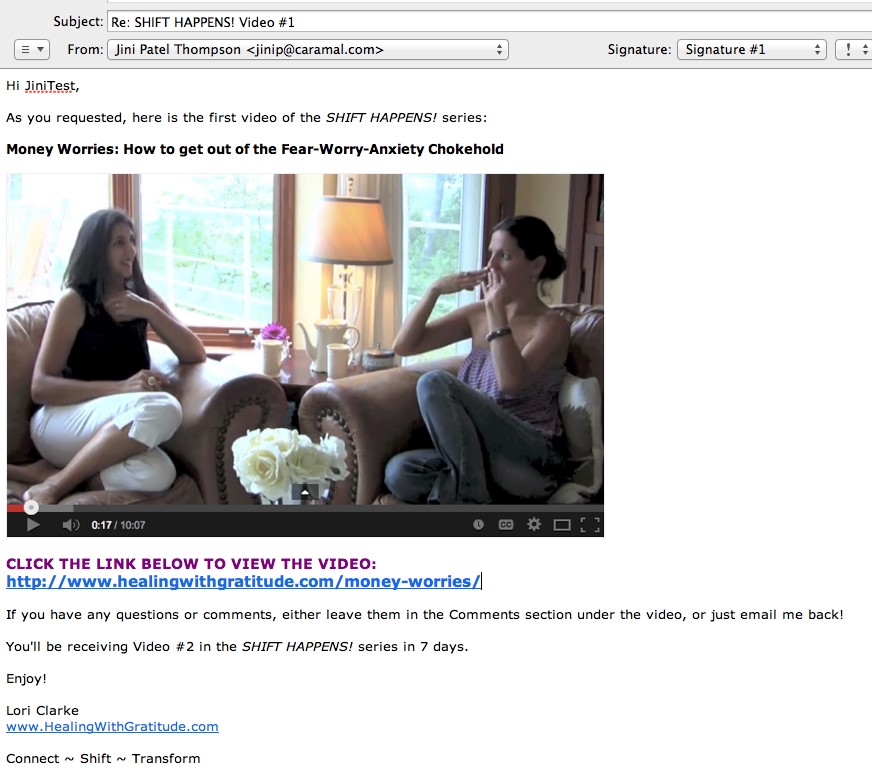
Now let’s take a look at her edited, final autoresponder email (she also decided to change her intro text) and see how much better it looks than her first draft!


FINAL Version of Autoresponder Email #1 for SHIFT HAPPENS! Series

19_11

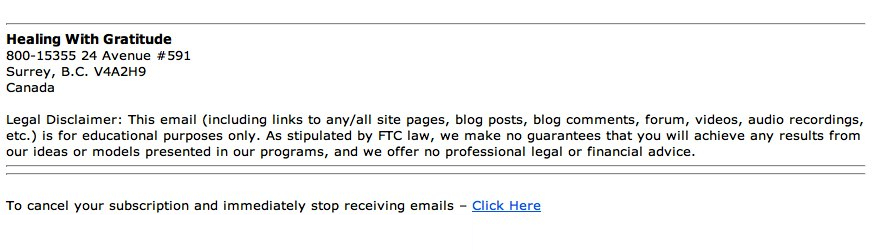
19_12-footerThen, obviously, Lori needs to carry on in this way – keeping all formatting the same – for the next 2 videos in the series.

Hidden Page vs Public Page

Note how initially Lori was going to send people to a YouTube video. Then, after thinking about it, she decided to send them to a hidden page – where she has the video embedded, along with some additional written content to add value and exclusivity to her offer. It’s easy to set up hidden, or password-protected pages – so check out this tutorial if you need it.

Setting her freebie up as a hidden page on her site has two benefits:

  1. It drives traffic to her site, thus increasing her search engine ranking, over time.
  2. It increases the perceived value of her freebie. Not just ‘anyone’ can view that information. Sure the video is available on her public YouTube channel (if you know where to find it), but the added text content is only on the hidden webpage.

Quality-Check Your Autoresponder

I wanted to show you this process (thanks Lori!), so that you can go back over your own autoresponder emails and double-check for all the same elements:

  • Is your branding cohesive?
  • Do you have a product name, or course name? If so, make sure you format it the same way every time it appears (bold, italics, caps, etc. – whatever you choose).
  • Decide whether to send people to a public page, or a hidden page
  • Does your email sound like YOU – does it match your personality?
  • Is your email visually appealing? Should you add a photo or image?
  • Do you want to invite discussion or feedback?
  • Do you list your website and contact info to show you’re legit?
  • Do you need a legal disclaimer?

If you are giving any kind of help or advice to people, then you may want to have a disclaimer at the end of your emails, at the bottom of your product page on your shopping cart, and/or the bottom of your sales pages on your site.

Here are three Legal Disclaimers you can swipe, or edit to fit your material:

Health, Fitness Legal Disclaimers

Legal Disclaimer: This email (including links to any/all site pages, blog posts, blog comments, forum, videos, audio recordings, etc.) is for educational purposes only and is not a substitute for professional medical advice. Do not use this information for diagnosing or treating a medical or health condition and never discontinue any prescription medication or other type of medical treatment without consulting your treating physician.

or

Legal Disclaimer: This email (including links to any/all site pages, blog posts, blog comments, forum, videos, audio recordings, etc.) is for educational purposes only and is not a substitute for professional medical advice. Please consult your physician for any health or medical concerns.

Advice, Education Legal Disclaimer

Legal Disclaimer: This email (including links to any/all site pages, blog posts, blog comments, forum, videos, audio recordings, etc.) is for educational purposes only. As stipulated by FTC law, we make no guarantees that you will achieve any results from our ideas or models presented in our programs, and we offer no professional legal or financial advice.

Business, Marketing Legal Disclaimer

You can either use the disclaimer above, or you can use a more extensive one, like this one I have at the bottom of the LTYF sales page. Feel free to modify it as you wish:

EARNINGS DISCLAIMER: We’ve taken every effort to ensure we accurately represent the Listen To Your Freedom Program and it’s potential to help you discover and grow your business. However, there is no guarantee that you will earn any money using the techniques you learn from our Program and we do not present this as a “get rich scheme.” Nothing on our websites or in our Program is a promise or guarantee of earnings. Your level of success in attaining similar results to those discussed is dependent upon a number of factors including your skill, knowledge, ability, dedication, business savvy, network, emotional state and financial situation. Because these factors differ between individuals, we cannot guarantee your success, income level, or ability to earn revenue. You alone are responsible for your actions and results in life, health and business. Any forward-looking statements outlined on our sites or in our Program are simply our personal experience and our expectations or forecasts for future potential, and thus are not guarantees or promises for actual performance. These statements are simply our opinion. As stipulated by FTC law, we make no guarantees that you will achieve any results from our ideas or models presented in this Program, and we offer no professional legal or financial advice.

DOWNLOAD these disclaimers in Word .doc format for easy swiping and editing!

Your Autoresponders

Now that you’ve seen an example of an autoresponder series, it’s time to get yours set up! Or at least planned out…


What are you offering to people who opt-in to your list (what is your sign-up freebie)?:


How many emails do you need to send to deliver this? One email, or like Lori, do you have a series of emails – each delivering part of your freebie?


Plan out the first draft (point form) of your actual email autoresponders here:


Now take a look at your email(s) and proof it/them against the Autoresponder Quality Control checklist:

[ ] Is your branding cohesive?

[ ] Do you have a product name, or course name? If so, make sure you format it the same way every time it appears (bold, italics, caps, etc. – whatever you choose).

[ ] Decide whether to send people to a public page, or a hidden page

[ ] Does your email sound like YOU – does it match your personality?

[ ] Is your email visually appealing? Should you add a photo or image?

[ ] Do you want to invite discussion or feedback?

[ ] Do you list your website and contact info to show you’re legit?

[ ] Do you need a legal disclaimer?


What Happens AFTER The Freebie?

Okay, now that Lori has added her Legal Disclaimer to her autoresponder emails, what happens when her 3-part series comes to an end?

Let’s say you offered a free eBook for your opt-in offer. What happens after that eBook has been delivered?

Well, you continue to build your relationship with your site visitor and eventually present them with something they want to purchase!

But first, let’s look at another live demo to help you nail down your autoresponder process and newsletter set-up (if you have one).

In the video below, LTYF Team Member Justin will walk you through the work you’ve done in the last three units, and answer several questions along the way!

Let’s look at this entire process (from the last three units) in video format, as Justin takes Freedomite Katharina Johnson through her autoresponder campaigns and also her newsletter set-up on GetResponse.

Whether you are using GetResponse, or 1ShoppingCart, or some other email marketing platform, the components will be the same and this video will help build your understanding of the entire process. It will also show you tips and tricks you can use to speed things up – like creating templates so you don’t have to type up each email or format graphic elements from scratch each time.

And remember: You should pick up the phone and call your platform for help with any questions, or if you get stuck. They will login to your account and then walk you through every step, so don’t be shy!

What Happens After The Autoresponder Series is Finished?

After your sign-up autoresponder series is finished, you may want to have people automatically moved to a new campaign. For example, perhaps you want them all to receive your newsletter, once per week, ongoing.

Some email marketing platforms can do this and some cannot. Infusionsoft and 1ShoppingCart can be set up to do this. But GetResponse cannot. So, if your platform cannot do this automatically, then you have to manually go in and transfer groups to your new campaign. Again, phone your platform and get them to walk you through the steps involved.

In GetResponse, here’s what that looks like (thanks Katharina!):

GetResponse HelpDesk: “I’m afraid that at the moment we don’t have an automation rule that allows something like that. But you could create a saved search by going to contacts –> search contacts –> advanced search –> and generating a list of contacts who have completed the cycle with the conditions. It will look like this:

AND

This means that whenever you want to send out an email to the people who have completed the autoresponder cycle, you have to do this process, as shown above. If you create a saved search of people who, let’s say, are not receiving autoresponders, then anyone who is not receiving autoresponders will be automatically added to the saved search.

A saved search is a search that you have already done before so it remembers the settings. And when you create a saved search, it creates a separate group of these people, like a separate list, and you can then send a newsletter, or some other email, or series of emails, to these people. When you are selecting recipients at the end of the set-up process, your saved search will be there too.”

NOTE: In case you would rather pull your hair out then set up all this stuff, or figure out what it means, remember, that’s what outsourcing is for! You can find someone on Upwork to take this whole process off your hands for the cost of dinner and a movie – just look for someone who is specifically experienced with your email marketing platform.

Lastly, remember to quality-check all of your autoresponders and newsletters before you go live:

  • Is your branding (look & feel) cohesive?
  • Do you have a product name, or course name? If so, make sure you format it the same way every time it appears (bold, italics, caps, etc. – whatever you choose).
  • Decide whether to send people to a public page, or a hidden page
  • Does your email sound like YOU – does it match your personality?
  • Is your email visually appealing? Should you add a photo or image?
  • Do you want to invite discussion or feedback?
  • Do you list your website and contact info to show you’re legit?
  • Do you need a legal disclaimer?*
  • Does it actually work? Test every autoresponder yourself – meaning, send yourself a test of each email before launching it – as the backend of these systems can be confusing and it’s easy to program things incorrectly. If it doesn’t work (if the email doesn’t arrive at the time it’s supposed to, or at all, or displays incorrectly, or the links don’t work, or anything else), you can check the details yourself or call into the support desk to get help troubleshooting.

*Don’t forget – I’ve given you a selection of legal disclaimers to swipe!

NEXT: Your turn: what are you doing with the people on your list after your freebie autoresponder series is finished?


Are you going to put them into another campaign for one of your products? Or are you going to transfer them to your email list? Or transfer them to your blog subscriber list? Write your plan here:


Join me as I talk with Ian Thompson about the bigger picture of email marketing and why it’s important to think long-term with your strategies, treat freebies the same as customers, and nurture those relationships.

Ian (aside from being my husband!) is a former marketing and advertising executive who handles all of the email marketing for my businesses.

If you found any of this confusing, then this overview – where we get into the WHY more than the HOW – should really help you get clear by giving you the big-picture overview. Likewise, if you didn’t need all of the technical info in the previous units, then this call will give you a new way of looking at your current autoresponder series and how to make them even more effective.

In this call, we go over two scenarios in detail; discussing all of the steps and why:

  • Pretend someone has signed up for a free report or free audio. What is your process with them over the next year?
  • Pretend someone has just purchased an eBook, or other product. What is your process with them over the next year?

DOWNLOAD AUDIO Communicate With Your List

Or click the play button below to listen online:

[sc_embed_player fileurl=”http://listentofreedom.s3.amazonaws.com/Module19-Communicate-with-List.mp3″]

Here’s one of your top take-away’s from this call with Ian: Think of each autoresponder series as a CAMPAIGN (not just a series of emails). And a campaign has two components:

  1. What is my objective with this campaign?
  1. Strategy: How am I going to achieve that objective?

When you think of your autoresponder series as a campaign, then each email and action becomes an interlinked series of events, like this:

Or, you could also have a really simplified version of an autoresponder campaign like this, which is also very effective:

Let’s keep going and these diagrams will start to make more sense and may even look easy to you!


How Do I Configure My Sign-Up or Opt-In Box?

Your First Touch With Your Customer

In this discussion, we’re going to go through all the elements necessary for you to use your opt-in (or sign-up) box on your site to begin and then nurture a beautiful, mutually-beneficial relationship with your tribe.

Your first touch, or interaction with your customer, does not happen when they purchase from you. It happens long before that. Your first touch with any customer is when they first come to your site and sign-up to get your freebie.

With this action, they initiate the process of eventually (if all goes well) becoming your customer.

If you fail to connect with them at this first touch, or you show them you are disorganized, or provide low quality stuff, then you will likely sever the relationship and they will not continue on and eventually become your customer, or member of your tribe.

On the other hand, if their experience of you and your stuff from their first touch (site visit and opt-in) is good (or great!), then you can continue to develop that relationship that will eventually result in a sale. And then likely more sales as time goes by; as you provide for more and more of their needs.

Note: If you find tech stuff really challenging, then you may want to listen to this audio first – as it will give you the overview and the WHY, before you get all stymied by the HOW. Also, after you know what you want to set up for your business, you may choose to outsource most of this kind of stuff. You can find someone on Upwork to take this whole process off your hands for the cost of dinner and a movie – just look for someone who is specifically experienced with your email marketing platform.

Configuring Your Sign-Up Box

So first you’re going to need to have your opt-in offer or sign-up box set up – and perhaps you have more than one – so you can start building a list of names and emails of people who are interested in what you have to say.

Before we go any further, let’s just make sure you have that sign-up box or opt-in offer configured correctly – so that your branding and message is coming through right from the first touch with your site visitor.

I’m going to use GetResponse as my example – and Freedomite Lori Clarke has once again graciously allowed me to use her system to demo on – but the same method and principles apply to any email marketing platform you choose to use.

Let’s work through things step-by-step using Lori’s homepage opt-in offer as an example and you can see I am testing it by entering my details:

What’s Wrong With This Opt-In?

  1. The first thing that’s wrong with this opt-in (sign-up box) is the programmer has not removed the notice at the bottom: Email Marketing by GetResponse

[ ] Remove Advertising or Links: Make sure you are not advertising your email platform on your opt-ins! If someone clicks that link, they will also leave your site – not good. Have your programmer remove this hyperlinked notice from your form.

  1. After I enter my details and click the Sign Up! Button, I receive this email in my Inbox. I have circled the problem areas:

The problem is that this subscription confirmation email looks generic. It does not carry Lori’s branding and I’m not even sure who it’s from. Maybe I signed up, then went out to run errands. I come back 4 hours later, see this in my Inbox… do I even remember who I signed up to, or who Lori is?

[ ] Personalize the text at the top and the bottom. Even if you can only personalize the text at the bottom and add your website, then this would be much better than just “Lori”, for example:

Looking forward to lots of fun, learning, shift and transformation together! Thanks so much for joining me.
Lori Clarke
www.HealingWithGratitude.com

  1. After I click the blue box to Confirm Subscription > I am taken to a webpage that says this:

Oh dear – same problem! What the heck is “lori_405262 list”? So Lori needs to personalize this message as well, to replace lori_405262 list with something people recognize as coming from her.

[ ] Customize Confirmation Messages: Sign up to your own list and go through every step of the process to make sure all the points of contact with your site visitor (or customer) highlight you and represent you.

Make Sure Your Opt-In is Branded & Personalized

Here’s another way you can customize the “Thank you for subscribing!” message. This is from Katharina at DrKatharina.com for her program Awakening Your Inner Healer (beta test group) – it works because there is no confusion as to what I signed up for:

New & Improved!

After Lori made these changes in her GetResponse account and personalized all the points of contact, here’s what Lori’s “Confirm Subscription” email now looks like:

And here’s what her new and improved “Thank you for subscribing!” webpage message looks like:

Much better wouldn’t you say? She is showing people right from their first contact that she knows what she’s doing – which immediately inspires confidence. And when that visitor comes to make a purchasing decision, that seed of confidence will contribute to the emotional decision to buy.

FINAL BIG TIP: If your email marketing platform, or shopping cart, or CRM system seems buggy, or super frustrating, or you just can’t figure out how things work, you can do two things: Phone your provider and ask for help and/or switch internet browsers. You would not believe how using a different internet browser can make everything go easily and smoothly! In my experience, Firefox is the best browser to use.

Also, know that I have instructional videos coming up, both 19.2 and 19.4, where I show you step-by-step how to set up the back-end for your autoresponder sequence (the automated emails that are sent out after someone opts-in to your free gift), so if you’re still a bit confused, stay with me to the end of this Module and I promise you it will all make sense!

Got it? Take a minute to scheme in your notebook…


Have you chosen your email marketing platform yet? Which one did you go with?

________________________________________________________

Have you come up with a juicy freebie for people who sign-up to your list? And have you go en your sign-up box configured yet? If so, your email marketing platform will have provided you with both the javascript and html code for your sign-up (opt-in) box. The javascript code will be about 1-2 lines long and the html code will be 10-50 lines long. Copy and paste both of them into a text document that you can save for easy reference.


Did you opt-in to your own offer on your site? Make sure you do, so you can test the entire sign-up process and make sure that all the customer touch-points we talked about in this unit look good. Here are the elements you want to make sure appear the same way on your opt-in box, your email confirmation, and your Thank-you/Welcome page or email:

Name of my sign-up freebie or list:

Name of me or my company
:


Is there anything you need to x, change, or tweak?


Okay, now that is all taken care of, what are your site visitors going to receive AFTER they sign-up to your list? Let’s get that mapped out for you in the next unit…

How Do I Re-Position or Expand My Products?

Once you know how to position your core products or services, and once you’ve been selling those for a while, do you have to create new products all the time?

Not necessarily. Often you can simply re-position an existing service or product and sell it as something different, or sell it to a different audience.

Differentiate & Expand

The easiest way for me to explain how this works, is to give you some examples. Here are some examples to stimulate your ideas about ways to present (position) your existing services beyond the obvious:

  1. Horse Trainer or Dog Trainer: Let’s say you currently offer private training sessions and group workshops. Not everyone can afford to hire you personally to come out and work with their animal. And others may not live near you, so can’t come for a workshop. But, many people just need some advice, or a fresh perspective. So you could offer:

Problem-Solving Phone Consult (30 minutes)

and/or

Training Advice Phone Consult (60 minutes)

TIP: Once you have held a consult with someone, you are now primely positioned to capture them as a client once they are ready to proceed with training. You can set up an automatic email sequence (autoresponder) to move them along this pathway; give them more help and keep yourself top-of-mind for when they are ready to book someone to physically work with their pet. Want to know more about using autoresponders to develop a deeper relationship with the people on your email list?

  1. Home Renovation: You currently handle home renovation projects for people who want to renovate their kitchen or bathroom, or entire house. But what about the people who are in the dreaming or planning stage (they’re not ready to do the renovation) and they just want to get some professional input at this stage?

Brainstorm Your Reno Consult (1 hour)

and/or

Reno Ideas & Advice Consult (1 hour)

  1. Professional Artist or Photographer: You currently sell your art and prints and maybe you offer workshops teaching others your style. But instead of just selling your own work, or specific technique, how about helping other artists with your global artistic expertise, or business experience?

5-Painting Art Critique (1 hour) – Submit up to 5 works and then we will discuss your strengths, what needs to be developed, easy tips for improvement that yield big results and what direction you should go in next.

and/or

Sell More Art! (1 hour) – We’ll talk about your unique situation, assess your strengths and constraints and I’ll share my ideas for how you can take your art marketing to the next level.

Your Turn


Use the above examples to help you brainstorm how to expand your products or services, or appeal to a new type of customer:


What are some ways you can expand the products or services you o er to make them bigger, or more interesting, or capture a new type of customer? You may be able to charge more too… refer to the examples in this unit if you need some ideas.


Now let’s look at other ways you can re-position an existing service or product and sell it to a completely different audience.


Re-positioning Existing Products For A New Market

You’ll notice that I often talk about multi-purposing your digital content; taking what you already have and packaging it up in different ways, and at different price points.

Well, you can also do this with physical products and services and the best way for me to show you what I mean, is to give you an example.

Example: Andy the Horse Trainer

Andy is a horse trainer. He offers a standard 2.5 day Horsemanship Clinic format. This is a standard length of time for people in the horse world, and the price at $375 is also considered very reasonable.

But Andy wants to expand his product offerings and he wonders how he could appeal to other audiences; which would give him a wider reach and more income streams.

So whilst his current Horsemanship Clinic format is great for people who own their own horse – neither the time commitment, nor the intensity would fit with people who do not own their own horse, or regularly spend time with horses.

He can however, teach pretty much the exact same content (techniques, methods) to anyone who’s interested in being with a horse, by packaging it up and positioning it differently. Here’s how…

Andy could offer a half-day workshop. But his positioning wouldn’t be for horse owners. It would be for people desiring leadership, or personal mastery, and the horse is the vehicle or coach for that process.

Using a similar fee rate for his existing clinic ($375 for 2.5 days) he could charge $149 and that would be a very easy sell to a wide circle of people.

He could also offer these workshops as Part 1, Part 2, etc. So that people who enjoyed the experience, could keep going (repeat customers!). Taking the exact same techniques he teaches in his regular Horsemanship Clinic, he could break down the content and re-position it.

For example, Andy could take 3 simple things; catching the horse, grooming her, and leading her… and turn that into a $149, half-day workshop. Here’s how he would position that…

Leadership Training – The Way of the Horse

Catch a horse in your mind first, then with the rope – Learn how to adjust your intention and body cues so the horse practically places its nose in the halter for you. Foster congruence between your mental intention and your body language, which will allow people to perceive you as trustworthy.

Experience how your energy transfers to others – When you groom a horse, his heart rate will sync to yours. Become aware of your breath, your emotions, and the energy you’re holding. Begin understanding that you can control your energetic presence in the world – and consequently, how people respond to you.

Leading and stopping the horse – Lead your horse with a hair trigger of pressure only; while maintaining your boundaries and groundedness. Learn that you can get your horse to walk slower or faster simply by using your own body energy and a simple cue. Have your horse stop with only a gentle, yet firm signal – or even just a shift in your body and energy. Go deeper into emotional and physical body congruence. Learn more about how your energy and intention affect those around you – especially your employees, or your children, or anyone else with whom you are in a leadership role.

Does that sound like a great workshop, or what? And well worth the money. Andy could market this workshop to a number of different audiences – and he would change the wording (re-position it) accordingly:

  • Parents struggling with kids who won’t listen or don’t respect them
  • Single women having trouble in relationships because men don’t respect them, or walk all over them
  • Anyone having difficulty in a leadership role
  • Anyone wanting to improve their leadership skills

The workshop positioned to teach or improve leadership could be marketed to large corporations for all their management staff. Andy could also target non-profit, or community organizations; which often have funds allocated for personal development. And he could also market directly to individuals in leadership roles.

You see how this works? More money for Andy, for less time. Yet he is also diversifying his revenue streams, which will protect his cash flow. He can also train an assistant to handle the lower level workshops, while he is teaching the higher levels, thus increasing his revenue. Let’s use Andy’s example and apply it to your own product offerings…


Use the example of Andy the Horse Trainer and brainstorm how you can apply it to your own business…

Look at all the different points of contact with your site visitors and your customers; examine the ways you are communicating with them. How are you making them FEEL? Are there any places you could position things in a better way? Make sure you take a look at common elements like: Returns, guarantee, shipping guidelines, customer service contact, policies, safety issues, rules and regulations, etc. Make your to-do list and jot any ideas down here:


Positioning Your Customer Contact Points

In every interaction you have with your customer, you need to be thinking about positioning. Because how you position something, determines how your customer perceives it. Which then determines how he feels about you – which is extremely important!


So positioning does not just apply to your products and services. It applies to every point of contact you have with your customer.

For example, how do you position (present) your safety guidelines, without making your customers feel they are in danger, or afraid to take a step without your permission?

Or how do you position your return policy in a way that makes your customers feel safe to order from you? And that you are on their side if something goes wrong with a product?

Let’s look at an example again, from Andy the horse trainer’s business. Andy has a horse training program that goes through three stages, from haltering through to saddling and riding. The first stage of groundwork is crucial to the success of the program, so he doesn’t want people to advance to Stage 2 unless he sees they are ready and gives his approval.

So how does Andy communicate (position) that to his clients?

BEFORE:
Note: You cannot advance to the next stage until Andy gives the go-ahead. You must learn this stage thoroughly before you will be given permission to move on to the next stage.

Now let’s say the same thing, but change the positioning (presentation).

AFTER:
Note: You will not be advanced to the next stage until Andy gives the go-ahead. He has worked with hundreds of horses over many years and this stage cannot be rushed, or the training will not hold. Andy wants nothing but success for you and your horse, so he needs to make sure you have both mastered this stage before progressing. You may not recognize the difference between learning and mastery, but Andy does, and he will support you and your horse for however long it takes for you to get there.

Which notice would make you feel safe with Andy? Which notice would make you feel he’s got your back and is looking out for your best interest, rather than trying to control you?

Both notices are saying exactly the same thing, but they are positioning it in completely different ways. Personally, the first notice would be enough to stop me from buying this course. I would be afraid that Andy could pull all kinds of egotistical crap on me and I’d have no recourse. Or that he could stall me indefinitely for no good reason. I would not trust him or feel safe.

The second notice makes me feel that Andy is a trustworthy guy of great integrity. I feel like he’s not only got my back, but also has some skin in the game – he’s willing to support me for however long it takes, wow, that’s commitment!

Do you see how important positioning is? Grab notebook, and let’s look at how your positioning is making your customers or site visitors feel…


Look at all the different points of contact with your site visitors and your customers; examine the ways you are communicating with them. How are you making them FEEL? Are there any places you could position things in a better way? Make sure you take a look at common elements like: Returns, guarantee, shipping guidelines, customer service contact, policies, safety issues, rules and regulations, etc. Make your to-do list and jot any ideas down here:


Okay, now that you have encouraged your customer to purchase from you, what happens AFTER you’ve made the sale? Are you done? No chance Lance…

How Do I Name My Products?

When most people talk about their product or their service, they focus on telling people WHAT it is. But what they should be focusing on is HOW the person will USE it and what benefits the person will experience (how their life will change) as a result of usage. This is going to affect how you name your products as well as how you present and position them.

Here’s an infographic to help you understand the difference between Features and Benefits:

So for each product or service that you offer, ask yourself this question:

How will someone use this and how will it change their life?

Use your answers to this question to form your sales copy, your product name, and make your answers (the benefits) the focus of all your promotional efforts; blog posts, teleseminars, webinars, etc.

Benefits vs Features

There’s a big difference between benefits (how the customer feels) and features (what the product does) and why you always want to focus on the benefits your product or service will bring. When you talk about the benefits – how the customer will feel, be, experience, improve, and in what ways their life will get better – you give your customer the emotional motivation to buy. Remember: People don’t buy what they need, they buy what they want, and how people feel about the story the product tells is far more important than what the product is.

Whether you’re positioning your website, or your individual products, you always want to focus on the SOLUTION you will provide. Not just describing what the item is. Harvard Business School professor Theodore Levitt summed this up when he said, “People don’t want to buy a quarter-inch drill. They want a quarter-inch hole!”

How To Name Your Stuff

So when you’re trying to figure out what to call your product or service, use my copywriting tips and techniques to come up with a memorable, appealing name for your product. Try to make sure your title includes the benefit your customer will receive – not just describe what it is.

Then you might want to think about whether there’s a way to package that product or service that will allow you to charge more for it.

For example, which of these products or services would you want to buy?

Boring Catchy Catchy+Extra
Retirement Planner eBook by Emily Jones, CPA $9.95 How To Plan Your Secure, Sexy Retirement eBook by Emily Jones, CPA $9.95 How To Plan Your Secure, Sexy Retirement eBook by Emily Jones, CPA plus a 1-hour Personal Mastermind Session with Emily Jones $249
Renovate Your Bathroom DVD by Jack Mulligan $14.99 Art Deco Your Bathroom! DVD by Jack Mulligan $24.99 Art Deco Your Bathroom! DVD by Jack Mulligan and 1-hour Personal Consult with Josh to go over your ideas and design. $137
How To Lose That Extra Weight CD by Annette Walters $16.95 21 Days To a Healthier, Slimmer You CD by Annette Walters $16.95 21 Days To a Healthier, Slimmer You CD by Annette Walters includes a weekly 1-hour compassionate group support, advice and cheerleading session with Annette (maximum 15 participants to ensure quality!) for 3 weeks in a row. $197

Note: that the prices here end in a 5, 7, or 9. This is because split tests have shown that if you offer a product at say, $22.99 or $23 – people will buy the $22.99 product because it feels cheaper to them. Other split tests have shown that ending the price in a 5, 7, or 9 triggers the most purchases. For example, $97 will pull better than $94. Don’t worry – we’ll cover pricing much more extensively throughout this Module.

Brainstorm Your Product Names

Now it’s your turn. Using the examples in the chart above, take a look at the current names you have for your products or services. Do you need to make them more appealing? Do your names contain a promise, solution or benefit? Can you add on a product (audio, video, eBook) or a service (consult, coaching, mastermind) to value-pack your product, or enable you to charge more?

Or, if you’ve just started thinking about products or services you might create, brainstorm those ideas now too.


How Do I Work On My Business When Loved Ones Don’t Support Me?

I want to talk about a common barrier that people face when they begin to put their soul, passion, or special skill out into the world in a bigger or brighter way. This is an issue that’s sure to crop up as you take your business to the next level, or start a significant new project; like writing that book you’ve always been scared to write, or recording that audio that means so much to you, or shooting that video that takes you to a new level of authenticity, or however else you choose to share your light, journey, or expertise with the world.

I’m talking about the resistance that can come up from your partner, friends, girlfriend, boyfriend, parents, spouse, etc. There can be many reasons behind this resistance: like fear of losing you, fear of you becoming more successful than they are, fear of you risking and losing (getting hurt), fear of their life changing as a result of your success, or fear of you or them being ridiculed, the list goes on.

Whatever causes this resistance, or lack of support, the big question is: How do you handle it? How can you not let it stop you from moving forward?

Enjoy this video as Lori Clarke and I share our experience and strategies for dealing with loved ones when they do not (or cannot) support you in your business:

Now, sometimes what Lori and I discuss here is able to clear some layers of sadness, anger, or lack of support and communication – only to reveal more layers deeper down! The thing about really, truly stepping out on this journey towards freedom and passion, is that it very may well trigger those around you with unfinished business in these areas. And you better believe, whatever unconscious baggage or stories they have around following (or not following) their dreams is going to come back at you as you follow yours. Sometimes, this can be a long, confusing, and difficult process for both parties.

One of our Freedomites, Jess, came up against her husband’s “stuff” while she was in the midst of creating her products and launching her site. Up until now, her husband had been more-or-less supportive – he told her she was free to do whatever she felt called to do, but while he wanted to believe her that this “Internet thing” could actually start bringing in income soon, he couldn’t really see how it would. kidsDTThough they had a loving, stable family and he had a great job, the piles of bills, kid care and bare basics ate up his salary effortlessly. With Jess on full-time Mom duty (and working on her site), his single stream of income was barely enough to get them through each month.

Jess’ husband started pushing her to get a job – any job. $11.10 per hour at Starbucks, anything to show she was contributing and take a little heat off the end of the month. But for the first time, he also became very negative about her LTYF work, which surprised and hurt her. They’d been through just about everything side by side, and here he was, basically informing her that he didn’t believe in her and her dream.

For Jess, it was both a terrifying and freeing process to hold her own and stand by her passions throughout this period. Terrifying because it felt like she was creating a rift in their tightly-knit relationship – and she was, by putting herself before the family, and holding strongly to her chosen path – and freeing because, for the first time, she was honouring her own needs and the higher work she felt called to, over everything else. She was prepared to shake things up, upset her husband, and effect her entire family to make room for herself to be more than Mom, and more than a hardworking and dutiful wife.

And when she drew this line distinctly, and her husband felt her conviction, he revealed a huge piece of the puzzle: throughout their long marriage, he had tried and failed (multiple times) to follow his dreams of owning his own company – with Jess’ full support and belief in him every single time. He felt devastated that he hadn’t achieved his goals and even more ashamed that he’d let her down. He felt, if she’d just pulled him back from the madness and reined in his ambition (like he was trying to do for her now), maybe they’d be in a better position now, maybe they wouldn’t have so much debt, and maybe his family could rest in ease instead of scrambling to make ends meet.

futureDTSo, he’d taken their entire financial situation as proof that following your dreams never ends well, and now he was trying to stop Jess from following her dreams in a mostly-unconscious attempt to right the wrongs of the past! Talk about deep and dark. It was that realization that allowed the flow of communication to open up again, and the discussion about how this situation was different from that situation, and gradually the trust began to build up again between them. Jess actually did end up taking a job while she grew her reader-base and allowed sales to increase organically – but not just any job. She set her intention for a job that was aligned with her core self, and she found it, then tailored it specially to her, and asked for – and received – a wicked salary for work she enjoyed doing and involved her top talents, while her sales on her site steadily grew.

Why didn’t she just go get that job earlier and save herself a whole lotta drama? Timing can be funny. The Universe waits til we are ready – not til we think we’re ready – before it lets things move effortlessly. And her husband had to realize what was holding him back, shift it, and move forward, before she could. I know, not fair, right? That’s the thing about families; while we all need to move at our own pace, energetically it may not be possible to make leaps and bounds without leaving people behind. When leaving them behind isn’t an option, we often have to wait, put down our projects, focus our attention entirely on the relationship and ask, what here needs healing? What needs to move, so that we can all breathe again? And sometimes, it can feel like we’re waiting forever for a loved one to shift, because until they do, we can’t fully embrace our vision.

Signs of Transformation

Transformation may feel very frightening to the deeper self – hence the panic and fear cloaked in nastiness and accusation. Here are some key phrases that you are likely to hear when you are spearheading growth and shift:

  • We can’t afford this, are you crazy?
  • You are abandoning your children
  • You are putting X before your family
  • You are putting a financial strain on us that goes against our goals/agreement
  • You should wait another year or so, the timing is bad

So how can you discern whether your partner has valid concerns and you really have lost the plot, or whether you are spearheading an energetic shift or transformation that is actually positive?

A good barometer is to ask friends, or a professional therapist for their opinion. Because when someone in a marriage or family follows the call of their deeper/higher self; even though to an outsider, the action taken looks perfectly reasonable and often positive (i.e. you can afford it, the kids are old enough to step up, it is a good long-term decision that will enrich your lives), the people IN the family feel the significance of the energetic shift and forward motion and go into fear. Because very few people embrace change and transformation willingly. And fear = anger = attack.

For this reason, you cannot rely on your family members for feedback! You need to go to people who have your best interest at heart, but are not participants in the transformation or shift you are bringing to your clan.

happy-manDTAnother Freedomite actually left his long-term boyfriend during his own process. Now, this is not to alarm you and certainly not to suggest you should do the same if you’re facing difficulties, but again, when the energy of the people closest to you does not match yours, something has to give. In this man’s case, the more he cleared his own blocks and stepped into the empowered state he found by listening to his freedom, the less viable his relationship seemed, as his partner wouldn’t – or couldn’t – come along for the journey. And his partner’s resistance was hampering his own need to keep moving forward. When he saw this clearly, the anger and confusion dissipated and he knew it was simply time to move on, not just for him, but for his boyfriend as well. They parted tenderly at the crossroads, honoring both of their needs and paths.

I’m telling you these stories to alert you to the complexities  – and the individuality – of a process like stepping into your power and finding your freedom. If you hadn’t realized by now, LTYF is about far more than creating or upgrading your desired business. It’s about igniting your purpose and supporting it with a robust, adaptable, efficient system so you can finally give your best gifts to the world. While holding your course is important, you’ll invariably find yourself coming up against your own blocks and saboteurs – and those of the people closest to you.

If you can, be brave, plunge in, and clear the way! Or, if it’s too much, take a break from whatever’s causing the stress, even if it’s your business-in-progress, and see if you can get quiet enough to hear or see what wants to happen, or what need isn’t being met in your relationship. Get clear what’s your “stuff” and what’s their “stuff”.

If you need help, ask for it. Use the EFT videos like this one or browse the Clear Your Blocks & Get Inspired section in the menu above. Find a therapist, or a workshop, or a support system that resonates with you and/or your loved one. There are infinite ways through, so find what works for you. Get clear on your priorities, rewrite any stories that are no longer serving you, and trust, breathe, allow, love. Above all, take care of yourself.

dreamsDT

How Do I Deal With Increasing Pressure As My Business Grows?

Are you concerned about the expectations or pressures that might arise when you ‘up your game’ or go to the next level?

Lori Clarke walks me through one of my fears of being pressured into public speaking in this 20-minute video. Watch how I decide to set my boundaries and re-frame these pressures into manageable, positive experiences:

You can also download just the audio from this video if you prefer to listen to it in your car, or on the go. However, know that the few places there are slides will occur as gaps in the audio – so just wait and the speaking will resume.

DOWNLOAD Audio only (right-click and Save as…)

The really cool thing is that two months after this process, I was booked for 2 speaking engagements, with a professional videographer (so I could have the digital content), within a two-hour journey or less, and all completely paid for by sponsors – YES! I also was offered the option to speak every month for the next year, with the same conditions applied.

I did not have to go looking for this, or do anything to make it happen. I just needed to clear my blocks (see the video!) and get clear on what I wanted. The sponsors approached me and took care of all the logistics. I just had to show up and deliver the talk of my choosing. Ahhhh, I love the magic of life when we clear our crap and get out of our own way! Now let’s take a look at your blocks. Grab your pen and paper…


What things or elements in your life are you feeling pressured by? Or, where are you being called to expand your reach, open to possibilities, or step out – but yet you feel resistance or strong emotion against going there?


Now take each of these pressures or heavy-feeling prospects and re-frame them. Re-position them in a way that makes you feel light and makes them feel do-able. You can switch to a new perspective, just like I did in the video, so claim your power to do so and write down your requirements, boundaries or stipulations needed to shift that perspective to something that feels light and open:


How Do I Deal With My Fears of Putting Myself Out There?

As you get ready to launch your product or service out into the world, perhaps you’re feeling some hesitation or fear about ‘exposing’ yourself in this way.

Going public with your gifts and launching yourself into the public arena can be an intimidating or frightening time! Join Lori Clarke and I as we explore these feelings and what you can do to free yourself of these limitations (9-minute video):

Now it’s your turn, so turn to a blank page in your notebook..

Now that you’ve watched the video, identify the places this ‘fear of putting yourself out there’ is showing up in your life right now. Remember that awareness is the first step in the process of change or shift:

Now visualize all these places, or instances inside a backpack that you’re carrying around. How does it feel? What’s the effect on your energy? How does this backpack of fears or limiting thoughts affect your thinking process?

And now visualize yourself cutting the straps off the damn bag!

How Do I Get My Partner and/or Kids On Board?

Lori Clarke and I share our strategies for shifting any obstacles around the need to have quiet work time when you work from home. We discuss how to get your kids and/or your partner, or spouse, aligned to support you in carving out a space for that necessary work time.

If you need more tips on this, check out this audio on “How Do I Find the Time To Work?

And now it’s time to assess your own situation – grab a pen and paper!

After listening to the Audio from Jini and watching the video with Jini and Lori in this module, what are some things you need to change in your home, your lifestyle, or your energetic/emotional state to create more time and space for the things you want and need to be doing – to create FREEDOM in your life?


NOTE: If your loved ones are actively resistant or angry about your business, there’s even more help under “How Do I Work On My Business When Loved Ones Don’t Support My Business?” for the video and examples given there; which should give you a strategy for what’s needed in your situation.

How Do I Clear Fear & Overwhelm?

elizabeth-berkley-im-so-excited

Is she excited, or scared?

There’s nothing cooler than starting a new biz, or more exhilarating than taking your existing biz to a whole new level. But as well, there are few things that are scarier. Funny how those two emotions – fear and excitement – often go hand in hand. The really interesting thing is that when you look at the biochemical expression of these two emotions in the body… there is only one molecule of difference between fear and excitement.

Fear Is A Messenger

So not only is it normal to feel fear at times like this, it is also a good strategy to let that fear run freely through your body. Take a moment now and close your eyes, invite that fear and allow it to flow through your whole body. Truly feel it. And as it runs and cycles around your body, see if you can sense your way around it, see if you can feel how right on the edge of excitement that fear is.

Fear is the signal from your ego that you are going into uncharted territory, because your ego’s primary mandate is to keep you safe. But the ego only knows what it has already encountered. So when you venture into new territory, the ego feels unbalanced, it feels you tipping into the unknown and so it pulls you back saying, “Whoa! Be careful!”

Take a moment now and thank your ego for doing such a great job of working to keep you safe. Thank your ego for using fear to effectively deliver the message to you.

Spend some time with me now, dialoguing with your ego about your fear, and while you’re talking (out loud or in your head) also tap with 3 or 4 fingers on the fleshy part of the side of your hand. This is an acupuncture meridian point that will help integrate your emotions and your visceral body during this dialogue.

karate-chop-point

Because you are allowing your fear to run freely through your body, you will also be able to access all the thoughts, beliefs and feelings connected to your fear. Perhaps you just want to call them out, one by one, as you tap on the side of your hand. Perhaps you want to talk about each feeling, or belief, or fear and where it came from and how it makes you feel and the effect it has on your life, or your relationships.

Speak about your fears, concerns, worries now as you keep tapping on the side of your hand. If you need some prompting to get things rolling, complete these sentences (don’t forget to tap the side of your hand at the same time!):

I’m afraid that…

What if…

I can’t…

I’m not good at…

I really suck at…

I can’t believe…

Who knows…

What will happen if…

And when you’re finished speaking out everything that arises for you (keep tapping the side of your hand the whole time) and all your hopes and dreams for how things could be different, take a breath – keep tapping – and then say:

And I love and accept myself anyway.

If you cannot say those words, then change them to, And I would like to someday be able to love and accept myself anyway. Take another breath and relax.

You can stop tapping on your hand.

Just sit quietly for a while now and feel into your body, feel the sensations…

Feel whether your heart feels open, or closed.

Feel your back.

Feel your feet and your knees.

Feel your neck and your head.

Take a few breaths.

Use this same process whenever you feel fear arising. Even just allowing your fear to run through your body – instead of tamping it down, boxing it up, or willing it away – will have a profound effect on how you experience your life.

Allow yourself to feel around the edges of that fear and maybe you’ll be able to feel how excitement is hovering there too.

Maybe you’ll even get to the point where you feel that fear coming and you welcome it, as a teacher, as a signpost, as a messenger and you even enjoy the rush of it! If you’ve ever galloped a horse, or jumped off a high diving board, or driven really fast, you’ve already experienced how fear and excitement can be a rushing, exhilarating place to be – some may even say, enjoyable.

Take a breath.

Release Fears That Stop You From Moving Forward

Now let’s go a little deeper as I’ve prepared a video for you where we will go into common fears that arise as you step forward into your true self. I help you clear some common fears around taking risks; financial scarcity and resilience, changing (as you grow into your brilliance) and perhaps losing friends. So that you can feel freed up to live a great life of creativity, adventure, ease, sharing your gifts, and helping others. All you have to do is repeat what I say, and tap along!

EFT Tapping is a powerful healing tool because it interfaces between the mind/body and thus can shift things at the energetic, or subconscious level. It also involves your bodily sensations and fears or memories that may be stored in your tissues or organs – so you may feel butterflies in your stomach, or heaviness in your chest. Don’t worry! These are all good signs that your body is speaking to you and signposting the way to your healing.

Note that you cannot just listen to this video! You must tap along with me on the acupuncture points for this therapy to work its magic.

In the beginning, we are going to start by venting, and voicing out loud all the negative crap that may be carried in your subconscious, or that other people have spoken over you, or beliefs absorbed from your parents without conscious awareness (often before the age of 6).

So even though it may feel like we are focusing on the negative and you probably don’t want to dwell on that, it is an important part of the process for unlocking these limiting concepts and moving them into flow; so they can be transformed into life affirming, positive beliefs and feelings that make your world bigger. So if you’re feeling uncomfortable, just stay with me, keep tapping, and know that we have to go down into the depths to bring these things up into the light, where we can then shift and transform them. Stick with the video and know that the positive affirmations and life-enhancing re-frames are coming!

Follow along with me; tap on the acupuncture points I’m tapping on and say (out loud or in your head) the words I’m saying:

Here are the tapping points I use in this video:
eft-tapping-points.jpg

Do not skip this process!! It is crucial to clear these emotional blockades that have held you back from your magnificence. This EFT Tapping is a mind/body healing tool that dialogues with the subconscious (where your bedrock beliefs and foundational experiences are held) and integrates the clearing/healing with your physical body via the acupuncture points meridian system. So don’t be surprised if you also experience some positive shifts in your physical body after following this video.

Alright! Excellent work!! You’re ready to get back into the nuts and bolts of setting up your new website. So here we go, as I walk you through exactly how to do each of the steps involved in registering your domain (website) and begin the process of turning your scary, exciting, exhilarating dream into reality…