How Do I Get Financing From a Bank or Investor?

jini2
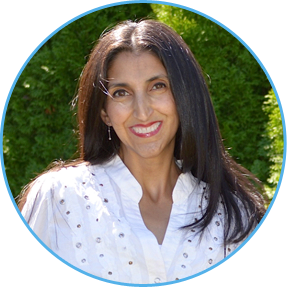
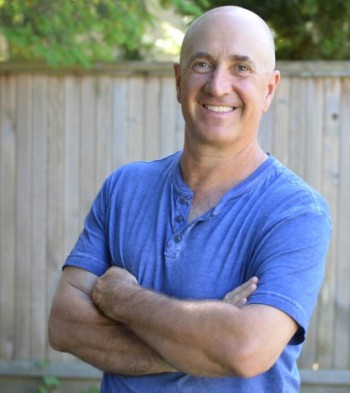
Stewart Thompson is a great person for us to talk to about yet another way of procuring funding for your business: via a bank, or a private investor. Stewart is the ideal person to discuss this topic with, not just because of his varied, international experience with building, funding and selling companies, but also because he is an assertive, outside-the-box thinker.

So we have a lot of fun on this call and Stewart gives you THREE amazing take-aways; each one ALONE is worth the price of your LTYF Membership. No, I’m not joking, this call is that valuable – so don’t miss it!

Here are some of the gems Stewart gives you on this call:

Stewart Thompson

Stewart Thompson

  • The main criteria a bank is looking at when an entrepreneur applies for a loan or line of credit.
  • If you can’t qualify for a bank loan, where else can you go for funding? NOTE: Stewart is going to give you a KILLER strategy here for finding an equity investor. He will also tell you how to structure the deal in a way that YOU stay in charge of your biz at all times; yet get the cash you need to grow your business.
  • The inside track on how Accounts Receivable Financing or Factoring works.
  • The pros and cons of using your company to purchase an office or warehouse space, versus buying it personally.
  • Stewart’s crazy-good method for keeping employees committed and long-term (in the 7 companies he owned, grown, and sold, NO ONE has ever quit!).

Click here to download the audio (right-click and Save As):
How To Get Financing From A Bank or Investor

Or click PLAY to listen:

[sc_embed_player fileurl=”http://listentofreedom.s3.amazonaws.com/module20-5-financing-bank-investorFF.mp3″]
Even if you’re not looking for capital or funding right now, you should listen to this call anyway, as it will give you some good ideas for long-term planning in your business. Stewart could easily sell this information alone for thousands of dollars, but he is generously paying it forward to support you in your passion and purpose.

About Stewart Thompson

Stewart started out with a company in the UK that manufactured small-run, branded condiments. He then expanded into supplying major blue chip companies like McDonalds, British Airways and others. He started with dry products like sugar and sweeteners, then went into sauces and condiments, and became the largest portion packet manufacturer in Europe.

Then Heinz (yes, the ketchup giant) bought that company for about $20 million in 1995, mis-managed it for 6 years, at which point Stewart bought the dry side back from them (just the sugar and sweeteners), for only 10 cents on the dollar. He built it back up to a thriving, profitable company, and then sold it again 5 years later to a German sugar company for over $25 million.

At that point, Stewart decided he wanted to live in the USA, so he set up another company in Florida to provide small-run, branded sugar portions for clients ranging from small local restaurants to large airlines like Delta and American Airlines; cruise lines like Carnival and Royal Caribbean and again McDonalds. Stewart Thompson was the person responsible for introducing the Sugar Stix concept to America and Canada.
How Do I Ask Family or Friends for Business Loans?

In this audio I’ll share some great ideas for HOW to approach your family or friends for money.

We’ll also explore tried-and-tested ideas for how to structure the loan in a way that provides a no-brainer win-win deal for all of you!

Now, many people say you should never mix business with friends or family, as it’s not worth jeopardizing the personal relationship. In my experience, if you treat these interactions AS business transactions, and you get everything in writing (you can write it yourself) so there’s good clarity between you, then having friends or family as investors can work well.

I lived in Asia (Tokyo and Singapore) for few years and I got a first-hand look at why Asians do so well when they migrate to other countries. It’s because the families pool their money together (and often live together) and support each others businesses. Then, let’s say the first brother’s business was up and running, he then paid for the 2nd daughter’s education, meanwhile the family was pooling their money to support the cousin’s new business, and so on.

In Western culture where we almost have taboos against investing in a family member’s business, this actually puts us at an economic disadvantage in comparison to Indian or Chinese cultures, where investing in family members is the norm.

So in this audio, I delve into ways you can make borrowing money from friends or family work in our culture; in ways that both serve and protect your friendship or familial relationship.

Click here to download the audio (right-click and Save As):
Novel Ways To Raise Funds From Family & Friends

Or click PLAY to listen:

[sc_embed_player fileurl=”http://listentofreedom.s3.amazonaws.com/funding-from-family-friends.mp3″]
Now, let’s say you do not want to approach family or friends for cash, or no one you know has the kind of money you need, or you would just rather finance your business another way, then stay tuned as we have a killer method for finding an equity partner (investor), whilst still maintaining complete control of your biz, over here…

How Do I use My Credit Cards To Finance My Business?

jiniIn this audio, I talk with Ian Thompson about how credit can actually be your friend – if you use it very, very wisely. With these tips, you can take advantage of credit companies’ Special Offers, and never pay regular high interest rates.

In fact, Ian’s going to show you how to get loans of up to $100,000 from credit card companies at 1.99% or 0.9% interest for 6-12 months.

Listen to the whole thing if you’re thinking of trying this out though, because we’ll tell you how to stay on top of this game and avoid being burned!
ian-2015-portrait-woodClick here to download the audio (right-click and Save As):

Fund Your Business With Your Credit Cards!

Or click PLAY to listen:

[sc_embed_player fileurl=”http://listentofreedom.s3.amazonaws.com/fund-biz-with-credit-cards.mp3″]
Now, if this all just sounds a bit too risky for you, no worries, we’ve got you covered! In this next audio we’re going to fly in the face of the advice most people give you to “never do business with friends or family” and I’m going to show you how to set it up in a way that protects the relationship first.

How Do I Use Crowdfunding to Finance My Project?

Crowdfunding is a way to utilize the financial power of a ‘crowd’ rather than just trying to find one individual, or company, or bank to finance your clearly defined project.
Crowdfunding can be used to finance a large variety of projects, from political or health documentaries, to music albums, to yoga outreach classes, to new inventions, to fashion, food products or cookbooks, games, book publishing, etc.

The only stipulation for a crowdfunding project is that it must be very clearly defined; both in scope and results.

Crowdfunding is a method that allows startups and individuals to raise money from small investors, fans, friends, family and anyone who is referred via your Facebook page, Twitter, Pinterest, Instagram, your blog, email campaign, etc. You can use any combination of these social media tools to drive potential backers to your crowdfunding page, which can be hosted at a number of different sites, like these:

Each of these crowdfunding sites has a different slant on which projects they prefer. Some lean more toward political or civil causes, others towards the arts, or technology, or teaching projects. So visit all of them and see which one fits with your project the best.

Some of these sites require you to obtain pledges for the complete amount you are asking for, within a certain time frame, or the funds aren’t released and the project is cancelled. Sites that do this, like Kickstarter, say this method works best because it creates urgency and motivates people to pledge their donations quickly, as well as protecting both parties from attempting to implement an under-funded project.

Other sites, like Indiegogo, do not have these restrictions. In fact, Indiegogo offers you the option of holding a Fixed campaign, where you must meet your fundraising goals, or a Flexible campaign, where you keep whatever you raise.

GoFundMe even allows you to fundraise for ANY reason – including medical bills, your wedding, animal rescue projects, etc. So take a look at the crowdfunding sites given above and pick the one that best suits your needs.

Note: All of these crowdfunding sites (given above) are also supported by YouTube – except for GoFundMe. This means that you can embed a link to your fundraiser page right in your video, onscreen: “Click here to visit my fundraising page and help me out”. Go to the Annotations section in YouTube support for clear, easy instructions on how to do this.

What Makes A Campaign Successful?

There are a number of elements that need to be in place for a crowdfunding project to be successful, aside from just being able to get people to visit your crowdfunding page.

Each of the crowdfunding sites listed above has guidelines, FAQs, or tutorials to give you the knowledge and tools you need to carry out a successful campaign. Since they are taking a commission from your revenues generated, it is very much in their interest for you to succeed.

I suggest you go to a few of these crowdfunding sites and have a look through a few of their most successful campaigns. All of them feature their top projects for you to study and see what common elements make for a successful campaign.

You’ll probably notice that all successful crowdfunding projects have these elements in common:

  • Very well organized and laid out, so backers can judge how realistic the project’s goals are.
  • Clearly explained objective, purpose and steps to achieve that; with a clear beginning and end. The good campaigns use sub-titles to break up their text and communicate clearly what each section is about.
  • The person launching the project is completely sincere and talks to potential backers in his/her own style and language.
  • Excellent photographs or video to provide a strong visual of who they are and what they want to achieve with their project.
  • All of the above combine to give the backer a clear idea and feeling that the project creator has the ability to complete the project as described.
  • Pledges start very low (often $1) and as they increase, they offer good rewards that backers would be glad to receive and that are directly related to the project.

Currently on Kickstarter, the most popular pledge amount is $25 and the average pledge is around $70. Small amounts with a free reward (a gift) for donating yield the best results. Projects without a reward at the $20 level or less, succeed only 28% of the time. But projects with rewards set at $20 (and lower) succeed 45% of the time. Many projects start their pledge amounts at only $1 and then begin offering rewards at the $10 mark.

When deciding what to offer as your rewards, offer something of value. Actual value matters more than just retail sticker price. For example, if you offer a reward that’s a limited edition item, or a one-of-a-kind experience, then there’s a lot more flexibility in setting the reward dollar value, based on your audience. But if it’s a manufactured good, then it’s a good idea to stay reasonably close to its real-world retail price.

Every project should be as creative and true to itself as possible. Put yourself in your backers’ shoes (the people you are asking to back you): would you drop the cash to support your project? And are the rewards motivating enough to help you say ‘yes’? The answer to that question will tell you a lot about your project’s potential.

Another way you can test whether your project is strong enough, is to search whichever crowdfunding platform you chose, for a project that YOU will support. And then actually DONATE to it – go through with all the steps involved with pledging your money to support that project. After you’ve done that, break down the project fundraising page into the elements that convinced you to part with your money. Now make sure your fundraising page has all those things too.

The added bonus to this little exercise is not only are you putting out what you want to get back, but you are now in the autoresponder email sequence for that project. So you can see how the person reaches out to you AFTER the ‘sale’ and how they communicate with you to honor the relationship after you’ve given them money. And of course, swipe away! Copy anything you like and customize it for your own project.

How about you? Have you ever thought of utilizing Crowdfunding to raise money for a project, or product you want to create?

Explore your ideas in your notebook…


Crowdfunding can be a great way to raise money for a project, or product you want to create. Is there anything you’d like to offer the world that could be created faster if you had some funds? Brainstorm your ideas here:


If you’re ready, draft your own crowdfunding proposal, along with sub-titles to answer reader’s questions, and the rewards you can offer to supporters (don’t forget to highlight the different sections of your proposal):


Here are some great examples of types of projects on Kickstarter that work well for crowdfunding and also how each of them set up their project page to be clear, inspire confidence and make it easy for fans, friends and family to contribute.

Please go and visit each of these examples live, so you can see how and why they were successful. Feel free to swipe the way they have organized their pitch, or presented their content.

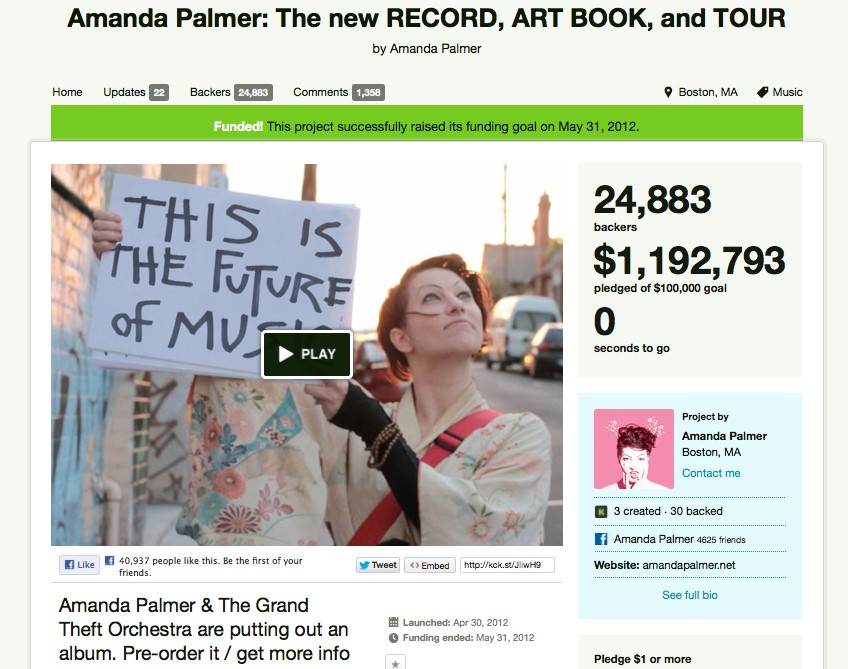
Amanda Palmer: The new RECORD, ART BOOK, and TOUR

Goal: $100,000
Pledged: $1,192,793

Singer/songwriter Amanda Palmer spent four years writing a record and putting her band together. Formerly part of the Dresden Dolls duo, Palmer broke away from a major record label to do her own thing. The album, supported by Kickstarter, was the first million-dollar music project on the Kickstarter platform. The album debuted in the top 10 of the Billboard Charts a few months later.

20_01

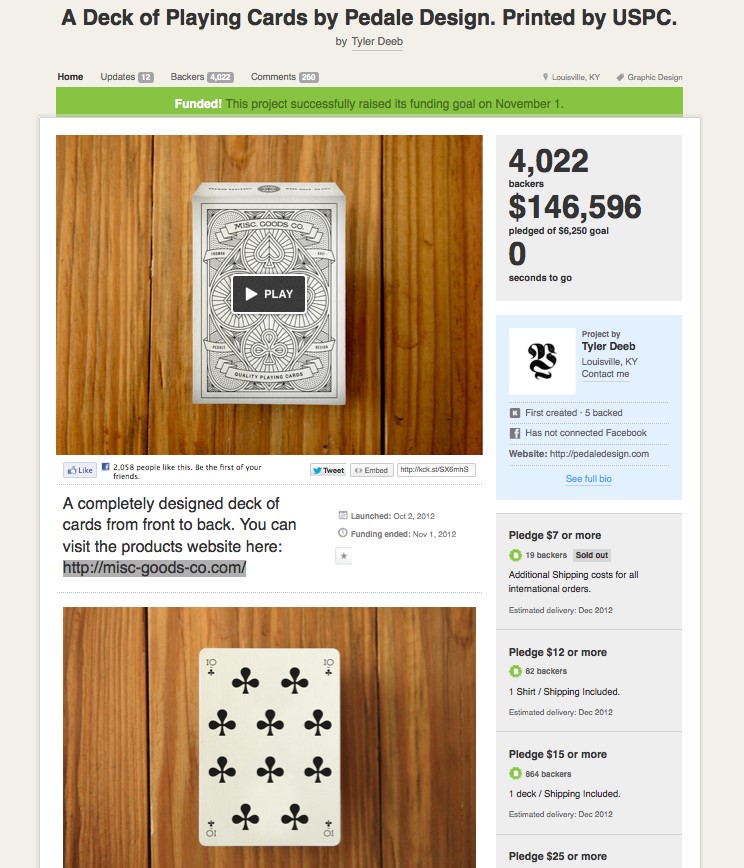
A Deck Of Playing Cards by Pedale Design

Goal: $6,250
Pledged: $146,596

Graphic designer Tyler Deeb’s project on Kickstarter is a perfect example of someone turning two of his skills and interests into income. Tyler wanted to design (he inked each playing card by hand) his version of a gorgeous deck of cards. He is also a card player who was bored with the same old deck of cards every time he sat down to play.

Points to note about Tyler’s project are that he presents top quality photographs of a number of the finished cards – showing he can actually deliver what he is promising.

20_02

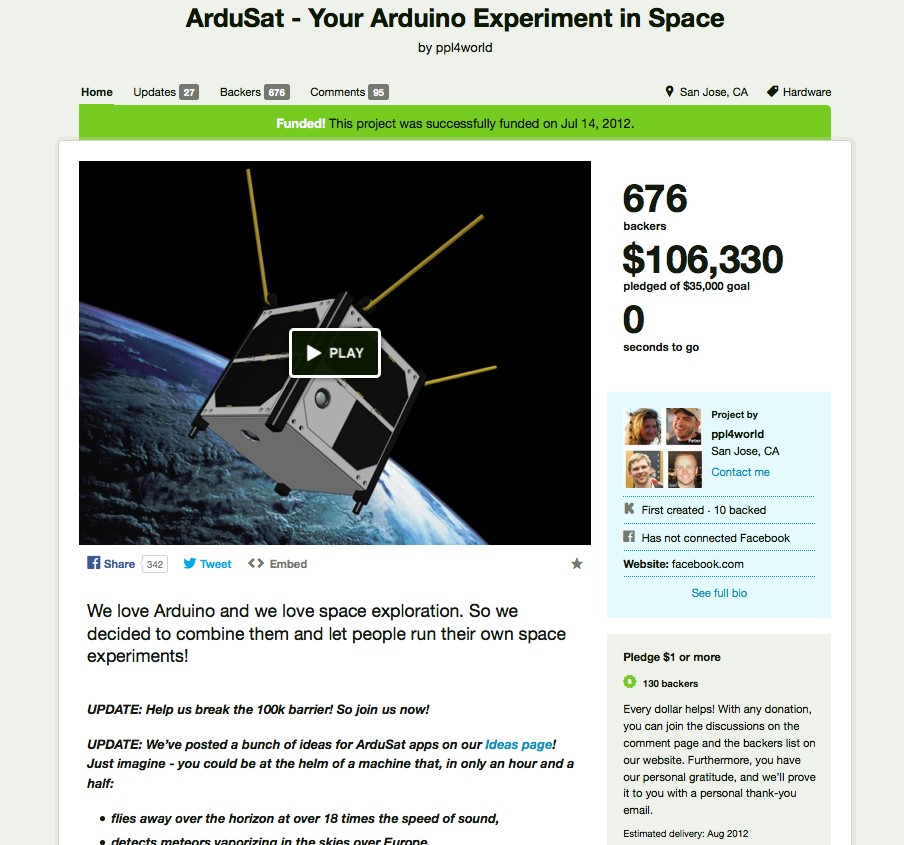
ArduSat – Your Arduino Experiment in Space

Goal: $35,000
Pledged: $106,330

ArduSat is a tiny satellite that weighs no more than 1kg, but it has made a huge impact on the future of space research. Created by NanoSatisfi, this Kickstarter project went well beyond its $35,000 goal in just one month.

The project has democratized space exploration, making it feasible for anyone to run his own space experiment, depending on how many pledges he gets.

20_03

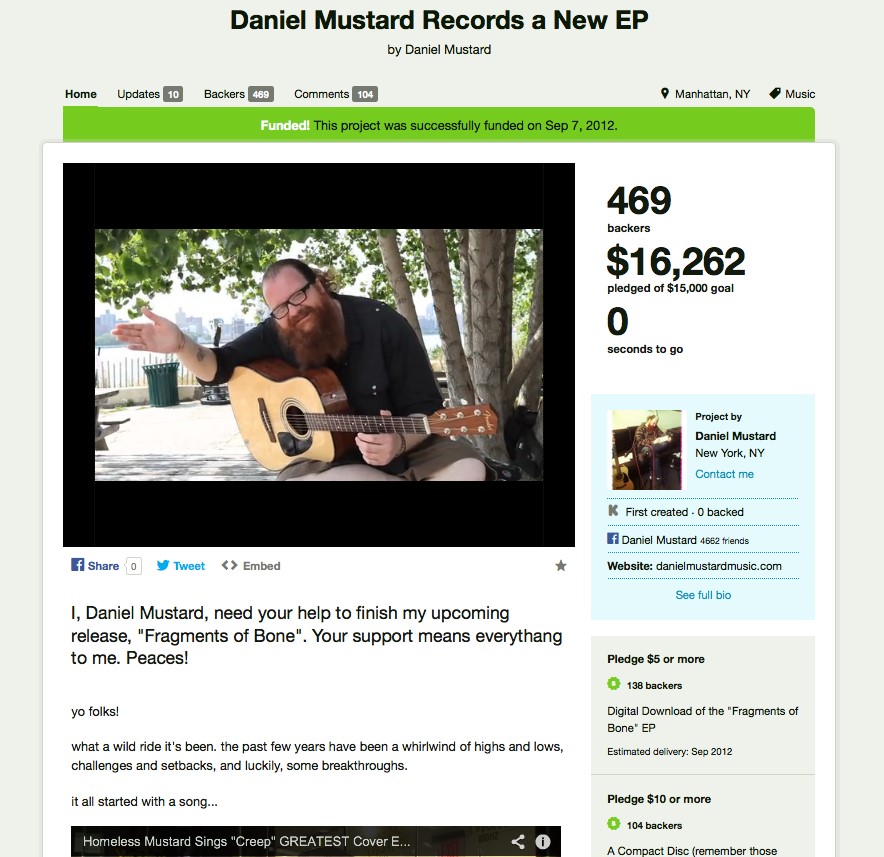
Daniel Mustard Records a New EP

Goal: $15,000
Pledged : $16,262

In 2009, when Daniel Mustard was homeless, his cover of Radiohead’s “Creep” went viral on YouTube. Mustard told Mashable the exposure gave him back his will to live.

Mustard lauched a Kickstarter project in July to pay for the cost of producing and distributing an album. Most of the songs were inspired by his tribulations. The musician is no longer homeless, having found temporary access at shelters and using the Internet to mingle with fans at Apple stores.

20_04

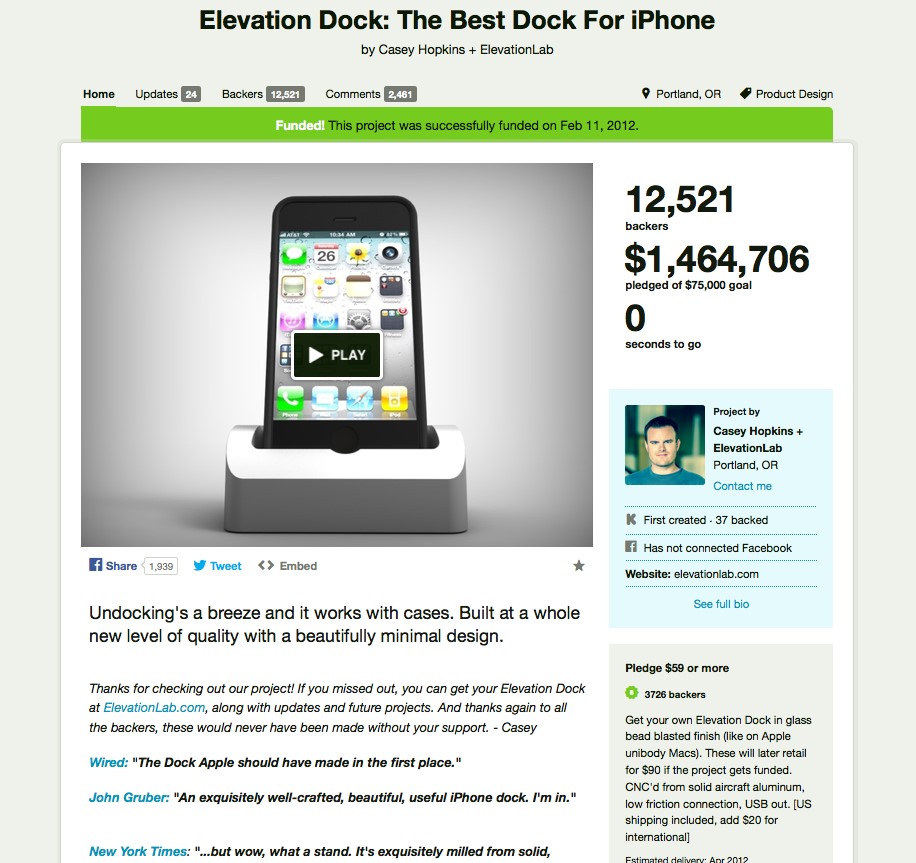
Elevation Dock: The Best Dock For iPhone

Goal: $75,000
Pledged: $1,464,706

The Elevation Dock was a simple concept with one main mission: to make docking an iPhone as seamless as possible, especially when the device is in a case.

This was obviously a common problem among iPhone users. Designer Casey Hopkins and ElevationLab were the first million-dollar project on Kickstarter. And the dock set the bar for high-quality craftsmanship.

20_05

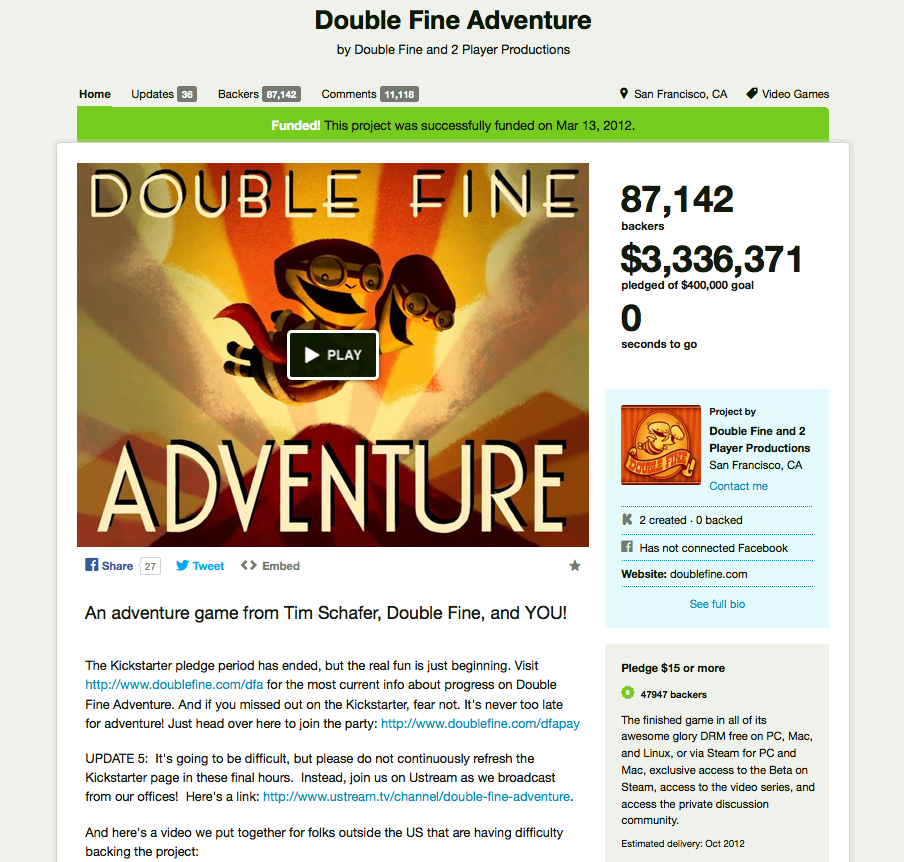
Double Fine Adventure

Goal: $400,000
Pledged : $3,336,371

2012 was a particularly groundbreaking year for gamers on Kickstarter. One of the most important projects, Double Fine Adventure became the first multi-million dollar video game campaign.

The game reached its $400,000 goal in less than 24 hours, making it one of the fastest-funded projects on Kickstarter. Gamers suddenly realized their ideas were viable, and more campaigns like the ones for OUYA and Shadowrun Returns had the opportunity to shine.

kicks-double-fine.jpg

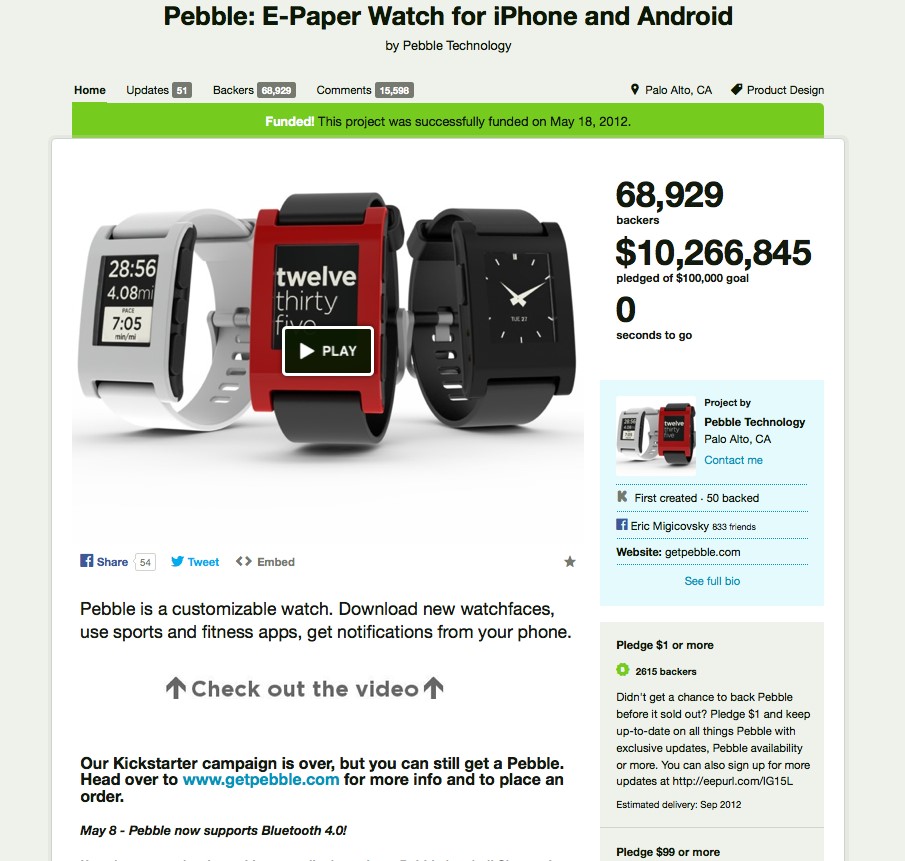
Pebble: E-Paper Watch for iPhone and Android

Goal: $100,000
Pledged: $10,266,845

An iPhone-friendly wristwatch, another seemingly simple concept, nonetheless blew up overnight. The makers at Pebble Technology had a modest $100,000 goal, but reached $1 million in a little more than a day.

20_07

These Days: A Novel

Lastly, here’s a Kickstarter campaign from Jack Cheng asking people to fund the publishing and printing of his first novel. It’s a great guide to use in terms of how to present and organize your text – which I will paste below for you to see…

20_08

Here’s Jack’s copy from his fundraising page. I’m including it here as it’s a very good framework to swipe and adapt to your project. Note how he uses sub-titles, bullet points, speaks from his heart, and includes all the details a backer would want to know:

A guy who designs prop computer interfaces meets a girl who doesn’t own a cellphone. A story about the human side of technology.

Hello! I’m Jack Cheng, a designer and former advertising copywriter. I’ve worked in technology off and on for over a decade, and have been thinking about its role in my life for even longer. I co-founded a startup called Memberly, and I’ve written articles and essays on topics like Habit Fields and The Slow Web. My writing has appeared both online and in print, in places like Thought Catalog and Offscreen Magazine.

For the last three years, I’ve spent my nights and weekends working on a novel. The manuscript has undergone several revisions already, and I recently finished a new draft based on feedback from a few beta readers. Now I’m raising money to hire a professional editor and publish the book in a range of formats.

Synopsis

These Days is about Connor Vast, a guy who designs fake computer interfaces for plastic prop displays in furniture showrooms. He meets a girl who doesn’t own a cellphone and is as disconnected as he is connected. As their relationship develops, he falls in with a group of entrepreneurs out to invent the future, but it’s the same future she’s rebelling against. It’s a story about the human side of technology—the people who make it, the reasons they build, and the people on the other end.

Length and Sample Pages

The current draft is approximately 250 pages. You can read an unedited sample of the first four pages here.

Where the Funds Will Go

contabilidadYour backing helps me do two things: it helps me make the book better, and it helps me get the book into the hands of the right readers. I don’t have the resources of a big publisher, but that’s not a bad thing. It just means that the constraints are in different places, and it’ll take some ingenuity and a startup-like mentality on my part. It also means your support is crucial to making These Days a success.
More specifically, your backing helps me with the following:

  • developmental editing
  • line and copy editing
  • proofreading
  • allow printing in bulk to bring down the per-book costs
  • purchase of fonts and other design assets
  • obtaining ISBN numbers, paying registration fees, and additional costs associated with getting listed in various online bookstores
  • envelopes, packing materials, postage
  • extra copies in case of “breakage” (those that get lost in the mail, etc.)
  • extra review copies

I’ll be detailing the entire process via backer-only updates along the way.

Why I’m Printing a Physical Book

For all the distances we travel between the pages of the book, the physical object itself is a souvenir of that experience. Like all souvenirs, the object is a memory device, so that when our eyes glance over the cover on our shelves, we are pulled momentarily and subconsciously into these past worlds and emotions. The nicks and creases and tea stains that patina the object over time further ground it in our memories, reminding us of where we were when we read the book, what we were doing, who we were with. The object is a conversation hook, an invitation to friends who stop by before going out on Friday night, and strangers you meet on the train in the sweltering New York summer. And the object is a ticket to return, a ticket that never expires.

e-reader and notebook coverI buy physical books. I buy e-books. Both have their advantages, but I believe that at this moment in time, a physical book is still a vastly superior interface for the stories I cherish. These are the books I find myself reading over and over again. These books have hard covers but they are also soft and yielding—they are forgiving to our different ways of highlighting and annotating. They can be dog-eared and marked up and still work when you drop them. They may not have search boxes, but their contents are imminently discoverable, especially when you’re not sure what exactly it is you’re trying to find. And they never run out of batteries.
My goal for this project is to tell a story worth cherishing, complete with an artifact—a souvenir—appropriate for the experience.

– –

Video credits: the background music is “Lattice” by Darren Harper. Nearly everything was shot on an iPhone.


The examples I’ve given you here show how you can use crowdfunding to finance a wide variety of projects – rather than trying to get a loan from a bank, or putting everything on your credit card.

I’ve also seen many crowdfunding campaigns for much smaller amounts, like $500 or $1000.

Just remember, you need to have a very clearly defined, specific project to be able to use crowdfunding. You can’t use crowdfunding to pay your rent, or buy real estate, or sell equity, for example – although remember that GoFundMe has very broad parameters of what’s allowable.

Each crowdfunding site has its own specific guidelines as to exactly what they allow and what is not allowed – so be sure to read through these guidelines when choosing your crowdfunding platform.

If you think crowdfunding would work well for your project, but you’d like more specific guidance, or, you’re going to be fundraising for a large amount, then you may want to hire a specialized crowdfunding coach, like Kat at Multitude.

You can also make use of Kat’s excellent free tutorials on every aspect of your crowdfunding campaign, like this tutorial that gives you all the do’s and don’ts of your crowdfunding video.

As you can see, crowdfunding is an awesome way to generate the money you need – IF you have the right approach and want to put this specific kind of effort in. But if you don’t feel that crowdfunding is going to work for your particular project, or if you’d simply rather fund it another way, stay tuned for the next three units. I’ll tell you some of my very own tried and true secrets to getting the money you need – even when it looks impossible!

Have these examples sparked any new ideas for you? Make sure you write them down in your notebook!


How Do I Use My Email List As My Top Asset?

ian-2015-portrait-woodJoin me as I talk with Ian Thompson about the bigger picture of email marketing and why it’s important to think long-term with your strategies, treat freebies the same as customers, and nurture those relationships.

Ian (aside from being my husband!) is a former marketing and advertising executive who handles all of the email marketing for my businesses.

If you found the previous units in this module confusing, then this overview – where we get into the WHY more than the HOW – should really help you get clear by giving you the big-picture overview. Likewise, if you didn’t need all of the technical info in the previous units, then this call will give you a new way of looking at your current autoresponder series and how to make them even more effective.

In this call, we go over two scenarios in detail; discussing all of the steps and why:

  • Pretend someone has signed up for a free report or free audio. What is your process with them over the next year?
  • Pretend someone has just purchased an eBook, or other product. What is your process with them over the next year?

[EDIT File name, 29:16 – “Module 19” reference, 30:28 – support we don’t offer, 53:00]

DOWNLOAD AUDIOCommunicate With Your List

Or click the play button below to listen online:

[sc_embed_player fileurl=”http://listentofreedom.s3.amazonaws.com/Module19-Communicate-with-List.mp3″]
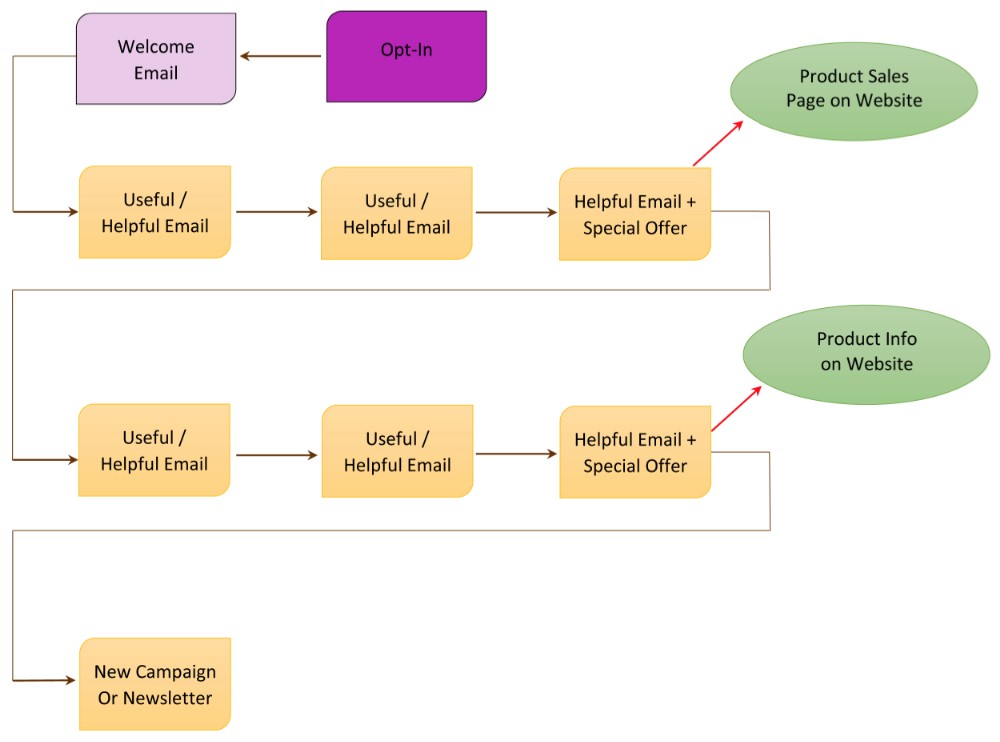
Here’s one of your top take-away’s from this call with Ian: Think of each autoresponder series as a CAMPAIGN (not just a series of emails). And a campaign has two components:

  1. What is my objective with this campaign?
  1. Strategy: How am I going to achieve that objective?

When you think of your autoresponder series as a campaign, then each email and action becomes an interlinked series of events, like this:

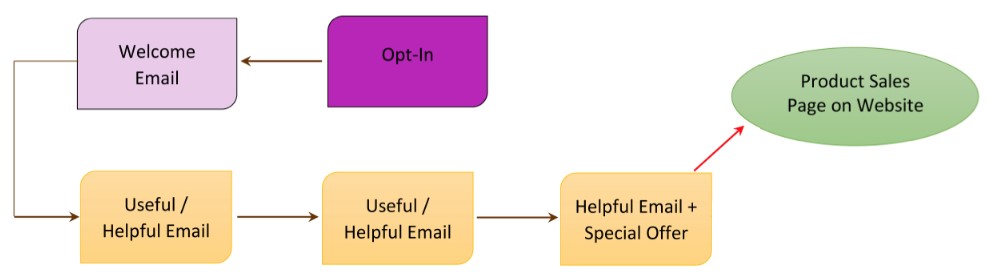
Or, you could also have a really simplified version of an autoresponder campaign like this, which is also very effective:

Let’s keep going and these diagrams will start to make more sense and may even look easy to you!

How Do I Create a Freebie Email Campaign For My Opt-In Offer?

What To Sell And What To Give For Free

Many people get confused between what to give away for free and what to charge for. Especially when you’re supposed to be giving your best stuff away for free! So let me give you a few examples to stimulate some ideas for your own content – you might remember these from when you were learning the basics of communicating with your email list – we’ll expand them into a campaign below.

Example #1 Professonal Stunt Longboarder

You have an eBook on how to be a pro longboarder. This eBook is a combination of text and demonstration videos.

→ You charge for the eBook (which could also be positioned as a Course, by the way) and you give away your best demo video for free. Which of your videos will produce the most elation (I did it!!) in your viewer? That’s the one you give for free.

OR

→ You charge for the eBook and you take your best video demo and you chunk it down into Parts 1, 2, 3. This then becomes 3 separate emails, each with a message from you, some tips, perhaps a link to a blog post, or an affiliate link to an awesome set of wheels (best for doing the stunt you’re going to teach them) and then Part 1 of the demo video, and so on, for a 3-email series.

Example #2 How To Refinish An Antique Armoire

You have an online DVD course that shows people how to purchase an antique armoire from a flea market and refinish it to showpiece quality.

→ You charge for the DVD course and you select just ONE topic from the course and send an email with some intro text and a video that shows just that one piece of how-to. Maybe you select the topic of how to spot a good buy from a garbage piece at the flea market – that’s hugely valuable, shows your expertise and if someone uses that info to buy an armoire, now they’re going to want your course to figure out how to refinish it!

OR

→ You charge for the DVD course, and you offer a mini-course for free. This mini-course tells them the major (overview) steps involved in purchasing and refinishing an armoire. But it doesn’t give the details; it doesn’t tell them which varnish to purchase, which grade of sandpaper – it talks about why it’s important to choose the correct products, but it doesn’t give out the products or specifications. It also doesn’t contain the videos. It only contains excerpts of 1 to 3 videos (so they can see how good your production, lighting, sound etc. is).

But they have a lot more knowledge than when they started. Probably, if someone wanted to, they could attempt the process themselves – maybe they’re an advanced woodworker and can figure out the details themselves. No worries, maybe that person will then become an affiliate of yours! Or he will refer people to your course.

Example #3 Hypnosis Audios

You have a series of audio-based healing sessions using hypnosis for different conditions: Stop smoking, lose weight, bedwetting, anxiety, insomnia, etc.

→ You charge for your individual audios or sessions and you give away your most WOW audio session for free. What is the audio that is likely to be an issue most of your site visitor’s have? Anxiety, stress, insomnia or weight loss? If you know who your customer is, you should already know the answer to this question. That is the audio you give away for free. Because once someone has a fantastic result, they will tell everyone and they will also come back for help with their other problems.

OR

→ You charge for your audio sessions, but you come up with a free email Mini-Course that will help people with a common problem – Are You Stuck In a Rut? So the first email is a quiz that helps them identify where and why they are stuck, along with a short video from you with some understanding and inspiration in the form of a story. The next email contains a link to an interview or teleseminar you gave on a related topic. The third email contains a download link for a mini-hypnosis session designed to help them feel more positive about their journey or challenges.


Okay NOW, let’s expand on those examples and I’ll give you the details on exactly how to set up the Freebie Campaign for each of those items.

OH – hilarious – so what I’m doing here (pull back for the overview) is in itself an example of what I’m trying to teach you! Let me explain: Imagine you’re getting this info through an opt-in offer. The way I gave you the Free vs. Paid examples above could be the free stuff. And the detailed how-to I’m going to give you below could be the stuff you then want to pay for. How cool is that? Sometimes I just tickle myself pink!!

Alright, now that I’ve calmed down, I’m going to give you the elements that make up a good Freebie Campaign (free stuff that leads to a product purchase) and then I’m going to give you three examples of how you would set up your email sequences (autoresponder campaigns) to carry on from your free opt-in offer in each of these examples.

Crafting A Freebie Campaign

I’m going to give you the elements that make up a good Freebie Campaign (free stuff that leads to a product purchase) and then I’m going to give you three examples of how you would set up your email sequences (autoresponder campaigns) to carry on from your free opt-in offer in each of these examples.

A Freebie Campaign is a sequence of free autoresponder emails that showcase who you are and give people an experience of your great stuff, and hopefully lead to a product purchase. And the purpose of a Freebie Campaign is that it:

  • Shows your tribe WHO you are
  • Shows your tribe the great SOLUTIONS, instruction, help, or entertainment you have for them
  • Shows them WHY they would want to be in relationship with you and why they would eventually want to purchase some great stuff from you
  • Gives them a compelling reason to purchase NOW

To put together your Freebie Campaign, you basically brainstorm to figure out what you can give away for free that is really great – look to give away some of your BEST stuff. Remember the old saying about ‘first impression is the biggest impression’? Or, ‘first impression is the lasting impression’? Well, that same principle applies here. It doesn’t matter whether your first touch (impression) with your site visitor is free or paid, it is still the first impression they have of you and will form the basis for how they think and feel about you for a very long time.

But remember what I’ve been telling you throughout LTYF; that people rarely buy their first time on a site. So it’s almost always going to be your free stuff that makes your first impression on people. And that’s why it’s absolutely crucial to come up with a really good Freebie Campaign for your site opt-in.

After your site opt-in campaign (autoresponder series) is set up, you can also come up with a Freebie Campaign for each new product or service you want to offer your list. Again, this free stuff will tell your tribe what this new product is about, whether it resonates with them, whether they have any need or desire for it – you have to give them a taste, touch and feel of it first.

In the three examples below I’m going to take three completely unrelated niches and show you how each of them could craft a great Freebie Campaign to promote a new product or service.

#1 Professonal Stunt Longboarder

Product: You have an eBook on how to be a pro longboarder. This eBook is a combination of text and demonstration videos (which could also easily be positioned as a Course – just saying!).

Opt-In or Email Offer to Your List: Give away your best demo video for free. Which of your videos will produce the most elation (I did it!!) in your viewer? That’s the one you give for free. If you have the ability to segment or tag your list, here’s where you would use a special link, or webform to track the people who express interest and want to be a part of this campaign.

Helpful/Useful Email #1: Great tip that changed the way you slide forever, ask readers to share any of their helpful tips, then talk about your eBook (tell a story!) and give your eBook offer.

Helpful/Useful Email #2: Intro paragraph on your great compilation wipe-out video, then link to your blog post to view it. Encourage readers to post links to their best wipe-out video in the Comments section below the blog. Then give your eBook offer in both the email and on the blog post.

Helpful/Useful Email #3: Story about a stunt video and link to your blog to watch it, then use one of the Compelling Product Offer techniques above to create urgency about your eBook offer. Maybe this is your ‘Last Chance!’ email for that special offer.

Here’s what this email campaign looks like visually:

Note: If you find it helpful to create a schematic like this, you can create them for free using either Google Drawing or Bubbl.us

Voila! Do you see how you have shared your personality, your help, your sense of humor and put some great groundwork into building a real relationship with the people on your list? AND you have also given them three chances to buy your eBook; which will help them even more.

OR

You take your best video demo and you chunk it down into Parts 1, 2, 3. This then becomes 3 separate emails, each with a message from you, some tips, perhaps a link to a blog post, or an affiliate link to an awesome set of wheels (best for doing the stunt you’re going to teach them) and then Part 1 of the demo video.

Your next email goes out 3 or 7 days later, contains a story or helpful advice and Part 2 of the video.

The last email goes out 3-7 days later, contains Part 3 and then a stronger call to purchase your eBook. Now that they’ve had a chance to get to know you and the quality of your stuff, you can give a stronger call-to-action. So maybe you offer a special discount that expires in 24 hours. Or you offer a special bonus if they purchase in the next 7 days.

There are many ways you can create an email campaign of great free stuff that shows your tribe who you are and what great stuff you have. There is no ‘right or wrong’, the only determining question you should ask yourself is: What would I be happy, thrilled, or excited to receive? And then send that to your list.

#2 How To Refinish An Antique Armoire

Product: You have an online DVD course that shows people how to purchase an antique armoire from a flea market and refinish it to a showpiece.

Opt-In or Email Offer to Your List: You offer a mini-course based on your DVD for free. This mini-course tells them every single step involved in purchasing and refinishing an armoire. But it doesn’t give the details; it doesn’t tell them which varnish to purchase, which grade of sandpaper. It talks about why it’s important to choose the correct products, but it doesn’t give out the products. It also doesn’t contain the videos (that are in the DVD Course). It only contains excerpts of 1-3 videos (so they can see how good your production, lighting, sound etc. is).

Voila! They have a lot more knowledge than when they started. They also have a lot of trust in you as an expert and they’ve seen the quality of your teaching and production quality of your videos. Now, if someone wanted to, perhaps they could attempt the process themselves – maybe they’re an advanced woodworker and can figure out the details themselves. No worries, maybe that person will then become an affiliate of yours! Or he will refer people to your course. Or he will purchase one of your other products.

OR

You could do a simple email marketing campaign that would be just as powerful at showing people how great your stuff is: You charge for the DVD course and you select just ONE topic from the course and send an email with some intro text and the video that shows just that one piece of how-to. Maybe you select the topic of how to spot a good buy from a garbage piece at the flea market – that’s hugely valuable, shows your expertise and if someone uses that info to buy an armoire, now they’re going to want your course to figure out how to refinish it! Here’s what that sequence would look like:

*See the section above on Compelling Product Offers That Result in Action if you’ve forgotten what a Compelling Offer is or how to craft one.

#3 Hypnosis Audios

Products: You have a series of audio-based healing sessions using hypnosis for different conditions: Stop smoking, lose weight, bedwetting, anxiety, insomnia, etc. You also charge for individual sessions.

Opt-In or Email Offer: You give away your most WOW audio session for free. What is the audio that is likely to be an issue most of your site visitor’s have? Anxiety, stress, insomnia or weight loss? Because you know who your customer is you will already know the answer to this question. And that is the audio you give away for free. Because once someone has a fantastic result, they will tell everyone and they will also come back for help with their other problems.

Helpful/Useful Email #1: You tell a client story (anonymous, of course) and offer some questions to stimulate exploration of your reader’s own issues. You can either give the whole content in the email, or a teaser paragraph that links to your blog – do whichever YOU prefer to receive. Have a link at the end of the text to a Private Session, or audio relevant to the topic.

Helpful/Useful Email #2: Send out a Quiz – people LOVE quizzes! You can get a free quiz plugin or webform (Infusionsoft) for your blog – so you would link to the page on your blog that has the quiz. Again, have a link at the end of the quiz to a Private Session, or audio relevant to the quiz.

Helpful/Useful Email #3: Send a compelling teaser that links to your blog where you tell a story using mostly photographs. After the photo story, include a powerful client testimonial and then a Compelling Offer for one of your products.

Here’s what this autoresponder sequence looks like, visually:

OR

You come up with a free email Mini-Course that will help people with a common problem – Are You Stuck In a Rut?. So the first email is a quiz that helps them identify where and why they are stuck, along with a short video from you with some understanding and inspiration (don’t forget to tell a story or two). The next email contains a link to an interview or teleseminar you gave on a related topic. The third email contains a download link for a mini-hypnosis session designed to help them feel more positive about their journey or challenges.

You see how easy this process can be? All you need to do to create an awesome autoresponder campaign is to visualize your customer and then ask yourself: What would I like to receive?

Create Your First Freebie Campaign!

Now let’s take everything you’ve learned and put it into action! We’re going to go play in your LTYF Workbook and create a Freebie Campaign that:

  • Shows your tribe WHO you are
  • Shows your tribe the great solutions, instruction, help or entertainment you have
  • Shows them WHY they would want to be in relationship with you and eventually purchase some great stuff from you
  • Gives them a compelling reason to purchase NOW

Here’s what you’re going to map out:

Simple Freebie Campaign


So let’s walk you through crafting each of the steps shown in the diagram above…

Let’s take everything you’ve just learned and put it into action! Pick one of your products or services (or you can use an idea for a product or service) and create a Freebie Campaign that:

  • Shows your tribe WHO you are
Shows your tribe the great solutions, instruction, help or entertainment you have
  • Shows them WHY they would want to be in relationship with you and eventually purchase some great stuff from you
  • Gives them a compelling reason to purchase NOW


Ready? Grab your notebook and get to work…


My Product or Service:


My Opt-In Offer (can be given in an email, or in a sign-up box on your site):


Welcome Email (you only need this if the person has never received email from you before – it contains the link they need to click to confirm they want to receive stuff from you):


Useful/Helpful Email #1 (this is where you deliver what you promised in your Opt-in Offer) Point-form is fine, then type out your final in your email program:


Useful/Helpful Email #2 (summary or bullet points of content/freebie + product offer at end – use stories!):


Useful/Helpful Email #3 – summary or bullet points of content/freebie + Compelling Special O er (Last Chance! email). Remember to link to the product page or download page on your site:


Ta-da!! You’ve just crafted your first Freebie Campaign. Isn’t that awesome??

Simply come back and re-visit this process every time you have a new product or service to offer. And when you’re ready to kick things up a notch and develop a bigger campaign (perhaps you have a higher priced product), make sure you check out detailed or segmented product launches, which might look something like this:

Okay, hopefully you now have lots of ideas about what you can offer for your site sign-up, new product launches, or existing product promotion. And if you are now swimming with questions like:

Have no fear, all those techniques and more (and they are all very easy to do) are explained in the links above!

And in case you’ve forgotten, now that your fabulous autoresponder campaign has resulted in product sales… what do you do next? You can start by listening to this audio where Ian and I detail our product follow-up sequences. We tell you exactly what we send out after someone has purchased one of our products.

Here’s a simple diagram of the product follow-up sequence for digital products, physical products, and services or sessions. This little chart will save you so much time (clarity!) AND make any new product autoresponder set up easy-peasy!

Did you like that? Did it make things a whole lot simpler? Go ahead and download this as a PDF you can print to guide you through your own campaigns.

DOWNLOAD Customer Follow-Up Chart here (Right-click and Save As…)

Tack this chart up on your bulletin board or wall – somewhere super handy – and make your life easier! Remember, the more you can simplify things, the more effective you’ll be.

As you now have a lot more understanding of the ways you can communicate with your list and develop a relationship with them, you should be able to answer this question…


What are you doing with the people on your list after your sign-up box autoresponder series is finished? They have opted-in to your list, received your freebie, now what? Are you going to put them into a campaign for one of your products? Or another freebie? Or are you going to transfer them to your email list? Or transfer them to your blog subscriber list? Write your plan here:


If you have any products or services already selling, run them through this same chart and checklist to make sure you’re providing an excellent experience for your tribe.


How Do I Go From An “Opt-In” or Email List To Getting Paying Customers?

Emailing your list with lots of free and helpful stuff enables you to build a relationship with them. A relationship is where you care about someone, you offer them help, or you make them laugh – you don’t just ask them for money.

Your free, helpful, inspiring or funny stuff is located on your site or blog, so this drives traffic to your site (which increases your search engine ranking) and also keeps bringing them back to you.

Or perhaps you have a really active Facebook page, so you like to engage your list by posting their comments on Facebook, then driving them to a blog post from your Facebook page.

Or you like to send them to a video on YouTube and then back again to your site or blog.

Eventually, this process of building a relationship by giving great free stuff will result in a sale. Here’s an example of what all these variations can look like:

Your email list (database) is your most valuable asset. It is your most powerful marketing tool, because it allows you to build that one-on-one relationship with your site visitors. People rarely buy the first time they come to your site, but after they know you and TRUST you, then they are likely to buy from you, if you have what they need.

But it is also easy to overwork your list and lose people. If you email people too often, it becomes annoying and they will unsubscribe. I’ve found that a maximum of 1 email per week results in long-term email retention; some of my list have been with me for over 10 years without unsubscribing.

Continue To Tell Your Story

If you were following my advice when you wrote your About page, your product descriptions, and your elevator speech and tagline, then you were storytelling all the way.

And the storytelling doesn’t stop there! When you email your list and continue to build your relationship with them, the best way to do that is tell them more stories. Meaningful stories, funny stories, inspirational stories, stories you heard from someone else that are so excellent you need to pass them on, stories your readers or customers have told you, and so on. Stories about things you’re struggling with, or stories about how something happening led to a thought or realization.

Stories about how and why you decided to create a new product, or why you promoted it the way you chose are also very powerful. Like this story from Leslie Bladgett, creator of bareMinerals make-up in an interview with Randi Zuckerberg:

“We decided to do our first ad campaign with models. Before that we brought in real people that sent us letters and they were the ones on the Infomercial. Now, we were going to hire people and pay them to model, which was kind of against the grain for me a little bit.

But what we did instead, is that we brought them in on the go-see, but we weren’t looking at them, we were listening to them. We had them answer questions. And the ones we liked, as people, and if they sounded like we wanted to hang out with them, if they had good ideas, if they weren’t all about vanity and themselves, had intelligence and were fun, we hired them.

We actually signed five people… signed them! …before seeing them. And they became our models. It was very stressful. I’m sweating just thinking about it.

The risk is that they all look exactly the same and that they’re all the same age. That would be weird because most of the people who are seeing it in the magazine don’t know how we got the models.

We know. It was really for us and we did a little campaign on it, but most of the people that saw these pictures didn’t know how we got them. So, what if they were all blonde, blue-eyed and 24-years old? That would be a bummer. But luckily we got quite the range. And I’m still in touch with these women. They’re cool. So I feel good about that.

And when the agency retouched the pictures, we had a big issue with them wanting to retouch them but that’s what they were used to. We had to say,  “We like her nose, we like her eyebrows, we like her chin.” We knew we needed to keep these people – whom we had met, heard and loved their stories – true all the way to the end. We feel good about that and that’s why we are an inspirational brand. We need to be inspired at work, and then hopefully our customers will be inspired.”

How are you feeling about bareMinerals now? Will this story build relationship with her list? Does it bind her existing customers more closely to her? Does it make new people want to go to her site, or keep an eye out for her products in stores? You bet!

Your integrity, your reasons for doing what you do, will shine through every facet of your business – use your email list to tell people those stories and by doing so you will build a deep, real relationship with the people on your list.

Even if you have an informational email – about a medicine, or a gadget, or a mattress – start the email with a story. The story can be about why you are emailing the information, how you came across the product, how the information changed your life, why you were so thrilled to discover the product, etc.

It doesn’t have to be a long story, it may only be one paragraph. But your story is your emotional hook that will get your email read, rather than trashed. The story is the thing that will keep your readers feeling that you are giving value and connection, rather than just selling something.

BIG TIP: And when you write the SUBJECT of that email (the title that shows in someone’s Inbox) make sure the Subject is about the story – not the product or information – because the story is always juicier.

For example, let’s say I want to send an informational email (or partial email that links to my in-depth blog post) about the many benefits of magnesium and why everyone should be taking it. That’s valuable information isn’t it? And I’m not selling anything – except of course the link to the magnesium brand I recommend – but that’s still not enough reason to get someone to open my email in the midst of the 100 other emails they received that day.

So which headline would work better and get my readers to open and read my email?

Information-based Subject:
The 10 Top Benefits of Magnificent Magnesium

Story-based Subject:
How Magnesium Saved My Dad a Trip to the Hospital Last Night

You see what I mean? The first one is a good title, but the second one peaks your curiosity. And then my email would open with my story about my Dad and his heart arrhythmia.

Even though I used a suggestion from my Copywriting Tips to come up with the first headline, the second headline is still more compelling because it has an emotional hook – you want to hear the story!

Or how about this Subject (title for your email) to make it even more relevant:

Magnesium Saved My Dad a Trip to the Hospital Last Night – Are You Mg Deficient?

So when you’re writing any email to your list, about any topic, try to always include a story about what happened, what you thought, what you wondered, an amusing anecdote, or something from your heart.

Also include a photo or image whenever possible – the more inviting your email looks, the more likely it is to get read.

Compelling Email Offers

When you want to promote something to your email list, remember that you NEVER just sell something, or give a sales pitch email. You always share or give something free first (a video, a helpful blog post, an eBook, a story, etc.) and then put your offer in the same email – usually at the end or middle of the email.

Then, right before your email campaign ends – and here’s the part that counts, so get ready! – you send out a LAST CHANCE email. This is something I have tested repeatedly and I’m telling you, it doesn’t matter how many emails you’ve sent to promote your product or program, or how many followers you’ve got in that sequence, or how much free stuff you’ve given away, you will sell the same or MORE from that final, ‘last chance’ email then you will have sold during your entire promotion!

So always, always, send out a ‘last chance’ email – even if your email campaign consists of just two emails; the offer and the last chance email.

If you are sending your email out en masse (an email blast), to your entire list and you don’t have the capability yet to segment off those who are particularly interested, then the maximum number of emails in a promotional sequence (or product launch) should be three – including the ‘last chance’ email. But two might be even better.

If you know people are interested in the offer, you can email them more. But if you’re just sending a group email blast to your entire list, then you don’t want to risk annoying people and having them unsubscribe. That’s why I recommend two emails for sure and you might be able to stretch it to three IF your offer is likely to interest everyone in your list.

If you are using Infusionsoft or 1ShoppingCart, then you will be able to tag and segment up your list into only those people who are interested and want to learn more. In that case, you are also able to carry out a Product Launch Sequence, so be sure to check that out when you are ready to offer a product or service to your list.

With some email platforms and Customer Relationship Management (CRM) systems, you can tag opt-ins or purchasers, thus segmenting them into specific groups, or areas of interest. So, if you have an email platform or CRM that can do this, then you can email a target group more often – because you know they are interested in your new product/service. But, if your system cannot tag and segment people based on their preferences, or interest areas, then all your opt-ins will be together in the same pool of ‘people who liked something you were offering’. In that case, you need to follow my instructions above and email blast those people a maximum of 2-3 times with your promotion.

If you do have a tagged and segmented list of people who are specifically interested in something connected to your promotion, then you could craft a story-based campaign up to 7 emails long – maybe run a competition, give a few things away for free (eBook, or video or audio). There is a lot more in-depth info on marketing campaigns throughout this site  – so don’t worry, this is an area you can always grow and expand your expertise in.

For now, sending 2-3 emails to your entire list will likely work well for you – especially if you follow the guidelines I’m giving you: Tell stories, give free stuff away, tell more stories, and use the ‘Last Chance’ heading in your final email.

Compelling Product Offers That Result In Action

Here are four ways to craft an offer to send to your list, that will encourage them to take action. Or you could turn these into postcards included with product you mail out, or create a blog post and/or video about your offer, etc. Remember to only choose “tactics” that feel good to YOU, that YOU would click on or buy. And when you write it, write it in a way that still feels like it’s you talking, not a sales template.

  1. Limited Time Offer. You need a legitimate reason WHY the offer is time restricted, this makes your offer believable and will create a sense of urgency. Maybe you’re promoting a service with an upcoming start date (after which it’s closed) or a product where the special pricing or combination of items will only be available until your new stock arrives.

Example: We are only taking registrations for X School/Program for the next 30 days. After that, enrollment closes and we cannot take on any new students, so that we can really focus in on our new Members.

  1. Discounted Price Offer. If you have a legitimate reason to discount, this kind of offer works well. If you’ve just brought in the newest model and so want to discount the previous model, that’s a great reason. Or perhaps you’re overstocked and need to make room in your warehouse. You can also offer a discount to celebrate a special day (Mother’s Day, for example), or to celebrate your first year in business, etc. If you restrict it to that day, then you will also have a Limited Time Offer that creates a ‘sense of urgency’ as well.

Example: Our supplier accidentally sent us double what we ordered, but rather than shipping it all back, we’ve decided to offer you a crazy discount of 30% ($10 off!) instead.

  1. Limited Availability Offer. This is where you let people know you only have a certain number of slots, or product available – for a good reason. Your reason WHY the appointments or product is limited has to make sense, so people know your offer is real. Otherwise, it will just feel like a gimmick and you won’t get the same response.

Example: I only have 3 spots open for my new X coaching program – and then all my time slots are filled and you would have to wait until the program ends for the next chance to get onboard. So don’t miss out as I’d LOVE to work with you!

  1. Free Bonus. This can be set up a few ways. Perhaps your free bonus is the ‘icing on the cake’ that is going to be the final emotional reason that convinces the person to buy. Perhaps your free bonus is actually more ‘valuable’ than the product you’re trying to sell. Or perhaps your free bonus is something that works synergistically with the product you’re charging for; you buy the book and get the workbook/journal as a free bonus. Or you buy the book and get the meditation as a free bonus. Or you buy the meditation and get an art journal as a free bonus, etc.

Example: Because I’m totally invested in helping you change your relationship with food and seeing REAL results in your body, when you purchase my new X book, I’m going to include this fabulous 100-page X Recipe Book for FREE!

Now let’s do a little brainstorming and create a compelling offer for one of your products…


Choose one of your products or services and pretend you’re offering that product to your tribe. How could you encourage them to make a purchasing decision? Which of the compelling offer techniques from this unit could you use? Write a compelling offer for your product here. Don’t worry if you’re not sure how to do this, just slap something down:


Example: [after I tell a story about magnesium] Special Offer: I’ve got only 30 bottles of the Mini-Minerals Magnesium left until we get our next delivery. So to make it easy for you to try this amazing mineral, here’s a 20% o coupon (so you save $7!) if you order by midnight on Tuesday.


Now I’m sure you might be wondering… How do I know what to sell and what to give away free?

How Do I Sell More Books?

You may have noticed how, throughout the Listen To Your Freedom program, I keep telling you to focus on getting people to opt-in or sign-up to your email list. I tell you over and over again how this is the backbone of your ability to develop a relationship with your site visitors and how this relationship will eventually turn into sales. Sound familiar?

Well, this same advice applies no matter what type of product you are selling – even books. Our typical concept of book buying has been that you go into a bookstore, the cover makes you pick up the book, you read the back of the book, and if you like it, you purchase the book. There’s nothing there that involves a relationship with the author, is there?

Except the majority of books are not sold like that anymore and bookstores have been dying for over a decade. The majority of book purchasing nowadays is either done online, or people have heard about the book online.

Even a lot of the marketing of mainstream publishers is now carried out online – their authors are required to appear in videos, online interviews, online Q&A sessions and many have their own blog where they blog about their family, their life, and their travels. It all equals relationship.

Tim Grahl is a marketing expert who specializes in helping authors promote their books. In his book on how to sell, Your First 1000 Copies, Tim writes:

“Your #1 goal as an author should be to grow your email list as much as possible.  Write that on a post-it.  Recite it to yourself every morning.  Tattoo it on your forehead.  Do whatever it takes to make sure that developing your email list is the #1 goal of your platform strategy.”

Tim goes on to say:

“How does this work in the real world?  When I say to “Tattoo it on your forehead”, I’m trying to give a sense of urgency, but it’s often easier to know you need to do something but much harder when you go to actually do it.

So let me give a clear step-by-step plan that is rooted in the ideas of the book.

  1. Create a compelling offer for your email list.  Give a free book away a chapter at a time over a month.  Give a free PDF download away.  Offer something for subscribers to get when they sign up for your email list.
  2. Create a landing page.  Create a page on your website where the only action for visitors to take is to signup for your email list.  Here’s one we created for a client that works really well:

http://www.jeffselingo.com/guide/

Create a page with a title, some content and then an email list signup.  That’s it.

  1. Link to that landing page in everything you do.  If you guest blog somewhere, put a link at the bottom of the post that invites people to download your PDF, get a free eBook, etc.  If you are doing a talk somewhere, put that link on the last slide in your powerpoint presentation.  If you do an interview, invite people to go to that page on your website.

We regularly see increases of 8x on email subscriptions just by doing these simple steps.”


Now if I clicked on the weblink Tim gave (take a look at the screenshot below), you can see how he has used the exact same process I outline here to come up with the solutions to this niche’s problems. And these solutions are presented as bullet points on the book’s landing page:

So visitors can immediately see that this freebie (excerpted from the book) has clear benefits to them and will solve their problems and alleviate their pain – that’s why this sign-up is working so well.

The author is also giving some of his best stuff away for free – remember how I frequently tell you to do this? So that people can be ‘wowed’ by the quality and excellence of your stuff and will definitely want more.

Launching Your New Book

When it comes time to launch your new book – and this usually starts before your book is finished – you can use the 3 points Tim Grahl outlined above, combined with either a simple product launch, or a complex product launch.

Those steps again are:

  1. Create a compelling sign-up offer – then email out your launch sequence to your opt-ins (3 – 10 emails). Or email your existing list.
  2. Create a landing page, or sales page, on your website which you link to in all your emails.
  3. Give out the URL for that landing page everywhere you talk about your book, in your blog, teleseminars, interviews, etc.

Again, this is the same format I followed for Listen To Your Freedom. Every email in my 7 Freedom Steps sequence (my sign-up offer) linked to my sales page, or landing page: www.ListenToYourFreedom.com/show-me

Your landing page, or sales page, is very simply where you speak from your heart about your product. Where you address all the pain points, or problems your visitor is facing, and you tell them about your solution(s).

Also put your opt-in offer on your landing page. Maybe that person came from a blog link, or was referred by a friend, so make sure they can opt-in to your launch sequence to learn more about you and start developing a trusting relationship with you.

Where Should I Host My Landing Page?

As we discussed in the last unit – at this point you may be wondering: Is it best to host a landing page on a separate URL, or incorporate it into my main site? And should I have the main menu showing, or not, so that people cannot click away from the page?

Some people have a landing page that only offers one option – for example they want the visitor to sign-up for a free audio, or video. Statistically, that method works. But personally, I don’t like it and it doesn’t represent me. I don’t like to force people to do things. I prefer to give people a choice, trusting that when the time is right, they will get with me.

But you may feel differently, or you may have a product or book that is ideally suited to that kind of landing page – listen to your gut.

If you go that route, after opting-in, the person will then be transferred (automatic url-forward) to your sales page where you will give them all the details about your book, or seminar, or course.

Some people like to use a paid plugin for WordPress called OptimizePress to design and host their landing pages, so be sure to check them as they are a great option. If you think you are going to have multiple landing pages, or sales pages, for multiple products, then OptimizePress (at $97) is probably your most economical option.

If you are with Infusionsoft, you can create landing pages easily within your account.

For myself, I usually just create a Page on my site and I pay my designer to create some nice forms or graphics for me.

There is no right/wrong choice here – just ask yourself: If I was coming to this page, what would I like to see? How would I like to be treated? And then just do what YOU would like! It really is that simple.

Whichever way you choose to go, make sure your landing page, or sales page:

  1. Looks really good; inviting and attractive.
  2. Looks good and works well on mobile devices (responsive design) like cell phones, iPads, tablets, etc.
  3. Make sure your page loads quickly (1 second or less) and any audio or video plays instantly, without glitches.

If you don’t want to link to a dedicated landing page, you could also link to your shop listing for your book, or your Amazon listing.

Fiction Books

Now, what if you are selling a fiction book?
You have to take a slightly different approach, but you still have to give people a taste of your writing – a taste that will leave them wanting more.

An effective way to do this, is to give away one of your books or novellas for free. A novella is a shortened version of a novel – usually around 100 pages or so. So it is far longer than a short story, but much shorter than a novel. An even stronger hook would be to make this book or novella the first in a series, so readers are attached to your characters and want to find out more.

Or, you can price your first novel (or novella) super cheap – $0.99 for example – and that is a very low-cost way people can get a taste of your work. This is what Amanda Hocking did to earn $1 million in 18 months on Kindle:

Being her own boss allowed her to set her own pricing policy – she decided to charge just 99 cents for the first book in a series, as a loss leader to attract readers, and then increase the cover price to $2.99 for each sequel.

Though that’s cheap compared with the $10 and upwards charged for printed books she gained a much greater proportion of the royalties. Amazon would give her 30% of all royalties for the 99-cent books, rising to 70% for the $2.99 editions – a much greater proportion than the traditional 10 or 15% that publishing houses award their authors.

You don’t have to be much of a mathematician to see the attraction of those figures: 70% of $2.99 is $2.09; 10% of a paperback priced at $9.99 is 99 cents. Multiply that by a million – last November Hocking entered the hallowed halls of the Kindle Million Club, with more than 1m copies sold – and you are talking megabucks.”

Elizabeth Lorraine is a fiction writer who also maintains an excellent blog and resource site for authors (check it out): thewritersguidetopublishing.com

She too has tested the low-priced or free book promotion strategy and here’s what she has to say about it:

I too have used the free book to skyrocket sales, over 11,000 since it debuted in August of paid books. I am writing four full-length books a year plus two shorter free ones which include chapters of the first book in each of my series. It works great to introduce people to me.

I will be launching book six of my first series Royal Blood Chronicles in a week, which will give me seven full length books. I price the first one at $0.99 the rest are at $2.99. I think each author needs to find their price point. Definitely a series sells much better.

I did try the 99 Cents on Book One – Bootscootin’ Blahniks – and then left Books Two and Three – Stompin’ on Stetsons and Buckles Me Baby – at $2.99 and got nowhere on Books Two and Three, although I got a couple thousand sales at the 99 Cent point.

For me, it wasn’t till I did that Book One Free and the rest at 99 Cents that I really began to build my reader base.

And for me, it is the Number of Readers over The Money From Each Sale.

I can remember my husband and I sitting together and first changing Bootscootin’ Blahniks from $2.99 to 99 Cents! Our hands were shaking! But here’s the thing… when by the next morning, we’d already sold more in 24-hours than we’d sold in the previous 6 months combined, we knew we were onto something!

When I took Bootscootin’ from 99 Cents to Free, I just went for the gusto, made the change, and called my DH at work to tell him what I’d done. LOL! The line was silent. Then, like the superfab SweetMan he is, he just said, “I know you, and obviously you’ve done your homework… and you sure as hell were right the last time.”

As Lorraine points out, until you are a popular author, it is much more important to get your work out there than to focus on money. Once you have a large reader base who love your work, they will watch for your next book and then your sales figures will climb. But until many people know about you and connect with your work, you won’t sell much anyway!

Remember what we’ve talked about throughout LTYF: Give your best stuff away for free. Then people will keep coming back to you for more.

What’s Your Book About?

Another important element you need to have in place for selling fiction books is to have a short, but compelling book description. This is the blurb that goes on the back of the book. In an online marketplace it is the first thing that viewers read about your book.


Have you even heard about distilling down your business into an “elevator speech”? Well, this is exactly the same thing – but done for a book.

So you’re in the elevator and someone turns to you and says, “Oh, what is your book about?” and… GO! You have just that short elevator ride to answer their question – and you want to answer it well enough that the person wants to go get your book – open up your notebook and get writing!

You’re in the elevator and someone turns to you and says, “Oh, what is your book about?” You answer:


Another great way to gather content for your book description is to have several family or friends read your book. Then ask them: “Pretend we’ve never met, I see you reading that book and I ask you, ‘what’s it about?’ and you answer me… what would you say?”


Have your recording device ready to go, or your notebook, to record what they say. When it’s your own book, you often need to bring in some ‘fresh eyes’ because you just can’t pull back and take an overview anymore – you’ve stared at it and lived in it for too long. You also may be surprised by what other people see as the major theme(s) or point of the book – perhaps things you thought were minor. Now, based on your notes, or your recordings, write your ‘fresh eyes’ book description here.


Author Richard Ridley has done an excellent article for CreateSpace (which you should also go have a look at – it’s owned by Amazon) on How to Write an Effective Book Description. A writer for more than 20 years, Richard offers a unique perspective on book marketing based on his own experiences as a self-published author.

He is the author of the IPPY Award-winning young adult series The Oz Chronicles. Book one in the series – The Takers – and is also the winner of the Writer’s Digest International Self-Published Book Award in the Middle Grade/Young Adult category.

Here is Richard’s article:

How to Write an Effective Book Description

One of the most crucial elements to selling a book is also probably the most difficult element to create for authors. The book description is your lead in, your chance to hook a reader and get them to crack the cover and satisfy their curiosity. Even in an online environment, the book description can bridge the gap between having just another title among a sea of choices and a sellable book worth reading.

The problem is that many authors have a hard time writing a good book description. The main reason it can prove so difficult is because they don’t want to leave anything out. As the creator of the material, there’s a natural instinct to find a way to cram all or as much of that material into the description. But too many details can render your description confusing and ineffective.

Elements of the Book Description

As someone who has failed and triumphed over book descriptions, here is what I have learned through my personal series of trial and error. Call them rules, suggestions or ramblings of an author gone mad, but I’ve collected these tips by observing and consulting with other authors, both self-published and traditionally published.

  1. Don’t include subplots. When it comes to the book description, the only thing that matters is the main plot or main theme. That’s all you need to focus on when you sit down to write your book description. Including anything else will send you off into an endless loop of “then this happened” moments that will dilute your book description. What is the primary action that drives your book?
  2. Keep it under 150 words. This, no doubt, will elicit some moans and groans by a lot of authors. Summarizing a book that consists of tens of thousands of words to just 150 is impossible, right? No. In fact, I am of the belief that you should be able to summarize your book in a single short sentence. Remember, you don’t have to concern yourself with the character development and sub-plots, so those tens of thousands of words it takes to adequately draw a reader into a book aren’t necessary when it comes to your book description. In the simplest terms, what is your book about and what will make readers interested?
  3. Write in third person, present tense. Even though your book is most likely told in past tense, your book description is not. You are describing this book as if you’re sitting face to face with the reader, and they’ve asked you what the book is about. You wouldn’t speak to them in the past tense. In addition, the book description is told from third person point-of-view even if you’ve written your book from first person point-of-view.
  4. Use emotional power words. You are trying to evoke emotions with your book description, the same emotions that your book evokes. To convey these feelings, you need emotional powers words like tormented, charismatic, passion, obsession, terrifying, etc. There are too many to mention here, but a quick search for “Power Words” on the internet will produces hundreds of words to choose from. Just be careful not to overdo it. Use power words sparingly and strategically. If I had to put a number it, I’d say in a 125 word description, you’d use 6-10 emotional power words.
  5. You are not the author. You are not writing your book description as the author. You are writing it as the publisher. Making an impact on the reader is your principal concern. What will move the reader to want to know more about your book? What will motivate the reader to add your book to his or her cart? Write the book description with your head, not your heart. Remember, the book description is marketing material – not literature.

Those are my five main points when it comes to writing a book description. Another good practice when writing your book description is to read as many book descriptions in your genre as possible. It’s a great way to figure out what the industry standard is. These descriptions become industry standards for one reason: they sell books.

Here’s an example of a book description that I believe gets it right. It’s for Gil Adamson’s novel, The Outlander, published by Harper Collins in 2007.

In 1903 Mary Boulton flees alone across the West, one heart-pounding step ahead of the law. At nineteen, she has just become a widow – and her husband’s killer. As bloodhounds track her frantic race toward the mountains, she is tormented by mad visions and by the knowledge that her two ruthless brothers-in-law are in pursuit, determined to avenge their younger brother’s death. Responding to little more than the primitive instinct for survival at any cost, she retreats ever deeper into the wilderness – and into the wilds of her own mind.

From the description, I know the book is a psychological thriller featuring a young woman on the run from some very nasty people. I get a hint that her husband may have deserved his fate, but I’m also led to believe that Mary Boulton may be mentally unstable. The description is roughly 90 words. It’s told in third-person, present tense, and I count seven emotional power words (“heart-pounding,” “frantic,” “tormented,” “mad,” “ruthless,” “primitive,” and “wilds”). I only know the main plot: she killed her husband, and now she’s a fugitive running for her life. I picked up the book because of its cover, but I opened the book because of this description. I now own it.

You’re not just writing your description for your back cover. You’re also writing this for your social media network, as part of your bio information for personal appearances, for flyers and other print material, etc. This isn’t just for you; it’s for your fans. With a concise book description, they are more likely to copy and paste it into an email to friends and family or on their own social networking accounts. Think of this type of description as being portable. It’s easy to share and, as a result, is a major tool in your spread-the-word campaign.

I will leave you with this: you may get it wrong the first time you try to write a book description, and that’s okay. It’s just another part of the process. As you go through various versions, don’t delete those earlier ones. I’ve found that by combining the elements of the latest version with earlier versions, I hit pay dirt. Good luck, and happy selling!”

I’m going to quote again, this key paragraph from Richard Ridley’s article above:

You’re not just writing your book description for your back cover. You’re also writing this for your social media network, as part of your bio information for personal appearances, for flyers and other print material, etc. This isn’t just for you; it’s for your fans. With a concise book description, they are more likely to copy and paste it into an email to friends and family or on their own social networking accounts. Think of this type of description as being portable. It’s easy to share and, as a result, is a major tool in your spread-the-word campaign.”

So in keeping with all these ways people are going to use your book description to spread the word about you; know that your book description does not just tell people what your book is about, but it is also used to let new people know about your work. So make sure your book description or book title also contain the top keywords for your target audience.

For example, let’s say someone is looking for new books on paranormal romance – that is a very specific genre and they’re going to be using those and related keywords to search for new books and authors, like:

  • Paranormal romance
  • Vampire novels
  • Vampire romance
  • Psychic novels
  • Historical paranormal romance

If you want your books to turn up in their search results, then you have to include these keywords (whichever ones apply) in your book description. You will also have fields where you can enter keywords when you upload your eBook to Kindle (or other e-reader platforms), so make sure you take advantage of that too. This page will tell you more about keywords if you need help. Now get to work writing your book description!


Write down the top keywords for your book that should appear 2 – 3 times in your book description:


Now put together everything you’ve learned, your keywords and the two book descriptions you’ve already written above, and write your final book description:


TIP: Bestselling fiction author J.A. Konrath has an excellent blog with all kinds of tips and insider knowledge. He also gives away all his contacts – cover designer, eBook promoter, eBook store builder, etc. for free.

Guy Kawasaki is a bestselling book author and marketing expert who has more than 6 million social media followers – so a good guy to learn from! Here’s a quick, very simplified intro of his process:

And now, Guy gives us his top 19 techniques that show how authors can use social media channels like Facebook, Twitter, Google+, and Pinterest to reach their target audiences and sell more books.

Note: The how-to stuff starts at 4:00 minutes – if you want to skip the introduction.

Next, we have this great video from Brian Jud, who is a consultant and author of 17 books on self-publishing and marketing.

In this webinar, Brian will show you creative and practical tactics to increase your book’s chances of success as you publish and after it goes on sale.

In the publishing phase, you can begin arranging media events, prepare your title for reviews, build your audience with social networking, and more.

Once your book is available for sale, the stage of perpetual promotion begins. Brian will show you innovative, low-cost, and proven marketing actions you can take to sell more books.

PLEASE NOTE:

I have provided these videos for those of you who want to do a kick-ass job of promoting your book and maximize your routes to success. But I also want you to know that I have done very little to promote my health books! I have focused on building an extremely helpful online site and blog where I give tons of stuff away for free. People often find their way to me through a really specific search term (e.g. internal hemorrhoid remedy) for which there is not a lot of competition. And via word-of-mouth. This works for me because my solutions are truly unique and they work super well – when you heal yourself, you tell everybody!

So you also have to look at the type of book you’ve written and how much competition is in your niche, to determine how much promotion you need to do to put your book on the map. Also, if you already have a good-sized email list, then you may want to focus your marketing efforts on them, rather than on procuring new readers.

All I’m saying, is that if you watch videos like these and feel exhausted, then know that there are other, more organic ways that also work well. Just stay true to yourself and keep doing the things that authentically let people know about the valuable stuff you have for them – it may take longer, but you’ll be happier! Or, of course, you can hire someone to do all the book promotion for you! If you don’t know how, this is the easy-peasy way to outsource stuff you don’t like doing.

Making Money With Your eBook

Here is a free eBook for you to download – compliments of BookBaby – on the essential steps to market your eBook like a pro. This eBook is not only a valuable marketing guide, it is also a great template of how to layout and design a really great looking freebie for your opt-in or sign-up offer on your site!

As you read through Making Money With Your eBook you will also see that many of the recommended steps are things you have already done in previous Modules – so give yourself a smug pat on the back and just focus on the items remaining.

DOWNLOAD Making Money With Your eBook: Think Like a Marketer and Sell Your Book Like a Pro by Steven Spatz

By the time you’ve finished this Module, watched the two videos in the last unit, and read this eBook – you will know more about marketing your book than most published authors! How awesome is that?


How Do I Deal with Copyright For My Book, CD, DVD, or Program?

There are a number of items that need to be in place for you to be considered the legal owner of your creative work – anything literary, musical, dramatic or instructional. Obviously, your creative work can be in physical or digital form. Before you start selling your book, or program or audio in the marketplace – or even giving it away for free – you want to be legally recognized and protected as the owner and creator of that piece of content. So before we get started, let’s just go over the different types of products and how they can be protected:

Copyright provides protection for literary, artistic, dramatic or musical works (including computer programs) and other subject-matter known as performer’s performances, sound recordings and communication signals. Patents cover new inventions (process, machine, manufacture, composition of matter) or any new and useful improvement to an existing invention. Trade-marks are words, designs, or any combination, used to distinguish the goods or services of one person or organization from those of others in the marketplace. Industrial designs are the visual features of shape, configuration, pattern or ornament, or any combination of these features, applied to a finished article. Integrated circuit topographies refer to the three-dimensional configuration of electronic circuits embodied in integrated circuit products or layout designs. The only type of protection we’re going to cover here is copyright, because any of the others require the assistance of a lawyer.

Your Copyright Notice

A copyright is a legal notice, but for anything in digital form, like eBooks, it is surprisingly easy to establish. You simply put your copyright at the beginning of your eBook. If it is a Report or white paper, or technical, or informational PDF, then you may also want to put the copyright notice in the footer of every page. This is what I have done for the LTYF Modules in PDF format – my copyright is in the footer of every page.

For a digital MP3 file, you could either speak the copyright at the beginning of the audio, or list it on the download page, include it in the download email, and on the sales page.

For a digital (online) video, you could either show the copyright notice at the beginning and end of the video, list it on the download page, include it in the download email, and on the sales page. A basic copyright notice looks like this: © 20XX [your name]. All Rights Reserved. [ company name]. [ website url] For example: © 2014 Jini Patel Thompson. All Rights Reserved. Listen To Your Gut Enterprises Inc. www.ListenToYourFreedom.com

To insert your copyright notice in the footer of every page, you add it to your Word .doc (before you save it as a pdf). You click on VIEW -> Header and Footer. Then scroll down the footer at the bottom of the page and enter your copyright notice and center it on the page. Then click X to close the footer box. You’re done.

For a physical, printed book, there is no requirement to register your copyright in the U.S., but it is a service provided by the Library of Congress as a means to record claims to copyright. If you ever have a dispute about your copyrighted work, some experts maintain your best evidence is going to be the registration you made, and the date it was entered, to show you are the originator of the work. In most countries you can also submit and have a copy of your actual (physical, printed) book, DVD, or CD kept on file with whatever government office handles that – just ask Google! Type this into Google: how to register book copyright in [your country] or how to register DVD copyright in [your country] For a printed book, it’s a good idea to register your copyright, even though it isn’t required, for these reasons:

  1. Copyright registration will put the facts of your copyright into the public record
  2. In the event of legal action, your registered work may be eligible for statutory damages and attorney’s fees
  3. If you register your copyright within 5 years of publication, it is considered prima facie evidence (self-evident from the registration) in a court of law

You can get all the details here: www.copyright.gov

If the legal registration process sounds like too much work for you, then an easier way to at least get some additional protection is to place a copy of your printed book, DVD, CD, or eBook (print it out) into an envelope, address it to your lawyer, write on the outside of the envelope: DO NOT OPEN – MUST REMAIN SEALED, and mail it to your lawyer. The postmark will date stamp it for you and your lawyer can store it for you in his/her files in the event of any legal dispute.

Now, here’s where I’m going to speak ‘off the record’! If you have put a copyright notice on all of your products from day one, you have been issued an ISBN number for your books, DVDs, or CDs and perhaps you even have a copy of your book or DVD stored in your country’s central library… do you think you have set a pretty good legal stamp on the fact that you are the author of that work? I think so. Personally, I wonder if it would change things that much if I also paid to have a copyright certificate as well? Especially when the government agency who issues your copyright plainly states, “please note that the Copyright Office is not responsible for policing or checking on registered works and their use, nor can it guarantee that the legitimacy of ownership or the originality of a work will never be questioned.”? What’s the value of a “copyright” when the legal, issuing body has not even checked whether the work has already been copyrighted by someone else?
This is the process they use for patents and trademarks – part of registering a trademark or patent involves the lawyer conducting a thorough search to ensure that no one else has already registered that patent or trademark. With a copyright, there is no such cross-checking and investigation process, you just mail in the form and the fee.

In my personal opinion, if I was a songwriter, or a playwright, then it would be worth the time and money for me to register an official copyright – just to have a layer of protection. Because in both these fields, my work would first be shopped around to industry before being publicly acknowledged as mine. Therefore, it would be easy for an unscrupulous agent, or executive, or fellow writer to swipe my piece and correspondingly difficult for me to prove that I am the author.

In both these cases though, I would also mail a sealed, postmarked copy to my lawyer. But for a book, or eBook, or DVD that I hold the ISBN for, that carries a copyright notice, that I’ve been blogging about, shooting videos about, and people are discussing it in public forums; then personally I feel a good ownership trail has been laid down for that work that would pre-date any infringers. I would also look at the likelihood of someone legally challenging my work, or of me taking someone to court for copyright infringement. But of course, you must check with your lawyer and make your own legal decisions! Your opinion and risk comfort level may be very different from mine and I encourage you to follow your lawyer’s advice.

As I understand it, there is no official copyright registry in either the UK or Australia, you simply use the standard copyright notice (as I have shown you above) on your books and the fact that you hold the copyright is considered an ‘automatic right’.

Here’s what the copyright page looks like on my 480 page, hardcover book with CD-rom, Listen To Your Gut. You can see my copyright notice, my ISBN, and my book registration data with the Library and Archives Canada Cataloguing in Publication. Note the wording of my comprehensive copyright notice here and feel free to swipe:  International Standard Book Number (ISBN)

The ISBN number provides a standard way to identify your book, instructional, entertainment, or documentary DVD or CD, especially for bookstores and libraries. You will need an ISBN number and bar code if you want to sell your book in any kind of bookstore, either a physical store, or on the internet.

One agency per country is designated to assign ISBNs for the publishers and self-publishers located in that country. To find your country’s ISBN agency, type this into Google: ISBN agency [your country] The ISBN number ties into a catalog of all (registered) books in print. This catalog lists the publisher, access and purchasing information, and descriptive data about each book.

ISBN means International Standard Book Number. An ISBN is a number, used like a serial number so that bookstores can accurately order books. An ISBN is not a bar code. You can receive the ISBN number for your book, DVD or CD (but not music CD) by contacting your country’s ISBN Agency.

Here are the agencies for the U.S. and Canada:

United States R.R. Bowker, LLC – US ISBN Agency
630 Central Ave.
New Providence, NJ 07974
Phone: (+1) 888-269-5372
Fax: (+1 908) 219-0188
Contact: John Purcell
Email: isbn-san@bowker.com
Web: www.isbn.org

Canadian ISBN Agency Library and Archives Canada
550, boul. de la Cité
Gatineau, QC K1A 0N4
Telephone: (819) 994-6872 / (866) 578-7777
Fax: (819) 934-6777
Email: isbn@bac-lac.gc.ca
Web: www.collectionscanada.gc.ca

Not many retailers require an ISBN for eBooks. Smashwords is one that does – if you want to get in their Premium Catalogue, but they can also assign you a free ISBN. Kindle doesn’t require your eBook to have an ISBN, Kobo books doesn’t and Barnes & Noble doesn’t. So you really don’t need to buy an ISBN for an eBook when you are first starting out. Once you get rolling and have a little more time and money, you can get ISBN’s for all your eBooks and add them at that time.

You are advised to have an ISBN for a printed book, especially if you are selling in retail outlets, like Amazon, bookstores, CreateSpace, etc. Some retailers (like CreateSpace) will offer you a free, or cheap ISBN. But this means that your book is registered with CreateSpace as the publisher, NOT with your company as the publisher. If you do this, then your book can only be sold through CreateSpace, Amazon and the bookstores and libraries that CreateSpace distributes to. If you wanted to make your book available to other stores, or libraries, you would have to publish another version of it, with your own company’s ISBN.

Here’s a visual chart to make this easier to understand: Technically, you are supposed to issue a new/different ISBN for each version of your book. So your printed book has one ISBN, your eBook has a different ISBN, your Kindle book yet another ISBN, and so on. But as I told you above, many digital retailers don’t require you to have an ISBN in order to carry your book, so it is not crucial – although that may change at any time!

Barcodes

Once you have your ISBN, you can either get your barcode through your ISBN Agency, or online at a place like SimplyBarcodes.net – which supplies barcodes for both North America and International sales. Your barcode (also called EAN barcode or UPC barcode) appears on the back of your book, or on your product packaging, it can look like this: Encoded within is whatever information you wish to have encoded, like price, description, ISBN number, etc. If you are selling your book, DVD, CD or products on your own site, you do not need to have a barcode on your products. However, if you are selling on Amazon (for example) you need to have either a bar code, or an ISBN. If you are selling in a physical retail store, you will need to have both an ISBN and a bar code. Obviously, if you are selling teddy bears (for example) in a store or on Amazon you don’t need an ISBN, you only need a bar code.

Okay, back to ISBN’s – which we’re nearly done with. Here are the official answers to common questions from the US ISBN Agency, Bowker:

Why do I need an ISBN?

If you are selling your book on your own, you are not required to have an ISBN. If you want to sell your book in bookstores, place it with distributors and wholesalers, and put it in libraries, you are required to have an ISBN on your book.

Can a self-publisher obtain an ISBN?

Yes, a self-publisher is a publisher: one who is undertaking the financial risk to bring a book to market and coordinating everything involved: advertising, marketing, printing, order fulfillment, etc. 

How does the process work?

First, a publisher applies for an ISBN. The ISBN Agency emails the ISBN to the publisher. The ISBN is placed on the copyright page and is encoded on a bar code, which is placed on the back cover of the book. Then, when the book is about to be sold, the publisher registers the title in Books in Print at www.bowkerlink.com

What happens if another publisher wants to publish my book?

The new publisher will put their ISBN on your book and the ISBN you were using will no longer be on the book or used at all. An ISBN identifies both the title and the publisher from which it can be ordered.

Can I reuse my ISBN?

No, once an ISBN is assigned to a book, the ISBN cannot be reused. If the content of the book changes, a new ISBN must be used. If the title of the book is changed after its publication, then a new ISBN must be used.

Can I sell or give my ISBN to someone else?

No, you cannot sell or give an ISBN to anyone. ISBNs cannot be transferred. An official ISBN Agency is the only one who can assign ISBNs.

Why should I register my title in Books in Print?

Books in Print is the main directory that bookstores and libraries use to locate books they want to order for their customers. If you want your book to be found and ordered, you should register it in Books in Print. 

Do you also assign Library of Congress catalogue numbers and handle copyright?

The U.S. ISBN Agency does not assign Library of Congress catalog numbers. The Library of Congress does this. The ISBN Agency is not a part of the Library of Congress. You can reach the Library of Congress at www.loc.gov. Copyright is also handled by the Library of Congress, or by The United States Copyright Office www.copyright.gov.

Do I need a bar code?

You will need a bar code if you are going to sell your book in stores. There are several different bar code systems in the United States. The kind of bar code used in bookstores is called the EAN 13 bar code. You can purchase an EAN 13 bar code at the time you order your ISBN or you can get one afterward from a bar code supplier, or www.bowkerbarcode.com.

What products are eligible for ISBNs?

ISBNs may be assigned to books and certain other items commonly found in bookstores. Non-book items eligible for ISBNs include ebooks, audiobooks, calendars, bookmarks, software, greeting cards, and instructional and documentary DVDs and videos. ISBNs may never be assigned to music CDs, articles of clothing, foods, medicine, or stuffed animals, among other items.

What is a distributor? What is a wholesaler? What is a retailer?

A distributor is a business that has a signed exclusive contract with a publisher to sell their books. The distributor warehouses the books, fulfills orders, and issues invoices. A wholesaler buys and sells books without an exclusive agreement with the publisher. The wholesaler consolidates orders to retailers. A retailer sells books to the public. A retailer can be a physical store or it can be online.

Legal Book Deposit

In most countries there is also a system whereby you can send a copy or two of your hardcover or softcover book to your country’s head library for registration and deposit. In some countries it is optional, in other countries it is legally required. This is another practice that I feel helps establish copyright, but the stated reason for it is so that each country can have a permanent record or collection of its citizens’ intellectual and artistic output – a record of all published works. In Canada, you automatically receive your forms for Legal Deposit submission after your ISBN is issued and you are legally required to send in your books. In other countries it is voluntary.

Book Disclaimer Notice

If your books involve content that may be construed as giving advice – especially in an area where only certain professions can legally give advice – then you should make sure your book has a good legal disclaimer at the front of the book. You can either hire a lawyer to provide you with a good disclaimer, or you can swipe one from a big publisher in your industry – who has no doubt paid a lawyer to come up with a good one! Simply find a book on the same topic as yours, copy the disclaimer and then customize it to you. For example, here’s the Disclaimer from my health books:

DISCLAIMER

This book is designed to provide information in regard to the subject matter covered. It is sold with the understanding that the publisher and author are not engaged in rendering medical, naturopathic, homeopathic or other professional services. If medical or other expert assistance is required, the services of a competent professional should be sought. Every effort has been made to make this book as complete and accurate as possible. However, there may be mistakes both typographical and in content. Therefore this book should be used only as a general guide and not as the ultimate source of information on intestinal health. Furthermore, this book contains information on IBD/IBS only up to the printing date. The purpose of this book is to educate and entertain. The author and Caramal Publishing shall have neither liability nor responsibility to any person or entity with respect to any loss or damage caused, or alleged to be caused, directly or indirectly by the information contained in this book. If you do not wish to be bound by this disclaimer, you may return this book to the publisher within 30 days of purchase for a full refund.

Note the last line of this disclaimer: If you do not wish to be bound by this disclaimer, you may return this book to the publisher within 30 days of purchase for a full refund. This line was swiped from a self-publishing how-to book – the author claimed it would set a blanket legal protection against being sued by any readers. By giving them the opportunity to return the book for a full refund if they did not wish to be bound by the disclaimer, it sets the precedent that by NOT returning the book, they are legally indicating their acceptance to be bound by the disclaimer. Sounded good to me! Thankfully, no one has sued me, or even threatened to sue me since my first health book was published in 2000. Fingers crossed! Here’s another disclaimer taken from a financial book. In this case, it was not titled with anything, but simply appears on the page in a box:

This publication is designed to provide general information regarding the subject matter covered. However, laws and practices often vary from state to state and are subject to change. Because each factual situation is different, specific advice should be tailored to the particular circumstances. For this reason, the reader is advised to consult with his or her own adviser regarding that individual’s specific situation. The author has taken reasonable precautions in the preparation of this book and believes the facts presented in the book are accurate as of the date it was written. However, neither the author nor the publisher assume any responsibility for any errors or omissions. The author and publisher specifically disclaim any liability resulting from the use or application of the information contained in this book, and the information is not intended to serve as legal and professional advice related to individual situations


Again, let’s simplify all this legal mumbo-jumbo right down to the bare bones – even if it’s boring, it doesn’t have to be scary.

Luckily there are only a few things you need to publish your book for sale, and protect your rights. First thing, create your copyright notice – just fill in the blanks! Example:

© 2015 Jini Patel Thompson. Caramal Publishing. All Rights Reserved.

© [ current year ] [your full name]. [your company name ]. All Rights Reserved.

Now do yours!

© _____________________________________________________________________


Then order your barcode, and register and purchase your own ISBN, or use CreateSpace’s ISBN and sell only to their network.

Finally, swipe a Disclaimer from a book with similar content to yours (or use one of the Disclaimers provided) and put it in the front pages. When you’re formatting – or getting someone else to format – your book, Front Matter appears in this order: Reviews, Disclaimer & Copyright Info, Table of Contents, Acknowledgement.


Does all this legal stuff sound like a hassle? Do you long to have a big publishing house just handle all the details for you? Well, let’s talk about the differences between self-publishing and finding a mainstream publisher to publish your book for you. Hint: I lean heavily in favour of self-publishing!

How Do I Get My Book Printed?

Before we get into the how-to’s, I just want to define a few of the terms we’ll be using:
Softcover book – a book with a soft, flexible cover. You can choose a matte or a gloss finish to that cover. The binding (where pages are affixed to the spine) is usually just glued.

Hardcover book – a book with a hard cover (boards) usually covered with some kind of material or texture and the title stamped on it in metallic or plastic. The binding can be just glued, or glued and sewn (Smythe-sewn).

Dust jacket – a flexible, printed sheet that wraps around the hard cover and folds inside the front and back of the book with flaps. You can choose a matte or gloss finish to your dust jacket.

Spine – the part of the book that is visible when it sits on a shelf. Usually shows the book title and author.

Here’s what the cover design for a softcover book can look like – this is what’s sent to the printer:

Here’s what the dust jacket design (this is what’s sent to the printer) for a hardcover book can look like:

There are a few ways to get your books printed fairly cheaply, depending on how you want to sell them.

Firstly, there’s a company in Ohio called 48hrBooks that is really good for short-run, softcover or hardcover books (no minimum order) – that way you can have books in stock if someone wants the physical book, with minimal investment. I recently published this 136-page softcover book on natural healing for constipation with them and they did a great job – production, communication, delivery, etc. – everything was no hassle and delivered as promised:

If you’re planning to sell on Amazon though, then your best option may be an Amazon company called CreateSpace. This service allows you to print-on-demand only the number of copies you need. You submit your book design files and they will keep them on file and just print and bind the number of copies you request, or sell on Amazon – and the print cost is very competitive.

However, if you’re selling only on Amazon, then CreateSpace automatically deducts the cost of printing from your retail price, so you pay NOTHING up-front. The customer buys your book, CreateSpace deducts the printing cost, Amazon takes their commission, and then you get the rest – and it’s all automated, you do nothing but receive your money.

The other fun thing about CreateSpace is they have online template designs you can use to design your book covers yourself. You just drop in your chosen photo or image and enter your title, sub-title, author name and voila! You have a decent-looking book cover.

Here’s one that was done that way using CreateSpace – note the photo on the cover is the same photo, the template just crops different sections of the same photo and then tiles them. Also note the bar code and ISBN number. A nice looking book at a total cost of about $4/copy and this book sold well to her students and at horse expos and events:

Note: During the template book creation process, CreateSpace will offer you a free ISBN. But this means that your book is registered with CreateSpace as the publisher, NOT with your company as the publisher.

If you do this, then your book can only be sold through CreateSpace, Amazon and the bookstores and libraries that CreateSpace distributes to. If you wanted to make your book available to other stores, or libraries, you would have to publish another version of it, with your own company’s ISBN. When you’re just starting out, this should not be an issue.

Once your book is printed by CreateSpace, you then have two options – and you can certainly do both, if you choose. You can sell your books through Amazon (i.e. the customer orders your book through Amazon) and Amazon will handle shipping and fulfillment of that book to the customer, plus any customer service issues.

Or you can order your books to sell on your own website, at your seminars, workshops etc. To do this, you simply place an order of your book with Create Space and again, there’s no minimum order. So you can order 10 books or 100 books. Here’s quick look at the pricing guidelines on CreateSpace. They also do DVDs and CDs as well.

Since companies change their pricing, you would do best to compare the pricing of 48hour Books and CreateSpace – taking into account CreateSpace’s affiliation with Amazon, and then choose the solution that will work best for you. You may also want to price-compare with BookBaby, Blurb and Lulu.

You will likely find that CreateSpace is significantly cheaper then these other book printers. The only catch is that with CreateSpace you cannot specify the type or weight of paper you want used for either the interior or the cover. You also cannot print your book as a hardcover.

Selling Your Book

We just talked a bit above about selling your book through Amazon. Since CreateSpace is an Amazon company, if your book is printed by CreateSpace it’s easy to have Amazon sell and ship your book.

But if you choose to have your book printed by an independent printer, then you will have two ways of selling books on Amazon:

  1. You warehouse your own books. Amazon emails you the customer order, you package and ship the book to the customer.
  2. Amazon warehouses your books, receives the order and ships it.

If you don’t use CreateSpace, then it is cheaper and easier to use option 1 to sell your book.

Also, you may want to start out just selling your book from your own website. In that case you will already be warehousing your own books – either in your home, or at your fulfillment house. If you want to go over that in detail, check out this unit on how to sell and fulfill your physical products.

For now, I’ll just share with you two different pathways that would both work well when you’re just starting out:

Publishing Path #1

1. Write your book in Word .doc format

2. Use CreateSpace to layout your book text, make the cover, and print the book. Use their free ISBN if you don’t mind having CreateSpace listed as the publisher of the book. Otherwise, get an ISBN from your country’s ISBN agency.

3. Sell through Amazon, directly from CreateSpace, using print-on-demand

4. Order books from CreateSpace to sell at your workshops, tradeshows, etc.

5. Either sell your books on your website (pack and ship from your home or fulfillment center), or just feature your book’s Amazon listing on your website

6. Sell the PDF eBook version of your book on your website as an eBook

7. Sell an AudioBook version of your book on your website

8. Then sell a Kindle version of your book on Amazon and/or Nook, Smashwords and other e-reader sales sites. Kindle will show you how to do this (complicated!) or you can hire a company like BookBaby.com to do it for you.

Publishing Path #2

1. Write your book in Word .doc format

2. Get ISBN number from your country’s ISBN agency.

3. Get barcode

4. Hire a designer from Elance.com or Fiverr.com to design your book cover, and layout the text (pages) of your book. Have them design both the print version and the eBook version at the same time.

5. Use either 48hrbooks.com or CreateSpace.com to print your book

6. Warehouse and fulfill (pack and ship) your book either in your own home,
or at a fulfillment center like Efulfillmentservice.com or Propack.com

7. Sell your book on your website and through Amazon (pack and ship from your home or fulfillment center), and at your workshops, tradeshows, etc.

8. Sell the PDF eBook version of your book on your website

9. Sell an AudioBook version of your book on your website

10. Then sell a Kindle version of your book on Amazon and/or Nook, Smashwords and other e-reader sales sites. Kindle will show you how to do this (complicated!) or you can hire a company like BookBaby.com to do it for you.

What Would Jini Do?

I like to have a lot of control over my book layout and cover design, so I would go with Publisher Path #2. BUT I would also like to test out CreateSpace’s distribution network. So I would actually publish two versions of the same book, with two different ISBNs. For the first I would use the free ISBN assigned by CreateSpace, as that would put me into CreateSpace’s distribution network. For the second version, I would use my own ISBN – and that is the one I would sell on my website and submit to libraries (if I wanted to) and other e-reader platforms like Nook and Smashwords. Then I would track my sales and see if anything interesting happened with the CreateSpace version!

Book Layout

For a printed book, if you are fluent in using InDesign or Quark, you can do the layout yourself. For myself, I always outsource this part (Elance.com).

BUT you still must maintain control of making sure your design elements are specified clearly and then you still have to double-check everything to make sure all is how you want it.

For example, for any book (whether printed or eBook) I always set up these style guidelines as soon as possible. For sure, my Word .doc that I sent to my layout person adheres to each of these – of course, you could change these however you wish, just make sure your entire manuscript follows whatever style guidelines you set:

  • Font size and type (eg. Helvetica 11 pt)
  • Headings (eg. Helvetica, Bold, 16 pt)
  • Sub-Heading (eg. Helvetica, Bold, 14 pt)
  • Sub sub-headings (eg. Helvetica, Bold, Italics, 12 pt)
  • Leading (space between lines) – about 1.2 lines; show me samples and I will choose
  • Page Numbers – Top of page, right corner of right-facing page and left corner of left-facing page
  • Margins – leave 1/2 inch blank at top, bottom, and outside edge of page, and 1 inch blank space at gutter
  • Chapter Title Pages – make sure they are always on a right-facing page
  • Front Matter appears in this order: Reviews, Disclaimer & Copyright Info, Table of Contents, Acknowledgements

So before you submit your manuscript to your designer for the final book layout – or before you upload it to CreateSpace – here is your checklist:

() Write manuscript in Word .doc format.

() Format all style elements.

() Add images and text for the front cover, front pages, any back pages and the back cover.

() Have the document (including front and back cover) proofread by at least 3 people who are picky, critical and good at spotting mistakes.

() After making all the corrections and you think it is perfect, give it to your most picky person for the final proofread.

() Send to your designer to create PDF and cover, or upload it yourself to CreateSpace.

() Keep the .doc file for future edits and also for Kindle formatting.

Hardcover Book versus Softcover Book

When determining whether to print a hardcover or softcover book, you have to take into account your audience, your product positioning, and how you expect readers will use the book. Let me explain…

If you are printing any kind of book that your readers will be in and out of, or refer to again and again, then you’ll want to go with a hardcover. And ideally with a smythe-sewn and glued binding. This will ensure the book can stand up to repeated wear and tear.

I have a 480-page book called Listen To Your Gut that my readers repeatedly refer to as their ‘bible’, or they tell me they carry it everywhere with them. Yet I have never had a complaint that the book fell apart because it is hardcover, and both smythe-sewn and glued.

The other occasion where you might want to print hardcover, is if your book has a prestige, or showcase element to it. Think of a coffee-table book – it just wouldn’t be the same in softcover.

Hardcover also has a much higher perceived value than softcover. So if you’re positioning your book as an elite or premium product, or again, playing on the prestige, or design element, then hardcover makes sense.

For all else, softcover is usually fine. Keep in mind that most readers of fiction and other books prefer softcover books, because they are more comfortable to hold and carry. Books that are meant to be stuffed in a purse or pocket, or taken traveling, are also better as softcover, because they’re lighter.

How Many Should I Print?

Don’t even think about printing 500 or 1000 copies of your book until you have established a sales record. It’s not uncommon for a niche publication to only sell 20 books per month. At that rate, it would take you over 2 years to sell out a print run of 1000 copies, by which time some of your information will probably be out of date.

Also, another big reason to print small runs: No matter how well you’ve edited your book, after it’s published, your readers will call your attention to all the errors you missed! If you only print 50 books at a time, you can easily fix these errors before the next print run.

Book Cover Design

My publishing company (Caramal Publishing) has been running since 1999, and we’ve published 16 books, plus CDs and DVDs, so I’ve had a fair bit of experience and tried a number of different methods.

If you want to get the interior layout of your eBook or Kindle book formatted and a cover design done, definitely use Elance.com to source a cheap-as-chips designer from India, Russia, China, etc. In fact, due to the competition in this marketplace you can often find a North American designer who will quote for only a little bit more.

There is no charge to you to post your project and receive quotes for the job (the provider pays Elance the brokerage commission). If you use www.elance.com it will be very cheap to get your eBook, DVD, or CD cover and interior ready and available. You can also use Elance to have your book formatted and uploaded to Kindle – which can be quite the hassle to do yourself.

Another great place to get your book cover design done, is at BookBaby. They have basic or deluxe design packages at different prices, with a very fast turnaround time.

You should also take a look at the eBook designers on Fiverr.com or Microlancer.com as it’s very fast to scroll down the page and find someone quickly whose style you like, and what they charge is listed right there.

For example, this designer from Bulgaria (took me about 4 minutes to find her) shows a great versatility in design, but all have a clean, professional look for – wait for it – only $70 complete!

And last – but not least – don’t forget CreateSpace! Both CreateSpace and Kindle offer free eBook cover creators – where you login and create your own cover from templates they provide. They’re not great, but you will get a decent book cover. Here’s a sample of CreateSpace cover templates:

Notice that the first template (upper left) is the one Christa used to do her book:

I also provide you with more ways to design and produce covers for your products (books, DVDs, CDs, eBooks, manuals, online courses, etc.), so be sure and check that out before making your final decision.

You’ll have to balance your design esthetic with your budget and then choose the best design service you can afford. If you can’t afford to pay for design, then don’t let that stop you! At the end of the day, your site visitors and people from your email list KNOW you and they know the quality of your content. They will not be put off purchasing by the fact that your book has a plain cover.

Whew! This unit is a monster! Is your head swimming yet? But don’t worry, if you’ve got a book in mind, then let’s get this down on paper and break all this down into manageable steps…


Let’s plan out your book printing! Start by looking at Publishing Path #1 and #2 again – which one appeals to you? Check which path you’re going to take first:

#1: Use CreateSpace to get my book out there super fast, with no money required and to test my audience, sales expectations, etc.

or

#2: I know I’ll be writing a lot of books and I want to have control over every aspect right from the start, so I’m going to manage the entire process myself and pay to have my rst 100 copies printed.

Do you think your book would sell better and present better as a:

  • Hardcover
  • Softcover
    (Hint: which would YOU like to receive?)


Here’s your book production checklist, to keep you on track and assure you that you haven’t missed anything:

Write manuscript in Word .doc format.

Format all style elements. NOTE: Go through all these points yourself, or give them to the person forma ing your book layout for you:

Font size and type (eg. Helvetica 11 pt)

Headings (eg. Helvetica, Bold, 16 pt)

Sub-Heading (eg. Helvetica, Bold, 14 pt)

Sub sub-headings (eg. Helvetica, Bold, Italics, 12 pt)

Leading (space between lines) – about 1.2 lines; show me samples and I will choose

Page Numbers – Top of page, right corner of right-facing page and left corner of left- facing page

Chapter Title Pages – make sure they are always on a right-facing page

Margins – leave 1/2 inch blank at top, bo om and outside edge of page and 1 inch blank space at gu er

Front Matter appears in this order: Reviews, Disclaimer & Copyright Info, Table of Contents, Acknowledgements

Add images and text for the front cover, front pages, any back pages and the back cover.

Have the document (including front and back cover) proofread by at least 3 people who are picky, critical and good at spotting mistakes.

After making all the corrections and you think it is perfect, give it to your most picky person for the nal proofread.

Send to your designer to create the PDF and cover, or upload it yourself to CreateSpace.

Keep the .doc le for future edits and also for Kindle forma ing.

Are you going to use a template from CreateSpace for your book cover design, or are you going to hire someone from Fiverr.com or EnvatoStudio.com to design your book cover for you?

If you’re at all artistic, what kind of image could you create to use for your book cover – and then send to your designer on Fiverr or EnvatoStudio to incorporate into your book cover design?


Create Your Own Cover

If money is super tight, or, if you have a subject matter that lends itself to a more artsy cover, you can create your own cover for your book, CD, or DVD. Here are two examples of covers created from hand-drawn artwork:

CD

BOOK

Check out my tutorial on how to create your own covers for your books, CDs, Program, Courses, or DVDs – along with other easy, affordable cover creation ideas.

Test Different Book Formats

When your hardcover or softcover book, or eBook, or Kindle book is ready, just test it and see which version your market prefers! You can’t know anything for sure until you test, as each person’s market is slightly different. The good news is, if you follow my tips here, you can keep your production cost really low, so if you find that Kindle works better for you than selling eBooks off your site, no problem. Either offer both, or just link to Kindle from your site instead.

Your people will also tell you what they want. If you get repeated requests for a printed book, then go ahead and print 20 or 30 and see how they sell.

I’m going to close this section, with a quote from Jack Cheng, a debut novelist who used Kickstarter as the platform to raise money to publish his first novel. Keep in mind, that Jack’s day-job is as a designer and advertising copywriter in the technology field:

Why I’m Printing a Physical Book

For all the distances we travel between the pages of the book, the physical object itself is a souvenir of that experience. Like all souvenirs, the object is a memory device, so that when our eyes glance over the cover on our shelves, we are pulled momentarily and subconsciously into these past worlds and emotions. The nicks and creases and tea stains that patina the object over time further ground it in our memories, reminding us of where we were when we read the book, what we were doing, who we were with. The object is a conversation hook, an invitation to friends who stop by before going out on Friday night, and strangers you meet on the train in the sweltering New York summer. And the object is a ticket to return, a ticket that never expires.

I buy physical books. I buy e-books. Both have their advantages, but I believe that at this moment in time, a physical book is still a vastly superior interface for the stories I cherish. These are the books I find myself reading over and over again. These books have hard covers but they are also soft and yielding—they are forgiving to our different ways of highlighting and annotating. They can be dog-eared and marked up and still work when you drop them. They may not have search boxes, but their contents are imminently discoverable, especially when you’re not sure what exactly it is you’re trying to find. And they never run out of batteries.

Of course, whether you’re creating eBooks, printed books, or even just PDF reports, there are a few legal elements you need to take care of, like copyright and ISBN’s. So head on over to the next unit where I’m going to make all of that stuff super simple for you!