How Do I Deal With My Fears of Putting Myself Out There?

As you get ready to launch your product or service out into the world, perhaps you’re feeling some hesitation or fear about ‘exposing’ yourself in this way.

Going public with your gifts and launching yourself into the public arena can be an intimidating or frightening time! Join Lori Clarke and I as we explore these feelings and what you can do to free yourself of these limitations (9-minute video):

Now it’s your turn, so turn to a blank page in your notebook..

Now that you’ve watched the video, identify the places this ‘fear of putting yourself out there’ is showing up in your life right now. Remember that awareness is the first step in the process of change or shift:

Now visualize all these places, or instances inside a backpack that you’re carrying around. How does it feel? What’s the effect on your energy? How does this backpack of fears or limiting thoughts affect your thinking process?

And now visualize yourself cutting the straps off the damn bag!

How Do I Get My Partner and/or Kids On Board?

Lori Clarke and I share our strategies for shifting any obstacles around the need to have quiet work time when you work from home. We discuss how to get your kids and/or your partner, or spouse, aligned to support you in carving out a space for that necessary work time.

If you need more tips on this, check out this audio on “How Do I Find the Time To Work?

And now it’s time to assess your own situation – grab a pen and paper!

After listening to the Audio from Jini and watching the video with Jini and Lori in this module, what are some things you need to change in your home, your lifestyle, or your energetic/emotional state to create more time and space for the things you want and need to be doing – to create FREEDOM in your life?


NOTE: If your loved ones are actively resistant or angry about your business, there’s even more help under “How Do I Work On My Business When Loved Ones Don’t Support My Business?” for the video and examples given there; which should give you a strategy for what’s needed in your situation.

How Do I Clear Fear & Overwhelm?

elizabeth-berkley-im-so-excited

Is she excited, or scared?

There’s nothing cooler than starting a new biz, or more exhilarating than taking your existing biz to a whole new level. But as well, there are few things that are scarier. Funny how those two emotions – fear and excitement – often go hand in hand. The really interesting thing is that when you look at the biochemical expression of these two emotions in the body… there is only one molecule of difference between fear and excitement.

Fear Is A Messenger

So not only is it normal to feel fear at times like this, it is also a good strategy to let that fear run freely through your body. Take a moment now and close your eyes, invite that fear and allow it to flow through your whole body. Truly feel it. And as it runs and cycles around your body, see if you can sense your way around it, see if you can feel how right on the edge of excitement that fear is.

Fear is the signal from your ego that you are going into uncharted territory, because your ego’s primary mandate is to keep you safe. But the ego only knows what it has already encountered. So when you venture into new territory, the ego feels unbalanced, it feels you tipping into the unknown and so it pulls you back saying, “Whoa! Be careful!”

Take a moment now and thank your ego for doing such a great job of working to keep you safe. Thank your ego for using fear to effectively deliver the message to you.

Spend some time with me now, dialoguing with your ego about your fear, and while you’re talking (out loud or in your head) also tap with 3 or 4 fingers on the fleshy part of the side of your hand. This is an acupuncture meridian point that will help integrate your emotions and your visceral body during this dialogue.

karate-chop-point

Because you are allowing your fear to run freely through your body, you will also be able to access all the thoughts, beliefs and feelings connected to your fear. Perhaps you just want to call them out, one by one, as you tap on the side of your hand. Perhaps you want to talk about each feeling, or belief, or fear and where it came from and how it makes you feel and the effect it has on your life, or your relationships.

Speak about your fears, concerns, worries now as you keep tapping on the side of your hand. If you need some prompting to get things rolling, complete these sentences (don’t forget to tap the side of your hand at the same time!):

I’m afraid that…

What if…

I can’t…

I’m not good at…

I really suck at…

I can’t believe…

Who knows…

What will happen if…

And when you’re finished speaking out everything that arises for you (keep tapping the side of your hand the whole time) and all your hopes and dreams for how things could be different, take a breath – keep tapping – and then say:

And I love and accept myself anyway.

If you cannot say those words, then change them to, And I would like to someday be able to love and accept myself anyway. Take another breath and relax.

You can stop tapping on your hand.

Just sit quietly for a while now and feel into your body, feel the sensations…

Feel whether your heart feels open, or closed.

Feel your back.

Feel your feet and your knees.

Feel your neck and your head.

Take a few breaths.

Use this same process whenever you feel fear arising. Even just allowing your fear to run through your body – instead of tamping it down, boxing it up, or willing it away – will have a profound effect on how you experience your life.

Allow yourself to feel around the edges of that fear and maybe you’ll be able to feel how excitement is hovering there too.

Maybe you’ll even get to the point where you feel that fear coming and you welcome it, as a teacher, as a signpost, as a messenger and you even enjoy the rush of it! If you’ve ever galloped a horse, or jumped off a high diving board, or driven really fast, you’ve already experienced how fear and excitement can be a rushing, exhilarating place to be – some may even say, enjoyable.

Take a breath.

Release Fears That Stop You From Moving Forward

Now let’s go a little deeper as I’ve prepared a video for you where we will go into common fears that arise as you step forward into your true self. I help you clear some common fears around taking risks; financial scarcity and resilience, changing (as you grow into your brilliance) and perhaps losing friends. So that you can feel freed up to live a great life of creativity, adventure, ease, sharing your gifts, and helping others. All you have to do is repeat what I say, and tap along!

EFT Tapping is a powerful healing tool because it interfaces between the mind/body and thus can shift things at the energetic, or subconscious level. It also involves your bodily sensations and fears or memories that may be stored in your tissues or organs – so you may feel butterflies in your stomach, or heaviness in your chest. Don’t worry! These are all good signs that your body is speaking to you and signposting the way to your healing.

Note that you cannot just listen to this video! You must tap along with me on the acupuncture points for this therapy to work its magic.

In the beginning, we are going to start by venting, and voicing out loud all the negative crap that may be carried in your subconscious, or that other people have spoken over you, or beliefs absorbed from your parents without conscious awareness (often before the age of 6).

So even though it may feel like we are focusing on the negative and you probably don’t want to dwell on that, it is an important part of the process for unlocking these limiting concepts and moving them into flow; so they can be transformed into life affirming, positive beliefs and feelings that make your world bigger. So if you’re feeling uncomfortable, just stay with me, keep tapping, and know that we have to go down into the depths to bring these things up into the light, where we can then shift and transform them. Stick with the video and know that the positive affirmations and life-enhancing re-frames are coming!

Follow along with me; tap on the acupuncture points I’m tapping on and say (out loud or in your head) the words I’m saying:

Here are the tapping points I use in this video:
eft-tapping-points.jpg

Do not skip this process!! It is crucial to clear these emotional blockades that have held you back from your magnificence. This EFT Tapping is a mind/body healing tool that dialogues with the subconscious (where your bedrock beliefs and foundational experiences are held) and integrates the clearing/healing with your physical body via the acupuncture points meridian system. So don’t be surprised if you also experience some positive shifts in your physical body after following this video.

Alright! Excellent work!! You’re ready to get back into the nuts and bolts of setting up your new website. So here we go, as I walk you through exactly how to do each of the steps involved in registering your domain (website) and begin the process of turning your scary, exciting, exhilarating dream into reality…

How Can I Open Further to Abundance?

This Millionaire Heart audio guides you through a process of uncovering what is currently blocking your heart and then releasing and opening it to receive abundance.

The audio comes to you compliments of Rikka Zimmerman and Darius Barazandeh. And I have actually provided you with two versions of this recording.

Version One is the original recording. If you enjoy metaphysical philosophies and want to hear more of Rikka and Darius’ personal stories, then you will likely prefer the full-length original.

Version Two is the shortened, to-the-point version, where I have deleted a lot of the spiritual or philosophical stuff and just kept the key points and the exercise I want you to do, which will begin the process of setting you free.

At the end of both versions is the Q & A from other listeners on the call. And yes, they’re a bit woo-woo, but don’t let that detract you from the value of this process!

At around 8 minutes (in Version Two), Darius will lead you through an exercise – this is an opportunity for you to experience some serious transformation. So the best way to facilitate that is to have your LTYF Workbook and pen next to you and be sitting or lying down comfortably.

After each question that Darius asks, put your iPod (or mp3 player) on pause and then write down your answer in your LTYF Workbook. This is exactly what I did and I ended up with 3 pages of powerful insights!

When Darius asks you a question, do NOT just answer it in your head! Pause the audio and write! If your answer spurs more thoughts, or questions, or realizations, just keep going; keep writing until you’re done. Then resume the audio again and listen until the next question. Have fun!


Download Version One of Millionaire Heart – full-length version (right-click and Save As)

Or click PLAY to listen:

Download Version Two of Millionaire Heart – short and sweet version (right-click and Save As)

Or click PLAY to listen:

As you may have realized, there’s a whole section to explore called Clear Your Blocks & Get Inspired with lots of tools for moving through whatever you come up against. But if you recognize that this is a big piece of what’s been blocking you in your life and you want to get on it quickly, then here are some good therapy modalities to investigate for help from an individual counselor (just plug these into Google or Bing and search for a good practitioner in your area – although both EFT and Matrix Reimprinting can be done via Skype):

  • Matrix Reimprinting therapy
  • Emotional Freedom Technique (EFT Tapping)
  • Hypnotherapy
  • Solution-focused Therapy

Can Business Be A Spiritual Journey?

Some of you are looking for ways to make your amazing, rewarding, makes-your-heart-sing business reach further, impact more lives, and bring you more personal and financial freedom.

Some of you are teetering on an edge, acknowledging that what you’re currently doing isn’t what you actually want to be doing – should I wipe the slate clean and start fresh? Do I have what it takes to begin all over again?

All of us are wondering, can we move toward the world/business/life we DO want, instead of just refusing what we DON’T want?

No matter what, this is a time of excitement and reconsideration – otherwise, why else would you be here? Whatever thoughts are circulating right now, just allow them, but don’t try to reach for the answers. They will come. Right now, your job is simply to open to possibility.

Can your business (or your job) be part of your spiritual journey? Can it actually be a healing process? Find out as I interview Mark Silver – a Sufi Master and Business Consultant from HeartOfBusiness.com where we discuss things like:

  • What to do when fear and anxiety over money start to overwhelm you.
  • Do you have to be a certain kind of person to be an entrepreneur?
  • What’s the best way to leave your job and make that scary transition to business owner?

DOWNLOAD Mark Silver Audio here (right-click and Save As)

Or click the PLAY button to listen online:

Note: If you’ve never downloaded a file before, click here for detailed instructions.

How Do I Create an Opt-In or Sign-Up?

When you’ve pretty much got your new site written and designed, you need to start thinking about building a list of readers/potential clients/followers. Maybe you already have a sign-up box and you send out a newsletter to your email list now and then. Or maybe you’re resistant to the idea of collecting emails, because of all the spam sitting in your email folders – you don’t want to do that to anyone else! Or you’re on track, you’ve got a steady trickle of sign-ups, and you’re emailing your list all the time. If so, why aren’t you making the sales you were hoping for?

Let me break it down a little. The purpose of your email list is not for easy marketing, it’s for creating an opportunity for two-way communication with your site visitors. Don’t get me wrong – it’s still your most valuable marketing tool! But that’s because, by signing up or opting in, your reader or follower has indicated that they’re interested in what you’re doing and they want to learn more. They’re most likely to buy from you if they trust you, like you, and feel like they know you. And that’s where a lot of people go wrong.

But let’s back up a bit to the basics – how do you get your site visitors to give you their name and email? By trading them for something valuable that they want, via an opt-in or sign-up form!

An opt-in or sign-up webform is simply a free offer that you have on your site, that gives your visitors something of really great value for free, in return for them “signing up” or “opting in” by giving you their name and email address. Here are examples of two very different opt-ins from two of my sites:

As you can see, your opt-in can be very simple, or it can be more complex. In the beginning, it may be easiest to go with a simple offer for one item that will either solve a common problem your reader has, or, something that will really grab their interest. Here’s the big secret: give your BEST stuff away for free! Think about it, if your free stuff blows them away, they will think, “This is what she/he gives for free?! imagine what I’ll get when I pay for it!”

Your opt-in may be for a free podcast, or teleseminar, or video, or eBook, or free consult with you – something that your visitors REALLY want or need and is often in digital format, so you can email it to them (no cost to you!). In the case of a free consult, you can conduct that via phone or Skype, at no hard cost to you (just your time).

For this opt-in on the homepage of my ListenToYourGut.com site, my conversion rate (percentage of people who purchase from me after signing up for this offer) is 25 – 30 percent. That is unheard of. A “good” conversion rate is considered to be 1 – 2 percent and many Internet marketers are happy with 0.5 percent.

Why is my conversion rate so high? Because I have implemented all of the things I’m telling you to do in this Listen To Your Freedom program; I give super useful, top quality stuff for free, I tell my story, I speak directly to my site visitor’s pain and problems, they know I understand them intimately, and as a result I build trust.

I also provide a series of 7 emails for this opt-in offer, and during the series I give them 3 free eBooks and 2 free teleseminars (mp3 and transcript). So they really build a relationship with me over 7 weeks and I give them so much excellent stuff without any expectation of them ever buying from me.

Seriously. If someone can heal themselves from this free series, then I am thrilled with that. Because guess what, do you think they’re going to tell people about me? Post to their friends on Facebook and Twitter about me? You bet they are. And if they ever have a gut issue in the future, or their friend or family member does, are they going to come back to me? Yes they are.

I routinely have my husband Ian saying things like this to me (because he handles the daily operations): “We had a customer buy $300 worth today and the last time he bought was six years ago.” Are you in it for the long-term? Then make sure everything you put out there reflects that.

Most internet marketers (and the strategies they’re selling you) rely on the quick sale; get them in quick, flood them with “free bonuses” and make the sale. Ask yourself this: How many of these guys are going to be around in 20 years? And who cares that they sell a million dollars worth of product when their return rate is 70%? And no, they don’t advertise that part of their method! I sell over a million dollars of product each and every year, and my return rate is less than 1%. THAT is the kind of business I’m showing you how to build here at Listen To Your Freedom.

Competition?

Even when you’re selling exactly the same thing as someone else, your opt-in can be completely different in look, tone, feel, and grab a different audience – depending on who you are.

Check out these two opt-ins to see what I mean. Each of these women are working a completely different look and feel from each other. They may be selling essentially the same product, but they are not really in competition with each other since they each attract a very different audience. But, they each generate over $1 million/year from their business:

VS.

The first opt-in is from Marie Forleo. She is a glam Jersey-girl in New York and she loves slick production and high fashion – her videos are shot with a full crew and post-production editing.

The second opt-in is from Leonie Dawson. Leonie is from Queensland, Australia and she has shot many of her videos from her laptop camera, often while breastfeeding, or out in nature. She also does all the artwork for her book covers, meditation covers and opt-in offers herself.

Both these women do a superb job of communicating exactly who they are and what they’re about, and offering products that satisfy their market. You can see just from their opt-ins that they know intimately who their customer is (i.e. who they are targeting). I encourage you to go have a look at both their sites and swipe away (borrow and adapt the elements that appeal to you) – like you should from any good site.

Why Do I Need An Opt-In Form?

Having a free opt-in allows you to start collecting names and emails for your list. Do this ASAP if you haven’t already! Your list is one of your most important assets. And even if you just get one opt-in per week in the early days, the names will quickly add up.

Then when you want to promote a book or product using an affiliate link (set up to receive a commission on) or your own book or product, you will have a list of people sitting in your database you can contact right away. These people may also forward your emails on to other people they know.

Also, what happens if you do another really great report, or podcast, or video that you want to give away for free? If you don’t have your site visitors’ email addresses, you can’t communicate with your people, you can’t even send them freebies!

A sign-up box that allows you to build an email list, or database, of people who are interested in you, allows you to start building a relationship with those people. It allows you to have a two-way conversation.

If only they can contact you, and see what you’re doing, but you can’t contact them, or ask them questions, then you don’t have a relationship. A relationship is a two-way street. Building a list allows you to get that relationship going and then deepen it.

Here are two separate emails from Freedomite Jeromy Johnson at EMFanalysis.com that illustrate perfectly the importance of having an opt-in or sign-up box on your site:

Email #1: “Hi Jini – see the comment below from a couple that just signed up for my email list. 20 new signups the past 2 days!

Comment
“We are very impressed with your site; we are both electro-sensitive. One of the most relevant sites, fact-wise, that we’ve seen; you have all the essential info. in a succinct, well-laid-out way. I will be forwarding a lot of it to doubting friends and family.”

Email #2: “I want to thank you for everything this year. LTYF has helped me in so many ways. Thank you!! It seems some traction is taking place as well. My website had been cruising along at about 100 visits per day. Yesterday it jumped up to 850 visitors and today I have had 1,700 visitors! Tons of new email address for my contact list. Perhaps this topic is starting to hit the mainstream….”

So like I said, even if you start out really slow, with only 1 sign-up per week, as you keep blogging about helpful or interesting things, you will get more and more people finding out about your site. And then as you saw from Jeromy’s second email, you will hit points of “critical mass” where your traffic, visitor, signups, revenue etc. take big leaps forward.

Don’t Upset or Burn Out Your List

So yes, there are endless ways to do this right, and tons of possibilities. But there are also some “don’ts” to keep in mind! Just like any good friendship, you must not abuse this relationship with your email list. Don’t just email your people when you have something to sell. ALWAYS, always, always send them free, helpful, useful or amazing information, tell them stories, share tools, tips, etc.

And when you do want to sell something, give something great for free first at the beginning of your email and then give them your sales offer afterwards – in the same email. Never just send a sales email – think how you feel when you get these, they feel rude and grabby don’t they?

Believe me, I have tested everything I’m telling you here. I currently have 52,000 people on my list and some of them have been with me for over 10 years, without unsubscribing.

As you can see, it’s a little bit art, a little bit science. But rather than looking at emails purely as a sales tool, take a breath, have some fun, and focus on building relationship and trust between you and your tribe. Believe me, it’s worth it.

Setting Up Your Opt-In

Okay, now let’s get into the nitty-gritty of how to set up your opt-in webform and then how to place that sign-up box on your website. In case you haven’t noticed by now, ‘opt-in’ and ‘sign-up’ are just two different ways of saying exactly the same thing.

However, before I can present you with the different technical solutions that can do this for you, we have to do a bit of Internet Marketing 101; so you’ll know what I’m talking about when I tell you a system has a certain feature, or not.

If websites and opt-ins are old news to you, heads up anyway! If you’ve paid someone to set up your site infrastructure, or if you’ve cobbled your site together from bits of information here and there, or even if you’ve taken your cues from an online business guru, it is possible your systems are not running as efficiently or professionally as they could be. So stick with me on this and run your site through the checklist as I go over all the important details.

There are 3 things that you’ll need to understand in order to make a good decision about which platform to use for your opt-in offer:

  • What is a customer relationship management (CRM) system?
  • What is an email marketing platform?
  • What do I get when I select a shopping cart for my site – what’s included?

The reason we need to talk about shopping carts at this stage, is because many shopping carts automatically come with email marketing platforms and opt-in web forms. So you need to know what you need, and what you can afford, in order to make the best choice for your site.

If this is sounding really technical and your eyes are starting to glaze over, snap out of it! Buckle on your self-discipline and stay with me, because you absolutely need to understand this section or you won’t make any money from your site! You can outsource the set-up of these components, if you wish, but you still need to understand what they are and how they work.

Let’s start with email marketing and CRM (customer relationship management), since these are both ways you will interact with and grow your relationship with your site visitors and customers…

How Do I Keep My Digital Content Secure?

Make Sure Only People Who Have Paid For Your Digital Products Get Access

In this unit we’re going to look at different methods you can use to secure your digital content – whether you’re emailing it out, or hosting it on your website.

If you have charged money for a product, or, if you are positioning it as valuable content, then you definitely want to secure that content or product, so that it is not available to Joe public.

eBook Security

Ebooks can be sold and delivered to your customer using exactly the same process you just learned in the last unit, and you can set some Security options on your eBook when you save it to PDF.

The only way you can really deter people from sharing your eBook with lots of friends and family is to lock it with a password. But keep in mind, they can still email it to their friends, along with the password.

To do this, you simply click on SECURITY OPTIONS when you are saving your .doc as a .pdf and here’s what pops up:

You can then select which actions you wish to password-protect.

Personally, I find it super annoying to have to enter a password every time I open an eBook – annoying enough that I would really hesitate to purchase again from someone who I knew was going to put me through that hassle.

Also be prepared to have your customers emailing you endlessly because they have forgotten or lost the password; if you choose to password-protect anything.

I don’t think you should ever restrict printing an eBook, because many people (especially older people) always print their eBooks out.

It does, however, make very good sense to use the Security Options box to prevent people from copying text, images and other content. I check this box and then I do not give the password out to anyone. Because I don’t mind if people share the eBook, I do not mind if they print it, but I don’t want them to be able to copy/paste sections of it into their blog, or emails, or anywhere else.

As another option, some shopping carts, like 1ShoppingCart, have an eBook sales facility automatically included, with a built-in security feature. Here’s how it works:

  • Immediately upon purchase of your eBook, the customer is sent to a download page for your eBook (which you have uploaded to your account as a PDF).
  • The customer also automatically receives an email giving them the link to the download page.
  • However, the security feature is that the link/download is only live for 24 hours.

This makes it harder to ‘share’ an eBook, since the link expires in 24 hours, they’re unlikely to pass the link around. Of course, they can still email the eBook to their friends, but this may be difficult due to file size. Then again, why not? I loan my printed books out to friends all the time, why should an eBook be any different?

How To Deliver A Private Video To Your Customer or Sign-up

Let’s say you have made a video to go along with your eBook, or MP3 audio. Because people have paid money for this product, you don’t want to just put the video up on your regular YouTube channel where all your people can see it. So how do you get that video to your customer – or the person who opted-in to your offer – yet keep it private, or ‘more’ private?

There are two ways you can set this up, one is completely private, and the other just makes your videos harder to find:

1.  If you want the video to only be available to your customers or opt-ins, then you need to get a Vimeo Pro account ($199/year) and upload your video there. Then you can set up a hidden or password-protected page on your blog (see instructions below) and embed the video on that page. When you set up your Vimeo Pro account, you are able to specify which URLS or webpages the video can be seen on. Your videos will not appear/play anywhere else.

2.  Your other option – that doesn’t cost any money – is to create a second YouTube channel under a pseudonym. Upload the video to this ‘cloaked’ YouTube channel and don’t use any keywords (or use 1 or 2 nonsense keywords) to help make sure your video doesn’t show up in Internet searches. Then create a hidden or password-protected page on your blog where you have your text about the video and the video itself.

A hidden page (instructions below) means the page does not appear on your website navigation. So the only way someone would get to the page is if they have the link (which you would email them), or they stumbled across it on a search engine listing. See this video for instructions on how to add a video to a page.

Watch my 7-minute video (hosted on Vimeo Pro) where I discuss when and why you might want to make your paid product videos private, or public. I go through the options and then show you how to email the video link to your customer or opt-in:

Note: If you do not need your video to be private at all, then you can simply upload the video to your regular YouTube channel. Then do a blog post about the video and embed the video into the blog post – here’s how to add a video to a blog post or page, if you don’t know how to do that.

How To Set Up A Hidden or Password-Protected Webpage

A hidden page means the page does not appear on your website navigation. So the only way someone would get to the page is if they have the link (which you would email them), or they somehow stumbled across it in a search engine listing.

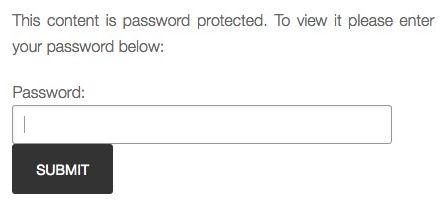
A password-protected page means that no one can view the content on the page without first entering a password.

You can have a hidden page, a password-protected page, or both!

Hiding a Page

Hidden pages are a great way to host your content online – like a video, MP3 audio, a link to download a PDF, etc. – without making it public.

By the way, if you don’t know how to set up a basic Page on your site, we’ve got you covered!

Now here’s how to install a super simple plugin to your blog that will enable you to hide pages whenever you want (takes about 40 seconds and no configuration required!).

You can either download the plugin from here:

http://wordpress.org/plugins/exclude-pages/

Or the easy way is to go to your blog dashboard: Plugins -> Add New. Then type: Exclude Pages into the Search box. When the search pulls it up, click INSTALL. If you need help, check out this video showing you how to install a plugin.

This plugin adds a checkbox: “[ ] Include this page in menus”, that appears in the right side column of your Page Editor. The box is checked by default. Simply uncheck the box to exclude the Page from the menu navigation that users see on your site. It looks like this:

Then click Publish, or Update (if you already published it), and you’re done!

For YOU to be able to get the URL (weblink) to that hidden page, you simply go to your Dashboard. Click Pages -> All Pages then click Edit for the hidden page. When the page opens up in your editing window, click View Page and it will show you that hidden page, live online. Then you simply copy/paste the URL (web address) of the page.

Password-Protecting A Page

1.  Set up a regular page or a hidden page (see instructions above) on your site. Let’s call this page “Great Book”, this will ensure the URL for that page is: www.mysite.com/great-book

2. When you go to publish that page, here’s what the PUBLISH box on the top right hand side looks like. See where the Visibility is set to Public?:

You can change this and set the Visibility to Password Protected. Simply click on the Edit link next to Public and enter your chosen password (I chose lederhosen), then click OK:

Then click Publish. Or, if you’ve already published the page, then click Update.

When someone enters the URL you gave: www.mysite.com/great-book

Here’s what they’ll see:

How easy is that?? I SO love WordPress! When they enter the password, lederhosen, they will then be able to see your /great-book page.

Remember that you can use hidden, and/or password-protected pages on your site to deliver all kinds of free or paid content – like articles, videos, audios, teleseminars, tutorials, online courses, etc.

What The Customer Receives

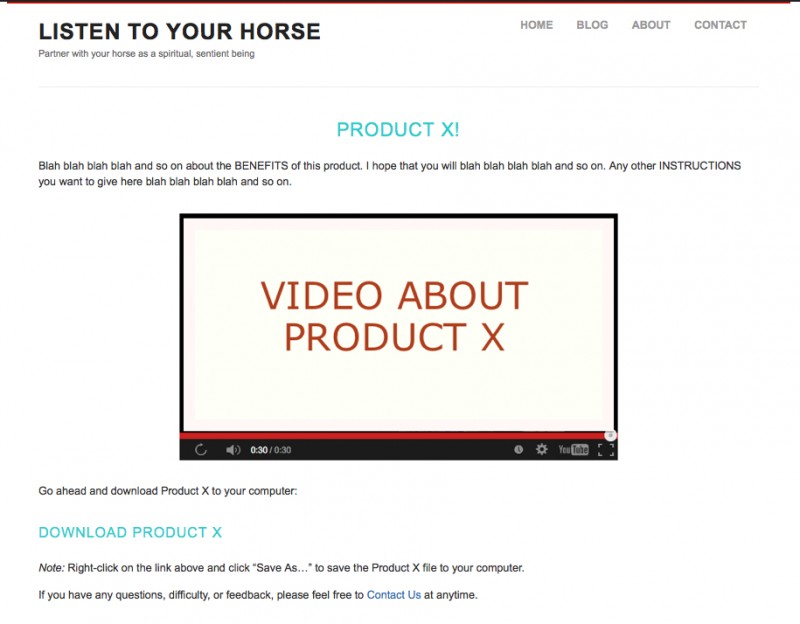
Just to help you get really clear about what this kind of delivery method looks like when it’s put into action, I’ve prepared a mock sequence to show you. Let’s pretend the digital content you want to deliver (audio file, PDF, etc.) is called Product X. I have used my website ListenToYourHorse.com to demo on, so keep in mind that all weblinks, emails, email signature, etc. will need to be changed to reflect your site and your business.

1. After your customer purchases Product X, here is the email they will receive from you:

2. When your customer clicks on the weblink in that email, here is the first thing they see:

3. After entering their password (LoveYou88) they see this webpage:

And that’s it! Your product has been delivered to your paying customer. Remember, it only seems complicated until you’ve done it once! So just take a breath and follow the process I’ve outlined here, step-by-step. Be prepared to take it slow and fumble around a bit, and you’ll be a pro in no time!

Now let’s look at a way to use these password-protected pages to deliver private content even if it’s tied to a physical product – like a book, CD, or DVD that sells in a physical bookstore.

How Do I Choose Which Tasks to Outsource?

Teams joining

A great way to get started with your list of outsourcing needs is this:

Pretend that you died, or had to leave your business for some absolutely unavoidable reason. Now, who would you get to replace yourself? Which tasks would you outsource to others that would enable your business to run smoothly without you? Make a list and then start implementing, one-by-one, the items on your list – it really can be that simple.

Then, every 4 months (ongoing!), come back to this list, go over it again and see what ELSE you can outsource and clear off your plate – leaving you free to do the most important tasks that make the most difference to your business.

1. Website Design
It may sound odd, but recent research shows that most people assume that a company with a website is larger and more stable than a company without one. So lucky for you, you already have a site! However, maybe you’ve started with just a basic site, so you may want to have a new site designed – or an existing site given a makeover – this only takes a couple of weeks or sometimes even days.

2. Programming
Web programming is an incredibly diverse field. Let’s just summarize: If it happens on a website, somewhere a programmer made it happen. Anything you’ve seen on another website can be developed on your website. Virtual outsourcing is the perfect way to tap into specialized web programming skills.Working

3. E-commerce Website
The rate of online purchasing of products and services continues to rise dramatically. With e-commerce you can reduce your transaction costs while reaching customers around the world. Use an outsourced freelancer to install your shopping cart, gateways and links to your credit card merchant accounts, install PayPal applications, and upload all your products or services to your shopping cart.

4. HTML Emails Or Newsletter
If you’re using text-only emails, consider upgrading to HTML emails. HTML emails (and Newsletters) have the look and feel of a website but are delivered to your clients’ inboxes. Once a template is set up, you can add your own text, images, or other graphic elements, create a variety of links to different pages on your site, and even include banner ads for your (or for others) services. Whichever email platform you chose (back in Module 11) you can hire a freelancer who’s familiar with that platform to set up your opt-in, autoresponders, newsletters, etc.

5. Search Engine Optimization & Search Engine Marketing
Search engine placement is critical to anyone with a website; even though you built it, they won’t come if they can’t find you. Search engine optimization (SEO) specialists help your site gain high rankings; the algorithms change constantly so techniques naturally evolve.

Search engine marketing (SEM) is also a specialized field. It can take days, months and years of expertiseSEO concept to write effective ads, place your banners on the right sites, set up effective affiliate programs, or manage your pay-per-click programs so you get the most visitors and more importantly conversions.


HINT: Never let an untested SEO company loose on your main website. Give them a small site or test project to do and see how it goes first. If they do anything that Google doesn’t like, they could get your site black-listed and seriously harm your business.

6. Slideshows
Creating a compelling and interesting slideshow can really grab your site visitor’s attention. A skilled graphic designer, or artist, can make sure your slideshow looks great and functions perfectly.

7. Animation
Get noticed and set your business apart with high quality animation. Many companies can benefit from animation on websites, movies, presentations, product demos, applications, advertisements, and logos.

Skilled animators are proficient in 2D/3D modeling for simpler applications like caricatures, and cartoons, while medical animation helps healthcare professionals see and understand complex procedures and processes. If movement can add value and understanding to your message, an animator can take you to that next level.

Animation can be quite expensive, so a much cheaper alternative is to have an animated “sketch” or whiteboard video – where the images are drawn in color or black & white. Fiverr has quite a few of these on offer for a really great price.

8. Social Networking Applications
Do you need a custom Facebook application? (Or simply want help setting up your Facebook page?) Do you want to optimize your use of MySpace or LinkedIn? You can learn the tricks of the trade yourself, but you don’t have to. Social media managers can manage all your social media pages and accounts.

9. Software or App Design
Good entrepreneurs have great ideas – the problem is affordably implementing those ideas. A freelance software designer in India or Russia can code your app or software for much less than you’d think!

10. Technical Support
Occasionally your site or site applications will have a problem; your email goes down, your forms no longer function properly, or (gasp!) a hacker takes over your site. Use an outsourced freelancer to step in, sometimes on a moment’s notice, to take care of your problem and get your site working smoothly again.

Local firms may not be able to respond as quickly as you need. Think of it this way: If you’re on the West Coast of the U.S. and your site goes down at 11 pm, it’s 11:30 am in Pune, India; your problem could be fixed before you get your morning coffee. And if your customers need support, outsource that function to firms who offer 24-hour, 7-day per week coverage.

11. Auto-responders
It’s exciting when potential clients use a form on your website to request information, or even better, order a product or service. Auto-responders automate the process of responding to queries or confirming registrations, requests, or sales, and can be set up to deliver information on a scheduled basis and to remind visitors or users of upcoming events or promotions. Use an outsourced freelancer to develop your auto-responder campaigns and/or to write your emails for you.Mailing List Diary

12. Podcasts
Recording and distributing audio has never been easier thanks to podcasts, and setting up web applications or blog plugins that allow users to listen to or download your audio files is a good idea. If you’re not sure how to best approach the problem, use an outsourced freelancer to create easy-to-use tools for you to upload and distribute your audio, or handle the entire process for you anytime you wish to add audio content to your site. Focus on your content – let a professional take care of how it’s delivered to your audience.

13. Web Banner Ads
Web advertising has exploded in popularity and effectiveness. Advertising on the right websites can put your products or services in front of consumers eager to buy your products or try your services – but only if the ad works. Banner ads can not only catch a site visitor’s attention; designed properly they can also send highly-targeted web traffic your way. Remember, successful advertising isn’t simply a function of spending – it’s also a function of spending wisely.

14. Print Ads
Statistics show print ads, including photos and well-designed graphic elements, catch the attention of four times as many readers as do text-only ads. Your freelancer can also source stock photography – in case you don’t have photos of your own. Make sure your ads are consistent with the business identity (branding) you’ve worked hard to establish.

15. Professionally Designed Product Catalogs
Catalog design is both art and science. Whether you have a few or a few hundred (or thousand) products, your catalog must be well-organized, accessible to readers, and most of all present your products in the best light possible. A catalog is worthless unless it helps you make sales; ensure your catalog combines photos, art, descriptions, and specifications – plus a call to action – to turn browsers into buyers.

16. Package Design
Great package design creates an emotional appeal and helps brand your product. Plus your design must be easy to store and assemble, meet shipping specifications and any regulatory requirements, and fit your budget. Package design requires skill and experience; while you may be willing to try your hand at designing your own product packaging, the result may only serve to signal that, well, you created your own packaging. Whether you need a label, a simple package, or a multi-part set of packaging, Use an outsourced freelancer to help you reinforce your business identity and help your product stand out in a crowded marketplace.Document archive

17. Document/Book Design
Even if you haven’t written a book or eBook yet, your manuals, guides, white papers, and other reports will make a greater impact if they’re well-designed. A great book or document designer can not only make sure your work is laid out properly and efficiently – he or she can also give your work greater impact. And your business identity can be incorporated, ensuring that while readers are learning, your brand is reinforced.

18. Audio
Say you’ve made an audio recording. The problem is you need to edit it for length, add other content, place a layer of music in the background, and clean up a few mistakes. With Audacity it can all be done, but the task is time consuming. Just outsource it instead!

19. Video
If a picture says a thousand words, how much is a video worth? Web visitors not only enjoy, they’ve come to expect videos that explain processes, feature products, or simply entertain visitors – and keep them coming back for more. But poorly-produced or delivered videos can quickly turn visitors away. Use an outsourced freelancer to edit, enhance, and prepare your video for “publishing” on the web, whether on your site or on social media sites. Also considered having an animated or “white board” video produced if the style fits your company.

20. 3D Graphics
3D graphics add a sense of realism and depth that two-dimensional graphics simply cannot. A 3D graphic can also be rotated and viewed from any orientation. A graphic of your new product can even be “opened” to show what’s inside. A good 3D graphic can convince you that it always has the same mass, that it’s hard, soft, rigid, or pliable… almost like it’s alive. Use an outsourced freelancer to create simple graphics for web or print use, or multi-piece models for display or sales presentations.

VIRTUAL ASSISTANTS

There is an entirely new category of worker called a Virtual Assistant (VA). A virtual assistant is far more than just a secretary or administrative assistant. Here are some of the varied tasks a Virtual Assistant can take off your plate:

Research

1. Sales Leads
Without sales, you don’t have business. But if you’re spending time meeting prospective clients and servicing existing customers, it’s hard to find new leads. A VA can find and research individuals, companies, and technologies – via blogs, websites and forums.  They can prepare reports and briefs to help you determine who to contact next. With the right information in hand you can focus on developing new business relationships instead of having to spend time researching.

2. Fact CheckingBearded man
To be persuasive, you need facts on your side; nothing ruins your credibility quicker than inaccurate information. A VA can double-check facts, provide statistics and backup information, and verify data to make sure you always put an accurate foot forward.

3. Products or Services to Buy
Not sure which car meets your needs? Looking for a home theater system but can’t make sense of all the different models and specifications? A VA can take into account your budget and preferences, sift through the options, check out reviews and recommendations, and create a short list of the prime contenders for purchase. Plus, a VA can comparison shop, find the best deals possible, and even arrange the purchase if you prefer.

4. Products or Services to Sell
A VA can perform a lot of basic research: Products already marketed that can be privately labeled, products you can buy wholesale and sell at retail, products you can license so you have the right to sell them… the possibilities are endless. If you’re already in business and are considering adding a new product or product line, let a VA handle basic research while you focus on your core business.

Data Entry / Word Processing

1. Turn Business Cards into Outlook Entries
Networking is critical in most businesses. Putting information from business cards into your Outlook address book (or whichever system you use) helps you stay organized and automatically organizes your phone or PDA. Who really has the time to do this? You can fax/scan/photograph or mail the business cards you receive, or send Excel or Word contact listings to a VA who can transfer the information for you. You’ll always have the information you need at your fingertips.

2. Collect Contact Information
Need specific information about current or prospective clients? With a little research performed by a VA you can collect all the data you need, including phone numbers, email addresses, social media links, etc. They can then enter the collected data into spreadsheets, documents, address books… whatever is most useful to you.

3. Article Submission
Posting articles in article directories, press release directories, and other websites, can be a great way to build an audience and generate links to your website or blog. Hundreds of directories exist. Make the process easy by hiring a VA: Simply provide youCraigslist-Precautionsr articles along with a list of directories you wish to submit to (or ask the VA to create a list for you), and your words can be seen by thousands of readers worldwide.



4. Craigslist (or another classified listing site) Posting
If you sell a product and want the maximum exposure possible, posting to online classifieds can be a great way to get the word out. But posting ads on a regular basis to a number of sites and cities can be exceptionally time-consuming. Give a VA an ad template, a list of cities, and the rest of your requirements, and your ads will appear on schedule. You can spend more time fulfilling orders instead of endlessly prospecting for new clients.

Social Media

1. Blog Posting
First a caveat: If you have a distinctive writing “voice,” only talented writers will be able to mimic it and create blog posts that “sound” like you. But don’t let that stop you from hiring a VA to help with your blog posts. Virtual Assistants can collect news, keep up with trends, do research… even write rough drafts of posts that you can then shape into your “own” distinctive style. And to keep the conversation among your readers going, a VA can respond to comments left on your blog, alerting you when a comment requires your expertise to answer.

Many bloggers generate a mixture of posts. Some are simple news recaps and updates while others are more like opinion pieces. Let a VA help you make your blog more robust… while also making it easier to maintain and keep fresh.

2. Commenting and Linking
Leaving comments on blogs and social media sites is a great way to make new connections and leave backlinks to your own sites and blogs. A VA can take care of the process for you. Create a list of sites (or have the VA create it), give guidelines on comments you’d like to leave, and off you go! You can also have the VA send you links to new articles or sites that you should check out personally. While you’re at it, a VA can respond to comments and questions left on your sites and blogs, too.

3. Profiles and Accounts
Want to benefit from social networking but don’t have the know-how or the time to start? Hire a VA to create your accounts and profiles on LinkedIn, Facebook, Twitter, Pinterest, and/or other social media sites. Once you’re all set, you can focus on creating and developing relationships.

4. Managing Social Media
Social Media sites like Facebook are great ways to network and create social connections – but managing your accounts can take time away from other productive work. A VA can keep up with your friend requests, respond to messages, post your videos, blog posts, photos or quotes, and keep you informed about your account activity.

General Administrative Assistant

1. Voicemail Managementfriendly administrative assistant at the desk with a laptop
Do you receive a lot of voicemails? Do you spend a lot of time in meetings and dread having to check your messages? A VA can check your voicemail on the schedule you set, prioritize your messages, and even email summaries to you in case you’re not in a position to receive calls. A VA can also return routine and emergency calls, saving the important or sensitive calls for you to make when you have the chance.

2. Email Management

Even if you receive hundreds of emails each day, chances are a number of them are routine – and if they’re routine, that means a VA can respond to those emails using guidance you provide. Then all you’ll need to do is respond to unusual or out of the ordinary emails. You can take it a step further and have your VA forward emails only you can handle to a separate account; that way you’ll never see or need to deal with the hundreds of emails your VA can handle for you.

If you feel like you type the same response – to different people – more than once, a VA can handle the task. You can either have a list of FAQs your VA can copy/paste from and email out to people. Or, even better, have your VA turn each FAQ into a separate blog post, then your VA emails out the weblink to that blog post, the person clicks the link to see their question answered on your site, and this drives more traffic to your site and increases your search engine rankings!

3. Gifts and Cards
Whether they’re our friends or our customers and clients, all of us want to remember important people at special times. Provide spending guidelines and other basic information, and your VA can track down and ship the perfect gifts, send online cards, or mail pre-signed greeting cards to everyone on your list.

4. Thank You and Follow-Up
Many businesses send notes or make phone calls to recent purchasers. It’s a great way to say “thank you” and also to answer any questions and proactively resolve potential problems. A VA can send thank you cards, or make post-purchase calls to new customers or clients, creating a memorable personal touch that can help drive repeat business and build long-term business relationships.

WRITING CONTENT & EDITING

Search engine ranking is primarily based on the free, informative content you provide on your website – or through other means that provide useful content and then drive traffic to your site via a link. Therefore, this is a key marketing activity that cannot be ignored.

1. Articles
You may never be published in a printed magazine or newspaper, but the Internet has created an endless demand for well-written, information-packed articles on virtually any subject. Not only will articles on your website provide useful advice and guidance to your visitors, they can also help your site perform better in search engine rankings, drawing more visitors – and potential customers – to your business. And by using an article distribution service you can place your article – and your contact information – on multiple sites, reaching even more customers.Stapel von alten Zeitungen und Zeitschriften

Create a work for hire (ghostwriter) agreement and you not only own the copyright for the work, but you can also publish the articles you commission under your own name.

Not only can writers develop your articles, but they can also post those articles directly to your site, saving you time and effort. Some writers specialize in certain fields, while others are capable of creating outstanding articles on a wide range of topics. If you want to inform, educate, and attract visitors to your site but don’t have the skills or time, writers all over the world are ready and waiting to assist you.

2. Press Releases
A press release is like a news story: It’s written to share information about a person, event, service or product. If your company has developed a new product, a new service, landed a large customer, expanded operations – in other words, something newsworthy and significant has occurred – a press release is a perfect way to let the world know. Properly written, your press release may catch the attention of an editor or reporter and serve as the springboard to a story or feature on the web, TV, or in print, gaining you valuable – and free – publicity.

Sounds great, but the fact is most press releases never get picked up by major media because they’re poorly written and seem intended to “sell” rather than to inform. Media outlets appreciate press releases that read like news – a skilled writer can turn a quickly discarded press release into an item that immediately grabs the attention of readers, media outlets – and customers.

3. Copywriting
Words are powerful. Well-crafted messages can be unbelievably powerful. Marketing copy takes many forms: slogans, headlines, direct mail text, taglines, jingle lyrics, etc. and is used in print ads, mail-order catalogs, billboards, commercials, brochures, postcards, websites, and other advertising media. Chances are any time you communicate in writing with your customers, a skilled copywriter can dramatically increase the effectiveness of your message.

Business concept. keyboard and crumpled paper on table.4. Editing
Have you ever written a letter or memo and realized, upon re-reading it a few days later, how much better it could have been? A fresh look, or a fresh pair of eyes, can quickly spot ways to improve nearly anyone’s writing. Most full-time writers will agree with this statement: “Any words, no matter how carefully chosen, can benefit from skillful and thoughtful editing.”

Instead of explaining complex information to a writer, you may feel it’s easier to write a first draft and have an editor make corrections and improvements. A good editor can help shape the tone and style of your text, help you fine-tune your message, and/or avoid embarrassing mistakes.

5. Newsletters
Want a custom newsletter to deliver valuable information to your customer base? It’s a great idea, but it takes time and effort (and skills) you may not have. With a little input regarding your goals, your audience, and potential subject matter, a provider can format, write, and even email your newsletter to your customer base.

You may initially decide to review the newsletter before it’s published, but once you develop a good working relationship your input may be limited to a few minutes of your time per each newsletter. And since you already have the content, your writer can post each newsletter to your website archives, and you can even pull out individual articles for inclusion on other sites – after all, you own the content!

6. Sales Materials
Do you have the skills and experience to write an effective television commercial? Most people would say no, but many try to write their own sales letters, advertising copy, or promotional literature. If you’re not sure your writing is making the grade, hire a skilled writer – the end result will be more bang for your advertising buck.

7. Books & eBooks
A writer can help you write – or even write entirely for you – books and eBooks for print or web publication. Not only can a book or eBook inform or enlighten current or prospective customers, it can also enhance your professional image and help you stand out as an expert in your field. While you may already be an expert in your field, you may not have the time or skills to devote to writing – but skilled writers do. It’s easier than you think. A good writer will adapt to your needs: Create content from scratch, or turn your thoughts and random musings into a well-crafted, professionally-written book.

8. TranslationThe word "Business" in a dictionary
The global marketplace makes selling products and services possible in almost any market. But if you want to promote your service in another country, you’ll need to speak their language – at the very least in print and web media.

Skilled translators translate writing and speech, taking into account slang, technical terms, and everyday usage. If your high school foreign language class didn’t prepare you adequately, don’t worry. A skilled translator is available for almost any language. Translators ensure language is no longer a barrier; if you want to reach global markets, it’s easier than ever.

9. Manuals & Guides
You understand your process, but can you convey your knowledge to employees or users? Manuals and guides not only inform and educate readers, they also save you time and effort. Effective manuals cut training time, reduce customer requests for assistance, and create a consistent process flow that can reduce waste and effort.

Skilled technical writers have a knack for distilling complex information and presenting it in a clear, logical, easy-to-understand way for experts and novices alike. In fact, you may know too much about your process or product to write an effective user’s guide – you’ll naturally assume knowledge or experience your readers just won’t have. A skilled tech writer can create documentation nearly anyone can understand. Not only will you save time by outsourcing your writing work, you’ll eliminate repetition of steps or instructions.

10. Public Relations
If a tree falls in the forest, does it make a sound? Maybe, but did anyone hear it? If you’ve launched a business, you need people to hear about it – without customers you don’t have a business. Public relations specialists craft press releases, provide media coaching, help get articles and reviews of your product or service highlighted by regional and national media outlets, and line up interviews or guest spots on radio or TV shows for you.

Public relations is very different from advertising. A well-placed positive article about your product or service can yield tons of inquiries and new customers, and a quick interview on a local TV program can make thousands aware of what you do – for free.

11. Grant Writing
Writing a grant for private, public, or government funding requires a unique set of skills. To get funding for your project or initiative you’ll need to convince the reader that your effort will be worthwhile and worthy of funding, and at the same time you’ll need to format and craft your grant proposal in the way organizations expect.

The success or failure of your search for funding often rests on the quality of the grant proposal itself. Don’t go it alone; a skilled provider can effectively communicate your mission, your goals, your short- and long-range plans, and how your project will make a real impact.

MISCELLANEOUS – YET IMPORTANT

1. Bookkeeping
Your bookkeeper doesn’t need to be down the street; many small businesses outsource their entire bookkeeping and accounting functions. For example, a home improvement and repair company with over 40 locations uses web-based tools to handle job costing, invoicing, sales, timesheets, labor and materials tracking… virtually all their day-to-day bookkeeping operations are handled virtually by a provider thousands of miles away.22_11

Web-based accounting also gives you 24-hour, 7-day per week access to your financial “books” and reports no matter where you happen to be. You can also add controls to ensure only you or trusted employees have the authority to sign checks or transfer and withdraw funds. The right bookkeeper will help you stay on top of your financial situation as well as streamline your administrative functions – and you could save money, too.

2. Collections
Many business owners despise the collections process. Contacting clients who are late paying bills or invoices is stressful and, handled poorly, can lead to hard feelings or even lost clients. And if you have a lot of customers or generate a number of monthly invoices and you don’t stay on top of the situation, your receivables can quickly add up to a considerable sum. Instead of facing a potentially emotionally-charged confrontation, outsource your collections process. Skilled collections providers handle customer communications firmly but with a deft, nimble touch.

Getting the money you’re owed and still maintaining a positive customer relationship is a difficult skill to master; plus good collections agents are also great negotiators, and may be able to find creative solutions that you, in the heat of the moment, might overlook. One of the basic tenets of outsourcing is to outsource the tasks you aren’t good at – in the case of collections it may also make sense to outsource a task you truly dislike.

3. Financial Reporting
What is your cost of sales this month? Which products generate the most profit? Which services should you stop providing because they actually cost you money? Which customers are truly your best customers – from a profit point of view? Accurate and timely financial reports give you the information you need to make quick decisions, re-focus your efforts, and grow your business based on data and facts, not on hunches or estimates.

Providers can generate the reports on a scheduled basis, or can set up automated reports in accounting packages like QuickBooks that you can then run yourself whenever you need information. Either way you save time and still get the critical information you need. Not sure which reports will help you? A skilled provider can suggest key metrics to evaluate based on the nature of your business.

4. Tax Returns
Your accountant may not be happy about it, but last year more people than ever used online freelancers to prepare their tax returns. Tax returns are rules-based accounting, and can be prepared by following a series of steps and guidelines – making tax return preparation a great virtual outsourcing service.

Providers can handle your business returns as well as your personal returns, and often for significantly less than your accountant or local tax return preparation service. If you handle your own basic bookkeeping, a provider can make sure that you take advantage of all the deductions and benefits available to you.

financial analysis5. Financial Analysis
How much is your business worth? What is your return on investment on recent projects? Are there seasonal swings you can take advantage of? Or best of all, does outsourcing one or more of your functions make good financial sense?

Skilled financial specialists can wade through complex data and financial statements and make recommendations that can improve your bottom line. The financial repercussions of some decisions are often not clear unless you can really crunch the numbers; if you don’t have that kind of skill, don’t worry – there’s help available.

6. Tax Consulting
Every business wants to minimize the taxes it pays. A skilled provider can ensure you pay as little tax as possible based on what you did last year, but a skilled tax consultant can help you make decisions today that will save you money next year. Don’t wait until tax time to find out that you could have taken advantage of legitimate deductions – if you only knew about them ahead of time.

You may also qualify for tax credits due to the industry you’re in or the employees you hire. Taxes are a significant expense for almost any business – proactive planning can help you retain more of what you earn.

7. Call Center
Users often require technical support to assemble, use, or maintain your product. You can rely on phone centers to remotely diagnose and fix problems your customers may experience. You can even create a database to track problems, and improve call center response time by providing step-by-step troubleshooting and help guides for operators to use.

The beauty of a call center is its scalability and affordability. Many call centers charge by the hour; if you get less calls your fee is lower, and if you get more calls you don’t have to worry about adding full-time or part-time employees to your staff.

Hand Holding Telephone against a white background8. Answering Service
Research shows that more than 50% of first-time callers will not leave a message if they reach an answering machine. And what if there’s an emergency and a customer (or family member) absolutely needs to reach you? Your small businesses may not have the resources to ensure all calls are answered. That’s where an answering service comes in.

It’s a simple process: Once calls are forwarded, the operator can tell which business is being called, answer the phone appropriately, and take messages or answer simple questions. Depending on your needs, answering services can not only answer calls but schedule appointments, answer customer questions, receive and forward faxes, and process orders.

To present the right image to your customers you may need someone to answer the phone during normal business hours. Instead of adding staffing, hire an answering service – that way you’ll never miss a call.

***********************
Whew! Was that a long enough list for you?

And that’s not even a comprehensive list of all the tasks you can outsource. For a really exhaustive list, visit Elance.

22_12The important thing is just to get your feet wet, and start the process of changing your thinking. Get fluent with outsourcing and you’ll be amazed at the positive difference it makes to your business and your personal life!



So remember the questions I asked you at the very beginning of this unit?

Pretend that you had to leave your business for 3 months, for some absolutely unavoidable reason. Now, who would you get to replace yourself? Which tasks would you outsource to others that would enable your business to run smoothly without you?


Now that you have an idea of all the varied tasks you can outsource, make a list of ALL the tasks that are NOT in your zone and that you would like to offload onto someone else. Don’t worry about whether you can a ord to hire anyone yet, just start by getting clarity and seeing your intention. This is a list you can keep returning to as your business grows:


Now that you have a good idea of where you’re heading, start outsourcing, one-by-one, the items on your list – it really can be that simple.

Then, every 4 months (ongoing!), come back to this list, go over it again and see what ELSE you can outsource and clear off your plate – leaving you free to do the most important tasks that make the most difference to your business.


How Do I Outsource the Stuff I Hate Doing?

The Best Outsourcing Sites

Specialists who freelance at every task you can imagine can be found at:

 Upwork (formerly Elance and Odesk)

upwork-logo

Guru

download (1)

iFreelance

ifreelance

Fiverr

images

  • Craigslist – specify that you are looking for students willing to work cheap to build their portfolio, references and experience
  • Local Colleges – Find a college that offers specialized programs in the tasks you need done. For example, I once needed to hire a sound engineer to master and add special effects to some audio storytelling CDs – if I had hired a professional, he would have charged me $2500 for the project. However, I got a student in her final year – with access to all her college’s cutting-edge equipment, who did a great job for only $600. She got her first client for her resume, plus awesome samples for her portfolio, and I got to complete my project at the quality level I required, for a fraction of the price – that’s a win-win for both of us!
  • TaskRabbit – Find safe, reliable help in your neighborhood: outsource household errands and skilled tasks. Search for local people who have had background-checks done to pre-screen applicants.

How To Hire A Freelancer

businessman freelancer or employee ticking box with markerAs soon as you have a little bit of money to be able to hire someone (and I’m talking 5 or 10 bucks!), then follow this same procedure to outsource any task:

  • Post your job with as much description as possible on Upwork.com or iFreelance.com or any other outsourcing agency.
  • Look for someone who has a minimum 90% Feedback Rating (or 4.5 stars) from other jobs.
  • Choose the top 2 or 3 people you want to work with and give them each a small job to start with.
  • See how they perform – maybe one is quicker, but makes so many errors that it takes you longer to correct all the errors than the other. Likewise, one might be way cheaper, but the cost saving is eaten away in the time you have to spend to correct their mistakes.
  • When you find someone who works brilliantly for you, hire them as your ongoing freelancer for that type of task – also ask what else they can do.

Congratulations! You just added the first person to your team! Without having to hire any employees and deal with all the paperwork, taxes, and personal drama that goes along with having staff. This is the kind of freedom I’m talking about!

Outsource Your First Task

outsource-cartoon-boxedFor their first time outsourcing, some people find it easier to just scroll through the freelancers on Fiverr.com and pick one with a good feedback rating. This way you don’t need to post your job description, you just go hire someone and try them out right away.

You may think this little cartoon at the side here is funny – but that’s exactly what I taught my 15-year-old son to do! He came to me at 10 pm on Sunday night, with 11 pages of handwritten poems, and asked me if I could type them up and print them out for him, as they were due Monday morning. Hmmm… let me think about that… Hell no!

Instead, I grabbed the priceless learning opportunity and taught him how to go to Fiverr and search for a transcriptionist in India – because India’s daytime is our night time. He had to pay $5 extra for 24-hour service and he requested the project be completed by 4 am our time.

I also taught him how to scan each page of his poems into a PDF, put all the PDFs into a file folder, compress the folder, and then upload that folder to Amazon S3 cloud server. Then I showed him how to grab the download link for the folder and message it to the transcriber in India.

I told him the next time he needed homework help, I would pay the regular $5 fee, but if he left it until last minute and needed a rush job, then he would have to pick up the extra $5 rush fee himself!

When he woke up the next morning, there was the finished file waiting for him. Then he complained because the transcriptionist had just typed everything in one long sequence, “Why didn’t he put each poem onto a separate page?!”

I replied, “Did you instruct him to? He will only do exactly what you ask him to do. So now you know for next time, you have to give super detailed instructions.”

Imagine if all of us were taught to outsource from a young age, so that we could focus on the pieces that only we can do – or that we do the best… wouldn’t life be a whole lot more interesting, right from the get-go?

In the next unit, I provide detailed instructions on how to post a job to Upwork, or hire a provider from Fiverr – so check that out first, if you wish. But if you’re ready to get rolling with your outsourcing, open up your notebook and get planning…


Choose now, the first task you are going to outsource. It may be the task you hate the most, or it may be the task you can a ord to outsource right now. Write it here:


Now pick an outsourcing agency to use (Elance, Fiverr, Odesk, Guru, iFreelance). Which one are you going to use?

________________________________________________________________________________


Write down here the outcome of your job posting, hiring and testing of applicants – any tips for next time?:


In case you have a mental block about finding people to do jobs and tasks that you either don’t want to do, or are not skilled at, I’m going to walk you through all of the steps involved in posting your job on Elance, or, finding and hiring a provider on Fiverr. I have shot a video specifically to show you step-by-step how simple it is. Remember, something is only difficult and intimidating the first time you do it!

In case you have a mental block about finding people to do jobs and tasks that you either don’t want to do, or are not skilled at, I’m going to walk you through all of the steps involved in posting your job on Elance, or, finding and hiring a provider on Fiverr. I have shot a video specifically to show you step-by-step how simple it is. Remember, something is only difficult and intimidating the first time you do it!

Hiring From Fiverr & Posting To Elance

Here is the video where I show you how super-duper easy it is to hire someone from Fiverr, or to post a job on Elance. The process for Upwork is very similar. The video begins with the Fiverr instructions and then the Elance portion begins at 6:22 minutes:

Now post your job on Elance, on Upwork, or Fiverr, or research the listings, and pick 1 – 3 people who look good. If you have enough work (and budget) then give each of the top 3 a small job to do. If you can only hire one right now, then pick the one that looks the best and give them the task. How did they do? If you aren’t happy, or you feel they did an “okay” job, hire someone else! Don’t stop until you find someone great.

Maybe you hired a few people on Fiverr, but none of them ‘wowed’ you. Then switch to Elance and repeat the process again. Don’t worry, it will be totally worth it to take the time and effort to find excellent people as you will keep them for years and they will grow alongside your business.

Post Your Job on Elance

Here are the detailed written instructions for how to post a job on Elance, if you want to understand more fully the process I showed you in the video.

To post a job, you must first create an account on Elance. Once you’ve verified your email address, you can post your job by following the steps below.  If your are signed out of your account, click the Get Started button on the homepage, or click on the Hire –> Post Job link if signed in.

On the job post form fill out the following information:

1. The name of the job

2. A detailed job description – For your job description, be as detailed as possible, including specific information about the work needed, the size of the job, estimated start and completion dates, and some background on your company.  You also have access to a number of job description templates by using the Description Assistant.

If you select a template and you no longer want to use it, you can remove the template, and revert back to your original text and selections, by choosing the UNDO button.

You may attach up to 10 files (maximum size 50 MB per attachment) that help clarify the job requirements and enable freelancers to prepare more thorough, relevant proposals.

"HOW?" letters (questions advice, enquiries help support why)3. Select the category and subcategory that best describe your job and the skill set you would like your freelancer to have.

4. Select a Fixed price or Hourly job.  Fixed price jobs are best when you have a well-defined scope and structure for the work.  If the job scope is less certain and you would like to work with your freelancer on a more flexible basis, then choose the hourly option.  Hourly jobs are Work View enabled.  Work View is a safe and efficient way to pay for hourly work online.  For Hourly jobs, you will be asked to indicate if the job is a part, full-time or a one-time job.  You will also be asked to indicate the number of hours per week as well as the duration of the job.

5. Pick your budget.  You will able to choose from predefined budget ranges or create your own custom budget range.

6. Near the bottom of the Job Post page click the Show button to see privacy and additional options for your job posting.  Here you can set additional job preferences, such as the posting duration, start date, visibility options, sealed proposals, and the option to automatically file 1099 forms. When you are finished, click Continue.

7. Next you will be able to select your posting type. Elance offers 3 types of job postings:

Featured Job Postings – With a featured job posting, your job will be highlighted to stand out from the crowd and attract more candidates.  There is a $25 cost to feature your post.

Freelancer at His WorkplaceVerified Job Postings – Verified job postings will have a payment verification seal on your job post.  This indicates to freelancers that you are more serious about the job. This is a one time $5 fee and the payment seal will be included on any future jobs.



Basic Job Postings – Basic jobs will only post your job without any of the features on the other two options.

I’ve only ever selected a Basic Job Posting (no charge) and that has been sufficient for my needs.

8. If you chose either the Featured or Verified option, you will be prompted to pay the fee. Proceed to enter in your payment details on the next page and finalize the job post.

Note: After you have posted the job you will be required to verify your email address in order to have your job posting published.  For security purposes you will receive an email from Elance.com shortly after clicking the Post This Job link.  Once you click the link within this email your job posting will be published on the Elance.com website.

Also: Jobs are not published immediately and may go through a short moderation process.

More information at:
http://help.elance.com/entries/415238-How-do-I-post-a-job

How Do I Run A Business Without Employees?

Team

Outsourcing is basically contracting another person or company (bonus: no employees!) to perform a specific task, or series of tasks, for your business.

Overseas outsourcing implies that the person or company, often in a developing economy, will do the same work, for a fraction of the cost of a local company.

Anyone who’s heard of outsourcing knows that it’s a great bandwagon to jump on that can accomplish key things for you and your business, like:

  • Increase your profitability – instead of paying $1000 to get something done, it may only cost you $300. Or, instead of paying an employee $3000/month, you can outsource those same tasks for only $650/month. The money saved increases your profits, so that you have more funds available to expand your business, or launch your next product!
  • Fast-track your business growth – think of all the marketing and sales activities you would be doing now, if you could afford it. Or, conversely, think of how much more marketing you would do if there was someone else doing all those mundane tasks you’re currently doing yourself. Outsourcing to cheap, yet efficient workers, allows you to focus on the crucial business-building tasks that only you can do, thereby accelerating your business growth. Why grow at 10% per year, when you can grow at 35% per year?
  • Increase your free time – if you have low cost, yet reliable, efficient workers doing 60% of your former workload, all of a sudden you have lots of free time available to go to the beach, socialize, spend time with your kids, take extra holidays, etc.  Now, if you feel a big “I couldn’t do that!” rising up, you need to do some work on yourself. This is a block or saboteur to your success. WHY do you not feel you deserve more pleasure? Why would you feel guilty outsourcing tasks so you can feed your soul and relationships? Identify the block here and transform it.
  • Get a bigger bang for your buck – let’s say your business development budget is $200/month. Think of what you can buy in your country for that amount… got it? Now think of how that might translate into a different currency in another part of the world: maybe a little more? A new website? Adding blogs, forums and article marketing to your existing websites? Someone to completely take over all your customer service and back-end administration? The fee scale difference can be staggering, depending on where you live. I once got a quote to transcribe a one-hour teleseminar from an American person ($250) and a Filipino person ($25). Yes, the cost differential can be that large!

When most of us think of outsourcing, we really like the idea, but when we think about actually implementing it… things get a bit fuzzy. It’s hard to get your head around new concepts, or things you’ve never done before.

Outsourcing time consuming, or monotonous tasks is essential so that you can focus on the higher value tasks that only you can perform. The second you can afford to hire someone to do the stuff you dislike – you must! But here’s the interesting part: When most people think about hiring someone to share the workload, they immediately think, “Oh, I can’t afford that yet.”

Can you afford dinner and a movie?

Can you afford a Starbucks a few times a week?

Then guess what? Yep, you can afford to outsource (hire someone else)!

Outsourcing Is Cheaper Than You Think!

Here are some actual prices paid by fellow Freedomites to outsource tasks (in Canadian dollars):

  • Get Audio CD (mp3) cover designed – $15
  • Get logo designed, with source files included – $20
  • Have someone manage Twitter, Pinterest and Facebook (posting fresh content to each one, 2 times per week) – $25/week
  • Get top-level book cover designed, with original source files included – $70
  • Have simple eBook cover designed, with original source files included – $25
  • Hire someone for a few hours per week to help with customer service – $4/hour
  • Hire someone for a few hours per week to handle various admin tasks (entering products into shopping cart system, keywording blog posts, doing Internet research) – $5.33/hour

Sounds pretty great hey? The only barrier to outsourcing is your own mind. It feels like a really big thing. It may feel scary and complicated… until you do it once. That’s all it takes, you just have to hire someone once and the huge barrier disappears.

But That’s Slave Labor!

outsourceFTFirst of all, let’s remember that you’re not forcing anyone to work when you use outsourcing services like Elance or Fiverr – they set their price, and you pick form a pool of people based on their style and skill-set, and the price you are willing to pay.

Now you may still be thinking that it’s unethical to hire someone for $4/hour. And depending on where that person lives in the world, you could be correct! But in the Philippines (for example) where the cost of living is SO much lower and the currency translates differently, $4/hour can be a middle class wage. It’s what an electrician makes in Manila. Your VA (virtual assistant) in the Philippines might be thrilled to earn $4/hour working for you and could then lift their entire extended family out of poverty.

One of my computer programmers in India – who’s worked for me since 2006 – earns $15/hour and lives in a swank penthouse. He takes regular holidays with his wife and kids and hosts large parties at international hotels for birthdays or special events. Does that sound like I’m paying him slave wages?

These currency differentials are most obvious between the “western” world (Canada, USA, UK, Australia, etc.) and the “developing” world (China, India, Phillipines, etc), which does give some of you an obvious outsourcing advantage over those of you who live in more depressed or developing economies. But no matter where you live you’ll be able to find someone, somewhere, who is willing to do the work you don’t want to do, for less money than it would cost you to do it yourself. This I can promise you!

As your business grows and your time becomes even more valuable, you’ll also want to outsource (get someone else to do) pretty much everything other than your top talent. The more you can outsource, the more time and head space you will have for doing your most important work.

22_02Each of us has the area of our business that I like to call our ZONE. When we get and stay in our zone, we are the most effective, the most productive, and we have the most impact on our business.

Perhaps your zone is coaching, maybe it is product creation, inventing, or writing. Maybe your heart soars when you are marketing or selling, or organizing systems and testing metrics. Whatever you LOVE to do the most, is your zone. And your business will flourish if you can get in your zone and stay there.

That’s where outsourcing comes in. For each task you are faced with throughout the day, ask yourself, does this make me feel heavy, or light? Then, as soon as you are able, keep only the tasks that make you feel light and outsource anything that makes you feel heavy.

As business coach Milana Leshinsky says:

Give your VA (virtual assistant) the tasks you hate, that only frustrate and drain your energy — so you can focus on the tasks you are passionate about and can put your heart into.

Expand your business by tapping into new opportunities you don’t have time to do yourself. Want to write a book? Want to start doing teleseminars? Want to start getting clients from pay per click marketing? There are probably dozens of areas Portrait of happy young casual people with arms folded over white backgroundyou’ve wanted to expand into but never had the time for. Good news: there are virtual assistants that do all of them for you.

Hire a VA to supplement your efforts on a particular project. Maybe there are certain elements of a project you don’t want to do, like researching web sites to write a book.  Hand off these things to a VA so you can focus on the part you’re good at and enjoy the most.”

The great thing about outsourcing to freelancers (people who own their own business) is you can start with only a small task, or a few hours a month, and gradually build up as your finances allow.

Now, you might think it’ll be awhile before you an afford to outsource – and maybe you’re right. If you really, really don’t think you can outsource anything at this point, or if you want to do all the tasks required to run your business, before you hire them out, then leave this Module for now and come back when you feel it’s time to start taking some of the workload off your own back.

But while you work, keep a list of all the tasks you love – and all the tasks you hate! Then one by one, you can start hiring people for the second list. And meanwhile, think about this – what is your time worth to you? What if you could free up an hour, or two, or eight, in the week, so that you can focus on what you’re really here to do?

Employees vs. Outsourcing

Other reasons I prefer to outsource work to freelancers, rather than hire employees are:

  • It’s much cheaper
  • I don’t have to deal with employee taxes, deductions, payroll
  • I don’t have to deal with employees’ personal problems
  • I only have to pay for the exact tasks I need doing, when I need them done – rather than committing to part-time or full-time hours.
  • I am free to flow with the demands and revenues of my business; sometimes I can afford to outsource more, sometimes less.
  • I don’t have the pressure of being responsible for someone else’s livelihood
  • Business owners (freelancers) are much more independent thinkers and more motivated to do a good job.

Of course, you are free to hire people however you wish, but especially when you are first starting out I strongly suggest you stay lean-and-mean and outsource, rather than hire employees.

Tasks You Can Outsource Immediately

22_03Just to help you brainstorm and begin breaking through those fears or resistance you may have, here are things you can hire a freelancer to do for you:

  • Set up your shopping cart so you can accept payments from your website
  • Edit and post your audios on your website
  • Create autoresponders for automatic delivery of your blog posts, e-books, newsletter, and/or follow-up messages after opt-in or purchase
  • Set up and manage a forum for you (you can get a free plug-in called BuddyPress to run your forum)
  • Set up an affiliate program for your products and services
  • Design your logo
  • Manage your social media accounts (post to Facebook, pin to Pinterest, tweet to Twitter)
  • Handle your customer service emails or phone calls
  • Design your book or eBook cover
  • Edit your book or eBook
  • Design your website
  • Write blog posts for you, or edit yours
  • Do Internet research for a book, a blog post, a market, etc.
  • Edit your newsletter
  • Do your accounting for you (but always double-check their work – never lose control of your money)
  • Handle your affiliate or Google AdSense ads
  • Prepare a marketing plan for your business or product
  • Handle ongoing tech issues

Identify Your Zone or Sweet Spot

Now it’s your turn. Take a look at all the stuff you have to do for your business. Have you identified your zone, or sweet spot yet? What is the part of your business that you love the most? What is it that made you start this business in the first place? For me, my zone is creating new products – books, supplements, audios, videos, programs, etc. Everything else I try to outsource.

22_04Now take $20 from your coffee budget, or $50 from the dinner and movie you were going to see and put it in your outsourcing fund. Yes, it’s that easy! I seriously do not want to hear any “I can’t afford it” whinging. Go check out Fiverr.com and see what you can buy for $20 or $50 that will allow you to get a hated task, or crucial task done.

When I say ‘crucial task’ I mean, perhaps you really need to get a good logo done – that is something crucial to your business that you likely cannot do yourself. So in that case, it’s probably more important to get your logo done first, then to outsource a task you dislike doing, but are able to do. Open up your notebook to plan how you’ll keep yourself in your sweet spot by outsourcing the rest…


Write your ‘zone’ or favorite part of your business here:


Next, let’s look at the parts of running your business that you hate the most. Which tasks would you gladly offload onto someone else and be thrilled to never have to perform again?


So write down the first task you need to outsource: ____________________________________________________________________________


Great first steps!! Now you can move on to the next steps, where you’re actually going to hire someone and begin getting comfortable and excited about outsourcing!