 Here’s another great process you can use to position your product or service and then craft your compelling offer for your sales page or shopping cart.
This one comes to us compliments of the fabulous Bernadette Jiwa, who says:
Nobody told Jobs and Wozniak how to build a computer company, let alone how to make it one of the most loved brands in the world, and Howard Schultz didn’t get the Starbucks magic from a manual.
Nobody can tell you what to stand for, or how your values, wants and needs, should intersect with those of your customers and then manifest as a business, an idea or experience. Figuring out the destination is hard — but recognising it, is more valuable than knowing exactly how you’re going to get there. The most useful answers are the ones we take time to figure out for ourselves — not the ones that everyone can find in a handbook.
It turns out that it’s more powerful to have your own map than it is to have someone else’s directions. Once you have that map, you’ll always have a way to get from where you are to where you want to go.”

The Difference Map works best if it’s completed in the order shown on the map:
1. Principles
2. Purpose
3. People
4. Personal
5. Perception
6. Product
Ask and answer as many questions as you can for each of the six sections – you’ll see the questions once you download the Map.
DOWNLOAD The Difference Map
By the time you complete it, you should have good clarity about what makes you different and how to position yourself and your stuff to visitors and clients.
Thanks Bernadette!
 When your body has good energy and your brain is sharp and quick, you can zip through your work much faster. So although I could write an entire book on how to have vibrant health (oh wait,
  So let’s not even mention the word ‘exercise’. Let’s talk about movement. And how about just making sure you MOVE your body somehow, every day?


 Staring at a screen for half the day (or a full day) will likely weaken your eyesight over time. And the older you are, the faster the change will occur.
 ou can also make screen-time easier on your eyes by downloading
  It never ceases to surprise me how many people think they can be effective and efficient keeping their task list in their head. Yet every single person I know who has tested working both ways – keeping their to-do list in their head, versus writing it down – finds they accomplish much more, much faster by writing their task list down!




 If your business does have time-sensitive elements that come in via email, then go back to
 The final key for this unit of foundational strategies involves some introspection and stepping into your ‘observer self’, to determine where you are leaking your lifeforce energy.
 But your observer self, looking on, notices that this type of drama occurs on a weekly basis. And maybe each new dramatic event takes 2 – 3 days of dialogue, support, or assistance to resolve. It takes up your time and your energy. When you sit down to work on your book again, you feel drained. You can’t think of much to say and you can’t stop thinking about poor mum, sis, friend, etc.
 Being able to discern between tasks that are urgent (gotta do this now!) and important (these will still matter next month or next year) is an essential skill to develop.
 I know I’m going against the current zeitgeist here when I state that multi-tasking is actually not an efficient way to work. Sorry! But that’s the truth and here’s why: When you allow (or force) yourself to focus on only one task at a time, you will complete that task much faster. And the quality of work you produce will be much higher due to your intense, laser focus on that one thing.
 Close my email app. Do not look at emails until the last half hour of my work segment. Then check my business email box only.
 Jo Barnes (one of my husband’s friends and a fellow Brit) is doing exactly what I keep telling you to do: Give great stuff away for free!
 DOWNLOAD
 If you use any social media right now, you’re probably used to seeing ads all over it, usually targeted somewhat at you. A lot of people get anxious about knowing how to use social media “properly” to promote their business. The truth of the matter? Social media algorithms change, and the tricks you learn or figure out or pay for become less effective or obsolete over time. And even though you get instant feedback in terms of likes, comments, views and shares, none of that necessarily contributes to making an actual sale. What people see on social media is momentary, and then they’re on to the next thing. And if the formulas change, they might not even get to see your content. There is still absolutely nothing that compares to a
  I also outsource much of Pinterest, because although I enjoy choosing and pinning pictures, my time is better spent creating the in-depth content on my blog and videos. My VA then grabs this content and pins it to Pinterest, Instagram, Facebook, Google+ and Twitter.
 Daymond John is the founder and CEO of the $5 billion clothing company FUBU and he manages his own twitter account – because he’s always on his cell phone and he enjoys tweeting!


 YouTube
 Vimeo
Vimeo The best free screencast software for Mac is Quick Time Player. Good paid screencast software for Mac includes Screenflow and IshowU HD. The best free screencast software for Windows PC is Screencast-O-Matic or CamStudio. Two of the best paid screencast software for Windows are Camtasia and SnagIt (SnagIt is much cheaper than Camtasia, but with good capability).
 Offer More Stuff – At some point in your video, direct the viewer to your website for more information, or a free eBook, or a detailed blog post, etc. You can add an “annotation” (like a note) to your videos on YouTube that goes to your webpage when someone clicks on it. You can also put a link to your site or page in the video description field that appears underneath your videos.
 YouTube does have music partnerships with some record labels – or some people have written to the music publisher and obtained permission to use the song – which is why you will see some videos with copyrighted music.
 Monetize Your Vids – You can also click a few boxes on your YouTube channel that tells YouTube you would like to run advertisements on your videos. YouTube will attach the ads automatically to the beginning of your video, or run them along the bottom; whichever option you select. If anyone watching your video clicks on the ad, or watches the entire ad, you receive a few cents in revenue from YouTube. It may not sound like much, but over time, you can build up to $50 or $100/month for essentially doing nothing.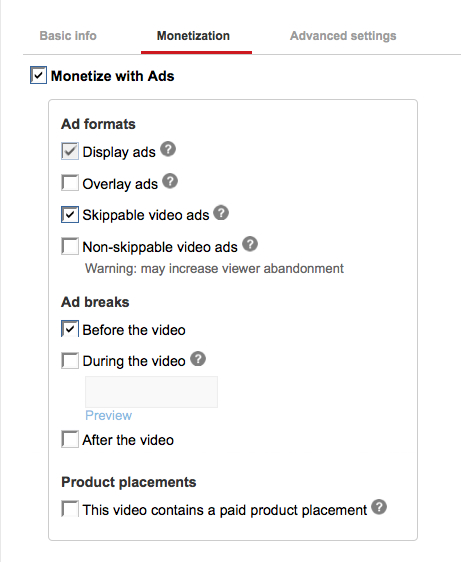
 I know I covered a lot of options in this unit. But please know this is so that, as your skills grow, you can keep returning here for ideas.
 Advanced YouTube Video Formatting (Encoding) Settings
 A codec is the format in which your video will be encoded. Vimeo accepts most major video codecs, but for best results we recommend using H.264. If you’re uploading High Definition (HD) video, choose the High Profile H.264 setting instead of Main Profile.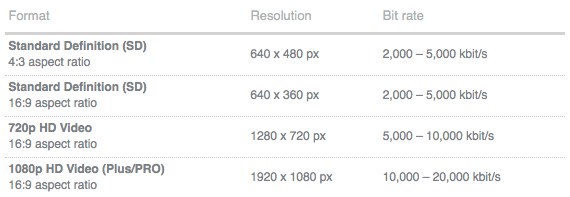
 As you are browsing around the Internet, whenever you read a blog post or forum post that catches your eye, or ends up being helpful, or perhaps you have some helpful comments to add, be sure and post a comment.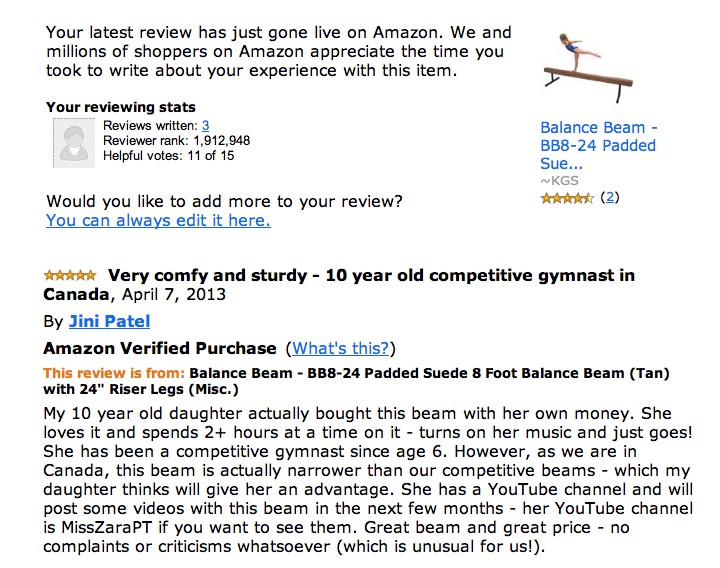
 We’ve all seen how quickly a great quote can go viral. Quotes also cause your reader to connect more deeply with you – because a resonant quote shows that you understand how they feel, or you share a frustration, but also a hope, or provide encouragement, or humor to lighten their day. And again, no matter which type of quote you post, a short quote is very easily and often shared among friends and family members (free marketing for you!).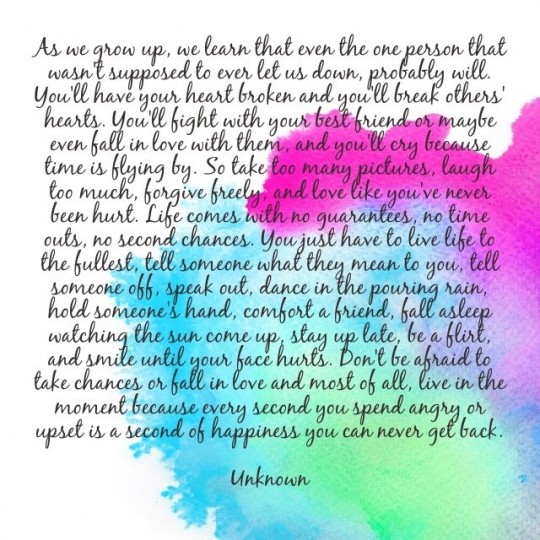















Recent Comments