How Do I Run A Business Without Employees?

Team

Outsourcing is basically contracting another person or company (bonus: no employees!) to perform a specific task, or series of tasks, for your business.

Overseas outsourcing implies that the person or company, often in a developing economy, will do the same work, for a fraction of the cost of a local company.

Anyone who’s heard of outsourcing knows that it’s a great bandwagon to jump on that can accomplish key things for you and your business, like:

  • Increase your profitability – instead of paying $1000 to get something done, it may only cost you $300. Or, instead of paying an employee $3000/month, you can outsource those same tasks for only $650/month. The money saved increases your profits, so that you have more funds available to expand your business, or launch your next product!
  • Fast-track your business growth – think of all the marketing and sales activities you would be doing now, if you could afford it. Or, conversely, think of how much more marketing you would do if there was someone else doing all those mundane tasks you’re currently doing yourself. Outsourcing to cheap, yet efficient workers, allows you to focus on the crucial business-building tasks that only you can do, thereby accelerating your business growth. Why grow at 10% per year, when you can grow at 35% per year?
  • Increase your free time – if you have low cost, yet reliable, efficient workers doing 60% of your former workload, all of a sudden you have lots of free time available to go to the beach, socialize, spend time with your kids, take extra holidays, etc.  Now, if you feel a big “I couldn’t do that!” rising up, you need to do some work on yourself. This is a block or saboteur to your success. WHY do you not feel you deserve more pleasure? Why would you feel guilty outsourcing tasks so you can feed your soul and relationships? Identify the block here and transform it.
  • Get a bigger bang for your buck – let’s say your business development budget is $200/month. Think of what you can buy in your country for that amount… got it? Now think of how that might translate into a different currency in another part of the world: maybe a little more? A new website? Adding blogs, forums and article marketing to your existing websites? Someone to completely take over all your customer service and back-end administration? The fee scale difference can be staggering, depending on where you live. I once got a quote to transcribe a one-hour teleseminar from an American person ($250) and a Filipino person ($25). Yes, the cost differential can be that large!

When most of us think of outsourcing, we really like the idea, but when we think about actually implementing it… things get a bit fuzzy. It’s hard to get your head around new concepts, or things you’ve never done before.

Outsourcing time consuming, or monotonous tasks is essential so that you can focus on the higher value tasks that only you can perform. The second you can afford to hire someone to do the stuff you dislike – you must! But here’s the interesting part: When most people think about hiring someone to share the workload, they immediately think, “Oh, I can’t afford that yet.”

Can you afford dinner and a movie?

Can you afford a Starbucks a few times a week?

Then guess what? Yep, you can afford to outsource (hire someone else)!

Outsourcing Is Cheaper Than You Think!

Here are some actual prices paid by fellow Freedomites to outsource tasks (in Canadian dollars):

  • Get Audio CD (mp3) cover designed – $15
  • Get logo designed, with source files included – $20
  • Have someone manage Twitter, Pinterest and Facebook (posting fresh content to each one, 2 times per week) – $25/week
  • Get top-level book cover designed, with original source files included – $70
  • Have simple eBook cover designed, with original source files included – $25
  • Hire someone for a few hours per week to help with customer service – $4/hour
  • Hire someone for a few hours per week to handle various admin tasks (entering products into shopping cart system, keywording blog posts, doing Internet research) – $5.33/hour

Sounds pretty great hey? The only barrier to outsourcing is your own mind. It feels like a really big thing. It may feel scary and complicated… until you do it once. That’s all it takes, you just have to hire someone once and the huge barrier disappears.

But That’s Slave Labor!
outsourceFTFirst of all, let’s remember that you’re not forcing anyone to work when you use outsourcing services like Elance or Fiverr – they set their price, and you pick form a pool of people based on their style and skill-set, and the price you are willing to pay.

Now you may still be thinking that it’s unethical to hire someone for $4/hour. And depending on where that person lives in the world, you could be correct! But in the Philippines (for example) where the cost of living is SO much lower and the currency translates differently, $4/hour can be a middle class wage. It’s what an electrician makes in Manila. Your VA (virtual assistant) in the Philippines might be thrilled to earn $4/hour working for you and could then lift their entire extended family out of poverty.

One of my computer programmers in India – who’s worked for me since 2006 – earns $15/hour and lives in a swank penthouse. He takes regular holidays with his wife and kids and hosts large parties at international hotels for birthdays or special events. Does that sound like I’m paying him slave wages?

These currency differentials are most obvious between the “western” world (Canada, USA, UK, Australia, etc.) and the “developing” world (China, India, Phillipines, etc), which does give some of you an obvious outsourcing advantage over those of you who live in more depressed or developing economies. But no matter where you live you’ll be able to find someone, somewhere, who is willing to do the work you don’t want to do, for less money than it would cost you to do it yourself. This I can promise you!

As your business grows and your time becomes even more valuable, you’ll also want to outsource (get someone else to do) pretty much everything other than your top talent. The more you can outsource, the more time and head space you will have for doing your most important work.

22_02Each of us has the area of our business that I like to call our ZONE. When we get and stay in our zone, we are the most effective, the most productive, and we have the most impact on our business.

Perhaps your zone is coaching, maybe it is product creation, inventing, or writing. Maybe your heart soars when you are marketing or selling, or organizing systems and testing metrics. Whatever you LOVE to do the most, is your zone. And your business will flourish if you can get in your zone and stay there.

That’s where outsourcing comes in. For each task you are faced with throughout the day, ask yourself, does this make me feel heavy, or light? Then, as soon as you are able, keep only the tasks that make you feel light and outsource anything that makes you feel heavy.

As business coach Milana Leshinsky says:

Give your VA (virtual assistant) the tasks you hate, that only frustrate and drain your energy — so you can focus on the tasks you are passionate about and can put your heart into.

Expand your business by tapping into new opportunities you don’t have time to do yourself. Want to write a book? Want to start doing teleseminars? Want to start getting clients from pay per click marketing? There are probably dozens of areas Portrait of happy young casual people with arms folded over white backgroundyou’ve wanted to expand into but never had the time for. Good news: there are virtual assistants that do all of them for you.

Hire a VA to supplement your efforts on a particular project. Maybe there are certain elements of a project you don’t want to do, like researching web sites to write a book.  Hand off these things to a VA so you can focus on the part you’re good at and enjoy the most.”

The great thing about outsourcing to freelancers (people who own their own business) is you can start with only a small task, or a few hours a month, and gradually build up as your finances allow.

Now, you might think it’ll be awhile before you an afford to outsource – and maybe you’re right. If you really, really don’t think you can outsource anything at this point, or if you want to do all the tasks required to run your business, before you hire them out, then leave this Module for now and come back when you feel it’s time to start taking some of the workload off your own back.

But while you work, keep a list of all the tasks you love – and all the tasks you hate! Then one by one, you can start hiring people for the second list. And meanwhile, think about this – what is your time worth to you? What if you could free up an hour, or two, or eight, in the week, so that you can focus on what you’re really here to do?

Employees vs. Outsourcing

Other reasons I prefer to outsource work to freelancers, rather than hire employees are:

  • It’s much cheaper
  • I don’t have to deal with employee taxes, deductions, payroll
  • I don’t have to deal with employees’ personal problems
  • I only have to pay for the exact tasks I need doing, when I need them done – rather than committing to part-time or full-time hours.
  • I am free to flow with the demands and revenues of my business; sometimes I can afford to outsource more, sometimes less.
  • I don’t have the pressure of being responsible for someone else’s livelihood
  • Business owners (freelancers) are much more independent thinkers and more motivated to do a good job.

Of course, you are free to hire people however you wish, but especially when you are first starting out I strongly suggest you stay lean-and-mean and outsource, rather than hire employees.

Tasks You Can Outsource Immediately
22_03Just to help you brainstorm and begin breaking through those fears or resistance you may have, here are things you can hire a freelancer to do for you:

  • Set up your shopping cart so you can accept payments from your website
  • Edit and post your audios on your website
  • Create autoresponders for automatic delivery of your blog posts, e-books, newsletter, and/or follow-up messages after opt-in or purchase
  • Set up and manage a forum for you (you can get a free plug-in called BuddyPress to run your forum)
  • Set up an affiliate program for your products and services
  • Design your logo
  • Manage your social media accounts (post to Facebook, pin to Pinterest, tweet to Twitter)
  • Handle your customer service emails or phone calls
  • Design your book or eBook cover
  • Edit your book or eBook
  • Design your website
  • Write blog posts for you, or edit yours
  • Do Internet research for a book, a blog post, a market, etc.
  • Edit your newsletter
  • Do your accounting for you (but always double-check their work – never lose control of your money)
  • Handle your affiliate or Google AdSense ads
  • Prepare a marketing plan for your business or product
  • Handle ongoing tech issues

Identify Your Zone or Sweet Spot

Now it’s your turn. Take a look at all the stuff you have to do for your business. Have you identified your zone, or sweet spot yet? What is the part of your business that you love the most? What is it that made you start this business in the first place? For me, my zone is creating new products – books, supplements, audios, videos, programs, etc. Everything else I try to outsource.

22_04Now take $20 from your coffee budget, or $50 from the dinner and movie you were going to see and put it in your outsourcing fund. Yes, it’s that easy! I seriously do not want to hear any “I can’t afford it” whinging. Go check out Fiverr.com and see what you can buy for $20 or $50 that will allow you to get a hated task, or crucial task done.

When I say ‘crucial task’ I mean, perhaps you really need to get a good logo done – that is something crucial to your business that you likely cannot do yourself. So in that case, it’s probably more important to get your logo done first, then to outsource a task you dislike doing, but are able to do. Open up your notebook to plan how you’ll keep yourself in your sweet spot by outsourcing the rest…


Write your ‘zone’ or favorite part of your business here:


Next, let’s look at the parts of running your business that you hate the most. Which tasks would you gladly offload onto someone else and be thrilled to never have to perform again?


So write down the first task you need to outsource: ____________________________________________________________________________


Great first steps!! Now you can move on to the next steps, where you’re actually going to hire someone and begin getting comfortable and excited about outsourcing!
 

How Do I Use My Email List As My Top Asset?

ian-2015-portrait-woodJoin me as I talk with Ian Thompson about the bigger picture of email marketing and why it’s important to think long-term with your strategies, treat freebies the same as customers, and nurture those relationships.
Ian (aside from being my husband!) is a former marketing and advertising executive who handles all of the email marketing for my businesses.

If you found the previous units in this module confusing, then this overview – where we get into the WHY more than the HOW – should really help you get clear by giving you the big-picture overview. Likewise, if you didn’t need all of the technical info in the previous units, then this call will give you a new way of looking at your current autoresponder series and how to make them even more effective.

In this call, we go over two scenarios in detail; discussing all of the steps and why:

  • Pretend someone has signed up for a free report or free audio. What is your process with them over the next year?
  • Pretend someone has just purchased an eBook, or other product. What is your process with them over the next year?

[EDIT File name, 29:16 – “Module 19” reference, 30:28 – support we don’t offer, 53:00]

DOWNLOAD AUDIOCommunicate With Your List

Or click the play button below to listen online:

[sc_embed_player fileurl=”http://listentofreedom.s3.amazonaws.com/Module19-Communicate-with-List.mp3″]
Here’s one of your top take-away’s from this call with Ian: Think of each autoresponder series as a CAMPAIGN (not just a series of emails). And a campaign has two components:

  1. What is my objective with this campaign?
  1. Strategy: How am I going to achieve that objective?

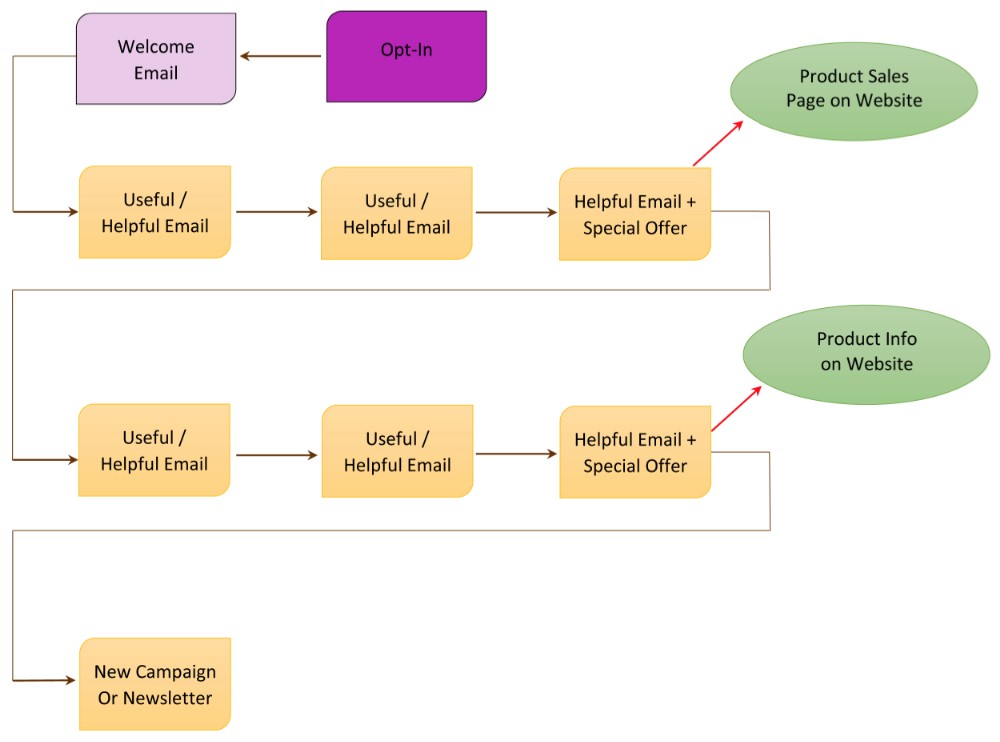
When you think of your autoresponder series as a campaign, then each email and action becomes an interlinked series of events, like this:

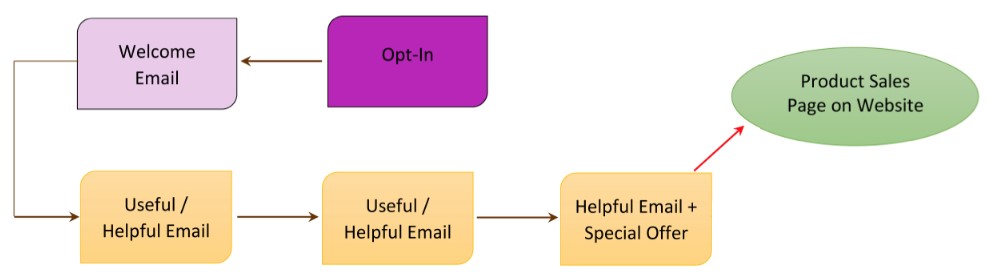
Or, you could also have a really simplified version of an autoresponder campaign like this, which is also very effective:

Let’s keep going and these diagrams will start to make more sense and may even look easy to you!

How Do I Create a Freebie Email Campaign For My Opt-In Offer?

What To Sell And What To Give For Free

Many people get confused between what to give away for free and what to charge for. Especially when you’re supposed to be giving your best stuff away for free! So let me give you a few examples to stimulate some ideas for your own content – you might remember these from when you were learning the basics of communicating with your email list – we’ll expand them into a campaign below.

Example #1 Professonal Stunt Longboarder

You have an eBook on how to be a pro longboarder. This eBook is a combination of text and demonstration videos.

→ You charge for the eBook (which could also be positioned as a Course, by the way) and you give away your best demo video for free. Which of your videos will produce the most elation (I did it!!) in your viewer? That’s the one you give for free.

OR

→ You charge for the eBook and you take your best video demo and you chunk it down into Parts 1, 2, 3. This then becomes 3 separate emails, each with a message from you, some tips, perhaps a link to a blog post, or an affiliate link to an awesome set of wheels (best for doing the stunt you’re going to teach them) and then Part 1 of the demo video, and so on, for a 3-email series.

Example #2 How To Refinish An Antique Armoire

You have an online DVD course that shows people how to purchase an antique armoire from a flea market and refinish it to showpiece quality.

→ You charge for the DVD course and you select just ONE topic from the course and send an email with some intro text and a video that shows just that one piece of how-to. Maybe you select the topic of how to spot a good buy from a garbage piece at the flea market – that’s hugely valuable, shows your expertise and if someone uses that info to buy an armoire, now they’re going to want your course to figure out how to refinish it!

OR

→ You charge for the DVD course, and you offer a mini-course for free. This mini-course tells them the major (overview) steps involved in purchasing and refinishing an armoire. But it doesn’t give the details; it doesn’t tell them which varnish to purchase, which grade of sandpaper – it talks about why it’s important to choose the correct products, but it doesn’t give out the products or specifications. It also doesn’t contain the videos. It only contains excerpts of 1 to 3 videos (so they can see how good your production, lighting, sound etc. is).

But they have a lot more knowledge than when they started. Probably, if someone wanted to, they could attempt the process themselves – maybe they’re an advanced woodworker and can figure out the details themselves. No worries, maybe that person will then become an affiliate of yours! Or he will refer people to your course.

Example #3 Hypnosis Audios

You have a series of audio-based healing sessions using hypnosis for different conditions: Stop smoking, lose weight, bedwetting, anxiety, insomnia, etc.

→ You charge for your individual audios or sessions and you give away your most WOW audio session for free. What is the audio that is likely to be an issue most of your site visitor’s have? Anxiety, stress, insomnia or weight loss? If you know who your customer is, you should already know the answer to this question. That is the audio you give away for free. Because once someone has a fantastic result, they will tell everyone and they will also come back for help with their other problems.

OR

→ You charge for your audio sessions, but you come up with a free email Mini-Course that will help people with a common problem – Are You Stuck In a Rut? So the first email is a quiz that helps them identify where and why they are stuck, along with a short video from you with some understanding and inspiration in the form of a story. The next email contains a link to an interview or teleseminar you gave on a related topic. The third email contains a download link for a mini-hypnosis session designed to help them feel more positive about their journey or challenges.


Okay NOW, let’s expand on those examples and I’ll give you the details on exactly how to set up the Freebie Campaign for each of those items.

OH – hilarious – so what I’m doing here (pull back for the overview) is in itself an example of what I’m trying to teach you! Let me explain: Imagine you’re getting this info through an opt-in offer. The way I gave you the Free vs. Paid examples above could be the free stuff. And the detailed how-to I’m going to give you below could be the stuff you then want to pay for. How cool is that? Sometimes I just tickle myself pink!!

Alright, now that I’ve calmed down, I’m going to give you the elements that make up a good Freebie Campaign (free stuff that leads to a product purchase) and then I’m going to give you three examples of how you would set up your email sequences (autoresponder campaigns) to carry on from your free opt-in offer in each of these examples.

Crafting A Freebie Campaign

I’m going to give you the elements that make up a good Freebie Campaign (free stuff that leads to a product purchase) and then I’m going to give you three examples of how you would set up your email sequences (autoresponder campaigns) to carry on from your free opt-in offer in each of these examples.

A Freebie Campaign is a sequence of free autoresponder emails that showcase who you are and give people an experience of your great stuff, and hopefully lead to a product purchase. And the purpose of a Freebie Campaign is that it:

  • Shows your tribe WHO you are
  • Shows your tribe the great SOLUTIONS, instruction, help, or entertainment you have for them
  • Shows them WHY they would want to be in relationship with you and why they would eventually want to purchase some great stuff from you
  • Gives them a compelling reason to purchase NOW

To put together your Freebie Campaign, you basically brainstorm to figure out what you can give away for free that is really great – look to give away some of your BEST stuff. Remember the old saying about ‘first impression is the biggest impression’? Or, ‘first impression is the lasting impression’? Well, that same principle applies here. It doesn’t matter whether your first touch (impression) with your site visitor is free or paid, it is still the first impression they have of you and will form the basis for how they think and feel about you for a very long time.

But remember what I’ve been telling you throughout LTYF; that people rarely buy their first time on a site. So it’s almost always going to be your free stuff that makes your first impression on people. And that’s why it’s absolutely crucial to come up with a really good Freebie Campaign for your site opt-in.

After your site opt-in campaign (autoresponder series) is set up, you can also come up with a Freebie Campaign for each new product or service you want to offer your list. Again, this free stuff will tell your tribe what this new product is about, whether it resonates with them, whether they have any need or desire for it – you have to give them a taste, touch and feel of it first.

In the three examples below I’m going to take three completely unrelated niches and show you how each of them could craft a great Freebie Campaign to promote a new product or service.

#1 Professonal Stunt Longboarder

Product: You have an eBook on how to be a pro longboarder. This eBook is a combination of text and demonstration videos (which could also easily be positioned as a Course – just saying!).

Opt-In or Email Offer to Your List: Give away your best demo video for free. Which of your videos will produce the most elation (I did it!!) in your viewer? That’s the one you give for free. If you have the ability to segment or tag your list, here’s where you would use a special link, or webform to track the people who express interest and want to be a part of this campaign.

Helpful/Useful Email #1: Great tip that changed the way you slide forever, ask readers to share any of their helpful tips, then talk about your eBook (tell a story!) and give your eBook offer.

Helpful/Useful Email #2: Intro paragraph on your great compilation wipe-out video, then link to your blog post to view it. Encourage readers to post links to their best wipe-out video in the Comments section below the blog. Then give your eBook offer in both the email and on the blog post.

Helpful/Useful Email #3: Story about a stunt video and link to your blog to watch it, then use one of the Compelling Product Offer techniques above to create urgency about your eBook offer. Maybe this is your ‘Last Chance!’ email for that special offer.

Here’s what this email campaign looks like visually:

Note: If you find it helpful to create a schematic like this, you can create them for free using either Google Drawing or Bubbl.us

Voila! Do you see how you have shared your personality, your help, your sense of humor and put some great groundwork into building a real relationship with the people on your list? AND you have also given them three chances to buy your eBook; which will help them even more.

OR

You take your best video demo and you chunk it down into Parts 1, 2, 3. This then becomes 3 separate emails, each with a message from you, some tips, perhaps a link to a blog post, or an affiliate link to an awesome set of wheels (best for doing the stunt you’re going to teach them) and then Part 1 of the demo video.

Your next email goes out 3 or 7 days later, contains a story or helpful advice and Part 2 of the video.

The last email goes out 3-7 days later, contains Part 3 and then a stronger call to purchase your eBook. Now that they’ve had a chance to get to know you and the quality of your stuff, you can give a stronger call-to-action. So maybe you offer a special discount that expires in 24 hours. Or you offer a special bonus if they purchase in the next 7 days.

There are many ways you can create an email campaign of great free stuff that shows your tribe who you are and what great stuff you have. There is no ‘right or wrong’, the only determining question you should ask yourself is: What would I be happy, thrilled, or excited to receive? And then send that to your list.

#2 How To Refinish An Antique Armoire

Product: You have an online DVD course that shows people how to purchase an antique armoire from a flea market and refinish it to a showpiece.

Opt-In or Email Offer to Your List: You offer a mini-course based on your DVD for free. This mini-course tells them every single step involved in purchasing and refinishing an armoire. But it doesn’t give the details; it doesn’t tell them which varnish to purchase, which grade of sandpaper. It talks about why it’s important to choose the correct products, but it doesn’t give out the products. It also doesn’t contain the videos (that are in the DVD Course). It only contains excerpts of 1-3 videos (so they can see how good your production, lighting, sound etc. is).

Voila! They have a lot more knowledge than when they started. They also have a lot of trust in you as an expert and they’ve seen the quality of your teaching and production quality of your videos. Now, if someone wanted to, perhaps they could attempt the process themselves – maybe they’re an advanced woodworker and can figure out the details themselves. No worries, maybe that person will then become an affiliate of yours! Or he will refer people to your course. Or he will purchase one of your other products.

OR

You could do a simple email marketing campaign that would be just as powerful at showing people how great your stuff is: You charge for the DVD course and you select just ONE topic from the course and send an email with some intro text and the video that shows just that one piece of how-to. Maybe you select the topic of how to spot a good buy from a garbage piece at the flea market – that’s hugely valuable, shows your expertise and if someone uses that info to buy an armoire, now they’re going to want your course to figure out how to refinish it! Here’s what that sequence would look like:

*See the section above on Compelling Product Offers That Result in Action if you’ve forgotten what a Compelling Offer is or how to craft one.

#3 Hypnosis Audios

Products: You have a series of audio-based healing sessions using hypnosis for different conditions: Stop smoking, lose weight, bedwetting, anxiety, insomnia, etc. You also charge for individual sessions.

Opt-In or Email Offer: You give away your most WOW audio session for free. What is the audio that is likely to be an issue most of your site visitor’s have? Anxiety, stress, insomnia or weight loss? Because you know who your customer is you will already know the answer to this question. And that is the audio you give away for free. Because once someone has a fantastic result, they will tell everyone and they will also come back for help with their other problems.

Helpful/Useful Email #1: You tell a client story (anonymous, of course) and offer some questions to stimulate exploration of your reader’s own issues. You can either give the whole content in the email, or a teaser paragraph that links to your blog – do whichever YOU prefer to receive. Have a link at the end of the text to a Private Session, or audio relevant to the topic.

Helpful/Useful Email #2: Send out a Quiz – people LOVE quizzes! You can get a free quiz plugin or webform (Infusionsoft) for your blog – so you would link to the page on your blog that has the quiz. Again, have a link at the end of the quiz to a Private Session, or audio relevant to the quiz.

Helpful/Useful Email #3: Send a compelling teaser that links to your blog where you tell a story using mostly photographs. After the photo story, include a powerful client testimonial and then a Compelling Offer for one of your products.

Here’s what this autoresponder sequence looks like, visually:

OR

You come up with a free email Mini-Course that will help people with a common problem – Are You Stuck In a Rut?. So the first email is a quiz that helps them identify where and why they are stuck, along with a short video from you with some understanding and inspiration (don’t forget to tell a story or two). The next email contains a link to an interview or teleseminar you gave on a related topic. The third email contains a download link for a mini-hypnosis session designed to help them feel more positive about their journey or challenges.

You see how easy this process can be? All you need to do to create an awesome autoresponder campaign is to visualize your customer and then ask yourself: What would I like to receive?

Create Your First Freebie Campaign!

Now let’s take everything you’ve learned and put it into action! We’re going to go play in your LTYF Workbook and create a Freebie Campaign that:

  • Shows your tribe WHO you are
  • Shows your tribe the great solutions, instruction, help or entertainment you have
  • Shows them WHY they would want to be in relationship with you and eventually purchase some great stuff from you
  • Gives them a compelling reason to purchase NOW

Here’s what you’re going to map out:

Simple Freebie Campaign


So let’s walk you through crafting each of the steps shown in the diagram above…

Let’s take everything you’ve just learned and put it into action! Pick one of your products or services (or you can use an idea for a product or service) and create a Freebie Campaign that:

  • Shows your tribe WHO you are
Shows your tribe the great solutions, instruction, help or entertainment you have
  • Shows them WHY they would want to be in relationship with you and eventually purchase some great stuff from you
  • Gives them a compelling reason to purchase NOW


Ready? Grab your notebook and get to work…


My Product or Service:


My Opt-In Offer (can be given in an email, or in a sign-up box on your site):


Welcome Email (you only need this if the person has never received email from you before – it contains the link they need to click to confirm they want to receive stuff from you):


Useful/Helpful Email #1 (this is where you deliver what you promised in your Opt-in Offer) Point-form is fine, then type out your final in your email program:


Useful/Helpful Email #2 (summary or bullet points of content/freebie + product offer at end – use stories!):


Useful/Helpful Email #3 – summary or bullet points of content/freebie + Compelling Special O er (Last Chance! email). Remember to link to the product page or download page on your site:


Ta-da!! You’ve just crafted your first Freebie Campaign. Isn’t that awesome??

Simply come back and re-visit this process every time you have a new product or service to offer. And when you’re ready to kick things up a notch and develop a bigger campaign (perhaps you have a higher priced product), make sure you check out detailed or segmented product launches, which might look something like this:

Okay, hopefully you now have lots of ideas about what you can offer for your site sign-up, new product launches, or existing product promotion. And if you are now swimming with questions like:

Have no fear, all those techniques and more (and they are all very easy to do) are explained in the links above!

And in case you’ve forgotten, now that your fabulous autoresponder campaign has resulted in product sales… what do you do next? You can start by listening to this audio where Ian and I detail our product follow-up sequences. We tell you exactly what we send out after someone has purchased one of our products.

Here’s a simple diagram of the product follow-up sequence for digital products, physical products, and services or sessions. This little chart will save you so much time (clarity!) AND make any new product autoresponder set up easy-peasy!

Did you like that? Did it make things a whole lot simpler? Go ahead and download this as a PDF you can print to guide you through your own campaigns.

DOWNLOAD Customer Follow-Up Chart here (Right-click and Save As…)

Tack this chart up on your bulletin board or wall – somewhere super handy – and make your life easier! Remember, the more you can simplify things, the more effective you’ll be.

As you now have a lot more understanding of the ways you can communicate with your list and develop a relationship with them, you should be able to answer this question…


What are you doing with the people on your list after your sign-up box autoresponder series is finished? They have opted-in to your list, received your freebie, now what? Are you going to put them into a campaign for one of your products? Or another freebie? Or are you going to transfer them to your email list? Or transfer them to your blog subscriber list? Write your plan here:


If you have any products or services already selling, run them through this same chart and checklist to make sure you’re providing an excellent experience for your tribe.


How Do I Go From An “Opt-In” or Email List To Getting Paying Customers?

Emailing your list with lots of free and helpful stuff enables you to build a relationship with them. A relationship is where you care about someone, you offer them help, or you make them laugh – you don’t just ask them for money.

Your free, helpful, inspiring or funny stuff is located on your site or blog, so this drives traffic to your site (which increases your search engine ranking) and also keeps bringing them back to you.

Or perhaps you have a really active Facebook page, so you like to engage your list by posting their comments on Facebook, then driving them to a blog post from your Facebook page.

Or you like to send them to a video on YouTube and then back again to your site or blog.

Eventually, this process of building a relationship by giving great free stuff will result in a sale. Here’s an example of what all these variations can look like:

Your email list (database) is your most valuable asset. It is your most powerful marketing tool, because it allows you to build that one-on-one relationship with your site visitors. People rarely buy the first time they come to your site, but after they know you and TRUST you, then they are likely to buy from you, if you have what they need.

But it is also easy to overwork your list and lose people. If you email people too often, it becomes annoying and they will unsubscribe. I’ve found that a maximum of 1 email per week results in long-term email retention; some of my list have been with me for over 10 years without unsubscribing.

Continue To Tell Your Story

If you were following my advice when you wrote your About page, your product descriptions, and your elevator speech and tagline, then you were storytelling all the way.

And the storytelling doesn’t stop there! When you email your list and continue to build your relationship with them, the best way to do that is tell them more stories. Meaningful stories, funny stories, inspirational stories, stories you heard from someone else that are so excellent you need to pass them on, stories your readers or customers have told you, and so on. Stories about things you’re struggling with, or stories about how something happening led to a thought or realization.

Stories about how and why you decided to create a new product, or why you promoted it the way you chose are also very powerful. Like this story from Leslie Bladgett, creator of bareMinerals make-up in an interview with Randi Zuckerberg:

“We decided to do our first ad campaign with models. Before that we brought in real people that sent us letters and they were the ones on the Infomercial. Now, we were going to hire people and pay them to model, which was kind of against the grain for me a little bit.

But what we did instead, is that we brought them in on the go-see, but we weren’t looking at them, we were listening to them. We had them answer questions. And the ones we liked, as people, and if they sounded like we wanted to hang out with them, if they had good ideas, if they weren’t all about vanity and themselves, had intelligence and were fun, we hired them.

We actually signed five people… signed them! …before seeing them. And they became our models. It was very stressful. I’m sweating just thinking about it.

The risk is that they all look exactly the same and that they’re all the same age. That would be weird because most of the people who are seeing it in the magazine don’t know how we got the models.

We know. It was really for us and we did a little campaign on it, but most of the people that saw these pictures didn’t know how we got them. So, what if they were all blonde, blue-eyed and 24-years old? That would be a bummer. But luckily we got quite the range. And I’m still in touch with these women. They’re cool. So I feel good about that.

And when the agency retouched the pictures, we had a big issue with them wanting to retouch them but that’s what they were used to. We had to say,  “We like her nose, we like her eyebrows, we like her chin.” We knew we needed to keep these people – whom we had met, heard and loved their stories – true all the way to the end. We feel good about that and that’s why we are an inspirational brand. We need to be inspired at work, and then hopefully our customers will be inspired.”

How are you feeling about bareMinerals now? Will this story build relationship with her list? Does it bind her existing customers more closely to her? Does it make new people want to go to her site, or keep an eye out for her products in stores? You bet!

Your integrity, your reasons for doing what you do, will shine through every facet of your business – use your email list to tell people those stories and by doing so you will build a deep, real relationship with the people on your list.

Even if you have an informational email – about a medicine, or a gadget, or a mattress – start the email with a story. The story can be about why you are emailing the information, how you came across the product, how the information changed your life, why you were so thrilled to discover the product, etc.

It doesn’t have to be a long story, it may only be one paragraph. But your story is your emotional hook that will get your email read, rather than trashed. The story is the thing that will keep your readers feeling that you are giving value and connection, rather than just selling something.

BIG TIP: And when you write the SUBJECT of that email (the title that shows in someone’s Inbox) make sure the Subject is about the story – not the product or information – because the story is always juicier.

For example, let’s say I want to send an informational email (or partial email that links to my in-depth blog post) about the many benefits of magnesium and why everyone should be taking it. That’s valuable information isn’t it? And I’m not selling anything – except of course the link to the magnesium brand I recommend – but that’s still not enough reason to get someone to open my email in the midst of the 100 other emails they received that day.

So which headline would work better and get my readers to open and read my email?

Information-based Subject:
The 10 Top Benefits of Magnificent Magnesium

Story-based Subject:
How Magnesium Saved My Dad a Trip to the Hospital Last Night

You see what I mean? The first one is a good title, but the second one peaks your curiosity. And then my email would open with my story about my Dad and his heart arrhythmia.

Even though I used a suggestion from my Copywriting Tips to come up with the first headline, the second headline is still more compelling because it has an emotional hook – you want to hear the story!

Or how about this Subject (title for your email) to make it even more relevant:

Magnesium Saved My Dad a Trip to the Hospital Last Night – Are You Mg Deficient?

So when you’re writing any email to your list, about any topic, try to always include a story about what happened, what you thought, what you wondered, an amusing anecdote, or something from your heart.

Also include a photo or image whenever possible – the more inviting your email looks, the more likely it is to get read.

Compelling Email Offers

When you want to promote something to your email list, remember that you NEVER just sell something, or give a sales pitch email. You always share or give something free first (a video, a helpful blog post, an eBook, a story, etc.) and then put your offer in the same email – usually at the end or middle of the email.

Then, right before your email campaign ends – and here’s the part that counts, so get ready! – you send out a LAST CHANCE email. This is something I have tested repeatedly and I’m telling you, it doesn’t matter how many emails you’ve sent to promote your product or program, or how many followers you’ve got in that sequence, or how much free stuff you’ve given away, you will sell the same or MORE from that final, ‘last chance’ email then you will have sold during your entire promotion!

So always, always, send out a ‘last chance’ email – even if your email campaign consists of just two emails; the offer and the last chance email.

If you are sending your email out en masse (an email blast), to your entire list and you don’t have the capability yet to segment off those who are particularly interested, then the maximum number of emails in a promotional sequence (or product launch) should be three – including the ‘last chance’ email. But two might be even better.

If you know people are interested in the offer, you can email them more. But if you’re just sending a group email blast to your entire list, then you don’t want to risk annoying people and having them unsubscribe. That’s why I recommend two emails for sure and you might be able to stretch it to three IF your offer is likely to interest everyone in your list.

If you are using Infusionsoft or 1ShoppingCart, then you will be able to tag and segment up your list into only those people who are interested and want to learn more. In that case, you are also able to carry out a Product Launch Sequence, so be sure to check that out when you are ready to offer a product or service to your list.

With some email platforms and Customer Relationship Management (CRM) systems, you can tag opt-ins or purchasers, thus segmenting them into specific groups, or areas of interest. So, if you have an email platform or CRM that can do this, then you can email a target group more often – because you know they are interested in your new product/service. But, if your system cannot tag and segment people based on their preferences, or interest areas, then all your opt-ins will be together in the same pool of ‘people who liked something you were offering’. In that case, you need to follow my instructions above and email blast those people a maximum of 2-3 times with your promotion.

If you do have a tagged and segmented list of people who are specifically interested in something connected to your promotion, then you could craft a story-based campaign up to 7 emails long – maybe run a competition, give a few things away for free (eBook, or video or audio). There is a lot more in-depth info on marketing campaigns throughout this site  – so don’t worry, this is an area you can always grow and expand your expertise in.

For now, sending 2-3 emails to your entire list will likely work well for you – especially if you follow the guidelines I’m giving you: Tell stories, give free stuff away, tell more stories, and use the ‘Last Chance’ heading in your final email.

Compelling Product Offers That Result In Action

Here are four ways to craft an offer to send to your list, that will encourage them to take action. Or you could turn these into postcards included with product you mail out, or create a blog post and/or video about your offer, etc. Remember to only choose “tactics” that feel good to YOU, that YOU would click on or buy. And when you write it, write it in a way that still feels like it’s you talking, not a sales template.

  1. Limited Time Offer. You need a legitimate reason WHY the offer is time restricted, this makes your offer believable and will create a sense of urgency. Maybe you’re promoting a service with an upcoming start date (after which it’s closed) or a product where the special pricing or combination of items will only be available until your new stock arrives.

Example: We are only taking registrations for X School/Program for the next 30 days. After that, enrollment closes and we cannot take on any new students, so that we can really focus in on our new Members.

  1. Discounted Price Offer. If you have a legitimate reason to discount, this kind of offer works well. If you’ve just brought in the newest model and so want to discount the previous model, that’s a great reason. Or perhaps you’re overstocked and need to make room in your warehouse. You can also offer a discount to celebrate a special day (Mother’s Day, for example), or to celebrate your first year in business, etc. If you restrict it to that day, then you will also have a Limited Time Offer that creates a ‘sense of urgency’ as well.

Example: Our supplier accidentally sent us double what we ordered, but rather than shipping it all back, we’ve decided to offer you a crazy discount of 30% ($10 off!) instead.

  1. Limited Availability Offer. This is where you let people know you only have a certain number of slots, or product available – for a good reason. Your reason WHY the appointments or product is limited has to make sense, so people know your offer is real. Otherwise, it will just feel like a gimmick and you won’t get the same response.

Example: I only have 3 spots open for my new X coaching program – and then all my time slots are filled and you would have to wait until the program ends for the next chance to get onboard. So don’t miss out as I’d LOVE to work with you!

  1. Free Bonus. This can be set up a few ways. Perhaps your free bonus is the ‘icing on the cake’ that is going to be the final emotional reason that convinces the person to buy. Perhaps your free bonus is actually more ‘valuable’ than the product you’re trying to sell. Or perhaps your free bonus is something that works synergistically with the product you’re charging for; you buy the book and get the workbook/journal as a free bonus. Or you buy the book and get the meditation as a free bonus. Or you buy the meditation and get an art journal as a free bonus, etc.

Example: Because I’m totally invested in helping you change your relationship with food and seeing REAL results in your body, when you purchase my new X book, I’m going to include this fabulous 100-page X Recipe Book for FREE!

Now let’s do a little brainstorming and create a compelling offer for one of your products…


Choose one of your products or services and pretend you’re offering that product to your tribe. How could you encourage them to make a purchasing decision? Which of the compelling offer techniques from this unit could you use? Write a compelling offer for your product here. Don’t worry if you’re not sure how to do this, just slap something down:


Example: [after I tell a story about magnesium] Special Offer: I’ve got only 30 bottles of the Mini-Minerals Magnesium left until we get our next delivery. So to make it easy for you to try this amazing mineral, here’s a 20% o coupon (so you save $7!) if you order by midnight on Tuesday.


Now I’m sure you might be wondering… How do I know what to sell and what to give away free?

How Can I Use Free Talks or Demonstrations to Make Great Sales?

Great Positioning = Great Sales

Lisa Sasevich is a former Hewlett-Packard and Pfizer executive who switched to public speaking when she had kids; she wanted more control and flexibility in her life, yet still wanted to make good money.

Lisa would drop her kids off at daycare and school and do free lunchtime talks to places like the Chamber of Commerce, or women’s groups. She used these free speaking gigs to educate and empower people with her great free content. She spoke about pretty much the same thing, over and over. She called it her Signature Talk and she came up with it by asking herself this question:

What is that one topic that would attract those people I’m meant to help? What would be the one talk that I could talk about over and over again?

And then she always made a compelling offer while speaking (positioned for her ideal customer) for her paid coaching package. She spoke only three times per month, for 90 minutes in the back of an Olive Garden or TGI Fridays restaurant and that earned her $5400/month in product sales! Here’s how that breaks down:

Average audience 30 people
20% conversion = 6 sales
Her coaching package cost $297 = $1800 per gig
She spoke 3 times per month
= $5400/month
= $65,000 per year

At this point, she had no eBooks, or online products, or any other content to sell – just her live coaching.

As she became more comfortable, she expanded her product offering to include an audio book and a few more coaching sessions per month. By that point, she was speaking to larger groups of about 50 people, but only twice per month. Her sales conversion rate remained the same, so here’s what that looked like:

Average audience 50 people
20% conversion = 10 sales
Her coaching package cost $497 = $5000 per gig
She spoke 2 times per month
= $10,00/month
= $120,000 per year

Now, if you don’t feel comfortable ‘selling from the platform’ or making your sales pitch during your talk, I’m going to show you a rather brilliant way around that.

How To Avoid Selling From The Stage!

Personally, when I speak, my main goals are to connect, give the audience something that changes their life, and begin building a relationship with those people. If I were to then give them a sales pitch, it would feel incongruent for me.
So what I do instead is I give a sales pitch, or compelling offer, for a freebie! That’s right, I choose something really great that I can give everyone in attendance for free. I tell people there is a sign-up sheet coming around where they can write down their email.

That way, there is no pressured sale for either of us! I can take my time building a relationship and educating them. I know they will want to take advantage of my help and solutions to their pain or problems, and this allows the relationship to develop naturally and for them to purchase when they are ready.

I find it works well to give people a choice of 2 – 3 freebies, so they can check the box next to the one they want. This makes it more real for people and is also more fun. I also send 2 sign-up sheets out at the same time – one from each side of the room. Here’s a sign-up sheet that I just created myself in Microsoft Word:

However, you may feel comfortable giving your product offer live, from the stage, and in that case, go for it! It is certainly an effective method of generating sales.

Also, there’s no reason why you can’t do both – use my trick to capture the emails of everyone there, so you can continue the relationship AND make your pitch from the stage.

In explaining why her talks were so well received and her sales conversion rate so high at her speaking engagements, Lisa says:

People are buying the destination, not the plane. Give them the ‘wedge’ that allows them to step into that space and hold it open. I call it the ‘wedge of possibility’ because when possibility opens, you need to put something there to hold it open. Otherwise it just becomes one of those things that are so amazing in the moment and then it disappears. You have to make people an Irresistible Offer – one that makes people say, Yes, I’m going to do that now and I’m going to do that with YOU. An offer that inspires action.”

Want to know more about how to position your product for the best price – and to make the sale? Here’s how to use customer feedback to inform and adjust your product positioning.

How Do I Know When to Start Selling My Stuff?

There is no magic time, and the sooner the better!

It is really important that you immediately start thinking about selling something on your site or to your email list if you aren’t already – even if it is just one simple eBook.

The longer you wait, the longer you are exponentially prolonging financial abundance. Just like a retirement fund can double in size if you start only 5 years sooner, likewise, the money you generate from your website can be drastically increased if you just get something (of good quality) out there as soon as possible.

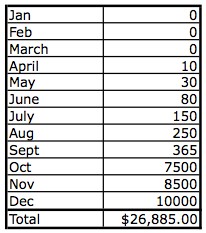
Pat Flynn from smartpassiveincome.com illustrates this beautifully by sharing his actual revenues from when he first started his blog; to when he added AdSense ads to his blog; to when he made his first eBook available for sale. Here’s his chart:

13_01January – started blog
April – added AdSense ads
October – added eBook for sale

Now, keep in mind that the reason his eBook sales were so high in the month he launched it, is because he had spent 10 months building his email list and blogging great quality content pretty much every day.

You’ll hear me say this over and over again: Most people won’t buy on a first-time visit to your site, or your Facebook page, or from following you on Twitter. They will buy when they have opted in to your email list and you have built a great relationship with them over time, by continually sending them helpful, encouraging, or entertaining stuff (via your blog posts, videos, etc.).

I encourage you to subscribe to Pat Flynn’s blog, because not only will he send you exactly the kind of helpful, encouraging stuff you can then use for inspiration, but your business will also benefit from his advice.

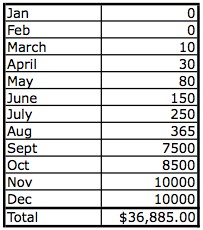
So Pat then did a projection (extrapolating the same numbers) and he wondered, what would have happened if I had started monetizing my site in March instead of April – just one month earlier? And he realized that by December, he would have made an extra $10,000!:

13_02

Is that enough motivation to kick your butt into gear?

Remember, that procrastination is not the cause, or reason, for lack of action – it is a symptom. So if you find yourself procrastinating, you need to get to the reason (often fear) that is underneath the symptom (procrastination).


How Do I Use Social Media to Promote My Business?

If you use any social media right now, you’re probably used to seeing ads all over it, usually targeted somewhat at you. A lot of people get anxious about knowing how to use social media “properly” to promote their business. The truth of the matter? Social media algorithms change, and the tricks you learn or figure out or pay for become less effective or obsolete over time. And even though you get instant feedback in terms of likes, comments, views and shares, none of that necessarily contributes to making an actual sale. What people see on social media is momentary, and then they’re on to the next thing. And if the formulas change, they might not even get to see your content. There is still absolutely nothing that compares to a really good email list. Whatever you do on social media, you want it all to point back towards your site, where people can engage more thoroughly with you and sign up for your freebie in exchange for their email. So take the anxiety out of social media marketing and try to remember the one rule that stands while the others change: just post engaging content that can link back to your site. That way, you can choose to use whichever platforms are most intuitive for you.

Facebook and Twitter are two of the most well-known social media platforms. You may already have a preference for one or the other, but let’s start with Facebook first.

Facebook is a great way for people just starting out to notify a whole bunch of people at once about their new business, or product, or service. Why? Because everyone has friends and family! And even if you don’t have that many friends, you likely have a lot of people you went to school with over the years, or worked with, or belonged to groups, or churches with.

Facebook is a very fast and easy way to access all of these friends, acquaintances and colleagues in one swoop. And because everyone likes to show that they have lots of “friends” on Facebook, everyone is likely to accept your “friend request”.

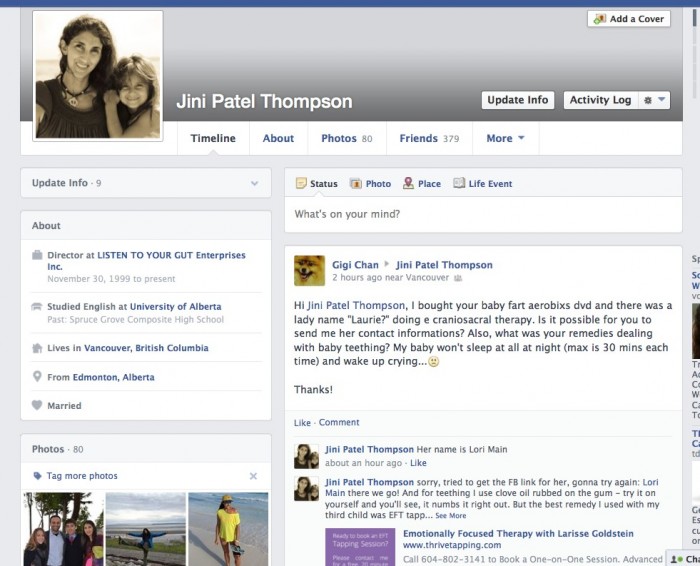
You can create a free account (personal profile) on Facebook and invite all your friends to become “friends” with you. You can also search for the school or college you attended and invite your classmates to be friends. Make sure you select your school info and hometown locale when you sign up as this alone can bring a flood of “friend requests” from others. Here’s what my Facebook personal profile page looks like:

You can see from the top right side post from Gigi Chan, that even though this is my personal page, people are still asking me business questions here and they feel like they can easily connect directly to me.

On your personal profile page you can either just post a little excerpt from your blog post, along with the link to your post, or you can post photos (with a blog link), or information (that links to your site) directly on your personal timeline (used to be called your Wall), OR you can also create a free Facebook PAGE or Fan Page.

A Facebook Page (Fan Page) is also free, but can be focused entirely on your business and you can promote freely on it without alienating any of your real friends!

You can also buy ads (very reasonably priced) from Facebook that send people to your Facebook Page for more info. Once on your Facebook Page, you then send them to your site. Facebook has all the instructions for setting up Pages and it is very easy. Just make sure you link to your website right in the header of your Page, so people can click to your site easily. Here’s what my Facebook Page (called Listen To Your Gut) looks like:

See how I have linked directly to my Shoppe and my Videos and other social media right at the top of the page? And my site URL is at the top left hand side.

The other advantage to having a Facebook Page, is that it’s fairly common for other people to ‘stumble’ across your page from:

  • Having seen it on a friend’s Like section
  • Having seen a post or photo you posted that got shared around
  • Having one of their friend’s post that they love you or your work

If you have a great photo or logo associated with your page, that will often intrigue people enough to click through and check you out.

Remember that your Facebook page never takes the place of your site, and it’s primary purpose is to drive people to your site. But it is definitely useful as a place to get you added or unexpected exposure.

Free Marketing!


I strongly recommend you set up at least a Facebook personal profile. When you’re just starting out, your family and friends are the largest network you have – and with Facebook, whatever you share with them can also be ‘shared’ with all their family and friends, if they like your post – kind of like pyramid marketing.

So yes, you definitely want to share your new business and new website with all your family and friends on Facebook – do a search for your schoolmates going back to your elementary school days and that will automatically garner you a few hundred ‘friends’. Could marketing (sharing yourself and your ideas) be any easier?

Also, if you have kids in school, you can ‘friend’ all of the other parents you chat with in the schoolyard. Or people like your massage therapist, hairdresser, chiropractor, etc.

The other benefit of Facebook is it makes people feel you are more accessible and more likely to answer them personally. When you’re first starting a business this is gold as it gets you lots of interaction, questions and feedback from your audience. After your business has grown bigger, you can always get your personal assistant to answer all your Facebook queries.

The other type of page people like to use on Facebook is a GROUP. People can become members of your group and then they can post questions to you, you can announce events, or post content, etc.

However, a PAGE allows you to do more things than a Group, so for that reason, I closed my group down and am getting everyone there to transfer over to my Page (by “Liking” it). Here’s what my Group looks like and you can see just from this screenshot that both the Page and the Personal Profile offer more options to promote your business:

Personally, I feel the main use for Group would be if you want to run a support group, or a private (secret) group for members of a program. But as I said, in the beginning, you only need a Personal Profile. And if you can add a Page, then great!

In the meantime, Jo Barnes has provided us with a free eBook to get you started on the nuts and bolts of how to use Facebook to promote your site and your stuff. She outlines all the details for you on how to set up and get going. Click here to get the download link for this free guide (Jo’s gift to you!). Here’s a snapshot of what she’s going to teach you, that gives you a nice visual of what I’ve already explained:

If you really like Facebook and want to work it, there are two great tools I can personally recommend. The first is a course offered by Jo Barnes – a totally down-to-earth, funny Brit who knows Facebook like the back of her hand. The second is GroSocial, which would be most useful if you have already been using Facebook for a while (it’s more advanced) and want to run really targeted contests and promotions.

Remember, I don’t recommend anything that I haven’t tried myself, and use for my own business. That doesn’t mean that another program is not just as good, or perhaps better – by all means go ahead and do your own research. It just means that you can have the confidence that I walk my talk; whatever I refer you to is something I have used or am using myself.

Facebook Ads

If you’ve been on Facebook, then you have already seen the advertising options available – the ads are in the sidebar and in “sponsored posts” that appear right on your timeline.

Facebook ads are effective not only in terms of generating “Likes” but, even more importantly, generating the “likes” that you want – from your target audience, no matter how narrow and specific it is.

Facebook allows you to target your ads to your audience in three ways:

  • According to demographics (location, age, sex)
  • By very specific interests (health, natural remedies, healthy food, recipes, for example)
  • By Likes – for example you can target your ads at Facebook users that “like” your competition’s fan pages by typing in their fan pages’ names.

What’s great about Facebook ads is that you can switch off your ads whenever you want to (if, for example, they are not effective at all) or you can change the copy and images within the currently displayed campaign, with no additional costs.

Advertising on Facebook is also really affordable! $30 – $50 is a reasonable budget to test an ad campaign on Facebook – that is enough money invested to tell you if your ads are working and whether you should continue, or hire someone to help you with it, or if it’s a good venue to advertise your business.

When we tried Facebook ads for our health business, we discovered they were a good way to increase page ‘Likes’ but not a good way to drive sales. We got much better results for our health stuff from using Google AdWords.

Automate Other Social Media to Post to Facebook

The great thing is that once you have your Facebook component set up, you can automate all your blog posts to appear as soon as you publish them. Simply install a free plugin on your blog, like NextScripts: Social Networks Auto-Poster. And you can have this plugin automatically post to Facebook and other social media as soon as you publish each new post.

You can also link your YouTube account so your videos are posted automatically to Facebook. And you can “like” or “share” anything on the web that relates to or helps promote your business.

For example, let’s say you “share” a great photo with an inspirational quote on your Facebook page and wall, and a bunch of your friends think it’s great, so they all share it, and so on, until it goes viral. That photo could end up being seen by 2 million people and some of those people are bound to be curious about who posted that photo and they will see your website URL (address) on the photo, or click on your name and voila! – new traffic to your brand or your site.

Another trick: If you had the time, instead of just ‘sharing’ someone else’s photo, you could download that photo, or take a screenshot of it. Then do a blog post about the photo and inspirational quote (remember, a few lines is sufficient) along with the photo credit (copyright) and a link to the original photo – to cover yourself legally. Then re-post the photo with your blog link on Facebook. That way, if it goes viral, people will have a direct link to your blog and you will likely add many names to your email list via your site opt-in. Exciting stuff!

Twitter

Like Facebook, Twitter is free and you can easily “share” your blog posts and videos with Twitter, so they are automatically tweeted out to all your followers. Personally, I don’t feel it’s a great tool for promotion, because I’ve found it doesn’t drive much traffic compared to other methods, but it’s so easy, you might as well add it to your repertoire. It’s also super easy to have your blog post directly to Twitter automatically for you.

Tim Grahl from Out:think echoes my experience in a story about his client, NY Times Bestselling author Dan Pink. Dan has almost 200,000 Twitter followers, however, when he Tweets something only 650 click on the link. So whilst the 200K number looks very high, the actual effect, or engagement is very low (less than 1 percent).

My experience with Twitter confirms this, which is why I don’t recommend you spend too much time with Twitter. But if it’s easy and you enjoy Tweeting, then why not?


Write down now whether you want to use Facebook or Twitter. And do you want to have just a personal profile, a business page, or a group?

Do you have the budget yet to hire someone to post to Facebook of Twitter for you, or do you need to start by doing it yourself? Or do you want to install a plugin on your blog that will automatically post your blog content to Facebook, Twitter, etc)?


Photo-Sharing Sites – Pinterest & Instagram

Photo-sharing services allow you to pin, or post photos that (as in the Facebook example I gave above) can easily go viral. The key to this method of social marketing is to make sure you add text to your photos that shares something about yourself or your topic that speaks to viewers. Remember, you don’t just want people to look at a great photo, you want them to click back to you and check out your site. So be creative. As our lovely Jo Barnes says:

“Put simply, Pinterest is a ruddy great online collaborative photo album where each user can share interesting images about a wide variety of topics with other users. Its power is in the fact that firstly – everyone loves to share photos right? Remember hours of pouring over old photo albums with your folks & friends. We LOVE it. Hence why photo sharing has become the No 1 activity online and why Pinterest has grown so rapidly!

But it doesn’t end there. Add to that, utilizing the right keywords in pin descriptions, linking to fantastic, high converting landing pages, sales pages or amazing content, your pins and boards can not only have a HUGE affect on your referral traffic, but they could even make it to the top of search results on Google or Bing.”

For example, you could create a photo (Pinterest calls these “Pins”) that has a Top 5 list. So let’s say your business (website) is about Natural Horsemanship. You get a photo of a gorgeous horse and superimposed over the picture you put the text: “The 5 Best Ways To Connect With Your Horse”. You then “pin” this photo to your Pinterest account. When someone clicks on the photo, it takes them to your blog post about that topic.

Note: You can use this exact same process to post the same photo to your Facebook page. And you can also post it as a blog post – either as is, or with a paragraph or two of text. Always multi-purpose your content whenever you can as this increases your marketing reach (tells more people about you) with zero extra work!

Here’s an example of what a Pinterest ‘pin’ looks like:

Note how she has made sure to include her website URL for when this image gets shared, posted and blogged around? This image then also becomes her photo at the top of her blog post about this topic.

Optional for the Tech-Lovers: If you can, add a “Pin It” button beneath the photo and write a smart, searchable tag for the caption. You may think you don’t need to add a “Pin It” button to your blog posts — that people who use Pinterest will naturally just pin the posts they like. But this is not true. People aren’t always thinking about Pinterest and so you need to tell them to pin the post. The pin button is an easy way to say, “Hey, go ahead and pin this.” It also shows that you are giving the person permission to pin the content. Remember, when you put the “Pin It” button on your post, you can customize the copy. Take advantage of that and be sure to include key words and hash tags to make your content searchable.

If this sounds too complicated, then never mind, when we had your blog installed, you had SHARE buttons added and these include a Pinterest Pin button – so people who are looking for great photos to pin can still grab yours.

Tip: You can easily add text to any photo by using free tools like Preview on iMac, or Gimp on PC. Or, you can use a free online tool to add text to your photos like AddText.com

Here’s a video where I show you step-by-step how to add words to your photo on Mac:

Using Preview with Mac

And Here’s a video showing you how to add words to your artwork or photo on a PC:

Here’s another example of text added to a photo (see how she’s included her website for when it gets emailed or passed around places other than Pinterest):

Here’s another great photo/quote that started out on Pinterest and then got passed around Facebook – it has now been “Liked” 2,700 times and shared 1,442 times – note how the creator made their website clearly visible, so they can benefit from all this free promotion:

If you find you really love Pinterest and want to make it a major part of your marketing efforts, Jo Barnes has an excellent course on Pinterest that is very reasonably priced. Jo is a fantastic, no-nonsense instructor who practices everything she teaches and is fun to learn from. She has also provided us with some excellent Pinterest training in a free eBook – click for the download link!

Or, you can hire someone on Elance to run your Pinterest account (and/or Facebook, Twitter, Instagram etc.) for as cheap as $5/hour. Just be sure to go look at the examples applicants give to make sure their English is good enough for you.

This is how I run my Pinterest account. I found Bbrave Marketing through Elance.com and they handle not just my Pinterest and Instagram, but my entire social media portfolio (Facebook, Twitter, Google+) as well – for only $50/week. They are fantastic and we’ve seen a noticeable increase in new site traffic since they took over.

But again, before you pay for anything, Jo Barnes has given us a really great eBook on getting started with Pinterest, for free! Jo will walk you step-by-step through setting up your account to maximize your efforts (i.e. least effort for most result!) and the best way to use Pinterest to tell people about your stuff and drive them to your site.


*Add instagram updated info?*

Instagram is also a rapidly-growing photo sharing app that started out just being used by cell phones, but they are now developing their website too. Facebook bought Instagram for $1 billion at the end of 2010, so I’m sure we’ll be seeing many new and interesting ways to use Instagram and also integrate it with Facebook in the years to come.

Instagram is a more personal posting platform than Pinterest. It is more about posting spontaneous pictures of yourself and your interests. For example, preparing a new recipe, in your office working on a new blog post, pictures of you attending workshops and seminars, interviewing people, etc.

And like all social media, these photos link back to your site. You can also optimize them for search engines by adding hashtags (#) with the keyword when you post the photo on instagram. E.g.: #homecooking, #pioneer, #slowfood. More about exactly how and when to use hashtags over here.

How Do I Get My Blog to Automatically Post To Facebook?

Auto-Posting To Facebook

There is a really good free plugin you can get that will automatically post an intro and picture of your blog post to your Facebook page. It’s called:

NextScripts: Social Networks Auto Poster

And then here’s a sample of how your blog post and link will appear on Facebook:

We’ve got you covered if you need help with how to install a plugin to your blog. And then here are the instructions for how to configure the plugin:

http://www.nextscripts.com/installation-of-social-networks-auto-poster-for-wordpress/

One thing: This is not a simple plugin and it will take a bit of time and effort to get it set up. But if you no longer want to spend the few minutes it’s takes to Share your blog post with Facebook, then this is definitely the way to go. Remember, you can always hire a programmer on Fiverr.com to configure it for you for about $5.

How Do I Know What Makes My Business Different?

Here’s another great process you can use to position your product or service and then craft your compelling offer for your sales page or shopping cart.

This one comes to us compliments of the fabulous Bernadette Jiwa, who says:

Nobody told Jobs and Wozniak how to build a computer company, let alone how to make it one of the most loved brands in the world, and Howard Schultz didn’t get the Starbucks magic from a manual.

Nobody can tell you what to stand for, or how your values, wants and needs, should intersect with those of your customers and then manifest as a business, an idea or experience. Figuring out the destination is hard — but recognising it, is more valuable than knowing exactly how you’re going to get there. The most useful answers are the ones we take time to figure out for ourselves — not the ones that everyone can find in a handbook.

It turns out that it’s more powerful to have your own map than it is to have someone else’s directions. Once you have that map, you’ll always have a way to get from where you are to where you want to go.”

The Difference Map works best if it’s completed in the order shown on the map:

1. Principles
2. Purpose
3. People
4. Personal
5. Perception
6. Product

Ask and answer as many questions as you can for each of the six sections – you’ll see the questions once you download the Map.

DOWNLOAD The Difference Map

By the time you complete it, you should have good clarity about what makes you different and how to position yourself and your stuff to visitors and clients.

Thanks Bernadette!

How Do I Communicate with Customers After They Have Purchased?

It’s important to keep in mind that your customer’s experience of you and the positioning of your product is not complete when they’ve purchased your product.

To maintain the positioning of your product (and your brand) you want to have at least three points of contact with your customer AFTER they’ve bought from you:

Immediately after purchase – Upon payment an email should automatically go out (an autoresponder) thanking the person for their order. For digital products, the email should contain the download link, or instructions about where/how to download it. For physical products, the email should contain the order invoice, shipping information, and possibly the courier tracking number (although usually the tracking number is sent in  a separate email). Make sure you include at least an email (but preferably also a phone number) where they can reach out for help or answers if they need to.

Within 3 days – An email should go out saying something like this: I hope you received your product. Just in case, here’s the download link again… If you have any questions, remember we’re right here for you, just email us at…

3 – 4 Weeks later – An email should go out saying something like this: Hi, just wanted to see how X was working out for you. I’d love to hear your feedback, or any suggestions you have for how to make it better… Please feel free to email me at anytime at…

Of course, if you are mailing, or couriering out a physical product, you will need to adjust the timing of these last two emails to allow for the shipping time.

You would set these emails up as autoresponders (automated emails) in either your shopping cart (e.g. 1ShoppingCart), or your email platform (e.g. GetResponse). Whichever provider you are with will have instructions for you on how to set up autoresponders that are tagged to be immediately sent out, upon the purchase of certain products or services. They will also show you how to set the timing of your emails at 3 days, 21 days, etc. after purchase.

If you find yourself wishing I would give you a template for these emails, I’m going to tell you why I’m NOT doing that… It is of utmost importance that you communicate to your people from your heart. You need to speak in your language, tone, sense of humor, quirkiness – whatever it is that makes you, YOU.

In this way, your emails will continue your relationship with that person. They will carry your distinct branding and your customer will feel you have reached out to them.

Just apply the customer shoe test: Pretend you’ve bought your product and put yourself in your customer’s shoes. You receive Email #1… how do you feel? Does it give you all the information you need? Do you have questions about anything? Can you reach someone by phone or email for help if there’s a problem? Do you need anything else?


Plan out your basic post-purchase email sequence now (do one for every product or service you sell and refer to my suggestions in this unit if you get stuck). If you want to save time, just do point-form notes here and write out the nal emails directly in your email program:

Email #1 – Immediately After Purchase

Subject (email title): Hi X,


Email #2 – Within 3 days for digital products, 10-14 days for physical products

Subject (email title): Hi X,


Email #3 – 21 days later for digital products, 28 days later for physical products

Subject (email title): Hi X,


If you’re not clear on how an autoresponder email sequence works, then check out this video where I walk you through the process, step-by-step. This 16-minute video covers a 3-step email sequence after a site visitor opts-in. But, the process is exactly the same for the 3-email sequence (above) after someone has purchased from you.

Of course, your contact with your customer won’t end after these three emails. Maybe one month later you want to send them another autoresponder sequence that gives them a free gift and tells them about your next product that would really help them.

Or perhaps you want to share the feedback you’ve received from others. Making people feel good about their purchase AFTER they’ve bought is just as important as motivating them to buy your product.

Maybe you want to send blog updates once a month, with a paragraph from your blog post, a photo and the link to your post.

It is YOUR relationship with your customer and always, always put yourself in their shoes and ask yourself, “What would I like to receive?” Would that be valuable, or useful, or would that bug me? How would I FEEL when I received this? And so on.

There is a lot more to developing and maintaining a relationship with your email list – this is just to stimulate your thinking process, and finish laying out the buying process.

For now, you can give yourself a BIG CONGRATS for completing the steps needed to offer your first product or service to the world!!

Are you feeling excited, are you feeling scared? Maybe a bit of both… If you’re anything like me, your belly has a tingling, butterfly sensation and you feel excited and squiffy.

In fact, this is the perfect time for those blocks and saboteurs to rise up and delay your progress!

So in the next two units, we’re going to explore two of the biggies that can pop up to slow you down, or stop you: Fear of putting yourself out there (losing privacy) and fear of the pressures or expectations that might occur when you decide to ‘go public’ or ‘up your game.’