Archives for March 2019

How Do I Write a Guest Blog On Someone Else’s Site?

Guest Blogging on Other People’s Sites

If your blog has some decent traffic going on – so people in your niche are taking notice of you – or you are already considered an expert in your field, you may be approached by other websites, asking if you could write a ‘guest post’ for their site.

This is a very good thing to do as it increases your exposure and reach within your niche. It also has the added benefit of other experts in your niche pointing out that you are considered an expert in that niche (social proof). Of course, your bio for that guest post would need to contain a link to your website, so that you can also build more traffic to your own site – which it will.

If you’re worried about ‘giving your ideas or expertise away’ it helps to think of it like this: If a print magazine, or compilation book, asked you to write an article or a chapter for them, would you hesitate? Or would you consider it a great way to expand your position as an expert or a ‘player’ in your field, along with great publicity for your name and website? It works exactly the same way when you guest post on someone else’s blog.

Of course, you cannot just use duplicate content from your blog for your guest post. But there are dozens of ways to write about the same topic. Just Google that topic and you’ll see all the different angles, opinions, studies quoted etc. from people who have already written about that topic.

All it takes to make a topic your own, is to include a personal story, or a story about a client, or a news story. That way, even if you are including the same basic information as other articles, the fact that you are writing it in your own words, and within the framework of a story, will make it fresh and unique.

How Do I Know What To Blog About?

Blog Post Ideas for When You’re Stumped

Firstly, your readers are interested in pretty much ANYTHING that you are interested in. You are creating and then feeding your tribe, so be the leader! They will follow you. Here’s a quick list of ideas for what to blog about when you’re stumped. See which of these gets you excited, then run with that – and you may come back here repeatedly, or print out this list and stick it above your computer.

Guest Posts or Interviews – These are an easy way to post, because most of the content is created by other people! Be sure to choose people who have excellent advice and things to say that would be helpful to your readers. Aside from creating excellent content for your site visitors, it’s always good to connect with other bloggers and experts in your field for networking purposes and to help position you as a ‘mover and shaker’ in your field.

You can approach someone whose work you love and ask them if you can share one of their blog posts with your readers, or you can request an interview with them. For busy people, you may ask if you can do a mini-interview, with only 3 questions that they can either email you the answers to, or tell you over the phone.

Ask Your Readers – Don’t have enough content for one post, but have a subject in mind? Why not ask your audience what they think? You’ll get to hear what your readers think, build a sense of community, and they create all the content for you! You can simply post a paragraph or a few lines, telling your readers what you’re thinking about, or the question you want their feedback on.

Ask them specifically to share their thoughts in the Comment section below – don’t assume people know how to comment on your blog post. Now you also have content for your following blog post, where you can do a follow-up post talking about what people said, this makes your audience feel included and builds your relationship with them.

Case Studies – This is where you share stories or examples of a person (or a few people) who have either struggled with a similar problem, or used your product or service to help themselves. You can grab a lot of this content straight from the emails people have written to you – just change their names or identifying details, unless you get their permission in writing. My policy is to only give the person’s initials and the state/province they live in, to protect their privacy.

Feedback or Testimonial – This is similar in content to a Case Study, but the purpose of sharing it and the positioning is completely different. While case studies are usually presented to make a point, or to analyze data (responses), pure feedback or testimonials are much simpler. You can post a testimonial by simply writing a one-line intro, for example: “Wow! I was so moved by this letter from a reader, I just had to share it with you:” Again, my policy is to only give the person’s initials and the state/province they live in, to protect their privacy.

Book Review – These work really well as blog posts for several reasons. Firstly, they allow your reader to get inside your head and get to know you better. You’ve heard the saying, ‘you can tell who a person is by the books they read’, so this is an intimate way to build relationship with your readers. It is also helpful, because most people are looking for a good book to read, or suggest to their bookclub. And lastly, you can include the Amazon link (from your Amazon Associates/affiliate account, so you receive a commission) to the book – makes it easy for people to pick up the book and you earn a bit of money!

Movie or Album Review – See Book Review above, all the same stuff applies, but you can give your opinion on your favorite musician or movie.

Give Your Thoughts On Other Blog Posts – Giving your opinion on other key blog posts can be really helpful for your audience. Show your readers you have their best interest at heart, by connecting them to other people in your niche. Link to posts you’ve read that you think would be great to pass on to your readers. As a bonus, the blogs you link to may take notice, which may spark a helpful or profitable relationship in the future.

Answer Reader or Customer Service Questions – This is a great way to multi-purpose your content. You are taking the time to answer someone’s question anyway, why not make it available to the rest of your readers? If someone is asking, there are at least 10 others who have the same question, yet didn’t bother to contact you. So don’t miss this opportunity to connect with your readers. Here’s an example:

http://blog.listentoyourgut.com/how-do-you-become-amazing/

Using your blog to answer reader questions also allows you to build a database of FAQs (frequently asked questions). You can have one of the categories on your blog be FAQs and you can also use this as a resource for when your business grows to the point where you need to hire a VA (virtual assistant).

In the meantime, it will also cut down on your time spent answering the same question over and over (trust me, this will absolutely happen). Instead of having to write the same reply over and over, you just tell the person you have answered their question here – and give the link to your blog post. This has the added benefit of driving more traffic to your site. What a win-win!

We do this on my LTYG blog, the category is called: LTYG Shoppe FAQ and is almost entirely managed by my customer care manager.

http://blog.listentoyourgut.com/category/ltyg-shoppe/

I also do this all the time and some of my blog posts that answer a reader’s question go on to become some of my most popular posts, here’s an example (see highlighted text):

http://blog.listentoyourgut.com/hydrogen-peroxide-home-remedies/

Of course, keep in mind that you don’t have to write your answer, you can also video your reply, or record it as an audio. But keep in mind that this can be really valuable content generation.. there will likely come a time when you want to take this Q&A content and package it up as a course, or eBook!

So, however you answer your people’s questions, make sure you can re-purpose it later on. With written text, it is fairly easy to edit later to re-position, or multi-purpose it. But if you’re producing audio or video, you will really hem yourself in if you present your content in a Q&A format, versus a problem-solution format.

For example, Marie Forleo has built an entire TV show around Q&A Tuesdays:

However, I still maintain that by calling her show Q&A Tuesdays Marie has really limited her ability to leverage, or multi-purpose her video content. If she had made each video topic-related, she would be able to package up her videos into theme-related courses, or how-to intensives where each video is a chapter in her course. These courses could then be products for sale, or free series’ that give tremendous value to people who opt-in to her list.

Remember, whether we’re talking about free videos on your YouTube channel or free posts on your blog, very few people are going to spend hours going through your old content to pull out the relevant stuff they need right now! But if you do it for them and package it all up in one place, they will absolutely be happy to pay you for that.

Link to Older Posts You’ve Written – Every day you’re going to have new people visiting your blog, and it’s impossible for everyone to know everything you’ve ever written. Keep new people in touch with your best, most helpful, or beneficial content by periodically listing a few posts from your archives that you’d like to share. Be sure to include a little intro or summary, to get people excited about reading each of the posts – don’t just give the post title and link.

Link To Some Favorite Content – As your products grow, you will be able to feature your favorite items in your blog posts. Or if you launch a new product, you absolutely should blog about it (and more than once!) telling people the story behind why you created it, how you created it, what it means to you, etc.

Don’t assume that people know where everything is on your site, or know everything you have to offer. Here’s a blog post where I featured some of my favorite teleseminars that are sold in my Shoppe:

http://blog.listentoyourgut.com/jinis-favorite-teleseminars/

Personal Stories – Some of you may not feel comfortable sharing personal things on your blog, but if you’re serious about building a relationship with your readers, you have to find some level of vulnerability you feel good about. People buy from people they trust. If you won’t show people who you really are, how are you going to build that trust with them?

So find areas of your personal life, your personal thoughts, or experiences that you do feel able to share. Maybe you want to keep your kids private, but you feel good about sharing your hiking adventures; the challenges you faced, how you overcame your difficulties on the trail, your thoughts as you felt like giving up, etc. That’s great! That gives your readers a glimpse into the real you and helps them feel more connected to you.

Also, keep in mind that you don’t have to always post written text or articles! If you don’t like to write much, you do not have to write your blog posts.


Here are ways to blog without writing more than a line or two:

Post your videos: Every time you upload a new video to YouTube, you should embed that video in a blog post (grab the embed code from under the YouTube video and paste it into your blog post). Include anywhere from one sentence to several paragraphs of explanation, or links to other helpful information, or a thought-provoking question, etc. Here’s an example:

Post other people’s videos: You can also do blog posts that consist entirely of other people’s videos that relate to your content in a way that is either helpful or funny. Simply paste the embed code for the video into your blog post, along with one or two lines about why you’re sharing it. Done. In fact, there are entire websites that consist of ONLY of posting other people’s videos from YouTube – like funnydogsite.com Here’s an example from my site:

Post other people’s articles: As mentioned above, a blog post can also be the first 1 – 3 paragraphs of someone else’s article or post you love with a link to READ MORE that takes them to the author’s site. Unless there is a specified copyright injunction against this, most authors are glad to have this kind of promotion. But remember, you cannot post their entire article, you can only provide an intro (I like to post 3 paragraphs) and then you must link to their blog. They are effectively swapping you the use of their content in exchange for you driving new traffic to their site.

It’s not a bad idea to contact the original author and ask for permission – not only to cover your bases (most folks are happy for the exposure, but it’s possible they might ask you to take the post down if you haven’t asked or if they don’t want to be associated with you), but if you’re lucky you might even start a mutually beneficial relationship, if their stuff and yours is complementary. Who knows, it could even lead to an affiliate deal between you both!

Post audio files or podcasts: If you find it really easy to speak your ideas, but more difficult to write, then go ahead and speak all your blog posts! Simply record your thoughts, helpful information, or tips onto your cell phone, computer or mp3 recording device – then upload to your blog. Could it be any easier?

Then, if you like, go get a podcast plugin for your blog (like PodPress) and set up a Podcast for yourself on iTunes. Or join an Internet radio site and make your blog post audios your radio show. This way you get double mileage out of each audio you create. And of course, you can interview other people. Or have a Question Of The Week that either you answer, or you ask random people to answer. Get creative!

Post a great photo with a few lines: Also, remember that good content doesn’t have to be pages long. A great blog post can consist of just a few lines with a great photo. Bernadette Jiwa is a master at this. Below is an example of one of her blog posts (written on Valentine’s Day), so you can see how useful, powerful and interesting even a very short blog post can be:

Also, something you can tuck in your cap as a great idea down the road; Jiwa then took all these blog posts (minus the photos) and turned them into a 142-page book – with one blog post per chapter – that is selling really well on Amazon, called Make Your Idea Matter: Stand Out With A Better Story.

Another way to blog a photo is to create a photo or piece of art with a great quote added to it, or, use this super-easy, free online meme-generator to create a funny photo with a caption (you can even draw on it). Remember, entertainment or giving people a laugh can lift their day and is certainly valuable content!

IMPORTANT: No matter what you are blogging about, ALWAYS have any links open in a NEW window – so people are not taken away from your site. This is done when you are adding the hyperlink (web-linked text) and you need to check the box that says: Open in a new window/tab – as shown here:

Also remember that we have very simple, yet detailed how-to blog instruction videos. So if you are having difficulty with anything (inserting a weblink or affiliate link, adding a photo or video, publishing a post, etc., we have you covered!.

So now that you don’t have any excuses left, get blogging and don’t forget to fill in your SEO keywords and description for each blog post!

Pat Flynn is a down-to-earth entrepreneur with three different websites. Pat is a very active blogger and here’s what he has to say about the importance of being uniquely you, blogging everything about yourself, and treating your site visitors the way you would want to be treated:

Be Different

The point here is to stand out, and the best way to do that is to be different. That’s why we can still find Waldo (with his candy-cane striped shirt and red cap) amongst a sea of people on a page. He’s unique.

This is exactly how I’ve found success online. I saw what everyone else was doing, and did something different. What everyone else is doing is what consumers and readers all eventually get used to. Choose to go the same path, and you’ll just blend in with the rest.

Here are some personal examples to prove it to you:

With my exam prep website, I was the only one to ever offer an audio guide. I pitched it as a way to study for the exam while in your car to and from work, or while at the gym. Because I was the only one to do this, it became a huge hit and helped me to earn over $30,000 in one single month.

Also, all of the other exam prep websites had “support tickets” that people had to fill out in order to get their questions answered. All I had to do was show a personal looking email address (with my name in it, which is important), that people could use to contact me if they had any questions. I included this in all of the products I offered as well. Whenever I received an email, I responded right away. Word spread, and my site became known as the only place to get an immediate, direct response to a question. Of course, because I wanted to keep things as passive as possible, I included FAQs on the site that people could read before contacting me, which totally minimized the amount of emails I’d get. However, just seeing my email address there anyways helped to make people believe that I was always there to help.

With the Smart Passive Income Blog, I do even more to “be different”. There are so many other “make money online” blogs out there all doing the same thing, that it actually became very easy for me to stand out.

For one, I don’t hide anything. I tell it all from my own experience, even the failures or that parts that I sucked at.

Secondly, I tell people exactly where my money comes from, down to the penny. If you’re a loyal reader of my blog, you know that my monthly income reports tend to be the most popular and most commented posts I that write.

Thirdly, I made sure I had a totally customized blog theme that no one else had.

Fourthly, I blog a lot about my personal life. A lot of you probably know that I have a dog named Gizmo and a son named Keoni. Maybe you’ve even seen the wedding video of my wife and I who turned a boring wedding dance into a killer hip-hop routine. I see so many other owners of make money online blogs who don’t even use their real name, or show one picture of themselves. Sad.

Lastly, and probably most importantly, I don’t hard sell or promote anything. This has probably been the key to my success, but with so many people going online today to try and make a buck, everyone is getting tired of seeing ads and promotions. That’s why you’ll very rarely see them here in this newsletter, and why my blog is virtually ad free. Now that’s totally being different, right?

Even though this is the case, I am still able to earn a lot of money from the blog. This happens because I’ve gained people’s trust, and when I do mention a product I’ve used and one that I trust in my own businesses, other people are happy to click on my affiliate links.

[Note: Pat earns $40,000+ per month from this blog – mostly generated by affiliate links]

So, how can you be different?

I’m sure there are a thousand ways, both small and extreme that you can do to be different. Check out what all of your competitors are doing, and don’t do that. Find something common between the websites that are in your same niche, and do the opposite.”

You should definitely check out Pat’s site, SmartPassiveIncome.com for lots of helpful free tips and advice you can use with your own site.


Full Circle Blogging

zorra-jiniBefore we head to your workbook, I just want to tell you about a recent email I received that really drove my own point home – how important it is to blog not just about your business or product, but about everything and anything that matters to you, because resonance and teaching comes in endless forms. AND, it’s a great example of how your blog and email list are an irreplaceable tool for direct, open communication with your readers and customers.

After a beautiful day at the barn with my horse, Zorra, and my dog, Tiah, I wrote this blog post about our afternoon together – although I provide tons of informational posts about natural health, I also write about anything else I find relevant to healing. In this case, it was about receiving healing from nature and our animal companions. I sent the link out in an autoresponder email (my weekly Newsletter) to my list, along with some other health and nutrition info.

A couple days later, one of my readers sent this reply to my customer service manager:

I owe Jini a big thank you for her lovely email, and the mayonnaise recipe….  right now I’m madly researching lactoferrin, but I thought Jini and you would be interested in this MAP vaccine update.  Not everyone with IBD has MAP, but it seems to be a major player, as you both doubtless know, and this is encouraging news. : )

Bless you both (and Jini’s horse and dog – what sweet, beautiful moments she shared with us all, and what wisdom to choose simply ‘softness’; I’m encouraging our son James to try cranio-sacral massage, and will report on that in due course).

Love to all LTYG people, human and furry,
JP

So a quiet moment with my horse turned into a short blog post, which I sent out to my email list, and in return I received this beautiful email full of warmth and gratitude, and some interesting information to follow up on. See how, even from an automated, online system, my readers feel they know me – well enough to send a friendly note and an update on their lives in reply to an autoresponder email! When you are whole-heartedly open in your blogging, when you put your truest self out into the world and share everything and anything that might resonate with someone, the energy comes back in the coolest ways! The possibilities are literally endless.


Make a list of the ways you think you would enjoy blogging – scan through the lists I gave you in this unit and circle at least 3 of these blog post ideas that appeal to you:

Guest Post or Interview

Ask Your Readers For Their opinion Or Thoughts

Case Study

Feedback or Testimonial

Book Review

Movie or Album Review

Give Your Thoughts On Another Blog Post

Answer a Reader or Customer Service Question

Link to an Older Post You’ve Wri en

Link To Some Favorite Content

Share a Personal Story
Post One of Your Videos
Post Someone Else’s Video
Post a Link to Another Person’s Article Post an Audio File or Podcast

Post a Meaningful Story About What Happened to You Today

Any other blogging ideas or ways that you’d like to offer your expertise, or create community, or help people via your blog? And if you don’t like blogging, then list the ways you plan to promote your stuff through affliate marketing or online marketing:


How Do I Know How Often To Blog?

Some Internet marketers will tell you that you must blog every single day. However, I’ve found a much better strategy is to blog only as often as you have something valuable, interesting, profound, or helpful to say.

A site full of garbage, recycled or boring content isn’t going to do anything for your brand, your reputation, or your site visitors – and it’s not going to make people opt-in to your list so they can receive more boring garbage! So don’t blog unless you have something good to post.

This is the main reason why – even though I love outsourcing everything possible – I don’t like hiring someone else to write my blog posts for me (as many do) – are they really going to post great content that makes visitors say, “Wow! Where can I get more?” Are they going to 100% understand my niche and what interests them, and me? Not likely.

I probably blog an average of once per week. Some weeks I’ll post three times, but then a few weeks can go by when I post nothing. Again, I only post when I have something I really want to share.

HOWEVER, you also need to know that unless you blog, no one will ever find your site! You can have the best website in the world, with a great opt-in offer, fantastic products, amazing design… but if you are not blogging interesting, entertaining, or useful content, then Google won’t index your site. This means your site will NOT show up in any web searches and no one will even know you exist.

The entire purpose of blogging is to attract visitors to your site, so people can find out about you! So if you’re not selling much, or not getting sign-ups for your freebie offer, then you MUST GET BLOGGING! So if you need a firm guideline, then tell yourself you need to publish at least one blog post per week.

But what if you would like to blog more often? Or maybe you just don’t have any ideas, or you’re unsure of what your readers would actually be interested in…Never fear, I’ve got a whole bunch of ideas to get you started!

How Do I Use My Blog to Increase My Email List?

Not only will blogging bring new visitors to your site, but you can increase sign-ups to your email list by sending people to your blog to read your interesting posts or watch your great videos (embedded in your blog post). How does this work?

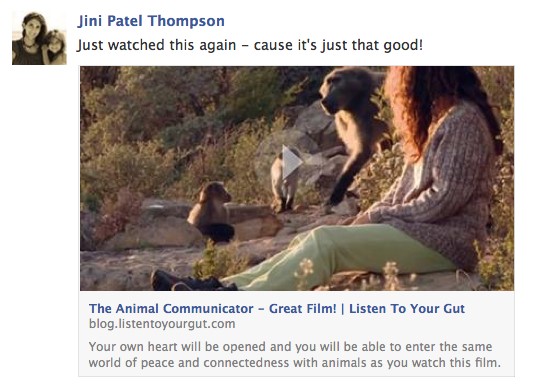
When you post on social media (Facebook, Twitter, Instagram, Pinterest, etc.) always post a blog link, so your followers will come to your site, like this one:

17_05See how it looks like I’m linking to the film, but it will play within a blog post on my own site (listentoyourgut.com)? It’s a great way to use your blog without having to write an entire original post. If your blog post – or another post that catches their eye while they’re there – is interesting, or helpful, or entertaining, they might want to find out more about you, or stay in touch with you and then they will either sign-up for your newsletter, or your free eBook, or your free mini-course, or subscribe to your blog, etc.

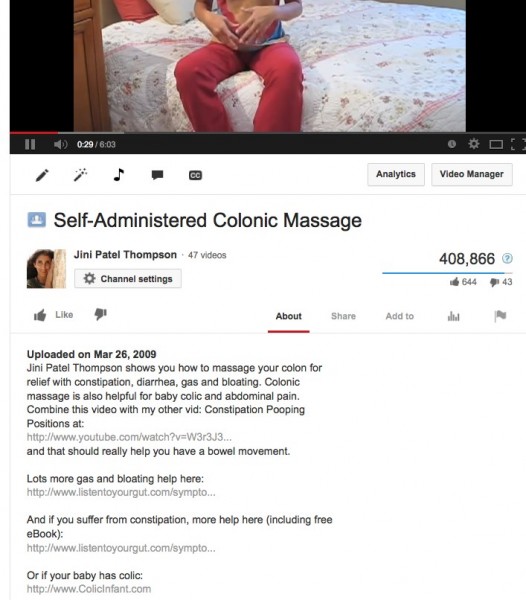
When you do a YouTube video, tell your viewers you have detailed info or a free report about that topic on your blog – then give the link orally and also put it as a hyperlink in the video description field (the ABOUT section) and also link an annotation on the video (see “Annotations” on YouTube for how to do this – it’s very easy), so they can click directly to it. Remember, the goal of all your site promotion activities (social media) is to get people to sign-up or opt-in to your email list. Here’s an example, in the About section for this video, I give a link to another helpful video, plus 3 helpful site links:

17_06

Easy! Just make it a habit – always make sure you’re sending people back to your website, to increase their chances of signing up on your website.

How Do I Know If I Should Be Blogging?

If you are trying to run or launch an online business…you need to be blogging. At the very, very least, keeping your blog updated is like making sure the Open/Close sign on your shop window says OPEN. An abandoned blog looks like dust accumulating on the counters, windows smudged, and that closed sign sitting there – does anyone ever turn it over? Is anybody home? Who’s going to buy from a shop like that?

I see this problem over and over – someone’s site looks great, they’ve added lots of new products, but no one knows they’re there because they’ve only published a few blog posts! So then they think their site/internet biz is not working. Gah!!

I am REALLY REALLY REALLY pushing this BIG TIME. You MUST MUST MUST blog!!

The first thing that will happen is the spammers will find you and begin posting comments. That’s good, because it shows you’ve just popped up as existing online! But don’t approve those comments (look at the comment poster’s email and website for Russian, eastern European addresses, or commercial websites, or just general nonsense), unless they look legit.

KEEP BLOGGING.

The next thing that will happen is real people will begin commenting. Now you know you’re starting show up on the web. As more people comment, your site gets more opt-ins (which shows you more web traffic is coming in), and THEN you will start to show up at a decent ranking in search engine results. Depending on how many sites are in your niche, this could take 6 months to 3 years! But you must not give up, you must keep blogging – at LEAST one blog post per week.

The more you learn about integrating keywords and search engine optimization (SEO), the more “findable” you’ll be, too. How many times have you typed in specific phrases or keywords into Google, and been surprised or delighted to find a blog by someone who’s already done what you want to do, or researched your problem, or learned the hard way – and wants to share it with you, for free? That’s one great way for you and your products to be found in the great sea of the internet – and believe it or not, it doesn’t have to be random and you can definitely influence the likelihood of this happening with a few tricks and some know-how.

The other reason to blog at least once per week is so that people know you’re serious and “active”. A friend of mine went to one Freedomite’s site, but noticed that she hadn’t blogged for 2 months, so figured she was shutting down, or going out of business. Thus, she didn’t even consider buying anything from her. Don’t make that mistake! Blog!

Consider it maintenance, infrastructure, foundation, or simply keeping up appearances – the truth is, that blog is all of those things and more for your business.

But it’s also your playground, your open journal, your stage, and your laboratory. Don’t blog because you have to – blog because you want to.

Seriously, I blog because it’s fun, educational, and beneficial for ME as well as my readers and my business.  Or, DO blog because you have to, if that’s how you get going: set yourself a weekly goal of one blog post a week, and stick to it. Bribe yourself, threaten yourself, or find your flow – I don’t care, just blog!!!!

…capiche?

Say it with me now: build your email list, and blog. Build your email list, and blog.

There IS an exception to this rule, and that is if you have a business that does NOT rely on traffic generated by search engines. For example, let’s say you have a high-end consulting business where you only have room for 5 clients and all your clients come to you through word of mouth. In that case, you may not need a blog at all! Because your site may function solely as an extended business card, or brochure. Your site may also be the internationally-accessible place for magazines, or events looking for speakers to download your press kit.

In scenarios like that, you do not need to blog regularly. But, if you need to have a steady flow of visitors to your site in order to get yourself and your stuff out there, then you absolutely need to publish at least one blog post per week, or you won’t show up on search engines and no one will know you exist!

In the rest of this unit, we’re going to look in depth at HOW and WHAT to blog, how Facebook (or the social media site of your choice) can be a simple, cheap, and effective marketing platform, and how to optimize your posts for search engine ranking and searchability.

Just remember – blogging is the single, GREATEST thing you can do to build your site traffic, your reputation, your brand, and your search engine ranking. Okay…rant is over. Mostly. For now.

How Do I Promote My Own Site For Free?

The main reason you want to promote your site is not just to market yourself and your stuff to potential customers, but to get people to opt-in (sign-up) to your email list.

It is very rare that a person will buy anything from you on their first visit to your site. That is why capturing their email address is CRUCIAL.

Once you have their email address, you can begin to build a relationship with them, by sending them lots of free and helpful stuff.

Your free, helpful stuff is located on your site or blog, so this drives traffic to your site (which increases your search engine ranking) and also keeps bringing them back to you.

After they know you and TRUST you, then they are likely to buy from you, if you have what they need.

So here’s what that looks like:

SOCIAL MEDIA
Facebook ~ Twitter ~ YouTube ~ Pinterest ~ Instagram ~ LinkedIn ~ etc

17_02

 YOUR SITE
Your Blog Post or Your Homepage or Your Landing/Special Offer Page

17_02

OPT-IN
Opt-In to your great freebie
and become part of your email list

17_02

EMAIL MARKETING
You start building a relationship with them
by giving them more great stuff for free

17_02

PURCHASE
Now they buy from you

So first you have to get people to your site.

Then you have to get them to opt-in and give you their name and email address.

Your email list (database) is your most valuable asset. It is your most powerful marketing tool, but it is also easy to overwork your list and lose people. If you email people too often, it becomes annoying and they will unsubscribe. And yes, I’ve tested this! I’ve found that a maximum of 1 email per week results in long-term email retention. Some of my list have been with me for over 10 years without unsubscribing.

There is lots more to learn about the best way to use your email list, and build a relationship using that list (email marketing), over here!

For now, let’s focus on the free and easy ways to tell people about you, and get them to your site, so they can sign up for that precious email list! So this module is all about the free ways you can market your stuff and build your tribe, using various social media. I will also help you figure out which social media you should be using to promote yourself and your stuff. But first…

Pressie Time!

Yay, time for another free gift: I took this marketing and sales sequence I gave you above (with the arrows, showing each step) and had my designer turn it into a nice pdf chart/graphic for you.

Print this out and pin it near your computer, so that it imprints on your brain and also so that you can check off the steps easily and quickly, making sure you haven’t missed any steps in the process.

This chart is not just useful for your social media marketing, but for ANY vehicle, platform or media you use to tell people about your stuff (Google AdWords, Joint-Ventures, Blog Posts, Guest Posts or Interviews). So I have expanded the chart to reflect all these different ways of telling people about the awesome stuff you have for them.

DOWNLOAD the Easy-Peasy Sales Success Chart

Remember: You don’t just tell people about your stuff, you always send them to a place on your site that has a sign-up box, where you can capture their name and email for your list.

Social Media

Many people rave on about the power of social media, but in reality, the main use of Facebook, Twitter, LinkedIn, Pinterest, etc. is to drive people to your site/blog, where they can sign up for your email list, see what you have to offer and get to know you better. Social media will rarely generate you direct sales (unless you are using it to promote a specific campaign), but your email list will.

Tim Grahl from Out:think (a marketing firm specializing in authors) illustrated this point perfectly when he revealed that one of his authors’ email list outsold ALL her social media activities by 100:6. That means that all her posts on Twitter, Facebook, her blog, etc. netted her 6 sales of her new course. Two emails to her list (an announcement email, then a last-chance email) netted her 100 sales. I can absolutely confirm their experience through my own testing of various marketing methods.

Your email list is King and the purpose of all of your social media marketing is to drive people to your site, where they can sign-up for your email list.

How Do I Tell People About My Stuff?

Your website (blog posts, keywords) and your daily marketing activities are like the backbone of your site promotion that keep working for you while you sleep, or even when you’re on vacation. You just have to blog once and it keeps working for you – even years later, you will still have people leaving fresh comments on a good blog post.

Likewise, you only have to upload a great video once, and year after year it will continue to tell new people about you and your solutions, prompting them to visit your website or blog, where they can sign up to your list.

Your daily, ongoing marketing and promotion should include things that don’t cost you a dime – like blogging, posting to Facebook, Twitter, Pinterest, commenting on other people’s blogs, posting in forums, uploading videos to YouTube, etc.

A lot of this ongoing “marketing” activity (giving people helpful information, or entertaining them) will likely occur naturally, since you have chosen a business that is something you’re already active, passionate and interested in.

Don’t turn this kind of site-promotion into a big deal!

If you have time to text your friends and family, you have time to carry out at least one of these social media marketing activities each day. And of course, remember to always provide a link to your site and give your full name, or the name of your site (in case the link is deleted and someone wants to Google you).

How To Promote Your Stuff Offline

Now let’s say, for example, that you absolutely hate blogging. Or maybe it’s just that publishing blog posts – whether written, or video, or audio downloads – is just not something you can get into a groove with. So you find you hardly ever do it. And as a result, no one knows about you! And your site generates very little organic search engine traffic.

If this is the case, then even if you have the best website in the world, you still won’t make much money because no one is coming to your site – they don’t even know you exist.

If this sounds like you, then don’t despair. Instead, either get some great affiliate partners with active blogs to promote your stuff for you, or, focus on all the offline ways you can let people know you exist and what you can offer them.

Depending on your niche or topic, different venues will work better than others, but here’s a list of ideas to get you going:

Give talks; free or paid – community organizations, local businesses, interest groups, clubs, etc. Make sure you have hand-out cards or postcards listing your tagline, elevator speech and website available, so people can find you. Maybe let them know you have a free gift for them on your website.

Host introductory, or free workshops – again, these can be local, or you can offer them in whichever cities or areas are likely to have a good concentration of your ideal customer. Make sure you have hand-out cards or postcards listing your tagline, elevator speech and website available, so people can find you online. If possible, let them know you have a free gift for them on your website, to encourage them to visit and sign up to your list.

Offer free seminars on specific topics – this will be particular to your niche. For example, if your business is health-related, then many health stores have monthly or weekly seminars you can sign up to present at. Check with local business groups if you have a biz-related service or product, etc. Check with hardware stores if you have DIY or special carpentry expertise, and so on. Of course, be sure to bring your cards along!

Post your cards at related, local businesses – grocery stores, coffee shops, specialty stores and health stores are all places that host bulletin boards where you can pin your postcard or hand-out card. Other businesses, like bodyworkers, new age shops, medical offices, chiropractors, dentists, etc. may allow you to leave a holder with your cards on their counter if they think your stuff will help their clientele – or, if you can offer them a referral fee. Again, make sure your tagline and elevator speech are on your card, along with your website address.

Attend local sales venues – like flea markets, farmers markets, craft fairs, or anywhere else your ideal customer is likely to show up. You can sell your products or services, but also make sure you focus equally on encouraging people to take one of your hand-out cards or brochures and visit your site.

Aside from these handy offline ways to promote your site, you can also use Google AdWords to drive traffic to your site via ads posted on other people’s sites and in search result listings. You can test this out yourself, or hire a Google AdWords specialist from Elance.com to set up a campaign for you. Google AdWords works brilliantly for some people’s sites and not so well for others, so it’s good to appoint a budget of $200 dollars or so to test it out first.


How Do I Communicate with Customers After They Have Purchased?

It’s important to keep in mind that your customer’s experience of you and the positioning of your product is not complete when they’ve purchased your product.

To maintain the positioning of your product (and your brand) you want to have at least three points of contact with your customer AFTER they’ve bought from you:

Immediately after purchase – Upon payment an email should automatically go out (an autoresponder) thanking the person for their order. For digital products, the email should contain the download link, or instructions about where/how to download it. For physical products, the email should contain the order invoice, shipping information, and possibly the courier tracking number (although usually the tracking number is sent in  a separate email). Make sure you include at least an email (but preferably also a phone number) where they can reach out for help or answers if they need to.

Within 3 days – An email should go out saying something like this: I hope you received your product. Just in case, here’s the download link again… If you have any questions, remember we’re right here for you, just email us at…

3 – 4 Weeks later – An email should go out saying something like this: Hi, just wanted to see how X was working out for you. I’d love to hear your feedback, or any suggestions you have for how to make it better… Please feel free to email me at anytime at…

Of course, if you are mailing, or couriering out a physical product, you will need to adjust the timing of these last two emails to allow for the shipping time.

You would set these emails up as autoresponders (automated emails) in either your shopping cart (e.g. 1ShoppingCart), or your email platform (e.g. GetResponse). Whichever provider you are with will have instructions for you on how to set up autoresponders that are tagged to be immediately sent out, upon the purchase of certain products or services. They will also show you how to set the timing of your emails at 3 days, 21 days, etc. after purchase.

If you find yourself wishing I would give you a template for these emails, I’m going to tell you why I’m NOT doing that… It is of utmost importance that you communicate to your people from your heart. You need to speak in your language, tone, sense of humor, quirkiness – whatever it is that makes you, YOU.

In this way, your emails will continue your relationship with that person. They will carry your distinct branding and your customer will feel you have reached out to them.

Just apply the customer shoe test: Pretend you’ve bought your product and put yourself in your customer’s shoes. You receive Email #1… how do you feel? Does it give you all the information you need? Do you have questions about anything? Can you reach someone by phone or email for help if there’s a problem? Do you need anything else?


Plan out your basic post-purchase email sequence now (do one for every product or service you sell and refer to my suggestions in this unit if you get stuck). If you want to save time, just do point-form notes here and write out the nal emails directly in your email program:

Email #1 – Immediately After Purchase

Subject (email title): Hi X,


Email #2 – Within 3 days for digital products, 10-14 days for physical products

Subject (email title): Hi X,


Email #3 – 21 days later for digital products, 28 days later for physical products

Subject (email title): Hi X,


If you’re not clear on how an autoresponder email sequence works, then check out this video where I walk you through the process, step-by-step. This 16-minute video covers a 3-step email sequence after a site visitor opts-in. But, the process is exactly the same for the 3-email sequence (above) after someone has purchased from you.

Of course, your contact with your customer won’t end after these three emails. Maybe one month later you want to send them another autoresponder sequence that gives them a free gift and tells them about your next product that would really help them.

Or perhaps you want to share the feedback you’ve received from others. Making people feel good about their purchase AFTER they’ve bought is just as important as motivating them to buy your product.

Maybe you want to send blog updates once a month, with a paragraph from your blog post, a photo and the link to your post.

It is YOUR relationship with your customer and always, always put yourself in their shoes and ask yourself, “What would I like to receive?” Would that be valuable, or useful, or would that bug me? How would I FEEL when I received this? And so on.

There is a lot more to developing and maintaining a relationship with your email list – this is just to stimulate your thinking process, and finish laying out the buying process.

For now, you can give yourself a BIG CONGRATS for completing the steps needed to offer your first product or service to the world!!

Are you feeling excited, are you feeling scared? Maybe a bit of both… If you’re anything like me, your belly has a tingling, butterfly sensation and you feel excited and squiffy.

In fact, this is the perfect time for those blocks and saboteurs to rise up and delay your progress!

So in the next two units, we’re going to explore two of the biggies that can pop up to slow you down, or stop you: Fear of putting yourself out there (losing privacy) and fear of the pressures or expectations that might occur when you decide to ‘go public’ or ‘up your game.’

How Do I Know What Makes My Business Different?

Here’s another great process you can use to position your product or service and then craft your compelling offer for your sales page or shopping cart.

This one comes to us compliments of the fabulous Bernadette Jiwa, who says:

Nobody told Jobs and Wozniak how to build a computer company, let alone how to make it one of the most loved brands in the world, and Howard Schultz didn’t get the Starbucks magic from a manual.

Nobody can tell you what to stand for, or how your values, wants and needs, should intersect with those of your customers and then manifest as a business, an idea or experience. Figuring out the destination is hard — but recognising it, is more valuable than knowing exactly how you’re going to get there. The most useful answers are the ones we take time to figure out for ourselves — not the ones that everyone can find in a handbook.

It turns out that it’s more powerful to have your own map than it is to have someone else’s directions. Once you have that map, you’ll always have a way to get from where you are to where you want to go.”

The Difference Map works best if it’s completed in the order shown on the map:

1. Principles
2. Purpose
3. People
4. Personal
5. Perception
6. Product

Ask and answer as many questions as you can for each of the six sections – you’ll see the questions once you download the Map.

DOWNLOAD The Difference Map

By the time you complete it, you should have good clarity about what makes you different and how to position yourself and your stuff to visitors and clients.

Thanks Bernadette!

How Do I “Protect My Energy”?

When your body has good energy and your brain is sharp and quick, you can zip through your work much faster. So although I could write an entire book on how to have vibrant health (oh wait, I already did!), I’m just going to give you some of the most important bits here.

These are the biggest-bang-for-your-buck things you can do to protect your energy and keep your brain and body strong and fast – no matter what your current work or life situation. This isn’t just about maximizing your productivity – this is about freedom, and what says freedom better than a healthy body and a clear mind?

Move Every Day

We’ve all heard the admonitions about exercise being the number one thing you can do for your health. In one ear and out the other, right?

So let’s not even mention the word ‘exercise’. Let’s talk about movement. And how about just making sure you MOVE your body somehow, every day?

Here are some ideas you can have fun with:

Take an activity that you normally do and just do it standing up. For example, I like to paint, so I make sure I stand at my easel.

Walk somewhere. For myself I rarely just ‘go for a walk’, there has to be some point to it. So I will make myself walk to the bank, or the grocery store. Or I walk to meet someone for lunch. I find giving myself a reward at my destination really helps; walk to a café, then sit down and have a yummy drink. Or walk to the bookstore and when you get there you get to buy yourself a book. Whatever works for you.

Put on some music and dance for 5 minutes.

  1. Lie down on the floor while your kids or partner is talking to you and just let your body stretch however it wants to. I do this at night while talking to my kids at bedtime – then I throw in some situps and butt lifts, since I’m already there and in position!
  2. Put a treadmill or a stationary bike in front of your TV.
  3. Convert your desk to a standing desk. You can do this cheaply by placing side tables (from Ikea) on top of your desk for your monitor and keyboard. Or you can buy an actual standing height desk. See the pictures below for ideas.
  4. Find a hobby that involves movement. When I got back into horses, my arm muscles instantly grew and my back straightened out more. I receive as many benefits as if I’d worked out. Try doing squats for 45 minutes (also known as posting trot!).
  5. Add movement and stretching to your regular activities. If you vacuum, change hands and work both sides evenly. When you’re gardening, alternate a ‘horseriding stance’ position (a wide squat), with spreading your legs wide and bending down, like a triangle – let this giraffe show you how it’s done:
  6. Sit on an exercise ball at your desk, rather than a chair. These are surprisingly cheap and very comfy. Here’s mine:

Standing Desk Options

You can convert your desk to a standing desk very easily and cheaply, or you can make it more professional. However, keep in mind that standing for hours on end is not good either, and can stress your lower back and leg veins. So best is to create a set-up where you can easily toggle back and forth between standing and sitting. Or, get a bar stool height chair for when you want to sit down.

My version of a standing desk, using boxes and end tables:

And here’s how that exact same setup allowed me to also work while sitting on my saddle! I wanted to work on training my heels to stay down, but I was also able to get some movement in by half-standing in the stirrups from time to time. Listen to your own body and get creative – maybe you want to set up a treadmill, or a bicycle at your desk, it’s all good!

Here are some other cheap and cheerful versions of standing desks:

Eat Well & Supplement

Here’s a simple formula to eating that will not only normalize your weight, but also give you good energy and muscle tone. Make sure your plate is composed of: protein, good fats and vegetables. You rarely need grains or carbs and when you do eat them, choose potatoes and starchy vegetables, rather than grains (wheat, rice, millet, etc.). When you do want some grains, eat quinoa. Chia seed in smoothies or as cereal also replaces the desire for grains. Good fats are coconut oil, olive oil, butter, other cold-pressed oils and fat from grass-fed animals only!

If you can have some raw food for breakfast, you’ll really notice the difference in your energy and how the rest of your day goes. Either get yourself a MagicBullet (cheaper than a NutriBullet, but does the same job – I’ve tested both) to make super fast and easy raw smoothies, with 30 seconds clean-up! Or get some raw protein (grass-fed whey or vegan protein) and add raw coconut water and chia powder.

If you eat this way, your body will just drop fat without any extra effort required. You will also feel much more energetic and if you tend toward depression, you should see a shift in about 3 months. Add a therapeutic quality probiotic and your results will accelerate.

Here’s what I drink for my morning protein shake:
http://blog.listentoyourgut.com/raw-grass-fed-whey-protein/

And here’s what my family drinks for raw juice:
http://blog.listentoyourgut.com/jinis-favorite-raw-juice-recipes-juicing-or-blending/

Protect Your Eyesight

Staring at a screen for half the day (or a full day) will likely weaken your eyesight over time. And the older you are, the faster the change will occur.

However, there are simple exercises you can do – that take less than 4 minutes – to strengthen the muscles of your eyes and prevent your vision deteriorating. I bought an entire book on this, called Eye Yoga. But chiropractor Ben Kim recently reminded me that even a few of these core exercises are enough to improve your vision:

Do these simple eye exercises – 3 times a day if you can – to keep your eyes and vision as healthy as possible:

  • Look as far to your right as possible for 3-5 seconds, then as far to your left as possible for 3-5 seconds. Rest for a few seconds, then repeat this sequence several times.
  • Look as far up as possible for 3-5 seconds, then look as far down as possible for 3-5 seconds. Rest for a few seconds, then repeat this sequence several times.
  • Slowly roll your eyes in a circle, first clockwise, then counter-clockwise. Rest for a few seconds, then repeat this sequence several times. Be sure to roll slowly – it should take at least 3 seconds for you to roll your eyes in a full circle.
  • Hold a pen in front of you, about an arm’s length away. Focus your vision on the tip of your pen for 3-5 seconds, then shift the focus of your vision to an object that is farther away for 3-5 seconds. The greater the distance between your pen and the distant object, the better.
  • If you are indoors, look out a window to find a distant object to focus your vision on. Repeat this sequence of going back and forth between your pen and a distant object several times. This last exercise is used by some professional baseball players to optimize visual acuity, which is essential for the hand-eye coordination needed to play ball.

Please note that all of these exercises should be done with your eyes, not your head and neck. So keep your head and neck still while you take your eyes through the movements described above.

If you would like more comprehensive guidance on how to improve and protect your vision, I can highly recommend:

Relearning to See: Improve Your Eyesight – Naturally! By Dr. Thomas Quackenbush

This book is based upon the Bates Method, but if you don’t mind reading “older” English (c. 1920), you can download the original Bates Vision Method book for free here:

DOWNLOAD Bates Method eBook

Or a great online course (also based upon the Bates Method) is RebuildYourVision.com

You can also make screen-time easier on your eyes by downloading f.lux, a simple program designed to automatically correct the light coming from your screen, depending on the time of day. Pumping bright computer light (which is designed to mimic sunlight) into your eyes at all hours, including after sunset, can affect both your eyesight and your circadian rhythms.

Flux changes your screen light from bluer, brighter light in the daytime to yellow, dimmer light in the evening, slowly adjusting as the hours go by, and synched to your timezone. Pretty cool. All you have to do is download it, allow it to use your location, and forget about it; it will operate quietly and automatically in the background without any further tinkering.

You can download f.lux here: https://justgetflux.com


How Do I Organize My Day-To-Day?

It never ceases to surprise me how many people think they can be effective and efficient keeping their task list in their head. Yet every single person I know who has tested working both ways – keeping their to-do list in their head, versus writing it down – finds they accomplish much more, much faster by writing their task list down!

You can check out my quick and easy way to create a Task List if you want, but for now let’s go more in-depth on this and also look at ways to create digital task lists for those of you that need, or prefer, that method.

Staying On Task

The way you organize your to-do list is going to depend on whether most of the elements of your business are time-sensitive, or not.

For example, if your business primarily involves making sales calls and then following up with those people in a timely fashion, then you are going to need a CRM (customer response management) software or app.

But for most of us, our business meetings, teleseminars, interviews and sales calls can be managed using either handwritten calendars and lists, or a normal calendar app for our computer or mobile, like this one, from ActionFocus:

Personally, I prefer to buy a desk calendar (with great photos) every year and then just handwrite onto it. This also works for my family as my husband and kids can pop into my office and check where I am or what I’ve got on. Sometimes my kids write their own reminders or appointments on here:

I combine this desk calendar with my handwritten to-do list with checkboxes. This is similar to what I showed you in the last unit, but this is my real-life one. As you can see, I prefer just a serviceable spiral notebook – that way my lists never get lost and I can flip back to check details:

I prefer to handwrite my task lists because I find it easier and faster and I prefer tactile things to screens.

Gift Time – LTYF Task Sheets!

For those of you that also prefer a written task list, I’ve created these groovy Task Sheets you can download and print out. You can use them as daily task sheets, or weekly task sheets – however you prefer to work is great. Here’s what they look like:

DOWNLOAD the LTYF Task Sheet (Right-click and Save As…)

Whether you prefer to keep a written task list, or to organize yourself digitally, it doesn’t matter which method you use – as long as you do it and don’t leave everything in your head!

Digital Organizers

If you prefer to use a digital calendar and to-do list, then you likely already have a digital calendar installed on your computer – check your Applications folder. But in case you don’t, I’m going to give you some good ones now, and you can also easily search for a good calendar organizer by entering these search terms into Google:

calendar organizer app
calendar organizer software
calendar organizer free software

First of all, Google has a free online calendar you can use:

https://www.google.com/calendar/render

And here are some good calendar apps for your mobile phone or tablet:

iPhone Calendar Apps

If you don’t like Calendar (which comes with your Mac computer and iPhone) then a great calendar app for your iPhone is Calendars+

Calendars+ is an elegant and easy to use calendar application available on iTunes. It works perfectly with Google Calendar and built-in iOS Calendar. For both iPhone and iPad.

Other good apps for iPhone are:

miCal

miCal is THE missing calendar for your iPhone and iPod touch. Many users like that you can read all your appointments without having to scroll. Award winning App at “App-Developer Conference 2010” and third place at “Best iPhone App”

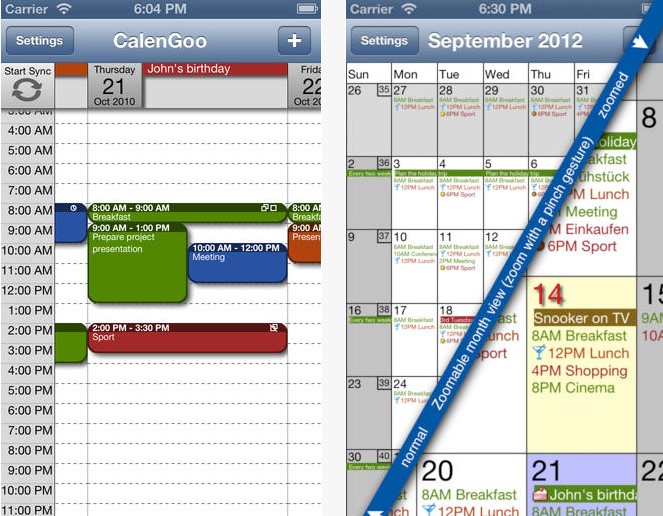
CalenGoo

CalenGoo gives you a fast and easy way to access and modify your Google Calendar with your iPhone, iPod Touch or iPad. It can also be used when you have no Internet connection, using the cached data. Changes are saved and uploaded the next time you are connected.

Android Calendar Apps

Rabotan ToDo Calendar

Full-featured all-in-one Calendar and ToDo List. Scheduled task are shown in calendar views as well. Includes an automatic interchange of tasks, and information about their completion, via sms and email.

Business Calendar

Business Calendar is a complete calendar application that synchronizes with your Google calendars. Smooth scroll and zoomable multi-day view (1-14 days). Graphical and textual presentation and month, agenda, day and event views.

WeekCalendar

Week Calendar is the most user friendly and all-round calendar app worldwide for everyone that needs to manage a busy schedule. Week Calendar works without setup using the Exchange, Google and other calendars you have configured on your Android device.


Take a minute to plan on paper…

Which monthly calendar are you going to use for yourself?


Which Task List system are you going to use, digital or written? And if written, what are you going to write on – a spiral notebook, a legal pad, a journal, or your LTYF Task Sheets?


Okay, now that you’ve got yourself organized for your monthly calendar and your daily or ongoing task lists, let’s look at another facet of staying organized so you can be super speedy and efficient.

Account Information – Logins

As you accrue more and more accounts and login information (usernames and passwords) it helps to store them all in one document for easy access on your desktop, in alphabetical order. An easy solution is to download a password manager, like LastPass. This is especially great if you need to share logins throughout your team.

But some people don’t like using software to store this sensitive information – here’s the super simple, nearly analogue way I keep all my account information organized, from my blog login, hosting account, Amazon account, Facebook account, YouTube channel, and so on. I have a file saved to my desktop called Internet-Accounts and I copy/paste all login URLs, usernames and passwords in alphabetical order. For example – see how I bold the account name so I can scan and quickly find what I want:

Amazon Affiliate
https://affiliate-program.amazon.com/
Username:
Pswd:
Email:

BigCommerce
https://shoppe.listentoyourgut.com/admin/
Username:
Pswd:

CodeCanyon
http://codecanyon.net
Username:
Pswd:

And so on… but remember to put your accounts in alphabetical order so you can find them easily.

If you don’t know how to alphabetize, you can have Microsoft Word do it for you! Simply create your list of account names first and then format them as a bulleted or numbered list:

  • CodeCanyon
  • BigCommerce
  • Amazon Affiliate

Highlight your list and then click Table → Sort and select these options:

Note: If you have an older version of Word, then on the Home tab in the Paragraph group, click Sort.

And your list will be automatically alphabetized to look like this:

  • Amazon Affiliate
  • BigCommerce
  • CodeCanyon

Then you can de-select the bullet points and fill in the login information:

Every 3 months or so, PRINT that list out.

Do not just store them in digital form and don’t store them on your phone or other mobile device that you could lose. It’s best if you can store your Account Logins file on a flash drive (memory stick), rather than on your computer or laptop. And then keep this flash drive somewhere secure. My husband had both his computers stolen and he had his account login information on his computer! So we had to spend 5 hours changing 19 pages worth of passwords – NOT something you ever want to do!

Some people prefer to store their login information in their Address Book or some other digital organization solution, but if you cannot easily print your entire list (with one click) you will not print it out regularly. And then you risk the same extreme hassle if your computer crashes, or you lose your digital data.

Also, don’t use the same password for all your accounts and avoid using your name, birthdate or other easily recognizable info for your passwords.

Now that you’re all organized, let’s talk about how to keep your body and energy healthy, strong, and supported while you work, play, and create! On to the next Module…