Archives for March 2019

Why Am I Not Having the Success I Feel I Am Working So Hard For?

How are you feeling as you’re getting closer to launching your site, overhauling your existing site, or implementing some big changes to your business? Do you notice any resistance arising in your thoughts, feelings of overwhelm, or perhaps a lack of action?  Well you know I’ve got your back!

Join me as I talk to Lisa-Marie Cabrelli from her perspective of being very successful in her own businesses (on Amazon’s Top 25 Seller list for Xmas 2012) and also as a business coach – about the things that come up to hold us back from being and living our truest, most vital self.

As Lisa-Marie says in this interview:

The most devastating thing to me is when you find people who have worked really, really hard for many years, and aren’t where they’re supposed to be, because they haven’t recognized that they have one of these blocks or saboteurs in their life. They haven’t even understood that it existed, so they have not even had the opportunity to work on it. They’ve wasted all of this time and energy working towards something that can never happen, because they’ve got one of these major blocks that are interfering with their progress.”

Join us as Lisa-Marie shares effective tools to overcome, or push through those blocks and saboteurs, for herself and her clients; to clear your blocks to success and living an extraordinary life. This call has the power begin a sea-change in your life, so don’t miss this one!

DOWNLOAD Overcoming Blocks and Saboteurs to Leading An Extraordinary Life

Or click Play to listen:

And here is the Elizabeth Gilbert presentation on Genius that we talk about in the call:

How Can I Shift Subconscious Fears & Beliefs?

EFT Tapping For Money Fears

If you’re not sure what your money fears are, or if they’re something you’ve been avoiding, try this illuminating writing exercise to put words to some of your ingrained patterns – and then come back here!

But if you’re here now and game, then tap along on some acupuncture points with me as I introduce you to EFT Tapping therapy and how it works to shift those subconscious fears and beliefs . Keep in mind though, that when I tap on abundance, I am not just referring to financial abundance. Great food, love relationships, creative endeavours, travel, adventure, etc. are all forms of abundance that we can open to further and increase their flow in our lives.

EFT Tapping is a powerful healing tool because it interfaces between the mind/body and thus can shift things at the energetic, or subconscious level. It also involves your bodily sensations and fears or memories that may be stored in your tissues or organs – so you may feel butterflies in your stomach, or heaviness in your chest. Don’t worry! These are all good signs that your body is speaking to you and signposting the way to your healing.

Note that you cannot just listen to this video! You must tap along with me on the acupuncture points for this therapy to work its magic.

In the beginning, we are going to start by venting, and voicing out loud all the negative crap that may be carried in your subconscious, or that other people have spoken over you, or beliefs absorbed from your parents without conscious awareness (often before the age of 6).

So even though it may feel like we are focusing on the negative and you probably don’t want to dwell on that, it is an important part of the process for unlocking these limiting concepts and moving them into flow; so they can be transformed into life affirming, positive beliefs and feelings that make your world bigger. So if you’re feeling uncomfortable, just stay with me, keep tapping, and know that we have to go down into the depths to bring these things up into the light, where we can then shift and transform them. Stick with the video and know that the positive affirmations and life-enhancing re-frames are coming!

Follow along with me; tap on the acupuncture points I’m tapping on and say (out loud or in your head) the words I’m saying:

Here are the tapping points we are using in this video:

eft-tapping-points.jpg

And if you want to learn more, you can download the Basic EFT Manual. This is such a powerful tool for shift and change that I became a Certified EFT Practitioner myself – because between myself, my kids, my animals and the rest of my family and friends, I use it all the time. And it is phenomenally effective. Try it and see what you think!

BY THE WAY… take note of the fact that I made this video a public-access video and I also gave out the website for Listen To Your Freedom along with a free offer. This is all part of building relationship with your potential customer (always give awesome stuff for free), and using social media to tell people about your stuff. Each of these concepts will be covered in greater detail as you work your way through LTYF. For now, I just want to call your awareness/attention to these elements of building a successful online/automated business.

Why Do I Feel Like I’ll Never Earn Enough Money?

If, as you imagine making a good living from something you love doing, you find yourself beset with self-doubts, or asking yourself questions like:

  • Who am I to think I could do this?
  • I’m already so fortunate – how can I possibly ask for more?
  • Why should I deserve to live a better life than anyone else in my family?
  • How dare I even try to do things differently?
  • I’m crazy to think I could ever make this happen.
  • This is going to be one more thing I get excited about and then don’t follow through on.
  • This is just going to be another failure.
  • I can never make stuff like this work.
  • Every idea I have is crap.
  • I’m too scared to even think about what I really want – I could never do that.
  • I’m just not organized/motivated/inspired enough.
  • I’m just so tired all the time, I don’t have enough energy.
  • I’m not confident enough.
  • How do I avoid being gutted by other people’s doubts and criticism?
  • People are starving, how can I have so much? I would feel guilty.
  • And so on…

…then please listen to me very closely: If you don’t deal with the root causes of statements and questions like this, you actually won’t ever be successful.

Because until you believe that you deserve abundance (in all its forms) and you give yourself permission to receive that abundance, your core energy and visceral self will keep slamming the brakes on anything you attempt that moves you above those beliefs. We’re taught that giving is good. But giving cannot exist without receiving. We need both processes to be in flow to be any good at either!

This is not a mental or intellectual construct. Of course, logically, we all know that we would love to be rich and that we are worthy of love and abundance – but if we don’t feel that, in our heart of hearts, in our bones, then we will just keep blocking those things from entering our life.

This is why 44% of lottery winners are broke within 5 years and 32% have gained weight – they just cannot handle the incongruence between what they feel inside and their current reality (as an aside, emotionally, excess weight is often about protection – fear – and overwhelm). If you don’t shift your subconscious fears and beliefs about your worthiness, you will find it very difficult to manifest financial success and hold onto it!

So how do you change visceral, embedded beliefs and limitations?

There are many ways to gain awareness of your beliefs or patterns that either block you from receiving abundance, or sabotage it whenever it starts showing up. Blocks and saboteurs show up in all kinds of thought patterns and behaviours, but by learning to recognize them you will begin the process of freeing yourself and your business – which is in so many ways an expression of yourself – to soar ever higher.

I have a variety of techniques that I have personally tried and found to be powerful and effective at clearing and removing the blocks, saboteurs and limitations from my own life – and once you learn them, you can apply them however you need to.

Do NOT skip this process! If you are unwilling to address these issues and seek healing, then you are highly unlikely to be successful in business – or, at the very least, you will not be as successful as you could be.

This is a vital part of the Listen To Your Freedom process. I can give you all the step-by-step business tools and knowledge that I have, but if you have a block or saboteur operating simultaneously, your subconscious (or your ego) will find a way to sabotage you.

So let’s get to work! Grab your notebook and make yourself a quiet space to dive deep…


What Is Money?

We all have beliefs about money that we have unconsciously absorbed from our parents, family members, or childhood events. Almost everyone has inherited negative, limiting beliefs about money – even if they have, or have had, plenty of it in their life. But we cannot begin to shift these beliefs (which then determine our actions) until we know what they are!

So let’s begin the process of uncovering what your conscious and subconscious beliefs and attitudes towards money are.

Let yourself go loose-brain now and fill in the rest of this sentence in your own notebook with as many different words or sentences as you can – don’t judge yourself, or try to fill in the “right” answer. In fact, we WANT all your devious, undercover answers to come on out into the light here. So go ahead and write down every thought – positive or negative – that comes to mind…


Money is :


Now keep going and do the same with the next set – just go loose-brain and write down whatever pops into your head. Don’t edit or judge!


Rich women are :

Rich men are :


Are you surprised by some of your answers? I know when I did this exercise my answers to the ‘Rich women are…’ really shocked me! So now spend some time mulling over the significance of your answers and how these beliefs have been directing your life.

For example, if you’re a woman and you answered, “Rich women are cold and emotionally distant,” but yet you value being openhearted and compassionate… then what kind of roadblock are you holding against yourself becoming wealthy? If you have this kind of strong, negative belief, then you are not going to allow yourself to become rich, because you have an even stronger desire to remain openhearted and compassionate.

So whenever money starts to flow to you, you will shut it down before you receive too much – because you cannot allow yourself to become cold and emotionally distant. Are you beginning to understand how this works?

The great news is that change starts with awareness. Awareness is the rst and perhaps biggest step in the process of changing limiting, contractile beliefs into life-giving, expansive ones. As we go through the Listen To Your Freedom program, I will be giving you more tools to facilitate shift and change for your abundance blocks and saboteurs. But this is the first step along the journey.


Your Money Story

Continuing on, now let’s look at your formative years and your parents (or guardian) specifically. Each of us automatically absorbs components of our parents money stories – both good and bad – and these then form our money story.

In this audio, I talk a bit about my Dad’s money story and how no matter how much money he has, he is mired in poverty-consciousness. He is always in fear of losing his money and never lets himself spend much – even though he is a multimillionaire.

When you look at each of your parents’ money story you will uncover how they feel about money, their beliefs about money, their beliefs about their own worthiness, their fears, their limitations, their judgments etc. And rest assured that you have inherited many of these, simply by osmosis.

So take some time now to recall the things you heard Mum and Dad say throughout your childhood – negative or positive. And write down the way each of them behaved towards money and around money, worthiness, earning money, spending money, etc. If you were raised by someone other than Mom and Dad, then just substitute your guardian or major childhood parental figure or influence.

My Mom’s Money Story:


My Dad’s Money Story:


Write down any insights, or things you never realized before, about how your parents’ beliefs have affected yours:


How was this exercise for you? Did you learn something interesting, surprising, or revealing about your relationship to money? It’s amazing what we can carry around with us that we’re not aware of. Many people start to feel a profound shift after that exercise – if that’s you, try revisiting your answers when you find your blocks and saboteurs creeping up again. And now that you’ve identified some of them, you’ll have an easier time spotting them for what they are – rather than getting sidetracked or blocked by them! You’ve taken the first step in opening up the flow of money and allowing it to come to you.


How Do I Pick A Color Scheme For My Site?

In this unit we’re going to talk about the eight main colors – red, orange, yellow, green, blue, purple, white and black – and how they have traditionally influenced human thought, feelings, traditions and usage.

As you go through the 8 basic colors below, jot down in your notebook any of the points or phrases that resonate with the emotions you already identified that you want your site visitor to feel.

Once you have a basic idea of the colors you’d like to use, I’ll give you a resource that will help immensely to narrow down your pallet and your exact hues – based on how you want your customer to feel!

RED

red

Red is the color of fire and blood, so it is associated with energy, war, danger, strength, power, determination as well as passion, desire, and love.

Red is exciting, attractive, daring, authoritative, forceful.

Red is a very emotionally intense color. It enhances human metabolism, increases respiration rate, and raises blood pressure. It has very high visibility, which is why stop signs, stoplights, and fire equipment are usually painted red.

In heraldry, red is used to indicate courage. It is a color found in many national flags.

Red brings text and images to the foreground.

Use it as an accent color to stimulate people to make quick decisions; it is a perfect color for ‘Buy Now’ or ‘Click Here’ buttons on Internet banners and websites. In advertising, red is often used to evoke erotic feelings (red lips, red nails, red-light districts, ‘Lady in Red’, etc). Red is widely used to indicate danger (high voltage signs, traffic lights).

This color is also commonly associated with energy, so you can use it when promoting energy drinks, games, cars, items related to sports and high physical activity.

Light red represents joy, sexuality, passion, sensitivity, and love.

Pink signifies romance, love, and friendship. It denotes feminine qualities and passiveness.

Dark red is associated with vigor, willpower, rage, anger, leadership, courage, longing, malice, and wrath.

Brown suggests stability and denotes masculine qualities.

Reddish-brown is associated with harvest and fall.

ORANGE

orange

Orange combines the energy of red and the happiness of yellow. It is associated with joy, sunshine, and the tropics.

Orange represents enthusiasm, fascination, happiness, creativity, determination, attraction, success, encouragement, and stimulation.

To the human eye, orange is a very hot color, so it gives the sensation of heat. Nevertheless, orange is not as aggressive as red. Orange increases oxygen supply to the brain, produces an invigorating effect, and stimulates mental activity. It is highly accepted among young people.

As a citrus color, orange is associated with healthy food and stimulates appetite. Orange is the color of fall and harvest.

In heraldry, orange is symbolic of strength and endurance.

Orange has very high visibility, so you can use it to catch attention and highlight the most important elements of your design. Orange is very effective for promoting food products and toys.

Dark orange can mean deceit and distrust.

Red-orange corresponds to desire, sexual passion, pleasure, domination, aggression, and thirst for action.

Gold evokes the feeling of prestige. The meaning of gold is illumination, wisdom, and wealth. Gold often symbolizes high quality.

YELLOW

yellow

Yellow is the color of sunshine. It’s associated with joy, happiness, intellect, and energy.

Yellow produces a warming effect, arouses cheerfulness, stimulates mental activity, and generates muscle energy. Yellow is often associated with food. Bright, pure yellow is an attention getter, which is the reason taxicabs are painted this color.

When overused, yellow may have a disturbing effect; it is known that babies cry more in yellow rooms.

Yellow is seen before other colors when placed against black; this combination is often used to issue a warning.

In heraldry, yellow indicates honor and loyalty. Later the meaning of yellow was connected with cowardice.

Use yellow to evoke pleasant, cheerful feelings. You can choose yellow to promote children’s products and items related to leisure.

Yellow is very effective for attracting attention, so use it to highlight the most important elements of your design.

Men usually perceive yellow as a very lighthearted, ‘childish’ color, so it is not recommended to use yellow when selling prestigious, expensive products to men – few men will buy a yellow business suit or a yellow Mercedes.

Yellow is an unstable and spontaneous color, so avoid using yellow if you want to suggest stability and safety. Light yellow tends to disappear into white, so it usually needs a dark color to highlight it. Shades of yellow are visually unappealing because they loose cheerfulness and become dingy.

Dull (dingy) yellow represents caution, decay, sickness, and jealousy.

Light yellow is associated with intellect, freshness, and joy.

GREEN

green

Green is the color of nature. It symbolizes growth, harmony, freshness, and fertility. Green has strong emotional correspondence with safety. Dark green is also commonly associated with money.

Green has great healing power. It is the most restful color for the human eye; it can improve vision.

Green suggests stability and endurance. Sometimes green denotes lack of experience; for example, a ‘greenhorn’ is a novice.

In heraldry, green indicates growth and hope. Green, as opposed to red, means safety; it is the color of free passage in road traffic.

Use green to indicate safety when advertising drugs and medical products. Green is directly related to nature, so you can use it to promote ‘green’ products.

Dull, darker green is commonly associated with money, the financial world, banking, and Wall Street.

Dark green is associated with ambition, greed, and jealousy.

Yellow-green can indicate sickness, cowardice, discord, and jealousy.

Aqua is associated with emotional healing and protection.

Olive green is the traditional color of peace.

BLUE

blue

Blue is the color of the sky and sea. It is often associated with depth and stability. It symbolizes trust, loyalty, wisdom, confidence, intelligence, faith, truth, and heaven.

Blue is considered beneficial to the mind and body. It slows human metabolism and produces a calming effect. Blue is strongly associated with tranquility and calmness. In heraldry, blue is used to symbolize piety and sincerity.

You can use blue to promote products and services related to cleanliness (water purification filters, cleaning liquids, vodka), air and sky (airlines, airports, air conditioners), water and sea (sea voyages, mineral water). As opposed to emotionally warm colors like red, orange, and yellow; blue is linked to consciousness and intellect. Use blue to suggest precision when promoting high-tech products.

Blue is a masculine color; according to studies, it is highly accepted among males. Dark blue is associated with depth, expertise, and stability; it is a preferred color for corporate America.

Avoid using blue when promoting food and cooking, because blue suppresses appetite. When used together with warm colors like yellow or red, blue can create high-impact, vibrant designs; for example, blue-yellow-red is a perfect color scheme for a superhero.

Light blue is associated with health, healing, tranquility, understanding, and softness.

Dark blue represents knowledge, power, integrity, and seriousness.

PURPLE

purple

Purple combines the stability of blue and the energy of red. Purple is associated with royalty. It symbolizes power, nobility, luxury, and ambition. It conveys wealth and extravagance. Purple is associated with wisdom, dignity, independence, creativity, mystery, and magic.

According to surveys, almost 75 percent of pre-adolescent children prefer purple to all other colors. Purple is a very rare color in nature.

Light purple is a good choice for a feminine design. You can use bright purple when promoting children’s products.

Light purple evokes romantic and nostalgic feelings.

Dark purple can evoke gloom and sad feelings. It can cause frustration. But, that depends on the tone of purple and also the contrasting colors placed next to it. Deep purple set next to gold does not feel gloomy or sad – it feels rich and luxurious. Likewise, aubergine (eggplant) is a dark purple color that can be very sophisticated and sleek.

WHITE

white

White is associated with light, goodness, innocence, purity, and virginity. It is considered to be the color of perfection.

White means safety, purity, and cleanliness. As opposed to black, white usually has a positive connotation. White can represent a successful beginning. In heraldry, white depicts faith and purity.

In advertising, white is associated with coolness and cleanliness because it’s the color of snow. You can use white to suggest simplicity in high-tech products.

White is an appropriate color for charitable organizations; angels are usually imagined wearing white clothes.

White is also associated with hospitals, doctors, and sterility, so you can use white to suggest safety when promoting medical products. White is often associated with low weight, low-fat food, and dairy products.

BLACK

black

Black is associated with power, elegance, formality, death, evil, and mystery.

Black is a mysterious color associated with fear and the unknown (black holes). It usually has a negative connotation (blacklist, black humor, ‘black death’).

Black denotes strength and authority; it is considered to be a very formal, elegant, and prestigious color (black tie, black Mercedes). In heraldry, black is the symbol of grief.

Black gives the feeling of perspective and depth, but a black background diminishes readability of the text.

A black suit or dress can make you look thinner. When designing for a gallery of art or photography, you can use a black or gray background to make the other colors stand out.

Black contrasts well with bright colors.

Combined with red or orange – other very powerful colors – black gives a very aggressive color scheme.

Note: The above color meanings were pulled from various marketing and interior design sources.

Now that you know a little bit more about the emotional meaning these primary colors convey, take a look at two of my logos (which provide the color scheme for each website) and you’ll probably understand a bit more about why I chose them!

Listen To Your Freedom
Live FREE. Do what you LOVE every day. And make MONEY

LTYF-Vector-Logo-2015

Listen To Your Gut
Motivation, Inspiration and Hope for a Healthy, Joyful, Vibrant Life

2012-LTYG-Z-RGB-Colour-corporate

Now, go back over the points or phrases (about your site visitor’s feelings) you wrote down in your notebook and see which colors they are associated with. Then check in with how you personally feel about those colors – perhaps there are one or two colors that resonate most strongly with you?

BIG TIP: Limit your website/logo color choice to 3-4 colors maximum. And make sure you pick one light tone and one dark tone for contrast.


Write down here the direction your color choice seems to be heading in. What are the 2 or 3 colors that are going to appeal to your site visitor, that you also feel drawn to yourself? What are the basic colors and/or combinations you want to go deeper into?


Web Colors

Don’t forget though, that from each of the basic, primary colors listed above, there are hundreds of hues and shades and tones. You can view a selection of web colors here:
http://www.w3schools.com/html/html_colors.asp.

Another great resource is this online color chart that lists every single website color available. If you click on a certain color it will then also show you the selected color on a full page, along with all the different colors of text you could use on your site.

If you want to find a certain tone or shade of a particular color, then you can use this Color Picker page to select the color you want and then all the shades/tones will display alongside it, for example:

But in the next 21 units of this Module I am also going to give you a complete color scheme for each color and tone – along with all the web colors for each. When you find a web color you like, write down the HEX number for your web color choice (e.g. #EF3E5B) as this is what you will need to enter in your blog set-up, or give to your programmer.

You will then use the colors you choose as a guideline when choosing the site header image that will appear on every page of your site. You will also use these colors to choose the color of your links or other colored fonts and the background color of your opt-in offer etc. (don’t worry if you don’t understand what those things are right now, you will soon!).

One warning: Do NOT ever use white or light colored font (words) for your text, on a black background. This is VERY difficult to read and even causes eyestrain for some people. Again, this is not my personal opinion, but the result of Internet research on how long people will stay on a page depending on readability. And since we’re on the topic, don’t make your text font (size of the letters) too small – unless you have a very small amount of text.


If you want to dive deeper into color, there are a ton of resources online. One of my favourite color sites, Creative Color Schemes, gives you an amazing range of colors and tones to stimulate your process and help you choose the colors you feel best represent your stuff and what you want your site visitor to feel when they come to your site.

Don’t underestimate the power of this! I have had repeated comments on my blog and in emails from people about my ListenToYourGut.com health site who say things like, “I just feel so happy when I come to your site, even when I’m really down, I always feel better when I come here.”

You can use this same understanding of color when you go to develop your product covers and packaging. So take some deep breaths and allow your creative self to come out and roam through these gorgeous colors. Don’t think much, just stop and note when a color tone catches your eye or your emotion.

How Do I Use My Blog to Generate Business?

Publish At Least One Blog Post Per Week!

As soon as your new site, or your new, or re-vamped blog is up, I want you to go ahead and publish your first blog immediately! If you’ve never done this before or need a refresher, we have super clear and easy videos showing you step-by-step how to write and publish a blog post, how to add photos, or link to other sites from your blog post, etc. And then be sure and celebrate this landmark event – the start of something truly beautiful!

Some Internet marketers will tell you that you must blog every single day. However, I’ve found a much better strategy is to blog as often as you have something valuable, interesting, profound, funny, entertaining, or helpful to say.

A site full of garbage, recycled, or boring content isn’t going to do anything for your brand, your reputation, or your site visitors – and it’s not going to make people opt-in to your list so they can receive more boring garbage! So only blog good, or funny, or touching, or helpful, or scandalous, or intriguing, or useful, unique-to-you-and-your-site posts.

This is the main reason I don’t like hiring someone in India or Russia to write my blog posts for me (as many do) – are they really going to post great content that makes visitors say, “Wow! Where can I get more?” Not likely.

On the flip side of that, if you rarely post anything to your blog, then you won’t be generating any content for search engines to catalogue, and no one will come to your site! So if you tend to be lazy about things like this, then set yourself a minimum of one blog post per week.

The only exception to this blogging schedule is if you have a business that does NOT rely on traffic generated by search engines. For example, let’s say you have a high-end consulting business where you only have room for 5 clients and all your clients come to you through word of mouth. In that case, you may not even need a blog at all! Because your site may function solely as an extended business card, or brochure. Your site may also be the internationally-accessible place for magazines, or events looking for speakers to download your press kit.

In scenarios like that, you do not need to blog regularly. But, if you need to have a steady flow of visitors to your site in order to get yourself and your stuff out there, then you absolutely need to publish at least one blog post per week, or you won’t show up on search engines and no one will know you exist!

Now let’s say that you would like to blog more often, you just don’t have any ideas, or you’re unsure of what your readers would actually be interested in.

What Should I Blog About?

Firstly, your readers are interested in pretty much ANYTHING that you are interested in. You are creating and then feeding your tribe, so be the leader! They will follow you. Here’s a quick list of ideas for what to blog about when you’re stumped. See which of these gets you excited, then run with that – and you may come back here repeatedly, or print out this list and stick it above your computer.

Personal Stories – Some of you may not feel comfortable sharing personal things on your blog, but if you’re serious about building a relationship with your readers, you have to find some level of vulnerability you feel good about. People buy from people they trust. If you won’t show people who you really are, how are you going to build that trust with them? So find areas of your personal life, your personal thoughts, or experiences that you do feel able to share. Maybe you want to keep your kids private, but you feel good about sharing your hiking adventures; the challenges you faced, how you overcame your difficulties on the trail, your thoughts as you felt like giving up, etc. That’s great! That gives your readers a glimpse into the real you and helps them feel more connected to you.

Book Review – These work really well as blog posts for several reasons. Firstly, they allow your reader to get inside your head and get to know you better. You’ve heard the saying, ‘you can tell who a person is by the books they read’, so this is an intimate way to build relationship with your readers. It is also helpful, because most people are looking for a good book to read, or suggest to their bookclub. And lastly, you can include the Amazon link (from your Amazon Associates/affiliate account, so you receive a commission) to the book – makes it easy for people to pick up the book and you earn a bit of money!

Movie or Album Review – See Book Review above, all the same stuff applies, but you can give your opinion on your favorite musician or movie.

Give Your Thoughts On Other Blog Posts – Giving your opinion on other key blog posts can be really helpful for your audience. Show your readers you have their best interest at heart, by connecting them to other people in your niche. Link to posts you’ve read that you think would be great to pass on to your readers. As a bonus, the blogs you link to may take notice, which may spark a helpful or profitable relationship in the future.

Also, keep in mind that you don’t have to always post written text or articles! If you don’t like to write much, you do not have to write your blog posts – you can simply post your videos, or other people’s videos instead, with a paragraph or even just a line of commentary. And if you don’t know how to do a blog post – check out these how-to videos!

That should be enough to get you started, but know that I also have LOTS more ideas for you on how and what to blog.

How Do I Hide My Site While It’s Under Construction?

There is nothing wrong with being in process, and if you’re brave or casual enough about your own, then you can absolutely edit your site as you go while leaving the unfinished product online. To tell you the truth, there will be a grand total of one person (you) and the occasional spam robot that will even look at in until you decide to launch. So the easiest thing to do is nothing at all – just get your site up as best you can and tweak or perfect it as you go! This is also helpful if you plan to ask for feedback from friends and family – they can’t help you decide what’s needed next if they can’t see it!

For some people, this will feel great, like permission to just get messy and be themselves. For others, your perfectionism will kick in and the very idea of putting something out there unpolished gives you the heebie-jeebies. So if you really don’t want other people to be able to see your site “under construction” when they type in your URL (web address), then ask your programmer to hide it for now. He can hide your site by either hosting it on his server, or uploading it to a more complicated web URL at your domain. For example, instead of uploading your home page to: www.YourSite.com he could upload it to: www.YourSite.com/test/version1

Then, when you have your site the way you want it, he can upload it to your proper (homepage) domain URL.

Do It Yourself

If you’re the DIY type, you can always do the cheap and cheerful method:

1. Create a Page in your WordPress Dashboard – name it “Home”, or “Under Construction”, or whatever you want.


2. Go to Appearance > Customize


3. Pick “Homepage Settings”, set to “A Static Page” and choose your new page.


This should effectively make your homepage – what people see when they type in your URL – your Under Construction page, leaving you free to tinker with the rest of your site behind the scenes. You may need to disable your menu, if it displays automatically. Otherwise, build your site as you would normally, and when you’re ready, switch your homepage to the page you want to display. Voila!

How Do I Transfer My Existing Site Content to a WordPress Site?

As I mentioned, even if you already have a website, you still need to either add a WordPress blog to your site, or you need to switch your site programming/software to WordPress. You would follow all the same instructions on this page to set up your new WordPress site, or add a WordPress blog to your existing site.

WHY You Must Have a WordPress Blog

I hope you understand why it’s important to have a WordPress site, or at the least, a WordPress blog. If you already have a site and it does not have a WordPress blog, then please realize that you will not benefit from many of the tools in the LTYF program.

You will have to work a lot harder to get search engine ranking and your potential customers will have to work harder to find you if you do not have a WordPress blog with all the plugins installed that I am going to detail in this Module. Needless to say, I strongly recommend you switch from whatever free or template platform you are currently using to a self-hosted WordPress blog site.Hand card

Please believe me, I have tested template sites like Wix and Website Builder, I have had HTML sites and PHP sites, and NOTHING will get you the search engine rankings like a WordPress blog with the plugins that I am going to give you installed.

When your business grows, you may want to have your main site pages, or your Shop, programmed in PHP, but you will still want your blog, or your articles, to be a WordPress blog. If that ever changes, I’ll let you know! But for now, know that you need to either switch your existing site to WordPress, or simply add a WordPress blog to your existing site.

Making the Switch

You can choose to either keep your current domain (website address) and just re-do your existing site using WordPress software, or, you can set up a new site on a new domain (much easier).

If you already have a site with a lot of content/articles then sometimes this content can be exported in a file format that is compatible with WordPress and can be easily imported, and sometimes not. A quick way to find out is to type this into Google:

Import posts from X into WordPress (Example: Import posts from Blogger into WordPress)

If the instructions look complicated to you, then you can hire a programmer from Upwork to do it for you – which is what I would do! This doesn’t need to cost a lot – it depends on how much content you have – it may be done for under $100. If possible, ask your programmer to keep the title of your posts the same; so you don’t lose the search engine rankings/traffic you’ve already built up.

If you want to keep the domain (website address) you currently have, but also preserve your existing content and articles, then this is a two-step process:

  1. Your programmer will need to create your new WordPress site on a hidden URL first (maybe your programmer can do this on his own server, if not, he can create a sub-domain on your server and host your new/temporary site there) and he will need to import all your existing content to this hidden site. During this period, you must not create any new content on your live site.
  2. Once everything is proofed and working well, he can replace your old site with your new WordPress site – just move it across to your live domain. But expect a day or two of downtime (i.e. your site won’t work) while this transition is taking place.

If your site is currently a free site (like Weebly or Blogspot, etc.) where your site is hosted on their server, then you will need to follow these instructions to first obtain your own hosting for your own domain. Once you have your new domain (website address), you create your new site there and import your blog posts from your old free site to your new domain.

If you are creating your WordPress site on a new URL, then once it is ready, you simply URL-forward your old domain to your new one and all your website traffic will be automatically sent to your new site. Your hosting company can walk you through how to URL-forward a domain – it is super easy, requires about 2 or 3 clicks and voila!

Here’s what Freedomite Jeromy Johnson has to say about switching his site from Weebly to WordPress:

If I could start over again (my website is 3 years old), I would definitely begin with WordPress. A friend got me started on Weebly and it seemed to be okay. It was easy to use and served my needs of having a decent looking site with fixed pages and blogging capability.

However, after switching all my content to WordPress the past few months (an endeavor I hope you never have to endure!), I have gone from just tolerating my website to being thrilled every day that I log on to see what is happening.

I have so much more functionality with WordPress and it is simple to use. It is sleek and super-fast for the end user as well. I am constantly getting compliments on the new look and feel. Search engine traffic, sign-ups, and comments (on my blog posts) have all increased since switching to WordPress only eight weeks ago. I am averaging 10 sign-ups a day right now and this month my site was viewed in 111 different countries!

I can also tell that my WP site will be able to grow with me (the useful WP plugins are amazing). With Weebly/Wix, I just didn’t get this. I was constantly emailing their helpdesk to see if they had such and such option – and the answer was usually “no – we may in the future though”. Weebly also made decisions that negatively affected my site (like having all my blog post “Like” and “Tweet” counts just disappear one day because they changed their URL structure). With these companies, you are at the mercy of whatever some young executive chooses to do.

I learned most of what I needed to know about using WordPress from Jini’s videos in Module 23. I also hired an excellent programmer on Upwork for $15/hour. He setup everything that I could not do myself and for nearly 3 months’ work (off and on), it has only cost me a few hundred dollars (my site has almost 100 pages/posts – which is why it was a pain to make the move).

My advice is to pick a WP Genesis responsive theme that fits you (I went with these guys after a long search www.themedy.com), watch Jini’s WP tutorial videos, hire a good programmer from India that can do all the little things that will take you weeks to learn from a programming book, and then enjoy your site as it grows with you over the years. It will be easy to update and modify the look in the coming years using WordPress.

How Do I Build My Own WordPress Website From Scratch?

The idea of building your first website by yourself might make some of you cringe. And you don’t have to do it all yourself! But if you love DIY, or money is super super tight, or tech stuff doesn’t scare you, you can most certainly put up a perfectly good WordPress website all on your own!

WordPress is a little more involved than website builders like Wix or SquareSpace, but that’s because it’s also a lot more versatile and a lot more robust. I can go on ad nauseam about why WordPress is the only option worth considering, and no they don’t pay me to say it!

Luckily Tyler Moore has already done a fantastic tutorial video showing you every single step – and saved me from having to shoot one! Seriously, you’ll love Tyler and you can work right alongside him, just pausing the video wherever you need to.


Once your site is up, remember we have extensive, yet super easy tutorial videos showing you how to do everything to organize and run your new WordPress website in the WordPress How-To Videos page.

But if you don’t want to do your website entirely on your own, I can show you how to work with a programmer to get exactly what you want made for you!

How Do I Get (And Keep) People On My Email List?

After you’ve chosen your email marketing platform and shopping cart, you need to make your final decision about what your opt-in offer will be. If you aren’t clear on what an opt-in offer is, head over here to plan yours out, before coming back here.

You always want to offer your BEST stuff, something that really shows who you are and the value you give and then you’ll be ready to get your opt-in webform up on your site! If, when you have your website and opt-in form running, and you’re not collecting at least a few names and email addresses per week, it’s definitely time for a fresh look at that sign-up offer.

If you don’t have anything really great to offer yet, you have two options:

  1. Offer something fun or enjoyable – this can be as simple as My 5 Most Delicious Cake Recipes to The 3 Best Garden Sheds In Existence to Gnomes Cottage & 10 Other Top Tiny Houses.
  2. Offer a “Coming Soon” sign up list. Amazingly enough, when MindValley entrepreneur Vishen Lakhiani did this on one of his blog sites, he actually got more sign-ups than for any other opt-in offer! His normal opt-in rate for site visitors was 12%, but his “Don’t Miss Out! Our free course launches in 2009, get on the wait-list and you will hear from us” opt-in offer had a sign up rate of 37%! You can watch his fabulous and inspiring presentation about this in the very next unit.

If you don’t want to do either of the above, then at the very least, you can set up (or have your programmer set up) a “Subscribe To My Blog” form. This way you can begin collecting names and emails right away – but unless you’ve already got lots of fantastic content, you won’t get too many subscribers anyway, so it’s definitely better to go with #2 above and do a “Coming Soon” offer. Then you can add your offer for an eBook, or report, or audio download, etc. when you have one available.

But do try to come up with something really awesome for this – you won’t regret it. Just a few options include: teleseminar, audio recording, video, eBook, game, quiz with analysis, list or resource, recipe, formula, picture tutorial, mini-course, free consult, free mini session, app, review or critique, or template form (legal, business, political)?

What do you have, or what can you create that will let people start building a relationship with you, AND give them as much value as they would receive from something they purchased from you? Keep reading, as I’m going to give you even more ideas.

Where Should I Put My Webform Opt-In Offer?

Eye-tracking software has shown that when people look at a site for the first time, their eyes immediately go to the top right or top left corners of the site. So the best place to put your sign-up offer is at the top of every page of your site, on either the right or left side.

The reason you may want to have your opt-in on every page is because you don’t know what page someone will land on when they first come to your site! Don’t assume people will come to your homepage.

Search engines (like Google) will spider your site (map it out) according to your content. So when someone is looking for a solution to their problem, Google is going to direct them to land on the page or post that gives the best solution – and that may not be your homepage.

With blog-based sites, the blog list and widgets are normally in a column (sidebar) on the right hand side. So usually you will put your opt-in in this same column, at the very top of the right hand side. If you want your sign-up to be a specific size, then it might be tricky to get it formatted correctly (since you’re copying code from your email marketing platform provider – GetResponse or 1ShoppingCart or InfusionSoft).

You could easily get a programmer on Fiverr.com to do this for you for $5 or $10. Or, if you’re paying a programmer to do your entire site, then have him/her configure your opt-in when he first puts your site up. But most blog sidebars will fit the standard opt-in sizes offered by your email marketing platform – see my video below.

By the time you finish this module, I’d like you to purchase your email marketing platform or shopping cart and create your opt-in offer (follow your provider’s instructions). Once you have created your opt-in offer, you will be able to copy the code for it. Then paste that code into a TextEdit or NotePad file (Save As: plain text only). And from there you copy/paste that code into your blog sidebar.

Here’s a video where I show you how easy it is to then paste that code into your blog and have your opt-in offer appear live on your site:

How Do I Know How Many Of My Site Visitors Are Opting-In?

In the example above, I talked about how Lakhiani’s “Coming Soon” opt-in got a sign-up rate of 37% versus the average sign-up rate of 12%. You may have been wondering how he knew this.

This kind of data is tracked by using a free site activity tracking tool called Google Analytics. If you don’t already have a Google Analytics account, go sign up for it now and get your tracking code.

You can install Google Analytics on your site, or have a programmer do it for you. If you want to do it yourself, simply type this into your browser: how to install google analytics on wordpress and it will pull up all the info and instructions you need.

Google Analytics will also tell you interesting information like how many people are visiting your site each day, which page they are coming in on (not always your homepage!), how long they stay, which page they are on when they leave your site, etc.

You don’t need to track this kind of data, but many people find it interesting and helpful. However, if you want to do any kind of testing – for example if you want to test two different homepage layouts to see which is more effective – then you would definitely need to install Google Analytics.

Here’s some feedback from a Freedomite who definitely enjoys tracking her site activity and you can see how meaningful the data is:

I want to thank you for everything this year. Listen To Your Freedom has helped me (us) in so many ways. It seems some traction is taking place as well. My website has been cruising along at about 80 visits per day. Two weeks ago it jumped up to 875 visitors and then 1,600 visitors the next day! Since then I’ve averaged over 1,000 visitors per day. Tons of new email addresses for my contact list – I’ve had 27 new signups the past 2 days! And my affiliate commissions have increased alongside. Thank you!!”

If you are already using Google Analytics and you want to take it a step further, you could install a heat map software; to show you exactly where people are clicking the most and least on each webpage. SumoMe is a good heat map app to use.

Examples Of Opt-In Forms and Placement

Now let’s look at some examples of sites that are doing a good job with their opt-in forms, and where they have placed the sign-up on their site.

If you are not getting many opt-ins, then either you are not getting many visitors to your site, or your opt-in offer is not attractive to your visitors, or your site visitors are not noticing your opt-in. You can use Google Analytics or the SumoMe heat map to gather the information about your site visitors that will answer these questions. You could also make sure you are doing everything I tell you; to create an attractive opt-in and place it in the correct spot on your site!

Here are three examples of the different ways you can use opt-in webforms to gather names and email addresses for your list. As you look at each of these, make note of:

  • Where on the page they have put their opt-in offer
  • What they are offering in return for the sign-up
  • Is their free gift likely to be interesting or attractive to their site visitors – is the offer something they likely need or want, does it solve a problem they have, or does it provide them with a benefit?
  1. SiteTrafficControl.com 

If you look at this Site Traffic Control homepage, they actually have 2 different kinds of opt-in offers on the top right. The first is Boost Your Conversion Rate * Download the White Paper. When you click on it, an opt-in form pops up for you to fill in your name and email. Their second opt-in is the Free Consultation. Now, for the free consult they ask you to enter your name, email, phone number and website.

You can ask for more information if its makes sense; which in this case, it obviously does. A free 30-minute personal consultation is a GREAT give-away with a high value, but it also justifies the need for a phone number since they need to call you and they also need your website so they can take a look at it and give you feedback.

Make sure you don’t ask for more information than you need or can justify, or you risk losing people. If you ask for more than a first name and email for a digital product download (teleseminar, eBook, report, white paper, etc) it can actually put people off and work against you.

  1. ModernHomesteading.ca/blog

This is a great opt-in offer because it shows they really know who their customer/visitor is. Look at the tagline on their brand:

Modern Homesteading
a no fluff look at rural living for newbies

Okay, so they know their visitor is likely considering a rural life, not someone who is already living on a farm, growing their own food. Or, it is someone who has just made the move, but is not yet fluent in homesteading skills.

All their blog posts and their affiliate products are geared to this very specific market. So they haven’t just picked a niche, they’ve picked a niche within a niche and they’re catering directly to that – which is why they came up on page one of Google.

Their opt-in offer – “What are the 5 mistakes you DON’T want to make when you move to the country?” – is brilliant because they are not only addressing an issue that is top of mind for their site visitor, they are also providing a clear benefit by relieving their visitor’s fear about a very difficult, scary transition. Their offer also has a strong curiosity factor – I want to download it ‘just in case’ I’m ever going to move to the country… and I grew up in the country!

They are also using two of the techniques in Jini’s Copywriting Tips & Tricks – the fear factor (mistakes you don’t want to make) and the number technique (5 mistakes).

This is definitely a headline for an opt-in offer worth swiping and then you just plug in your own content. Let’s take a quick break to go scribble in your notebook and see what you come up with…


Let’s take a closer look ate the great opt-in offer from Modern Homesteading:


What are the 5 mistakes you DON’T want to make when you move to the country?

Name: ___________
Email: ___________

Find out with our FREE Audio MP3


We’re going to go ahead and swipe this concept, and modify it to fit your own content or niche. Fill in the blanks below to create a sign-up box for YOUR website:


What are the 5 mistakes you DON’T want to make when you ___________________________ ?

OR

What are the 5 mistakes you DON’T want to make when ______________________________ ?

OR
W

What are the 5 mistakes you DON’T want to make while ______________________________ ?

Did you come up with something fun, interesting, or challenging for your own site? Let’s look at another example:


  1. ListenToYourPassions.com

Note the opt-in webform here on my art site is actually a permanent part of the right hand side column (in the Widget area of the sidebar). So no matter what Page or blog post you are on, you will see this opt-in. So with a blog-based site, you’ll need to get your programmer to place your opt-in webform in one of the fixed columns (sidebars) of your blog frame, like this, and that way it will automatically appear on every page of your site. You can also choose to have it appear on some of the pages of your site, but not on others.

I came up with something very simple here – it’s just a list of 100 words! Can you get any simpler than that? But what you can do with that list addresses a top problem that artists have. And this is an easy and fun solution to their problem of getting stuck in a rut, or feeling like their creativity is blocked. It is also unique and not something they’re likely to have already. The wording of my offer contains the benefit:

YES! Please send me the 100 WORDS GAME to kick-start my creativity.

I formatted the 100 words onto a nicely decorated one-page sheet that people can then tack on the wall of their studio for easy access. I added the line:

Compliments of Jini Patel Thompson: www.ListenToYourPassions.com

along the bottom of the page and made the URL a live link to my site. This means that if the person clicks on that URL, it will automatically open up my webpage.

ALWAYS put your website address and or copyright notice (if it’s original content, written by you, you want a copyright notice on it) on anything you give away – this is so that people can find you again easily. But it is also a good idea because people pass things on to their friends that they think are great. For downloads you should also have them in PDF format, so people cannot copy or alter them easily. A copyright notice for a free download is very simple, like this:

© 2014 Jini Patel Thompson. All Rights Reserved. www.ListenToYourPassions.com

OR

© 2014 Jini Patel Thompson www.ListenToYourPassions.com All Rights Reserved

How To Email Your Free Offer

The second someone enters their name and email to my opt-in offer and clicks SUBMIT, they are sent an email – the email is sent automatically from my Infusionsoft platform. This email asks them to confirm their email address and add me to their list of ‘accepted senders’ so that I can send them the free 100 Words Game.

This is a regulatory requirement to prevent spam and your email platform will likely require it too. To give you another example, here’s what my standard double opt-in (confirm email) looks like for my health site – you can see how it’s worded to cover the dozens of different free gifts I offer:

However, when you’re just starting out and have only your main opt-in offer, you can really customize your double opt-in (email confirm) message. So you may want to use something like this, feel free to swipe this:


Hi [Name Is Automatically Inserted Here],

Thanks for signing up for my [free item].

In order for me to send it to you, you need to click the link below to confirm that I am not a spammer and you really do want to hear from me. As soon as I receive confirmation, I can send you [the item]:

[confirm weblink appears here]

This way, we can make sure you don’t miss out due to having my emails flagged as ‘junk’ or ‘spam’. Some email providers (like Yahoo or Hotmail) filter your email automatically and may accidentally block emails you want to receive.

Your [item] is coming soon!

warmly,
[your name]
[your site]


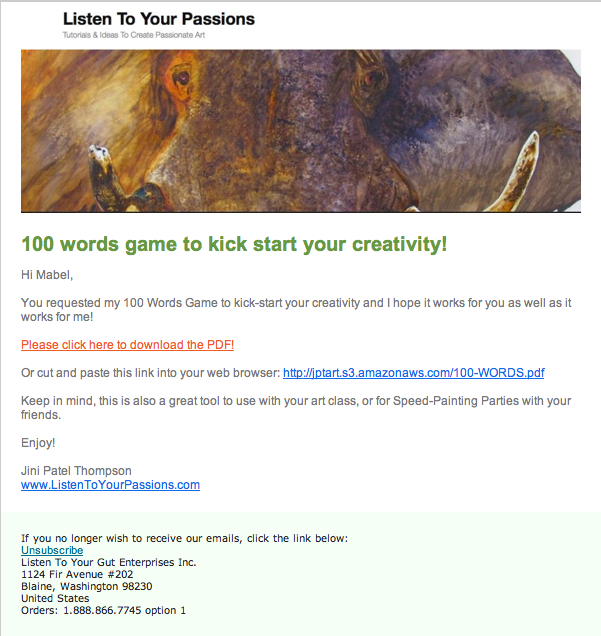
So for my art site, as soon as they click on the link to confirm (and even if they don’t) a second email automatically goes out that now contains the free gift:

You’ll notice in this email that I have given people a link to click on to download the 100 Words Game to their computer. I have stored the PDF file on my server, so that anyone can download it if they have the link. If you don’t want to store the file on your server, you can also set it up as a file attached to the email.

But if you have a larger file, it’s a good idea to upload it to your server and email people a download link, as I have done here. Otherwise, you may have people emailing you that they didn’t get the attachment, or they don’t know how to open it, etc. We have found that a download link creates less problems for people.

Don’t worry, you can find detailed instructions on how to upload files (audio or PDF) to a server by clicking this link. For now, you just need to have an understanding of how all this works. Now that we’re getting into the nitty-gritty of someone signing up for your opt-in and then you having an automated system to confirm their email and deliver your free gift, you’re probably seeing the value of having an email marketing platform like GetResponse or 1ShoppingCart.

Okay, are you ready to create and set up your opt-in offer?

Do this right now:

  1. Choose an email marketing platform to manage your sign-ups and automatically send your emails out to your growing list of names (your database).
  2. Figure out what you’re going to offer people who sign-up. What will solve one of your visitor’s problems? What will blow them away with great value?
  3. Create that content – whether it’s an eBook, an audio recording, a video, a simple PDF, or something else entirely. If you don’t have anything ready yet, then create a “Coming Soon – Don’t Miss Out!” offer. Or put up a Subscribe To My Blog sign-up form.
  4. Now use your email marketing platform to generate the computer code (html or javascript) for your opt-in offer. And put the offer at the top right, or top left of every page on your site.
    Note: Most WordPress blogs prefer html and javascript sometimes doesn’t work. Your programmer can do this for you, once you give him the code. Or you can follow my video below (this is the same one I gave you at the beginning of this unit) and put your opt-in offer on your blog yourself. But for now, your first step is to grab the code from your email marketing platform and copy and paste it into TextEdit (for Mac) or Notepad (for PC).

If you want to put your opt-in on your site yourself, or you already have your blog up, here’s the super easy how-to video again:

  1. Write the email(s) that people will receive when they sign up for your offer. You will likely need one email that has them confirm their email – this is also called a ‘double opt-in’. And the second email will then contain the free item (eBook, audio file, etc); either as an attachment or a download link to the free item. You can either swipe the templates I gave you above for your email text, or, follow my detailed instructions on how to write these emails (called autoresponders) and set them up in your email platform.

Opt-In Case Study: “How We Made $1 Million in 18 Months From a Simple Blog”

Remember way back at the beginning of this topic when I told you about Vishen Lakhiani who got a 37 percent opt-in rate for a “Coming Soon…” offer – which was more than double that of any of his other opt-ins?

Well, here he gives you all the details on that and also how he used a simple niche blogsite (on the topic of Remote Viewing!) to generate $1 million in only 18 months:


How Do I Combine My Shopping Cart, Affiliate & Email Systems?

Which is the best email marketing platform, affiliate program, and shopping cart for you to use, based on your type of business and your time and money constraints? If you don’t know what those are, follow the links to learn about each part of your site infrastructure.

Whichever platform you choose, there are detailed instructions (or instructional videos) on the provider’s site to teach you exactly how to create an opt-in form (using their platform) and how to put that form up on your site or blog. So, I will not provide those instructions here. I will just provide you with details about the different email marketing platforms, so you can choose the one best suited to your goals or business.

Therefore, I’m going to put myself in your shoes (easy to do because I’ve spent years there!) and tell you the best real-life solutions for your particular circumstances. Being that I have been both chronically ill and am still the mother of three kids, and currently own three businesses (and have two dogs and eleven horses!) I think it’s safe to say I know what I’m talking about.

NOTE: In the very next unit, I’m going to help you make your decision in the section What Would Jini Do? So if you feel yourself getting overwhelmed by the choices here, know that is coming right up next! OR if you prefer, you can just skip right over there and do what I say without looking at all the options here!

For those of you who do want to walk through this whole process and gain a better understanding of each component and how they fit together, first you will have to decide on your priorities, taking into account:

What type of business do you have? – do you have a lot of physical products, so it’s very important that they are displayed properly, with good descriptions, great photos, video, etc.? Or do you have just a few digital information products ( like eBooks, videos, teleseminars, home study courses), so your shopping cart is not so important?

How much time do you have? – do you prefer to spend your time on marketing, getting affiliates, setting up email campaigns and testing opt-in offers? Or do you dislike that kind of work and would rather market yourself by writing blog posts, making helpful videos, being a guest on or hosting teleseminars? Do you need a basic email marketing and CRM (customer relationship management) system, or do you need something robust and complex?

How much money do you have? – Do you have an operating budget and some start-up cash to invest in your new venture or business expansion? This would enable you to set up with a decent solution right from the start, thereby cutting down the hassle factor of having to upgrade, or change systems to eventually get where you want to be. Or are you hoping to spend as little as possible to start and willing to go with a less-robust option, knowing that you might have to go to the trouble of upgrading your systems once you’re fully operational?

I’m going to present you with 3 different solutions below for your email marketing platform, affiliate program and shopping cart – depending on where your priorities are. I’m going to break these solutions up according to how much time and money each of them require. I spent about 20 hours researching each system currently offered in both the email marketing and shopping cart arenas and so rather than go into each and every one, I’m just going to present you with my conclusions and the best solutions I found.

If you find yourself getting bogged down with all the details, remember that in the very next module I’m going to distill all this information down and make it super easy for you to decide, so don’t worry!

TIP: If you ever want a quick way to do a basic search to see how one product stacks up against another (as many people have done detailed online reviews), simply type into Google: _____ vs _____. But spend a good chunk of time scrolling through the different opinions and try to find people who are not just shamelessly plugging a system for the affiliate commissions.

You can assess each of these systems (where I’ve combined the necessary components for you) based on what you can afford and what your priorities are for your business. Keep in mind that I have left the affiliate program optional at this point.

Remember, an affiliate program is a way to promote your own products by giving referring bloggers or websites a commission when they refer customers to you. However, if you didn’t want to set up an affiliate program yet, then a way around this problem is to offer people who sign up to be your affiliates a Coupon Code instead to give to their people.

Using Coupon Codes Instead of An Automated Affiliate Program

In this case, you would have to do everything manually: You would use your email marketing platform to create a sign-up form for affiliates. When someone signed up, you would go to your shopping cart system and generate a Coupon Code specifically for that affiliate. You would then email the dedicated Coupon Code to the new affiliate.

So let’s say Alpha signs up to be an affiliate of yours. Alpha would then blog about why he thought you were so great and how your widget changed his life. He would offer his readers (or his list) a coupon for 10% off if they buy your widget. Alpha’s customer, Sandra, then goes to your site, purchases your widget and enters her coupon code to get 10% off.

The back-end system of a good shopping cart like BigCommerce or 1ShoppingCart will then show you a list of the coupon codes that have been entered. You know that Code XYZ comes from Alpha and you see that this month, 10 people have bought using Alpha’s coupon code. So you now write him a cheque for his commission on those products – or send him payment using PayPal.

The downside of doing it this way (coupon codes) versus a proper affiliate program is that this way you have to manually track commissions and manually make payments to your affiliates. With a proper affiliate program, all of this, from sign-up, to tracking, to consolidating payments, is automated – no work from you involved. Proper affiliate programs also have built-in 1st and 2nd tier commission structures.

This means that if Alpha refers his friend Genesis to sign up for your affiliate program, Alpha will also receive a commission on Genesis’ commissions. Of course, you are in charge of whether you even want to have 2nd tier affiliates and also of what percentage you will pay out in commissions.

If you won’t have anything to sell for about a year, or you are going to base your site around selling other people’s products, then you don’t need an affiliate program for your own stuff at this time. Otherwise, it’s best to choose a solution that has everything you need, so you only have to learn one system and you only have to set up everything once, and you don’t have the hassle of transferring all your data to a new system because you didn’t plan properly from the start!

I’m also going to list the current prices for each of these solutions and will do my best to keep these prices up-to-date (let me know if I’ve missed a price change!). Remember to think long-term when assessing what you need, and also remember that your time will soon be worth money!:

  1. BASIC Email Marketing & Shopping Cart Solution

GetResponse ($15/month) with PayPal (free) OR a 3rd Party eCommerce Site (cheap or free) – GetResponse is an easy, yet full-service email marketing platform that allows you to set up webforms for either your free offer opt-in, or your newsletter sign-up, or blog subscribers etc. and then allows you to email out to those people in an automated way – this means you don’t have to individually email people from your computer.

Automated emailing (also called autoresponders) means that you only write ONE email. You enter it into your platform, select the groups you want to receive the email and then press Send ONCE. This is how you can email two thousand people in about 5 minutes, with a couple clicks of your mouse. Mail Chimp is a completely free email platform, but the free version does not allow you to have any autoresponders – so you will still have to send every email manually, one by one. So if you have virtually no money, you can start with Mail Chimp, but know that you’ll need to switch to GetResponse as soon as you can.

GetResponse has instructional videos that show you how to set up your opt-in form and then also how to manage (email out to) the names on your list. You can email out your newsletter, or information emails, or emails with content attached. You can also do online surveys, video email marketing and put your opt-in (sign-up) forms on your Facebook fan page, provide social media ‘share’ buttons, etc. Here’s a quick overview (2 minutes) so you can see how simple it is:

I would only use GetResponse on its own if you are not planning on selling more than 2-3 products from your own site for at least one year. GetResponse also works great for people who make their money primarily from affiliate (commission) sales, or who only want to offer PayPal as a payment option, or who are using a 3rd party site to sell their products or services like eBay, Shopify, Etsy, or Bandcamp (more on these options in a moment). GetResponse basic level (up to 1000 subscribers) is only $15/month so it is a very cheap way to get started.

It is free to set up an account with PayPal and you only pay them a commission on each sale. PayPal is certainly easy and very cheap (free until you sell something!) if you want to keep cots low.

The good news is, GetResponse integrates easily with full-service shopping carts like Big Commerce, or 1ShoppingCart, along with the ability to take credit cards. So you can also start with just GetResponse and PayPal, or GetResponse and a 3rd party eCommerce site store, and then easily move your database across to one of these full-service shopping cart solutions when you can afford to.

There are other similar email marketing platforms like Mail Chimp (which is free to start), iContact, AWeber, etc. but none has the ease of use combined with the extensive functionality that GetResponse offers.

If you’re planning to go as minimal as possible, then start with either the free service from Mail Chimp or make your life easier by starting with GetResponse. Then sell straight from your site by either invoicing people directly using PayPal, or setting up automated BUY NOW links to PayPal. Or, choose a 3rd party eCommerce site and create your storefront (you’ll still need a PayPal account for this), and link to it or embed it on your site. So PayPal (or your eCommerce site via PayPal) is your shopping cart solution at this level and you do not have an affiliate program, nor can you use coupon codes, because you don’t have a full-service shopping cart.

eCommerce Site Benefit Breakdown

Using an external (3rd party) eCommerce site can be great for particular types of products, as many of them are set up for specific markets – for example, Etsy is for handmade, vintage, and craft items, while Bandcamp is for original music. Others, like Amazon, eBay and Shopify, are more general and sell just about anything.

Pros: What’s so handy about these sites is that they are already frequented by customers looking for what you’re selling (like selling your jewelry at a crafts store, or your music at a record shop), which could increase the likelihood of someone stumbling across your product in an otherwise immense online market. They also provide you with everything you need to start selling – you just have to customize your page (storefront), upload your products and descriptions, and link to the page on your site.

Cons: The downside of eCommerce sites is the commission they charge, combined with the PayPal processing fee; over time as you generate more revenue, you may find that the cost of a quality shopping cart system is actually cheaper than all these accumulated fees. Or, you might not find a site that caters specifically enough to your product or service. The main drawback of an eCommerce shop, is that your customers will be sent away from your site and may easily get distracted and end up buying someone else’s product instead. You also can’t customize beyond what their site infrastructure allows for, and you must sell within their parameters. These sites also require the buyer to have an account on that site – which will add one more annoying step in the process that might make or break that sale.

If you’re selling an eBook, or a solution-focused product or service (you’ve invented a great dog-door, or you do event catering), then PayPal is a better option until you can afford your own shopping cart. You have no real reason to send people through another site (although you might end up trying eBay or Amazon for your books or products in addition to your own site) just to buy your one product, especially if it falls outside the niche-range of well-known eCommerce sites.

Or try both: But if your product fits well within a niche on an established, high-traffic eCommerce site, by all means give it a try. Many people – such as craftspeople, musicians, artists, vintage or antique collectors, and more – find the exposure too good to pass up. And many products will sell well from both your site and an eCommerce site, which gives you the benefits of both. You have to weigh the pros and cons to figure out if your particular offering will benefit from the ease and exposure of an eCommerce site at this time, or whether it is not worth the time and money right now, if you’re short on both. Once your website is running smoothly and generating a good income, then you definitely should look to offer your products on eCommerce sites like Amazon and you may even find your customers requesting this!


  1. MID-LEVEL Email Marketing & Shopping Cart Solution

1ShoppingCart ($34/month) – This is your solution if you’re on a tight budget, yet you need to have a good shopping cart, and you also want a good email marketing platform. The only drawback to this entry-level package with 1ShoppingCart is it does not include an affiliate program. Now, having said that, you can also purchase an affiliate program separately called Omnistar for $27/month. So then you will have a shopping cart, affiliate program and email marketing platform for a combined total of $61/month. So still a very reasonable cost.

The downside is that you now have to manage 2 different systems; 1ShoppingCart and Omnistar, so that will take you a bit more time than having everything in one system. Another important distinction with 1ShoppingCart at this level, is that you cannot embed your shopping cart on your own website. At this level, people will leave your site and your store will be hosted on 1ShoppingCart’s server. You will be able to custom-brand your store though, with your own logo and colors, so your customers will not feel like they have left your site. There will also be menu buttons on your store that link back to your own site – so it’s a pretty good solution at this price point.

If you can afford to step up to the next level of 1ShoppingCart ($119/month), you can then get the shopping cart, email marketing system and affiliate program all together. You will also be able to embed your store on your own site. This is definitely, 100% the best way to go if you can afford it.

I know if you’re launching a new venture, it’s very tempting to go with the cheapest option – because everything is so unknown and unproven. But I really encourage you to take a leap of faith in yourself, to invest in yourself and your vision. Let me give you an example from a fellow Freedomite of why this is important.

Lori Clarke started out using GetResponse for her email marketing and PayPal for her product sales ($15/month). She went to all the work of learning the GetResponse system, setting up her opt-in and email autoresponder series and then setting up the PayPal BUY NOW buttons on her product pages… and then 2 months later, started all over again with 1ShoppingCart ($119/month). What happened? I’m going to let Lori herself tell you her reasons for the switch:

“I switched because I found 1ShoppingCart was more intuitive and user friendly. GetResponse also wasn’t robust enough on the customer management side, and their customer service (to me as the customer) wasn’t as good as 1ShoppingCart. The other part of it was that I wanted to add an affiliate program and a shopping cart – by the time I would have paid for all three of these separately, it didn’t make sense; because by the time my business was generating decent money, I would have to switch anyway!

I needed to believe that my business was going to thrive and go to the next level. I needed to choose something that was reflective of what I wanted and believed my business could be. So although I didn’t have the funds, I let my belief drive me, not my pocketbook.”

Read that last paragraph over again… So definitely think about the long-term when you are choosing your email marketing platform. And yes, if you don’t yet have a vision, or believe that your business is going to generate enough money, then you may choose the cheapest (or free) option. That’s totally okay, but just know that it’s going to cause you more work down the road when you have to switch everything over to the more robust, efficient system.

  1. TOP-LEVEL Email Marketing & Shopping Cart Solution

Infusionsoft ($299/month) – When my business outgrew 1ShoppingCart (when we were generating $10,000 in sales per month), we researched the market for CRM (customer relationship management) and email marketing solutions and we chose Infusionsoft as the best platform to be able to do everything we wanted, plus everything we might need to do in the future! Please note that Infusionsoft sometimes has an additional sign-up fee and sometimes not – so check for current pricing.

Infusionsoft goes way beyond the capability of GetResponse, 1ShoppingCart, or any others; but of course, since Infusionsoft can do so much more, it is also much more complicated to use and manage. So it requires a lot of time to both set up and manage ongoing. You either need someone in your business who loves techie marketing stuff, or you need to be able to hire someone to handle Infusionsoft for you.

We are still with Infusionsoft and while it is a complicated system and fairly pricey – it is well worth it. If you currently have a business that is already doing more than $60,000/year in revenues (or you plan to get there fairly quickly), you should definitely take a good look at Infusionsoft.

What’s The Difference?

The main difference between 1ShoppingCart’s customer relationship management (CRM) system and Infusionsoft’s advanced CRM system lies in the way their systems track and categorize opt-ins and/or customers. Here’s my General Manager, Justin Wade, on why he loves Infusionsoft so much! And remember, I don’t receive affiliate commissions from Infusionsoft, they are all donated to our fabulous charities – we recommend Infusionsoft so highly simply because they’ve made that much of a difference in operations for my health business, as Justin will now explain:

Data and Behavior-Based Marketing

The biggest difference between Infusionsoft and cheaper alternatives out there, like Aweber and Constant Contact, is the ability to collect more data about your customers which you can then use to automatically provide a personalized experience.

For example, let’s say you have a potential customer (also known as a prospect or lead) who has expressed interest in your products. This person then clicks on a link about PRODUCT A in an email you sent. Infusionsoft enables you to keep track of the fact that the person is interested in PRODUCT A and could then trigger other email, or email sequence, based on that click. Conversely, let’s say that the same customer also did not click on the link in that same email about PRODUCT B, within 30/60/90/X days. Infusionsoft can also check for this and communicate with the person accordingly.

This behavior-based approach is much more likely to make your prospects and customers feel connected with you and your business, because your have programmed Infusionsoft to figure out what your customers are interested in and engage them accordingly.

Keep in mind that you have to input the email sequences you want Infusionsoft to send out, based on which links are clicked. Infusionsoft doesn’t create anything out of thin air, it merely actions what you have mapped out and programmed it to do.

My autoresponder is just fine, though…

If you aren’t using Infusionsoft then you are robbing yourself of vital customer data, bottom line. Most of the autoresponders out there use a linear progression (i.e. Email #1 is sent today, #2 goes out in a week, #3 in 30 days, etc) and, as a user, you might say “yay, it’s automated!”. However, once you see the campaign builder in Infusionsoft it really becomes clear how antiquated and behind the curve the other guys are.

The campaign builder could be regarded as an autoresponder but that would be sort of like calling an iPhone “just a phone” or a space shuttle “just an aircraft”. Each campaign contains a variety of different elements which can include a limitless amount of interconnected autoresponders, webforms, etc. Where traditional autoresponders operate in a straight line, Infusionsoft operates as a fully interconnected logic web. The key is being able to inject automatic decision-making processes into this web based on what your customers do.

For example, let’s say John buys a book from your store. Most autoresponders would just send John some emails about similar books and maybe a coupon code at some point. Fairly standard stuff. With Infusionsoft, you can set it up to check for (and act on) things like:

  • Has John purchased from us before?
  • If so, how many times? How recently? For how long?
  • If not, how did he find out about us?
  • What has John clicked in the emails we’ve sent? How long ago did he click?
  • Does John own any books from the same author? Which genre(s)? Are they eBooks or physical copies?
  • Has John received any coupon codes? If so, has he used them?
  • Has John filled out any surveys at our site? What did we learn about him?

And the best part is, you can use any or all of the above pieces of information together or separately to customize John’s experience as your customer. How? The answer is Tags.

Tags are Infusionsoft’s way of labeling a customer based on anything and everything he or she does. This includes, but is not limited to, clicks, filling out forms/surveys, and purchases (or lack thereof). Tags can be applied for any behavior. As an example, if your company carries the ACME brand and Wile E. Coyote is your customer, he might have the following tags:

ACME Purchases

Signed up for “7 Ways to Catch a Roadrunner” e-mail series

Clicked blog post link – What You Need To Know About Jet-Propelled Unicycle Operation

Filled out “Look out below! Crucial info about safety from falling pianos”

Purchased Explosive Tennis Balls (under an ACME brand category)

Purchased Anvil (under an ACME brand category)

Purchased Jet-Propelled Unicycle (under an ACME brand category)

89th Order

Purchased within the last 30 days

So let’s say you are now carrying a new ACME product and want to target the specific customers on your list who might be interested. You can use Infusionsoft to sort by people who have purchased ACME products in the past and you can set up an autoresponder to send out some emails. Here’s where the personalization comes in… Let’s assume you sent the original email to 100 people. In order to separate people who are REALLY interested from people who are potentially interested, you can set Infusionsoft to check whether any of the 100 recipients clicked your product link in the 7 days that will pass between the first and second emails. For people who purchased your new product, the system can be set to stop the campaign entirely (or send the customer over to a cross-promotion autoresponder… or send the customer an email in 30 days asking for product feedback…). For the people who clicked, you can send another email immediately with additional information if you’d like to capitalize on their interest. For the others, you can automatically send them into a separate autoresponder which will contact them in X amount of days as a last ditch attempt to connect. With each subsequent email, you can further segment this group of people based on clicks, purchases, etc. and use additional autoresponders to upsell, cross-sell, and/or side-sell to your heart’s content. The possibilities are endless.

Another great thing about tags is that you can use them to trigger autoresponders. As an example, you could set up an autoresponder which sends some emails about you and the services you have to offer over the course of X amount of days. If you’re at a tradeshow and meet a new business contact, you can add the person to your Infusionsoft contact list directly from your laptop, tablet, or smartphone and then just apply the “New Tradeshow Lead” tag that you set up to trigger the aforementioned autoresponder. Infusionsoft would then execute the autoresponder for that person and send out the emails about you.

Who are my customers and where did they come from?

If you are using any type of advertising then you’ll definitely want to know if people are finding you as a result of your advertising efforts and Infusionsoft makes this really easy. It uses a function called “lead source” which basically labels any and all of your customers based on where they came from. Whether you are running campaigns on Google or sending out paper flyers, Infusionsoft tracks this and makes it easy to get the information you need.

Another customer metric that is thrown around a lot is called Lifetime Customer Value. This is simply the grand total amount of money that you expect a customer to spend with you. For example, let’s say you sell some sort of product that assists with vasectomy recovery. Your Lifetime Customer Value in that case is probably going to be really easy to calculate because you aren’t likely to have many repeat customers. It gets a lot more difficult if you are selling something like spices or clothing where people might make frequent purchases spanning years. Not to worry, Infusionsoft makes this information readily available so you can look at who is spending how much and on which products in order to assist your strategic decision-making.

API and Technical Stuff

Infusionsoft has a fantastic API. What is an API? In computer programming, an application programming interface (API) is a set of routines, protocols, and tools for building software applications. An API expresses a software component in terms of its operations, inputs, outputs, and underlying types. In layman’s terms, an API allows a piece of software to talk to another piece of software and exchange information. For example, if you have ever used FedEx or UPS to get real time shipping quotes while shopping (or for your own business) then you witnessed that system speaking to the FedEx or UPS system via the API. If you use a shopping cart like Big Commerce, Shopify, Volusion, etc. and want to use Infusionsoft as your back end marketing juggernaut, all info will pass from your cart system to Infusionsoft via the API. Using a proprietary 3PL system? No problem, that will communicate with Infusionsoft via the API as well.”

Can you see the value of a robust CRM system? The more tailored you can make your marketing, the more you can provide your people with what they want, and the less you bug them with things they’re not really interested in. Hence, your sales increase and your ‘unsubscribes’ from your list decrease.

Infusionsoft is the only automated CRM system I know of that can do automated tagging, multiple tagging and then automatic removal from groups and adding to new groups based on the person’s actions.

You can also search your database to segment it up according to multiple parameters. Let’s say I want to see how many people in my list (database) live in California, New York, Michigan and Oregon AND have purchased only blue pens AND have bought in the last 3 months. Infusionsoft can search my database and pull that list for me in seconds.

These are just two of the advanced CRM elements that Infusionsoft enables you to do and there are many more. I just wanted to give you enough of an idea so you understand WHY it’s worth paying extra for this system and worth spending the extra time on set-up. Sometimes Infusionsoft charges a set-up fee (in addition to the monthly fee) and sometimes they don’t, you will just have to check.

Now, here comes the only downside to Infusionsoft – their shopping cart is not great.

Infusionsoft and BigCommerce ($339/month) – So you can either use Infusionsoft’s shopping cart (which is decent, but not great), or you can go with a really awesome shopping cart system called BigCommerce. Again, we did a thorough review of shopping cart systems when we upgraded our LYTG Holistic Health Shoppe – which sells over 350 products – and we chose BigCommerce, rather than using Infusionsoft’s.

We especially like BigCommerce because it allows your customers to do all kinds of cool things like compare similar products, create a wish list, view special offers or featured products, watch videos (without leaving the product page), leave product reviews, and so on. It also has an “abandoned cart” function that tells you when people added stuff to their cart, but then didn’t follow through with that purchase. You can then have an autoresponder sent to them offering them a discount or free shipping if they want to complete their order.

BUT, when you are first starting out, or you only sell digital products, you absolutely can use Infusionsoft’s shopping cart. And after you’ve been running for about a year, you can look into upgrading your shopping cart to BigCommerce if you need it.

At that point, you will need to also purchase an API (application programming interface) to get all your ongoing purchasing and order info to transfer automatically from BigCommerce to Infusionsoft. When you need that, contact Ian (my husband) and he’ll tell you exactly what you need to do: ian@listentoyourfreedom.com

Now, before you get completely confused, know that I am going to boil all these options down for you and make it super easy to make your choice! Keep reading for help deciding how to make it all work for you.


Note: Remember that all the affiliate commissions from links throughout Listen To Your Freedom go to our amazing charities – so please click through to these sites, rather than typing in the the URL. Join us in paying it forward!


How Do I Choose My Site/Customer Infrastructure?

Alright, I think I have given you enough information and ideas to make a good decision about the infrastructure set-up that balances your needs and your budget, or, to reconsider your current system and weigh in with your needs, cash-flow, and plans for growth. So again, take a look at your priorities, before making your decision from the options I gave you in the last unit. Remember, you need to take into account:

  1. What type of business do you have? – do you have a lot of physical products, so it’s very important that they are displayed properly, with good descriptions, great photos, video, etc.? Or do you have just a few digital information products (ebooks, teleseminars, home study courses), so your shopping cart is not so important? Or are you planning to, or do you already use, an eCommerce site like Bandcamp, Etsy, or Amazon?
  2. How much time do you have? – do you prefer to spend your time on marketing, getting affiliates, setting up email campaigns and testing opt-in offers? Or do you dislike that kind of work and would rather market yourself by writing blog posts, making helpful videos, being a guest on or hosting teleseminars? Do you need a basic email marketing system, or do you need something robust and complex with added CRM (customer relationship management) capability?
  3. How much money do you have? – Do you have a decent operating budget or some start-up cash to invest in your business? This would enable you to set up with a decent solution right from the start, thereby cutting down the hassle factor of having to upgrade, or change systems to eventually get where you want to be. Or are you hoping to spend as little as possible to start and willing to go with a cheaper, less-robust option, knowing that you might have to go to the trouble of upgrading your systems once you’re fully operational?

The Bottom BOTTOM Line

If you’re still not sure, after reading the What Would Jini Do? section below, or you just want the no-think option, then go ahead and sign up for 1ShoppingCart (Premium Package $119/month). Look, you’re obviously serious about turning your passion into a business, or taking your passionate business to the next (and next-next!) level, or you wouldn’t be here on LTYF! This package will safely take you up to revenues of $100,000/year before you’ll need to switch to Infusionsoft. Just go do it. And then you can click over to the next unit.

For those of you who still want more of the WHY, keep reading…

What Would Jini Do?

In case your head is whirling by this point and you’re a step away from screaming, “Just tell me what to do, for god’s sake!” I will now break it down for you as if your business were my business. SO, knowing what I know now, if I were just starting or revamping an online business, here’s the platform and shopping cart I would choose, depending on my circumstances:

Scenario 1: I have lots of time (or am able to hire someone to manage my CRM and email marketing system). I have a decent amount of money, and plan to have less than 30 products. I want to be able to do everything from an affiliate program to targeted marketing campaigns. A decent shopping cart is all I need and having everything in one system is my top priority: Purchase InfusionSoft ($299/month + possible signup fee)

Scenario 2: I don’t have many products to sell, or my products are all information (digital), or affiliate products (i.e. I’ll be selling other people’s products), so I don’t need a fantastic shopping cart, but I’m totally into marketing. I want to get into complex marketing campaigns, Google Adwords campaigns, SEO-driven campaigns, etc. I need to be able to split-test, test headlines, test opt-in offers, test markets. I intend to make more money off of 5 products than most people make off of 100, because I’m a marketing maven! And I’m willing to spend the substantial amount of time it takes to set this up and manage it: Purchase InfusionSoft ($299/month + possible sign-up fee)

Scenario 3: I have lots of time (or am able to hire someone to manage my CRM and email marketing system), a decent amount of money, and more than 25 products. I want to be able to do everything from an affiliate program to targeted marketing campaigns. I can’t afford an automated API yet, but I can afford to hire someone each month to import my customers from my shopping cart to my email marketing platform. My shopping cart is very important to me and must be the best: Purchase InfusionSoft and BigCommerce ($339/month + possible Infusionsoft sign-up fee)

Scenario 4: I have some money, but not much time and I have more than 10 products. I want to have an affiliate program along with my email marketing platform and a decent shopping cart: Purchase 1ShoppingCart (Premium package $119/month)

Scenario 5: I want to keep my costs really low and I can do without an affiliate program for now, but I definitely need a decent shopping cart and a decent email marketing platform: Purchase 1ShoppingCart (Plus Package $34/month)
Bonus: I will be able to upgrade to 1ShoppingCart Premium package as soon as I decide I need it (and have an affiliate program) without having to move my database or do any additional set-up!

Scenario 6: I want to spend virtually nothing to start, I don’t need an affiliate program, and I only have a few things to sell: Purchase GetResponse and PayPal and/or an eCommerce shop ($15+/month)
Bonus: I will be able to add 1ShoppingCart as soon as I feel I need it (and have an affiliate program and/or CRM) and I can import my database easily and automatically (all at once) from GetResponse to 1ShoppingCart.

Scenario 7: This is going to be a zero-cost operation at first, but I realize I need to start building my list (database) immediately and then have an easy way to sell my eBook when it is ready: Mail Chimp and PayPal (Free)
Bonus: I will be able to add 1ShoppingCart eventually (and have an affiliate program and/or CRM) and I can then import my database from Mail Chimp to 1ShoppingCart. Or I can upgrade to GetResponse first, so that I can host autoresponder emails, and then upgrade to 1ShoppingCart.

Choose and Implement Your Platform!

You can visit each of these 4 options (click on the name to go to their site) and take a look at their pricing, watch their summary video for a quick overview of how each platform works and what it can do for you, and then make your choice!

GetResponse:

1ShoppingCart:

InfusionSoft:

BigCommerce:

*Notice that most of these weblinks are affiliate links. ALL of the affiliate commissions from Listen To Your Freedom go to our amazing charities. Remember to put your affiliate links everywhere in your stuff – in documents, your blog, pdfs, sidebar links, emails, etc.